cc-master
Health Warn
- License — License: MIT
- Description — Repository has a description
- Active repo — Last push 0 days ago
- Low visibility — Only 5 GitHub stars
Code Fail
- process.env — Environment variable access in ccm/apps/cli/bin/ccm.cjs
- fs module — File system access in ccm/apps/cli/scripts/build-sea.sh
- fs.rmSync — Destructive file system operation in ccm/apps/cli/src/discover.ts
- os.homedir — User home directory access in ccm/apps/cli/src/discover.ts
- fs module — File system access in ccm/apps/cli/src/discover.ts
Permissions Pass
- Permissions — No dangerous permissions requested
No AI report is available for this listing yet.
Turn any Claude Code session into a long-horizon master orchestrator — pick the right dynamic-workflow paradigm and keep the main thread productively advancing across compaction and sessions.
cc-master
中文见 README_zh.md。
Give it a big goal — and a budget. Then go do something else.
cc-master turns a Claude Code session into a project lead that never sleeps and actually watches the money. You bring the idea and make the handful of calls that truly need you; it handles the rest — breaking the work down, running it in parallel, tracking progress, keeping spend in check, checking its own work. You come back, and it's done. And it didn't blow your budget.
And there's real machinery behind the warmth: it runs the numbers thousands of times to tell you when you'll ship and which step is most likely to slip; it watches your quota and adjusts its pace as it goes — easing off when you're tight, pressing when you've got room; and it keeps a few accounts in rotation, spreading the load and quietly switching before any one runs dry. So it breaks the work into parallel pieces and delivers it, fast and steady, all the way to done — no idling, no walls, no wasted spend.
You stop being the one who has to watch everything.
But make no mistake — this is not "make a wish and the AI does it all." Taste, design, direction — the calls only you can make stay yours; what it takes off your plate is just the breakdown, scheduling, babysitting, and accounting that would otherwise bury you. It even teaches the AI to stop and ask you when it should — cc-master's skills are full of philosophy and method for when to pull the human back in, handing judgment back to you rather than making the call for you. At bottom it does one thing: in the age of AI-assisted coding, it reallocates your attention to where it's actually worth spending.
/cc-master:as-master-orchestrator turn my idea into something that works
One line, and it's off — then you're free to step away. It works on its own and only comes back when a call is genuinely yours to make.
Is this you?
- 🚀 You have ideas, but you're not an engineer. You can say what you want — but a thing that takes days and pulls in a dozen threads, you can't babysit it to the finish. What you're missing is a reliable project lead. That's what this is.
- 🔧 You're an engineer, but you don't want to be "the manager." You'd rather solve the hard technical problem than break work down, schedule it, do the accounting, and ride herd on a pile of tasks. It takes the management off your plate so you can stay in your craft.
- 🧭 You lead a team. You want to be ten of yourself. It carries the drudge-work scheduling; you set direction and make the big calls.
Three different people, one missing piece: a mind that can manage the thing to the finish — and do the math.
What it actually does for you
Hand a big job to a plain AI and you'll find out fast: it loses the plot mid-conversation and forgets what it was doing; it can only do one thing at a time and you have to spoon-feed it; it dives in head-first and might burn your whole month's quota in one go; and it either pesters you every three sentences or quietly goes off the rails — then tells you it's "basically done" when it isn't.
cc-master takes all of that off your hands, like a project lead who can actually do the math:
- 🧩 Break it down, put a crew on it. It splits your big goal into ordered steps and runs the ones that can go at once in parallel. And it doesn't split blindly — it works out which chain decides when the whole thing finishes (the critical path) and leans on that.
- 🔮 It tells you when you'll finish before it starts. It runs thousands of simulations and gives you odds — "50% chance Wednesday, 95% chance Friday" — and flags which step is most likely to slip. That used to be a project manager with a spreadsheet for an afternoon. Now it's one command, milliseconds.
- 💰 It manages your budget like a CFO. It knows roughly what each step costs, how long you can keep going, and what pace spends best; when you're close to overspending it slows down — and hands "do we keep spending?" back to you to decide. You won't wake up to a blown budget and a half-finished job.
- ⚡ It barely ever "stops." Other AIs hit a usage limit and tell you to "come back in a few hours." This one doesn't — when one account runs low it quietly switches to a full one and keeps going. You don't even notice.
- 🧠 It doesn't forget. Other AIs lose the thread after a long chat; this one remembers who it is, where it got to, and what's left — even across dozens of context resets and several sessions — and picks up right where it left off.
- 🙋 It only asks you about the things that matter. Small calls it makes itself; only when something genuinely needs you does it stop, lay out the context, and wait for your word.
- 🏁 It won't fake being done. Before it wraps, it checks itself against your original goal, point by point: is every piece actually done? did it ask you everything it should have? did anything quietly die in the background? If it's not done, it won't pretend it is.
All you do is the one idea at the start, and the few calls along the way.
Watch it work, start to finish
You drop one line: "Translate my app into 6 languages." Then you go to sleep.
- It figures out the order first: the strings have to be pulled out and the framework wired up before any language can be translated. So it does the groundwork, then fans out all 6 languages at once.
- Groundwork gets the better (pricier, steadier) AI; the translations get the cheap one — saving money without cutting quality. It does the math wherever the math matters.
- Halfway through, a question only you can answer comes up: "Product terms — translate them, or keep them in English?" It notes it for you and moves on, while every other language keeps going.
- As it runs, quota gets tight — it slows the pace, or switches to a full account and keeps going. No wall, no overspend.
- You come back in the morning: all 6 languages done, every one checked, and your call on the product terms folded in.
Start to finish, you said one sentence and made one decision.
When not to use it
A one-or-two-line fix you can knock out in ten minutes? Just do it — don't bring in the "project lead," that's overkill and it'll be slower. This is built for the kind of goal that's too big for one person to track, takes days, and runs many threads at once. The bigger, messier, and longer the job, the more it's worth.
What it actually is (for the curious)
cc-master is a plugin for Claude Code, built from three things: a thin layer of orchestration logic (teaching the AI how to be the lead), an engine that does operations-research forecasting and pacing, and a layer that pools and schedules the quota across several accounts.
We keep a clear line between "what it does today" and "what we're still building." Most of it works now; smarter budget management and a coordinated fleet of AI leads are on the way. Every mechanism, and whether each one is shipped or still on the drawing board, is written down honestly in the Feature Manual — we don't oversell it in the README.
Get started
One command installs both pieces — the ccm engine and the cc-master plugin. The two version independently (ADR-022): the plugin ships under bare vX.Y.Z tags, ccm under ccm-vX.Y.Z tags, on separate release tracks. The installer resolves the latest of each line:
# install the latest of each line (plugin + ccm)
curl -fsSL https://raw.githubusercontent.com/nemori-ai/cc-master/main/install.sh | bash

# …or pin a specific version of either line — each flag is optional and
# independent; whichever you omit resolves to the latest of that line:
curl -fsSL https://raw.githubusercontent.com/nemori-ai/cc-master/main/install.sh | bash -s -- \
  --ccm-version ccm-v0.11.0 --plugin-version v0.10.1

# pin just one line, leave the other on latest (e.g. hold ccm, take latest plugin):
curl -fsSL https://raw.githubusercontent.com/nemori-ai/cc-master/main/install.sh | bash -s -- --ccm-version ccm-v0.11.0
It detects your OS and architecture, downloads the right ccm binary and puts it on your PATH, then installs the plugin into Claude Code. You just need curl (or wget), unzip, and the claude CLI (≥ v2.1.195) already on your machine. The ccm engine is a hard prerequisite — without it the plugin won't start an orchestration (ADR-021) — which is exactly why the installer puts it in place first.
Rather do it by hand, or run from source? Clone the repo and point Claude Code straight at it:
git clone https://github.com/nemori-ai/cc-master.git && claude --plugin-dir ./cc-master. You'll still needccmon your PATH — downloadccm-<os>-<arch>from the latestccm-v*release's Assets (ccm has its own release line now), rename it toccm,chmod +x, and drop it in~/.local/bin.
Moved your Claude config? If you run Claude Code with CLAUDE_CONFIG_DIR pointing somewhere other than ~/.claude, ccm follows it automatically — its board home and account pool live under your configured directory, no extra flags needed.
Status line (automatic)
cc-master ships its own status line — a context progress bar plus your 5h / 7d quota usage, color-coded by how full each is. The first time you run any ccm command, cc-master configures it for you automatically (it writes statusLine.command in your global settings.json). The same status line also feeds the 5h / 7d quota signal that powers forecasting and pacing.
Heads-up: this overwrites your existing statusLine (your original is backed up first). To put yours back: ccm statusline uninstall (restores your original and stops cc-master from re-installing). To disable the auto-install entirely, set CC_MASTER_NO_AUTOINSTALL=1.
Now hand it a goal:
/cc-master:as-master-orchestrator <your goal> # hand it over — it starts
Everyday use
The handful of commands you'll actually type. The /cc-master:… ones run inside a Claude Code session; ccm … runs in your terminal.
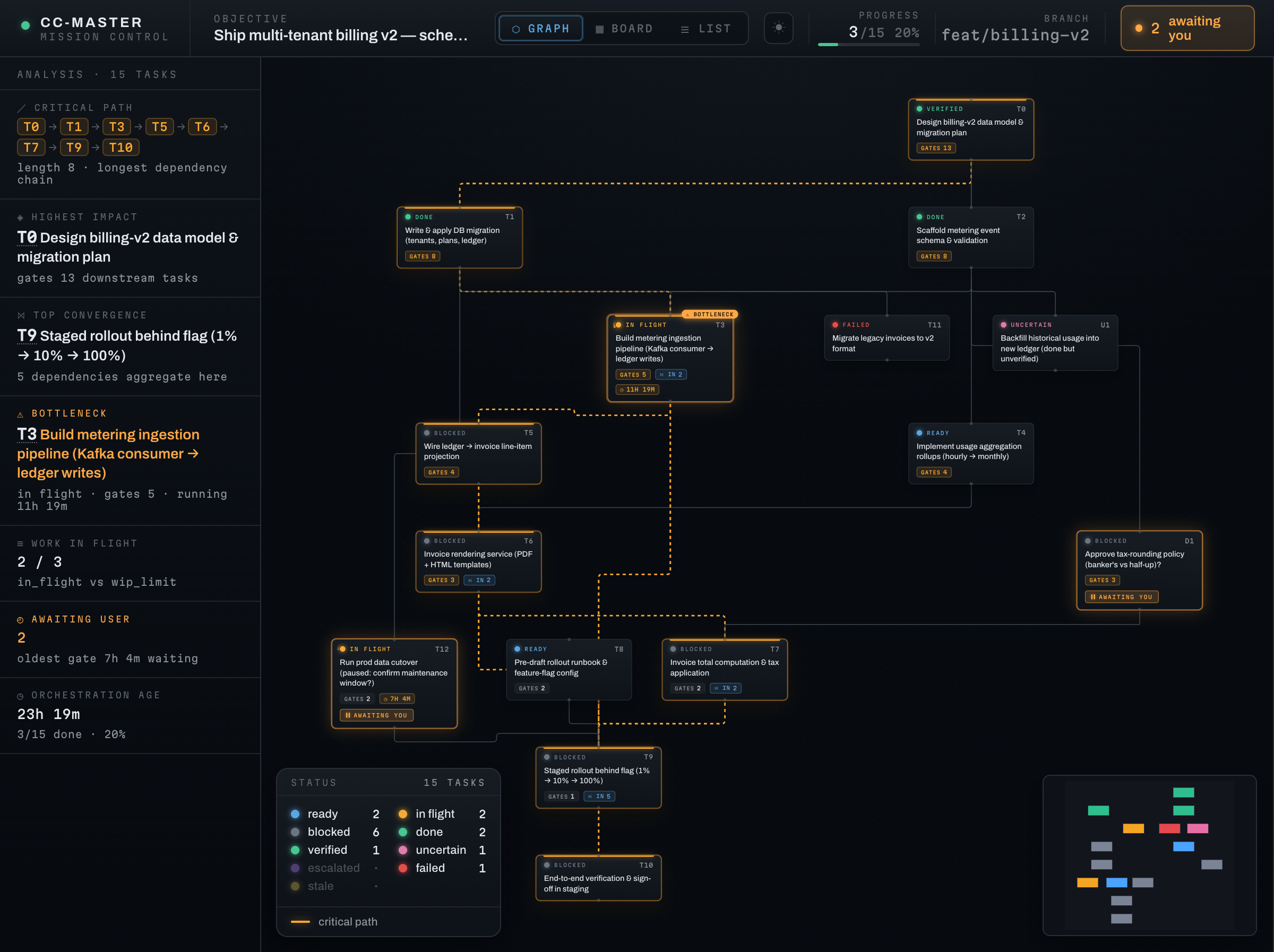
/cc-master:as-master-orchestrator <goal>— hand over a big goal; it builds the plan and starts working. This is how every run begins./cc-master:status— a quick read of where things stand: overall progress, what's blocked, and any decision waiting on you./cc-master:view— open its live plan as a read-only graph in your browser; it updates on its own and never touches the work./cc-master:discuss <decision>— whenstatusflags a decision that's waiting on you, talk it through in a fresh session; your answer flows back into the plan./cc-master:stop— wrap up and archive the board. Reversible — you can pick the run back up later./cc-master:handoff-to-new-session— cleanly hand the run to a fresh session before this one ends; the new session takes over with/cc-master:as-master-orchestrator --resume.ccm account add|list|switch <email>— build and steer a pool of backup accounts so it can switch to a full one when quota runs low. You run these directly in your terminal; your tokens stay token-blind and never reach the AI's context.
That's the everyday set. The full command surface (every
ccmnamespace and flag) is in the command catalog; what's shipped vs. still on the way is in the Feature Manual.
Go deeper
- Everything it can do, with honest status → Feature Manual
- Contributors / architecture, start here →
AGENTS.md - Full design →
design_docs/spec.md
Acknowledgements · License
Standing on the shoulders of those who came before: Claude Code (Anthropic), claude-code-workflow-creator, superpowers, claude-code-workflow-orchestration.
MIT © 2026 cc-master contributors
Reviews (0)
Sign in to leave a review.
Leave a reviewNo results found