cc-split-diff-view
Health Pass
- License — License: Apache-2.0
- Description — Repository has a description
- Active repo — Last push 0 days ago
- Community trust — 13 GitHub stars
Code Pass
- Code scan — Scanned 12 files during light audit, no dangerous patterns found
Permissions Pass
- Permissions — No dangerous permissions requested
No AI report is available for this listing yet.
Claude Code mod that draws Edit and Write diffs in two side-by-side columns
Split diff view for Claude Code


A Claude Code mod that
draws the diff of every Edit and Write in two side-by-side columns
instead of one stacked -/+ list:
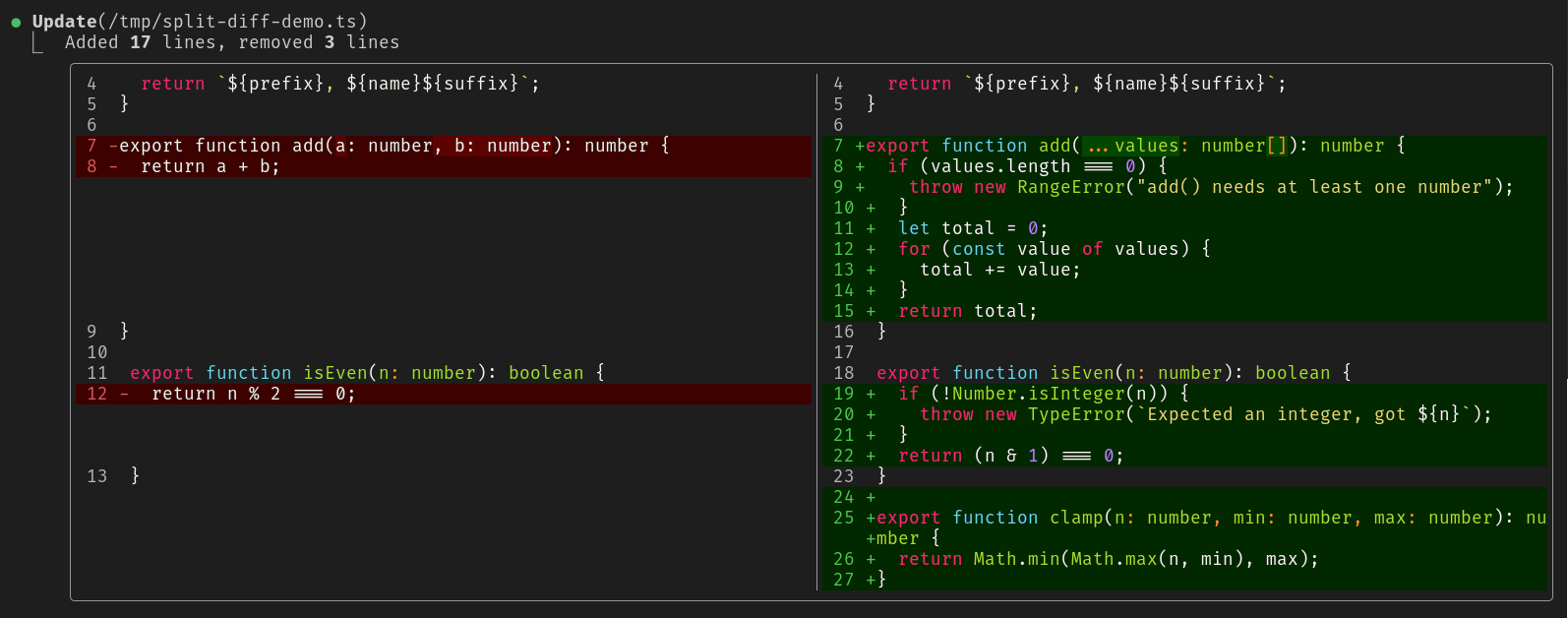
- removed lines on the left, added lines on the right
- each side keeps its real line numbers
- a changed line sits next to the line that replaced it
- long runs between hunks collapse to
⋯ N unchanged lines - colors are Claude Code's own diff colors (
diffRemoved/diffAddedtheme
keys), so they follow your/theme - syntax highlighting comes from Claude Code's own highlighter (the
Code
element, the one the built-in/diffpane uses), with the language taken
from the file's extension
Errors, edits held for review, brand-new files and anything without a diff
keep Claude Code's normal drawing.
Requirements
- Claude Code v2.1.287 or later (the version that introduced mods;
they are on by default). Check withclaude --version. - Mods must be allowed to load: not started with
--safe-modeor--bare,
and not blocked by your organization's managed settings.
Install
From a terminal:
claude plugin marketplace add neteye-platform/cc-split-diff-view
claude plugin install cc-split-diff-view@neteye-platform
Or from inside a Claude Code session:
/plugin marketplace add neteye-platform/cc-split-diff-view
/plugin install cc-split-diff-view@neteye-platform
No download or build step is needed: Claude Code fetches the repository and
loads the TypeScript directly. Start a new session (or run /reload-plugins),
then ask Claude to edit a file.
To check it loaded, run /plugin and look for cc-split-diff-view under
Installed.
Update
Claude Code caches an installed plugin by version, so updates arrive when theversion in .claude-plugin/plugin.json is bumped:
claude plugin marketplace update neteye-platform
Uninstall
claude plugin uninstall cc-split-diff-view@neteye-platform
You can also turn it off without removing it from the Installed tab of/plugin.
Try it for one session without installing
git clone https://github.com/neteye-platform/cc-split-diff-view.git
claude --plugin-dir ./cc-split-diff-view
The mod hot-reloads when you save a file in that directory.
Limitations
- Only
EditandWriteare redrawn. The permission prompt is not a render
site, so a mod cannot change it. - Each line is highlighted on its own, so something that spans lines (a block
comment or a template string) can be colored as plain code when only part of
it is in the diff. - Hooks stay active in the VS Code extension,
claude -pand cloud sessions,
but the interface part only draws in the terminal and the Desktop app's Code
tab. - Mod events and render-site props can change between Claude Code releases.
If the diff suddenly looks like the default again, runclaude plugin validate .and check the debug log.
Credits
Developed by Oscar Zambotti (@oskarnrk) in the
NetEye Platform development team, with Claude Code.
Listed on Awesome Claude Code Mods.
Reviews (0)
Sign in to leave a review.
Leave a reviewNo results found