imap-mcp
Health Warn
- License — License: MIT
- Description — Repository has a description
- Active repo — Last push 0 days ago
- Low visibility — Only 5 GitHub stars
Code Pass
- Code scan — Scanned 12 files during light audit, no dangerous patterns found
Permissions Pass
- Permissions — No dangerous permissions requested
No AI report is available for this listing yet.
MCP server for IMAP mailboxes: read, search, organise and draft mail — it deliberately cannot send
imap-mcp






A Model Context Protocol (MCP) server for any IMAP
mailbox. It speaks IMAP rather than one vendor's API, so it works with whatever provider you
already have.
Lets MCP clients like Claude Code, Claude Desktop or Codex read and search your mail, organise
it into folders, save attachments and draft replies — with every message fenced as untrusted
content, and the write tools off unless you turn them on.
Eleven tools, not fifty: a mail account is a workflow, not an API surface, so related
operations are folded into one tool with a mode rather than split across many. And eleven is
the ceiling, not the floor — IMAP_ALLOW_TOOLS=essential registers a curated six instead, and
under the read-only default that narrows to four. See
choosing which tools load.
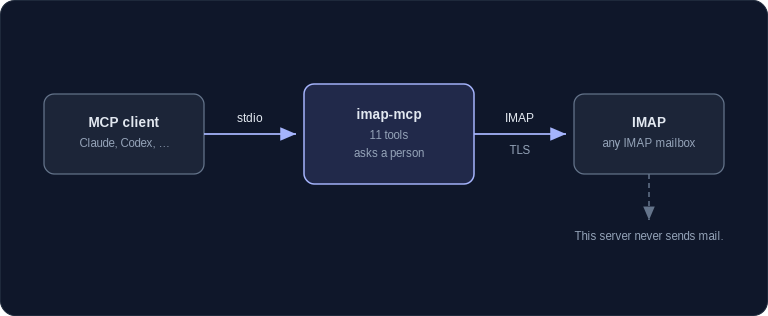

What makes it different
It cannot send mail. That is the feature. An agent with access to private data, exposure to
untrusted content, and a channel to the outside world is exploitable by anyone who can put a
message in the inbox — the pattern that produced
EchoLeak, where one
crafted email exfiltrated internal data from Microsoft 365 Copilot with no user interaction.
This server has the first two and deliberately not the third. save_draft writes the reply
into your Drafts folder; you send it from your own mail client. No amount of clever text in a
message can make this server post anything anywhere.
Writes are off until you turn them on. With only IMAP_HOST, IMAP_USER andIMAP_PASSWORD set, the server registers six read tools and nothing else. The mailbox tools
appear with IMAP_READ_ONLY=false — note the default is true, the opposite of the other
servers in this family, because this one reaches a mailbox. Tools that are off are not registered at all — a
capability the model cannot see is one it cannot be talked into using.
Mail is treated as hostile input, because it is. Anyone in the world can put text in your
inbox. Message bodies are fenced between markers carrying a per-call random nonce, and every
line inside them is prefixed with that nonce, so the "this is data" signal does not stop at the
edges of a long forwarded thread. A reminder follows the block, because otherwise the last
instruction-shaped sentence in the model's context is the attacker's. Zero-width characters and
directional overrides are stripped before the model sees anything, hidden HTML elements are
dropped on a best-effort basis (the fencing, not the stripping, is what carries the weight), and
markdown image syntax — inline and reference style — is defused so a rendering client cannot be
made to fetch a tracking URL.
That covers folder names too: a folder name is chosen by whoever created
the folder, which on a shared mailbox is not necessarily you. list_mailboxes returns the name
twice — path exactly as the server spelled it, because that is the handle every other tool
takes, and display_name cleaned up for reading, with a warning on the entry when the two differ.
Alongside the message you get a server-side assessment: the SPF/DKIM/DMARC verdicts with the
authserv-id they came from, which prompt-injection shapes matched, and which words mix Latin
with Cyrillic or Greek letters. When something matches, the warning is the first thing in the
result rather than a field buried in JSON.
Those verdicts carry a forgeable flag, and by default it is always true. A sender can write
an Authentication-Results header of their own, and if your provider does not add one, theirs
is the only one there — nothing inside the message distinguishes the two. SetIMAP_TRUSTED_AUTHSERV_ID to the id your provider stamps (it is the first token of the header
on any message you already have) and only that id counts as authentic. Until you do, spf=pass
is reported as what it is: a claim, from a header anyone could have written.
"New mail" that actually works. The server tags messages it has handed over with a custom
IMAP keyword (AiSeen by default), so list_new_messages returns each message once. The human\Seen state is never touched — everything is read with BODY.PEEK.
Deleting and moving ask a person. Where the client supports MCP elicitation, delete_messages,move_messages and deleting a folder raise a real dialog that the model cannot answer on its
behalf. Where it does not, they fall back to a two-call token — and say so, rather than implying
somebody approved. ELICITATION=false takes that fallback deliberately; it never removes the
guard. See Asking a person.
Requirements
- Node.js 24 or newer
- An IMAP account. Providers with two-factor authentication generally need an app-specific
password.
Configuration
| Variable | Required | Default | Description |
|---|---|---|---|
IMAP_HOST |
yes | — | Hostname of the IMAP server, e.g. imap.example.net |
IMAP_USER |
yes | — | Account username, usually the address |
IMAP_PASSWORD |
yes | — | Password or app-specific password |
IMAP_PORT |
no | 993 / 143 |
Defaults by TLS mode |
IMAP_TLS |
no | implicit |
implicit, starttls or none |
IMAP_MAILBOX |
no | INBOX |
Mailbox the message tools default to |
IMAP_READ_ONLY |
no | true |
Exactly false registers the five mailbox tools |
IMAP_ALLOW_TOOLS |
no | — | Tool names, list_* prefixes or essential |
IMAP_DENY_TOOLS |
no | — | Same syntax; subtracted from the allow list |
IMAP_SEEN_KEYWORD |
no | AiSeen |
Keyword for new-mail tracking; empty turns it off |
IMAP_TRUSTED_AUTHSERV_ID |
no | — | The authserv-id your provider stamps; see below |
IMAP_DRAFTS_MAILBOX |
no | auto | Overrides the folder found via the \Drafts flag |
IMAP_MAX_MESSAGES |
no | 100 |
Default page size |
IMAP_MAX_ATTACHMENT_BYTES |
no | 1048576 |
Ceiling for returning an attachment inline |
IMAP_MAX_DOWNLOAD_BYTES |
no | 26214400 |
Ceiling for writing one to disk |
IMAP_MAX_EXTRACT_BYTES |
no | 10485760 |
Ceiling for reading a document's text; max 67108864 |
IMAP_COMMAND_TIMEOUT_SECONDS |
no | 30 |
Seconds one IMAP command may take; max 600 |
IMAP_ATTACHMENT_TYPES |
no | see below | Comma-separated content-type allowlist |
IMAP_DOWNLOAD_DIR |
no | — | Setting it allows saving attachments there |
IMAP_INSECURE_TLS |
no | false |
Exactly true accepts a self-signed certificate |
ELICITATION |
no | true |
false replaces the dialog with the token. Not prefixed |
Booleans are compared against the literal string true; 1, yes and True are not true.IMAP_READ_ONLY is the mirror image: only the literal false turns it off, so a typo leaves
the write tools unregistered.
IMAP_COMMAND_TIMEOUT_SECONDS applies to each IMAP command, not to a whole tool call, and your
MCP client has a deadline of its own; read
slow servers before raising it.
Choosing which tools load
IMAP_ALLOW_TOOLS and IMAP_DENY_TOOLS take comma-separated tool names; a trailing *
matches a whole family. essential is a curated preset of six — list_mailboxes,list_new_messages, list_messages, get_message, set_message_flags and move_messages.
Four of those are read tools, so it stays useful under the read-only default.
IMAP_ALLOW_TOOLS=essential
IMAP_ALLOW_TOOLS=list_new_messages,get_message,move_messages
IMAP_DENY_TOOLS=delete_messages
One boundary the list cannot draw: move_messages copies as well as moves (mode: "copy"),
and the two are one tool. Denying move_messages removes both; there is no way to keep moving
and forbid copying, or the other way round. Both modes ask for confirmation.
An entry that matches no tool aborts startup and names it, so a typo cannot silently hide a
tool — an absent tool is not something anyone traces back to an environment variable. A
filtered tool is never registered, so it is absent from tools/list and unknown totools/call alike, exactly like a write tool under IMAP_READ_ONLY.
It covers tools, and the attachment resources follow get_attachments: when that tool
is filtered out, they are not registered either.
If you run several of these servers at once, mcp-hub is the other
answer — its /hub endpoint replaces every server's tools with six meta-tools.
The password is deleted from the process environment as soon as it is read, so child
processes do not inherit it. /proc/<pid>/environ still holds the environment the process
started with, readable by any process of the same user; the child that parses attachments
runs under Node's permission model and cannot read it.
Without IMAP_DOWNLOAD_DIR this server never writes to the filesystem. The three size limits are
separate on purpose, because they answer three different questions:IMAP_MAX_ATTACHMENT_BYTES protects the model's context window,IMAP_MAX_DOWNLOAD_BYTES protects your disk, and IMAP_MAX_EXTRACT_BYTES bounds how much
hostile input one parser is handed. Raising any one of them is not a request to raise the others.
The server starts without credentials on purpose — it completes the handshake and lists its
tools, and every call then fails with setup instructions instead of reaching a server.
Installation
Claude Code
claude mcp add imap-mcp \
  -e IMAP_HOST=imap.example.net -e [email protected] -e IMAP_PASSWORD=… \
  -- npx -y @ni-c/imap-mcp
Claude Desktop
{
  "mcpServers": {
    "imap-mcp": {
      "command": "npx",
      "args": ["-y", "@ni-c/imap-mcp"],
      "env": {
        "IMAP_HOST": "imap.example.net",
        "IMAP_USER": "[email protected]",
        "IMAP_PASSWORD": "…"
      }
    }
  }
}
Codex
[mcp_servers.imap-mcp]
command = "npx"
args = ["-y", "@ni-c/imap-mcp"]
env = { IMAP_HOST = "imap.example.net", IMAP_USER = "[email protected]", IMAP_PASSWORD = "…" }
Docker
docker run --rm -i \
  -e IMAP_HOST=imap.example.net \
  -e [email protected] \
  -e IMAP_PASSWORD=… \
  ghcr.io/ni-c/imap-mcp
Saving attachments needs a writable directory, and the image runs as uid 1000 — so a
bind mount has to be owned by it on the host: -e IMAP_DOWNLOAD_DIR=/data -v "$PWD/attachments:/data" with chown 1000:1000 attachments. WithoutIMAP_DOWNLOAD_DIR the container never writes anything.
Through mcp-hub
A client that cannot spawn a local process — ChatGPT connectors, Claude on the web,
Cursor, LibreChat — reaches imap-mcp through mcp-hub: one
container serves many stdio MCP servers over Streamable HTTP, with an OAuth 2.1 login
behind a single password and long-lived tokens for the clients that cannot do OAuth. Its/hub endpoint puts every server behind six meta-tools, so one connector reaches all of
them without N×tool schemas in the model's context, and it speaks both protocol revisions
— a question this server asks travels through it to the person at the far end.
Its /config/mcp.json uses Claude Code's format, so the entry is the one you already
have:
{
  "mcpServers": {
    "imap-mcp": {
      "command": "npx",
      "args": ["-y", "@ni-c/imap-mcp"],
      "env": {
        "IMAP_HOST": "imap.example.net",
        "IMAP_USER": "[email protected]",
        "IMAP_PASSWORD": "…",
        "IMAP_ALLOW_TOOLS": "essential"
      },
      "denyTools": ["delete_messages"]
    }
  }
}
allowTools and denyTools there are the hub's own per-server filter, which is not
the same thing as *_ALLOW_TOOLS in env — the difference, and the mistake it invites,
are in the client guide.
Tools
Read — always registered
| Tool | What it does |
|---|---|
get_server_info |
Capabilities, permanent flags, whether the keyword is storable, which tool groups are on |
list_mailboxes |
Every folder with message and unseen counts and its special-use role |
list_messages |
Lists and searches: sender, recipient, subject, body, date range, flags, Gmail query |
list_new_messages |
Messages not handed over yet; marks them afterwards, dry_run to preview |
get_message |
Headers and body, fenced untrusted, plus the security assessment; include_thread |
get_attachments |
Without part_id lists them, with part_id reads, extracts or saves one |
Mailbox — needs IMAP_READ_ONLY=false
| Tool | Confirmation |
|---|---|
set_message_flags |
none — flags are reversible, and \Deleted is refused |
move_messages |
👤 for both move and copy, 🔒 where the client cannot |
delete_messages |
👤 asks the user, 🔒 where the client cannot |
manage_mailbox |
👤 for delete, 🔒 for rename, none for create |
save_draft |
none — a draft does not leave the mailbox |
👤 raises a dialog the model cannot answer · 🔒 needs a confirmation token: call once to
receive one, then again with it.
copy is confirmed as well as move, because the thing that cannot be taken back is not
the deletion — it is the disclosure. A destination is a free-form folder name, and on a
shared account or a public namespace one call hands every message to everyone who can read
it, leaving the source folder untouched. For the same reason set_message_flags refuses to
add \Deleted: it is half a deletion, and the next client to close the mailbox may finish
it. Use delete_messages, which asks.
Neither a confirmation nor a dialog quotes a mailbox name inside its own sentence — folder
names come from the account, which on a shared mailbox means a colleague chose them.
Structured output
Every tool declares an outputSchema and answers with structuredContent
alongside the text block, so a client can use the result without parsing prose:
{
  "untrusted": true,
  "source": "imap",
  "mailbox": "INBOX",
  "total_matching": 214,
  "offset": 0,
  "returned": 25,
  "next_offset": 25,
  "messages": [{ "uid": 4711, "subject": "…", "from": "…", "seen": false }],
}
Every tool that reports anything out of the mailbox carries untrusted: true
and source: "imap" as fields — a sender display name, a folder name a
colleague chose and an attachment filename are all attacker-controllable, and
they reach the model through the listing tools long before anyone opens a
message. Only get_server_info and the five write tools are without it: those
report this server's own configuration, or what it just did with the uids it was
given.
get_message and a text attachment keep the per-call nonce fence in the text
block — the structured half states the same fields, so a client is not made to
parse the fence to find them. An image attachment keeps its bytes in the content
block, where a client renders them, rather than repeating the base64.
A refusal is now an error result: an attachment the policy rejects, one whose
bytes are an executable whatever it claimed, one too large to inline. Each was a
plain result that read like an answer.
Attachments are also available as MCP resources at imap://message/{uid}/part/{partId}
(with ?mailbox=… for a folder other than the default), which matters where the server has
no useful filesystem. The resource path runs the same allowlist,
size limit and magic-byte check as the tool — it is not a second, unguarded door.
Not exposed, on purpose
No sending, no SMTP, no raw IMAP passthrough, no APPEND of arbitrary MIME, no HTML
composition, no OAuth2, and no OCR — a scanned PDF has no text to extract and says so
rather than guessing. The first is the whole security argument (see SECURITY.md); the
second would make every guard here optional; the last is planned but needs a test account
before it ships.
Safety
- Every result carrying mailbox content is marked untrusted, message bodies additionally
fenced with a per-call nonce and marked line by line. - Attachments pass two independent gates. The declaration is checked against a
content-type allowlist, an executable-extension refusal list and a size ceiling; the bytes
are then checked against magic numbers. An executable renamed to.pdfand declaredapplication/pdfclears every declaration check and fails on its bytes — including when
saving to disk, where it would be more dangerous, not less. - A
part_idmust come from a listing call, so the body cannot be pulled out through the
attachment tool and escape its framing. - Documents are parsed in a process that can be killed.
mode: "text"reads a PDF or
Office file with a bundled PDF.js and a ZIP reader — the only place this server parses a
binary a stranger sent. It runs in a child process with a heap limit and a timeout, its
stdout discarded rather than shared with the JSON-RPC transport, PDF.js'sevalsupport
off, compressed streams measured against a ceiling before PDF.js inflates them, and an
entry allowlist that decides what is decompressed before the buffer is sized. Nothing in
that path touches the network or the filesystem. - Extracted text says what it is. Extraction returns every text-drawing instruction in a
file, including text set below one point or drawn in the colour of the paper, and returns
nothing that was drawn as a picture. The result says so above the fence, because "the
document says X" is otherwise a claim the user has no way to check. - Downloads cannot escape their directory. The target comes only from the environment, the
filename is sanitised, the resolved path is re-checked, and the file is opened withwxand
mode0600— so nothing is overwritten and no planted symlink is followed. - Mailbox names, flags and addresses are refused if they contain line breaks. IMAP is a
line protocol and a draft is a mail header; a CR is an injection primitive, not a typo. - TLS is never disabled globally.
IMAP_INSECURE_TLSis scoped to the connection it names;NODE_TLS_REJECT_UNAUTHORIZEDappears nowhere. - Every change to the mailbox is logged to stderr with the UIDs and folder — never the
subject. stderr is the one channel the model does not read. - Responses are bounded. Whole items are dropped rather than the JSON being sliced, and the
truncation notice comes first so the recovery hint survives.
SECURITY.md has the trust model, what these measures do not cover, and how to report a
vulnerability.
Documentation
The full guide, tool reference and security notes live at
imap-mcp.ni-c.de (source in docs/).
Development
npm install
npm test
npm run build
The test suite runs against an in-memory IMAP fake, so it needs no server and no
network. For a live server to point the real thing at, see
CONTRIBUTING.md — it starts a throwaway mailbox in a container.
Releasing
- Add the CHANGELOG entry and bump
package.json. npm run lint && npm run build && npm run test:coverage- Commit, then push a signed tag:
git tag -s vX.Y.Z -m "vX.Y.Z" && git push origin main vX.Y.Z
The release workflow publishes to npm (Trusted Publishing, with provenance), creates
the GitHub release from the CHANGELOG section and updates the MCP Registry entry.
Contributing
Issues, discussions and pull requests are welcome — see
CONTRIBUTING.md. For vulnerabilities please use
private reporting
rather than a public issue; the policy is in SECURITY.md.
License
MIT © Willi Thiel
Reviews (0)
Sign in to leave a review.
Leave a reviewNo results found