Herd
Health Pass
- License — License: NOASSERTION
- Description — Repository has a description
- Active repo — Last push 0 days ago
- Community trust — 12 GitHub stars
Code Fail
- process.env — Environment variable access in .github/workflows/cla-acknowledgement.yml
- fs module — File system access in .github/workflows/cla-acknowledgement.yml
- rm -rf — Recursive force deletion command in agent-skills/install.sh
- rm -rf — Recursive force deletion command in apps/herd/install.sh
- process.env — Environment variable access in apps/herd/install.sh
- fs module — File system access in apps/herd/install.sh
Permissions Pass
- Permissions — No dangerous permissions requested
No AI report is available for this listing yet.
Herd: source-available meta-harness for agent fleets
Quickstart · Docs · CLI · Changelog · Machines · Security · Community · Troubleshooting · Website



Herd is the meta-harness for agent interaction.
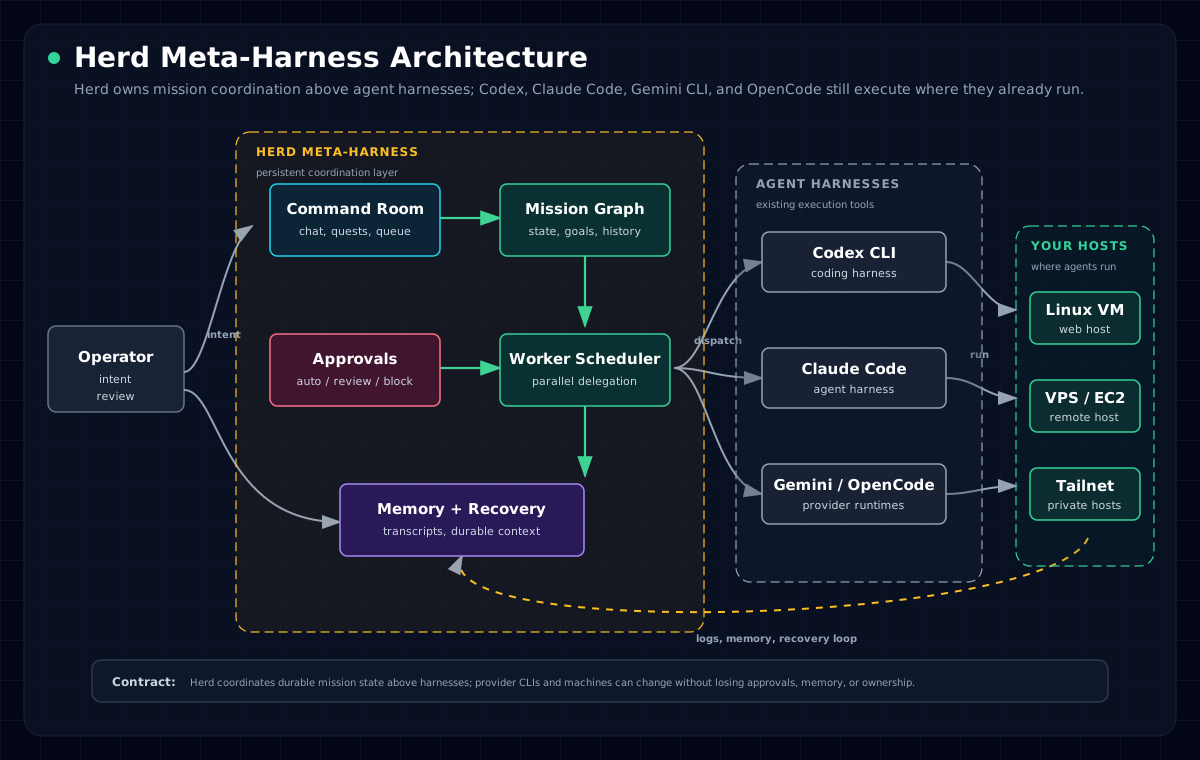
Cursor is obsolete. Pair-programming with one chatbot is a dead end; the next interface is Herd: a meta-harness above Codex, Claude Code, Gemini CLI, OpenCode, and the machines where they run.
Herd owns mission state, worker orchestration, memory, approvals, and the command-room surface. Connectivity and execution stay delegated to harnesses and infrastructure you already trust: provider CLIs, SSH, Tailscale, hosted runtimes, and your own reverse proxy. The mission graph and execution rules stay stable even when the underlying harness or transport changes.
Manage agent work, not terminal tabs.
| Step | Operator action | Herd outcome |
|---|---|---|
| 01 | Install the control plane on a trusted machine. | Hermetic Node/pnpm toolchain, local env, server boot, and bootstrap sign-in. |
| 02 | Connect provider auth and machines. | Codex, Claude Code, Gemini CLI, OpenCode, local hosts, SSH boxes, and Tailscale machines become explicit runtime targets. |
| 03 | Run commanders and workers from Command Room. | Work is queued, delegated, reviewed, remembered, and recoverable. |
What Herd Is
Herd is a source-available meta-harness for personal agent fleets.
It looks like an operating room for agent work. Under the hood: commanders, workers, persistent memory, agent-harness readiness, machine routing, action policies, approvals, public docs, and an install path that keeps the runtime on infrastructure you own.
operator intent -> Herd meta-harness -> agent harnesses -> your machines -> durable mission state
Herd Is Right For You If
- You coordinate more than one AI agent harness and need a persistent command surface above them.
- You run the web control plane on a Linux host and connect only machines you administer.
- You want agents to keep mission memory across provider sessions, browser tabs, and worker restarts.
- You need sensitive actions to be reviewable instead of blindly executed.
- You want public, agent-readable docs that describe setup, operations, references, and recovery.
Quickstart
The installer is hermetic for the Node toolchain. It needs git, curl, tar, and outbound HTTPS; it installs Node 22.16.0 and pnpm 10.23.0 in a local toolchain directory without replacing or relying on your system Node. Herd uses Node's built-in SQLite driver for the local runtime-session database, so older Node 22 builds that require --experimental-sqlite are not supported.
curl -fsSL https://herd.gehirn.ai/install.sh | bash
The installer clones Herd, prepares the local app environment file, installs the hermetic toolchain and dependencies, builds the app, boots the shell once, seeds a one-time bootstrap API key, and prints the local sign-in URL.
Continue with the full quickstart to complete first-run onboarding, provider auth, machine readiness, and the first useful commander run.
Feature Matrix
| Commanders Durable agent identities with memory, conversations, quests, and worker ownership. |
Workers Delegated execution sessions on registered machines the operator controls. |
Approvals Action policy can auto-run, queue for review, or block external actions. |
| Agent Harnesses Uses provider CLIs where they already run instead of hiding credentials in a black box. |
Workspace Context Commanders operate in real repos with file context, route-aware prompts, and durable traces. |
Public Docs Human docs plus `llms.txt` cover setup, concepts, operations, references, and troubleshooting. |
Problems Herd Solves
| Without Herd | With Herd |
|---|---|
| One chatbot owns the conversation, state, and bottleneck. | Commanders assign parallel workers while Command Room keeps the mission coherent. |
| Agent sessions vanish when a tab, machine, or provider session dies. | Mission state, memory, approvals, and history persist outside any single transport. |
| Remote machines and local laptops require bespoke scripts and manual tracking. | Machines are registered, checked for readiness, and used as explicit worker execution targets. |
| External actions either run blindly or require constant babysitting. | Action policies make approval, auto-run, and block behavior inspectable and adjustable. |
Bundled Commander Workforce
Fresh Herd installs include a backend-owned commander marketplace and a starter workforce:
- Asina: engineering manager for issue triage, code investigation, review, orchestration, and release follow-through.
- Einstein: research intelligence analyst for web research, knowledge search, domain distillation, and reports.
- Alfred: general assistant for meeting prep, scheduling support, inbox/doc triage, and daily follow-through.
Open the Marketplace page or complete first-run onboarding to install the starter workforce. Packages are inspectable in the bundled commander package directory; each package contains COMMANDER.md, skills.manifest.json, memory-seed.md, onboarding.md, and examples. The required starter skill dependencies ship in agent-skills/herd-starter/ so a fresh public checkout has the workflows the bundled commanders advertise.
Deploy Shapes
| Shape | Use it when | Docs |
|---|---|---|
| Linux web host | You want the supported self-hosted control plane behind your own reverse proxy or load balancer. | Hardening |
| iOS client | You want a supported mobile client connected to your Herd instance. | Platform support |
| macOS / Windows | Unsupported for v1 self-hosted control-plane deployment. | Platform support |
Docs
Full documentation lives under docs/:
- Quickstart
- Hardening
- Provider auth
- Credential pools
- Machines and workers
- Uninstall
- Workspace
- Channels
- Commanders
- Organization
- Workers
- Command Room
- Approvals
- CLI reference
- Changelog
- API reference
- Platform support
- Naming policy
- Security policy
- Troubleshooting
- Agent-readable llms.txt
Community And Support
Use GitHub issues for reproducible bugs and scoped feature requests. Use the
Pioneering Minds AI community at https://pioneeringminds.ai for support,
operator discussion, roadmap discussion, and open-ended community conversation.
GitHub Discussions are intentionally disabled for this repository.
Before opening a pull request, read CONTRIBUTING.md and
the Contributor License Agreement. Maintainers review and merge
accepted pull requests.
License
Herd is source-available under the PolyForm Noncommercial 1.0.0 license.
- Personal and other noncommercial use is allowed under that license.
- Commercial use requires a separate written agreement.
- See COMMERCIAL-LICENSE.md and NOTICE.
Reviews (0)
Sign in to leave a review.
Leave a reviewNo results found