claude-pet
Health Pass
- License — License: MIT
- Description — Repository has a description
- Active repo — Last push 0 days ago
- Community trust — 12 GitHub stars
Code Fail
- rm -rf — Recursive force deletion command in .github/workflows/build.yml
- rm -rf — Recursive force deletion command in build.sh
- exec() — Shell command execution in src/claude_pet/app.py
Permissions Pass
- Permissions — No dangerous permissions requested
No AI report is available for this listing yet.
Meet Claude's Virtual Pet Companion for Coders

Claude Pet
Meet Claude's Virtual Pet Companion for Coders.
Made by Byteflow.bot — free & open source.
v0.5.0 — the pet that reacts to Claude Code (sound + emotions), remembers every project you code in, learns skills from repeated patterns, coaches your ergonomics with animated exercises, watches your GitHub repos for commits/PRs/reviews/deploys, and shows it all in a futuristic HUD dashboard when you click it.


Why?
Claude Code runs in your terminal. If you tab away to Slack, the browser, or another editor, you have no idea what Claude is doing — is it thinking? Waiting on you? Failed? Finished?
Claude Pet fixes that.
It's a small robot mascot that floats in the bottom-right corner of your screen and reacts to every Claude Code event in real time:
- 🤔 Purple spinning eyes — Claude is thinking about your prompt
- 👀 Cyan scanning eyes — Claude is reading files
- ✍️ Blue sparkles — Claude is writing / editing code
- 🖥️ Green down-arrows — Claude is running a bash command
- ✅ Green ^^ eyes + 3 short dings — task complete
- ❌ Red X eyes + low thud — task failed
- 🔵 Blue pixel circles + 2 beeps — Claude needs your attention
- 💤 Sleeping face + Zzz — idle for 3 minutes
- ⭐ Star eyes — new session started
You always know what's happening — even when you can't see the terminal.
✨ What's new in v0.5.0
| Version | Feature |
|---|---|
| v0.5.0 | GitHub Repo Watcher — commits, PRs, PR reviews, releases, CI runs, and deploy status alerts for any repo (no webhooks, ETag-cached polling, optional PAT) |
| v0.4.6 | Overlay chrome deduplicated — no more double titles/countdowns |
| v0.4.5 | Ergonomics SVG accents now render (monitors, water glass, arrows) — CSS custom-property inliner |
| v0.4.4 | Clean minimal HUD dashboard — halo/scanline removed, larger readable type |
| v0.4.3 | HUD Stats tab with data cells + circular gauge meters |
| v0.4.2 | Futuristic dashboard theme: deep navy, cyan hairlines, corner brackets, monospace |
| v0.4.1 | /break endpoint — claude-pet ergonomics break-now actually opens overlays |
| v0.4.0 | Ergonomics Coach — activity-aware breaks, animated exercises, adherence tracking |
| v0.3.3 | Pet self-replaces stale versions on upgrade (no manual kill -9 needed) |
| v0.3.2 | claude-pet doctor self-heals broken hooks; installer uses ~/.claude-pet-venv/ (TCC-safe) |
| v0.3.1 | Skills land in Claude Code's discovery path (~/.claude/skills/) so they actually load |
| v0.3.0 | Memory brain — SQLite graph, .ua ingest, ranked context injection, self-learning skills |
112 tests across 3 platforms (macOS / Windows / Linux), all green.
👀 v0.5.0 — GitHub Repo Watcher
Add any GitHub repo — public or private (with a token) — and the pet will notify you the moment something happens on it:
- New commits → curious face + attention beeps ("3 new commits on main by @octocat")
- PRs opened / merged / closed → success or error reactions
- PR reviews — approved / changes-requested / commented → distinct sounds
- New releases → success dings ("Release v1.2.0 published")
- CI runs (GitHub Actions) — pass / fail / cancel → matched reactions
- Deploy status — success or failure per environment
- Issues opened → curious poke
Design highlights:
- Polling, not webhooks — the pet is a local desktop app, no public endpoint required
- ETag caching — quiet repos cost 0 rate-limit budget after the first poll
- Rate-limit safe — 60/hr unauthenticated (fine for 5 repos at 5-min interval), 5000/hr with a personal access token
- First-poll silent — adding a repo doesn't spam you with 30 old events; only alerts on activity after you added it
- Deduplicated — the same event never fires the pet twice
- Per-type toggles — silence PushEvent-only if a repo commits too often, keep alerts for reviews/deploys
claude-pet github watch facebook/react          # start watching
claude-pet github watch nikhilagrima/claude-pet
claude-pet github list                           # see what's watched
claude-pet github events                         # recent activity feed
claude-pet github check                          # force-poll now
claude-pet github token ghp_yourPAT              # optional, unlocks private + 5000/hr
Or add repos via the GITHUB tab in the dashboard — click the pet, type owner/repo, hit + Watch.
🔔 Never miss when Claude needs you
The killer feature: sound alerts. When Claude finishes a task, the pet plays 3 short dings. When Claude is waiting for your input or permission — the moment you'd otherwise leave it hanging while you read Slack — the pet plays 2 attention beeps. Failures get a low thud. You can tab away, grab coffee, work on another screen: your ears tell you the moment Claude needs you back.
🧘 v0.4.0 — Ergonomics Coach
The pet now watches for real work time (from Claude Code hook events) and prompts you for evidence-based micro-breaks at the right moments — not when you're at lunch. Every prompt opens an overlay where the pet itself demonstrates the exercise through an animated SVG, with a countdown ring and a Done / Skip button.
- Eye break (20-20-20) every 20 min of active work — look ~6 m away, 20 s, keep blinking (AOA guidance)
- Chin tuck every 30 min — most-RCT-backed fix for forward-head posture (CCOHS)
- Wrist circles every 45 min — prevent RSI (OSHA)
- Reach high every 60 min — postural reset (HSE 2025)
- Water break every 60 min — hydration reminder
What makes it different from every other break app:
- Activity-aware — the pet's existing 3-min sleep state pauses all timers, so timers never fire when you're not actually working
- Never interrupts typing — if a threshold hits while you're typing a prompt, it defers up to 5 min
- The pet demonstrates — you don't get "time for a break!" and have to Google what to do; the mascot performs the stretch, you mirror it
- Guided completion — the overlay stays until you mark Done or Skip; adherence is tracked and shown in the Ergonomics tab
claude-pet ergonomics status     # see current thresholds + windows
claude-pet ergonomics stats      # 7-day adherence, streak, most-skipped
claude-pet ergonomics break-now  # open a break overlay immediately
claude-pet ergonomics snooze 30  # 30-min pause
claude-pet ergonomics on / off   # master toggle
Config lives at ~/.claude/claude-pet/config.json (intervals per category, quiet hours, sound on/off, per-category toggles). Right-click the pet → Take a break now, Snooze 30 min.
Not medical advice. This is wellness guidance based on published ergonomics research (AOA, HSE, OSHA, CCOHS). It does not diagnose or treat any condition. If you have pain, see a professional.
🧠 v0.3.0 — Memory brain for Claude Code
Claude Pet is no longer just a mascot. It's a local memory brain:
- Graph memory of every project — decisions, conventions, fixes, gotchas stored in
~/.claude/claude-pet/memory.sqlite(never bundled, never synced). - Automatic context injection — SessionStart hook emits a ≤800-token ranked block back to Claude Code (
weight × recency × FTS5 match), so Claude sees what matters on turn 1 without you copy-pasting anything. - Ingests
.ua/knowledge-graph.json(Understand-Anything format) as authoritative when present. - Self-learning skills — patterns reinforced ≥2× promote themselves to real
SKILL.mdfiles under~/.claude/claude-pet/skills/, with valid frontmatter Claude Code picks up automatically. Tier evolves: 🥚 hatchling → 🐣 apprentice → 🦉 senior → 🦄 master. - Click the pet → a panel opens with Projects, live Graph, Skills, and Stats (including estimated tokens saved).
- Never-cut safety — the pet's injection always ends with a ruleset that forbids skipping validation, security, or accessibility to save tokens.
claude-pet memory                # summary of the current project
claude-pet memory --all          # every project you've ever used
claude-pet note "Working on the auth refactor, next step is JWT rotation"
claude-pet context               # the exact block Claude sees on session start
claude-pet context --budget 400  # smaller injection for tighter turn budgets
Guarantees: 100% local, no cloud, no embeddings, no vector DB, no new daemon. 11 secret-pattern regexes redact anything sensitive before it touches disk. .sqlite files are .gitignored — the package ships fresh empty memory.
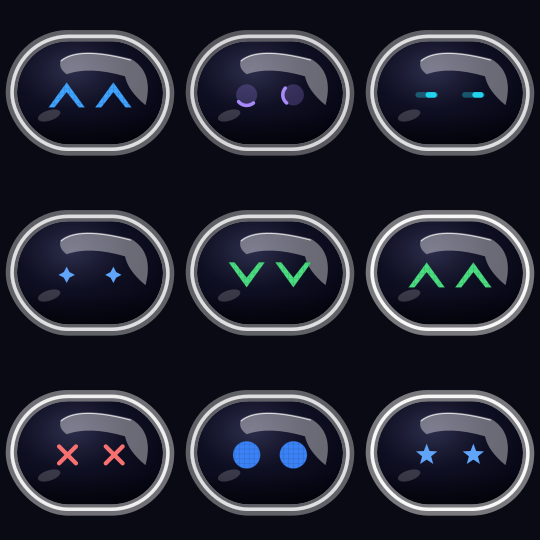
11 emotions, all rendered live from SVG. Fully transparent window — the mascot floats on your desktop with no chrome, no border, no rectangle.
Install
🚀 Quick install (copy-paste)
macOS / Linux:
git clone https://github.com/nikhilagrima/claude-pet.git ~/claude-pet && cd ~/claude-pet && bash install.sh
(On macOS, use bash install.command instead.)
Windows (PowerShell):
git clone https://github.com/nikhilagrima/claude-pet.git $HOME\claude-pet
cd $HOME\claude-pet
.\install.bat
🖱 Double-click install (for non-terminal folks)
Download the latest release ZIP and unzip it.
Double-click whichever installer matches your OS:
OS File macOS install.command(right-click → Open the first time)Windows install.batLinux install.shWait ~60 seconds. Done — the mascot appears in your bottom-right corner.
📦 Pre-built app (macOS)
Download Claude Pet.app from Releases, drag to /Applications, double-click. No Python required.
What the installer does
- Checks Python 3.10+
- Installs Homebrew (macOS, if missing)
- Installs Cairo graphics library (all platforms)
- Creates a Python venv
- Installs the
claude-petpackage - Writes Claude Code hooks to
~/.claude/settings.json(real-time reactions) - Starts the mascot in the background
The installer is idempotent — safe to run multiple times.
How to use it
- Click the mascot → opens the HUD dashboard (Projects / Graph / Skills / Stats / Ergo tabs)
- Drag the mascot → move it anywhere
- Right-click the mascot → context menu:
- Hello / Working / Celebrate / Sleep (reaction pokes)
- Take a break now (open the ergonomics overlay immediately)
- Snooze breaks 30 min
- Turn Ergonomics ON/OFF (label reflects current state)
- Reset position / Quit
- In the dashboard's Ergonomics tab → master toggle button + "Break now" + live streak / adherence / today's breaks
- After 3 min idle → mascot falls asleep with animated Zzz's, all ergonomics timers pause
- Every 30 s during idle → mascot briefly shows the current time
The mascot stays on top of every application (including fullscreen apps and other Spaces on macOS), so you never lose sight of it.
CLI reference
Process lifecycle:
  claude-pet run                Run pet + server in this terminal (foreground)
  claude-pet start              Start pet + server detached in the background
  claude-pet stop               Kill running pet
  claude-pet doctor             Diagnose broken hook paths and auto-heal
  claude-pet update             Pull latest release, reinstall, restart

Hook wiring:
  claude-pet install-hooks      Add Claude Code hook entries to ~/.claude/settings.json
  claude-pet uninstall-hooks    Remove them again
  claude-pet hook <event>       Internal — invoked by Claude Code hooks

Memory brain:
  claude-pet memory             Show saved history for the current project
  claude-pet memory --all       List every remembered project
  claude-pet note <text...>     Attach a note to the current project
  claude-pet context            Print the context block Claude sees on session start
  claude-pet forget --path P    Delete every memory row for a project

Ergonomics coach:
  claude-pet ergonomics status  Show current thresholds + windows
  claude-pet ergonomics stats   7-day adherence, streak, most-skipped
  claude-pet ergonomics break-now [slug]  Open a break overlay now (any slug)
  claude-pet ergonomics snooze 30         Pause 30 min
  claude-pet ergonomics on / off          Master toggle
  claude-pet ergonomics reset             Wipe ergonomics history

GitHub repo watcher:
  claude-pet github watch owner/repo      Start watching a repo
  claude-pet github unwatch owner/repo    Stop watching
  claude-pet github enable/disable o/r    Pause/resume without removing
  claude-pet github list                  Show watched repos + last-check age
  claude-pet github events [--limit 20]   Recent activity feed
  claude-pet github check                 Force-poll all repos now
  claude-pet github token <PAT>           Store a personal access token
                                          (unlocks private repos + 5000 req/hr)
  claude-pet github token --remove        Clear the stored token

Options:
  --show-in-dock              macOS: show the pet icon in the Dock / Cmd-Tab
                              (default: accessory-app mode, no Dock icon)
Sound cues
| Event | Sound | Pattern |
|---|---|---|
| Task complete (Stop) | Glass ding | 3× beeps |
| Needs attention (Notification / UserPromptSubmit) | Morse ping | 2× beeps |
| Task failed (PostToolUseFailure) | Basso thud | 1× |
macOS uses built-in system sounds. Windows falls back to Windows Notify System Generic.wav. Linux uses freedesktop's complete.oga / dialog-error.oga. If none are found, bundled fallback WAVs play.
Architecture
claude-pet/
├── src/claude_pet/
│   ├── app.py         PySide6 frameless transparent window (all platforms)
│   ├── bot_svg.py     Live SVG generator — 11 emotions × animation frames
│   ├── server.py      Local Flask on :5050 holding current state
│   ├── hook.py        Called from Claude Code hooks → maps event to emotion
│   ├── cli.py         `claude-pet` subcommands
│   └── assets/        Icons + fallback sounds
├── install.command / install.bat / install.sh   Double-clickable installers
├── build.command / build.bat / build.sh         PyInstaller build scripts
└── claude_pet.spec                              PyInstaller config
Data flow: Claude Code event → hook.py → HTTP POST to :5050 → pet polls and renders new emotion.
Build your own binary
# macOS
./build.command   # produces dist/Claude Pet.app

# Windows
build.bat         # produces dist\claude-pet.exe

# Linux
./build.sh        # produces dist/claude-pet
Uses PyInstaller. Cross-compilation isn't supported — you must build on the target OS.
Updating to a new release
One command — auto-detects your install type, pulls the latest, restarts the pet:
claude-pet update
- Editable install (git clone): runs
git pull --ff-onlyin the source tree, refreshes pip in case new deps landed, then triggers the pet's self-replace so the running process picks up the new code. - Regular pip install: runs
pip install --upgrade git+https://github.com/nikhilagrima/claude-pet.git, then restarts. - Idempotent — running when already on latest prints
already up to dateand exits. Add--forceto reinstall anyway.
Prefer a fresh install?
cd ~/claude-pet && git pull && bash install.command   # macOS
cd ~/claude-pet && git pull && bash install.sh         # Linux
cd $HOME\claude-pet && git pull && .\install.bat       # Windows
The installer is fully idempotent — safe to run any number of times.
Uninstall
claude-pet stop
claude-pet uninstall-hooks
pip uninstall claude-pet
That's it — no daemon left running, no LaunchAgent, no scheduled task.
Requirements
- Python 3.10 or newer
- macOS 11+ (Big Sur or later)
- Windows 10+
- Linux with X11 or Wayland compositor (GNOME, KDE, Sway all tested)
Contributing
PRs welcome — Claude Pet is designed to be forked. See CONTRIBUTING.md for the ~10-line diff needed to add a new emotion, exercise, dashboard tab, integration, or theme. Bug fixes, translations, alternative mascot designs, and new exercise SVGs are especially appreciated.
Star the repo if you want to boost the project → github.com/nikhilagrima/claude-pet
License
MIT © 2026 Byteflow.bot. Do whatever you want.
Built with love for the Claude Code community by Byteflow.bot.
Reviews (0)
Sign in to leave a review.
Leave a reviewNo results found