continuum
Health Pass
- License — License: NOASSERTION
- Description — Repository has a description
- Active repo — Last push 0 days ago
- Community trust — 14 GitHub stars
Code Fail
- os.homedir — User home directory access in bin/continuum.mjs
- process.env — Environment variable access in bin/continuum.mjs
- network request — Outbound network request in daemon/adapters.mjs
- os.homedir — User home directory access in daemon/config.mjs
- process.env — Environment variable access in daemon/config.mjs
- fs.rmSync — Destructive file system operation in daemon/dashboard.mjs
- os.homedir — User home directory access in daemon/dashboard.mjs
- process.env — Environment variable access in daemon/dashboard.mjs
- network request — Outbound network request in daemon/dashboard.mjs
Permissions Pass
- Permissions — No dangerous permissions requested
No AI report is available for this listing yet.
Your whole desktop context — everything you've seen, read, typed, and heard — as a single MCP your agent can use. Open source, local-first, on-device.
Continuum

Your whole desktop context — everything you've seen, read, typed, and heard — as a single MCP your agent can use.
You bounce between Claude, Slack, X, your editor, a call — a dozen apps a day — and each one starts
blank, so you become the courier: re-pasting, re-explaining, rebuilding context over and over.
Continuum carries it across. It quietly remembers what happens in every app — on your machine,
private, yours — and serves it to any agent over MCP. Ask Claude "what was I just doing in X?"
and it already knows.
Open source. Local-first. One command to connect.
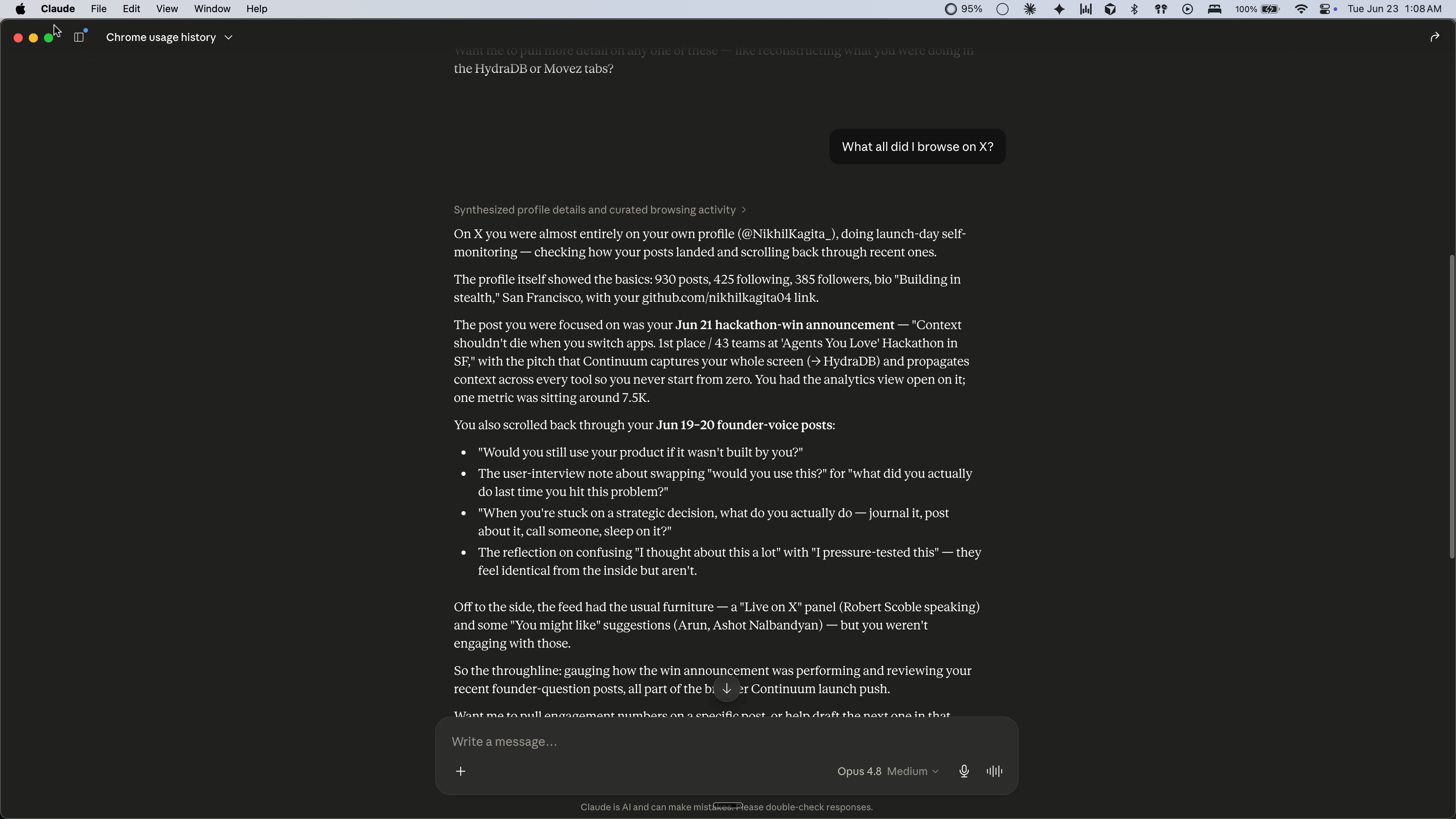
▶ Watch the demo — ask Claude "what was I just doing in X?" and it answers from your own captured activity.
Get started — hand it to your agent
Nobody wires up dev tools by hand anymore — you tell your agent to. Paste this into Claude Code,
Codex, or Cursor and it installs Continuum, starts capture, and connects the MCP for you:
Set up Continuum so you can see my desktop context: install it (
npm i -g continuum-core), start
capture in the background (continuum start &— I'll grant Screen Recording when macOS prompts),
then add the Continuum MCP server to your config using the JSON fromcontinuum mcp-config. After
that, use thesearch_contextandrecent_activitytools whenever I ask what I was working on.
Then just ask it "what was I doing in X?" — that's the whole setup.
Or run it yourself — about 30 seconds
Needs Node 18+. Don't have it? Grab it at nodejs.org or brew install node.
npm install -g continuum-core
continuum verify          # prove it works — no keys, no permissions, no setup
verify captures a sample work session and answers questions about it — the whole
capture → memory → recall loop in one command.
Prefer source? git clone https://github.com/nikhilkagita04/continuum && cd continuum && npm link
Use it
continuum start
continuum dashboard
start captures what's on screen, on-device — grant Screen Recording once when macOS
prompts. dashboard opens your searchable timeline at localhost:3939.
Connect it to your agent (MCP) — the payoff
Continuum speaks MCP, so any agent can query your desktop context. Pick the path that fits:
Claude Desktop — one command:
continuum mcp-install # adds Continuum to Claude Desktop; your config is preserved + backed up
Then fully quit/reopen Claude (Cmd+Q) and ask "what was I working on this morning?"
Any other client (Cursor, your own agent) — a 5-line block (continuum mcp-config prints it):
{ "mcpServers": { "continuum": { "command": "node", "args": [".../daemon/mcp-server.mjs"] } } }
(Or skip all this and use the hand-it-to-your-agent prompt up top — it does install + connect in one paste.)
Keep continuum start running so there's something to recall.
What it is
A primitive, not an app. Most context tools are either closed "brain" apps you hand
everything to, or screen recorders that dump raw frames and leave you to dig. Continuum is the
open layer you build on:
- Sees what you see — and hears what you hear — on-device OCR of the whole focused window
(captured only when it meaningfully changes, with repeated chrome de-duplicated so episodes are
content not noise), plus optional on-device meeting transcription (mic + system audio,
speaker-attributed, transcribe-then-delete) fused with what's on screen. - Local-first — everything lives in
~/.continuum; credential managers are excluded and
PII is redacted; nothing leaves your machine. - Composable — query it from the CLI, the SDK, or MCP, so any agent can use your memory.
Tiers
| Free | Pro (later) | Enterprise (later) | |
|---|---|---|---|
| Capture · recall · MCP | ✅ | ✅ | ✅ |
| Embeddings / LLM | local, $0 | OpenAI / Anthropic | hosted |
| Temporal knowledge graph | — | ✅ | ✅ team graph |
The graph tier needs a frontier model (local models can't do reliable entity extraction), so
it's the natural paid line. Everything below it is free and local.
How it works

Four stages turn ~29k raw daily events into ~30 LLM calls — and the LLM never touches the
capture path, which is what keeps it light. Deep dive:
docs/architecture/ingestion-pipeline.md.
Build on it
The stages are importable modules — a useful tool is ~20 lines. See examples/ for a standup
generator and the Claude Desktop MCP config.
Develop
npm test
swiftc daemon/stage1/screen.swift -o daemon/stage1/screen
npm test runs the suite (no network); continuum eval reports capture-quality metrics (OCR
fidelity, segmentation, grounding, end-to-end recall) over local fixtures. The second line builds the
macOS screen-capture helper. Contributions under DCO
(git commit -s). License: Apache-2.0.
Reviews (0)
Sign in to leave a review.
Leave a reviewNo results found