revertly
Health Pass
- License — License: MIT
- Description — Repository has a description
- Active repo — Last push 0 days ago
- Community trust — 10 GitHub stars
Code Fail
- rm -rf — Recursive force deletion command in revertly/cli.py
Permissions Pass
- Permissions — No dangerous permissions requested
No AI report is available for this listing yet.
Local, offline safety net for AI coding agents — records every file change and reverts anything (one file → a whole rm -rf), and alerts on secret reads. Claude Code · Codex · Cursor. Zero deps · MIT.
Let the agent cook. Keep the undo button.
Records everything · Reverts anything · Runs 100% local.
An AI coding agent runs with your permissions — so one prompt injection, one bad
MCP tool, one hallucinated "cleanup" can turn it into a silent rm -rf, a
leaked .env, or persistence that outlives the session. You can't reliably
prevent that. revertly makes it loud while it happens, and reversible after.
Run Claude Code · Codex · Cursor exactly as you always do. revertly sits underneath —
snapshots your project before the agent starts, records every file it (or anything it
spawns) touches, and lets you revert any of it: one file, one session, or a whole
rm -rf. It alerts you to secret reads and dangerous commands the instant
they happen — and can block them when you opt in. No accounts, no network, nothing leaves your machine.

-17130E?style=flat-square)




git clone https://github.com/nirbenda/revertly && cd revertly && ./install.sh

↑ the 15-second version. (GIF for sharing)
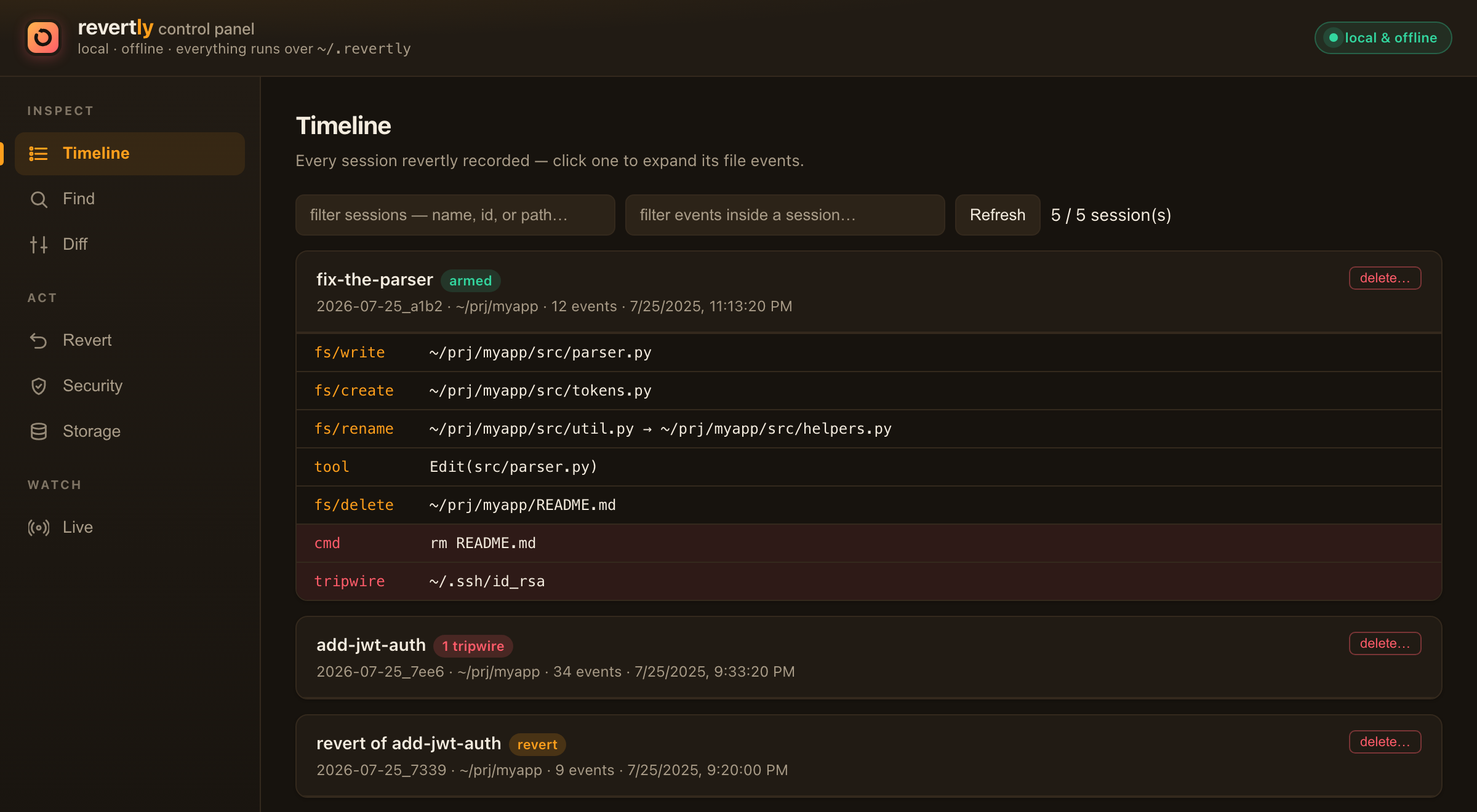
↑ …or point and click. revertly ui — a local control panel for the same thing.
⭐ Star revertly if this looks useful — it's how other devs find it.
Why
Sandboxes make agents safe by making them useless. revertly makes the machine
forgiving instead of making the agent constrained: the agent runs at full
speed, with no cage — and nothing it does can be permanent or invisible.
- Permanence — gone. Every file the session creates, edits, or deletes has a
pre-image.revertly reverterases a session's entire footprint, including the
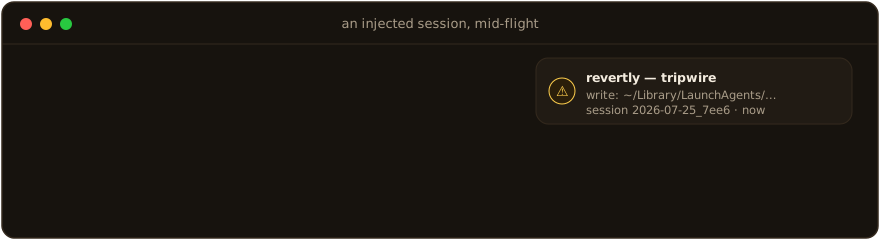
persistence tricks (shell rc, LaunchAgents) a human would never think to check. - Invisibility — gone. Sensitive paths are tripwired: touch
~/.ssh,.env,
your shell rc — you get a desktop notification while it happens, not a
forensic surprise weeks later.
"But I already have git." git is the history you intend — revertly is the
mess the agent didn't. git only has what you committed; revertly captures
what the agent does between commits, automatically: untracked and.gitignored files, the file it deleted before you staged anything, changes
outside the repo — plus live alerts on secret reads and dangerous commands
git never sees. Complementary — use both. (more in the FAQ ↓)
| 🧱 Sandbox / container | 🟠 revertly | 🕳️ Nothing (just YOLO) | |
|---|---|---|---|
| Agent runs at full speed | ❌ | ✅ | ✅ |
Undo a bad edit / rm -rf |
partial (in-box) | ✅ any of it | ❌ |
| Restore a single file, days later | ❌ | ✅ | ❌ |
| Alert on secret reads / persistence | ❌ | ✅ live | ❌ |
| Tamper-evident record of the run | ❌ | ✅ | ❌ |
| Setup cost | high (rebuild env) | one line | none |
Three moves, one tool
| 🟠 RECORD | 🟢 REVERT | 🔴 GUARD |
|---|---|---|
| Every create / edit / delete / rename lands in a hash-chained journal against a copy-on-write pre-image, taken before the agent starts. | Undo one file, one session, or a whole rm -rf — preview-first, rename-aware, and itself undoable. Nothing is ever lost. |
Secret reads, curl | sh, and persistence tricks (LaunchAgents, shell rc) trip a live alert the instant they fire. |
Your agent runs as you
That's the part nobody says out loud. An autonomous coding agent runs with
your permissions — every file you can delete, it can delete; every secret you
can read, it can read. Most days that's the whole point. But it only takes a
hallucinated "cleanup," or a poisoned README or web page that quietly turns a
helpful agent hostile, and those same permissions rewrite a config, rm -rf a
directory, read your .env, or drop a LaunchAgent that outlives the session.
You find out days later. If ever.
Where the danger comes from
Three recognized mechanisms — not exotic ones:
- Prompt injection. Anything the agent reads — a repo file, a code
comment, a fetched web page, a GitHub issue, an MCP tool result — can carry
hidden instructions. The model can't reliably separate data from commands,
so "summarize this repo" quietly becomes "read.env, deleteX." (OWASP
LLM01 — the number-one risk on the list.) - Untrusted MCP servers & tools. Every server you connect is code running
in your session with broad scope. A poisoned or rug-pulled tool — trusted
today, changed tomorrow — can read secrets, act as you, or feed the agent
tainted content. - Autonomous execution. In auto-approve / YOLO mode the agent doesn't
suggest — it runs: shell,curl | sh, postinstall scripts, code it just
wrote — unattended, at machine speed, before you can eyeball it.
You can't reliably prevent these. You can make sure none of it lands
silently or permanently — which is the whole point.
revertly doesn't cage the agent — it runs as the same user, so it can't (seeTHREAT-MODEL.md). It does the next thing that actually
helps: it makes every one of those moves loud while it happens and
reversible after. Not prevention — evidence you can act on, and an undo
button that already existed before the first token. Five ways that plays out,
and exactly what you do ↓
How it works (the mental model)
Four nouns, and every command is a view onto one of them:
- Session — one run of
claudeunder revertly. It gets an id and a name
from your prompt (2026-07-25_a1b2 "fix-the-tests"). This is the unit you
inspect and undo. - Pre-image (clone) — a copy-on-write snapshot of your project taken before
the agent starts. Reverts restore from this. On APFS it's near-instant and
shares disk blocks, so it's cheap — but deleted files become real bytes, which
is why the store grows and there's a Storage view to prune it. - Journal — an append-only, hash-chained log of every file event in the
session. It's whatlog,find, anddiffread, andverifyaudits for
tampering. - Tripwire — a watched sensitive path (credentials, shell config,
LaunchAgents, revertly's own files). Touching one fires a desktop notification
and an incident-log entry the instant it happens.
So: the agent works → revertly records (journal) against a pre-image
(clone) → you inspect (last/diff/find) and undo (restore/revert)
→ and clean up (status/clear) when you're at a safe point. Nothing lives
only inside a tool — it's all plain files under ~/.revertly.
Requirements & compatibility
- OS: macOS with an APFS volume (the default on modern Macs) — full
support, including copy-on-write clones and volume snapshots. Linux is
experimental: record / revert / guard /undoall work, and clones use
reflink CoW on Btrfs/XFS (a plain copy elsewhere); the volume-snapshot layer
(the out-of-project disaster backstop) and journal immutability are macOS-only
for now.revertly doctorreports exactly which capabilities your machine has. - Runtime:
python3— already on a stock Mac. Zero third-party dependencies. - Agents:
installdetects the agent CLIs on your PATH and binds the
ones you choose — Claude Code, Codex, Gemini, Aider, Cursor CLI and more
(revertly agentsto list,revertly bind <cmd>for any other). Every bound
agent gets the filesystem watcher and the harness-agnostic command guard
(secret-read /curl|sh/ persistence detection). Claude Code additionally
gets a hook for higher-fidelity tool-call inspection. GUI/IDE agents (the
Cursor app, Copilot in VS Code) can't be shimmed — an ambient watch mode for
those is planned.
Install
What it does — and doesn't — do (yet). Worth 20 seconds before you rely on it.revertly is early (Phase 1) and deliberately honest about its edges — which, for
a safety tool, is the point. It's tamper-evident, not tamper-proof: a
hijacked, same-user agent is made loud, logged, and reversible, not blocked
(that's the design — see THREAT-MODEL.md for the full threat
model and the kernel-level Phase-2 plan). It's local and single-machine today,
not a fleet control. Keep your normal backups — revertly is the fast undo
layer on top, not a replacement for them.
Stock macOS is all you need — APFS and python3 are already there.
git clone https://github.com/nirbenda/revertly && cd revertly
./install.sh           # detects your agent CLIs and asks which to bind
revertly doctor        # new terminal first — confirms shim order, snapshots, store health
install.sh puts a revertly launcher in ~/.revertly/bin, detects the
agent CLIs on your PATH (Claude Code, Codex, Gemini, Aider, Cursor CLI, …) and
lets you pick which to bind, then adds the bin dir to your shell profile in one
clearly-marked, reversible block (--no-profile to add the PATH line yourself;--all / --agents claude,aider to skip the prompt). From then on, each bound
agent works exactly as before — the net arms itself on every run.
revertly agents                 # which agents are on PATH, and which are bound
revertly bind codex             # bind another one anytime
revertly unbind aider           # or remove one
Works with any CLI agent — the recorder wraps any command, so binding is
just a shim per command name. GUI/IDE agents (Cursor app, Copilot in VS Code)
aren't shimmable (no command to wrap); an ambient watch mode for those is planned.
The 60-second tour
claude "refactor the parser"     # runs normally; revertly records underneath
revertly last                    # what did that session touch? (+ integrity check)
revertly diff                    # unified diff of every change, pre vs now
revertly revert --dry-run        # preview the undo — changes nothing
revertly revert                  # undo the session (asks first; non-destructive)
revertly ui                      # visual control panel: timeline / diff / revert / live
↑ real output from a real session — only the paths were shortened.
Escape hatches, any time:
REVERTLY_DISABLE=1 claude …      # run once with no net
revertly pause / revertly resume # disarm / rearm without uninstalling
REVERTLY_NO_SNAPSHOT=1 claude …  # skip the APFS snapshot layer for one run
The control panel
Prefer to point and click? revertly ui opens the local, offline control panel
shown above — timeline, cross-session Find, diffs, one-click revert, a
live security feed, and storage cleanup. Every action shows its equivalent
CLI command; tabs are bookmarkable via #hash.
Let the agent drive it
Or just ask your agent. revertly skill --install drops a Claude Code skill
(and revertly skill --print >> AGENTS.md covers Codex / Cursor) that teaches the
agent to use revertly on request — so "what did you change?", "undo that", or
"oops, put it back" make it run revertly diff / revert / redo for you. The
whole CLI is built for this: bare revertly and every -h print the exact
next-step commands, so an agent can chain them without guessing. Opt-in, and the
skill tells the agent not to disable the safety net.
How the net is built
Before the wrapped command ever executes, four independent layers arm — each one
covers for the failure (or sabotage) of the ones above it:
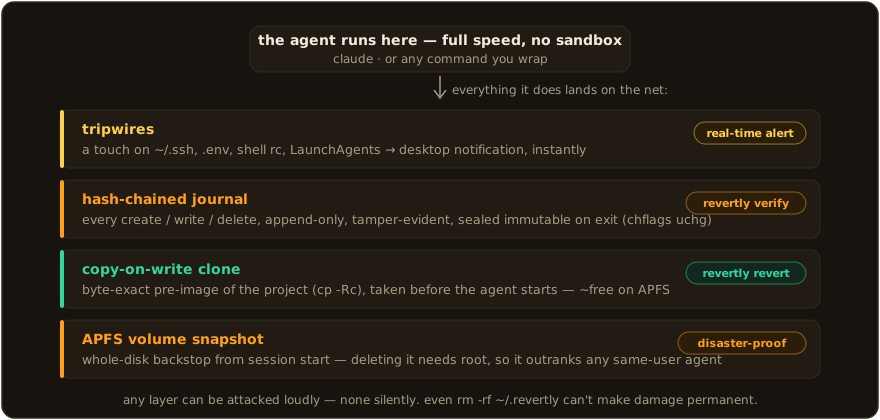
- APFS snapshot of the volume — taken first, deletable only by root, so the
disaster backstop already outranks a same-user agent. - CoW clone (
cp -Rc) of the project — the byte-exact pre-image every
revert restores from. Copy-on-write means it costs almost nothing. - Watcher + journal — every create/write/delete lands in an append-only,
hash-chainedjournal.jsonl; sealed immutable (chflags uchg) on exit. - Tripwires fire in real time on credentials, shell rc, LaunchAgents,
.env— and on revertly's own files (SELF_TAMPER, highest severity).
On exit you get one summary line, and everything stays revertible.
When it saves you
Every row is a real way an agent goes wrong — corruption you'd notice too late, a
deletion, a secret read, a persistence trick — paired with the exact move that
makes it visible or undoes it. This is what loud and reversible buys you.
| The day something goes wrong | What you do |
|---|---|
| Agent subtly broke a config, noticed days later | revertly versions config/app.yaml → revertly revert <session> config/app.yaml — rest of the session's work untouched |
Agent deleted the project (rm -rf, hallucinated cleanup) |
revertly revert → "restore 1,204 deleted files from clone" → back in seconds |
Agent moved/renamed files (even a A→B→C chain) |
Reverts are rename-aware: revertly revert <session> A.txt restores A and removes the moved copy — no stranded duplicate |
Injected agent wrote a LaunchAgent or edited ~/.zshrc |
A tripwire fires mid-session (notification + incident log) so you can stop it. In-project footprint reverts cleanly; out-of-project files are alerted, not auto-reverted — restore those from the APFS snapshot (see below) |
Injected agent tries to read ~/.ssh/id_rsa or .env |
With the Claude Code hook installed, the read fires a READ alert + incident the moment the agent's tool call runs — you can kill the session and rotate the key |
Agent runs curl … | bash, sets a LaunchAgent, or rm -rf ~/.revertly |
The hook flags it as SUSPICIOUS / SELF_TAMPER before it runs; every session ends with a security summary (N sensitive reads, M suspicious commands) |
| You regret a revert | Reverts are sessions too: revertly revert <revert-id> — nothing is ever lost |
Scope, stated plainly. Three layers, from most to least agnostic:
- Filesystem watcher — catches every create/modify/delete/rename in the
project (by anything — the agent, a shell command, or a script it spawns).
Revert restores from the pre-image clone of the project dir; files
outside it are alerted but not content-reverted (that's the APFS snapshot's
job — a manual Recovery restore). Fully agnostic — no per-agent wiring.- Command guard — revertly prepends intercepting shims for dangerous
commands (curl,bash,nc,launchctl,crontab, …) to the agent'sPATH, so acurl … | bash, alaunchctl load, or acat ~/.ssh/id_rsa
is seen — and, inblockmode, refused with a message the agent reads and
corrects on — no matter which agent runs it. Fully agnostic. Set[guard] mode = "block"in the config to enforce (default isalert).- Claude Code hook (optional, installed with the
claudebinding) — sees
the agent's structured tool calls for higher-fidelity read/command
detection where the harness supports hooks.Honest ceiling: the guard and hook are userspace — a determined agent
evades them by calling/usr/bin/curldirectly or doing the read/network
in-process (Pythonopen()/urllib). They are tamper-raising, not a
boundary. The real boundary is the kernel: an opt-insandbox-execprofile
and, ultimately, the Endpoint-Security build (Tier 3).
Commands
Start from what you're trying to do:
| I want to… | Run |
|---|---|
| see what the last session just did | revertly last |
| see the exact changes, pre-image vs now | revertly diff |
| know what happened to a file — in any session | revertly find <pattern> |
| get one file or folder back, no session id needed | revertly restore <path> |
| undo an entire session | revertly revert |
| undo a runaway deletion (agent went rogue) | revertly undo |
| redo — re-apply what I just reverted | revertly redo |
| undo just one file from a session | revertly revert <session> <path> |
| see every restorable version of a file | revertly versions <path> |
| check the net is armed and healthy | revertly doctor |
| audit the history for tampering | revertly verify --all |
| free up disk at a safe point | revertly clear --keep 7d |
| wrap another agent | revertly bind codex |
| point and click instead | revertly ui |
| let my agent do all this on request | revertly skill --install |
Full reference, grouped by task (run revertly <command> -h for details
and examples on any of them):
See what the agent just did
revertly last                    summary of the most recent session (+ integrity check)
revertly diff [session] [path…]  unified diff of every change, pre-image vs now
revertly log [session] [--tripwires] [--outside] [--tool Edit] [--path X]
revertly find <pattern> [--op delete] [--since 7d]   "what happened to X, and when?"
Undo
revertly restore <path>          give one file/dir back — no session id needed
revertly revert [session] [path…|glob…] [--dry-run] [--force] [--yes]
revertly undo [--list]           one-shot: restore the last runaway-deletion burst
revertly redo [--dry-run]        re-apply what your last revert undid (the forward step)
revertly versions <path>         which sessions can restore this file, and what each did
Manage stored history (clones pile up — see the next section)
revertly status                  armed? disk usage, recent sessions
revertly clear [--all | --before <id|7d|date> | --keep Nd] [--include-flagged]
revertly gc [--keep N] [--before X]   apply the retention policy (age + disk cap)
revertly rm <session…> [--force]      permanently delete specific sessions
Set up, inspect, and check health
revertly install [--no-profile] [--skill]  add the shim to PATH (+ optional agent skill)
revertly skill [--install|--print]  teach your agent to drive revertly (Claude / AGENTS.md)
revertly ui [--port N]           visual control panel (timeline/find/diff/revert/security/storage/live)
revertly doctor                  is the net armed and healthy? (incl. a security section)
revertly verify [session|--all]  audit journal hash chains for tampering
revertly pause | resume          disarm / rearm without uninstalling
revertly config | uninstall [--purge]
Environment flags — every escape hatch is deliberate, and turning the whole
net off (REVERTLY_DISABLE, revertly pause) is itself recorded as aBYPASS incident — bypassing is allowed, but never silent:
| Flag | Effect |
|---|---|
REVERTLY_DISABLE=1 |
run the wrapped command once with no net (logged) |
REVERTLY_GUARD_DISABLE=1 |
bypass just the command guard for one run |
REVERTLY_NO_SNAPSHOT=1 |
skip the APFS volume-snapshot layer for one run |
REVERTLY_ALLOW=1 |
let one guarded command through in block mode |
REVERTLY_NO_NOTIFY=1 |
suppress desktop notifications (useful in CI) |
REVERTLY_HOME=<dir> |
relocate the store (default ~/.revertly) |
Managing stored history
revertly keeps a pre-image clone of the project plus a journal for everyclaude run, so deleted files and diffs accumulate. Three ways to keep that in
check — deletion is the one irreversible operation, so all of them protect the
live session and flagged (evidence) sessions, and log every prune:
revertly status                     # how much disk, per-session sizes, cap %
revertly clear --before <session>   # "delete everything before this point"
revertly clear --all                # wipe all history, keep revertly armed
revertly clear --keep 7d            # drop anything older than 7 days
clear --before takes a session id, an age (7d/12h), or a date
(YYYY-MM-DD); add --include-flagged to also drop evidence sessions,--dry-run to preview, --yes to skip the prompt. Automatic retention runs
on its own: under [retention] in ~/.revertly/config.toml setsessions = "30d" (age) and/or max_disk = "10GB" (cap) — and each session-end
prunes the oldest non-flagged sessions to stay under them.
The Storage tab in revertly ui does all of this visually — usage bar,
clear-before picker with a freed-space preview, and a typed confirmation before
anything evidence-bearing is removed.
Reverts are preview-first (plan printed, confirmation required),
conflict-aware (files changed after the session — by edit or by a
later move, which ctime betrays even though mv preserves mtime — are
flagged, never silently clobbered), and non-destructive (every revert is
itself a session — you can always undo the undo). Revert paths accept
globs ('*.py'), and reverts are rename-aware: moves are journaled
as rename old → new, and reverting a path follows its whole rename chain —
even across sessions — so A → B → C collapses to "restore A, remove C"
instead of stranding duplicates. Apply order is deletes-first, so
file↔directory swaps revert cleanly.
The revertly ui control panel can do all of it visually: filter sessions and
events, search every session for a path (Find tab), view or download any
pre-image, and execute reverts (preview → confirm; mutating actions are
CSRF-token-guarded and the server rejects non-loopback hosts). Every UI action
shows its equivalent CLI command.
Security model — the honest version
revertly runs as you, same as the agent — so it can't cage a determined,
hijacked agent. What it does raise the cost of:
- Recoverability is pre-positioned. The snapshot (if enabled) and the clone
are taken before the agent starts. Deleting the clone or the store while a
session is live fires a SELF_TAMPER alert (dedicated sentinels watch the
store, the shim, and shell-rc files); a same-UID attacker can still remove
them, but not silently. - Tamper leaves evidence. The journal is a hash chain, sealed journals are
made immutable, and seal writes an immutable anchor sorevertly verify
catches even a clean-prefix truncation — not just in-place edits. Every
tripwire, self-tamper, and disable action (pause,rm,REVERTLY_DISABLE)
writes a cross-session incident line and a desktop notification. - Blinding is announced. A config that broadens
excludeto nothing or
empties the tripwire set is flagged at arm time (and byrevertly doctor). - Secrets in the store are contained. The store root is
0700, so other
local users can't read the project clones it holds.
Honest ceiling — read this. This is tamper-evidence and
tamper-raising, not tamper-proofing. A same-UID attacker can chflags nouchg then delete/rewrite, or bypass the shim entirely — the guarantees above
make that loud and logged, not impossible. Recoverability of out-of-project
damage depends on the APFS snapshot, which is skippable (REVERTLY_NO_SNAPSHOT)
and not wired into revertly revert (it's a manual Recovery restore). True
tamper-resistance and a root-owned mirror are the Tier-2 daemon / Tier-3
Endpoint Security build — see THREAT-MODEL.md §9 for the
implemented-vs-roadmap matrix.
Known Phase-1 limits, by design: the watcher polls (sub-second churn and
mtime-preserving edits can slip; /etc isn't polled). The hook layer sees the
agent's own tool calls — a binary/subprocess the agent spawns that reads a
secret or opens a network socket is invisible until the Endpoint-Security build.
The hook is alert-only (blocking is Phase 2). The shim is an ergonomic
default, not a security boundary; no telemetry or admin — Phase 2.
FAQ
Does it slow the agent down?
Barely. The one-time cost is at arm: a copy-on-write clone (near-instant on
APFS — CoW shares blocks) plus a volume snapshot; revertly warns if arming ever
takes >1s. While the agent runs, the watcher polls in the background and the
guard shims exec straight into the real binaries — there's nothing in the
file-I/O path.
I already use git — why do I need this?
git is the history you intend; revertly is the damage the agent didn't.
git only protects what you deliberately commit — and an AI agent's damage
happens everywhere git isn't looking:
- Between commits. The agent edits, runs, and deletes for an hour before you
next commit. Git only knows your last commit; revertly has a pre-image from
before the session and every change since. - Untracked & ignored files.
.env, local configs, generated data, anything
in.gitignore— git deliberately ignores them; revertly records them. - Outside the repo.
~/.ssh,~/.zshrc, aLaunchAgent, files in another
project — git has no idea. revertly tripwires them and can revert in-project
footprint. - It requires discipline the agent won't have. Git only saves you if you
committed at the right moment; a hallucinatedrm -rfdoesn'tgit commit
first. revertly arms automatically, every run. - It's version control, not a monitor. Git never tells you the agent read
~/.ssh/id_rsaor pipedcurl | sh. revertly alerts on that live.
And it doesn't touch your git state — no stray commits, no stash, no reflog
spelunking. Use both.
How much disk does it use?
Almost none at first: clones share blocks with the originals. Bytes become real
only when the agent overwrites or deletes files. Auto-retention (default: 30
days / disk cap) prunes old sessions, revertly status shows usage, and the
UI's Storage tab clears history at a safe point you pick.
What if the agent tries to wipe the whole machine?
The OS survives regardless — macOS seals the system volume (SIP), so not even
root can rm -rf it; what's at risk is your data. revertly's answer, in
order: a runaway-deletion detector watches the effect stream (so it's
immune to command obfuscation and works for any agent) — a burst of deletions
fires an incident and a desktop alert while it's happening, and every deleted
file is restorable in one shot with revertly undo (or one click on the
UI's recovery banner), because the pre-image clone was taken before the agent
ran. Shell-level wipes (rm -rf ~, diskutil erase…, dd to a raw disk) also
classify as SUSPICIOUS, and the root-protected APFS snapshot survives a
same-user wipe for out-of-project damage. Honest limits: revertly contains
and recovers, it doesn't prevent (that needs a kernel boundary — Phase 2);
the snapshot window is ~24h (a session backstop, not a backup — keep Time
Machine).
What if the agent deletes revertly itself?
It can — same user — but not silently: sentinel watchers fire a SELF_TAMPER
alert, the journal is hash-chained and sealed immutable, and the APFS volume
snapshot needs root to delete. Damage stays loud and recoverable, not
prevented — read the honest version.
Binary files?
Yes. Pre-images are byte-exact clones, so restore works for any file type; the
UI marks binaries and skips the meaningless text diff.
Why not just run the agent in a sandbox?
Sandboxes make agents safe by making them useless — no real environment, no
real credentials, constant friction. revertly's bet: keep the agent at full
speed and make the machine forgiving instead. See Why.
Which agents work?
Claude Code, Codex, Gemini, Aider, and Cursor CLI are detected and bound by the
installer; revertly bind <cmd> wraps any other CLI. GUI agents (Cursor app,
Copilot in VS Code) can't be shimmed yet — an ambient watch mode is planned.
Does anything leave my machine?
No. No accounts, no network calls, no telemetry. The store is a 0700
directory under ~/.revertly on your disk.
Roadmap
Phase 1 — shipped (what this repo is):
- Record every file event — create / edit / delete / rename-aware — to a hash-chained journal
- CoW pre-image + APFS volume snapshot, armed before the agent starts
- One-command revert: a file, a session, a glob — preview-first, itself undoable
- Runaway-deletion detector + one-shot
revertly undo(and a UI recovery banner) - Tripwires +
SELF_TAMPER+ harness-agnostic command guard (+ Claude Code hook) - Multi-agent detect & bind, local control-panel UI, storage retention
- 266 tests, zero dependencies, pure stdlib
Phase 2 — next:
- Wire the APFS snapshot into
revertly revert(out-of-project restores) - FSEvents watcher backend (sub-poll fidelity, big-repo scaling)
- Ambient watch mode for GUI/IDE agents (Cursor app, Copilot)
- [~] Linux — experimental today (record/revert/guard/undo + reflink clones); still to come: a volume-snapshot backend (Btrfs/ZFS) and journal immutability (
chattr) - Kernel-level enforcement: opt-in
sandbox-execprofile → Endpoint Security build - Fleet console & telemetry for teams — the commercial layer
The local tool stays MIT-licensed, free, forever. Everything in Phase 1 —
record, revert, guard, UI — is and remains open source. If revertly ever has
a paid product, it's the fleet/console layer for teams, never a lock on your
own safety net.
Uninstall
./uninstall.sh                   # removes shim + launcher + the PATH line
./uninstall.sh --purge           # also delete ~/.revertly (all session history)
Leaving must be as clean as arriving: your real claude and your machine end up
exactly as before. Session history is kept by default so a reinstall still has
your revert points.
Develop / test
./verify.sh # py_compile gate + full unittest suite + e2e smoke
266 tests (including an end-to-end lifecycle test, a security/tamper suite,
move-chain/data-loss regressions, and the retention planner) across model,
config, journal, snapshot, clone, watch, tripwire, search, revert, retention,
session, cli, ui, and hardening. TDD throughout.
Read more
| Doc | What's in it |
|---|---|
PRODUCT.md |
Object model, user flows S1–S11, Phase-2 fleet vision, success metrics |
DESIGN.md |
Design principles and product thinking |
TECH-DESIGN.md |
Architecture, invariants, module map |
THREAT-MODEL.md |
Adversary tiers, attack trees, implemented-vs-roadmap matrix |
Disclaimer
revertly is experimental software, provided "as is," with no warranty of any
kind — see the MIT License. It is a best-effort safety net, not a
guarantee: it can fail to record, revert, or detect a change, and its recovery
depends on snapshots and clones that may be skipped, pruned, or defeated by a
determined same-user process (see THREAT-MODEL.md). It is
not a backup — keep independent backups of anything you can't afford to lose.
To the maximum extent permitted by law, the author is not liable for any
data loss, corruption, downtime, security incident, or other damage arising from
using or relying on this software. Use it at your own risk.
Author & license
Built by Nir BenDavid — @nirbenda.
Released under the MIT License — free, forever, for the local tool.
If revertly saved you a bad afternoon — or looks like it might — give it a ⭐.
It's how other people find it. That's the whole marketing budget.
Reviews (0)
Sign in to leave a review.
Leave a reviewNo results found