yapcode
Health Warn
- License — License: MIT
- Description — Repository has a description
- Active repo — Last push 0 days ago
- Low visibility — Only 5 GitHub stars
Code Pass
- Code scan — Scanned 12 files during light audit, no dangerous patterns found
Permissions Pass
- Permissions — No dangerous permissions requested
No AI report is available for this listing yet.
One voice agent to control all your Claude Code sessions — drive them hands-free from your browser or phone.
yapcode
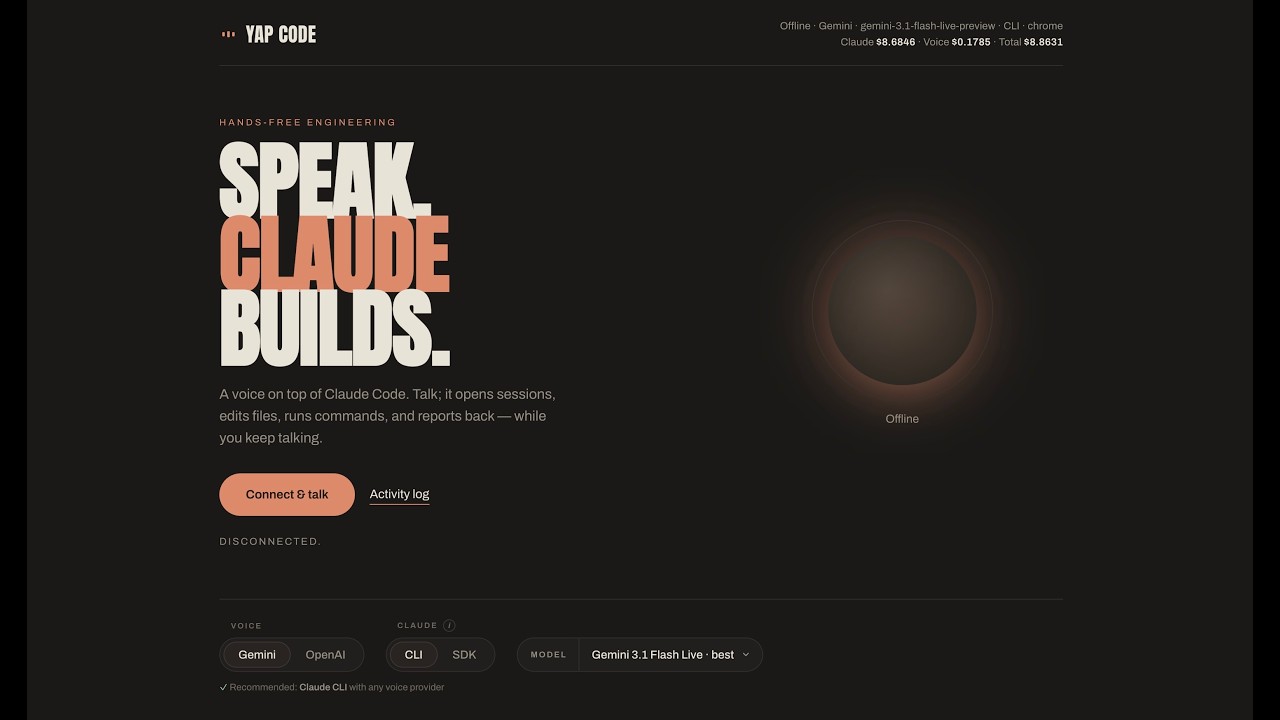
Talk to your laptop. Watch Claude Code write the code.



yapcode is one voice agent for all your Claude Code
sessions. It becomes Claude's mouth and ears: you speak, and it drives real Claude
Code sessions on your machine via tmux — starting them across your projects, sending
instructions, approving permission prompts, running slash commands, and narrating the results
back. A live terminal streams the actual Claude TUI to your browser and your phone, so you can
watch (and take over by keyboard) at any time.
What it does
- 🎙️ Hands-free Claude Code — speak; the agent drives a real
claudesession and reads the answer back. - 🖥️ Live terminal, anywhere — the Claude TUI streams to browser and phone via xterm.js; watch it work or grab the keyboard.
- 🔀 OpenAI Realtime or Gemini Live — pick your voice model (OpenAI direct or via Azure; Gemini has a free tier). Keys stay server-side.
- 📱 Code from mobile (on your local network, for now) — talk to Claude and watch the live terminal from anywhere in the house. Setup: use it from your phone.
- ✅ Approve by voice — say "yes", "allow", or "switch to auto mode" without touching the keyboard.
- 🤝 Co-drive — voice and keyboard share one
tmuxsession; type and talk on the same session simultaneously. - 🔁 Hand off in either direction —
/voice-handoffcontinues a terminal session by voice; the printedtmux attachtakes the keyboard on a voice one. Details: co-driving. - 🖥️ Control the real TUI via voice — "run /init" · "interrupt that" · "what's on the screen?"
- 🗂️ Juggle projects — list, start, rename, and close sessions across your allowed folders, by name, entirely by voice.
[!WARNING]
The backend executes real commands on your computer — it drivesclaude, which runs
shell commands, edits files, and approves tool calls on your behalf. Read
Security model (read this first) before you expose it
beyondlocalhost.
Quickstart
Prerequisites
yapcode up checks these and tells you what's missing (full list):
- Claude Code, installed and logged in
- Voice API key — Gemini (free tier), OpenAI native, or OpenAI via Azure
- tmux
- Python 3.12+
- Node 20+
Installation
git clone https://github.com/nithiink/yapcode.git
cd yapcode
./bin/yapcode up    # first run: setup wizard → installs deps → opens http://localhost:3000
Don't want to install the prerequisites yourself? Use Homebrew —brew pulls in tmux, [email protected], and node for you:
brew tap nithiink/yapcode
brew trust nithiink/yapcode   # one-time: newer brew gates third-party taps until trusted
brew install yapcode
yapcode up    # same wizard; opens http://localhost:3000
The first-run wizard asks for a voice key and the folder(s) the
agent may edit; after that, yapcode up just launches.
Contents
- How it works
- Security model (read this first)
- What's in the box
- Prerequisites
- Install from source
- Install with Homebrew
- Running
- Use it from your phone (local network)
- Windows (WSL2)
- Configuration reference
- Security & access control (details)
- Co-driving: voice + keyboard on one session
- Troubleshooting
- Architecture (for contributors)
- Contributing
- License
How it works
  you ──speak──▶  Voice agent          (OpenAI / Azure, or Gemini Live)
                    │  tool calls
                    ▼
                 Backend  (FastAPI, :8000)
                    │  tmux send-keys / capture-pane
                    ▼
                 Claude Code CLI  (real `claude` session in a tmux pane)
                    │
                    ▼
  browser/phone ◀── live xterm.js terminal  (Next.js frontend, :3000)
- Backend (
backend/) — FastAPI. Mints short-lived voice-provider tokens (your provider
keys stay server-side; the browser only ever gets an ephemeral token) and turns the voice
agent's tool calls into real actions against Claude Code via tmux. - Frontend (
frontend/) — Next.js 16 / React 19. The browser UI, the realtime audio
transports, and the live xterm.js terminal that streams the Claude TUI. - Each session runs in a tmux session named
vc_<id>, so the voice agent, the browser
terminal, and your own keyboard can all drive the same Claude session at once.
The code-level path through this pipeline is in
Architecture (for contributors).
Security model (read this first)
yapcode runs a backend that executes commands on your machine. It has two independent
layers of defense — both fail-closed.
| Layer | Control | What it does |
|---|---|---|
| 1. Authentication | VC_AUTH_TOKEN |
A shared secret that gates every sensitive endpoint and the live-terminal WebSocket. If set, it is required from every caller — including loopback (loopback = connections from your own machine: 127.0.0.1, ::1, localhost). If unset, only loopback clients are allowed and all remote callers are refused. Network mode (run-network.sh, binding 0.0.0.0) refuses to start without a token. |
| 2. Directory sandbox | ALLOWED_PROJECT_ROOTS |
A mandatory allowlist of directories Claude sessions may start in. If unset, start_session refuses — sessions cannot be started anywhere on the filesystem. Paths are realpath-resolved and containment-checked, so .., symlinks, and absolute-path escapes are blocked. |
In plain language:
- On
localhost, it just works with zero config — the backend trusts loopback (your own
machine:127.0.0.1,::1,localhost), so no token is needed. - The moment you go off your laptop (LAN, phone, tunnel), you must set a token, and
the network launcher will not start without one. - Sessions only start inside folders you allowlist (
ALLOWED_PROJECT_ROOTS), and the
voice agent itself can't run arbitrary commands — its only tools spawn and drive Claude
sessions. What Claude does inside a session is governed by Claude Code's own permission
model: in default mode it asks first and you approve or deny (by voice or keyboard); auto
mode acts without asking, exactly like at the keyboard.
Full details — the _access_ok check, Origin allowlist, CSRF defenses, log redaction — are in
Security & access control (details) below.
What's in the box
yapcode/
├── backend/                   # FastAPI: mints voice tokens, drives Claude via tmux
├── frontend/                  # Next.js 16 / React 19: UI, voice transports, xterm terminal
├── integrations/              # Claude Code plugin (/voice-handoff co-driving)
│   └── claude-code-plugin/
├── packaging/                 # Homebrew formula + release script
│   ├── yapcode.rb
│   ├── release.sh
│   └── README.md
├── bin/                       # the `yapcode` CLI launcher (bash)
├── LICENSE                    # MIT
└── README.md
Prerequisites
| Requirement | Notes |
|---|---|
| OS | macOS or Linux. Windows must use WSL2 (yapcode drives Claude Code through tmux, which is Unix-only). |
| tmux | On PATH. |
| Python 3.12+ | An older default python3 fails with a misleading No matching distribution found for claude-agent-sdk error. |
| Node 20+ | For the frontend. |
| Git | To clone (for the from-source path). |
| Claude Code | Installed and logged in separately: claude.com/claude-code, or `curl -fsSL https://claude.ai/install.sh |
| A voice provider key | OpenAI, Azure OpenAI, or Google Gemini. Gemini has a free API tier (aistudio.google.com/apikey). |
# macOS — installs everything except Claude Code itself
brew install tmux node [email protected] git
On Debian / Ubuntu, apt covers tmux/Python/git, but its Node is usually too old — install
Node 20+ via nvm (as shown in the WSL2 section),
not from apt. Use Ubuntu 24.04+ for Python 3.12.
# Debian / Ubuntu — Python/tmux/git only (install Node 20+ separately via nvm)
sudo apt install tmux git python3 python3-venv
Install from source
This is the primary path — git clone, then ./bin/yapcode up. The commands are in the
quickstart; the details unique to a clone:
- On first
upthe launcher bootstraps dependencies: ifbackend/.venvis missing it picks
a Python 3.12+ interpreter andpip installsbackend/requirements.txt; iffrontend/node_modulesis missing it runsnpm ci. (It does not installtmux, Python,
or Node — those are prerequisites; use Homebrew if you'd rather not
install them yourself.) - It then preflights ports 8000/3000, starts both servers, polls for readiness (~60s), prints
yapcode is running — http://localhost:3000, and opens it. ./bin/yapcode configand./bin/yapcode sessionwork from a clone too.
Manual / dev setup
Use this if you want full control of each piece (and for contributing — see
Contributing).
# Backend
cd backend
python3 -m venv .venv                       # MUST be Python 3.12+ (see Troubleshooting)
.venv/bin/pip install -r requirements.txt
cp .env.example .env                         # then edit: at minimum a voice provider key
                                             #   and ALLOWED_PROJECT_ROOTS

# Frontend
cd ../frontend
npm ci
ALLOWED_PROJECT_ROOTS and a voice provider key are the minimum required config. tmux must be
on your PATH. On macOS, if your default python3 is older than 3.12:
brew install [email protected]
# then create the venv with python3.12 -m venv .venv
One config file. In a clone the single source of truth is
backend/.env— the wizard
writes it,yapcode configedits it, and the backend loads it directly, so there's no second
location and no precedence to track. (Only a Homebrew install differs: its read-only Cellar
can't hold a writablebackend/.env, so the wrapper setsYAPCODE_CONFIG_DIRand the file
lives at~/.config/yapcode/.envinstead. You can set that same variable in a clone if you'd
rather keep config outside the tree.)
First-run setup wizard
The first time you run any subcommand (up / session / config) with no config present, a
wizard runs and writes the config file (created 0600, umask 077) — backend/.env from a
clone, or ~/.config/yapcode/.env on a Homebrew install. It prompts for:
- Gemini API key — optional (free tier at https://aistudio.google.com/apikey), Enter to skip.
- OpenAI key (
sk-...) — optional, Enter to skip. - Folder(s) the agent may edit — comma-separated; a leading
~is expanded. At least one
is required; each must exist and may not be empty,/, or your$HOME(rejected as too
broad).
The wizard derives the default VOICE_PROVIDER (Gemini key → gemini; else OpenAI key →openai; else openai placeholder with a warning to add a key later) and auto-generates aVC_AUTH_TOKEN for later network/phone use. Azure OpenAI is config-file-only (not
prompted) — add it later with yapcode config.
Only the absence of the config file triggers the wizard; later runs never re-prompt. To change
anything, edit the file or run yapcode config.
CLI subcommands
| Command | What it does |
|---|---|
yapcode up (default) |
Runs the wizard if needed, bootstraps deps, starts backend (:8000) + frontend (:3000), opens the app. Ctrl-C stops both. |
yapcode session [dir] |
Starts and attaches a voice-ready Claude session in dir. |
yapcode config |
Opens the config file (backend/.env, or ~/.config/yapcode/.env on Homebrew) in $EDITOR (falls back to open). |
yapcode -h / --help prints usage: yapcode {up|session [dir]|config}. An unknown
subcommand prints usage to stderr and exits 2.
Install with Homebrew
Prefer not to install the prerequisites yourself? brew install pulls in tmux,[email protected], and node and builds the app — handy on a fresh machine. Works on macOS and
Linuxbrew:
brew tap nithiink/yapcode
brew trust nithiink/yapcode   # one-time; see note below
brew install yapcode          # pulls in tmux, [email protected], node; builds the app
yapcode up                    # first run: setup wizard → starts servers → opens browser
Why
brew trust? Newer Homebrew refuses to install from any third-party tap (anything
outside homebrew/core) until you trust it once — supply-chain protection, not a warning about
this tap specifically. If your brew is older and doesn't havebrew trust, skip that line.
Details unique to Homebrew:
- The formula
depends_onnode, [email protected], and tmux, copies the source into the Cellar,
builds the backend virtualenv and a production frontend build (so the launcher runsnext start, with no compile-on-launch), and putsyapcodeon yourPATH. - Your config (
~/.config/yapcode/.env) and runtime state (~/.local/state/yapcode/) live
outside the install and survivebrew upgradeand uninstall.
brew upgrade yapcode # later, to update
Running
Using the launcher?
yapcode upalready handles localhost running — this section is the
manual equivalent, useful for development. Network mode applies to everyone.
Localhost (zero-config, trusted loopback)
# Terminal 1 — backend on http://localhost:8000
cd backend && ./run.sh

# Terminal 2 — frontend on http://localhost:3000
cd frontend && npm run dev
On localhost the backend trusts loopback (your own machine: 127.0.0.1, ::1, localhost), so
no auth token is needed. The backend never auto-loads VC_AUTH_TOKEN from a .env file — it's
opt-in per run mode, so run.sh (and yapcode up) stay zero-config even with a token in your
config; it applies only when run-network.sh exports it. Open http://localhost:3000.
LAN / phone (network mode, TLS + token required)
Network mode binds 0.0.0.0 over HTTPS/WSS and fails closed without a VC_AUTH_TOKEN.
# Terminal 1 — backend over TLS on https://0.0.0.0:8000 (needs VC_AUTH_TOKEN in backend/.env)
cd backend && ./run-network.sh

# Terminal 2 — frontend over TLS on https://0.0.0.0:3000
cd frontend && npm run dev:network
One-time per device:
Generate dev TLS certs at
frontend/.certs/dev-key.pemanddev-cert.pem. The cert's
SANs must include the device's IP. Copy the template and set your LAN IP under[alt],
then:cd frontend/.certs cp san.cnf.example san.cnf # then edit: set IP.1 to your LAN IP openssl req -x509 -newkey rsa:2048 -nodes -days 825 \ -keyout dev-key.pem -out dev-cert.pem -config san.cnfRe-run this whenever your LAN IP changes.
Visit
https://<host>:8000once and accept the self-signed cert — otherwise thewss
terminal connection is silently blocked.Open the app once as
https://<host>:3000/#vc_token=<VC_AUTH_TOKEN>. The browser stores the
token inlocalStorageand strips it from the URL. (The token is never baked into the JS
bundle.)
A phone needs HTTPS (a "secure context") for the microphone to work off localhost.
If you ran the first-run wizard, a VC_AUTH_TOKEN was already
generated for you — it's in your config file (yapcode config to view). Manual setups
can generate one with:
python3 -c "import secrets; print(secrets.token_urlsafe(32))"
Use it from your phone (local network)
The full experience — talk to Claude and watch the live terminal — from your phone, as long
as it's on the same Wi-Fi as your computer. The work always happens on your machine; the phone
is just a remote.
On your computer (once):
- Start network mode — both servers over TLS,
with the cert's SAN matching your LAN IP. - Find your LAN IP:
ipconfig getifaddr en0(macOS) orhostname -I(Linux) — say it's192.168.1.42. - Have your
VC_AUTH_TOKENhandy — the wizard already wrote one to your config file
(yapcode configto view).
On your phone (once per device):
Join the same Wi-Fi as your computer.
Open
https://192.168.1.42:8000and accept the self-signed certificate. Skip this and
the live terminal is silently blocked (thewss:connection fails without any visible
error).Open
https://192.168.1.42:3000/#vc_token=<your token>— the app stores the token and strips
it from the address bar. Allow microphone access when prompted.💡 You don't have to type this URL:
npm run dev:networkprints the full
phone URL (IP + token) at startup — just open it on your phone.
Every time after that: just open https://192.168.1.42:3000 — talk, watch the terminal,
approve permission prompts from the couch, the kitchen, anywhere on the network.
If something doesn't work:
- Mic button does nothing → you opened
http://or used a hostname not in the cert — the
mic needs a secure context (https://). - Terminal stays blank → re-visit
https://<ip>:8000and accept the cert again. - Nothing loads after a router change → your LAN IP changed; regenerate the certs with the
new IP (see network mode) and re-accept on the
phone.
Windows (WSL2)
There is no native Windows support — yapcode drives Claude Code through tmux, which is
Unix-only. The supported path is WSL2.
# 1. In PowerShell (Administrator), then reboot and set a Linux username/password:
wsl --install -d Ubuntu-24.04
Use Ubuntu 24.04 — it ships Python 3.12. Ubuntu 22.04 ships 3.10 and 20.04 ships 3.8,
both too old (you'll hit the misleadingclaude-agent-sdkpip error).
# 2. Inside Ubuntu — system deps:
sudo apt update && sudo apt install -y tmux git python3 python3-venv curl

# 3. Node 20+ via nvm:
curl -o- https://raw.githubusercontent.com/nvm-sh/nvm/v0.40.1/install.sh | bash
exec $SHELL
nvm install 20

# 4. Install Claude Code inside WSL and run `claude` once to sign in.

# 5. Clone into the LINUX home (NOT /mnt/c/...) and start:
git clone https://github.com/nithiink/yapcode.git ~/yapcode
cd ~/yapcode
./bin/yapcode up
Then open http://localhost:3000 in your Windows browser (WSL2 forwards localhost, and the
mic only works in that secure context — don't use a LAN IP).
WSL gotchas:
- Clone into the Linux home (e.g.
~/yapcode), not/mnt/c/...— the latter is slow and
breaks file watching. - Set
ALLOWED_PROJECT_ROOTSto a Linux path (e.g./home/<you>/projects) and keep edited
projects on the Linux side.
Configuration reference
Config lives at backend/.env (chmod 600) — one file, loaded directly by the backend, with
no second location and no precedence to track. A Homebrew install instead uses~/.config/yapcode/.env (its wrapper sets YAPCODE_CONFIG_DIR, since the Cellar is
read-only); set YAPCODE_CONFIG_DIR yourself to keep a clone's config out of the tree too.
Runtime state (logs, tmux store) lives under <project>/.yapcode/ from a clone, or~/.local/state/yapcode on Homebrew (override base via XDG_STATE_HOME / VC_SESSION_STORE);
the Homebrew config + state survive brew upgrade and uninstall.
The first-run wizard writes this file; yapcode config edits it.
Core
| Variable | Required | Default | What it does |
|---|---|---|---|
ALLOWED_PROJECT_ROOTS |
Yes | — | Comma-separated dirs the agent may start sessions in. Mandatory sandbox — if unset, start_session refuses (fail closed). |
VC_AUTH_TOKEN |
Network mode | (empty) | Shared secret. If set, required from every caller incl. loopback; if unset, only loopback is allowed and remote is refused. Auto-generated by the wizard. |
VOICE_PROVIDER |
Yes | azure |
azure | openai | gemini. Also toggleable in the UI. |
CLAUDE_MODEL |
No | opus |
opus or sonnet. |
Voice providers (keys stay server-side)
| Variable | Default | Notes |
|---|---|---|
OPENAI_API_KEY |
— | OpenAI provider key. |
OPENAI_REALTIME_MODEL |
gpt-realtime-mini |
OpenAI realtime model. |
REALTIME_VOICE |
marin |
OpenAI/Azure realtime voice. |
AZURE_OPENAI_ENDPOINT |
— | Azure resource endpoint. |
AZURE_OPENAI_API_KEY |
— | Azure key. |
AZURE_OPENAI_DEPLOYMENT |
— | Default Azure realtime deployment. |
AZURE_OPENAI_DEPLOYMENTS |
(the single deployment) | Comma-separated allowlist of deployments the UI may pick (best first). |
GEMINI_API_KEY |
— | Google AI Studio key (free tier available). |
GEMINI_MODEL |
gemini-2.5-flash-native-audio-preview-12-2025 |
Gemini native-audio model. |
GEMINI_VOICE |
Kore |
Gemini voice. |
Origins, state & advanced
| Variable | Default | Notes |
|---|---|---|
VC_ALLOWED_ORIGINS |
empty | Extra exact cross-origin browser origins (comma-separated). |
VC_ALLOWED_ORIGIN_REGEX |
(LAN regex) | Overrides the default private-LAN origin regex (localhost/127.0.0.1/::1 + 10.x/192.168.x/172.16–31.x); set empty to disable LAN origins. |
VC_SESSION_STORE |
<repo>/.yapcode/tmux |
Session control-dir root (tmux sessions, meta.json, events.jsonl, …). |
VC_COST_LOG_PATH |
<repo>/cost-log.jsonl |
Append-only cost log. |
VC_PRICING_JSON |
(built-in rates) | JSON object overriding per-model list pricing, e.g. {"opus":{"input":5,"output":25}} (USD per 1M tokens, matched by model-id substring). The CLI backend has no dollar figure in its transcript (Max subscription), so the displayed "Claude $…" is reconstructed from per-message token usage × these rates; cache reads bill at 0.1× input, 5-min cache writes at 1.25×, 1-hour writes at 2×. |
VC_DEBUG_LOG_PATH |
<repo>/debug-log.jsonl |
Append-only pipeline event log. |
VC_DEBUG_LOG_FILE |
1 |
Set 0 to keep debug events in-memory/SSE only (no file). |
VC_DEBUG_BUFFER |
3000 |
In-memory ring-buffer size for the event bus. |
VC_KILL_SESSIONS_ON_SHUTDOWN |
0 |
1 kills CLI sessions on shutdown instead of detaching + rehydrating on restart. |
CLAUDE_CLI_CHROME |
(on) | Set 0 to disable passing --chrome to the claude CLI. |
TOOL_TIMEOUT_S |
600 |
Tool-dispatch timeout (seconds). |
Frontend-side: BACKEND_URL (default http://localhost:8000) is what the Next /api/* proxy
forwards to; dev:network sets it to https://localhost:8000 and NODE_TLS_REJECT_UNAUTHORIZED=0.
See backend/.env.example for the full annotated list of every variable.
Under Homebrew, the launcher wrapper exports
YAPCODE_ROOT(pins the install tree) and
redirects runtime writes out of the read-only Cellar:VC_SESSION_STOREpoints at~/.local/state/yapcode/tmux(a subdirectory), whileVC_COST_LOG_PATHandVC_DEBUG_LOG_PATH
are files directly under~/.local/state/yapcode.
Security & access control (details)
The two-layer model is summarized up top; this section adds the
code-level specifics. The security boundary is the auth token; the Origin allowlist is a
convenience for same-network devices, not the boundary.
Layer 1 — authentication (VC_AUTH_TOKEN)
_access_ok in backend/main.py is the gate. A mismatch returns 401 (when a token is
configured) or 403 (when relying on loopback). Token comparison is constant-time
(secrets.compare_digest). Even loopback must present a configured token, so the same-origin Next
proxy can't launder a remote attacker's request into a "trusted" localhost call. The token is
never auto-loaded from a .env file (opt-in per run mode); run-network.sh reads it from the
config file and exports it, and refuses to start if none is set.
Token transport. Authorization: Bearer, X-VC-Token header, or ?token= query param
(SSE/WebSocket can't set headers). The browser supplies it once viahttps://<host>:3000/#vc_token=<token> (persisted to localStorage, stripped from the URL). It
is never baked into the JS bundle. The token is redacted from access logs (it rides the
query string on the SSE debug stream and the terminal WebSocket). The terminal WebSocket
authorizes Origin + token before ws.accept(); a disallowed Origin closes with 4403, a
bad/missing token with 4401.
Layer 2 — directory sandbox (ALLOWED_PROJECT_ROOTS)
ALLOWED_PROJECT_ROOTS confines every session's starting working directory. Every
candidate path — including fuzzy-matched ones — is realpath-normalized and
containment-checked, so .., symlinks, and absolute-path escapes are blocked. The wizard also
rejects roots that are empty, /, $HOME, or non-existent.
Scope note: this bounds where sessions start, not what a running Claude session may touch —
actions inside a session are gated by Claude Code's own permission prompts (and act freely in
auto mode, as at the keyboard). The voice agent's own tool surface contains no
arbitrary-command tool: it can only spawn and drive Claude sessions.
Additional hardening
- CORS is restricted to trusted frontend origins (no wildcard), and the Origin allowlist is
enforced in-app (not just via CORS response headers) — a disallowed Origin gets403even
though CORS would hide the response. - The Next
/api/*proxy rejects cross-site requests (viaSec-Fetch-Site, with Origin/Host
fallback) to block drive-by CSRF. The frontend dev server binds loopback only (-H 127.0.0.1),
so in zero-config localhost mode the proxy isn't reachable from the LAN; LAN access requiresnpm run dev:network. - Interactive API docs (
/docs,/openapi.json) are disabled so the route/schema map isn't
disclosed.
The Origin allowlist is a convenience for same-network devices — the token is the security
boundary.
Co-driving: voice + keyboard on one session
Because each session runs in a tmux session named vc_<id> and tmux allows multiple clients on
one pane, you can drive a single Claude session by voice and keyboard at the same time —
single process, single transcript, no conflicts.
The bridge is the /voice-handoff command (a skill shipped in the Claude Code plugin atintegrations/claude-code-plugin/). It registers the terminal session you're sitting in with
your local yapcode backend, so the voice agent can co-drive that exact session. Install the
plugin once (user scope, available in every session):
claude plugin marketplace add nithiink/yapcode
claude plugin install yapcode@yapcode
Then, with the backend running, either:
- Start voice-ready (recommended): run the plugin's
yapcodelauncher
(integrations/claude-code-plugin/bin/yapcode— distinct from the top-levelyapcodeCLI)
instead of plainclaude. Work normally; type/voice-handoffwhenever you want voice — it
switches on instantly, no restart. Keep typing there, and open the app to talk. - From a plain
claudesession: type/voice-handoff; yapcode reopens the session under
voice management and prints atmux attach -t vc_…command. Press Ctrl-D to leave the
old process (single writer per session), then run the attach command to keep typing in the
same session while the voice agent drives it too. Only want to drive by voice? Just open the
app — no attach needed.
Reaching a remote or tunneled backend instead of localhost: set YAPCODE_URL (defaulthttp://localhost:8000) and YAPCODE_TOKEN (required when the backend has VC_AUTH_TOKEN
set).
Both clients share one pane, so take turns — don't type and talk in the exact same instant.
More detail in the plugin README.
Troubleshooting
| Symptom | Cause & fix |
|---|---|
brew install refuses: Refusing to load formula … from untrusted tap |
Newer Homebrew gates all third-party taps until trusted once (supply-chain protection — not a warning about this tap specifically). Run brew trust nithiink/yapcode, then brew install yapcode. |
pip fails: No matching distribution found for claude-agent-sdk==… |
Python is too old — must be 3.12+. macOS: brew install [email protected] and build the venv with python3.12. Ubuntu: upgrade to 24.04 (20.04 ships 3.8, 22.04 ships 3.10). |
start_session refuses / "no allowed roots" |
ALLOWED_PROJECT_ROOTS is unset — the sandbox fails closed by design. Set it to existing folders (not /, $HOME, or empty). |
run-network.sh exits 1 immediately |
Network mode fails closed without VC_AUTH_TOKEN in backend/.env. Generate one and set it, then open the app once with /#vc_token=<token>. |
yapcode up exits 1 on startup |
Port 8000 or 3000 is already in use. Free the port and retry. |
| Live terminal connects but stays blank / silently fails (LAN/phone) | You skipped the one-time self-signed-cert accept at https://<host>:8000, so the wss terminal is blocked. Visit it once and accept. Also: an HTTPS page must use wss (no mixed content). |
| Mic doesn't work on phone | getUserMedia needs a secure context. Use npm run dev:network (HTTPS on 0.0.0.0); plain npm run dev is HTTP + loopback-only. The device's IP must be in the cert SANs (frontend/.certs/san.cnf, copied from san.cnf.example); regenerate the cert for a new IP. |
| App loads on a phone but toggles/buttons appear dead | Your LAN IP is outside the 192.168 / 10 / 172.16 private ranges, so Next 16 blocked /_next/* assets. Add the specific origin to allowedDevOrigins in frontend/next.config.mjs. |
| Voice model select is greyed out | The model is locked while connected — disconnect first to change it. |
| Token I set in config has no effect on localhost | Intentional: the backend never auto-loads VC_AUTH_TOKEN from a .env file (opt-in per run mode), so localhost stays zero-config. It applies only in network mode, where run-network.sh exports it. |
| Config changes don't take effect | There's one config file — backend/.env (or ~/.config/yapcode/.env on Homebrew). Edit it (or run yapcode config) and restart. Make sure you don't also have stale values exported in your shell, which win over the file. |
| First page load is slow | Without a production build (frontend/.next/BUILD_ID), the launcher runs npm run dev, which compiles the UI on first load. A next build produces the BUILD_ID and switches it to npm run start. |
| Sessions vanished after restart | yapcode can run Claude two ways — the default interactive CLI backend or the Agent SDK backend (see Architecture). Only the CLI backend rehydrates detached tmux sessions on restart; SDK subprocesses die with the backend. Set VC_KILL_SESSIONS_ON_SHUTDOWN=1 to kill on shutdown instead. |
brew install yapcode can't find the formula |
Tap it first: brew tap nithiink/yapcode, then brew install yapcode. If a fetch fails, brew update and retry; you can always fall back to the clone install. |
Architecture (for contributors)
The whole point: a spoken instruction becomes a real tmux action driving the live Claude CLI.
The high-level pipeline is in How it works; below is the path through the code.
   You speak
      │
      ▼
┌──────────────────────┐   ephemeral token only      ┌───────────────────────────────┐
│  Voice provider       │ ◀────── POST /api/session ── │  Frontend (Next.js 16/React19) │
│  OpenAI/Azure (WebRTC)│                              │  components/VoiceAgent.tsx     │
│  Gemini (WebSocket)   │ ── function_call ──────────▶ │  lib/realtime.ts | lib/gemini.ts│
└──────────────────────┘                              └───────────────┬───────────────┘
                                                       POST /api/tools/execute (proxy)
                                                                       │
                                                                       ▼
                                                        ┌──────────────────────────────┐
                                                        │  Backend (FastAPI, main.py)    │
                                                        │  POST /tools/execute           │
                                                        │  tools.dispatch_tool (tools.py)│
                                                        └───────────────┬───────────────┘
                                                                        │ tmux send-keys
                                                                        ▼
                                                        ┌──────────────────────────────┐
                                                        │  tmux session  vc_<id>         │
                                                        │  real `claude` CLI (TUI)       │
                                                        └───────────────┬───────────────┘
                                                          tmux capture-pane → narrate back
                                                          PTY over WS → live xterm terminal
(WebRTC and WebSocket are just the realtime audio transports for the two provider families.)
How a voice tool call becomes a tmux action:
- The voice model emits a
function_call(e.g.tell_claude,start_session,answer_prompt). The frontend POSTs it to the Next/api/tools/executeproxy, which forwards
to the backendPOST /tools/execute. tools.dispatch_tool(backend/tools.py) runs the tool. Long-running ones (tell_claude,run_slash_command,answer_prompt) return{status:"working"}immediately; the frontend
polls and narrates when Claude is done.- The CLI runner (
backend/tmux_runner.py) creates a detached tmux session namedvc_<handle[:8]>running the interactiveclaudeCLI. Input istmux send-keys; output is
read withtmux capture-pane. Permission decisions flow through a PreToolUse hook inbackend/tmux_hooks/. - The browser's live terminal (
frontend/components/LiveTerminal.tsx, xterm.js) bridges a
PTY-over-WebSocket to the same tmux pane — closing it just detaches; the session keeps
running. (This shared pane is what enables co-driving.)
Two Claude execution backends share a ClaudeRunner interface (backend/claude_runner.py;
routing between backends lives in backend/session_manager.py):cli → TmuxClaudeRunner (default; real interactive CLI, uses your Max subscription, supports--chrome) and sdk → SDKClaudeRunner (Claude Agent SDK). Each session handle is a uuid owned
by one backend.
Unified pipeline event bus (backend/event_log.py): every hop (voice ↔ backend ↔ Claude) is
captured into one ordered stream feeding an in-memory ring buffer, live SSE subscribers (the
in-app Activity log via /debug/stream), and an append-only debug-log.jsonl. This is your
best friend when debugging.
Contributing
Contributions welcome — this is MIT-licensed and built to be hacked on.
Dev-mode setup (hot reload)
Both servers reload on change, so the inner loop is fast:
cd backend && ./run.sh             # uvicorn main:app --port 8000 --reload --reload-dir .
cd frontend && npm run dev         # next dev -H 127.0.0.1 -p 3000
- Backend runs with
uvicorn --reload. The watcher is scoped tobackend/(--reload-dir .)
so the rapidly-written events log doesn't trigger reloads. With detach-on-shutdown, reload
preserves running CLI sessions (they rehydrate on restart) — you rarely lose state. - Frontend runs with
npm run dev(Next dev server, loopback-bound on127.0.0.1).
Dependency management
# Backend deps are lock-pinned with hashes
uv pip sync requirements.lock                                              # install from the lock
uv pip compile requirements.txt -o requirements.lock --generate-hashes    # regenerate
uv run --with pip-audit python -m pip_audit -r requirements.lock          # audit

# Frontend
npm ci                                                                    # lockfile-exact install
Repo layout map (where things live)
| Path | What's there |
|---|---|
backend/main.py |
FastAPI app, endpoints, auth (_access_ok, require_auth, WS auth), lifespan/rehydration. |
backend/tools.py |
The voice-model tool list (TOOL_DEFINITIONS) + dispatch_tool. |
backend/tmux_runner.py |
The CLI runner — spawns/drives tmux + the claude CLI. |
backend/claude_runner.py |
ClaudeRunner interface + the SDK runner. |
backend/session_manager.py |
Session handles, project resolution, routing (cli vs sdk). |
backend/permissions.py |
Classifies tools as safe / question / risky. |
backend/slash_commands.py |
Slash-command discovery + execution. |
backend/event_log.py, cost_log.py |
Pipeline event bus + cost JSONL logging. |
backend/tmux_hooks/ |
PreToolUse / Stop / Notification hooks wired into Claude. |
frontend/components/VoiceAgent.tsx |
The main UI: connect, timeline, sessions, prompts, cost. |
frontend/components/LiveTerminal.tsx |
xterm.js terminal over the PTY WebSocket. |
frontend/lib/realtime.ts, lib/gemini.ts |
The two voice transports (OpenAI/Azure WebRTC, Gemini Live WS). |
frontend/app/api/* |
Same-origin proxy to the backend (CSRF defense, auth pass-through). |
integrations/claude-code-plugin/ |
The /voice-handoff co-driving plugin. |
packaging/yapcode.rb, release.sh |
Homebrew formula + release script. |
Tip: the in-app Activity log (SSE from
/debug/stream) shows every voice ↔ backend ↔
Claude event live — a great way to understand the pipeline before changing it.
Good first contributions
- Docs — clarify setup, expand troubleshooting, improve the WSL2 path, or fix anything in
this README that tripped you up. - Voice providers — both transports implement one
VoiceSessioninterface
(frontend/lib/voice.ts:start/stop/injectUpdate/setMuted). Adding or improving
a provider is well-isolated work; the backend mint logic lives inbackend/main.py
(POST /session). - Integrations — extend the Claude Code plugin in
integrations/claude-code-plugin/(e.g.
the/voice-handoffflow). - New voice tools — add to
TOOL_DEFINITIONS+dispatch_toolinbackend/tools.py.
PR expectations
- Keep changes scoped; match existing style. The backend pins deps with hashes — if you touch
requirements.txt, regeneraterequirements.lock. - Note any new env var, command, port, or flag in the README's configuration reference.
- Test the path you changed locally (the localhost run is zero-config); note which provider(s) /
OS you tested on, since transports and tmux behavior vary. - Be explicit if a change affects the security model (auth, the directory sandbox,
CORS/Origin/CSRF handling, redaction) — those need careful review and shouldn't be weakened
without discussion. - Don't commit secrets. The committed
cost-log.jsonl/debug-log.jsonlwill be scrubbed from
history before the repo goes public; don't add to them.
Releases are cut with
packaging/release.sh vX.Y.Z(clean tree required; idempotent on the
tag). Homebrew distribution goes live only after the repo is public and a tag exists.
License
MIT — Copyright (c) 2026 Nithiin Kathiresan.
Reviews (0)
Sign in to leave a review.
Leave a reviewNo results found