design-from-code
Health Warn
- License — License: MIT
- Description — Repository has a description
- Active repo — Last push 0 days ago
- Low visibility — Only 5 GitHub stars
Code Pass
- Code scan — Scanned 3 files during light audit, no dangerous patterns found
Permissions Pass
- Permissions — No dangerous permissions requested
No AI report is available for this listing yet.
Design UI changes from real source code — verify data, iterate faithful HTML mockups, then delegate. A Claude Code plugin & Codex skill by nlook.me
design-from-code
Verify facts in code → agree on HTML → lock it in a .md → delegate the build.
A workflow skill for Claude Code and OpenAI Codex that designs changes to existing UI from the real source — not from imagination.




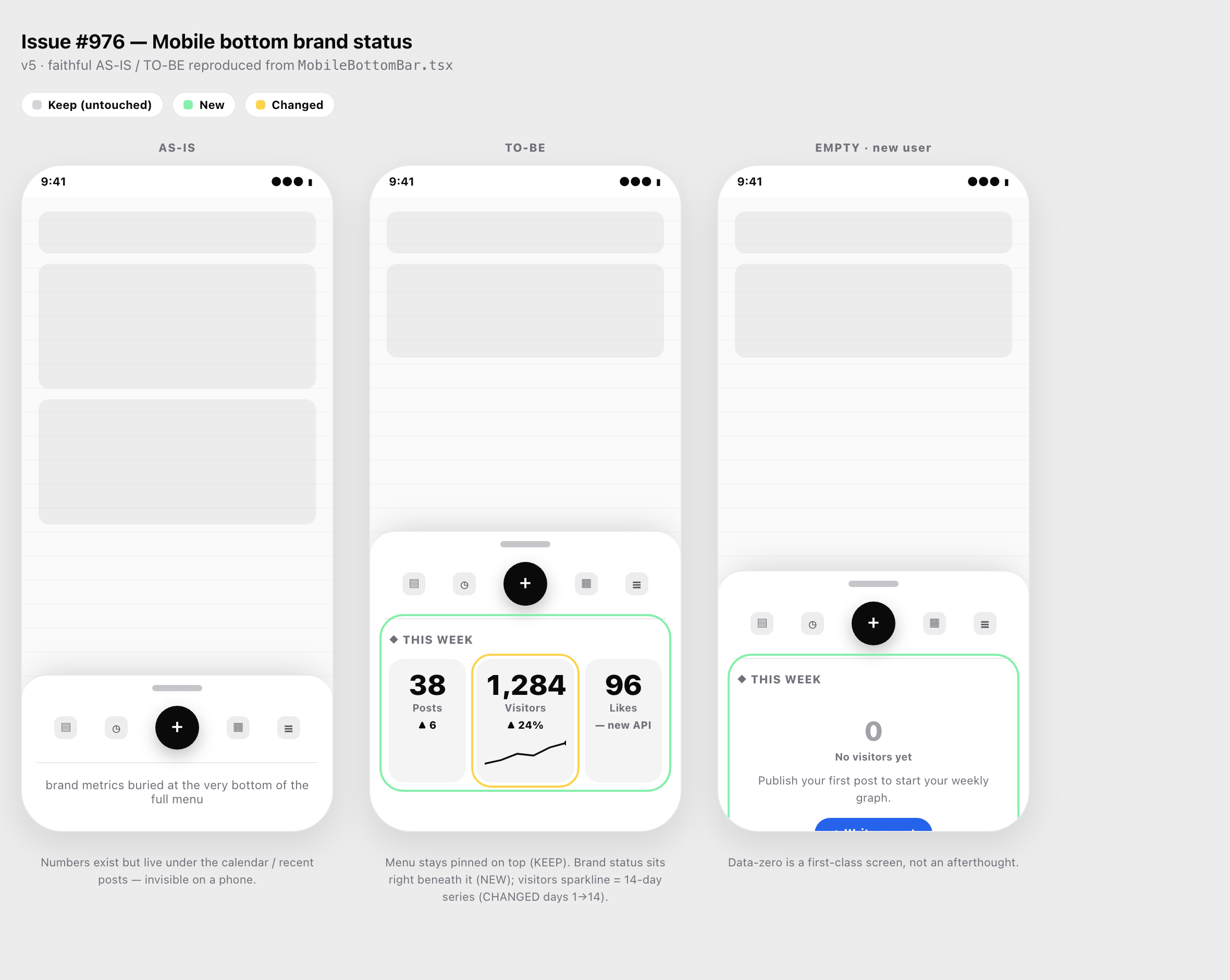
Actual output of the skill (issue #976): the current bar reproduced from MobileBottomBar.tsx (AS-IS), the proposed change (TO-BE — green = new / yellow = changed), and the data-zero empty state — all as one self-contained HTML file, zero dependencies.
Before drawing anything, it reads the actual component JSX and traces the data model in code, then reproduces the current screen pixel-for-pixel and iterates self-contained HTML mockups until you approve. The result is a design doc grounded in facts, ready to hand to an implementer.
Built and maintained by the team behind nlook.me — a publishing platform where writers ship documents and watch readership grow. The worked example here is a real nlook feature.
Why this exists
Most "design a UI change" prompts fail the same two ways:
- The model guesses how the data works. "What does this visitor count actually count?" — if you imagine the answer, you are wrong ~100% of the time. This skill traces handler → use-case → repository → schema and confirms it as fact before designing.
- The mockup is schematic, so it doesn't match reality. This skill reads the actual JSX (render functions, class names, labels, spacing) and reproduces the current component so the proposal sits believably inside the real product.
It also bakes in the things people forget: one decision at a time, explicit keep / new / changed tags, and the empty (data-zero) state as a first-class screen.
What you get
- An 8-step workflow (issue → code map → data verification → HTML mockup → confirm → faithful AS-IS/TO-BE → design doc → delegated build + verify)
- Self-contained HTML mockups: phone frames, inline-SVG charts (no chart library), monotone big numbers, keep/new/changed outlines, empty states
- Reference guides for each hard part and a fully worked real example
Install
This repo is both a Claude Code plugin and a plain skill folder. Pick one path.
Option A — Claude Code plugin (recommended)
From inside Claude Code:
/plugin marketplace add nlook-service/design-from-code
/plugin install design-from-code@design-from-code
The first command registers this repo as a marketplace; the second installs the bundled skill. Restart the session and the design-from-code skill is available.
Replace
nlook-service/design-from-codewith your fork'sowner/repoif you forked it.
Option B — Manual skill install (Claude Code or Codex)
Both tools read the same SKILL.md format and load skills from a skills/ directory.
git clone https://github.com/nlook-service/design-from-code.git
cd design-from-code

# Claude Code (user-wide)
ln -s "$PWD/skills/design-from-code" ~/.claude/skills/design-from-code

# OpenAI Codex CLI (user-wide)
ln -s "$PWD/skills/design-from-code" ~/.codex/skills/design-from-code
Use cp -r instead of ln -s if you prefer a copy. For a single project only, symlink into that repo's .claude/skills/ instead of the home directory.
Verify your install
Three quick levels — run the first one, do the others once.
1. Files & manifests are intact (one command):
bash verify.sh
Expected: a list of ✓ checks ending in PASS — N checks ok. It validates the skill frontmatter, the name/folder match, bilingual triggers, every referenced file, the self-contained example, the plugin JSON, and (if installed) that the symlinks resolve. Exit code 0 on success, so you can wire it into CI.
2. It actually loads (fresh session):
- Claude Code: start a new session and type
/design-from-code. It should appear and load. Running/helpor the skill picker should list it with the English description. - Codex: start a session;
design-from-codeshould be in the skill list.
3. It actually triggers and produces a mockup (the real test):
In a repo that has some UI, say:
Design how to add a "last updated" label to the existing card header. Mockup first.
You should see it (a) read the real component, (b) ask one narrow question, and (c) hand you a self-contained .html you can open in a browser. That round-trip — real source → HTML you can see — is the skill working end to end. Korean works too: try "이 카드 헤더에 ~ 추가 설계해줘".
The example artifact is pre-rendered, so you can sanity-check the output shape before installing: open
examples/mobile-bottom-brand-status-v5.htmlin any browser.
How loading works (you probably don't need to "load" anything)
After install you don't import or enable the skill anywhere. There are exactly two ways it fires — and the everyday one needs no command at all.
| How you trigger it | When to use | |
|---|---|---|
| Automatic (default) | Just describe the task in plain language: "Design how this card should look — mockup first." | Almost always. This is the intended path. |
| Explicit | Type /design-from-code (Claude Code) or pick it from the skill list (Codex) |
When you want to force it, or auto-matching didn't catch an unusual phrasing |
Either way, start a fresh session after installing — the host only scans skills at session start.
What happens under the hood
You don't keyword-match; the model does an intent match. Here is the actual mechanism, so the behavior isn't a black box:
- At session start, Claude Code / Codex loads only the frontmatter of every installed skill — its
nameanddescription— into context. The fullSKILL.mdbody and thereferences/files are not loaded yet (that keeps your context cheap). - On each message, the model compares what you asked against those
descriptionlines and decides whether one matches. - On a match, it loads that skill's full body and starts following the workflow. Only then does it read the reference guides it needs.
So the description: field in skills/design-from-code/SKILL.md is the entire trigger surface. The phrases listed there — (EN) "design this", "make a mockup"… / (KO) "설계해줘", "시안 만들어줘"… — are examples that bias the match, not a fixed keyword list it checks literally.
Languages — what you do and don't do
You do nothing per language. One install covers every language. There is no separate Korean build, no locale flag, no config.
| Behavior | Why | |
|---|---|---|
| English & Korean | Trigger most reliably | Their phrases are written into the description, so the match is strongest |
| Other languages (Japanese, Chinese, Spanish, …) | Still work | Matching is semantic, not literal — 「このカードにラベルを追加する設計をして」 maps to the same intent even though it isn't listed |
| Any language, edge phrasing | Use /design-from-code |
The explicit command bypasses matching entirely and always works |
If you want another language to fire as reliably as EN/KO, add a few of its trigger phrases to the single description: line in skills/design-from-code/SKILL.md (keep it one line), then re-run bash verify.sh and restart the session. Nothing else changes — the workflow body itself is language-agnostic and the model replies in whatever language you wrote in.
Usage
Trigger it with any UI-design request that touches existing code:
Issue #976: add a brand-status card (posts / visitors / likes) to the mobile
bottom bar. Show me a mockup first.
The skill then runs:
| # | Step | What happens |
|---|---|---|
| 1 | Read the issue | gh issue view (needs gh auth login for GitHub issues) |
| 2 | Map the code | Explore agents return the relevant components/hooks/schema |
| 3 | Verify the data | Trace handler→query→schema; confirm what each number actually means |
| 4 | HTML mockup v1 | Phone frames, 2–3 options, empty state, inline SVG |
| 5 | Confirm | One decision at a time; bump to v2, v3… per feedback |
| 6 | Faithful AS-IS/TO-BE | Read real JSX, reproduce 1:1, tag keep/new/changed |
| 7 | Design doc .md |
Approved mockup + verified data model + build entry points |
| 8 | Delegate + verify | Hand to a language-expert agent; close with build/type-check/tests |
See examples/ for a runnable HTML deliverable and the issue-976 walkthrough for the full v1→v5 story (including where the user corrected the layout).
Repository layout
design-from-code/
├── .claude-plugin/
│   ├── plugin.json              # plugin manifest
│   └── marketplace.json         # lets the repo act as its own marketplace
├── skills/
│   └── design-from-code/
│       ├── SKILL.md             # skill definition + 8-step workflow
│       ├── references/          # the hard parts, one file each
│       │   ├── code-fidelity-reproduction.md   # ★ read JSX → reproduce HTML 1:1
│       │   ├── data-model-verification.md
│       │   ├── html-mockup-recipe.md
│       │   └── prompt-templates.md
│       └── examples/
│           └── issue-976-walkthrough.md
├── examples/
│   ├── mobile-bottom-brand-status-v5.html   # open in a browser
│   └── images/
│       └── mobile-bottom-brand-status-v5.png
├── verify.sh                    # `bash verify.sh` → checks the install
├── README.md
└── LICENSE
Requirements
| Need | Why | Required? |
|---|---|---|
Claude Code (with ~/.claude/skills or plugin support) or Codex CLI (~/.codex/skills) |
Host that loads the skill | Yes (one of) |
| A browser | Open the HTML mockups | Yes |
| An existing codebase to read | The skill reproduces real components & traces real data | Yes for full fidelity — see below |
gh CLI authenticated (gh auth login) |
Only to read a GitHub issue as input | Optional |
python3 |
Deeper JSON check in verify.sh |
Optional |
No build step, no chart library, no runtime — mockups are plain self-contained HTML.
Where it fits — and where it degrades gracefully
This skill's superpower is reading real source and real data. The author's case worked well because the code and the data were both there to read. If yours are different, here's exactly what happens — nothing breaks, but know the limits:
| Your situation | What the skill does | Caveat |
|---|---|---|
| Greenfield / brand-new screen (no existing component) | Skips AS-IS reproduction; still does data-verify + fresh mockups | Step 6 (faithful AS-IS/TO-BE) has nothing to reproduce — it becomes a normal mockup |
| Non-React stack (Vue, Svelte, SwiftUI, Flutter, plain HTML) | The "read the real component" method still applies — it reads your template/widget | The reference examples are written in JSX/Tailwind; the technique generalizes, the snippets are illustrative |
| Data is a black-box 3rd-party API (you can't read the query/schema) | Falls back to verifying against the API's docs/contract instead of source | You can't pin the number to a schema column; confirm semantics from API docs |
| Requirement is plain text, not a GitHub issue | Skips gh; reads the text directly |
gh/auth not needed at all |
| Monorepo paths differ from the examples | Paths like app/src are placeholders; it discovers yours |
Don't copy example paths literally |
| Headless screenshots blocked (CI, sandbox) | Source-reading is the primary path; screenshots are optional verification | file:// is often blocked — serve over a local HTTP server, or just open the file |
| Codex instead of Claude Code | Steps map cleanly: Agent(Explore) → a sub-agent, SendUserFile → file output |
Tool names differ; the method is tool-agnostic |
Rule of thumb: the more real code and data you have, the better the output. With neither, it still helps you think, but it can't reproduce what doesn't exist — and it won't pretend to.
What if there's no code to read at all?
The skill's headline move — "reproduce the real component, verify the real data" — needs source to read. So before anything else it runs a Step 0 gate: is there enough real code to read? It locates the target component and its data path, then picks a branch and tells you which one up front. So what happens when there's none? (Brand-new product, empty repo, pure idea, or you just don't have the code handy.) It doesn't fail and it doesn't hallucinate a fake "current screen." It drops the steps that need source and keeps the rest:
| What's missing | What the skill skips | What it still does |
|---|---|---|
| No existing component (greenfield screen) | Step 6 — faithful AS-IS reproduction (there is no AS-IS) | Steps 4–5: fresh HTML mockups, 2–3 options, empty + populated states, one-decision-at-a-time |
| No data layer / schema yet | Step 3's trace to a schema column | Asks you to define what each number should mean, and writes that down as the spec instead of verifying it |
| No repo open at all (designing from a description) | Step 1–2 code mapping | Treats your prose as the brief and goes straight to mockups; the design doc records assumptions as assumptions, flagged for you to confirm |
The important guarantee: when it can't read a fact, it does not invent one silently. It will say "this is an assumption, confirm it" rather than draw a screen that looks authoritative but is guessed. The output degrades from "reproduced from real source" to "a clearly-labeled proposal" — which is still a self-contained HTML mockup you can open, react to, and iterate.
If you do have code but it just isn't in this repo, point the skill at it (open that project, or paste the relevant component/query) and it switches back to full-fidelity mode. The line that decides output quality is simply: how much real source it was allowed to read.
Is this only for redesigning what I already have? Where does new design come from?
Worth being blunt about the scope, because it's easy to expect the wrong thing. This skill answers "does this match the real component and the real data?" — fidelity and truth. It does not answer "what should this look like?" — aesthetic direction, style, novelty. Code doesn't contain "how it should feel," so the skill won't invent a visual direction out of nothing, and won't pretend to.
That means:
- Changing something inside an existing design → design-from-code is strong on its own. The surrounding screen is the reference.
- A genuinely new look → you supply the direction as input first, then hand it to this skill to ground and ship. Sources, cheapest first:
- Real references — screenshots or sites of products you want it to feel like. Point at them or paste them. (Strongest signal.)
- A named style direction — something concrete enough to constrain choices: editorial · Swiss · neo-brutalism · glassmorphism · bento · dark-luxury. "Clean and minimal" is too vague to be a direction.
- Your own design system / tokens, if you have them — that is your reference.
- A dedicated design-ideation skill to diverge on options (e.g. a
frontend-design/ UI-mockup skill), then bring the chosen direction back here.
Mental model — diverge, then converge. References and ideation skills diverge ("what could it look like?"). design-from-code converges ("pin it to real data, reproduce faithfully, lock the doc, delegate the build"). It's the second half of the pipeline, not the first — pair it with a source of visual direction and you get both novelty and fidelity.
About nlook
design-from-code comes out of building nlook.me — a platform for publishing your writing and growing an audience: ship a document, then watch real readership (visitors, likes, weekly trends) instead of guessing. The example in this repo is the exact workflow we used to design nlook's own mobile experience: read the real component, verify what each number counts, and only then draw the screen.
If you write — essays, docs, newsletters, research — and want it to actually be seen, try it at nlook.me.
Contributing
Issues and PRs welcome. The skill is plain Markdown plus self-contained HTML examples — no build step. If you add a worked example, keep mockups dependency-free (inline CSS + inline SVG) so they open in any browser.
License
MIT — see LICENSE. Fork and adapt freely.
Reviews (0)
Sign in to leave a review.
Leave a reviewNo results found