open-cursor
Health Warn
- License — License: MIT
- Description — Repository has a description
- Active repo — Last push 0 days ago
- Low visibility — Only 5 GitHub stars
Code Fail
- fs module — File system access in .agents/skills/launch/scripts/bootstrap/bootstrap-profile.sh
- spawnSync — Synchronous process spawning in .agents/skills/launch/scripts/monaco-paste.ts
- process.env — Environment variable access in .agents/skills/launch/scripts/monaco-paste.ts
- exec() — Shell command execution in .agents/skills/launch/scripts/updateSettings.ts
- fs.rmSync — Destructive file system operation in .agents/skills/launch/scripts/updateSettings.ts
Permissions Pass
- Permissions — No dangerous permissions requested
No AI report is available for this listing yet.
The free, open source Cursor alternative. An AI code editor that runs on your own API key, your Claude Code or Codex plan, local models, or free models.

OpenCursor
An AI code editor that runs on your own model, key or subscription.
No account and no proxy server in between.
opencursor.org · Install · Download




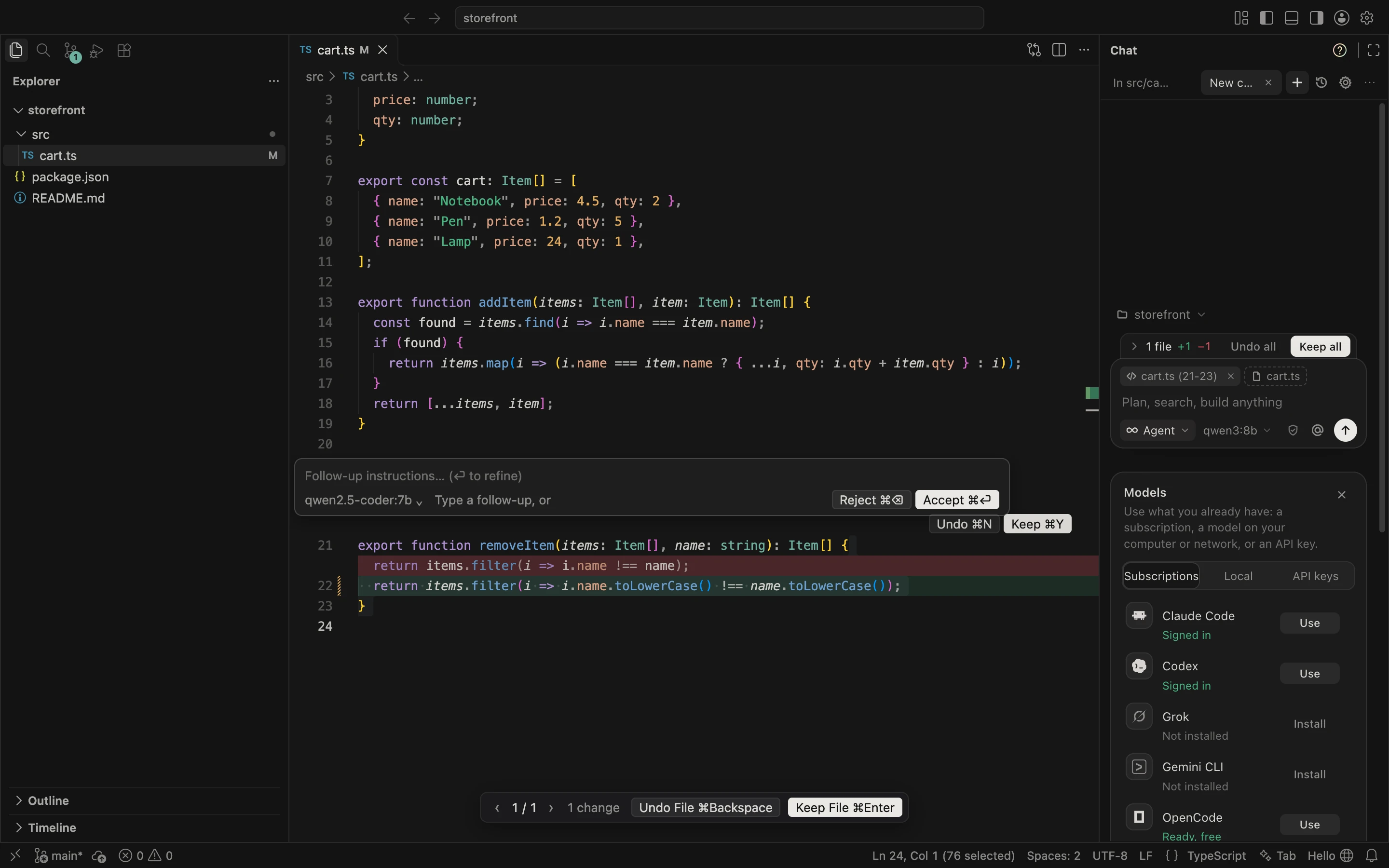
OpenCursor is a fork of Code - OSS with an agent, Tab completion and inline editing built in. It is laid out the way Cursor is, so the habits carry over: Cmd+K edits in place, Cmd+L sends your selection to the agent, Tab finishes the line. Your VS Code extensions, themes and settings work as they always did.
What sets it apart is who you pay. Point it at an API key, a model running on your machine, or the Claude Code, Codex, Grok or Gemini CLI you are already signed in to. Requests go straight from your computer to that provider.
Quick setup
macOS and Linux
curl -fsSL https://opencursor.org/install.sh | sh
Windows (PowerShell)
irm https://opencursor.org/install.ps1 | iex
The script picks the build for your system and processor from the latest release and installs it: the app in Applications on macOS, the .deb or .rpm on Linux (or a portable copy in ~/.local when neither fits), the per user setup on Windows. Set OPENCURSOR_VERSION=v0.1.0 to install a specific release.
Then open OpenCursor and pick a model on the start screen: a subscription you are signed in to, a local model, or an API key. New versions show up as a notice in the app; Update installs them on restart.
Download
Prefer to install by hand? Grab the latest build from Releases.
| Platform | Files |
|---|---|
| macOS | macos-arm64.dmg (Apple Silicon), macos-x64.dmg (Intel) |
| Windows | windows-x64-setup.exe or windows-arm64-setup.exe, or a portable .zip |
| Linux | .deb, .rpm or .tar.gz, for x64 and arm64 |
Builds are not signed yet, so the first launch of a downloaded file needs one extra step. The install commands above skip it.
- macOS: open the app once, then System Settings > Privacy & Security > Open Anyway.
- Windows: on the SmartScreen prompt, choose More info > Run anyway.
Features
| Agent | Reads and searches your code, edits files and runs commands. Four modes: Agent, Plan, Debug and Ask. You choose how much it may run on its own: ask every time, an allowlist, Auto (it asks before deleting, installing or going online) or full access. |
| Tab | Completions over several lines as you type, from a fill in the middle model such as Codestral or an Ollama coder model, or from a fast chat model. |
| Cmd+K | Describe a change and watch the diff stream into the file. In the terminal, a sentence becomes a command. VS Code's own Cmd+K chords still work. |
| Review | Every edit is a diff you keep or undo per hunk, per file or all at once. Every message is a checkpoint you can restore. |
| Context | @ files, folders, symbols, git changes, lints, terminal output, docs, the web and earlier chats, or paste images. A local index of your codebase powers semantic search. |
| Rules and MCP | Rules from .open-cursor/rules, AGENTS.md and CLAUDE.md, your own slash commands, and any MCP server. Cursor projects work as they are. |
| Help | Ask how anything in the app works and it takes you to the right setting or page. Common questions are answered instantly, without a model. |
| Menu bar | A small panel next to the clock: hand a task to the agent in any project, or jump to an open window. |
Models
| Source | Examples |
|---|---|
| Free | OpenCode's free models with no account, installed in one click; free keys from OpenRouter, Groq, Google Gemini, NVIDIA, Z.ai, Mistral and SambaNova |
| Subscription | Claude Code, Codex CLI, Grok CLI, Gemini CLI |
| Local | Ollama, LM Studio or any OpenAI compatible server, on this computer or another on your network |
| API key | Anthropic, OpenAI, Google Gemini, OpenRouter, DeepSeek, xAI, Mistral, Groq, NVIDIA, Z.ai, SambaNova |
A subscription runs the CLI you already use in the background, so you keep OpenCursor's chat, review and checkpoints while the work counts against your plan. With a free key connected, Free (auto) moves to another free model when one hits its limit. API keys stay in your system keychain.
Development
Build from sourceYou need Node 24 (see .nvmrc) and the usual VS Code build prerequisites.
npm ci
npm run compile
./scripts/code.sh
The AI extension builds on its own and is bundled into the app:
cd extensions/open-cursor
npm ci
node .esbuild.mts --watch
Package a macOS build with ./scripts/open-cursor/package-mac.sh arm64. End to end scenarios that drive a real window live in scripts/open-cursor/scenarios; ./scripts/open-cursor/test-all.sh runs them all.
OpenCursor's own code is small and sits beside the upstream tree.
extensions/open-cursor/               the AI extension
  src/agent/                          chat, agent loop, modes, tools
  src/providers/                      model providers
  src/cliAgents/                      Claude Code, Codex, Grok, Gemini and OpenCode adapters
  src/help/                           Help mode: manual, instant answers, in app links
  src/tab/  src/inline/               Tab and Cmd+K
  src/edits/                          review and checkpoints
  src/context/  src/indexing/         @ mentions, rules, codebase index
  webview/src/                        chat and settings interfaces
src/vs/workbench/contrib/openCursor/  inline diff and the Cmd+K box
src/vs/code/electron-main/            menu bar item
See ARCHITECTURE.md for how the pieces fit together.
Privacy
There is no account and no server between you and your models: requests go from your computer straight to the provider, and API keys stay in your system keychain. Once a day OpenCursor sends an anonymous install count, a random ID made on your computer plus the version and OS, so we know how many people use it. Nothing about you, your code, chats or keys is sent. Turn it off in Settings > General > Privacy. The counter's code is in stats/.
Contributing
Issues and pull requests are welcome. Run npm run typecheck in extensions/open-cursor before opening one, and keep changes to upstream VS Code files small so newer Code - OSS releases merge cleanly.
License
MIT. Built on Code - OSS by Microsoft, also MIT.
Made by Noah, @fsconfig on X. If you like OpenCursor, a star or a follow means a lot.
Reviews (0)
Sign in to leave a review.
Leave a reviewNo results found