openroll
Health Warn
- License — License: GPL-3.0
- Description — Repository has a description
- Active repo — Last push 0 days ago
- Low visibility — Only 6 GitHub stars
Code Fail
- rm -rf — Recursive force deletion command in install.sh
Permissions Pass
- Permissions — No dangerous permissions requested
No AI report is available for this listing yet.
A free video editor for macOS, Windows and Linux. No account, no watermark, and nothing leaves your computer.

OpenRoll
A free video editor for macOS, Windows and Linux.
No account, no watermark, and your videos never leave your computer.
Install · Download · Features · Edit with AI · Contribute



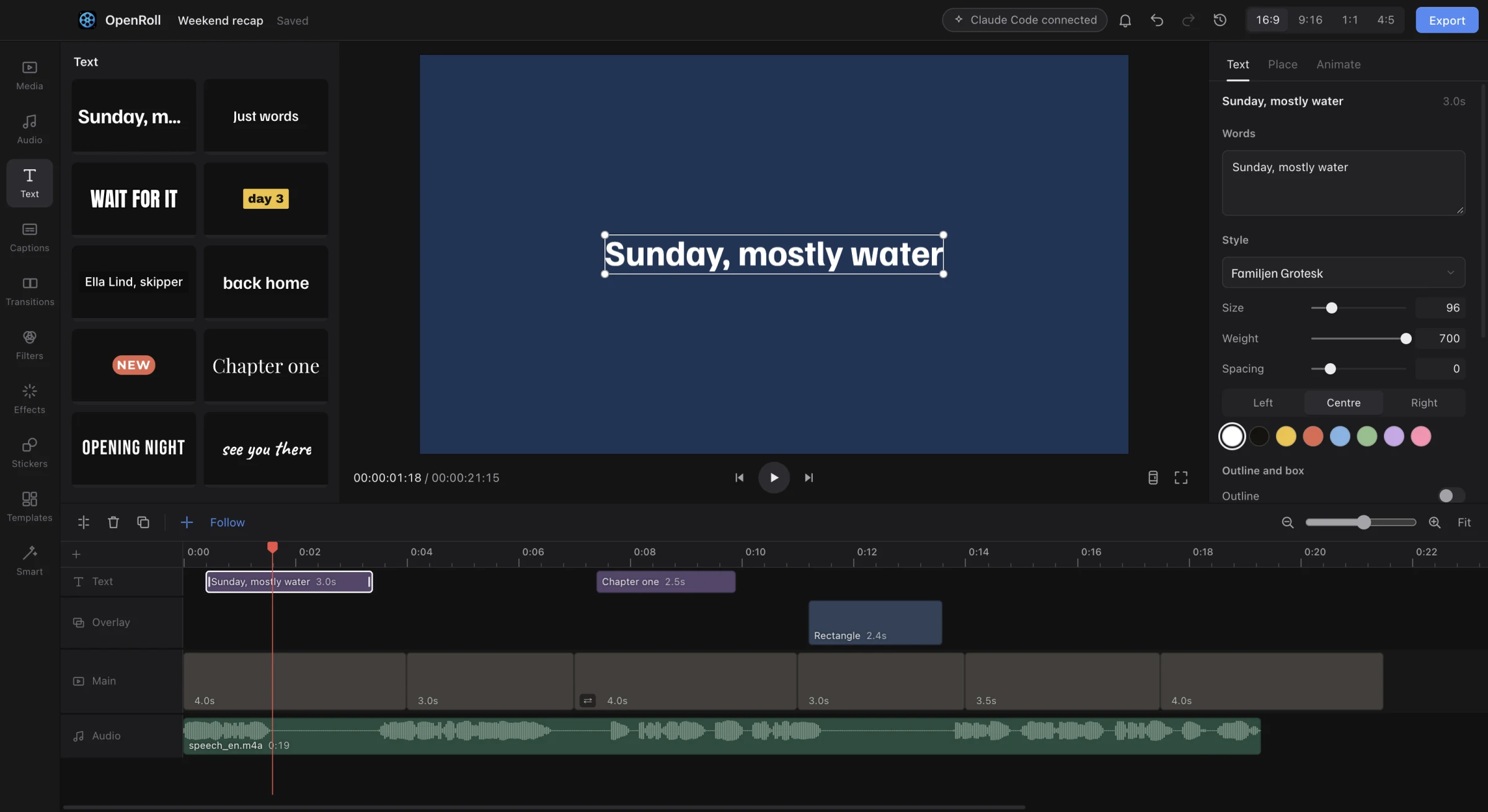
OpenRoll is built for the edits people make every day: cutting a vlog, captioning a short, putting music under a trip. It has the tools of a paid editor, captions, background removal, beat cuts, vertical reframing, and runs all of them on your own machine. Projects are plain files you own. Exports never carry a watermark.
Features
- Timeline. Magnetic main track, ripple and roll edits, slip, markers, J K L shuttle and a shortcut for every common action. Playback holds 60 fps on 4K and phone footage.
- Captions. Speech to text runs on your computer, with word by word highlights, styles, and SRT or VTT export. Smart cut removes silences and filler words in one step.
- Sound. Noise removal, voice enhance, loudness to the social standard, music that dips under speech, beat detection, voiceover and text to speech.
- Look. 24 filters, 22 effects, LUTs, curves, HSL, masks, green screen, keyframes on any value and transitions.
- Smart tools. Background removal, stabilising, auto reframe for vertical video, smooth slow motion and upscaling, all running locally.
- Formats. Long video to shorts, picture in picture, split screen, stickers and safe zones for TikTok, Reels and Shorts.
- Export. MP4 (H.264 or HEVC), WebM, ProRes 422 and 4444, GIF, M4A, WAV and stills, in the background while you keep editing.
- Edit with AI. Claude Code, Codex, Cursor and other MCP tools can edit the open project with you. Every change shows live and undoes like your own. See docs/AI.md.
Quick setup
macOS and Linux
curl -fsSL https://raw.githubusercontent.com/noah-thing/openroll/main/install.sh | sh
Windows (PowerShell)
irm https://raw.githubusercontent.com/noah-thing/openroll/main/install.ps1 | iex
The script picks the right build for your system from the latest release, checks it against the release's SHA256SUMS.txt, and installs it: the app in Applications on macOS, the .deb on Ubuntu and Debian (an AppImage elsewhere), the per user setup on Windows. Updates then install quietly in the background; you can turn that off in Settings.
Download
Prefer the files? Get them from Releases.
| System | File |
|---|---|
| macOS, Apple silicon | OpenRoll-<version>-mac-arm64.dmg |
| macOS, Intel | OpenRoll-<version>-mac-x64.dmg |
| Windows | OpenRoll-Setup-<version>-win-x64.exe, or the portable .exe |
| Windows on Arm | OpenRoll-Setup-<version>-win-arm64.exe, or the portable .exe |
| Linux | .AppImage, or .deb for Debian and Ubuntu |
If your computer shows a popup the first time you open OpenRoll, that's only because the app isn't code signed yet. The setup command above skips it. All of the code is in this repository, and every release lists the checksum of each file in SHA256SUMS.txt. To open it past the popup:
- macOS: open OpenRoll once and close the popup, then go to System Settings, Privacy and Security, and click Open Anyway.
- Windows: if SmartScreen appears, click More info, then Run anyway.
- Linux: make the AppImage executable (
chmod +x) and run it.
Building from source
Requires Node.js 22 or newer.
git clone https://github.com/noah-thing/openroll.git
cd openroll
npm install
npm run ffmpeg     # fetch the ffmpeg build for this system
npm run dev        # run with live reload
Tests, packaging and the code style are in CONTRIBUTING.md.
How it works
- Engine. Media is decoded with WebCodecs through Mediabunny, on the hardware decoder when there is one. A WebGL2 compositor draws every frame in a worker, so the interface never waits on video.
- Clock. Audio drives playback time. Video follows it and drops a frame rather than drift.
- Projects. A project is one JSON file. Times are integer microseconds, and every edit is a pure function from one project to the next, which is what makes undo exact.
- Export. The exporter renders the same scene as the preview, so what you see is what you get. Formats WebCodecs cannot write go through a bundled ffmpeg.
Licence
OpenRoll is free software under the GNU General Public License v3.0 or later. Bundled components and their licences are listed in THIRD_PARTY_NOTICES.md.
Reviews (0)
Sign in to leave a review.
Leave a reviewNo results found