ai-context-kit
Health Warn
- License — License: MIT
- Description — Repository has a description
- Active repo — Last push 0 days ago
- Low visibility — Only 7 GitHub stars
Code Pass
- Code scan — Scanned 1 files during light audit, no dangerous patterns found
Permissions Pass
- Permissions — No dangerous permissions requested
No AI report is available for this listing yet.
Build a reusable Markdown context about you and your company (Claude Code skills + templates), then use it in ChatGPT, Claude, Gemini, Cursor or CLAUDE.md. Write context once, reuse everywhere. MIT.
English · Polski
ai-context-kit
Build a reusable context file about you and your company, once — then drop it into any AI tool so every answer is sharper and on-brand. Two Claude Code skills that interview you, plus plain Markdown templates if you don't use Claude Code.



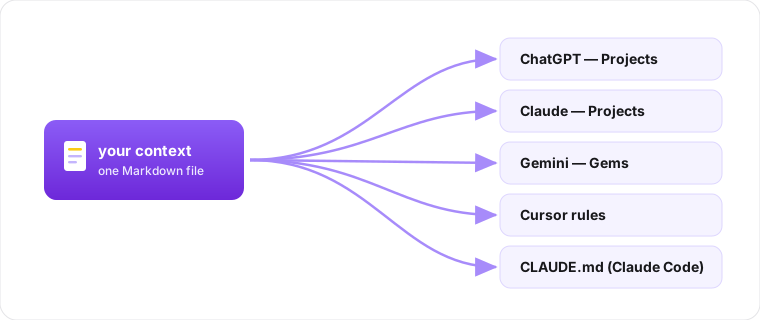
Why
An AI assistant is only as good as the context you give it. Most people retype the same facts — who they are, what the company does, who the clients are — into every new chat. Then the answers come back generic, because the model is guessing.
This kit helps you write that context down once, as clean Markdown, and reuse it everywhere. It's the boring foundation that makes everything else (proposals, content, client replies, code) come out in your voice instead of a stranger's.
Two pieces, because they change at different speeds:
- personal-context — who you are: role, background, how you work, how you want AI to help.
- company-context — what the company is: offer, clients, personas, positioning, voice, common questions.
Two ways to build it
With Claude Code (guided interview): install a skill, run it, answer a short set of questions. The skill probes gaps, suggests what's missing, and writes the file for you.
git clone https://github.com/nocodework/ai-context-kit
mkdir -p ~/.claude/skills
cp -r ai-context-kit/skills/personal-context ~/.claude/skills/
cp -r ai-context-kit/skills/company-context  ~/.claude/skills/
Then in Claude Code: "build my personal context" or "build our company context" (the skills interview and write in your language). Output lands as personal-context.md / company-context.md in the directory where you launched Claude Code. After pulling repo updates, re-copy the skills the same way.
Without Claude Code (fill a template): copy a template and write the answers yourself.
curl -O https://raw.githubusercontent.com/nocodework/ai-context-kit/main/templates/company-context.template.md
See examples/ for filled-in samples (English and Polish) to copy the shape from. Po polsku? Użyj plików *.template.pl.md i README.pl.md.
Use your context in any AI tool
You wrote one Markdown file. Here's where to put it so the AI actually uses it. (Menu names change over time; the idea is always "instructions / knowledge / project files / rules".)
Universal (works everywhere): paste the file's contents at the start of a chat, or attach the .md as a file. Simple, always works.
ChatGPT
- Projects: create a Project → open it → Instructions and paste the context, or add the
.mdas a project file. Every chat inside that project then uses it. - Custom GPT: Configure → Instructions (paste) or Knowledge (upload the
.md). If the GPT is shared publicly, treat Knowledge as public — users can extract those files, so keep client names and sales know-how in private Projects instead.
Claude
- Projects: create a Project → Project knowledge → add the
.md(or paste into the project's custom instructions). Shared by every chat in the project. - Claude Code: put it in
CLAUDE.mdat your repo root (or~/.claude/CLAUDE.mdfor all projects). It's loaded automatically every session — no pasting.
Gemini
- Gems: create a Gem → paste the context into the Gem's instructions. Or attach the
.mdfile in a normal chat.
Cursor / AI IDEs
- Save it as
.cursor/rules/context.mdcwithalwaysApply: truein its frontmatter — the Markdown body stays as-is. (.cursorrulesstill works but is legacy.)
Agent CLIs (Codex, Gemini CLI, GitHub Copilot)
- Same file, different name:
AGENTS.mdat the repo root (read by Codex, Cursor and a growing list of tools),GEMINI.mdfor Gemini CLI,.github/copilot-instructions.mdfor GitHub Copilot.
Keep it alive: store the file in a repo or a note, update it as things change, and re-paste / re-upload the new version. A stale context is worse than none.
What each context captures
personal-context — identity and role, short background and expertise, what you do day to day, how you like to work and decide, your communication style and voice, your goals, and how you want AI to help (formats to use, things to always/never do).
company-context — what the company does in one line, the offer and what makes it different, your ideal customer and real client examples, key personas (who buys, who uses, their pains), positioning and messaging, tone of voice (words to use/avoid), the team, and the questions clients ask most often with your answers.
Full field lists live in templates/.
Contributing
Issues and PRs welcome — see CONTRIBUTING.md and the roadmap. New here? A few good first issues are open — translating a template or adding a new context type (product, project, brand-voice) is a great place to start. The output is plain Markdown and the skills are plain instructions; nothing to build. Be kind: Code of Conduct.
License
MIT, by NoCodeWork. Use it for anything.
Reviews (0)
Sign in to leave a review.
Leave a reviewNo results found