oat-agents
Health Pass
- License — License: MIT
- Description — Repository has a description
- Active repo — Last push 0 days ago
- Community trust — 50 GitHub stars
Code Pass
- Code scan — Scanned 12 files during light audit, no dangerous patterns found
Permissions Pass
- Permissions — No dangerous permissions requested
No AI report is available for this listing yet.
Open Agent Team: One screen for the whole team. One key to take over any agent.
English · 繁體中文
oat-agents
One screen for the whole team. One key to take over any agent.
A meta-agent leads one layer of member agents. Each member is a plain Claude Code or Codex
session on its own branch. You watch the whole team from one terminal and step into any of
them whenever you want.
Why · Three things · How a Run goes · Your team and its rules · Execution and isolation · Get started
Why
Most coding agents can already hand work off to subagents. That works for one or two. With
five on a real change, it gets hard to follow.
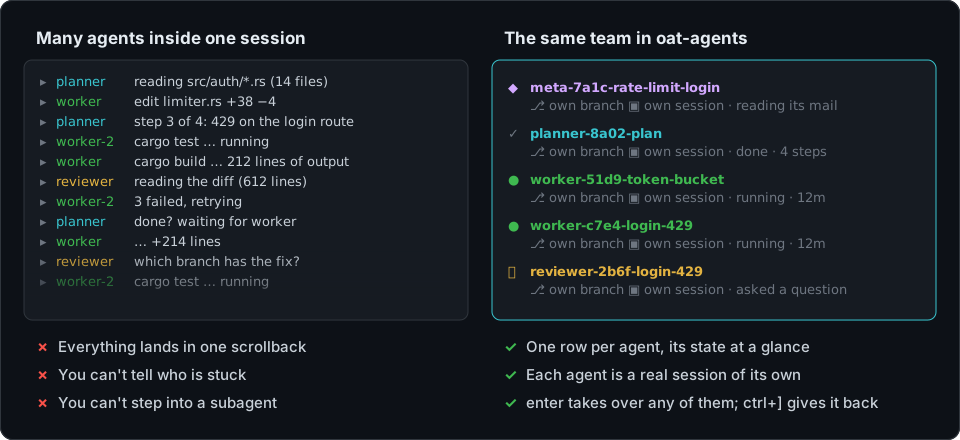
A team of coding agents runs into two problems.
The first is that the information doesn't reach you. Inside one session, every subagent's
output lands in the same scrollback. You can't see which one is stuck, and when one goes wrong
you can't talk to it directly. All you can do is ask the parent to pass a message along. You
need to see each agent's context.
The second comes from the obvious fix. If the agents have to keep a record for you, that
record is extra work on top of the change, and every note an agent writes for you is attention
it didn't spend on the change. An agent should do its work and nothing extra.
So oat-agents has to do three things at once, with as little structure as it can.
Three things, with the least structure
A simple structure
A team has two levels: one meta-agent, which splits your goal and hands out the pieces, and
the member agents it launches. Who is on the team, how the work is split and which skills each
role loads all live in a plugin. Changing how your team works never means changing oat-agents.
See Define your team and its rules with a plugin.
No extra work for the agents
A member agent is plain Claude Code or Codex, in its own interactive interface. Besides the
change, it only sends the meta-agent a report when it's done, or a question when it's blocked.
oat-agents takes care of the rest: a git worktree and branch for each agent, and a pod for its
build and test commands when its role asks for one. See
Execution and isolation.
Context you can see
The live view shows only the flow of information: one row per agent, with its state, diff,
timeline and log, and the whole team on one screen. When you want to act, select an agent and
press enter. You're typing into its real tmux session, the same as if you had opened it
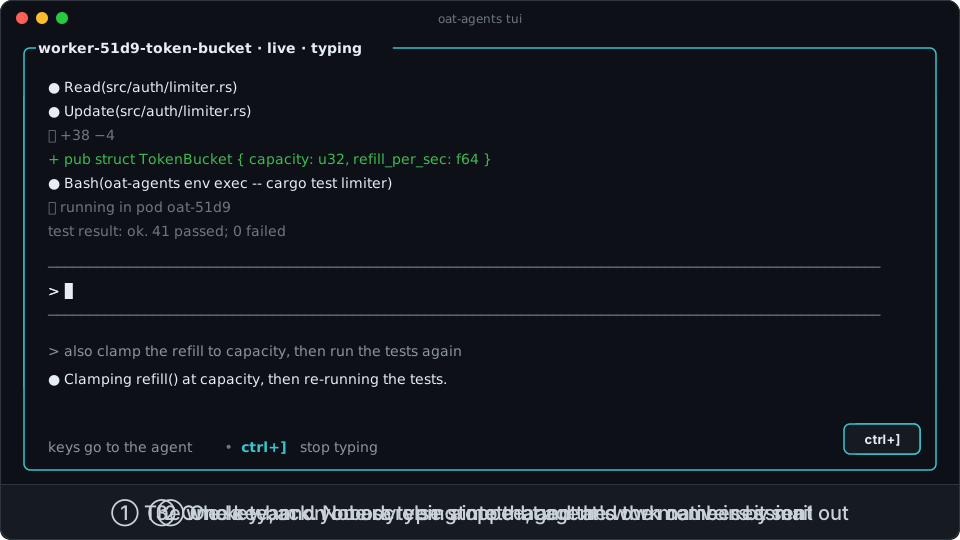
yourself. ctrl+] brings you back to the team. See How a Run goes.
How a Run goes
That is oat-agents tui. The Run is illustrative, but the layout, glyphs and keys are the
real ones.
- You start a Run with a goal:
oat-agents meta fire --prompt "…". Describe the outcome you
want, not the steps. - The meta-agent launches member agents with
role fire: a planner, two workers, a
reviewer, or whatever roles your plugin defines. It doesn't write the code itself. - Members write to the meta-agent through the Run inbox. One that finishes sends its report
(dispatch done); one that is blocked asks a question (dispatch ask) and waits for the
reply. Only the meta-agent reads the inbox. - When the meta-agent needs a decision it can't make from the goal, its row shows 🙋. Select
it, pressenterand type your answer. Otherwise it doesn't ask. - When a review fails, the fix goes to a new member agent. The failed attempt keeps its row,
its report and its place in the workflow log. - The meta-agent closes the Run with
meta finishand prints a receipt. The work is on the
Run'soat/<run>/…branches, and you review and merge it.
You choose how close to work. Stay at the top: read the roster, open the meta-agent's
checklist (ctrl+l), or ask the meta-agent where things stand. Or go down to any member, read
its diff, and work with it directly.
Define your team and its rules with a plugin
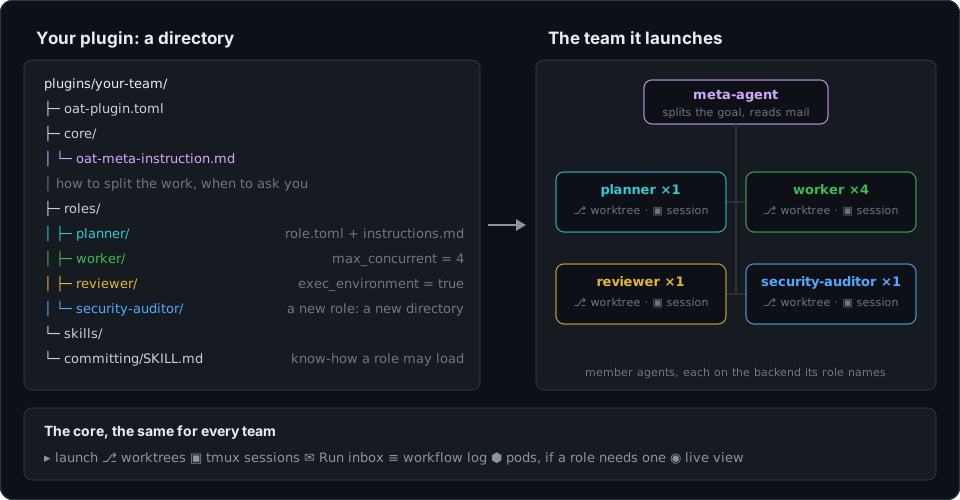
How your team works lives in a plugin, a directory of Markdown and TOML. It says which
roles exist, what each one is told, which model it runs on, and how the meta-agent should
split work and when it should ask you. The core supplies the mechanism and nothing else
(ADR-0001, ADR-0004).
The example plugin ships planner, worker and reviewer so oat-agents does something
useful on day one. Your plugin can keep them, replace them, or add a tester, asecurity-auditor, or a migrator that runs four at a time. A team with no planner at all
works too.
A new role is one directory with two files:
team/
├── oat-plugin.toml
├── core/
│   └── oat-meta-instruction.md          # tell the meta-agent when to use your roles
└── roles/
    └── security-auditor/
        ├── role.toml
        └── instructions.md
# team/roles/security-auditor/role.toml
description = "Audits a change for security issues and reports findings with evidence."
start = "existing"          # run inside the worktree of the change under audit
exec_environment = false
max_concurrent = 1

[model.claude]
model = "opus"
<!-- team/roles/security-auditor/instructions.md -->
# Security auditor

You start in the worktree of the change under audit. Look for injection, authorization gaps
and leaked secrets. Report each finding with the file, the line, and why it is exploitable.
Pin it next to the example team (or on its own), trust it once, and the next Run can use it:
oat-agents init --force --embedded --path team my-team
oat-agents plugin list --repo .          # prints the exact trust command for each plugin
| Want to change… | Where |
|---|---|
| Which roles exist and what they do | roles/<role>/role.toml + instructions.md in your plugin |
| How the meta-agent splits work, when it asks, when it gives up | core/oat-meta-instruction.md in your plugin |
| Reusable know-how a role may load | skills/<skill>/SKILL.md, listed in the role's skills = [...] |
| Model, reasoning effort, or backend, per role | [model.claude] / [model.codex] in role.toml, or override per repository in .oat/roles.toml |
| How many of one role run at once | max_concurrent, overridable per repository |
| Share one team across repositories | Publish the plugin as a git repo and pin it with init --git <url> <commit|latest> <name> |
Every TOML file rejects unknown fields, so a typo fails at load time instead of being silently
ignored. The full format is in docs/plugins.md.
Execution and isolation
oat-agents is a single Rust executable, and there is no server, database or daemon behind
it. A Run is branches, tmux sessions and plain files under ~/.local/state/oat-agents/. That
includes the workflow log, an append-only JSONL file you can tail -f, jq or grep.
Each member agent gets a worktree on its own branch (oat/<run>/<name>) and a tmux session on
oat-agents' private tmux server. meta fire and role fire print the command that attaches to
it (tmux -L oat attach -t oat_<…>).
A role that sets exec_environment = true runs its build and test commands in a pod built from
your .devcontainer/ (Kubernetes today), as long as the Run has an execution profile. The
agent itself, and everything else, stays on your machine. The live view shows pod:… beside
each agent, or HOST (no pod) in yellow when a role wanted a pod and didn't get one. If the
environment couldn't run a check, the role protocol has the agent report it as unverified,
never as a pass.
Agents run unattended. Nobody is there to approve each step, so oat-agents starts your agent
CLI with its permission prompts turned off. A worktree keeps each agent's work apart, but it
doesn't limit what the agent can reach, so only run oat-agents on a machine and with
credentials you'd trust an agent with.
The supported backends today are Claude Code and Codex. You choose one per role, so a single
team can mix them.
Get started in five commands
You need: git, tmux, a Rust toolchain (rustup.rs, 1.85+, to
build), and at least one agent CLI installed and logged in: Claude Code (the default) or
Codex.
1. Install with one command. You don't need a clone: the script fetches the source into a
temporary directory, builds it, puts oat-agents in ~/.local/bin, installs theoat-agents-cli skill so your own coding agent can explain and drive oat-agents for you, and
then deletes the temporary directory.
curl -fsSL https://raw.githubusercontent.com/Noopher-AI/oat-agents/main/install.sh | sh
# Pass options after `sh -s --`: another install directory, a tag or commit, binary only
curl -fsSL https://raw.githubusercontent.com/Noopher-AI/oat-agents/main/install.sh \
  | sh -s -- --bin-dir /usr/local/bin --ref <tag-or-commit> --skip-skill

# With cargo alone (binary only, into ~/.cargo/bin)
cargo install --locked --git https://github.com/Noopher-AI/oat-agents

# From a checkout
git clone https://github.com/Noopher-AI/oat-agents && cd oat-agents && ./install.sh
2. Point it at a repository. With no flags, init pins the built-in example team.--local keeps the config under .git/, so your git status stays clean.
cd ~/src/your-project
oat-agents init --local
3. Trust the plugin once on this machine. Its instructions will steer your agents, so
oat-agents won't run a plugin you haven't approved.
oat-agents plugin trust embedded --name example
4. Start a Run with a goal. Describe the outcome, not the steps. Use --input-file for a
longer goal, or --agent codex to run the meta-agent on Codex.
oat-agents meta fire --name rate-limit-login \
  --prompt "Rate-limit the login endpoint: 5 attempts a minute per account, with tests."
5. Watch the team.
oat-agents tui
↑↓ picks an agent and ←→ switches between its live, diff, timeline and log tabs.enter types into the selected session, ctrl+] gives the keys back, ctrl+l opens the
checklist and ctrl+\ opens the console.
Tip: Ask your own coding agent "how do I use oat-agents?". The
oat-agents-cliskill
thatinstall.shinstalled walks it through starting, observing and taking over a Run.
Optional: run checks in pods
Set up an execution profile once per machine, and roles that ask for one run their build and
test commands in a pod:
oat-agents init --repo . --exec-profile local --exec-context <kube-context> --exec-namespace <namespace>
$EDITOR ~/.oat/exec.toml           # finish the [image] table; every field is there, commented
oat-agents env doctor --profile local
oat-agents env image  --profile local
meta fire and role fire report where commands will run, and warn when a role that wanted a
pod will run on the host. See docs/exec-environments.md.
Words you'll see
| Word | Meaning |
|---|---|
| Goal | What you want done, written for the meta-agent. It states the outcome, not the steps. |
| Run | One execution of one goal, from meta fire to meta finish. |
| Meta-agent | The agent that leads a Run: it splits the goal, launches member agents and reads their mail. It runs the core role oat-meta. |
| Member agent | An agent the meta-agent launched for one piece of work, as one of your plugin's roles. |
| Dispatch | One launch of one role: one session, one worktree, one settlement. A retry is a new Dispatch. |
| Run inbox | Mail from member agents to the meta-agent: reports and questions. Only the meta-agent reads it. |
| Workflow log | The append-only record of the Run. It's what you and the live view read. |
The full glossary, including the words we deliberately avoid, is in.dev_docs/CONTEXT.md.
Reading further
docs/plugins.md: writing a plugin, with the on-disk format and a worked exampledocs/exec-environments.md: pods, from setting up a profile to choosing one for a Run and seeing it.dev_docs/adr/: the architecture decisionsAGENTS.md: how to work in this repository, including the verification commands
Contributing
Issues and pull requests are welcome. Start with CONTRIBUTING.md; report
vulnerabilities privately as described in SECURITY.md. Everyone taking part is
expected to follow the Code of Conduct.
License
MIT.
Reviews (0)
Sign in to leave a review.
Leave a reviewNo results found