maruda
Health Warn
- License — License: MIT
- Description — Repository has a description
- Active repo — Last push 0 days ago
- Low visibility — Only 5 GitHub stars
Code Fail
- rm -rf — Recursive force deletion command in harness/scripts/install.sh
- fs module — File system access in harness/scripts/setup.sh
Permissions Pass
- Permissions — No dangerous permissions requested
No AI report is available for this listing yet.
AI with a harness. Agent skills, rules, CI and security gates for AI-assisted development.
maruda
AI with a harness.
日本語版は README.ja.md にあります。
maruda is a collection of Claude Code agent skills plus a full project harness for AI-assisted development — code quality reviews, security audits, living documentation, GitHub-issue-driven implementation with autonomous verification, and day-one CI/security gates (gitleaks, Semgrep, Trivy). Built on harness engineering and loop engineering principles: the environment enforces quality mechanically (hooks, strict CI, branch protection) while a bounded improvement loop (diagnose → issue → plan → resolve ⇄ verify) does the work.
The name is marutto (まるっと, "the whole lot") plus DA — Dev with AI: the
skills, the rules, the CI and the security gates arrive together, not one at a
time.
Renamed from
dev-skills. This repository moved fromymd38/dev-skillstonorthraystudio/marudaon 2026-09-20. GitHub redirects the old URLs, so
one-liners and clones that still point at the old address keep working and
projects already installed need no action. New links should use the new address.
What are Skills?
Skills are Markdown files that give AI agents specialized knowledge, workflows, and output templates for specific tasks. When installed, Claude Code recognizes relevant requests and applies the skill automatically — no manual prompting required.
Continuous Improvement Cycle
These skills form a continuous improvement loop for your codebase:
graph LR
    Diagnose["🔍 Diagnose<br/>software-evaluation<br/>vulnerability-scan<br/>data-validation"]
    Visualize["📊 Visualize<br/>progress-dashboard"]
    Register["📋 Register Issues<br/>report-to-issues"]
    Draft["✍️ Draft Issue<br/>gh-issue-drafter"]
    Plan["🧠 Plan<br/>gh-issue-planner"]
    Resolve["🛠️ Resolve + Verify<br/>gh-issue-resolver"]
    Batch["📦 Batch Run<br/>gh-batch-runner"]

    Idea["💡 Rough idea<br/>(hand-written)"] -- "Loose 'what I want'" --> Draft
    Diagnose -- "Reports + JSON" --> Visualize
    Diagnose -- "Reports" --> Register
    Register -- "GitHub Issues" --> Plan
    Draft -- "Scoped GitHub Issue" --> Plan
    Plan -- "Agreed plan comment" --> Resolve
    Plan -- "Several Issues, one release" --> Batch
    Batch -- "One commit per Issue" --> Resolve
    Batch -- "One PR from epic/**" --> Done
    Resolve -- "Re-run diagnosis on the diff" --> Diagnose
    Diagnose -- "Regressions only" --> Resolve
    Resolve -- "PR + Code Changes" --> Done["✅ Verified PR"]
    Visualize -. "Track trends" .-> Done
The Resolve ⇄ Diagnose arrows are the autonomous verification loop: gh-issue-resolver
re-runs the diagnosis on its own diff, fixes the findings it caused, and re-checks — up to
3 iterations, never outside the agreed plan's impact scope. Findings that predate the change
are handed to report-to-issues instead of being fixed in the same PR.
When several Issues ship together, gh-batch-runner collects them under an Epic Issue,
lands one commit per Issue on a shared epic/** branch, verifies that branch as a whole
against the integration branch, and opens a single PR. Issues that ship separately stay on
the individual path, and a dependency chain that ships separately uses stacked PRs.
| Step | Skill | What happens |
|---|---|---|
| Diagnose | software-evaluation, vulnerability-scan, data-validation |
Evaluate code quality, security, and data correctness. The first two produce reports + JSON summaries; data-validation is session-output only by design |
| Visualize | progress-dashboard |
Generate an interactive HTML dashboard from JSON summaries to track improvement trends |
| Register | report-to-issues |
Parse reports, deduplicate against existing issues, create GitHub Issues |
| Draft | gh-issue-drafter |
Turn a rough, hand-written intent into a scoped Issue (Done / Out of scope / Design constraints) — the human-authored entry point into the cycle |
| Plan | gh-issue-planner |
Investigate the issue, propose a structured response plan, post the agreed plan as an issue comment |
| Resolve | gh-issue-resolver |
Pick up the agreed plan comment, create a branch, implement, run tests, open a PR |
| Batch run | gh-batch-runner |
Only when several Issues ship together: collect them as sub-issues of an Epic, implement in dependency order on epic/<n>-<slug>, verify the branch as a whole, open one PR into the integration branch |
| Verify | gh-issue-resolver (Step 8) |
Re-run the triggered diagnoses on the diff, attribute each finding, autonomously fix the regressions this change caused, and hand pre-existing findings to report-to-issues. Bounded to 3 iterations and the agreed plan's impact scope |
Note:
spec-docis independent of this cycle — use it anytime to generate or sync living documentation.setupis also independent: it installs the harness that makes this cycle the default path in a new project.
Available Skills
| Skill | Description |
|---|---|
| spec-doc | Generate or sync a "Living Specification" from source code to eliminate doc-code drift. Use when creating, updating, or reviewing architecture documentation for a directory or module. |
| software-evaluation | Evaluate code quality across five pillars (Architecture, Reliability, Observability, Security, DX) and produce a 1–10 scorecard with a strategic improvement roadmap. |
| vulnerability-scan | Run an OWASP-based offensive security audit using Semgrep and produce a read-only vulnerability report with severity ratings and remediation recommendations. |
| data-validation | Validate data read from the project's own fixtures or an explicitly configured non-production connection — record counts, NULL rates, distribution, uniqueness, referential integrity, and format validity — with sampled evidence rows and regression attribution. Read-only; produces no JSON. |
| report-to-issues | Parse reports from software-evaluation or vulnerability-scan, interactively select tasks, and register them as GitHub Issues using the gh CLI. |
| gh-issue-drafter | Turn a rough, hand-written intent into a well-scoped GitHub Issue. Proposes the missing Done definition, Out of scope, and Design constraints for user approval, then files the Issue with a scoped-issue marker that gh-issue-planner recognizes. |
| gh-issue-planner | Fetch a GitHub Issue by ID, investigate related code, propose a structured response plan (approach, impact scope, implementation steps), and post the agreed plan as an issue comment. Implementation is out of scope. |
| gh-issue-resolver | Implement and verify a fix for a GitHub Issue whose response plan has already been posted as a comment by gh-issue-planner. Creates a branch, applies the agreed plan, runs tests, opens a Pull Request, then re-runs the diagnosis and autonomously fixes the regressions its own change caused. |
| gh-batch-runner | Run several planned Issues as one release: an Epic Issue holds the members as sub-issues, each lands as one commit on a shared epic/** branch in dependency order, the branch is verified as a whole against the integration branch, and a single Pull Request opens into it. |
| progress-dashboard | Generate an interactive HTML dashboard that visualizes quality scores and security findings over time from JSON summaries. |
| setup | Install the full harness (CLAUDE.md + hooks + settings + rules) into the current project through a short interview — languages and commands are asked, never auto-detected. |
Installation
Setup by use case
Pick the row that matches your situation — each command is complete as written:
| Use case | Do this |
|---|---|
| New project, languages decided | Full one-liner below with your --langs, add --with-skills. Then git init → first push → Stage 2 of the maturity ladder (--protect) |
| New project, languages not decided yet | Minimal one-liner below (rails only) → decide languages later with /maruda:setup in Claude Code |
| Existing project | Full one-liner — existing CLAUDE.md / settings / hooks are never overwritten; settings hooks are merged. Then /maruda:setup to merge the cycle section into your CLAUDE.md |
| Claude Code user, skills only | /plugin marketplace add northraystudio/maruda then /plugin install maruda@northraystudio — commands arrive namespaced as /maruda:<skill> (see Skills only) |
| Skills only, another agent (or no plugin) | npx skills add northraystudio/maruda --skill '*' --agent claude-code -y --copy (see Skills only) |
| Team repo — share with teammates | Install with --copy (default in the commands here), then commit .claude/, CLAUDE.md, and .github/ — teammates get everything on clone, no install needed |
| Prefer answering questions over flags | Install skills first, then run /maruda:setup in Claude Code — interview-style, writes only after you approve the summary |
| Default branch pushed → enforce the gates | curl -fsSL <install.sh URL> | bash -s -- --langs <yours> --protect (needs gh auth with repo admin) — checks become required and actually block merges |
| Add AI PR review (PR Agent) | Full one-liner plus --pr-agent (or --no-ci --pr-agent if you already have CI), then add the OPENAI_KEY repository secret. Advisory only — never a required check |
| Update to the latest skills / harness | Re-run the install command — changed harness files appear as <file>.new for manual merge, nothing is overwritten; coming from a yds- install, see the migration note below |
# Full one-liner (languages are explicit, never detected)
curl -fsSL https://raw.githubusercontent.com/northraystudio/maruda/main/harness/scripts/install.sh \
  | bash -s -- --langs go,typescript --pm pnpm --with-skills

# Minimal one-liner (rails only)
curl -fsSL https://raw.githubusercontent.com/northraystudio/maruda/main/harness/scripts/install.sh \
  | bash -s -- --minimal
Full harness (recommended for new projects)
Skills alone give workflows (L1). The full harness adds mechanical guardrails —
format-on-write and dangerous-command hooks, a lean CLAUDE.md, cycle rules,
GitHub Actions CI, and a security scan — so quality is maintained from day one
and the continuous improvement cycle is the default path (L2–L3).
With --langs, the installer also generates:
.github/workflows/ci.yml— per-language jobs (Go: go.mod guard / tidy-check / build /test -race/ cached pinned golangci-lint; Node: script preflight / frozen-lockfile install / lint / typecheck (TS) / test; Python: ruff / pytest). Strict by design: a missing lint/typecheck/test script — or zero tests — fails the job with an actionable::errortelling you exactly what to add, so verification lands with the first code PRdocs/harness-checklist.md— the manual steps that turn strict CI green (add scripts, first test, commit lockfile, branch protection, promote trivy); delete it when done.github/workflows/security-scan.yml— gitleaks + semgrep gating from day one (shift-left), trivy staged ascontinue-on-error, Node production-dependency audit. Both workflows also run on direct pushes to the default branch.gitleaks.tomland.semgrepignorewith a smallest-unit-only allowlist policy- With
--pr-agent:.github/workflows/pr-agent.ymland.pr_agent.toml— advisory AI review via qodo-ai/pr-agent (describe / review / improve when a PR opens,/reviewon each push, slash commands for repository members; action pinned to a release-tag SHA). Opt-in because it needs anOPENAI_KEYsecret and API billing; never a required check, and it composes with--no-cifor projects that already have CI .env.exampleand.gitignoreentries for.env.claude/rules/— the cycle contract, score-aligned coding principles (KISS / YAGNI plus the five evaluation pillars inverted into "write it right the first time" rules), and per-language best practices (go.md/python.md/typescript.md, installed per--langs). Each rule is tagged with thesoftware-evaluationpillar it scores on; the security rules preemptvulnerability-scanfindings
Disable with --no-ci; skip individual components with --no-format-hook /--no-bash-guard / --no-guidance-hooks / --no-rules / --no-env-guard;
add the advisory PR Agent with --pr-agent.
CI tool and action versions are pinned (no @latest); the local format hook
only runs project-installed formatters and never downloads code.
Checks gate merges only when branch protection marks them required. The
installer reports the protection state in its checklist; pass --protect
(needs gh auth with admin on a pushed default branch) to apply required
status checks automatically, or configure them in GitHub settings.
Gate maturity ladder
The defaults are day-one settings. Promote gates as the project matures:
| Stage | When | Action |
|---|---|---|
| 0 — Day one (default) | Fresh project | gitleaks + semgrep block; trivy informs (continue-on-error); CI strict (missing scripts/tests fail) |
| 1 — Deps triaged | Trivy findings reviewed, unfixable ones in .trivyignore with reasons |
Delete the continue-on-error: true line in security-scan.yml — trivy becomes a hard gate |
| 2 — Enforced | Default branch pushed, repo admin available | setup.sh --protect (or GitHub settings) — checks become required status checks, force-push/deletion blocked |
| 3 — Tightened | Team cadence stable, few false positives | Raise --audit-level to moderate, add stricter Semgrep rulesets (e.g. p/cwe-top-25), consider strict: true reviews |
PR Agent (--pr-agent) sits outside the ladder on purpose: it is advice, not
a gate, and --protect never adds it to the required checks.
Installer regression tests: bash harness/tests/run.sh.
| Entry point | When to use |
|---|---|
curl | bash one-liner |
Fresh machine / CI / "just drop the files in" (non-interactive, flags required) |
harness/scripts/setup.sh |
You already cloned this repo |
/maruda:setup in Claude Code |
Decide languages and commands interactively (no auto-detection) |
--plugin |
Record the plugin in .claude/settings.json so everyone who clones the repo installs the same skills |
# From a clone (one-liners: see "Setup by use case" above)
./harness/scripts/setup.sh --target /path/to/your-project --langs python --python-pm uv
Prefer inspecting scripts before piping to bash:
curl -fsSL https://raw.githubusercontent.com/northraystudio/maruda/main/harness/scripts/install.sh -o install.sh
less install.sh && bash install.sh --langs go
Existing files are never overwritten. When an incoming file differs from
what you already have, it is written alongside as <file>.new (pacman.pacnew style) — review with diff <file> <file>.new, merge what you want,
then delete the .new. Identical files clear stale .new proposals;--force overwrites outright. settings.json is the exception: its hooks
are merged automatically (existing entries preserved). The final checklist
lists every proposed file.
Supported languages: Go, Python, TypeScript, JavaScript. Run setup.sh --help for all flags.
Migrating from the
yds-names: theyds-prefix is gone. It existed to
group the skills in a flat command list, and the plugin namespace now does that
job —/yds-spec-docbecomes/maruda:spec-docunder the plugin, or/spec-doc
vianpx skills add. In projects installed before the rename, delete the old.claude/skills/yds-*directories and reinstall; leaving them registers every
skill twice. The cycle rule moved with it:.claude/rules/dev-skills-cycle.mdis
replaced by.claude/rules/maruda-cycle.md, andsetup.shreports the stale file
rather than deleting something it did not write. The submodule path in the
examples below is now.claude/maruda(git mv .claude/dev-skills .claude/maruda
if you use one). Handoff markers (<!-- gh-issue-planner:agreed-plan -->etc.)
and JSON summarytypevalues keep the legacy names, so existing issues and
dashboard data remain compatible.
Skills only
Option 1: Claude Code plugin (Recommended)
/plugin marketplace add northraystudio/maruda
/plugin install maruda@northraystudio
Every skill arrives namespaced — /maruda:spec-doc, /maruda:setup,/maruda:gh-issue-planner — so nothing collides with other skill collections,
and the bundled harness/scripts/setup.sh is always the same version as the
skills. /maruda:setup then installs the harness itself; the plugin cannot write
files into your project, so CLAUDE.md, hooks, settings.json, rules and CI staysetup.sh's job.
To pin a release instead of tracking main, add the marketplace with a ref:
// .claude/settings.json
{
  "extraKnownMarketplaces": {
    "northraystudio": {
      "source": { "source": "github", "repo": "northraystudio/maruda", "ref": "v0.1.0" }
    }
  },
  "enabledPlugins": { "maruda@northraystudio": true }
}
setup.sh --plugin writes exactly those two keys for you (--plugin-ref v0.1.0
to pin a tag), merging into whatever is already in settings.json. Note that
Claude Code does not auto-install from settings: the keys make the marketplace
known and mark the plugin enabled, and each person still runs/plugin install maruda@northraystudio once.
Option 2: CLI Install (any agent)
# All skills, non-interactive, copied into .claude/skills/
npx skills add northraystudio/maruda --skill '*' --agent claude-code -y --copy
Running plain
npx skills add northraystudio/marudaopens an interactive picker
where nothing is pre-selected — press Space to select skills before Enter,
or use the flags above.--copycopies files instead of symlinking, so the
skills can be committed and shared with your team.
To install a single skill:
npx skills add northraystudio/maruda --skill spec-doc --agent claude-code -y --copy
Option 3: Manual Copy
Copy any skill directory into your project:
cp -r skills/spec-doc .claude/skills/spec-doc
Or copy all skills at once:
cp -r skills/* .claude/skills/
Option 4: Git Submodule
Add as a submodule to keep skills up to date with upstream changes:
git submodule add https://github.com/northraystudio/maruda.git .claude/maruda
Then reference skills from .claude/maruda/skills/.
Usage
Once installed, describe your task naturally and the relevant skill is applied automatically:
"Generate a spec for src/api/"
→ Uses spec-doc skill

"Review the code quality of src/backend/"
→ Uses software-evaluation skill

"Scan src/ for security vulnerabilities"
→ Uses vulnerability-scan skill

"Check the data quality of db/" / "データ検証して" / "NULL率を調べて"
→ Uses data-validation skill

"Create GitHub Issues from docs/evaluation/myapp.20260406.md"
→ Uses report-to-issues skill

"Turn this into an issue" / "ざっくり書くのでIssueにして"
→ Uses gh-issue-drafter skill

"Plan issue #42" / "Issue #42の対応方針を立てて"
→ Uses gh-issue-planner skill

"Implement issue #42" / "Issue #42を実装して"
→ Uses gh-issue-resolver skill (requires an agreed plan comment from gh-issue-planner)

"Issue 1,2,3をまとめて対応して" / "Ship these issues as one release"
→ Uses gh-batch-runner skill (requires an agreed plan comment on every member Issue)

"Generate a progress dashboard" / "Show improvement trends"
→ Uses progress-dashboard skill

"Set up the harness" / "セットアップして" / "ハーネスを入れて"
→ Uses setup skill (interview-style, writes only after approval)
You can also invoke skills directly:
/maruda:spec-doc src/
/maruda:software-evaluation src/backend/
/maruda:vulnerability-scan src/
/maruda:data-validation db/
/maruda:report-to-issues docs/evaluation/myapp.20260406.md
/maruda:gh-issue-drafter
/maruda:gh-issue-planner
/maruda:gh-issue-resolver
/maruda:gh-batch-runner
/maruda:progress-dashboard
/maruda:setup
Skill Categories
Documentation
spec-doc— Generates a machine-readable "Living Specification" (docs/spec.md) from source code. Covers architecture, interfaces, data models, state transitions, and development constraints. Syncs with existing specs rather than replacing them.
Code Quality
software-evaluation— Scores a codebase across five pillars with evidence-based findings (file:line citations required). Produces a prioritized roadmap with P0–P3 action items.
Security
vulnerability-scan— Combines automated Semgrep scanning with a manual review checklist covering OWASP Top 10. Triages true positives from false positives and includes a dependency CVE audit.
Data
data-validation— Checks record counts, NULL rates (including empty strings, zero values, and sentinels), value distribution, uniqueness, referential integrity, and format validity. Reads only from the project's own fixtures/seeds or an explicitly configured non-production connection — never a guessed or production source. Every finding carries up to 5 sampled rows with PII masked, and every expectation is traced back to a schema constraint, type definition, or test assertion. Classifies each finding asregression/pre-existing/environmentalsogh-issue-resolverknows what it is allowed to fix. Writes no JSON and, by default, no file at all — routine validation should not grow the commit target.
Visualization
progress-dashboard— Reads JSON summaries fromsoftware-evaluationandvulnerability-scan, then generates a self-contained HTML dashboard with quality score trends, radar charts, security findings trends, roadmap progress, and dependency risk panels.
Issue Management
report-to-issues— Decomposes evaluation or security-audit reports into actionable tasks, presents them for user selection, and registers the chosen items as GitHub Issues with appropriate labels and priority.gh-issue-drafter— Takes a loose, hand-written "what I want" and drafts the structure it almost always lacks (machine-checkable 完了条件, 触らない範囲, optional 設計方針). After author approval, files the Issue tagged with<!-- gh-issue-drafter:scoped-issue -->sogh-issue-plannertreats the scope as binding. The human-authored counterpart toreport-to-issues.gh-issue-planner— Fetches a GitHub Issue viaghCLI, classifies it (bug/feature/refactor/docs), searches related code, and presents a structured plan (approach, impact scope, steps, open questions). Posts the agreed plan as an issue comment tagged with<!-- gh-issue-planner:agreed-plan -->.gh-issue-resolver— Picks up the agreed plan comment posted bygh-issue-planner, creates a feature branch, applies the changes, runs tests, opens a Pull Request, and verifies the fix against the original issue. Verification is autonomous: it re-runs whichever diagnoses the diff triggers, attributes each finding against the base branch, and fixes theregression-class findings itself — bounded to 3 iterations and to the agreed plan's impact scope, returning togh-issue-plannerwhen it hits either wall.pre-existingfindings are never fixed in the same PR; they are offered toreport-to-issues.gh-batch-runner— Runs several planned Issues as one release. Membership is an Epic Issue holding the members as sub-issues (gh api .../sub_issues), and ordering comes from GitHub'sblocked_bydependencies, both re-read at the start of every run. Each Issue lands as a single commit onepic/<n>-<slug>under the usual per-Issue limits; no child PRs are created. The branch is then verified as a whole against the integration branch — what newly breaks there is the batch's regression and is fixed, what already failed is handed toreport-to-issues— and a single Pull Request opens into the integration branch, where CI and review actually gate.
Setup
setup— Installs the full harness into the current project through a short interview: a leanCLAUDE.md(Stack & commands, cycle, hard rules), four hooks (format-on-write, dangerous-bash guard, SessionStart context, Stop nudge), a merged.claude/settings.json, and.claude/rules/maruda-cycle.md. Languages (Go / Python / TypeScript / JavaScript) are asked, never auto-detected; nothing is written before the confirmation summary is approved. The non-interactive counterparts areharness/scripts/install.sh(one-liner) andharness/scripts/setup.sh.
Progress Dashboard Preview
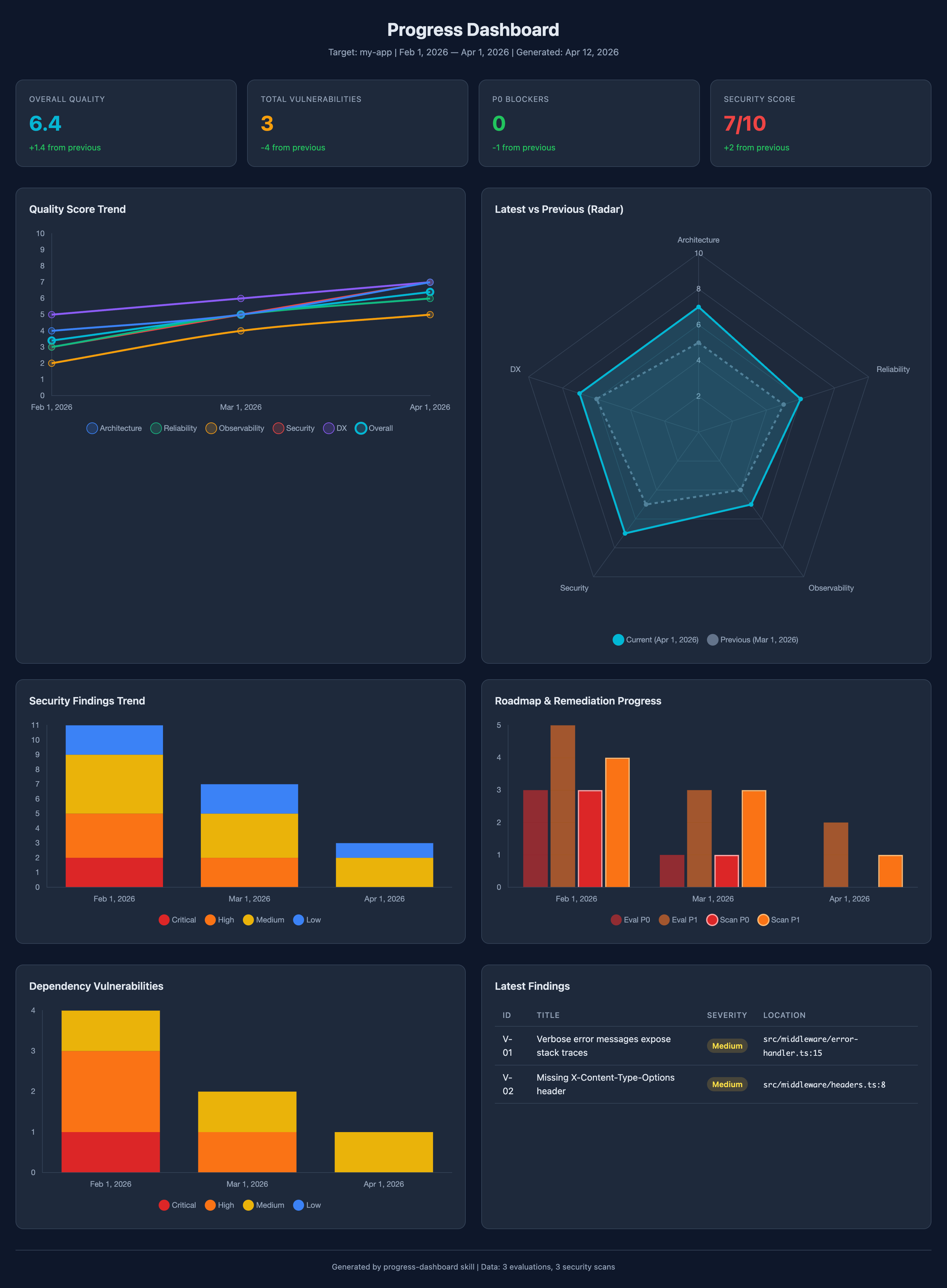
Sample dashboard generated from 3 months of evaluation and security scan data. Open
examples/progress-dashboard/dashboard.htmlin a browser to try it interactively.
Examples
The examples/progress-dashboard/ directory contains working sample data:
| File | Description |
|---|---|
evaluation/my-app.*.json |
3 months of software-evaluation JSON summaries (Feb–Apr 2026) |
security-audit/my-app.*.json |
3 months of vulnerability-scan JSON summaries (Feb–Apr 2026) |
dashboard.html |
Self-contained HTML dashboard with Chart.js — open in any browser |
License
Reviews (0)
Sign in to leave a review.
Leave a reviewNo results found