nota
Health Warn
- License — License: AGPL-3.0
- Description — Repository has a description
- Active repo — Last push 0 days ago
- Low visibility — Only 6 GitHub stars
Code Fail
- rm -rf — Recursive force deletion command in scripts/bundle-mac.sh
- rm -rf — Recursive force deletion command in scripts/package-dmg.sh
- exec() — Shell command execution in scripts/package-linux.sh
- rm -rf — Recursive force deletion command in scripts/package-linux.sh
Permissions Pass
- Permissions — No dangerous permissions requested
No AI report is available for this listing yet.
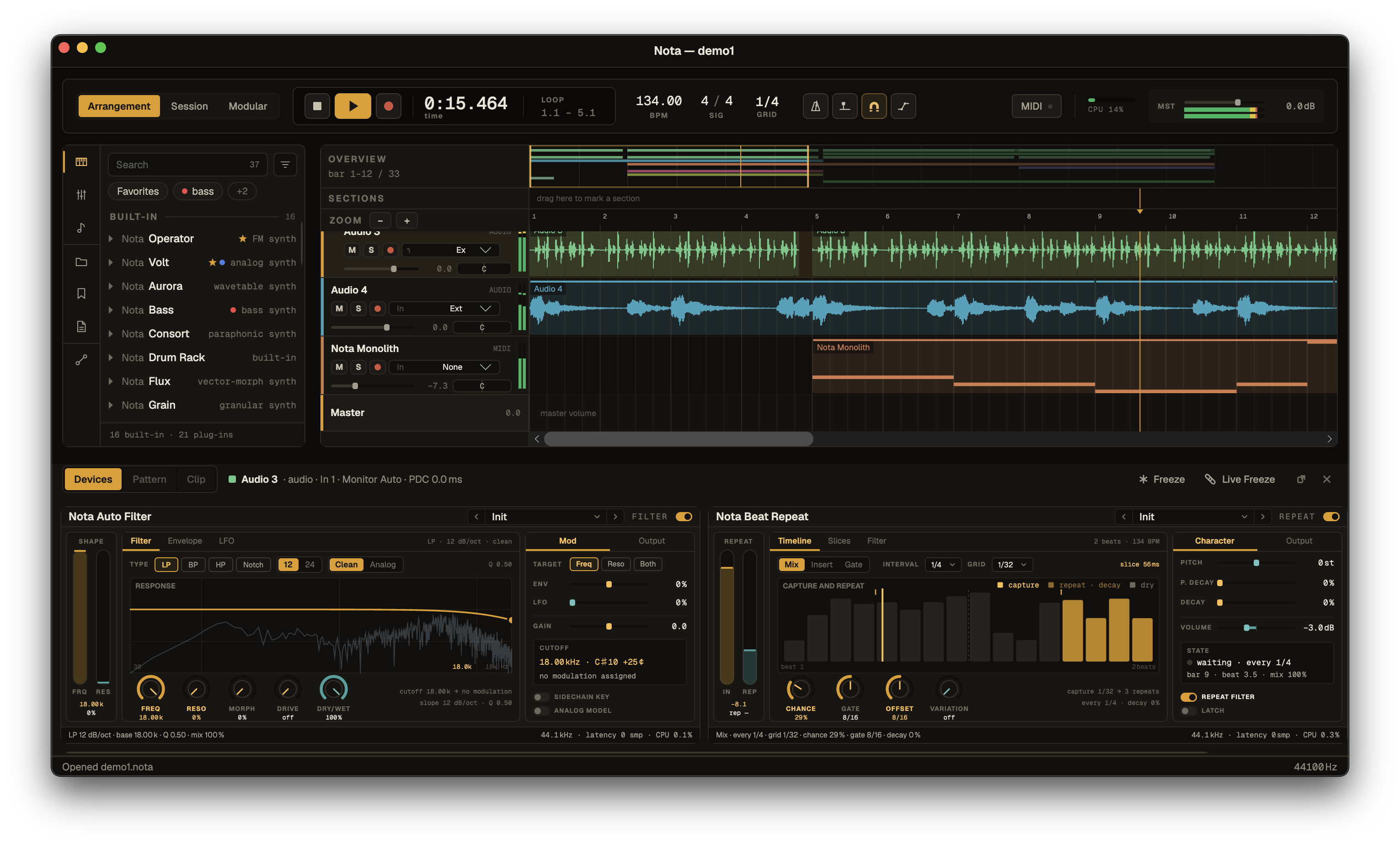
Nota is a free cross-platform digital audio workstation (DAW). The audio engine and DSP are a portable C++20 core; the UI is Avalonia (.NET). Plugin hosting (VST3, plus AU on macOS) runs through JUCE, isolated in its own module so the engine core stays JUCE-free.
Nota

Disclaimer. Nota is first and foremost an AI-driven product — the bulk of it
was developed with AI assistance. It started as a tool I built for myself, and was only
later opened up as open source. Guided and shaped throughout by me,
Egor Khindikaynen aka Ambertape (music).
Nota is a cross-platform digital audio workstation (DAW). The audio engine and DSP
are a portable C++20 core; the UI is Avalonia (.NET). Plugin hosting (VST3, plus AU
on macOS) runs through JUCE, isolated in its own module so the engine core stays
JUCE-free.
- UI / app: .NET 10, Avalonia 12 (C#) —
src/managed - Engine / DSP: C++20, built with CMake + Ninja —
src/native/nota.engine - Audio backends: CoreAudio (macOS), WASAPI (Windows), PulseAudio/ALSA (Linux, via miniaudio)
- MIDI: CoreMIDI (macOS), RtMidi — WinMM (Windows) / ALSA (Linux)
Documentation: ARCHITECTURE.md — how the engine, the C ABI and the
app fit together · CONTRIBUTING.md — contributing, licensing your
work, and the real-time rules · LICENSES/ — license terms and the
dependency register.
The native engine is built separately by CMake, and the app's project copies the
right artifact (libnota_engine.dylib / nota_engine.dll / libnota_engine.so +nota-scanworker) next to the managed binary for P/Invoke.
Features
A quick digest — see FEATURES.md for the full, categorised list.
- Three views — a linear Arrangement timeline, a clip-launching Session grid
(material moves freely between them), and a Modular signal-graph editor with CV
modulation (LFO / envelope follower / MIDI→CV / ADSR / Macro / Math, patched with
cables onto any parameter). - Tracks & mixer — audio / MIDI / return / master / nestable group tracks; sends
and returns; MIDI routing between tracks; peak/RMS + true-peak metering; per-track device
chains. - MIDI editing — piano roll (draw/move/stretch, quantize, velocity, live edits as one
undo step); input from a MIDI keyboard, the computer keyboard, or a gamepad (macOS);
audio→MIDI (melody / harmony / drums / slice). - Audio — recording (inputs and internal buses), WAV/AIFF/FLAC/MP3 import, clip
editing with fades and gain, and warp / time-stretch (Complex / Complex Pro). - ~35 built-in devices — synths (subtractive, wavetable, FM, granular, physical,
drum-machine and more), a full effects suite (EQ, dynamics, reverb/delay, saturation,
limiting, utility), MIDI effects (arp, scale, chord, …), and Instrument / Drum / Audio
Effect racks with macros. - Plugin hosting — VST3 everywhere, AU on macOS: native GUIs, state save/restore, PDC,
transport sync; parameters are automatable and MIDI-learnable. - Automation & MIDI Learn — draw/record automation on any parameter; map hardware
controllers to almost anything. - Export — master and stems to WAV (pcm16/pcm24/float32), true-peak normalize, dither,
bit-identical chunked rendering. - AI control (MCP) — an optional loopback MCP server lets Claude drive the open project
(off by default). - Cross-platform — macOS, Windows and Linux, for both x64 and arm64.
Prerequisites
Common to every platform:
- .NET SDK 10
- CMake ≥ 3.24 and Ninja
- A C++20 compiler
Per platform, additionally:
| OS | Toolchain | Native dev packages |
|---|---|---|
| macOS | Xcode command-line tools | (CoreAudio/CoreMIDI ship with the OS) |
| Windows | Visual Studio 2022 (MSVC + Windows SDK); Inno Setup 6.3+ for the installer | (WASAPI/WinMM ship with the OS) |
| Linux | build-essential |
libasound2-dev libx11-dev libxext-dev libxrandr-dev libxinerama-dev libxcursor-dev libfreetype6-dev libfontconfig1-dev |
On Debian/Ubuntu, install the Linux native deps with:
sudo apt install build-essential cmake ninja-build libasound2-dev libx11-dev libxext-dev libxrandr-dev libxinerama-dev libxcursor-dev libfreetype6-dev libfontconfig1-dev
miniaudio runtime-links PulseAudio/ALSA (dlopen), so
libpulse/libasoundaren't
needed at link time — onlylibasound2-dev(for RtMidi). JUCE (plugin hosting)
pulls the X11/freetype/fontconfig libs.
Build & run (development)
Each platform has a build script that compiles the native engine, builds the managed
app, and runs the smoke test. Then run the app with dotnet run.
macOS
scripts/build.sh            # native (universal arm64+x86_64) + managed + smoke
dotnet run --project src/managed/Nota.App
Windows — from a Developer PowerShell for VS 2022:
pwsh scripts/build-win.ps1  # native (x64/WASAPI) + managed + smoke
dotnet run --project src/managed/Nota.App
Linux
scripts/build-linux.sh      # native (PulseAudio/ALSA + RtMidi/ALSA) + managed + smoke
dotnet run --project src/managed/Nota.App
To build only the native engine directly:
cmake -G Ninja -S src/native/nota.engine -B src/native/nota.engine/build -DCMAKE_BUILD_TYPE=Release
cmake --build src/native/nota.engine/build
On memory-constrained machines/containers, cap parallelism so the large JUCE
translation units don't get OOM-killed:export CMAKE_BUILD_PARALLEL_LEVEL=2.
Packaging (distributables)
All scripts write to dist/.
macOS — universal .app and .dmg:
scripts/bundle-mac.sh          # -> /Applications/Nota.app (ad-hoc signed)
scripts/package-dmg.sh         # -> dist/Nota-<version>-universal.dmg
Windows — Inno Setup installer (x64 / arm64; one x64 host cross-builds both):
pwsh scripts/package-win.ps1 x64     # -> dist/Nota-Setup-<version>-x64.exe
pwsh scripts/package-win.ps1 arm64   # -> dist/Nota-Setup-<version>-arm64.exe
Linux — portable AppImage (built for the host arch; appimagetool auto-downloaded):
scripts/package-linux.sh # -> dist/Nota-<version>-<arch>.AppImage
Building a Linux AppImage from macOS/Windows
The native .so can't be cross-compiled off Linux, so build it inside a Linux
container. The AppImage is built for the container's architecture: on Apple Silicon,
Docker runs an arm64 container by default, so --platform linux/amd64 is what
forces an x86_64 build (via QEMU emulation — correct but noticeably slower).
Keep each command on one line when copying — line-continuation backslashes get
dropped by some terminals and break the apt-get package list.
x86_64 (linux-x64) → dist/Nota-<version>-x86_64.AppImage:
docker run --rm --platform linux/amd64 -e CMAKE_BUILD_PARALLEL_LEVEL=2 -v "$PWD":/src -w /src mcr.microsoft.com/dotnet/sdk:10.0 bash -c 'apt-get update -qq && apt-get install -y --no-install-recommends cmake ninja-build build-essential curl ca-certificates file squashfs-tools libasound2-dev libx11-dev libxext-dev libxrandr-dev libxinerama-dev libxcursor-dev libfreetype6-dev libfontconfig1-dev && scripts/package-linux.sh'
arm64 (linux-arm64) → dist/Nota-<version>-aarch64.AppImage (drop --platform; native on Apple Silicon, fast):
docker run --rm -e CMAKE_BUILD_PARALLEL_LEVEL=2 -v "$PWD":/src -w /src mcr.microsoft.com/dotnet/sdk:10.0 bash -c 'apt-get update -qq && apt-get install -y --no-install-recommends cmake ninja-build build-essential curl ca-certificates file squashfs-tools libasound2-dev libx11-dev libxext-dev libxrandr-dev libxinerama-dev libxcursor-dev libfreetype6-dev libfontconfig1-dev && scripts/package-linux.sh'
License
Licensed under AGPL-3.0-only — see LICENSES/
for the terms, and LICENSES/third-party.md for the
dependency register.
Nota links JUCE, which is AGPLv3, so the open build is AGPL rather than GPL — seeLICENSES/README.md.
Reviews (0)
Sign in to leave a review.
Leave a reviewNo results found