squawk
Health Pass
- License — License: MIT
- Description — Repository has a description
- Active repo — Last push 0 days ago
- Community trust — 13 GitHub stars
Code Pass
- Code scan — Scanned 12 files during light audit, no dangerous patterns found
Permissions Pass
- Permissions — No dangerous permissions requested
No AI report is available for this listing yet.
Smart notifications for Claude Code on macOS.
https://github.com/user-attachments/assets/e99fe0b1-1423-4f97-bf2a-b0fd287f4eb5
squawk
squawk brings smart macOS notifications to Claude Code. It only alerts you
when Claude is out of sight, offering quick actions to reply, approve, or jump
to the pane.
Features
- Context-Aware Alerts: Silent when focused, in-pane banners when visible,
and notifications when off-screen. - Inline Replies: Reply from the notification to keep Claude going.
- One-Click Approvals: Allow permission prompts straight from the alert.
- Message Previews: See Claude's latest response at a glance.
- Smart Lifecycle: Alerts persist until addressed, but auto-clear when you
focus the pane. - Clean Grouping: Session notifications update in place instead of
cluttering your screen. - Zero-Config: Works out of the box, with optional env var overrides (see
Configuration).
Events
squawk uses Claude Code hooks to notify on the following events:
| Event | Fires when | Notification |
|---|---|---|
Stop |
Claude finishes its turn | Finished; reply to keep it going |
StopFailure |
The turn dies on an API error (rate limit, server error, …) | Turn failed |
Notification |
Claude is waiting on you or an MCP server asks for input | Needs your input |
PermissionRequest |
Claude needs permission to run a tool | Needs your permission; Approve from the alert |
Requirements
- Claude Code,
tmux,jq, andalerter(Core dependencies) - Claude for Desktop (Optional)
squawkborrows its app icon to make
notifications look native. Without it, you get a default fallback icon (or you
can manually setSQUAWK_ICON).
brew install jq tmux claude
brew install vjeantet/tap/alerter
brew install --cask claude-code
Install
git clone https://github.com/nov1n/squawk ~/.local/share/squawk
~/.local/share/squawk/bin/squawk install
Keep the clone where it is as squawk install symlinks to it and reads it at
runtime (so git pull upgrades in place). squawk install:
- Checks if required dependencies are correctly installed.
- Symlinks
squawkinto~/.local/bin(override withPREFIX=). - Merges its hooks (
Stop,StopFailure,Notification,PermissionRequest)
into~/.claude/settings.json. - Offers to add the tmux snippet the in-pane banner needs to
~/.tmux.conf(or
prints it for you to add yourself).
Restart Claude Code after installing so it loads the new hooks.
Configuration
All via environment variables (or an optional ~/.config/squawk/config that's
sourced if present):
| Variable | Default | Purpose |
|---|---|---|
SQUAWK_ICON |
(auto) | Bundle id whose icon the notification uses (alerter --sender). Defaults to the Claude icon when Claude for Desktop is installed in a standard path. Set a bundle id to use another app's icon, or none to disable. |
SQUAWK_BANNER |
(yellow ⬤ style) | Full tmux pane-border-format for the in-pane banner; {label} is replaced with the event. Restyle colors, symbols, padding/width, and alignment — e.g. #[align=left,bg=magenta,fg=white,bold] ▶ {label} . |
SQUAWK_TIMEOUT |
0 |
Seconds before a notification auto-dismisses. 0 keeps it persistent (squawk clears it when you return to the pane). Set a number to auto-dismiss instead. |
SQUAWK_SOUND |
(silent) | Play a sound with the notification. Set to default or a macOS system sound name (Ping, Glass, Submarine, …). |
SQUAWK_APPROVE |
1 |
Show the Approve button on permission notifications. Set to 0 for notify-only (decide in the terminal). |
SQUAWK_REPLY |
1 |
Show a reply field on "Finished" notifications (your reply continues the conversation). Set to 0 for notify-only. |
SQUAWK_ENABLE |
1 |
Set to 0 to disable squawk entirely. |
SQUAWK_DEBUG |
(unset) | Set to 1 to log decisions to SQUAWK_DEBUG_LOG. |
SQUAWK_DEBUG_LOG |
$TMPDIR/squawk-debug.log |
Debug log path. |
Uninstall
squawk uninstall
Removes the Claude Code hooks (preserving siblings), the ~/.local/bin/squawk
symlink, and the tmux snippet.
Development
make test    # bats suite
make lint    # shellcheck + shfmt
make fmt     # auto-format
FAQ
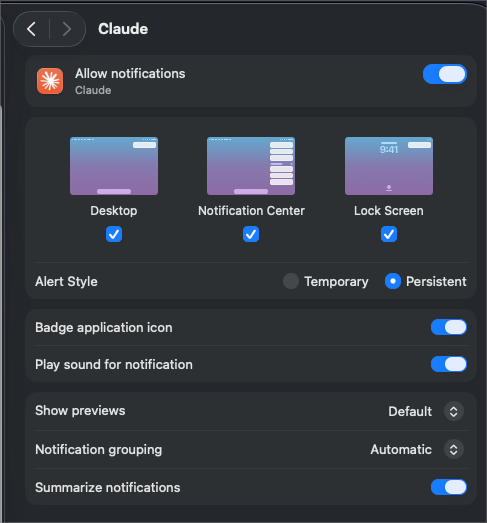
Why am I not getting notifications?macOS must allow notifications for the app whose icon squawk borrows (Claude
Desktop by default). Open System Settings → Notifications → Claude, turn on
Allow Notifications, and set the style to Alerts so the reply/approve
buttons appear and persist. If notifications still don't show, macOS may be
dropping the impersonated sender — set SQUAWK_ICON=none to use the default
icon.
The command is too long or multi-line. You can't safely approve what you
can't fully see, so when it doesn't fit, the body is truncated with … and the
button is withheld — click the body to open the pane and approve the full
command there.
Not fully. When two clients are attached to one session, tmux reports its
pane/window state per-session, not per-client, so squawk can't tell which
terminal you're actually looking at and may stay quiet when it should notify. A
single attached client — with any splits, windows, and detached sessions — is
fully handled.
AI disclosure
squawk was built almost entirely with Claude Code. The design, implementation,
and tests were produced through AI pair-programming under human direction and
review.
License
Reviews (0)
Sign in to leave a review.
Leave a reviewNo results found