camp
Health Warn
- License — License: Apache-2.0
- Description — Repository has a description
- Active repo — Last push 0 days ago
- Low visibility — Only 6 GitHub stars
Code Pass
- Code scan — Scanned 12 files during light audit, no dangerous patterns found
Permissions Pass
- Permissions — No dangerous permissions requested
No AI report is available for this listing yet.
Workspace and context manager for domain specific AI automation and large scale AI workflows
camp

Easily manage hundreds of projects and millions of planning documents. Part of Festival. Camp handles the workspace — your projects, tools, intents, and context. fest handles the planning and execution inside it.
Campaign workspace manager — create multi-project context workspaces instantly and easily navigate between workspaces, projects and workstations.
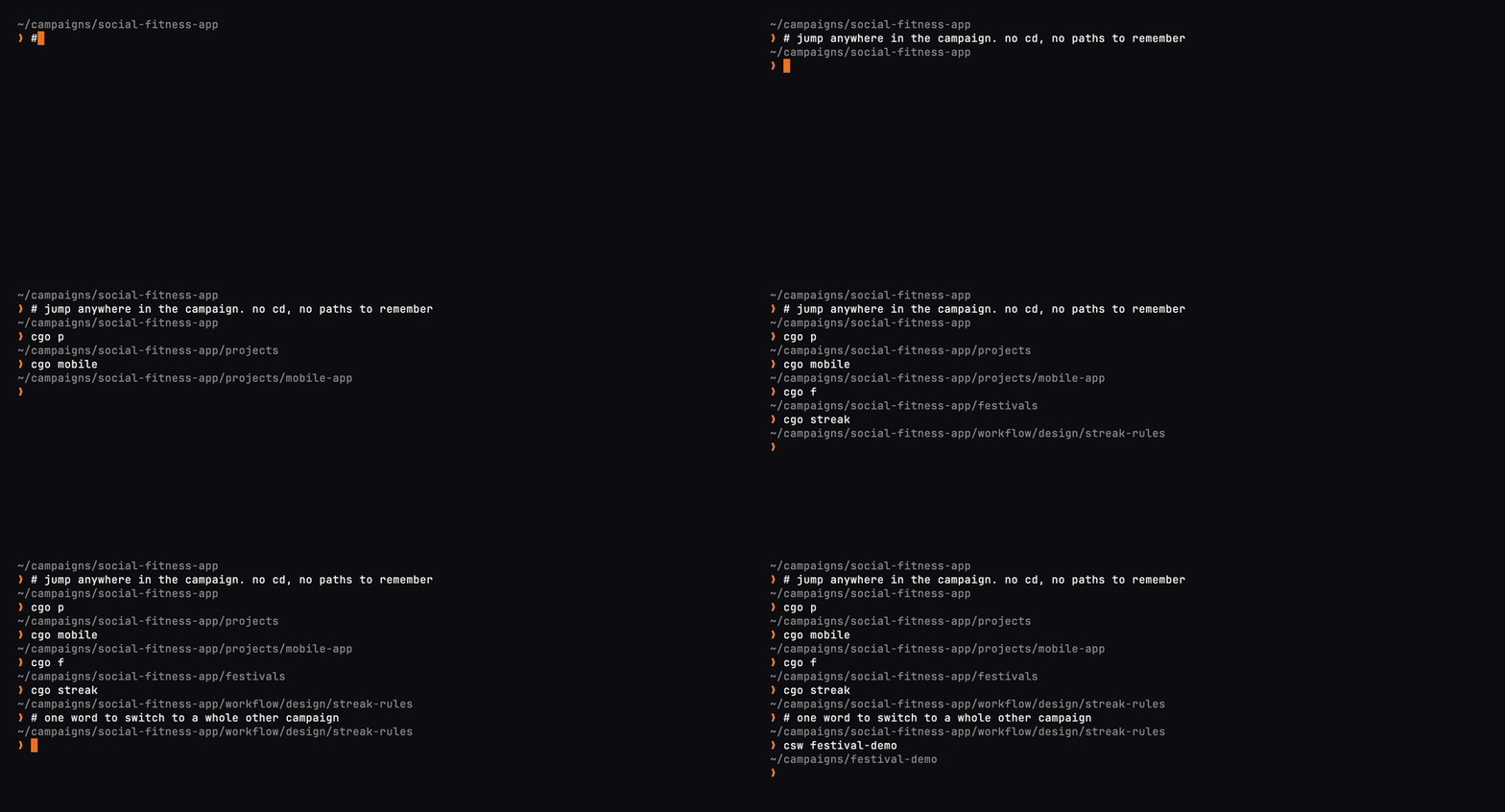
cgo: jump anywhere in the workspace with fuzzy matching, from any shell.

camp wi: one queue for every kind of work in the campaign.
Installation
Go Install
go install github.com/Obedience-Corp/camp/cmd/camp@latest
From Source
git clone https://github.com/Obedience-Corp/camp
cd camp
just install stable
Shell Integration
Add to your shell config to enable the cgo navigation function and tab completion:
Zsh (~/.zshrc):
eval "$(camp shell-init zsh)"
Bash (~/.bashrc):
eval "$(camp shell-init bash)"
Fish (~/.config/fish/config.fish):
camp shell-init fish | source
The eval hook provides:
cgofunction - Shell-native navigation with actualcdbehavior- Tab completion - Context-aware completion for categories, projects, and commands
campcompletion - Full command completion for the camp CLI
After adding the eval line, restart your shell or run source ~/.zshrc (or equivalent).
Finding the installed binary
Shell integration defines camp as a shell function (so camp go / cgo can cd in your current shell). That means plain which camp usually prints the function body, not a filesystem path.
Use these instead:
# zsh — path of the external binary (skips shell functions)
whence -p camp
# or: which -p camp

# bash
type -P camp

# show the function plus every binary on PATH
type -a camp

# resolve symlinks to the real file
realpath "$(whence -p camp)"   # zsh
realpath "$(type -P camp)"     # bash
To run the binary without the wrapper (scripts, debugging): command camp version.
Quick Start
# 1. Initialize a campaign
mkdir my-campaign && cd my-campaign
camp init

# 2. Add shell integration (restart shell after)
echo 'eval "$(camp shell-init zsh)"' >> ~/.zshrc

# 3. Navigate!
cgo p          # Jump to projects/
cgo f          # Jump to festivals/
cgo p api      # Fuzzy find "api" in projects/
Features
- Navigation — Category shortcuts, fuzzy finding, pins, and a cached index for instant project lookups (
go,pin,shortcuts,cache) - Project Management — Git submodules, linked local workspaces, campaign-owned directories, worktrees, and scaffolding (
project add/link/list/new/rename/remote/remove/run/unlink/worktree/prune) - Planning — Intents, promotion, dungeon for deprioritized work, and a unified work-item dashboard (
intent,promote,dungeon,gather,workitem) - Productivity — Leverage scoring to identify high-impact work (
leverage) - Git Integration — Campaign-level git operations with submodule fan-out (
stage,commit,log,push [all],pull [all],status [all],fresh [all],refs-sync) - Campaign Ops — Health checks, file operations, cross-campaign tools (
doctor,copy,move,sync,transfer) - Shell Integration — Native
cdbehavior with zsh, bash, and fish (shell-init) - Tab Completion — Smart completion for categories, projects, and paths
- Plugins — Discover camp plugins on
PATH(plugins)
Note: flow is a hidden low-level status engine. Use camp promote for lifecycle promotion.
Category Shortcuts
Navigate instantly with single-letter shortcuts:
| Shortcut | Directory | Description |
|---|---|---|
p |
projects/ | Project subdirectories |
f |
festivals/ | Festival methodology |
w |
workflow/ | Workflow directory |
d |
docs/ | Human documentation |
i |
.campaign/intents/ | Intents via camp intent |
settings |
.campaign/ | Campaign settings directory |
wt |
projects/worktrees/ | Git worktrees |
du |
dungeon/ | Archived work |
r |
workflow/reviews/ | Review materials |
de |
workflow/design/ | Design documents |
ex |
workflow/explore/ | Exploratory notes |
cgo i remains available as an operator shortcut into the hidden intent state,
but the normal human interface is camp intent.
Commands
Navigation - cgo
The cgo shell function is your primary interface:
# Jump to campaign root
cgo

# Jump to category
cgo p               # projects/
cgo f               # festivals/

# Fuzzy search within category
cgo p api           # projects/api-* (matches api-service, api-gateway, etc.)
cgo f fest          # festivals/*fest*

# Run command from category (without changing directory)
cgo -c p ls           # List contents of projects/
cgo -c f fest status  # Run fest status from festivals/
Pins: Pin frequently visited directories, jump to them with camp go or cgo, then use toggle to bounce back:
camp pin code                               # Pin current directory
camp pin design workflow/design/my-project  # Pin a matching design directory
camp go code                                # Resolve a pin through camp go
cgo design                                  # Shell jump to a pin
cgo t                                       # Jump back to the previous location
camp pins                                   # List all pins
camp unpin design                           # Remove a pin
Shortcuts: View all category shortcuts and custom shortcuts:
camp shortcuts # List all available shortcuts
Setup
camp create <name>         # Create a new campaign at the default campaigns directory
camp create <name> --path ~/Dev/sandbox  # Create under a specific campaigns directory
camp init                  # Initialize current directory
camp init my-campaign      # Create and initialize new directory
camp clone <url>           # Clone a campaign with full submodule setup
Project Management
Projects can be added inside the campaign as a git submodule, or linked to
the campaign if they're already on your machine.
camp project add <url>      # Add as a git submodule
camp project link <path>    # Link an existing local directory as a project
camp project rename old new # Rename a managed project and its Camp references
Use submodules via camp project add (or camp p add) if you plan to use
your campaign on multiple devices — linked projects must exist in the same
location on each device in order to work.
When an upstream repository was renamed too, pass the new URL explicitly:
camp project rename old new --remote-url [email protected]:org/new.git
Camp preserves dirty checkouts and conventional Camp worktrees, migrates
typed settings and work-item references, and reports historical prose it
intentionally leaves unchanged. Use --dry-run to inspect the transaction.
For the rest of the project surface (list, remove, unlink, stage,commit, run, worktree, prune, remote, new), seedocs/cli-reference/.
Attaching Non-Project Directories
Some directories belong to a campaign for context but aren't full projects
(notes, reference repos, scratch dirs). After creating a symlink to one
inside the campaign tree, run camp attach on the symlink to bind its
target so detection works from inside it. The same attachment can be bound
to multiple campaigns; each campaign-local symlink selects its own context:
ln -s ~/Dev/external-repo docs/examples/external-repo
camp attach docs/examples/external-repo

# From another campaign, attach the same resolved target again:
camp attach /path/to/external-repo --campaign other-campaign

# Force the campaign picker instead of using the current campaign:
camp attach docs/examples/external-repo --campaign

# now you can pin and navigate to it:
cd docs/examples/external-repo
camp pin external-repo
cgo external-repo
camp detach <path> removes the marker. Linked projects keep usingcamp project link / camp project unlink.
When a shared attachment is accessed directly rather than through a
campaign-local symlink, camp resolves it to the first bound campaign
(active_campaign_id). Detaching that fallback campaign makes the next bound
campaign active.
Planning
Intents, promotion, and the dungeon provide lightweight planning tools:
# Intents - capture ideas, goals, and work items
camp intent                # Manage campaign intents
camp intent add --campaign other-campaign "Capture idea"  # Cross-campaign capture (add only)
camp gather                # Import external data into the intent system

# Promotion - move intents, workitems, and festivals through lifecycle stages
camp promote               # Resolve context and dispatch to the right promote command

# Dungeon - archive deprioritized work
camp dungeon               # Move items to/from the dungeon

# Work items - a unified dashboard across intents, designs, explore, and festivals
camp workitem              # Interactive TUI dashboard of active work
camp workitem --json       # Machine-readable output
The dungeon triage crawl honors a .crawlignore file alongside the dungeon
directory — see docs/crawlignore.md for syntax and
placement.
Productivity
# Leverage scoring - identify high-impact work
camp leverage              # Compute leverage scores for campaign projects
See docs/leverage-score.md for details on the scoring algorithm.
Git Integration
Campaign-level git operations:
camp stage                 # Stage changes (same scope as commit) without committing
camp stage --include-refs  # Also stage submodule ref updates at campaign root
camp commit                # Commit changes in the campaign root
camp log                   # Show git log of the campaign
camp push                  # Push campaign changes to remote
camp push all              # Push all submodules with unpushed changes
camp pull                  # Pull latest changes
camp pull all              # Pull all submodules
camp status                # Show git status of the campaign
camp status all            # Dashboard of all submodules (branch, dirty/clean, push status, unmerged branches)
camp status all --view     # Interactive TUI viewer with per-repo detail
camp fresh                 # Post-merge branch cycling: fetch, safely sync default, prune, optional new branch
camp fresh all             # Same cycle across every project in the campaign
Campaign Operations
camp doctor                # Diagnose and fix campaign health issues
camp sync                  # Safely synchronize submodules
camp refs-sync             # Update campaign's recorded submodule pointers to each submodule's HEAD
camp copy                  # Copy a file or directory within the campaign
camp move                  # Move a file or directory within the campaign
camp run                   # Execute command from campaign root, or just recipe in a project
camp root                  # Print the current campaign root
camp id                    # Print the current campaign ID
camp concepts              # List configured concepts (picker/completion concepts)
camp cache info            # Show navigation cache status and metadata
camp cache rebuild         # Force rebuild the navigation cache
camp cache clear           # Delete the navigation cache
Cross-Campaign
camp list                  # List campaigns (active only by default; grouped by org)
camp list --org obey       # Filter by org; also --tag (AND), --status, --all, --group/--no-group
camp switch                # Switch to a different campaign
camp transfer              # Copy files between campaigns
camp register              # Register campaign in global registry
camp unregister            # Remove campaign from registry
camp registry              # Maintain ~/.obey/campaign/registry.json (prune, sync, check)
Organizing Campaigns (org / tags / lifecycle)
Campaigns carry three orthogonal organizational axes in the registry
(~/.obey/campaign/registry.json), filesystem + git only, no database:
- org: single membership; every campaign is in exactly one org (default
default). Group related campaigns; reassign by adding to a new org. - tags: a single global pool of labels; a campaign can carry any number,
and the same tag crosses orgs freely. - status: lifecycle, one of
active/inactive/reference. The defaultcamp listandcamp switchsurfaces show onlyactive; use--allor--statusto include inactive/reference campaigns. The lifecycle command iscamp lifecycle, notcamp status(which stays the git-status wrapper).
A campaign at its defaults (org default, no tags, active) stores no extra
keys, so existing registries are untouched until you organize something.
camp org add obey c1 c2       # Assign campaigns to an org (also reassigns)
camp org remove c1            # Return campaigns to the default org
camp org rename obey obedience# Rename an org, reassigning all members atomically
camp org list                 # Orgs with member + active counts
camp org show obey            # Member campaigns of an org
camp org                      # Print the current campaign's org

camp tag add c1 paid-work q3  # Add tags (set semantics; re-adding is a no-op)
camp tag rm c1 q3             # Remove tags
camp tag list                 # Global tag pool with counts

camp lifecycle set c1 reference  # Set status: active | inactive | reference
camp lifecycle list              # Status counts

camp festivals --org obey     # Festivals across an org's campaigns (composes 'fest list')
All of these accept --json. camp festivals filters campaigns by org/tag and
composes fest list --json per campaign; it does not modify fest list.
Skills
Camp centralizes skill bundles in .campaign/skills/ and projects them into
tool ecosystems (Claude, agents, etc.) as per-bundle symlinks so a single
source of truth stays in the campaign while provider-native skills
directories keep working.
camp skills # Manage campaign skill bundle projection (link/unlink/status)
System
camp settings              # Manage camp configuration (interactive)
camp plugins               # List discovered camp plugins on PATH
camp date                  # Append date suffix to file or directory name
camp version               # Show version information
Shell Integration
camp shell-init zsh       # Output zsh init script
camp shell-init bash      # Output bash init script
camp shell-init fish      # Output fish init script
How the Eval Hook Works
The eval hook dynamically generates and executes shell code at startup:
# What happens when you add this to ~/.zshrc:
eval "$(camp shell-init zsh)"

# 1. camp shell-init zsh outputs shell code (functions, completions)
# 2. eval executes that code in your current shell
# 3. The cgo function and completions become available
Why Eval Instead of Sourcing a File?
- Version sync - Always uses functions matching your installed camp version
- No file management - Nothing to update when camp is upgraded
- Shell detection - Camp can detect your shell environment dynamically
What Gets Installed
The shell-init script provides:
# 1. The cgo navigation function
cgo p                    # Runs: cd "$(camp go p --print)"
cgo p api                # Runs: cd "$(camp go p api --print)"
cgo -c p ls              # Runs: camp go p -c ls (no cd)

# 2. Quick capture helpers
cint "new feature idea"  # Runs: camp intent add "new feature idea"
cnote "meeting note"     # Runs: camp intent note "meeting note"

# 3. Tab completion for cgo
cgo <TAB>                # Completes categories: p f w d i wt du cr pi de ex
cgo p <TAB>              # Completes project names

# 4. Tab completion for camp commands
camp <TAB>               # Completes: init go project list register...
camp project <TAB>       # Completes: add commit link list new prune remote remove run unlink worktree
Troubleshooting
# Verify the camp binary is on PATH (do not use plain `which camp` —
# after shell-init it prints the wrapper function, not the binary path)
whence -p camp            # zsh: external binary only
type -P camp              # bash: external binary only
type -a camp              # function + every binary on PATH
realpath "$(whence -p camp)"  # follow symlinks to the real install

# Test shell-init output
camp shell-init zsh

# Manually reload
source ~/.zshrc

# Check if cgo is defined
type cgo
Campaign Directory Structure
A campaign provides a standardized layout for AI development:
my-campaign/
├── .campaign/           # Campaign configuration and system state
│   ├── campaign.yaml
│   ├── watchers.yaml
│   ├── intents/         # System-managed intents (camp intent, cgo i)
│   │   ├── inbox/
│   │   ├── active/
│   │   ├── ready/
│   │   └── dungeon/
│   ├── settings/        # Campaign-local settings and defaults
│   ├── skills/          # Campaign skill bundles (camp skills)
│   ├── leverage/        # Leverage snapshots and cache (camp leverage)
│   └── cache/           # Navigation index cache
├── projects/            # Git submodules and linked workspaces
│   ├── api-service/     # Git submodule
│   ├── web-app/         # Git submodule
│   ├── my-local-repo -> /Users/you/code/my-local-repo   # Linked workspace (symlink)
│   └── worktrees/       # Git worktrees (cgo wt)
│       └── api-service/
│           ├── feature-x/
│           └── bugfix-y/
├── festivals/           # Festival methodology (cgo f)
│   ├── planning/
│   ├── active/
│   ├── ready/
│   ├── ritual/
│   └── dungeon/         # completed/, archived/, someday/
├── workflow/            # Workflow resources (cgo w)
│   ├── design/          # Design documents (cgo de)
│   ├── explore/         # Exploratory notes (cgo ex)
│   └── reviews/         # Review materials (cgo r)
├── docs/                # Human documentation (cgo d)
└── dungeon/             # Archived work (cgo du)
Worktree Navigation
Navigate git worktrees with @ syntax:
cgo wt                    # Jump to worktrees/
cgo wt api-service@       # Show branches for api-service
cgo wt api-service@feat   # Jump to api-service@feature-x
Tab Completion
The shell integration includes intelligent tab completion:
# Navigation
cgo <TAB>                              # Shows: p f w d i wt du cr pi de ex
cgo p <TAB>                            # Shows: api-service web-app cli-tool
cgo p api<TAB>                         # Completes to: api-service api-gateway
cgo wt api@<TAB>                       # Shows worktree branches

# --project flag (all project commands)
camp project commit -p <TAB>           # Shows project names from project list
camp project worktree add -p <TAB>     # Same project name completion
Configuration
Campaign Config
Located at .campaign/campaign.yaml:
name: my-campaign
type: product
description: My awesome project
Project Jump Locations
Projects can define shortcuts to jump directly to subdirectories within the project. The default shortcut is used when navigating to the project without specifying a sub-path.
Add a projects section to .campaign/campaign.yaml:
projects:
- name: festival-methodology
    path: projects/festival-methodology
    shortcuts:
      default: fest/           # Jump here by default
      cli: fest/cmd/fest/      # Named sub-shortcut

- name: api-service
    path: projects/api-service
    shortcuts:
      default: src/
Usage:
cgo p fest       # Jumps to projects/festival-methodology/fest/ (uses default)
cgo p fest cli   # Jumps to projects/festival-methodology/fest/cmd/fest/
cgo p api        # Jumps to projects/api-service/src/ (uses default)
Without a default shortcut, navigation jumps to the project root.
Config Files
Camp uses a small set of configuration and state files:
~/.obey/campaign/config.jsonfor global user preferences such as editor,
theme,no_color, andverbose.campaign/campaign.yamlfor campaign metadata, project entries, and picker
concepts.campaign/settings/jumps.yamlfor campaign-local navigation paths and
shortcuts.campaign/settings/fresh.yamlfor optionalcamp freshdefaults.campaign/watchers.yamlfor the camp/fest watcher contract
See docs/campaign-settings-files.md for the
full file-by-file reference, including which files are scaffolded bycamp init and which are only created on first use.
Documentation
- CLI Reference — Complete reference for every command and flag
.campaign/Directory Reference — Hidden campaign metadata layout and ownership- Campaign Settings Files — Global and local config/state files explained
- Leverage Scoring — How leverage scores are computed
- Shortcuts — Category shortcuts reference
- Shell Integration — Detailed shell setup guide
.crawlignoreSyntax — Excluding paths from dungeon triage
Migration guides for behavior changes live under docs/migrations/.
Individual command docs are in docs/cli-reference/ (auto-generated via just docs).
Development
just                      # List all commands
just build-camp           # Build camp binary (vet + build)
just build                # Show all build recipes (profiles, cross-platform)
just test                 # Show all test recipes
just test all             # Run all tests
just install              # Show install options (stable, dev, current)
just install stable       # Install stable profile to $GOBIN
just gate-fast            # Run the local quality gate on demand
just docs                 # Regenerate CLI reference docs
just docs-check           # Fail if committed CLI reference is stale
just run <args>           # Run with arguments
Quality Gate
Camp has no hosted CI. Quality gates run locally, on demand:
just gate-push   # quick smoke: whitespace, build, vet, lint, short dev tests
just gate-fast   # broader: both-profile build, vet, lint, CLI docs check, full dev unit tests
just gate        # full matrix: gate-fast plus stable unit tests
Every release recipe runs just gate before tagging, so releases are always
gated (including just docs-check: generated docs/cli-reference/ must match
the current command surface). There is no pre-push hook; run a gate when you
want a signal. Changing pack/unbundle/clone/transport (or any) command help
requires just docs and a commit of the regenerated reference.
If you previously ran just hooks-install, run git config --unset core.hooksPath
once to fully revert that local setting, it now points at a removed directory.
Part of Festival
Camp is one half of Festival, the current product from Obedience Corp.
- camp — workspace and context. One place for all your projects, tools, intents, agents, and work.
- fest — planning and execution. Hierarchical: festival → phase → sequence → task.
- Festival — combined distribution of camp + fest. Full docs at fest.build.
Find camp useful? Star the repo so others can find it.
License
Apache License 2.0 - See LICENSE for details.
Reviews (0)
Sign in to leave a review.
Leave a reviewNo results found