shelfie
Health Warn
- License — License: MIT
- Description — Repository has a description
- Active repo — Last push 0 days ago
- Low visibility — Only 5 GitHub stars
Code Pass
- Code scan — Scanned 12 files during light audit, no dangerous patterns found
Permissions Pass
- Permissions — No dangerous permissions requested
No AI report is available for this listing yet.
Automatic artifact log for Claude Code — every file, page and server Claude makes, with dates, descriptions and change history, on one page.





Automatic artifact log for Claude Code. Every file, page and server Claude makes in a project — with dates, short descriptions and change history — on one page you can open from Finder.
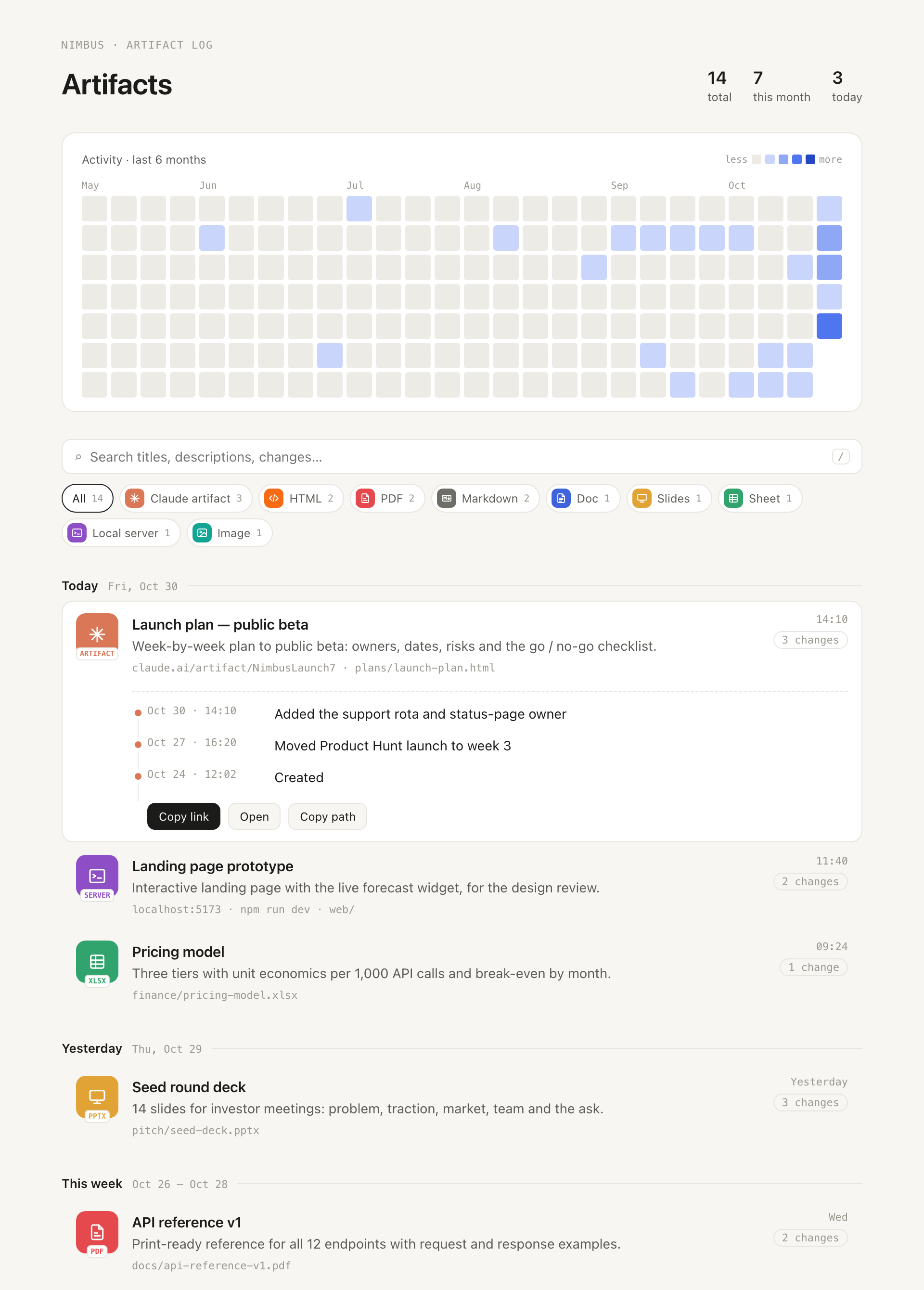
You ask Claude for a dashboard, a PDF guide, a pitch deck, a prototype on localhost. A week later you're scrolling a chat to find it. Shelfie keeps the shelf for you:
- Captured automatically. Hooks notice new and changed files, pages published to claude.ai, and local servers. Nobody has to remember anything.
- Described while the context is fresh. At the end of a reply, Claude is asked once to say what each new item is — and whether it's a real deliverable at all. READMEs, scratch notes and throwaway servers are filtered out.
- Change history. One line per session: "Added the FAQ section", "Week 3 results".
- Find it by date. A GitHub-style activity map, a timeline grouped by day / week / month, search, and type filters with icons.
- Local and private. Everything lives in your project's
.shelfie/folder. The dashboard is a single static HTML file — no server, no network requests.
[!NOTE]
Shelfie never uploads anything. It only reads what Claude Code's hooks tell it and the files in your project, and writes to.shelfie/.
Install
Shelfie installs per project.
claude plugin marketplace add octozaur/shelfie
claude plugin install shelfie@shelfie --scope project
Start Claude in the project. On the first session Claude asks you two things:
- Which formats to track (default: all of them).
- Whether Shelfie may record its notes without permission prompts. If you agree, one allow rule for Shelfie's own
notecommand (<project>/.shelfie/bin/shelfie note …) is added to.claude/settings.local.json— your personal, uncommitted settings. If you decline, Shelfie still works, but you'll approve each note.
Requires python3 (3.9+, standard library only — the one that ships with macOS is fine). macOS and Linux.
What gets tracked
| Type | Icon label | What |
|---|---|---|
| Claude artifact | ARTIFACT |
A page published to claude.ai (Claude desktop app). If it was published from a file in the project, file and page are one entry. |
| HTML | HTML |
.html, .htm |
PDF |
.pdf |
|
| Markdown | MD |
.md, .markdown |
| Doc | DOCX |
.docx, .doc, .odt, .rtf |
| Slides | PPTX |
.pptx, .key, .odp |
| Sheet | XLSX |
.xlsx, .xls, .csv, .tsv, .ods |
| Local server | SERVER |
A prototype or app Claude runs on localhost — recorded with the command, folder and port so you can start it again |
| Image | IMG |
.png, .jpg, .jpeg, .gif, .webp, .svg |
Only changes made while Claude is working on a reply count — your own edits between turns, git pull or cloud sync never show up. A burst of many new files of one type in one folder (say, 74 generated levels) becomes a single entry. Deleted files stay in the log, greyed out as missing.
Commands
/shelfie |
Open the dashboard (.shelfie/shelfie.html) |
/shelfie formats |
See and change which formats are tracked |
/shelfie ignored |
See what Claude decided was not an artifact |
/shelfie restore <id> / /shelfie ignore <id> |
Put an item back, or hide one |
/shelfie setup |
Re-run the first-run questions |
You can also run .shelfie/bin/shelfie --help in a terminal.
How it works
UserPromptSubmit ─ marks the start of the turn
PostToolUse ────── claude.ai publishes, dev-server starts, .claude/launch.json
Stop ───────────── scans for files changed during the turn → registry
                   new or changed items? → asks Claude once:
                   .shelfie/bin/shelfie note <id> --artifact yes|no --title … --desc … --change …
                   → re-renders .shelfie/shelfie.html
Claude is asked about an item at most once per session, so editing the same file ten times in one conversation produces one history line.
Files in .shelfie/:
config.json— tracked formats and extra exclude globs (e.g."exclude": ["drafts/*"])registry.json— the log itselfshelfie.html— the dashboard (regenerated; safe to delete)bin/shelfie— project launcher, refreshed every session
[!TIP]
Whether to commit.shelfie/is up to you: add it to.gitignoreto keep the log personal, or commitregistry.jsonto share it with the team.
Development
python3 -m unittest discover -s tests -t .
python3 tests/fixtures/make_demo.py /tmp/nimbus         # demo dashboard (the one in the screenshot)
claude --plugin-dir /path/to/shelfie                    # try it in any project
Changes are listed in CHANGELOG.md. Bug reports and ideas are welcome in issues.
License
Reviews (0)
Sign in to leave a review.
Leave a reviewNo results found