openspec-webui
Health Warn
- License — License: MIT
- Description — Repository has a description
- Active repo — Last push 0 days ago
- Low visibility — Only 7 GitHub stars
Code Warn
- network request — Outbound network request in frontend/src/lib/api.ts
Permissions Pass
- Permissions — No dangerous permissions requested
No AI report is available for this listing yet.
Interactive browser UI for browsing and managing OpenSpec specifications
OpenSpec WebUI
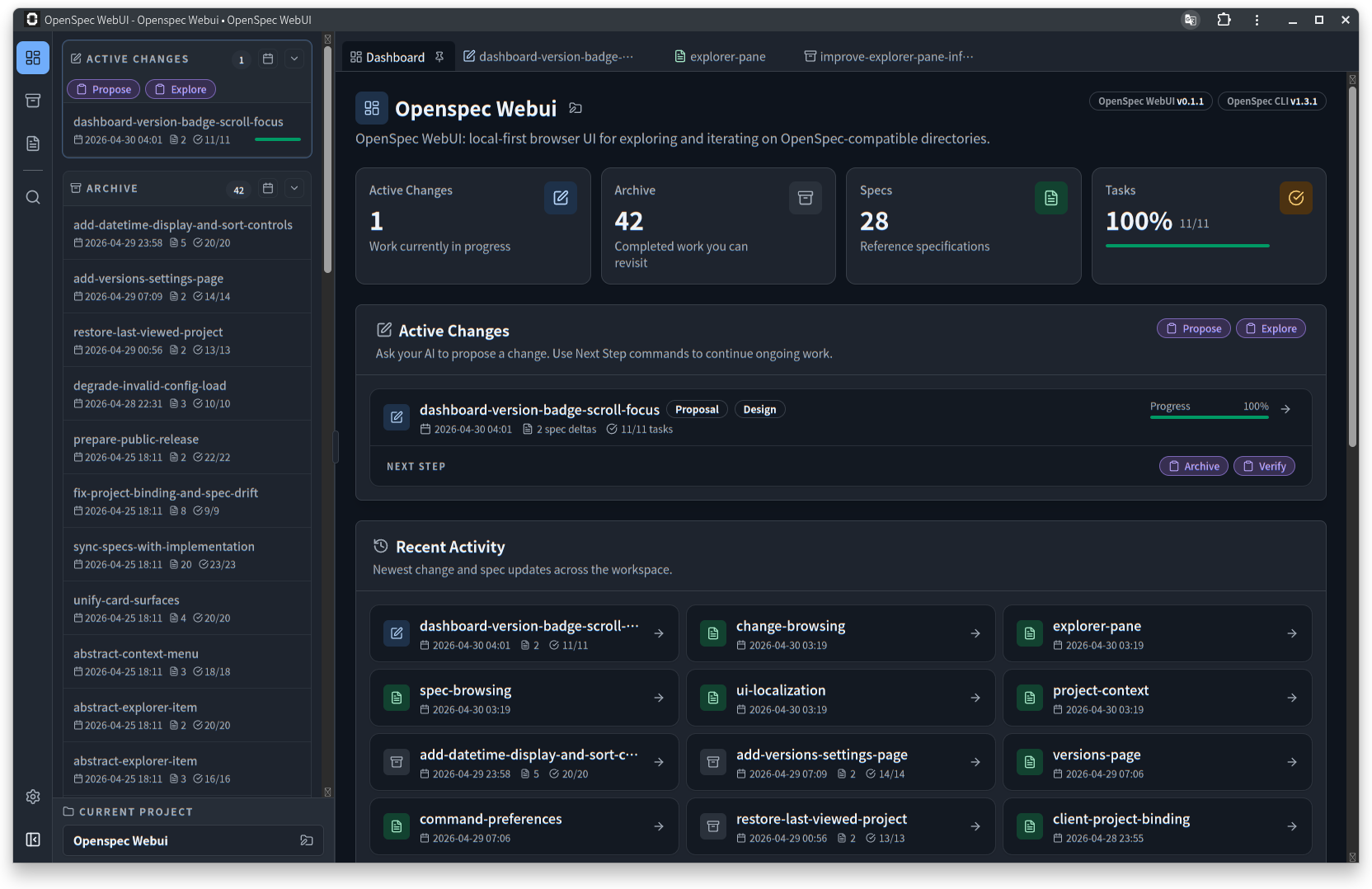
OpenSpec WebUI helps you review OpenSpec artifacts, run validation, track change progress, and copy the next command into your AI coding tool — without manually navigating the OpenSpec folder structure.
What is this?
OpenSpec is a spec-driven development workflow for managing specs, proposals, designs, and tasks.
OpenSpec WebUI is a local browser interface for projects that use OpenSpec. Your AI coding tool still creates and updates the files; OpenSpec WebUI helps you review the results, run validation, understand the current change state, and copy the next command to continue the workflow.
Features
Review OpenSpec projects
- Multi-project support — add, switch, and remove projects from the UI
- Browse
config.yaml, specs, active changes, and archived changes from the browser - Review proposals, designs, tasks, and supplemental change files with Markdown preview
- Search across all OpenSpec content
- Live refresh when files change
- Group supplemental change files by folder/tab
Validate and track progress
- Run OpenSpec validation from the UI
- View failed, warning, and info validation results in a dedicated panel
- Jump from validation results to the related spec or change
- Track checkbox task progress across changes
Work with AI coding tools
- Copy context-aware next commands for the current workflow state
- Switch between command formats for OpenSpec-supported AI coding tools
- Copy selected text as attributed Markdown quotes for AI prompts
Other
- UI available in 7 languages (English, Japanese, Portuguese, Spanish, Chinese, French, German)
- Light / dark / system theme support
Install
npm install -g openspec-webui
Or use without installing:
npx openspec-webui
Usage
openspec-webui [options]
Examples
# Start with default settings (127.0.0.1:3001, auto-open browser)
openspec-webui

# Use a different port
openspec-webui --port 8080

# Allow access from other devices on the network
openspec-webui --host 0.0.0.0

# Start without opening the browser
openspec-webui --no-open
Options
| Option | Description |
|---|---|
-p, --port <port> |
Port to listen on (default: 3001) |
--host <address> |
Host to bind to (default: 127.0.0.1) |
--no-open |
Do not open the browser automatically |
-V, --version |
Display version |
-h, --help |
Display help |
Security and permissions
openspec-webui is local tooling — it starts a local server, reads OpenSpec project files, runs openspec commands, and checks npm for version updates. Project contents are not sent to external services. No install-time lifecycle scripts are used.
Development
Requirements
- Node.js >= 20
Commands
npm install
npm run dev        # Start dev mode (server + frontend watch)
npm run dev -- --host 0.0.0.0 --port 3001 --no-open
npm run build      # Build production assets
npm run test       # Run unit tests
npm run typecheck  # TypeScript + Svelte diagnostics
Dev mode details
- App URL:
http://127.0.0.1:3001 - Server code is watched and restarted automatically
- Frontend source changes rebuild
dist-frontendautomatically - After frontend edits, refresh the browser manually
License
MIT. See LICENSE.
This project is based on MusicAdam/openspec-viewer, which is licensed under the MIT License.
Third-party package licenses can be found in the included ThirdPartyNotices.txt.
Reviews (0)
Sign in to leave a review.
Leave a reviewNo results found