autologin-mcp
Health Warn
- License — License: MIT
- Description — Repository has a description
- Active repo — Last push 0 days ago
- Low visibility — Only 5 GitHub stars
Code Fail
- process.env — Environment variable access in scripts/release.mjs
- network request — Outbound network request in scripts/release.mjs
- exec() — Shell command execution in scripts/render-images.mjs
- process.env — Environment variable access in scripts/render-images.mjs
- spawnSync — Synchronous process spawning in scripts/smoke.mjs
- network request — Outbound network request in src/bridge/filler.ts
- exec() — Shell command execution in src/bridge/server.ts
Permissions Pass
- Permissions — No dangerous permissions requested
No AI report is available for this listing yet.
Auto-login MCP for AI coding agents. Logs your agent into the app under test; credentials stay on your machine and never reach the model.

autologin-mcp
Auto-login MCP server for AI coding agents.
Your agent logs in to the app it is testing. Your password never reaches the model.






Website · Quick use · Documentation · FAQ · Changelog
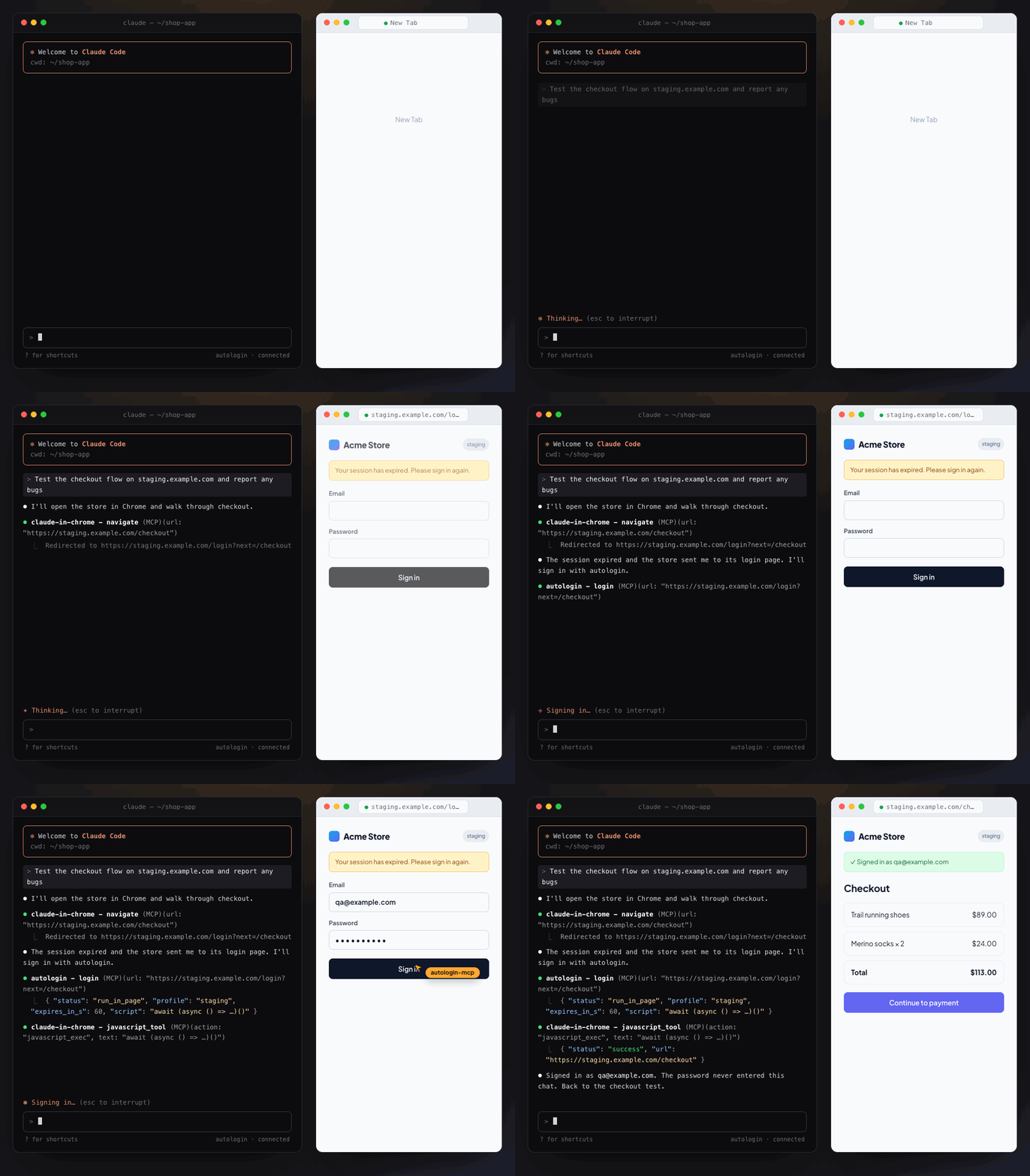
autologin-mcp is an open-source Model Context Protocol (MCP) server that lets AI coding agents such as Claude Code log in to the web app they are testing. When the agent's browser tab shows a login form, a "session expired" message, a 401/403 or a redirect to a login page, the agent calls the login tool, and autologin-mcp fills the form with credentials stored on your machine. The username and password never appear in the conversation, so they never reach the model. It works with Claude in Chrome, Playwright MCP and chrome-devtools-mcp, and needs no browser setup.
You:            "Test the checkout flow on staging"
Agent:          …navigates… the session has expired, the app shows a login form
Agent:          calls autologin.login({ url })                 ← no password in the request
autologin-mcp:  returns a one-time script                      ← no password in the response
Agent:          runs it in the tab → { "status": "success" }   ← the page got the password from your machine
Agent:          continues the checkout test
Quick use
Requirements: Node.js 22.12+, Claude Code, and a browser tool for the agent (for example Claude in Chrome).
# 1. Register the MCP server, skill and guard hook in Claude Code
npx autologin-mcp install

# 2. Add a login profile. Run this in a normal terminal, not in the AI chat.
npx autologin-mcp add
#   Profile name (e.g. staging): staging
#   Root URL (e.g. example.com or localhost:3000): staging.example.com
#   Username: [email protected]
#   Password (hidden):
- Restart Claude Code and test as usual. When the app asks for a login, the agent calls
loginby itself. - Optional: turn on
chrome://inspect/#remote-debuggingin Chrome (144+) to let autologin-mcp fill the tab directly (CDP mode).
Upgrade with npx autologin-mcp@latest install, remove with npx autologin-mcp uninstall. Step-by-step guide: Getting started.
Features
- Logs in when the agent needs it. The agent calls
loginwhen the page shows a login form, a "session expired" message, a 401/403 or a redirect to a login URL, then carries on with its task. - The password never enters the chat. Credentials go from a file on your machine straight into the page. Tool results are scrubbed of passwords, and a guard hook keeps the agent away from the credentials folder.
- No browser setup. Bridge mode uses the JavaScript tool the agent already has. Turn on Chrome remote debugging and CDP mode fills the tab itself.
- Locked to your app's origin. Credentials are released only to the site of the profile, so a prompt-injected page on another site gets nothing.
- Real-world forms. React, Vue and Angular inputs, forms that render late, submit buttons in many languages, and the page's own error message when a login fails.
- No account lockouts. Three failed logins in five minutes pause the profile until you check the credentials.
- Several accounts and apps. One global credentials file outside your projects, with as many profiles as you need.
- One command to install.
npx autologin-mcp installregisters the MCP server, the skill and the guard hook in Claude Code.
Why
- Sessions expire in the middle of long agent runs. The agent stops, or asks you for the password.
- A password pasted into the chat becomes part of the conversation. It is sent to the model provider and ends up in transcripts, logs and context summaries.
- A password in a file the agent can read (a project
.env, a prompt file) has the same problem, and can end up in git.
autologin-mcp splits the work: the agent decides when to log in; a small deterministic program on your machine does the how, with no AI involved. It finds the login form, fills it, submits it and reports only the outcome.
Documentation
The full documentation is in docs/ and on the website. The essentials:
How it works
- Bridge mode (default, zero setup).
loginreturns a one-time loader script containing only a 60-second URL on127.0.0.1. The agent runs it in the tab with the JavaScript tool it already has (javascript_tool,browser_evaluateorevaluate_script). The page then fetches the credentials from your machine, and they are released only if the page's browser-setOriginheader belongs to the profile's site. - CDP mode (automatic when Chrome remote debugging is on). autologin-mcp connects to Chrome over the DevTools Protocol and fills the tab itself; the agent runs nothing.
- The filler works with React, Vue and Angular forms, waits for the outcome, and returns
success,submitted, orfailedwith the page's error message.
More: How it works.
The credentials file
npx autologin-mcp add writes ~/.autologin-mcp/credentials.env (permissions 600). It is global, outside your projects, so it never ends up in git. Edit it with npx autologin-mcp edit:
STAGING_URL=staging.example.com
[email protected]
STAGING_PASSWORD='p@ss w0rd#1'      # quote values that contain spaces or #

LOCAL_URL=localhost:3000
LOCAL_USERNAME=admin
LOCAL_PASSWORD=admin
LOCAL_SUBMIT_SELECTOR=button[type=submit]   # optional, for unusual forms
A profile only fills pages whose host matches its root URL (example.com, *.example.com, localhost:3000). Several accounts for the same app are fine. More: Configuration.
MCP tools
| Tool | What the agent gets back |
|---|---|
list_profiles |
Profile name, root URL and username for each profile. Never passwords. |
login({ url?, profile? }) |
Bridge mode: run_in_page with a one-time script/function to run in the tab. CDP mode: the result directly (success, submitted, failed, no_login_form, rate_limited, …). |
login_status({ profile? }) |
The latest outcome per profile, for when the agent's JavaScript call was cut off. |
open_config |
Opens the credentials file in your editor. The content is never returned. |
More: MCP tools and CLI reference.
Security in one paragraph
A Claude Code guard hook and deny rules block the agent from reading the credentials folder, also in skip-permissions mode. Every tool result is scrubbed of passwords. The bridge listens on 127.0.0.1 only, each script works once for 60 seconds, and credentials go only to the profile's origin, so a prompt-injected page on another site gets nothing. Three failed logins in five minutes pause a profile, so a wrong password cannot lock the account. autologin-mcp prevents accidental exposure, not a deliberately hostile agent: use dedicated test accounts. More: Security model.
Works with
| Agent / browser tool | Status |
|---|---|
| Claude Code + Claude in Chrome | Supported and tested end to end |
| Claude Code + Playwright MCP | Supported (browser_evaluate, or CDP with a shared browser) |
| Claude Code + chrome-devtools-mcp | Supported (evaluate_script, or CDP with a shared browser) |
| Other MCP clients | The stdio server runs; installer, skill and guard hook are Claude Code only |
More: Agents and browser tools and Troubleshooting.
FAQ
How do I let Claude Code log in to my web app without giving it my password?
Install autologin-mcp, add a profile for your app in a normal terminal, and restart Claude Code. When the app shows a login form, Claude calls login and autologin-mcp fills the form with the credentials on your machine. Claude only sees the outcome.
Does the password ever reach the AI model?
No. It goes from the local credentials file straight into the page, through the origin-checked 127.0.0.1 bridge or the Chrome DevTools Protocol. Tool results are redacted, and a guard hook blocks reads of the credentials file.
Do I need Chrome remote debugging?
No. Bridge mode needs no browser setup. Remote debugging enables CDP mode, which also works when the app's Content-Security-Policy blocks the bridge.
Does it support SSO, 2FA or multi-step logins?
Not yet: it handles username + password forms on the app's own page. Multi-step logins, iframes, SSO hosts and TOTP are on the roadmap.
Is it free?
Yes, MIT licensed.
More questions: FAQ.
Roadmap
- Opt-in auto-login (CDP mode): watch a profile's URL and log in without the agent asking
- Multi-step logins (username → next → password), iframes, SSO login hosts
- TOTP codes
-
doctorandtest <profile>commands - Installers for Codex CLI, Gemini CLI and Cursor; a Claude Code plugin
Development
npm install
npm test            # unit tests + end-to-end tests in a headless Chrome
npm run coverage    # fails below 98% statements/branches/functions/lines
npm run build && npm run smoke
The end-to-end tests start a throwaway headless Chrome (set CHROME_PATH if Chrome is not in a standard location). See CONTRIBUTING.md. Security reports: SECURITY.md.
Releases
Every release has the same version in package.json, the git tag, npm and the GitHub release. See CHANGELOG.md for what changed in each version.
License
MIT © Olgay Sezgin
Reviews (0)
Sign in to leave a review.
Leave a reviewNo results found