context-garden
Health Warn
- License — License: MIT
- Description — Repository has a description
- Active repo — Last push 0 days ago
- Low visibility — Only 5 GitHub stars
Code Pass
- Code scan — Scanned 12 files during light audit, no dangerous patterns found
Permissions Pass
- Permissions — No dangerous permissions requested
No AI report is available for this listing yet.
🌱 Context Garden is a context management suite for coding agents on multi-repo platforms. Shares system knowledge across repositories and agent swarms, and cuts what each agent reads: exact code ranges, clustered logs, remembered repo facts. Offline Claude Code skills, no LLM calls.
🌱 Context Garden


Self-contained Agent Skills that cut an agent's context usage: deterministic, offline, no LLM
calls inside the tooling. Optionally with ContextGarden, a desktop app for whole platforms.
Install
Two options. Both give you the same six skills; the app adds one window around them.
| Full app | Skills only | |
|---|---|---|
| For | multi-repo platforms, several agents and accounts | any Claude Code setup |
| You get | gardens of repos, skills per garden, agent terminals, dashboard | the six skills, hooks and agents |
| Needs | git; Claude Code and/or Codex; logged-in gh / glab for orgs and groups; Rust only to build from source |
Claude Code |
Option 1: Full app (ContextGarden)
From a release. Download the installer for your OS from
Releases: .dmg (macOS),.msi / .exe (Windows), .deb / .rpm / .AppImage (Linux). The builds are not
code-signed yet, so the first start needs one extra step:
- macOS: right-click ContextGarden in Applications, then Open (or
xattr -dr com.apple.quarantine /Applications/ContextGarden.app). - Windows: SmartScreen, then "More info", then "Run anyway".
- Linux:
sudo apt install ./ContextGarden_*.deb, orchmod +xthe.AppImageand run it.
From source. Needs Rust, Node 18+ and the
Tauri prerequisites for your OS (Xcode Command Line
Tools on macOS, WebView2 on Windows, webkit2gtk on Linux). Rust is not optional, the app's
backend is Rust:
# Rust (https://rustup.rs); on Windows: winget install Rustlang.Rustup
curl --proto '=https' --tlsv1.2 -sSf https://sh.rustup.rs | sh
xcode-select --install   # macOS only, if not installed yet
Then build the installer and install it like a release:
git clone https://github.com/oliverweissl/context-garden && cd context-garden/app
npm install
npm run tauri build    # installer in src-tauri/target/release/bundle/
Use the installed app, not npm run tauri dev: the dev build is for working on the app
itself and some features work less well in it.
Command-line tools. The app drives your own CLIs, so install them first:
git, and Claude Code and/or Codex.- GitHub orgs:
gh(brew install gh,winget install GitHub.cli, or your package
manager), thengh auth login. - GitLab groups:
glab(brew install glab,winget install glab.glab, or your
package manager), thenglab auth login. It asks for a
personal access token with
theapiandwrite_repositoryscopes. For self-hosted GitLab:glab auth login --hostname gitlab.example.com.
Single repo URLs and local folders need neither gh nor glab.
Then: add your accounts (optional; the app signs in through the agent CLI and installs the
skills into each), start a garden from repos, folders, GitLab groups or GitHub orgs, take the
recommended skills, and open agents side by side. Apart from the skills it installs nothing,
never touches agent credentials, and shows a button when a newer release or newer skills are out. More:app/README.md.
Option 2: Skills only
As a Claude Code plugin (all six skills, their hooks and agents):
/plugin marketplace add oliverweissl/context-garden
/plugin install context-garden@context-garden
/context-garden:setup    # skills start off: pick the ones for your use case
Or copy single skills (their hooks then need the settings snippet in the skill's references/):
cp -r skills/{skill} ~/.claude/skills/{skill} # or the project's .claude/skills/
The skills
| Skill | Does |
|---|---|
🌰 seedbank |
Promotes repeatedly-rediscovered repo facts into a small, always-loaded AGENTS.md. |
✂️ pruner |
Returns exact file:start-end ranges worth reading (Python + C/C++) instead of grep-exploring. |
♻️ compost |
Compacts huge compiler/test/CI/HPC output into clustered summaries. |
🍄 mycelium |
Keeps subagents cheap: completes briefs, routes general-purpose to specialists, enforces a hard per-agent tool budget (low/medium/high/extreme), and shares finding notes between agents. |
🏡 greenhouse |
Shared memory across the repos of one platform: per-repo cards (provides, depends on, key facts) beside the repos. |
🌾 weeder |
Shrinks a Skill's always-loaded token cost without losing instructions. |
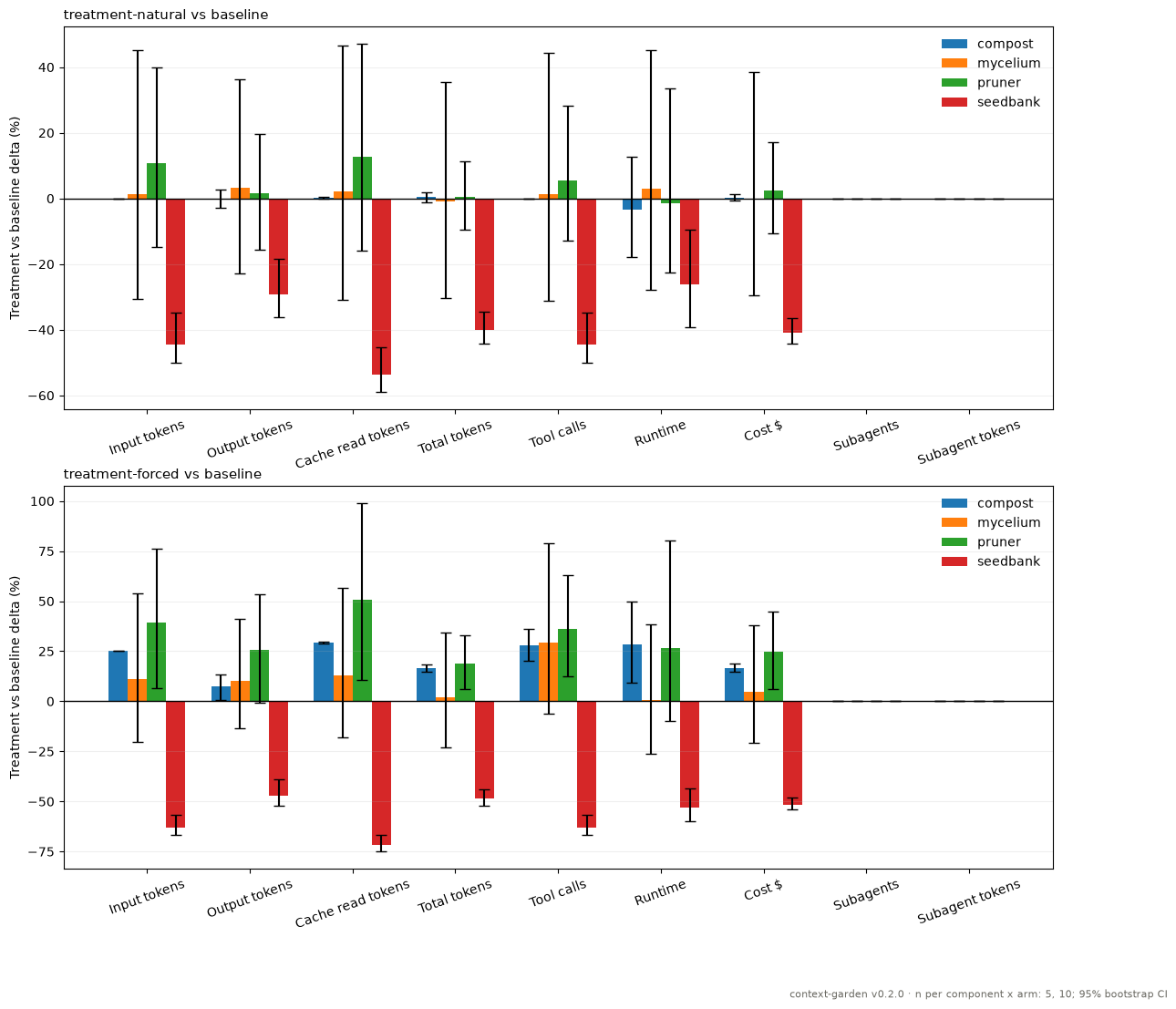
Benchmark results for v0.2.0 on the small fixtures in this repo, run with Claude Code (summary; older versions in docs/benchmarks/):
Turn skills on
Every skill starts off: nothing runs, not even the hooks, until you choose. The app does
this per garden; with the plugin run /context-garden:setup (it asks), name a preset
(/context-garden:setup platform, add --scope user for every repo), or ask Claude
("turn on compost and pruner").
| You work... | Preset | Turned on |
|---|---|---|
| in one repo, everyday coding and debugging | solo |
seedbank, pruner, compost |
| on several repos that call each other (services, shared packages, APIs) | platform |
+ greenhouse |
| with many subagents per task | swarm |
+ mycelium |
| with many agents across a multi-repo platform | platform-swarm |
+ greenhouse, mycelium |
| mostly with long builds, test suites, CI or HPC/SLURM logs | logs |
compost only |
Each skill is on (Claude uses it when relevant), manual (only when you call it, e.g./context-garden:compost summarize the failing pytest run) or off. Skills a preset does not
turn on become manual; all turns everything on, off hides the reminder.
Modes are Claude Code's own skillOverrides setting, most specific first:.claude/settings.local.json (this repo, only you; default), .claude/settings.json (this
repo, shared), ~/.claude/settings.json (every repo):
{"skillOverrides": {"compost": "on", "pruner": "user-invocable-only"}}
"user-invocable-only" is manual; a skill with no entry is off.CONTEXT_GARDEN_MODE_<SKILL>=on|manual|off overrides everything for one shell. Copied skills
can also be switched with skills/<skill>/bin/<skill> mode on|manual|off [--scope ...].
Claude Code ignores skillOverrides for plugin skills, so each skill checks its mode when it
loads; its one-line description is still listed (about 60-100 tokens). To drop that too, copy
the skill or /plugin disable context-garden.
Hooks and agents
Skills teach Claude how to do a job; the deterministic parts run as hooks, and jobs worth
delegating ship as agents. Every hook is a no-op unless its skill is on (except a
session-start reminder to run /context-garden:setup while no skill has a mode).
Started in a folder of many repos (not itself a git repo), each hook works on the repo the
action touched (the file read, the cd target, the error's paths, an agent's notes), as if
the session had started there. The folder itself gets only mycelium's spawn log, and only
when an agent brief names no repo.
| Skill | Hook | Agent |
|---|---|---|
| compost | before Bash: a raw build/test command is denied with the compost command to run instead (hook in .compost/config.json: redirect, ask, rewrite, off) |
|
| pruner | on prompt submit: a pasted traceback/compiler error gets a slice as context | preloaded into scout |
| seedbank | after Read/Grep/Glob and read-only Bash: record observations in the touched repo; at stop: once per session, ask to curate this session's candidates | gardener curates and promotes |
| mycelium | before Agent: complete the brief, route general-purpose to a specialist; before each subagent tool call: hard tool budget; when an agent stops: record its Notes: block |
scout read-only search, landscaper one bounded edit, botanist runs checks |
| greenhouse | session start: platform overview, or ask where the base is; session end: card sync if the base opted in | envoy reads another repo's checkout |
| weeder | weeder runs the whole slimming workflow |
Development
skills/{skill}/bin/{skill} --help
bash skills/{skill}/tests/smoke_test.sh   # offline, bundled fixtures
docs/architecture.md (layout, self-containment rule, design principles) ·docs/skill-development.md (adding a Skill) ·docs/benchmarking.md (running and plotting benchmarks) ·examples/ (measured before/after) ·app/README.md (the desktop app).
Contributing: CONTRIBUTING.md. License: LICENSE.
Reviews (0)
Sign in to leave a review.
Leave a reviewNo results found