kru
Health Pass
- License — License: MIT
- Description — Repository has a description
- Active repo — Last push 0 days ago
- Community trust — 89 GitHub stars
Code Fail
- rm -rf — Recursive force deletion command in .github/workflows/ci.yml
- rm -rf — Recursive force deletion command in .github/workflows/release.yml
- network request — Outbound network request in browser-extension/service-worker.js
- crypto private key — Private key handling in renderer/app.js
- process.env — Environment variable access in scripts/check-version.mjs
- rm -rf — Recursive force deletion command in scripts/notarize-macos.sh
- rm -rf — Recursive force deletion command in scripts/package-headless-linux.sh
Permissions Pass
- Permissions — No dangerous permissions requested
No AI report is available for this listing yet.
Local-first MCP password and credential manager for AI agents. Use passwords, API keys, SSH identities, and TOTP without exposing hidden plaintext to the model.
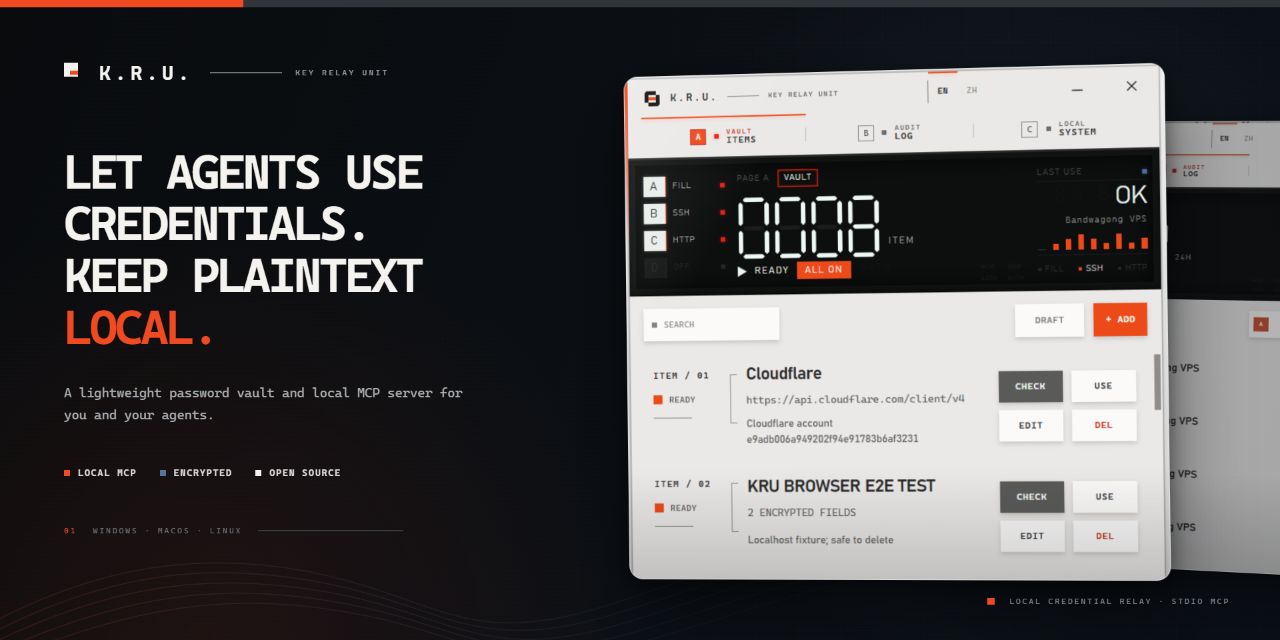
KRU — Local password and credential manager for AI agents
A local MCP credential relay that keeps agent workflows moving without exposing hidden plaintext.
Local only · Free and open source · No account · Windows / macOS / Linux
KRU is a free, open-source, cross-platform password manager, credential vault, and local stdio MCP server for AI agents. It lets MCP clients such as Codex, Claude Code, Cursor, OpenCode, and OpenClaw use saved passwords, API credentials, SSH keys, TOTP codes, and custom secrets while hidden plaintext stays outside the normal model context.
Use KRU when an agent needs to sign in to a website, connect to a server, call an authenticated API, or finish a terminal prompt without asking you to paste a secret into the conversation.
Use KRU like this
Once KRU is connected, describe the task normally. Include the unique KRU item name for the most reliable match, or simply tell the agent to check KRU when authentication is needed.
| Goal | Example |
|---|---|
| Server task | Use "Production Server" in KRU MCP to deploy the current build and verify the service. |
| Authenticated API | Use "DNS Provider" in KRU MCP to list the domains in this account. |
| Browser sign-in | Open the admin console. When credentials are required, use "Admin Account" in KRU MCP. |
| Automatic lookup | Continue the task. If authentication is required, check KRU first. |
The quoted text is the item name saved in KRU. If you omit it, the agent can inspect KRU's item list and choose a match.
What KRU does
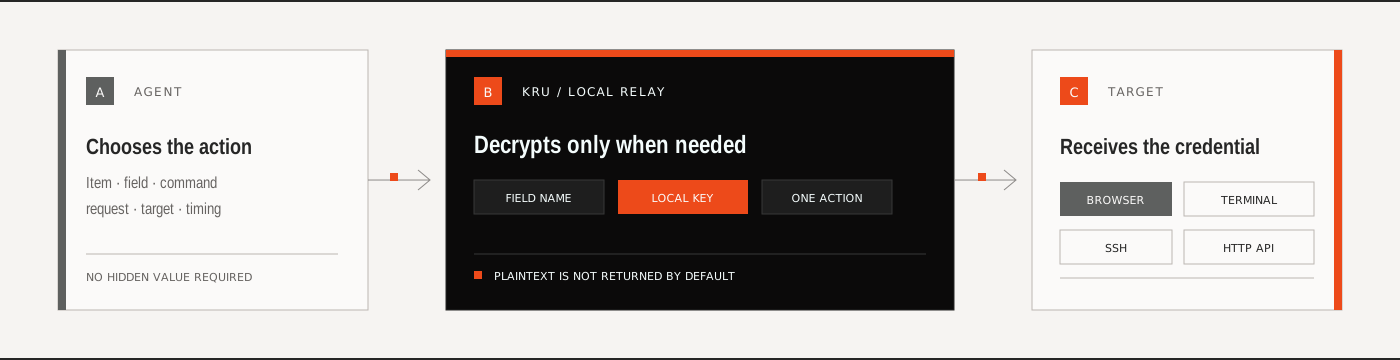
KRU is a small local MCP tool for saving and using credentials without breaking an agent's workflow. The agent controls the task, while KRU performs credential operations locally—filling a focused field, running local or SSH commands, transferring files and directories, or sending authenticated API requests.
KRU stores credentials as independent modules rather than fixed “login / SSH / API” item types. Username, password, API credential, private key, key passphrase, TOTP, host, port, URL, and custom fields can be combined in one item. The available MCP actions are derived automatically from that combination.
There is no KRU account, subscription, cloud vault, or remote MCP service. KRU is free and open source, runs on Windows, macOS, and Linux, and keeps vault data encrypted on the current device. Its local stdio MCP starts only when an agent calls it.
| 01 / STORE Save only the modules the item needs. Values are encrypted locally. |
02 / DISCOVER The agent sees item names, field names, non-secret targets, and available actions. |
03 / USE KRU performs the selected credential action locally without returning hidden plaintext. |
Start in three steps
Download and open KRU
Choose the portable build for your platform. No registration is required.Connect your agent
Open Settings → Agent connection, connect a detected client, then start a new agent session.Save an item
Give it a unique name and add only the modules you need. You can start from a preset or build the item module by module.
KRU registers a local stdio MCP command. The MCP process starts on demand when the agent calls it.
MCP client compatibility
KRU's Agent connection screen can detect, connect, and repair local configuration for Codex, Claude Code, Cursor, OpenCode, and OpenClaw. Other AI assistants and coding agents can connect through the manual configuration below whenever they support a local stdio MCP server.
One item, several actions
| Action | When KRU advertises it | What happens locally |
|---|---|---|
| Fill | The item contains a credential module | KRU writes the selected value into a focused browser, desktop control, or managed terminal |
| SSH | The item contains a password or private key | KRU authenticates locally; the host, port, and username can be saved defaults or supplied for the task |
| File transfer | The item contains a password or private key | KRU recursively uploads or downloads files and directories over SFTP |
| HTTP | The item contains any configured secret | KRU injects built-in authentication or resolves hidden-module placeholders locally |
| Terminal | The agent runs a local command or opens a managed terminal | KRU can substitute hidden modules without returning them to the agent |
An item may advertise more than one action. KRU has no observation, diagnostic, restricted, or execution mode: if ssh_run is available, the agent sends the command the task actually requires.
Plaintext visibility is per module
Every module has its own Agent visibility switch:
- Hidden — the default for credential modules. KRU can use the value, but it is not included in MCP responses.
- Visible — the value may be returned to the agent only after you explicitly enable the switch.
- TOTP — KRU derives the current six-digit code; the permanent seed is never returned.
The eye and copy controls in the editor are for the local owner. The optional six-digit PIN locks plaintext viewing in the GUI; it does not replace vault encryption and does not disable MCP actions.
Built for local use
| Encrypted vault XChaCha20-Poly1305 protects stored fields. The machine key stays local. |
Portable backup Export an encrypted .mvault package and import it on another device. |
Auditable Local activity records show which client requested which action without logging secret values. |
Browser, SSH, and API behavior
Browser filling
Reliable unattended browser filling uses the bundled Chromium extension. KRU writes one selected field into the currently focused control; when the agent explicitly sets submit=true, it can submit that field's form in the same call. It does not inspect the page, choose a field, or export cookies. Chrome, Edge, and Brave require one manual extension load on first use.
SSH
KRU supports password and private-key authentication, unrestricted-length commands and output, direct stdin, and recursive SFTP upload/download. Host, port, and username may be saved as defaults or supplied for the current task. Destination parent directories are created automatically and existing file or directory targets are replaced only after a complete temporary copy is ready. KRU does not pin or compare SSH host fingerprints. Authentication plaintext is not returned to the agent.
HTTP APIs
KRU recognizes common API providers and Basic combinations, and falls back to Bearer Token when no provider matches. A saved service URL is a default and relative-path base, not an Origin restriction; the agent may use any HTTP/HTTPS destination required by the task. Other protocols can place {{kru:module name}} placeholders in the URL, headers, query, JSON/text body, or form values, and KRU resolves them locally. Redirects are followed, responses have no default size limit and may stream directly to a local file, and multipart uploads are supported.
Local app controls
The Settings page includes:
- desktop shortcut (where supported) and launch-at-login controls;
- close-to-tray or quit behavior;
- optional six-digit local PIN;
- Agent connection and repair;
- Browser Bridge pairing;
- encrypted backup import/export and direct access to the local data folder.
Replacing or upgrading the executable does not remove your vault. KRU intentionally reuses the current OS user's data directory:
| Platform | Vault location |
|---|---|
| Windows | %APPDATA%\mcp-vault\v2 |
| macOS | ~/Library/Application Support/mcp-vault/v2 |
| Linux | ${XDG_DATA_HOME:-~/.local/share}/mcp-vault/v2 |
Exported .mvault packages are encrypted and portable, but they contain their own unlock material for easy import. Protect a backup file as carefully as the original credentials.
Common questions
Is KRU a password manager for AI agents?
Yes. KRU combines a locally encrypted credential vault with an MCP server that agents can call when a task reaches an authentication step. It is designed for AI coding agents, terminal agents, and other local MCP clients.
Does KRU give my password to the LLM?
Not by default. Hidden modules are used locally by KRU and are excluded from MCP responses and normal model context. You can explicitly make an individual module visible when a workflow genuinely requires the value.
What credentials can KRU store and use?
KRU supports usernames, passwords, API keys and tokens, SSH private keys and passphrases, TOTP seeds, hosts, ports, service URLs, and custom fields. Modules can be combined freely in one item.
Does KRU require a cloud account?
No. KRU is a local-first, account-free secrets manager. The app, vault, MCP server, activity records, and backups remain under your control on the current device.
Downloads
| Target | Package | Notes |
|---|---|---|
| Windows x64 | .zip |
Portable GUI, tray, desktop input, and browser extension |
| macOS arm64 | .zip |
Native .app; Accessibility permission is required for desktop input |
| Linux x64 GUI | .tar.gz |
AppImage GUI; desktop input supports X11 |
| Linux x64 headless | .tar.gz |
No WebView dependency; MCP, SSH, HTTP, terminal, backup, and browser bridge |
MCP surface
KRU 0.15 uses unique item names directly instead of exposing internal UUIDs. If the user has already named the item and the action is clear, the agent can call that action immediately. An explicit item or a unique items_search result becomes lightweight context for the current MCP session, so compatible fill, SSH, transfer, HTTP, and terminal calls can omit the repeated name. Natural phrases such as use Production Server in KRU MCP are understood. Discovery remains available for lookup, switching, module inspection, and ambiguity. Hidden plaintext must never be requested from the user, and unknown fields or retired tool names are rejected.
Each agent session owns its stdio MCP process. Starting a newer KRU build or another agent session does not interrupt work already in progress; sessions end when their client disconnects or the user explicitly quits KRU from the tray.
| Tool | Purpose | MCP impact hint |
|---|---|---|
items_search(query?) |
Find usable items, modules, and advertised actions | Read-only, idempotent, local |
credential_fill |
Use one saved module in an approved local target, optionally submitting it | Changes local state; submission can have external effects |
terminal_run |
Run a one-shot local shell command with optional stdin and hidden-module substitution | Local or external effects possible |
ssh_run |
Run a command through a saved identity and saved or runtime SSH target | External effects possible |
ssh_upload |
Recursively upload a local file or directory through a saved identity | Reads a local path and changes the remote target |
ssh_download |
Recursively download a remote file or directory through a saved identity | Reads a remote path and changes the local target |
http_send |
Send an authenticated HTTP request, optionally transferring local files | External and local-file effects possible |
terminal_start |
Start a managed local process | Changes local state |
terminal_write |
Write ordinary input into a managed terminal | External effects possible |
terminal_read |
Read redacted managed-terminal output | Read-only, idempotent, local |
terminal_stop |
Close a managed terminal session | Idempotent state change |
Ordinary commands, scripts, JSON, or configuration can be passed directly through terminal_run.stdin or ssh_run.stdin, avoiding shell escaping and temporary files. Commands, stdin, paths, PTY input, and HTTP request fields can reference hidden modules with {{kru:module name}}. Local paths accept absolute, home-relative, and MCP-workspace-relative forms. KRU imposes no fixed limit on command length, SSH or terminal output, module count, or concurrent terminal count; callers may still opt into explicit time or response-size limits.
Every successful tool call returns typed structuredContent and equivalent JSON text. Business failures return an MCP tool result with isError=true; malformed protocol input remains a protocol error. Tool annotations help clients describe impact, but all real security restrictions are enforced by KRU's backend.
There is no unrestricted get_secret tool. items_search returns item and module metadata plus advertised actions. A credential value is included only when its Agent visibility switch is on.
Manual stdio configuration:
{
  "mcpServers": {
    "kru": {
      "command": "C:\\absolute\\path\\to\\kru.exe",
      "args": ["mcp", "stdio"]
    }
  }
}
KRU can also print client-ready configuration:
kru config stdio-json
kru config stdio-toml
Security model
KRU is designed to keep hidden values out of normal MCP parameters, responses, activity records, application logs, and LLM API traffic. The KRU process and the final target necessarily handle plaintext briefly while an action runs.
KRU is not a sandbox. It does not defend against a malicious agent, a compromised machine or browser, or another process running as the same OS user. It cannot determine whether the agent focused the correct input or chose a trustworthy target. Read the complete security policy and threat boundary before relying on KRU for sensitive infrastructure.
Build from source
Requirements: Rust 1.88+, Node.js 22+, and the Tauri 2 platform prerequisites.
npm install
npm run check
npm test
npm run build
npm run portable
Additional release targets:
npm run release:mac
npm run release:linux
npm run release:headless
License
MIT — use it, inspect it, and improve it.
Reviews (0)
Sign in to leave a review.
Leave a reviewNo results found