openorchestra
Health Warn
- License — License: GPL-3.0
- Description — Repository has a description
- Active repo — Last push 0 days ago
- Low visibility — Only 5 GitHub stars
Code Pass
- Code scan — Scanned 12 files during light audit, no dangerous patterns found
Permissions Pass
- Permissions — No dangerous permissions requested
No AI report is available for this listing yet.
Local-only macOS workspace for AI coding agents (Claude Code, Codex, OpenCode, pi): run them in parallel in isolated Git worktrees, coordinate multi-repo tasks over A2A, and review diffs in an embedded Zed editor. Built in Rust with GPUI.
openOrchestra







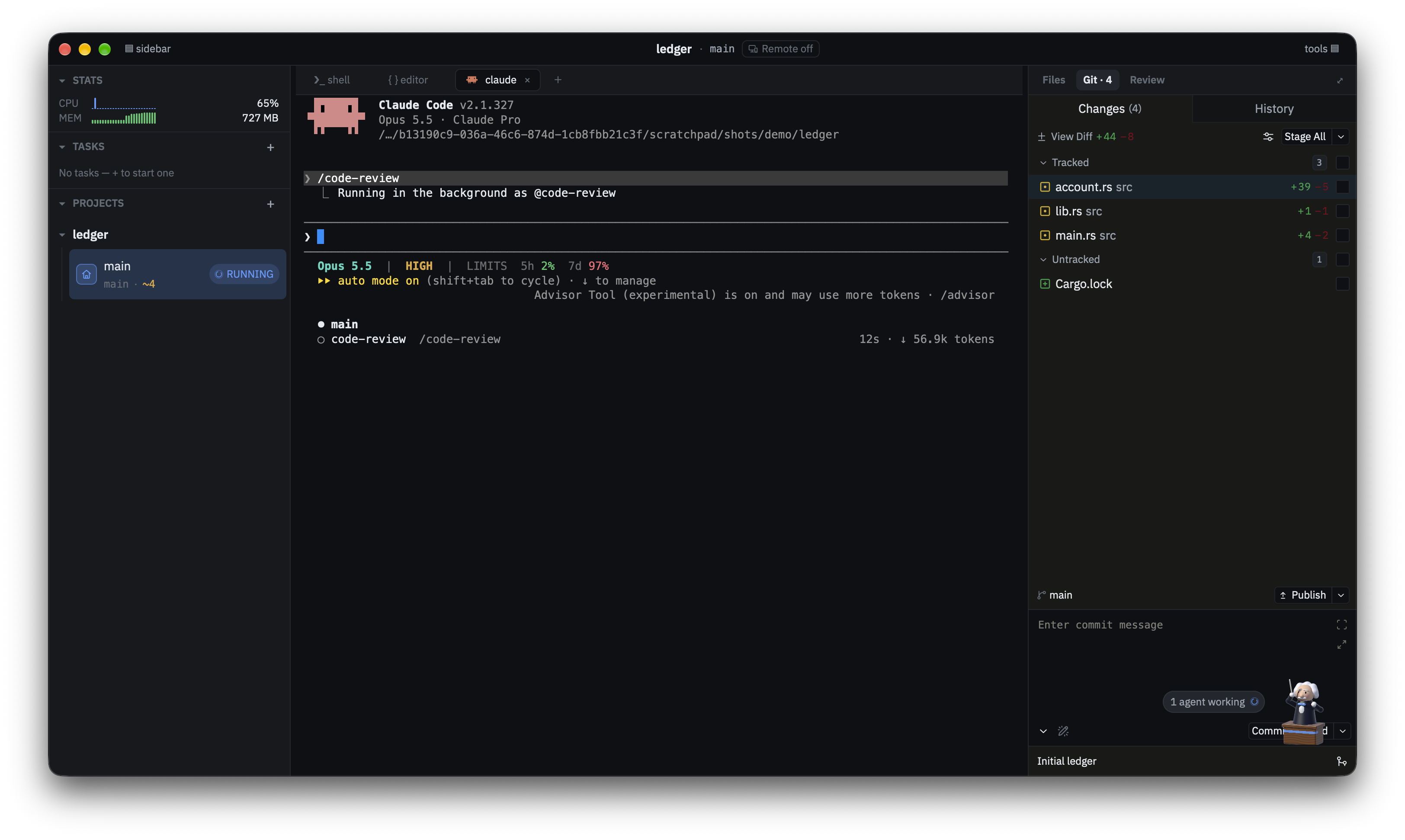
A native macOS workspace for running coding agents (pi, Claude Code, Codex,
OpenCode, Kimi and Grok) in parallel, each in its own git worktree, next to a
real embedded zed editor. Agents live in tmux sessions, so they keep running when the
app closes. Their changes appear in a diff panel you can review and comment on,
and a native notification tells you when one needs you. Tasks that span several
repos get one specialist agent per repo, coordinated over a localhost A2A
broker.
Everything runs on your Mac. There's no account, no cloud and no telemetry.
Features
- Tasks in worktrees.
⌘Ncreates a task: a git worktree on its own
branch, with its own terminals, editor and agent. The sidebar groups tasks by
project and shows each one's branch, PR, ahead/behind, uncommitted changes,
CI status, and an agent pill (Running, Waiting, Stopped). - Any agent CLI. Each agent is the vendor's own CLI with your own login,
running in an embedded terminal. A new task starts its agent. A project's main
checkout opens with a plain shell, and the tab strip's+adds more agents,
terminals or editors. - Sessions that outlive the app. Every terminal and agent tab is a tmux
session. Quitting or crashing doesn't stop the agent, and reopening
reattaches. - A real IDE.
⌘Eopens zed's own workspace for the worktree: file tree,⌘Pquick-open,⌘⇧Fproject search, the git panel, Markdown preview and
zed's language-server support (rust-analyzer for Rust). You get syntax
highlighting for every language zed has built in: Rust, TypeScript/TSX,
JavaScript, Go (plus go.mod and go.work), Python, C, C++, JSON and JSONC,
YAML, CSS, Bash and.env, Markdown, diffs, git commit messages, JSDoc and
regular expressions. - Diff review. Each changed file expands inline with real line numbers. You
can use a side-by-side view, pick the diff base, and tick "reviewed" boxes
that track progress. Click a line number to comment, then copy every comment
as feedback for the agent or save them as Markdown. You can push from the
diff header. - Multi-repo tasks. A task can include several projects. Each one gets a
specialist agent, and a coordinator agent delegates to them through the A2A
broker (crates/a2a-broker). - Setup and teardown scripts. Each project's
⋯menu has Edit setup
scripts…. Scripts committed to the repo (.openorchestra/hooks.toml) or
kept locally run when a worktree is created or archived. Before running
committed scripts, the app asks you to confirm. - Notifications. When an agent is waiting on you, you get a native banner
with a View button.⌘⇧Ajumps to the next waiting agent. - Remote control from your phone on your home network (see below).
- Footprint monitor. The sidebar's STATS band shows the app's own CPU and
memory use, broken down by worktree, including the agents' processes.
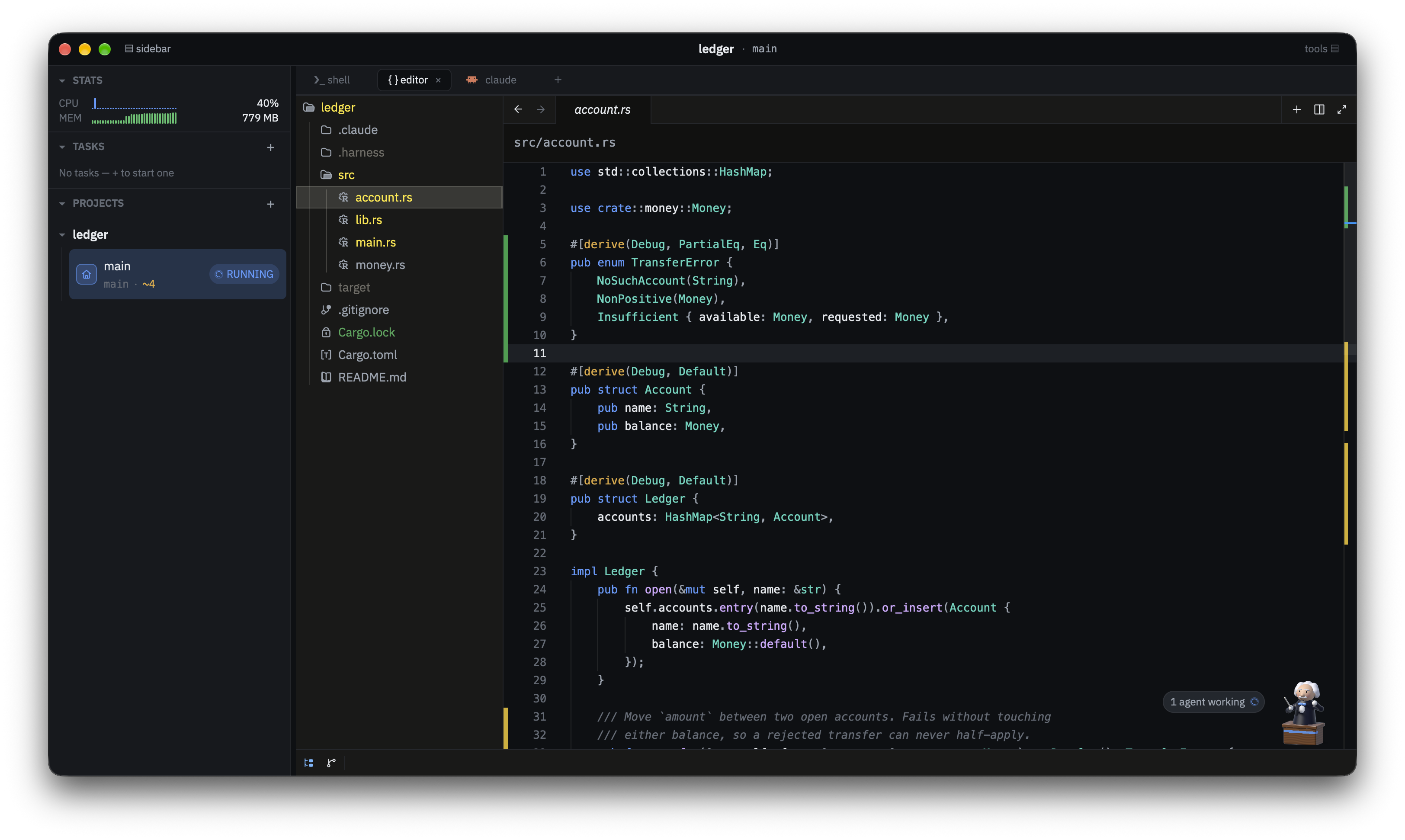
The embedded editor
The editor tab is zed's own workspace for the worktree: file tree, syntax
highlighting and git gutter markers on what the agent changed.
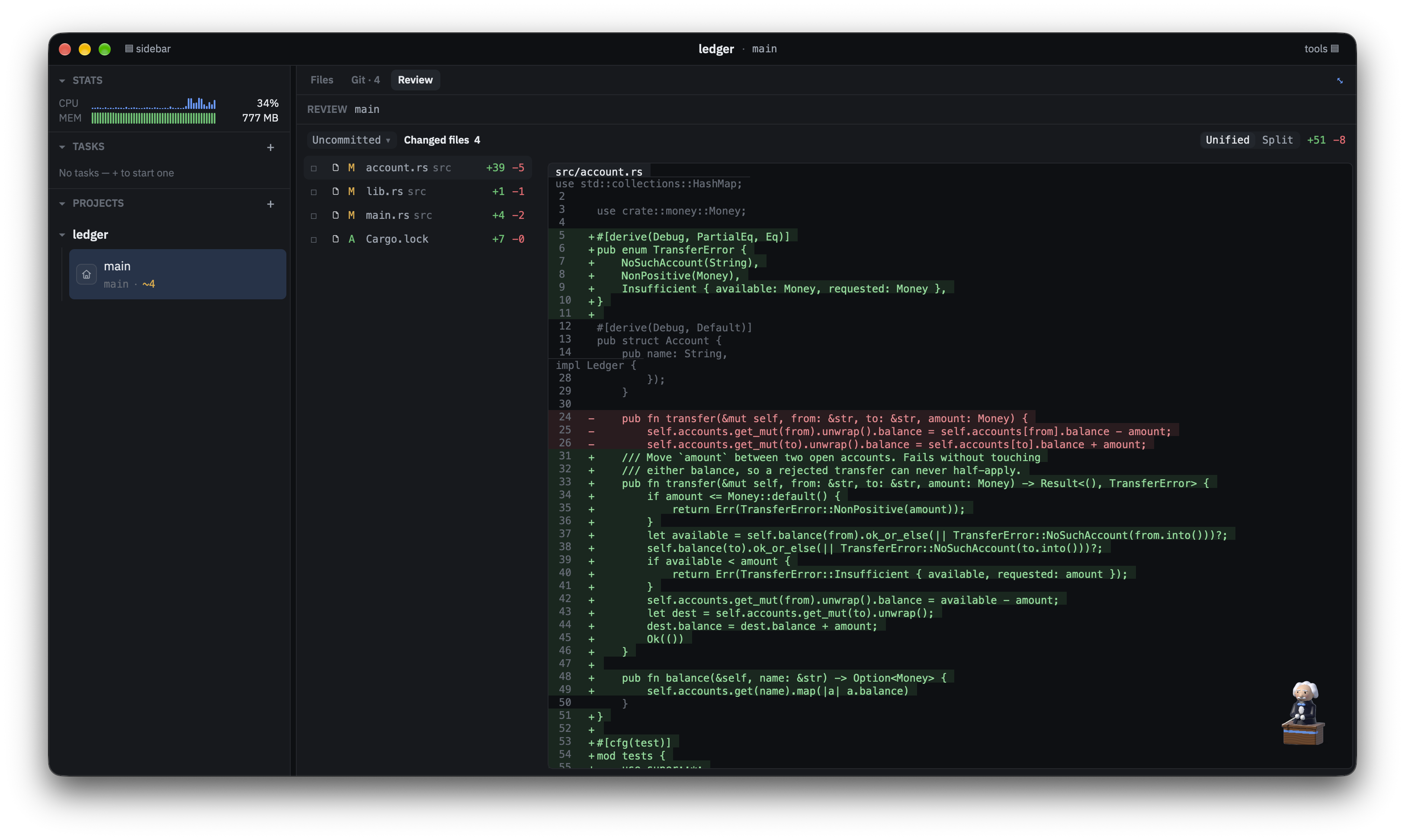
Reviewing the agent's changes
The Review panel lists the changed files against the chosen base
(uncommitted work here), with unified or split diffs and real line numbers.
Requirements
- macOS 12 or later.
- git and tmux are required. The app shows a requirements screen until
both are found. - Recommended: at least one agent CLI (
pi,claude,codex,opencode,kimiorgrok). Without one, agent tabs fall back to a plain shell. - Optional:
gh(PR and CI badges) andrust-analyzer(Rust language
features).
The requirements screen lists anything missing, with the command that installs
it.
Install
With Homebrew:
brew install --cask omarpr/tap/openorchestra
This also installs tmux. Or download the .dmg from the
Releases page. It is a
universal build (Apple Silicon and Intel), signed and notarized, so it opens
with a double-click.
Build from source
make setup && make app && open dist/openOrchestra.app
make setupinstalls/verifies the build and runtime tools (idempotent).make appbuilds a release bundle for the host architecture intodist/openOrchestra.app.make dmgbuilds a universal (Apple Silicon + Intel) bundle and a.dmg
beside it.make dmg-notarizedadditionally signs it with Developer ID and
notarizes it with Apple, so the download opens on a plain double-click;make releasedoes that and publishes to GitHub Releases.- First launch will ask for notification permission — that's the
"agent needs your attention" banners with their View button.
For development iterations, make run builds and launches the debug app in a
separate .app bundle. This lets the development build use native macOS
notifications; logs remain attached to the terminal.
Keyboard shortcuts
These are the defaults. You can see and rebind all of them in Settings →
Shortcuts (⌘,).
| Shortcut | Action |
|---|---|
⌘N |
New task |
⌘T |
New terminal tab |
⌘E |
Open the editor (IDE) tab |
⌘⇧C |
New agent chat tab |
⌘W |
Close tab |
⌘⌥↓ / ⌘⌥↑ |
Next / previous worktree |
⌘⇧] / ⌘⇧[ |
Next / previous tab |
⌘1…⌘8, ⌘9 |
Go to tab N, last tab |
⌘⇧A |
Jump to the next agent waiting on you |
⌘B |
Toggle the sidebar |
⌘⇧B |
Toggle the tools panel |
⌘P |
Find file by name (in the editor) |
⌘⇧F |
Find in files |
⌘⇧D |
Project diff (git) |
⌘⇧G |
Toggle the git panel |
⌘F |
Find in the current file |
Where state lives
App state is kept under ~/.openorchestra: preferences, open tabs,
review comments (review-notes.json), saved reviews (reviews/), local hook
overrides (hooks/) and the remote-control settings (remote.json). Nothing is
written into your repositories except worktrees and, if you choose, committed
hook scripts.
Remote control from your phone
You can follow and type into your agents from a phone or tablet on the same
home network. Only tabs you mark are reachable; everything else on the Mac
stays invisible.
- Right-click a terminal or agent tab and choose Allow remote control.
- Open Settings → Remote and turn it On (HTTPS on port 7443).
- Click Add a phone and scan the QR code. It opens a short setup page that
installs and trusts the app's own certificate authority (an iOS profile, or
a CA certificate on Android). Check that the fingerprint on the phone
matches the one in Settings. - On the phone, open
https://<your-mac-name>.local:7443(iPhone/iPad), orhttps://<Mac IP address>:7443(Android), and add it to the home screen. - Enter the 8-character pairing code shown in Settings. It works once and
expires after 10 minutes.
Android tip: .local names often don't resolve on Android, so use the Mac's IP
address. If the Mac's IP changes, Settings shows a notice and the phone's saved
address needs updating. Changing the port also means re-adding the app on each
phone.
The phone app is called openOrchestra. On an iPhone or iPad opened in Safari it
first asks you to add it to your Home Screen, so you pair once in the installed
app (a "Pair in this browser instead" link skips that). The agent list shows
each agent's icon and a status pill (RUNNING, WAITING, STOPPED).
Opening an agent shows a Conversation | Terminal switch. For Claude Code and
pi agents the Conversation view is the default: your messages and the agent's
replies verbatim (with Markdown), one-line tool calls with a check or cross
(tap one to see its output, capped at 64 KB), collapsed thinking, and a status
bar ("Working…" with the current tool, "Needs your input", "Agent stopped").
Images in replies are not shown. The switch appears once the agent has a transcript (a brand-new Claude Code or
pi agent shows the Terminal until its first message), and your last choice per
agent is remembered. Other agents (for example Codex) show the Terminal only.
On the Mac, a chip in the top bar shows whether the current terminal or agent
tab is reachable from a phone, and Settings → Remote → Agents on phone
turns each tab on or off.
In Settings you can set a device to Watch only or Revoke it, and keep
the Mac awake while serving. Phones on the local network only (private
addresses) are accepted. A manual test list is indocs/superpowers/plans/2026-11-16-oo-remote-manual-checklist.md.
The PWA source is in web/remote (make web builds it); the server is theoo-remote crate in crates/remote.
Repository layout
| Path | What it is |
|---|---|
crates/harness-app |
The GPUI desktop app (its own Cargo workspace, see CONTRIBUTING) |
crates/worktrees, forge, status-watch |
Git worktrees and hooks, gh PR/CI polling, agent status signals |
crates/agent-runtime, pi-client |
Per-agent launch and status adapters, the pi RPC client |
crates/a2a-broker |
The localhost agent-to-agent broker for multi-repo tasks |
crates/remote |
oo-remote, the phone remote-control server |
crates/agent-schema, crates/training |
The pi tool contract and session harvesting (agent-schema/, training/ hold their data and docs) |
pi-ext |
pi extensions loaded per worktree (status signal, harness tools) |
web/remote |
The phone web app (PWA) |
docs |
Design records. architecture.md is a dated snapshot; docs/superpowers/ holds specs and plans |
Contributors
 omarpr |
 joeswiggin |
 jakesorce |
Community
Join the openOrchestra Slack to ask questions, share how you use it,
and hear about new releases. Bugs and feature ideas still belong in
GitHub issues, and security
reports go through SECURITY.md.
Contributing
CONTRIBUTING.md covers the setup, the project invariants,
and the one build gotcha that bites everyone: crates/harness-app is outside the
root workspace, so a root cargo build skips it and still reports success.
By taking part you agree to the Code of Conduct.
License
Not a preference — a consequence. openOrchestra embeds a real zed editor, and the
crates it links (workspace, project, editor, git_ui, search,terminal, theme, and the rest) are GPL-3.0-or-later, so anything distributed
with them must be too. gpui and util are Apache-2.0, which combines into a
GPLv3 work in that direction.
Reviews (0)
Sign in to leave a review.
Leave a reviewNo results found