claude-plan-visualizer
Health Warn
- License — License: MIT
- Description — Repository has a description
- Active repo — Last push 0 days ago
- Low visibility — Only 6 GitHub stars
Code Pass
- Code scan — Scanned 4 files during light audit, no dangerous patterns found
Permissions Pass
- Permissions — No dangerous permissions requested
This skill generates self-contained HTML visualizations from markdown implementation plans, displaying architecture diagrams, diff-marked components, and interactive feedback annotations directly in your browser.
Security Assessment
Overall risk: Low. The static code scan found no dangerous patterns, hardcoded secrets, or requirements for risky permissions. It operates locally by reading markdown files from your workspace and writing a standard HTML output file. The tool is fundamentally a template generator that does not execute shell commands or make external network requests. The only data it interacts with is your local development plan files.
Quality Assessment
The project is actively maintained, with its last code push occurring today. It uses the permissive MIT license and includes a highly detailed README with clear installation and usage instructions. However, community trust and visibility are currently very low. With only 6 GitHub stars, the tool has not yet been widely tested or vetted by a large user base, which typically means undiscovered bugs might be present.
Verdict
Safe to use — it provides a strictly local, harmless utility, though developers should be aware of its early-stage maturity and lack of broad community validation.
Generates self-contained HTML visualizations from markdown implementation plans — BEFORE/AFTER architecture, diff-marked components, key decisions, and risks.
Plan Visualizer
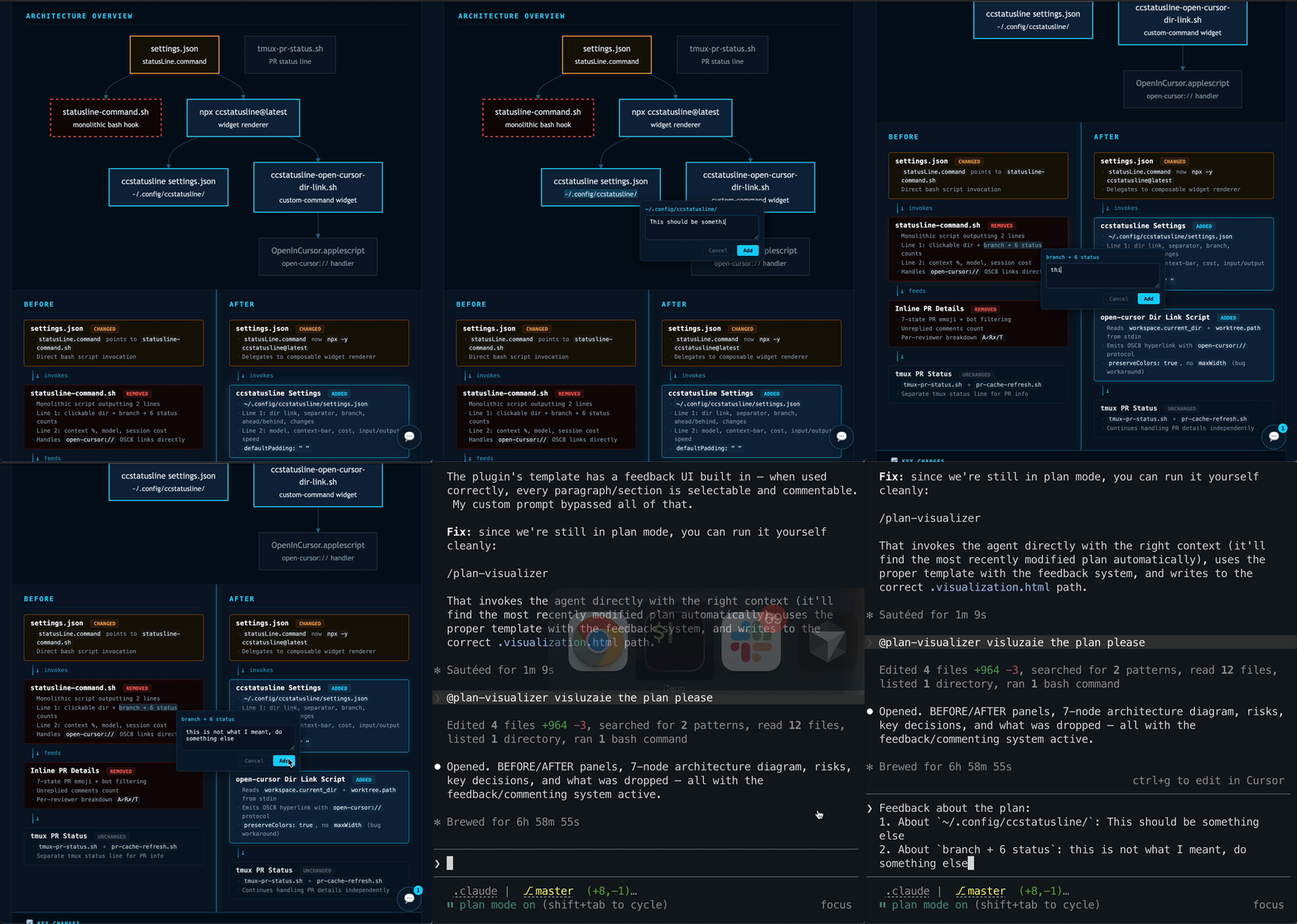
Generates HTML visualizations from markdown implementation plans. Opens in any browser — shows BEFORE/AFTER architecture with diff-marked components, mermaid architecture diagrams, key decisions, risks, and interactive feedback annotations.
Installation
Add the marketplace to Claude Code:
/plugin marketplace add omril321/claude-plan-visualizer
Then install the plugin:
/plugin install plan-visualizer@claude-plan-visualizer
Configuration
Create ~/.claude/plan-visualizer.json to customize the URL protocol for plan file links:
{"url_protocol": "open-cursor"}
Supported protocols: file (default), open-cursor, vscode, or any custom protocol handler.
If this file doesn't exist, the plugin defaults to file:// links.
Usage
Invoke the agent manually by asking Claude to visualize a plan:
Visualize the plan at plans/my-plan.md
Or use it programmatically from a planning skill by invoking the plan-visualizer:plan-visualizer agent with the plan file path.
What It Does
- Reads config — checks
~/.claude/plan-visualizer.jsonfor URL protocol preference - Reads the plan — extracts goal, components, changes, decisions, risks, steps, assumptions, and success criteria
- Classifies the layout — chooses BEFORE/AFTER, BROKEN/FIXED, or CURRENT/TARGET framing
- Generates architecture diagram — creates a mermaid diagram showing component relationships with diff-styled nodes (when plan has 3+ related components)
- Generates HTML — file with CSS animations, diff markup, mermaid rendering, feedback system, and responsive layout
- Writes the output — saves as
plan-basename.visualization.htmlalongside the plan file - Updates the plan — adds a clickable link back to the visualization using the configured protocol
Output
A single HTML file with:
- Header with plan title, subtitle, scope badge, and link to source plan (using configured protocol)
- Change legend (Added / Changed / Removed / Unchanged)
- Architecture overview diagram (mermaid, when applicable)
- Side-by-side BEFORE / AFTER panels with flow-step components
- Bottom sections (max 5, prioritized): Implementation Steps, Success Criteria, Key Changes, Key Decisions, Risks, Assumptions, In Scope, Out of Scope
- Interactive feedback system for plan review annotations
Feedback System
The generated HTML includes an interactive annotation system:
- Select any text on the visualization (headings, bullets, diagram labels)
- Add a comment via the popover that appears near your selection
- Review collected feedback by clicking the floating button (bottom-right)
- Copy structured feedback to clipboard — formatted for pasting directly into the agent:
Feedback about the plan:
1. About `<selected text>`: <your comment>
2. About `<another selection>`: <your comment>
Mermaid Diagrams
When a plan has 3+ components with relationships, the agent generates a mermaid architecture overview diagram showing:
- Component nodes with labels and file paths
- Dependency/flow arrows between components
- Diff-styled nodes: cyan border (added), orange border (changed), dashed red border (removed), dim border (unchanged)
Mermaid.js is loaded from unpkg CDN (requires internet connection).
Plan Format
Works best with plans containing:
## Summarywith a**Goal:**line**What changes:**bullet list of files/components**Key decisions:**and**Risks:**sub-fields## Stepswith### Step Nheadings and verify criteria## Assumptionsand## Success Criteria## Scope Definitionwith In Scope / Out of Scope
Also handles plans without these sections via graceful fallback.
When It Skips
The agent skips visualization when the plan:
- Has fewer than 3 steps AND fewer than 3 files changed
- Is purely investigatory (no code/architecture changes)
- Is administrative only (staging commits, docs cleanup)
Components
| Component | Purpose |
|---|---|
plan-visualizer agent |
Reads plan markdown, generates HTML visualization |
knowledge/plan-visualizer-template.html |
HTML/CSS/JS template with mermaid support and feedback system |
~/.claude/plan-visualizer.json |
User config file for URL protocol (outside plugin) |
License
MIT
Reviews (0)
Sign in to leave a review.
Leave a reviewNo results found