AIOffice
Health Warn
- License — License: MIT
- Description — Repository has a description
- Active repo — Last push 0 days ago
- Low visibility — Only 5 GitHub stars
Code Fail
- rm -rf — Recursive force deletion command in dist/install.sh
- network request — Outbound network request in dist/install.sh
Permissions Pass
- Permissions — No dangerous permissions requested
No AI report is available for this listing yet.
Give your agent an Office engine — an AI-native CLI + MCP server that creates, edits, renders & validates real .docx / .xlsx / .pptx. One self-contained C#/.NET binary, no Microsoft Office.
AIOffice
English | 简体中文



Give your agent an Office engine. AIOffice lets AI agents create, query, edit, render, preview and validate real .docx / .xlsx / .pptx the way they call functions: one command in, exactly one JSON envelope out. 100% self-built on pure C#/.NET — one ~36 MB single-file binary, no Microsoft Office, no runtime dependencies, no wrapped third-party engines.
# install (pick one) — then `aioffice version` to check
npx aioffice version                       # zero-install, great for CI / MCP hosts
npm install -g aioffice                     # global `aioffice` on your PATH
brew install onecer/tap/aioffice            # macOS / Linux
curl -fsSL https://raw.githubusercontent.com/onecer/AIOffice/main/dist/install.sh | sh
aioffice create report.docx --title "Q3 Report"
aioffice edit   report.docx --set '/body/p[1]' text="Revenue grew 12%"
aioffice read   report.docx --view outline
aioffice diff   report.docx old.docx        # semantic compare: a sorted change list
aioffice convert report.docx deck.pptx      # cross-format: a slide per heading, bullets below
aioffice mcp    # the same document engine, as MCP tools over stdio
Why AIOffice
- Illustrated docs — start with the visual docs hub: docs/README.md.
- 100% self-built single binary — pure C#/.NET, direct lossless OOXML via DocumentFormat.OpenXml + ClosedXML. No Office, no cloud, no wrapped engines, no runtime to install.
- Three real formats, one tool — author and edit genuine
.docx,.xlsx,.pptxthat open in real Word, Excel and PowerPoint. - Errors that teach — every failure returns one JSON envelope with an actionable
suggestion(andcandidatesfor bad paths), so an agent self-corrects instead of guessing. - render → look → fix — render any node to PNG via the system browser and see what you made; over MCP the image comes back inline.
- Frozen 1.0 contract — a stable, machine-readable surface (
surfaceVersion1.0) your agent can rely on. See CONTRACT.md. - CLI = MCP, one mental model — the current source tree exposes 19 CLI verbs and 19 MCP tools. Learn it once, drive it from a shell or over stdio.
Show, don't tell
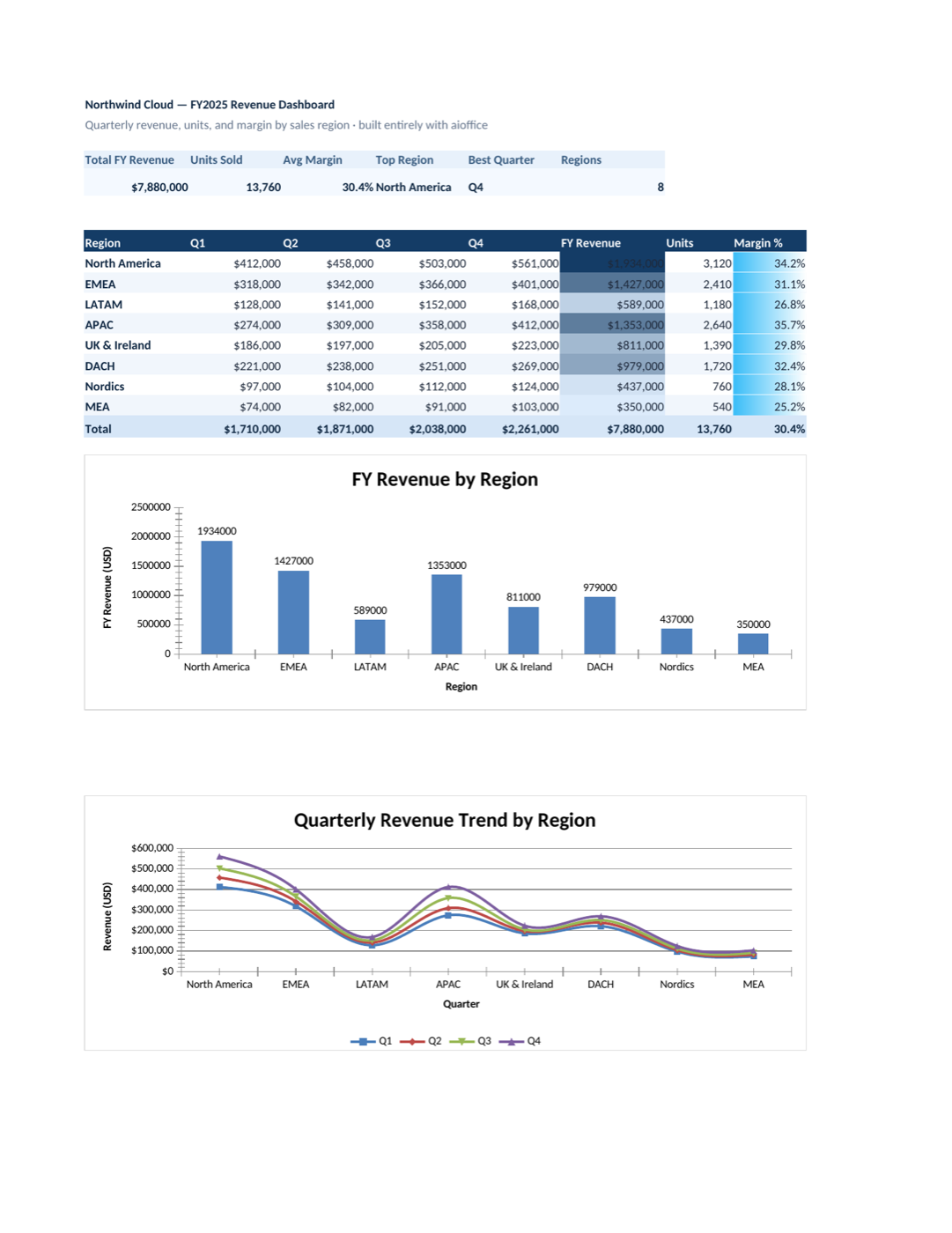
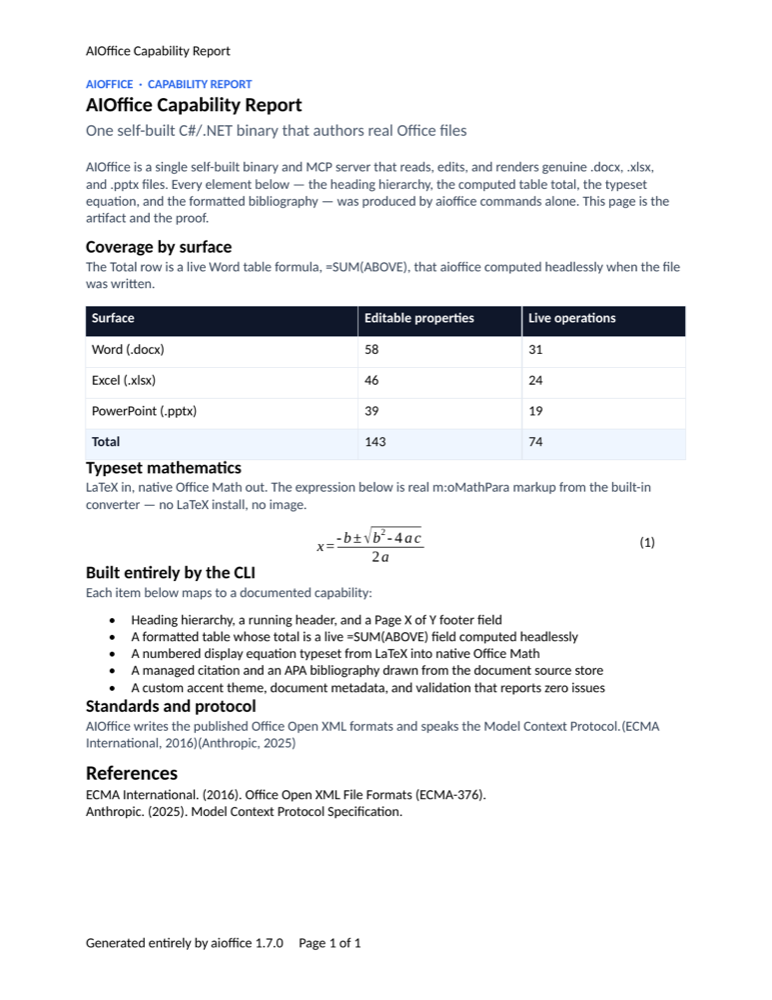
Three real Office files — a pitch deck, a revenue dashboard, and a capability report — built command by command by aioffice alone. No Office installed to build them, no templates, no manual touch-ups. The screenshots below are those exact files opened in LibreOffice — independent, third-party proof that aioffice writes genuine, valid OOXML that any Office app renders faithfully. The full gallery, with the verbatim command sequence behind each one, is in SHOWCASE.md; reproduce all three with one script, examples/tour.sh.
 |
 |
 |
deck.pptx — 6 dark slides + a native bar chart (17 commands) |
dashboard.xlsx — KPI band, live =SUM/=XLOOKUP, 2 charts (11 commands) |
report.docx — table formula, LaTeX→Office-Math, citations (18 commands) |
The three artifacts above are built by examples/tour.sh (every command verbatim) and documented in SHOWCASE.md. Here's a self-contained miniature of the same workflow — three small files and the render → look → fix loop — that you can paste into an empty directory:
# in an empty working directory, with aioffice on PATH

# ---- deck.pptx — 3 slides, dark background + accent shapes ----
aioffice create deck.pptx
aioffice edit deck.pptx --ops '[
  {"op":"add","path":"/slide[1]","type":"shape","props":{"name":"bg","x":0,"y":0,"w":"33.87cm","h":"19.05cm","fill":"0F172A"}},
  {"op":"add","path":"/slide[1]","type":"shape","props":{"name":"deco-1","x":26.2,"y":10.8,"w":12,"h":12,"fill":"1E293B"}},
  {"op":"add","path":"/slide[1]","type":"shape","props":{"name":"deco-2","x":30.4,"y":15,"w":8,"h":8,"fill":"38BDF8"}},
  {"op":"add","path":"/slide[1]","type":"shape","props":{"name":"accent","x":2.6,"y":6.1,"w":5.2,"h":0.16,"fill":"38BDF8"}},
  {"op":"add","path":"/slide[1]","type":"shape","props":{"text":"AIOffice","x":2.5,"y":6.6,"w":24,"h":3.6,"fontSize":60,"bold":true,"color":"FFFFFF"}},
  {"op":"add","path":"/slide[1]","type":"shape","props":{"text":"An AI-native CLI + MCP server for real Office files","x":2.5,"y":10.4,"w":26,"h":1.8,"fontSize":20,"color":"94A3B8"}},
  {"op":"add","path":"/slide[1]","type":"shape","props":{"text":"This deck was built entirely by aioffice edit — no Office installed","x":2.5,"y":16.9,"w":26,"h":1.2,"fontSize":12,"color":"64748B"}}]'
aioffice edit deck.pptx --ops '[
  {"op":"add","path":"/slide[1]","type":"slide","position":"after"},
  {"op":"add","path":"/slide[2]","type":"shape","props":{"name":"bg","x":0,"y":0,"w":"33.87cm","h":"19.05cm","fill":"0F172A"}},
  {"op":"add","path":"/slide[2]","type":"shape","props":{"name":"accent","x":2.6,"y":2.0,"w":3.6,"h":0.16,"fill":"38BDF8"}},
  {"op":"add","path":"/slide[2]","type":"shape","props":{"text":"M1 in numbers","x":2.5,"y":2.5,"w":20,"h":2.2,"fontSize":34,"bold":true,"color":"FFFFFF"}},
  {"op":"add","path":"/slide[2]","type":"shape","props":{"name":"card-1","x":2.5,"y":6.4,"w":8.6,"h":8.2,"fill":"1E293B"}},
  {"op":"add","path":"/slide[2]","type":"shape","props":{"text":"3","x":3.4,"y":7.4,"w":6.8,"h":2.6,"fontSize":48,"bold":true,"color":"38BDF8"}},
  {"op":"add","path":"/slide[2]","type":"shape","props":{"text":"file formats — docx, xlsx, pptx — one 36 MB binary","x":3.4,"y":10.6,"w":6.8,"h":3.4,"fontSize":13,"color":"94A3B8"}},
  {"op":"add","path":"/slide[2]","type":"shape","props":{"name":"card-2","x":12.6,"y":6.4,"w":8.6,"h":8.2,"fill":"1E293B"}},
  {"op":"add","path":"/slide[2]","type":"shape","props":{"text":"17","x":13.5,"y":7.4,"w":6.8,"h":2.6,"fontSize":48,"bold":true,"color":"38BDF8"}},
  {"op":"add","path":"/slide[2]","type":"shape","props":{"text":"MCP tools, 1:1 with the CLI verbs","x":13.5,"y":10.6,"w":6.8,"h":3.4,"fontSize":13,"color":"94A3B8"}},
  {"op":"add","path":"/slide[2]","type":"shape","props":{"name":"card-3","x":22.7,"y":6.4,"w":8.6,"h":8.2,"fill":"1E293B"}},
  {"op":"add","path":"/slide[2]","type":"shape","props":{"text":"0","x":23.6,"y":7.4,"w":6.8,"h":2.6,"fontSize":48,"bold":true,"color":"38BDF8"}},
  {"op":"add","path":"/slide[2]","type":"shape","props":{"text":"Office installs required — render, preview, validate built in","x":23.6,"y":10.6,"w":6.8,"h":3.4,"fontSize":13,"color":"94A3B8"}}]'
aioffice edit deck.pptx --ops '[
  {"op":"add","path":"/slide[2]","type":"slide","position":"after"},
  {"op":"add","path":"/slide[3]","type":"shape","props":{"name":"bg","x":0,"y":0,"w":"33.87cm","h":"19.05cm","fill":"0F172A"}},
  {"op":"add","path":"/slide[3]","type":"shape","props":{"name":"deco","x":-3,"y":13.5,"w":10,"h":10,"fill":"1E293B"}},
  {"op":"add","path":"/slide[3]","type":"shape","props":{"name":"accent","x":2.6,"y":7.0,"w":5.2,"h":0.16,"fill":"38BDF8"}},
  {"op":"add","path":"/slide[3]","type":"shape","props":{"text":"render → look → fix","x":2.5,"y":7.5,"w":28,"h":3.2,"fontSize":44,"bold":true,"color":"FFFFFF"}},
  {"op":"add","path":"/slide[3]","type":"shape","props":{"text":"One JSON envelope at a time. github.com/onecer/AIOffice","x":2.5,"y":11,"w":26,"h":1.6,"fontSize":18,"color":"94A3B8"}}]'
aioffice validate deck.pptx

# ---- report.docx — running header, Heading1/2, intro, table ----
aioffice create report.docx
aioffice edit report.docx --ops '[
  {"op":"add","path":"/header[1]","type":"header","props":{"text":"AIOffice Demo"}},
  {"op":"add","path":"/body","type":"p","position":"inside","props":{"text":"AIOffice M1 Report","style":"Heading1"}},
  {"op":"add","path":"/body","type":"p","position":"inside","props":{"text":"This document was created entirely from the command line by aioffice — headings, header, table and styles included. Every block below is addressable (/body/p[2], /body/table[1]) and was written through the same atomic edit batches an AI agent would use."}},
  {"op":"add","path":"/body","type":"p","position":"inside","props":{"text":"Milestone snapshot","style":"Heading2"}},
  {"op":"add","path":"/body","type":"table","position":"inside","props":{"rows":4,"cols":3}},
  {"op":"set","path":"/body/table[1]/tr[1]/tc[1]","props":{"text":"Milestone"}},
  {"op":"set","path":"/body/table[1]/tr[1]/tc[2]","props":{"text":"Highlights"}},
  {"op":"set","path":"/body/table[1]/tr[1]/tc[3]","props":{"text":"Status"}},
  {"op":"set","path":"/body/table[1]/tr[2]/tc[1]","props":{"text":"M0"}},
  {"op":"set","path":"/body/table[1]/tr[2]/tc[2]","props":{"text":"create / query / edit / render / validate"}},
  {"op":"set","path":"/body/table[1]/tr[2]/tc[3]","props":{"text":"shipped"}},
  {"op":"set","path":"/body/table[1]/tr[3]/tc[1]","props":{"text":"M1"}},
  {"op":"set","path":"/body/table[1]/tr[3]/tc[2]","props":{"text":"png render, live preview, headers/footers, xlsx charts"}},
  {"op":"set","path":"/body/table[1]/tr[3]/tc[3]","props":{"text":"shipped"}},
  {"op":"set","path":"/body/table[1]/tr[4]/tc[1]","props":{"text":"M2"}},
  {"op":"set","path":"/body/table[1]/tr[4]/tc[2]","props":{"text":"tracked changes, comments, pivot tables"}},
  {"op":"set","path":"/body/table[1]/tr[4]/tc[3]","props":{"text":"next"}},
  {"op":"add","path":"/body","type":"p","position":"inside","props":{"text":"How it was made","style":"Heading2"}},
  {"op":"add","path":"/body","type":"p","position":"inside","props":{"text":"aioffice edit report.docx --ops … applied all of the above in one atomic batch; aioffice validate confirms the OOXML is clean, and aioffice render --to png produced the image you are looking at."}}]'
aioffice read report.docx --view outline        # orient: headings + canonical paths
aioffice edit report.docx --remove '/body/p[1]' # drop the empty paragraph create left behind
aioffice validate report.docx
aioffice get report.docx '/header[1]/p[1]'      # → "text": "AIOffice Demo"

# ---- metrics.xlsx — sales table, SUM/AVERAGE, formats, bar chart ----
aioffice create metrics.xlsx
aioffice edit metrics.xlsx --ops '[
  {"op":"set","path":"/Sheet1/A1","props":{"value":"Month"}},
  {"op":"set","path":"/Sheet1/B1","props":{"value":"Revenue"}},
  {"op":"set","path":"/Sheet1/C1","props":{"value":"Units"}},
  {"op":"set","path":"/Sheet1/A1:C1","props":{"bold":true,"fill":"DBEAFE"}},
  {"op":"set","path":"/Sheet1/A2","props":{"value":"Jan"}},
  {"op":"set","path":"/Sheet1/B2","props":{"value":48800}},
  {"op":"set","path":"/Sheet1/C2","props":{"value":305}},
  {"op":"set","path":"/Sheet1/A3","props":{"value":"Feb"}},
  {"op":"set","path":"/Sheet1/B3","props":{"value":52400}},
  {"op":"set","path":"/Sheet1/C3","props":{"value":327}},
  {"op":"set","path":"/Sheet1/A4","props":{"value":"Mar"}},
  {"op":"set","path":"/Sheet1/B4","props":{"value":61200}},
  {"op":"set","path":"/Sheet1/C4","props":{"value":382}},
  {"op":"set","path":"/Sheet1/A5","props":{"value":"Apr"}},
  {"op":"set","path":"/Sheet1/B5","props":{"value":57600}},
  {"op":"set","path":"/Sheet1/C5","props":{"value":360}},
  {"op":"set","path":"/Sheet1/A6","props":{"value":"May"}},
  {"op":"set","path":"/Sheet1/B6","props":{"value":66900}},
  {"op":"set","path":"/Sheet1/C6","props":{"value":418}},
  {"op":"set","path":"/Sheet1/A7","props":{"value":"Total","bold":true}},
  {"op":"set","path":"/Sheet1/B7","props":{"value":"=SUM(B2:B6)","bold":true}},
  {"op":"set","path":"/Sheet1/C7","props":{"value":"=SUM(C2:C6)","bold":true}},
  {"op":"set","path":"/Sheet1/A8","props":{"value":"Average"}},
  {"op":"set","path":"/Sheet1/B8","props":{"value":"=AVERAGE(B2:B6)"}},
  {"op":"set","path":"/Sheet1/C8","props":{"value":"=AVERAGE(C2:C6)","numberFormat":"0.0"}},
  {"op":"set","path":"/Sheet1/B2:B8","props":{"numberFormat":"$#,##0"}},
  {"op":"add","path":"/Sheet1","type":"chart","props":{"kind":"bar","dataRange":"A1:B6","anchor":"E2","title":"Revenue by month"}}]'
aioffice get metrics.xlsx /Sheet1/B7            # → "formula": "=SUM(B2:B6)", "cachedValue": 286900
aioffice get metrics.xlsx /Sheet1/B8            # → "formula": "=AVERAGE(B2:B6)", "cachedValue": 57380
aioffice get metrics.xlsx '/Sheet1/chart[1]'    # → bar chart "Revenue by month", A1:B6 @ E2
aioffice validate metrics.xlsx

# ---- render: the "look" step ----
aioffice render deck.pptx    --to png --scope '/slide[1]' -o deck-1.png
aioffice render deck.pptx    --to png --scope '/slide[2]' -o deck-2.png
aioffice render deck.pptx    --to svg --scope '/slide[1]' -o deck-1.svg
aioffice render report.docx  --to png -o report.png
aioffice render metrics.xlsx --to png -o metrics.png

# ---- look → fix: the slide-2 card labels overflowed their cards ----
aioffice query deck.pptx 'shape:contains("formats")'   # find the label → /slide[2]/shape[6]
aioffice edit deck.pptx --ops '[
  {"op":"set","path":"/slide[2]/shape[6]","props":{"text":"file formats — one binary"}},
  {"op":"set","path":"/slide[2]/shape[9]","props":{"text":"MCP tools, 1:1 with the CLI"}},
  {"op":"set","path":"/slide[2]/shape[12]","props":{"text":"Office installs required"}}]'
aioffice validate deck.pptx
aioffice render deck.pptx --to png --scope '/slide[2]' -o deck-2.png
This miniature uses the same loop as the full showcase: create → batched edit → validate → render --to png → look → edit to fix. The xlsx PNG shows the sheet as the HTML renderer draws it: cells, formats and cached formula results; the bar chart lives in the file (see get '/Sheet1/chart[1]') and shows up when Excel opens it. For the three polished artifacts and their verbatim commands, see SHOWCASE.md and examples/tour.sh.
Why AI-native?
Most office libraries are built for programmers. Most office CLIs are built for humans. AIOffice is built for agents — every design decision optimizes the loop an LLM actually runs: act → observe → recover → verify.
| Feature | What it means for an agent |
|---|---|
| One JSON envelope per command | {ok, data, error, meta} on stdout, always. Nothing to scrape, nothing to guess. |
| Errors that teach | Every error carries a mandatory suggestion. invalid_path even ships candidates — the nearest valid paths, computed server-side. One failed call, zero wasted recovery turns. |
| Stable addressing | /body/p[3], /Sheet1/A1:C10, /slide[2]/shape[3] — 1-based, canonical, returned by query so edits never aim at guessed indices. |
| Atomic batch edits | edit --ops '[...]' applies all-or-nothing, supports --dry-run, and guards with optimistic concurrency (--expect-rev) — a stale file fails before any write, with stale_address. |
| Automatic undo | Every mutation snapshots the pre-image into a 20-deep ring. snapshot restore is one call — and is itself undoable. |
| Write-time formula evaluation | Excel formulas are computed and cached into the file (=SUM(A1:A2) → reopen shows 42 instantly). Functions the engine can't evaluate produce an explicit formula_not_evaluated warning — never a silently stale value. |
| render → look → fix | Render docx/xlsx to HTML, pptx slides to SVG — and any of them to PNG via the system browser, no Office installed. The agent sees what it made and fixes it. |
| Human-in-the-loop preview | preview open serves a live view on localhost; rendered nodes carry data-aio-path, so a human click comes back to the agent as a canonical path via preview selection. |
| Sandboxed by default | All file args resolve inside a workspace allowlist (--workspace, symlink-escape checked). Out-of-bounds access → sandbox_denied, exit 4. |
| Introspectable surface | aioffice schema returns the entire command surface as machine-readable JSON. Agents read the spec instead of hallucinating it. |
| CLI = MCP, one mental model | Current main exposes 19 CLI verbs and 19 MCP tools. Learn it once, drive it from a shell or over stdio. |
Errors that teach — real output
$ aioffice get report.docx '/body/paragraph[1]'
{
  "ok": false,
  "error": {
    "code": "invalid_path",
    "message": "'paragraph' cannot appear under /body (body contains: p, table).",
    "suggestion": "Use a candidate path, or run 'aioffice query <file> \"*\"' to list addressable nodes.",
    "candidates": ["/body/p[1]"]
  },
  "meta": { "file": "report.docx", "rev": "c73500e407fc", "elapsedMs": 143, "version": "0.1.0" }
}
Honest formulas — real output
$ aioffice edit data.xlsx --ops '[{"op":"set","path":"/Sheet1/B1","props":{"value":"=SEQUENCE(3)"}}]'
{
  "ok": true,
  "data": { "applied": 1, "ops": [{ "op": "set", "path": "/Sheet1/B1", "applied": ["formula"] }] },
  "meta": {
    "warnings": [{
      "code": "formula_not_evaluated",
      "message": "1 formula cell(s) use functions the built-in engine cannot evaluate: /Sheet1/B1. The formula text is saved without a cached value; Excel computes it when the file opens."
    }]
  }
}
Install
AIOffice ships as one self-contained native binary — no .NET runtime, no Microsoft Office, no extra files. Pick whichever method fits your setup; every method downloads the binary matching your OS/CPU and verifies it against the release's SHA256SUMS. Full matrix and platform notes in docs/INSTALL.md.
# 1) npm (Node ≥ 18) — global install, or run on demand with npx
npm install -g aioffice          # puts `aioffice` on your PATH
npx aioffice doctor              # one-shot, no install (great for CI / MCP hosts)

# 2) Homebrew (macOS / Linux)
brew install onecer/tap/aioffice

# 3) One-line script (macOS / Linux; Windows uses PowerShell — see below)
curl -fsSL https://raw.githubusercontent.com/onecer/AIOffice/main/dist/install.sh | sh

# 4) Direct download — grab the asset for your platform from the releases page,
#    verify its SHA256, chmod +x, and put it on your PATH:
#    https://github.com/onecer/AIOffice/releases/latest
Windows (PowerShell): irm https://raw.githubusercontent.com/onecer/AIOffice/main/dist/install.ps1 | iex.
On macOS, a directly downloaded binary may need xattr -d com.apple.quarantine <path> once (the script and Homebrew do this for you; binaries are not yet notarized — see docs/SIGNING.md). After install, aioffice version should print a JSON envelope with the installed package version.
Use it from your agent (MCP)
AIOffice exposes the same engine twice — a CLI and a stdio MCP server. Run aioffice mcp --workspace <dir> and point your agent at it:
aioffice mcp --workspace /path/to/your/documents # stdio JSON-RPC, sandboxed to <dir>
Per-host config (Claude Desktop, Claude Code, Cursor, generic stdio, TonoBraid) is in docs/MCP-SETUP.md. Point the agent's system prompt at SKILL.md — the AI-facing onboarding guide (envelope shape, addressing grammar, read-before-write loop). Copy-paste task recipes live in docs/COOKBOOK.md.
Build from source
# Build (requires .NET 10 SDK)
dotnet build AIOffice.sln

# Run from source
alias aioffice='dotnet run --project src/AIOffice.Cli --'

# Or publish a single-file binary (~36 MB, self-contained)
dotnet publish src/AIOffice.Cli -r osx-arm64 -c Release \
  -p:PublishSingleFile=true --self-contained
# rids: osx-arm64 | osx-x64 | win-x64 | win-arm64 | linux-x64 | linux-arm64

aioffice doctor          # environment / handlers / workspace diagnosis
A 60-second tour
# Word
aioffice create report.docx --title "Q3 Report"
aioffice edit   report.docx --ops '[
  {"op":"add","path":"/body","type":"p","position":"inside",
   "props":{"text":"Quarterly results","style":"Heading1"}}]'
aioffice query  report.docx 'p[style=Heading1]'      # → canonical paths + snippets
aioffice render report.docx --to html -o report.html

# Excel — formulas evaluated at write time
aioffice create data.xlsx
aioffice edit   data.xlsx --ops '[
  {"op":"set","path":"/Sheet1/A1","props":{"value":21}},
  {"op":"set","path":"/Sheet1/A2","props":{"value":21}},
  {"op":"set","path":"/Sheet1/A3","props":{"value":"=SUM(A1:A2)"}}]'
aioffice get data.xlsx /Sheet1/A3                    # → "cachedValue": 42

# PowerPoint — see what you made
aioffice create deck.pptx          # starts with one blank slide
aioffice edit   deck.pptx --ops '[{"op":"add","path":"/slide[1]","type":"slide",
                                   "position":"after","props":{"title":"Hello"}}]'
aioffice edit   deck.pptx --add '/slide[1]' --type shape text="AIOffice" x=2cm y=3cm w=10cm h=2cm
aioffice render deck.pptx --to svg --scope '/slide[1]' -o slide1.svg

# Safety nets
aioffice snapshot list report.docx                   # automatic pre-edit snapshots
aioffice snapshot restore report.docx 1              # one-call rollback
aioffice validate report.docx                        # OOXML validation + lint
Markdown in, Office out
Agents think in markdown and csv. M5 (v0.6.0) makes those the front door — every command below is verbatim from the release smoke run:
# markdown -> real docx (headings, nested lists, pipe tables, links, bold, code)
aioffice create report.docx --from notes.md
aioffice read   report.docx --view outline     # headings + canonical paths
aioffice read   report.docx --view markdown    # …and back out as GFM — structure round-trips
aioffice validate report.docx                  # "valid": true, 0 errors

# csv -> typed xlsx (quoted commas survive, dates type, "007" STAYS text)
aioffice create orders.xlsx --from orders.csv
aioffice get    orders.xlsx /Sheet1/A2         # → "value": "007", "type": "text"
aioffice read   orders.xlsx --view csv         # one sheet back out as RFC 4180 csv
Mismatched pairs fail fast with the matrix in the suggestion: .md/.markdown → .docx, .csv/.tsv → .xlsx. Same wiring over MCP: office_create {file, from} and office_read {view:"markdown"|"csv"}.
LaTeX in, equations out
M6 (v0.7.0) adds a hand-rolled LaTeX → OOXML Math converter (no LaTeX dependency). You write LaTeX; the document gets real Office Math that Word renders as an equation. The commands below are verbatim from the release smoke run:
# create a doc and add an inline equation + a display block (the quadratic formula) + a matrix
aioffice create report.docx --title "M6 Report"
aioffice edit report.docx --ops '[{"op":"add","path":"/body/p[1]","type":"equation","props":{"latex":"E = mc^2"}}]'
aioffice edit report.docx --ops '[{"op":"add","path":"/body/p[1]","type":"equation","props":{"latex":"\\frac{-b \\pm \\sqrt{b^2-4ac}}{2a}","display":true}}]'
aioffice edit report.docx --ops '[{"op":"add","path":"/body/p[1]","type":"equation","props":{"latex":"\\begin{pmatrix}1&0\\\\0&1\\end{pmatrix}","display":true}}]'

aioffice read report.docx --view text     # → "M6 Report$E = mc^2$", "$$\frac{-b \pm \sqrt{b^2-4ac}}{2a}$$", …
aioffice get  report.docx /body/p[1]/omath[1]   # → "latex": "E = mc^2", "display": false
aioffice validate report.docx              # "valid": true, 0 errors

# unknown commands degrade — the file still validates, you just get a warning
aioffice edit report.docx --ops '[{"op":"add","path":"/body/p[4]","type":"equation","props":{"latex":"\\foobar{x} + \\alpha"}}]'
# → ok:true + meta.warnings: [{ "code": "equation_partial", "message": "…\\foobar… appear literally…" }]
The original LaTeX is stored on each equation (as an mc:Ignorable vendor attribute), so get returns your source verbatim and round-trips stay byte-faithful. The supported subset — fractions, radicals, super/subscripts, big operators, matrices (pmatrix/bmatrix/…), \left…\right, accents, \text, Greek letters and operators — is documented at aioffice help equations. Render it and the math is real:
aioffice render report.docx --to png -o quadratic.png # the formula below was produced exactly this way
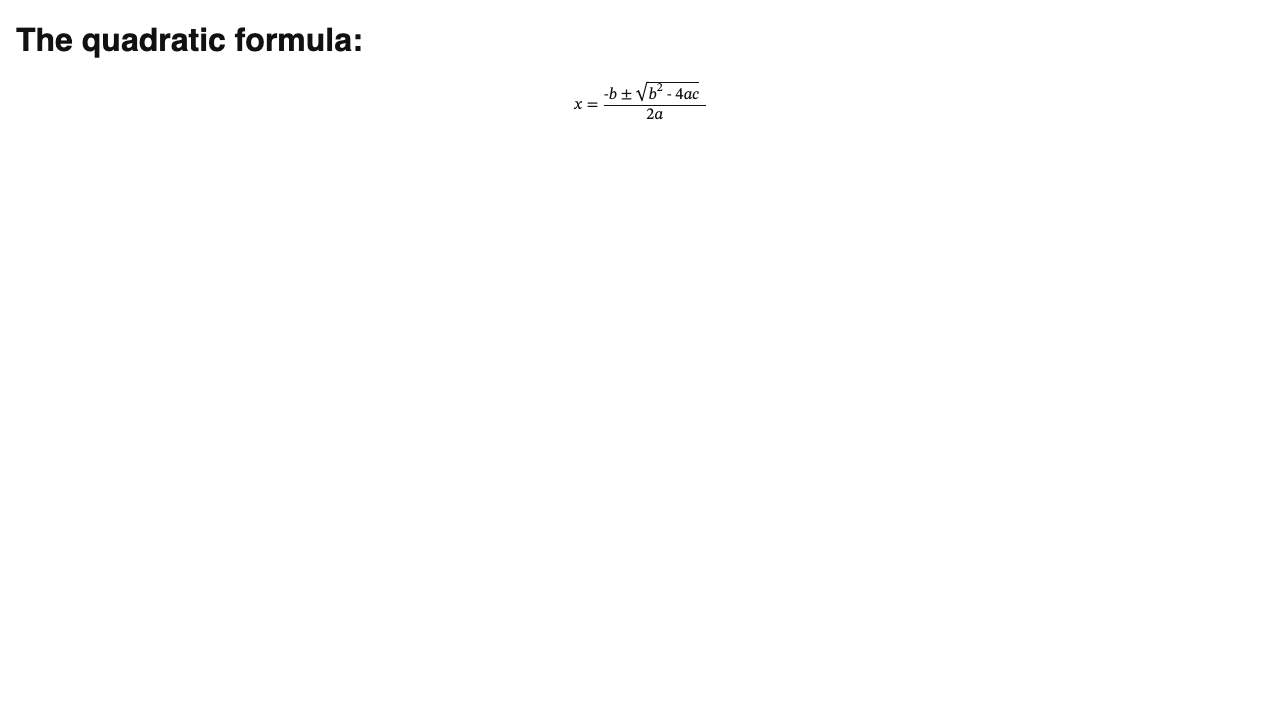
M10 (v0.11.0): the same converter now drives PowerPoint. The LaTeX → OMML engine moved into Core (a pure System.Xml.Linq producer, no DocumentFormat.OpenXml dependency), so a given LaTeX string renders identically in docx and pptx. Equations on a slide live as native OMML inside a text box, addressed /slide[i]/shape[@id=N]/omath[k]:
aioffice edit deck.pptx --ops '[{"op":"add","path":"/slide[1]","type":"equation","props":{"latex":"x = \\frac{1}{2}"}}]'
# → target "/slide[1]/shape[@id=5]/omath[1]"
aioffice get deck.pptx "/slide[1]/shape[@id=5]/omath[1]"   # → "latex": "x = \\frac{1}{2}"
aioffice validate deck.pptx                                  # "valid": true, 0 errors
Excel is N/A by design — spreadsheets carry cell formulas, not math objects — so add type:equation on an .xlsx returns unsupported_feature naming the workaround (a cell formula, or an embedded rendered image).
Audit before you ship
aioffice audit is accessibility + quality lint for Office files. Findings are
data, never errors — the command exits 0 even when it surfaces
error-severity findings, exactly like validate. --fix applies only the
safe, non-destructive autofixes and re-audits, so you see what is left.
# A deliberately-bad report: image with no alt text, H1 then H3, a header-less
# table, an empty heading, no document title.
$ aioffice audit report.docx
{ "ok": true, "data": {
  "findings": [
    { "code": "a11y_no_doc_title",   "severity": "warning", "path": "/properties",      "autofixable": true  },
    { "code": "a11y_no_alt_text",     "severity": "error",   "path": "/body/p[5]",        "autofixable": true  },
    { "code": "a11y_heading_skip",    "severity": "warning", "path": "/body/p[3]",        "autofixable": false },
    { "code": "quality_empty_heading","severity": "warning", "path": "/body/p[4]",        "autofixable": false },
    { "code": "a11y_no_table_header", "severity": "error",   "path": "/body/table[1]",    "autofixable": true  }
  ],
  "summary": { "errors": 2, "warnings": 3, "infos": 0 } } }

# --fix applies the safe autofixes (alt text, table header, doc title), then
# re-audits. The heading-skip and empty-heading findings are report-only and
# stay in `remaining` for you to fix by hand.
$ aioffice audit report.docx --fix
{ "ok": true, "data": {
  "findings": [
    { "code": "a11y_heading_skip",     "path": "/body/p[3]", "autofixable": false },
    { "code": "quality_empty_heading", "path": "/body/p[4]", "autofixable": false }
  ],
  "summary": { "errors": 0, "warnings": 2, "infos": 0 },
  "fixed": 3,
  "remaining": ["a11y_heading_skip#/body/p[3]", "quality_empty_heading#/body/p[4]"] } }

# Still valid OOXML afterwards.
$ aioffice validate report.docx
{ "ok": true, "data": { "valid": true, "count": 0, "issues": [] } }
Same verb, same findings, same --fix semantics for .xlsx (formula errors
like #DIV/0!, merged data cells, missing alt text/title) and .pptx (picture
alt text, slide titles, off-canvas shapes, tiny fonts, reading order). Scope with--category accessibility|quality|all and --severity error|warning|info; the
full code list and which codes are autofixable is in aioffice help audit.
Over MCP it is office_audit {file, category?, severity?, fix?} — the 15th tool.
Diff & review
aioffice diff semantically compares a document against a baseline and
returns a sorted, deterministic change list — added / removed / modified
(with before/after) / moved. Changes are data: exit 0 even when the two
documents differ a lot. The baseline is either another same-format file or
one of the file's own pre-edit snapshots.
# two files — what changed between this draft and the last one
$ aioffice diff new.docx old.docx
{
  "ok": true,
  "data": {
    "changes": [
      { "kind": "modified", "path": "/body/p[1]",
        "before": "Heading1", "after": "Heading2", "detail": "style" },
      { "kind": "modified", "path": "/body/p[2]",
        "before": "Second paragraph.", "after": "Second paragraph EDITED.", "detail": "text" },
      { "kind": "added", "path": "/body/p[4]", "detail": "paragraph" }
    ],
    "summary": { "added": 1, "removed": 0, "modified": 2, "moved": 0 },
    "baseline": "old.docx",
    "view": "detailed"
  }
}

# against a snapshot — "what did I just do?" (every edit auto-snapshots first)
$ aioffice edit report.docx --set '/body/p[2]' text='Revised'
$ aioffice diff report.docx --snapshot 1
#   → the single change that edit made, before/after, deterministic

# terse review — counts plus one path+kind line per change
$ aioffice diff metrics.xlsx baseline.xlsx --view summary
The change list is always sorted by (path, kind), so the same two documents
diff identically on every platform and every run. A cross-format baseline (a.docx against a .xlsx) is invalid_args naming the mismatch. Over MCP it isoffice_diff {file, other? | snapshot?, view?} — the 16th tool.
Convert between formats
convert moves a document from one format to another. It routes by the(source, destination) extension pair: same-family text bridges reuse the
existing code (docx↔md, xlsx↔csv), cross-format pairs go through a
content-neutral model (headings, paragraphs, formatted runs, lists, tables,
images), and any → pdf/png/svg/html routes to the render layer. Conversion is
inherently lossy across formats — whatever the target cannot represent is named
honestly in data.dropped and a single convert_lossy warning.
# docx → pptx — a slide per heading, its bullets as the slide body, tables as native pptx tables
$ aioffice convert report.docx deck.pptx
# → {"from":"docx","to":"pptx","blocksWritten":10,"dropped":[],"written":".../deck.pptx"}

# xlsx → docx — a heading + table per sheet; formulas cross as their cached values
$ aioffice convert data.xlsx data.docx
# → a docx whose Sheet1/Totals tables hold the display values (e.g. =SUM(...) → 30)

# anything → markdown — via the neutral model, so xlsx and pptx reach md too
$ aioffice convert report.docx report.md      # headings, bullets and a pipe table
$ aioffice convert report.md roundtrip.docx   # and back — the outline round-trips

# anything → PDF — paged print via the system browser
$ aioffice convert report.docx report.pdf

# guardrails
$ aioffice convert a.docx b.docx              # invalid_args: "use edit" (same format)
$ aioffice convert a.docx a.xyz               # unsupported_feature, naming the targets
A deck converted from a chart-bearing workbook reports the loss instead of hiding
it: meta.warnings: [{ "code": "convert_lossy", "message": "Some content did not survive the conversion: charts (…the chart is not converted)." }]. Over MCP it isoffice_convert {src, dest} — the 17th tool. See aioffice help convert for the
full (src → dest) matrix.
Embed & extract
M10 (v0.11.0) lets a document carry another file as an embedded OLE/package object — a source .xlsx attached to a report, a .pdf, a .zip, anything — in all three formats. Embed it, list embeds, extract the bytes back out byte-identical, remove it. The commands below are verbatim from the release smoke run:
# embed a workbook into a report, list it, extract it back out, verify byte-identical
aioffice edit report.docx --add /body --type embed src=data.xlsx name="Q3 model"
# → "/embed[1]", mediaType "…spreadsheetml.sheet"
aioffice read report.docx --view embeds        # → [{ path:/embed[1], name:"Q3 model", mediaType, size }]
aioffice edit report.docx --ops '[{"op":"extract","path":"/embed[1]","props":{"to":"out.xlsx"}}]'
shasum -a 256 data.xlsx out.xlsx               # identical — the payload round-trips exactly
aioffice edit report.docx --ops '[{"op":"remove","path":"/embed[1]"}]'
aioffice validate report.docx                   # "valid": true, 0 errors
The container is per-format — docx /body (or a tc/header/footer), xlsx /Sheet1 (anchored), pptx /slide[i] — and embeds are addressed /embed[i], /Sheet1/embed[i], /slide[i]/embed[@id=N]. extract is a producing op: it writes the dest but never mutates the source document, and the extracted bytes equal what was embedded even after an open+save cycle. The media type is sniffed from the source file; the embed src and the extract to are both sandbox-resolved (an escaping path is sandbox_denied). It rides on office_edit / office_read — no new MCP tool, still 17. See aioffice help embeds.
What's new in 1.7
1.7.0 is the sixth post-1.0 feature release — purely additive, so surfaceVersion stays 1.0 (everything below lives inside the frozen CONTRACT.md line; nothing was removed or renamed, the op kinds are unchanged, and there is no new verb or MCP tool). It rounds out print readiness, adds the camera tool and calculation settings, and deepens the equation engine. 18 verbs / 17 MCP tools unchanged.
- xlsx print completeness —
seton/SheetN:printTitleRows/printTitleCols(repeat bands),pageBreaks({rows,cols}),fitToPage({fitToWidth,fitToHeight}or{scale}),centerHorizontally/centerVertically,printGridlines/printHeadings, andprintHeader/printFooter({left,center,right}field-code strings:&P&N&D&T&F&A).get /SheetNreflects them. Seeaioffice help print-setup. - xlsx linked picture / camera tool —
add type:linkedPicturemirrors a cell range as a picture; an honest static snapshot (a true live link is validator-fragile), fired with alinked_picture_staticwarning. Addressed/SheetN/linkedPicture[i]. - xlsx calculation settings —
set /(workbook root):calculationMode(auto/manual/autoExceptTables),iterativeCalc,maxIterations,maxChange,fullPrecision.get /now returns{calculation, workbookProtection}(wasunsupported_feature— an agent that handled the old error still works). - docx drop caps, picture watermark, more fields, numbered equations —
set {dropCap,dropCapLines,dropCapFont}on a paragraph;add type:watermark {image,washout}for a picture watermark;add type:fieldkindsstyleRef(STYLEREF),symbol(SYMBOL),quote(QUOTE);add type:equation {display:true,number:…}for a numbered display equation, addressed/equation[@num=…]. - deeper equations (docx + pptx, shared Core converter) —
\begin{aligned|gathered|cases}arrays,\binom/\dbinom/\tbinom,\overbrace/\underbrace, multi-integrals\iint/\iiint, more accents and relations/arrows. Backward-compatible — strictly more LaTeX renders (fewerequation_partialwarnings); pptx equations inherit it all automatically. Seeaioffice help equations. - pptx notes/handout masters, animation timing, table-cell alignment —
set /notesMaster({background,bodyFont}) andset /handoutMaster({background,headerFooter,slidesPerPage}); animationrepeat/rewind/autoReverseviaset /slide[i]/animation[k]; table-cellvalign/marginLeft|Right|Top|Bottom/textDirection. Seeaioffice help masters.
These are surfaced in schema / office_schema, documented under aioffice help (new topics print-setup, masters; equations/animations/properties-*/addressing deepened), and kept in lock-step by SchemaConsistencyTests (the MCP tool surface stays inside its 3,500-token budget). New add type (linkedPicture), new set-paths (/notesMaster, /handoutMaster), new addressing forms (/SheetN/linkedPicture[i], /equation[@num=…]), new prop keys, and two new warning codes (linked_picture_static, equation_numbers_cached) — all additive. See CONTRACT.md §7g and CHANGELOG.md. 2331 tests green on macOS + Windows (Core 180 · Word 681 · Excel 619 · Pptx 709 · MCP 87 · Preview 24 · Render 31).
What's new in 1.6
1.6.0 is a distribution & onboarding release — no capability change. The native binary is byte-for-byte the same surface as 1.5.0: 18 CLI verbs / 17 MCP tools / surfaceVersion 1.0, the frozen CONTRACT.md line, every envelope, error code and addressing form unchanged. What 1.6 adds is everything around the binary, so agents and humans can install and wire it up in one line:
- npm package —
npm i -g aioffice(ornpx aioffice …). A tiny wrapper that downloads the matching native binary from the GitHub release and SHA256-verifies it; the binary is not shipped inside the tarball. Seenpm/README.mdand theAIOFFICE_DOWNLOAD_VERSION/AIOFFICE_DOWNLOAD_BASEURLoverrides. - Homebrew formula —
brew install onecer/tap/aioffice, installing the prebuilt per-platform binary (dist/Formula/aioffice.rb). - One-line install scripts —
dist/install.sh(macOS/Linux, POSIX sh) anddist/install.ps1(Windows PowerShell): detect platform → download → SHA256-verify → install → PATH hint; macOS quarantine stripped automatically. - Onboarding docs — SKILL.md (AI-facing skill guide), docs/COOKBOOK.md (10 copy-paste recipes), docs/INSTALL.md (all four install paths), docs/MCP-SETUP.md (Claude Desktop / Claude Code / Cursor / generic stdio / TonoBraid configs), docs/SIGNING.md (the code-signing / notarization roadmap).
The whole release is outside the C#/.NET source tree — the build and tests are unaffected. 2125 tests green across 7 projects (Core 124 · Word 612 · Excel 572 · Pptx 675 · MCP 87 · Preview 24 · Render 31). To publish: cd npm && npm publish --access public (after npm login); create onecer/homebrew-tap with dist/Formula/aioffice.rb as Formula/aioffice.rb (filling the four sha256 values from the v1.6.0 SHA256SUMS); the install scripts are served straight from main. See CHANGELOG.md.
What's new in 1.5
1.5.0 is the fifth post-1.0 feature release — purely additive, so surfaceVersion stays 1.0 (everything below lives inside the frozen 1.0 contract line; nothing was removed or renamed, and the op kinds are unchanged). It closes the modern scalar-function gap (XLOOKUP/IFS/SWITCH/LET/… now evaluate) and rounds out the spreadsheet what-if toolkit (Scenario Manager + Goal Seek), while Word gains table-cell formulas, building blocks and line numbering, and PowerPoint gains embedded fonts, action buttons and custom layouts. 18 verbs / 17 MCP tools unchanged.
- Scalar function evaluation (xlsx) —
=XLOOKUP,=IFS,=SWITCH,=LET,=MAXIFS,=MINIFS,=AVERAGEIFS(and=TEXTSPLIT, which spills) are now evaluated at write time and the cached value is written, so headless readers see a real result with noformula_not_evaluatedwarning.TEXTJOIN/CONCAT/IFERROR/SUMIFS/COUNTIFSwere already evaluated and keep working. - Scenario Manager (xlsx) —
add type:scenario({name, cells:{addr:value,…}, comment?}) saves a named changing-cell set;set {applyScenario:"name"}writes the values in and recalculates dependents. Addressed by/Sheet1/scenario[@name=…]. - Goal Seek (xlsx) —
set {goalSeek:{targetCell, targetValue}}on a changing cell solves for the input that makes the target formula reach the target (Newton + bisection), sets it, and recalculates; no convergence → the newgoal_seek_no_solutionwarning (the cell is left unchanged). - Table-cell formulas (docx) — a
formulaprop on a table cell (=SUM(ABOVE),=AVERAGE(LEFT)or cell-ref arithmetic like=A1*B2) becomes aw:fldSimplefield with the value computed headlessly and cached. An optionalnumberFormatshapes it; a field input raises thetable_formula_cachedwarning. - Building blocks (docx) —
add type:buildingBlockstores reusable AutoText / Quick Parts content in the glossary part;add type:buildingBlockRefinserts a stored block's content into the body. Addressed by/buildingBlock[@name=…]. - Line numbering (docx) — a
lineNumberssetprop on/section[i]({start, increment, restart, distance?}, or"none"). - Embedded fonts (pptx) —
add type:fonton/fontsembeds a sandbox-resolved.ttf/.otfas a font part and registers ap:embeddedFont(regular slot, or all four withembedAll).srcis required and must live inside the workspace. Addressed by/fonts/font[@name=…]. - Action buttons (pptx) —
add type:actionButtonon a slide ({action, target?, …};action∈first|last|next|prev|home|end|slide|url) — navigation buttons building on M8 shape hyperlinks. - Custom layouts (pptx) — the M6
add type:layoutgains aplaceholdersprop ([{type, x, y, w, h}]) that builds a freshslideLayoutpart on a master; a slide binds to it by name (add type:slide {layoutName:"Hero"}).
These are surfaced in schema / office_schema, documented under aioffice help (new topics scenarios, goal-seek, table-formulas, building-blocks, embedded-fonts, action-buttons, layouts, line-numbers; formulas extended with the scalar functions), and kept in lock-step by SchemaConsistencyTests (the MCP tool surface stays inside its 3,500-token budget — details live in office_help, not the tool schemas). New add types (scenario/buildingBlock/buildingBlockRef/font/actionButton), new prop keys (applyScenario/goalSeek/table-cell formula/lineNumbers/embedAll/layout placeholders), new addressing forms (/Sheet1/scenario[@name=…], /buildingBlock[@name=…], /fonts), and two new warning codes (goal_seek_no_solution, table_formula_cached) — all additive. The scalar-function evaluation is backward-compatible: cells that used to carry formula_not_evaluated for these functions now carry a cached value, and an agent that handled the warning still works. See CONTRACT.md §7e and CHANGELOG.md. 2125 tests green on macOS + Windows.
What's new in 1.4
1.4.0 is the fourth post-1.0 feature release — purely additive, so surfaceVersion stays 1.0 (everything below lives inside the frozen 1.0 contract line; nothing was removed or renamed, and the op kinds are unchanged). It closes the long-standing dynamic-array gap: FILTER/UNIQUE/SORT (and friends) now evaluate and spill instead of only being recognised. 18 verbs / 17 MCP tools unchanged.
- Dynamic-array evaluation + spill (xlsx) — setting a cell to
=FILTER,=UNIQUE,=SORT,=SORTBY,=SEQUENCE,=RANDARRAYor=TRANSPOSEnow evaluates the formula and spills the result array into the rectangle anchored at the cell (the anchor keeps the array formula; every spilled cell carries a cached value). These no longer raiseformula_not_evaluated;geton the anchor reports aspillRange.RANDARRAYis deterministically seeded for stable round-trips. - Financial functions (xlsx) —
RATE,IRR,XIRR,NPV,PV,FV,PMT,NPERare evaluated at write time (iterative ones by Newton's method with a bisection fallback) and the cached numeric value is written — no moreformula_not_evaluatedfor them. - What-if data tables (xlsx) —
add type:dataTablebuilds a one- or two-variable data table over a range ({rowInput?, colInput?}); the corner formula is recomputed across the input axes into a cached body carrying the Excel{=TABLE(…)}construct. Addressed by/Sheet1/dataTable[i]. A blocked spill raises the newspill_blockederror (exit 2). - Mail-merge execution (docx) — the existing
templateverb runs a mail merge when--datais a JSON array of records: one merged document per record with the new--outputpattern ({n}= record index,{Field}= a record value; every expanded path sandbox-resolved), or one combined document (a section per record) without it.office_templategains an optionaloutputparam — still 17 tools. A single object--datastill fills one document unchanged. - IF fields (docx) —
add type:ifFieldadds a Word «IF» field ({field, operator, value, trueText, falseText}) resolved per record during a merge. - Page borders (docx) — a
pageBordersetprop on/section[i]({style, color?, widthPt?, sides?}, or"none"). - Slide zoom (pptx) —
add type:zoomadds a slide/section/summary zoom navigation object on a slide ({kind, target?, x?, y?, w?, h?}), addressed by/slide[i]/zoom[k]. - Click-trigger animations (pptx) — a
triggerOn:"@N"prop onadd type:animationplays the effect when another shape (stable idN) is clicked. - Table styles (pptx) —
add type:tableaccepts a built-instyle(none|light1|light2|medium1|medium2|medium3|dark1|dark2) plus banding/edge flagsfirstRow,lastRow,bandRow,firstCol.
These are surfaced in schema / office_schema, documented under aioffice help (new topics formulas, data-tables, mail-merge, page-borders, zoom, table-styles; animations extended with triggerOn), and kept in lock-step by SchemaConsistencyTests (the MCP tool surface stays inside its 3,500-token budget — details live in office_help, not the tool schemas). New add types (dataTable/ifField/zoom), new prop keys (pageBorder/triggerOn/table style), new addressing forms (/Sheet1/dataTable[i], /slide[i]/zoom[k]), the extended template behavior, and one new error code (spill_blocked) — all additive. The dynamic-array / financial evaluation is backward-compatible: cells that used to carry formula_not_evaluated now carry a cached value, and an agent that handled the warning still works. See CONTRACT.md §7d and CHANGELOG.md. 2016 tests green on macOS + Windows.
What's new in 1.3
1.3.0 is the third post-1.0 feature release — purely additive, so surfaceVersion stays 1.0 (everything below lives inside the frozen 1.0 contract line; nothing was removed or renamed, and the op kinds are unchanged). 18 verbs / 17 MCP tools unchanged.
- Chart polish (xlsx + pptx) — additive presentation props accepted both when adding a
chartand viaseton an existing chart path (/Sheet1/chart[i],/slide[i]/chart[k]):dataLabels(trueor{show, position?}),legend(none|right|left|top|bottom),axisTitles({category?, value?}),trendline(none|linear|exponential|movingAverage),errorBars(none|stdErr|stdDev|percent),gridlines({major?, minor?}),secondaryAxis(named series → a secondary value axis).getreports them underpolish. - Advanced conditional formatting (xlsx) — three new
conditionalFormatkinds:formula(an=expressionrule like=$B1>100),topBottom(top/bottom N or N%),aboveBelowAverage(above/below the range mean, optionalstdDev). - Pivot calculated fields (xlsx) — a
calculatedFieldsprop onadd type:pivot:[{name, formula}]formula fields computed from source headers (e.g.Margin = Revenue - Cost), validated at add time and reported byget. - Body shapes & text boxes (docx) —
add type:shape(a floating DrawingML shape:rect|roundRect|ellipse|line|arrow, at/body/shape[i]) andadd type:textBox(at/body/textBox[i]), each with fill/line/inline text. - Legacy form fields (docx) —
add type:formField(text|checkbox|dropdown) addressed by/formField[@name=…], valued byset, listed byread --view fields. - Theme editing (docx) —
set /themeedits the theme color scheme (dk1/lt1/dk2/lt2,accent1…accent6,hlink,folHlink) and fonts (majorFont,minorFont);get /themereports them. - 3D models (pptx) —
add type:model3dembeds a.glb/.gltfas a real 3DModel media part behind a poster picture fallback (PowerPoint 2019+ renders it);src/posterare sandbox-resolved and the add carries amodel3d_as_mediawarning. Addressed by/slide[i]/model3d[@id=N]. - Motion-path animations (pptx) — a new
motionPathanimation effect withpathline|arc|circle|custom(custom takes a normalizedpointslist);read --view structurelists it.
These are surfaced in schema / office_schema, documented under aioffice help (new topics chart-polish, conditional-format, themes, 3d-models, form-fields, animations; expanded properties-docx / properties-xlsx / properties-pptx), and kept in lock-step by SchemaConsistencyTests (the MCP tool surface stays inside its 3,500-token budget — details live in office_help, not the tool schemas). New add types (shape/textBox/formField/model3d), new prop keys, the /theme addressing form, and one new warning (model3d_as_media) — all additive. See CONTRACT.md §7c and CHANGELOG.md. 1924 tests green on macOS + Windows.
What's new in 1.2
1.2.0 is the second post-1.0 feature release — purely additive, so surfaceVersion stays 1.0 (everything below lives inside the frozen 1.0 contract line; nothing was removed or renamed, and the op kinds are unchanged — group/ungroup are add types, not new op kinds). 18 verbs / 17 MCP tools unchanged.
- SmartArt (pptx, create + read) —
add type:smartartbuilds a real diagram: layoutslist/process/hierarchy/orgChart/cycle, each mapping to a built-in PowerPoint layout that regenerates on open. Nodes are a flat{text, level}list (0-based level builds the hierarchy).office_get /slide[i]/smartart[k]returns the layout and node tree. Editing nodes in place isunsupported_feature(rebuild). - Connectors (pptx) —
add type:connectorwires ap:cxnSpbetween two shapes (by@idor name):kindstraight/elbow/curved,startArrow/endArrownone/arrow/triangle,color/width/name. - Grouping (pptx) —
add type:groupwraps two or more shapes (/slide[i]/group[@id=N], children addressable as…/group[@id=N]/shape[@id=M]);add type:ungroupdissolves a group, promoting children with absolute coordinates. - Table of figures (docx) —
add type:tableOfFigureslists Figure/Table/Equation captions; entries come from cached captions with afigures_cachedwarning. - Index (docx) —
add type:indexEntrymarks anXEfield;add type:indexbuilds the alphabetized index (columns), page numbers cached with anindex_cachedwarning. - Mail-merge fields (docx) —
add type:mergeFieldinserts aMERGEFIELDthetemplateverb fills by name — from the same--datamap that fills{{key}}placeholders. - Form controls (xlsx) —
add type:formControlauthorscheckbox/optionButton/spinner/comboBox/listBox/buttonwithlinkedCell,items/listFillRange,min/max/increment. - Protection (xlsx) — per-cell
locked; sheet-pathprotected(+password,allow*flags); workbook-rootprotectStructure(+protectWindows). Excel's light UI protection (not encryption); AIOffice always owns and can lift it. - numberFormat presets (xlsx) — named codes for the
numberFormatprop:accounting-usd,currency-usd/eur/gbp/jpy,percent,scientific,date-iso,datetime-iso,duration, … A preset resolves to its Excel code; any non-preset string stays a literal.
These are surfaced in schema / office_schema, documented under aioffice help (new topics smartart, connectors, number-formats, structural-fields; expanded properties-pptx / properties-xlsx), and kept in lock-step by SchemaConsistencyTests (the MCP tool surface stays inside its 3,500-token budget). See CONTRACT.md §7b and CHANGELOG.md.
What's new in 1.1
1.1.0 is the first post-1.0 feature release — purely additive, so surfaceVersion stays 1.0 (everything below lives inside the frozen 1.0 contract line; nothing was removed or renamed). 18 verbs / 17 MCP tools unchanged.
- More chart kinds, everywhere — xlsx and pptx chart factories gain
doughnut,radar,bubble,stackedBar,percentStackedBar,stackedArea, andcombo, alongside the existingbar/line/pie/scatter/area.bubbletakes an x/y/size triple per point;combodraws the first series as columns plus the rest as a line (≥2 series). An unsupported kind still returnsunsupported_featurelisting the expanded set. - iconSet conditional formatting (xlsx) — a new
conditionalFormatkind painting 3/4/5-icon glyph sets (3TrafficLights1,3Arrows,4Rating,5Quarters, …) withreverse/showValue. - Citations & bibliography (docx) —
add type:sourceto the bibliography store,add type:citation(aCITATIONfield),add type:bibliography(renders every cited source inAPA/MLA/Chicago).read --view sourceslists the store; the bibliography is cached (Word rebuilds onF9) so abibliography_cachedwarning rides along. - Embedded media (pptx) —
add type:mediaembeds audio/video (mp4/mov/m4a/mp3/wav) as ap:picwith ana:videoFile/a:audioFile;srcand the optionalposterimage are sandbox-resolved (an escaping path issandbox_denied). - Text & shape effects —
setshadow/glow/reflection/outlineon a docx run (Word 2010w14:effects) or a pptx shape (a:effectLst); each takestrue(default accent) or a color/object,falseclears. - New slide transitions (pptx) —
split,reveal,cut,zoom, on top ofnone/fade/push/wipe.
These are surfaced in schema / office_schema, documented under aioffice help (new topics docx/citation, docx/effect, pptx/media, pptx/effect; expanded charts / conditional-format / transition), and kept in lock-step by SchemaConsistencyTests. See CONTRACT.md §7a and CHANGELOG.md.
MCP (for Claude and other agents)
aioffice mcp # stdio MCP server — 19 tools over the same document engine
Claude Desktop / Claude Code config:
{
  "mcpServers": {
    "aioffice": {
      "command": "aioffice",
      "args": ["mcp", "--workspace", "/path/to/your/documents"]
    }
  }
}
| MCP tool | CLI verb | MCP tool | CLI verb |
|---|---|---|---|
office_create |
create | office_template |
template |
office_read |
read | file_snapshot |
snapshot |
office_query |
query | office_status |
doctor |
office_get |
get | office_help |
help |
office_edit |
edit | office_schema |
schema |
office_render |
render | preview_open |
preview open |
office_validate |
validate | preview_selection |
preview selection |
office_audit |
audit | office_diff |
diff |
office_convert |
convert | preview_mark |
preview mark |
preview_goto |
preview goto |
preview_open / preview_selection (live preview with human click-to-select) registered in M1 (v0.2.0); office_audit (accessibility + quality lint) is the 15th tool, added in M7 (v0.8.0); office_diff (semantic compare) is the 16th tool, added in M8 (v0.9.0); office_convert (cross-format conversion) is the 17th tool, added in M9 (v0.10.0). Current main also adds preview_mark and preview_goto, bringing the MCP tool count to 19 while keeping the document contract on surfaceVersion: "1.0". Total tool-schema budget is capped at 3,500 tokens and enforced by a test.
Command surface (current main)
| Verb | Summary |
|---|---|
create <file> [--from notes.md|data.csv] [--kind] [--title] |
New document (kind inferred from extension) — or import: .md → .docx, .csv → .xlsx |
read <file> [--view outline|text|stats|structure|properties|embeds|markdown|csv] |
Cheap inspection projections, paged; properties returns core+custom doc props under data.properties.{core,custom} (all formats), embeds lists embedded OLE/package objects (all formats), markdown exports a docx body as GFM, csv exports one xlsx sheet (--sheet, --range) |
query <file> <selector> |
CSS-like selectors → canonical paths (p[style=Heading1], cell[value>100], shape:contains('Q3')) |
get <file> <path> |
One node + its properties |
edit <file> --ops <json|@file> |
Atomic batch set/add/remove/move/replace/accept/reject/extract · --dry-run · --expect-rev · sugar --set/--add/--remove · add types include embed (any file as an OLE/package object, all formats) and equation (LaTeX → OMML math, docx+pptx); extract writes an embedded object's bytes back out · document-wide find/replace sugar --find X --replace Y [--regex] [--match-case] [--whole-word] (docx body+headers+footers, every sheet, every slide incl. notes; aggregate {replacements, locations}; with --track on docx every hit becomes a revision pair) |
render <file> [--to html|svg|text|png|pdf] [--scope] |
The look step — html for docx/xlsx, svg per pptx slide, png/pdf via the system browser (pptx pdf: whole deck, one page per slide) |
validate <file> |
OOXML validation + lint with fix suggestions |
audit <file> [--category accessibility|quality|all] [--severity error|warning|info] [--fix] |
Accessibility + quality lint — findings are data (ok:true, exit 0); --fix applies only safe autofixes (alt text, table header, doc/slide title, orphan bookmark) and reports {fixed, remaining} |
diff <file> [<other>] [--snapshot N] [--view summary|detailed] |
Semantic compare against a same-format file or a snapshot of the file itself — a sorted, deterministic {changes:[added/removed/modified/moved], summary, baseline} (changes are data, exit 0); --view summary trims to counts + path+kind |
convert <src> <dest> |
Cross-format conversion — docx/xlsx/pptx ↔ each other (content-neutral model), docx↔md, xlsx↔csv, any→pdf/png/svg/html. Lossy across formats: data.dropped + a convert_lossy warning name what didn't survive; same ext → invalid_args, unknown target → unsupported_feature |
template <file> --data <json|@file> |
{{key}} merge across docx/xlsx/pptx (split-run safe) |
snapshot <list|restore> <file> [n] |
Pre-edit snapshot ring (20) |
preview <open|selection|close|mark|unmark|marks|goto> <file> [path] [--port N] |
Live localhost preview; human clicks -> canonical paths via selection; marks and goto support review callouts |
doctor |
Environment / runtime / handler diagnosis |
schema [verb] |
Machine-readable JSON of the whole surface |
help [topic] |
addressing · selectors · properties-docx/xlsx/pptx · errors · equations (docx+pptx) · embeds · rtl · sections · audit · diff · convert · docx/citation · docx/effect · pptx/media · pptx/effect |
mcp |
stdio MCP server |
plugin <install|uninstall|list|status> |
CLI-only host installer for Claude, Codex, opencode and TonoBraid config |
version |
Version info |
Global flags: --json (default when not a TTY) · --pretty · --workspace <dir> (sandbox root, default cwd, or AIOFFICE_WORKSPACE) · --quiet.
Exit codes: 0 ok · 2 user error · 3 internal/format error · 4 sandbox_denied · 5 unsupported_feature.
Addressing (1-based): /body/p[3] · /body/table[1]/tr[2]/tc[1] · /body/p[3]/omath[1] · /Sheet1/A1:C10 · /Sheet1/table[@name=Sales] · /Sheet1/row[2]:row[6] · /'Q3 Data'/B2 · /slide[2]/shape[3] · /section[1] · /master[1]/layout[2] · / (pptx slide size + sections) · M7: /properties (core + custom doc properties) · /sdt[@tag=status] (docx content controls) · /style[@name=Currency-Red] (xlsx named cell styles) · M8: /caption[@label=Figure][1] (docx captions) · /Sheet1/slicer[1] (xlsx slicers) · M10: /embed[1] · /Sheet1/embed[1] · /slide[2]/embed[@id=7] (embedded objects) · /slide[2]/shape[@id=7]/omath[1] (pptx equations).
AI-facing contract — the stable v1.0 surface (envelope shape, frozen error codes, addressing grammar, exit codes, op/view/tool vocabularies, and the Known limitations) is documented in CONTRACT.md and reported as surfaceVersion (1.0) in schema and doctor.
What works today (M0 + M1 + M2 + M3 + M4 + M5 + M6 + M7 + M8 + M9 + M10 + 1.1)
| Format | M0 (v0.1.0) | + M1 (v0.2.0) | + M2 (v0.3.0) | + M3 (v0.4.0) | + M4 (v0.5.0) | + M5 (v0.6.0) | + M6 (v0.7.0) | + M7 (v0.8.0) | + M8 (v0.9.0) | + M9 (v0.10.0) | + M10 (v0.11.0) | + 1.1 (v1.1.0) |
|---|---|---|---|---|---|---|---|---|---|---|---|---|
| .docx | create · paragraphs/headings/styles · tables · text & formatting edits (bold/italic/color/alignment/size) · query/get · outline/text/stats/structure views · HTML render · {{key}} templates · validate |
headers/footers (create + edit, /header[1]/p[1]) · PNG render · live preview |
tracked changes (--track --author, read --view revisions, accept/reject by /revision[@id=N] or scope) · comments (add/read/remove, /comment[@id=N]) · custom styles (/styles add, /style[@id=X] set/get/remove) · images (PNG/JPEG, sandboxed src, aspect-keeping) |
lists (numbered/bulleted, nested levels, restart; 1./• markers in text view, real <ol>/<ul> in HTML) · hyperlinks (external url + bookmark anchors) · bookmarks · footnotes · page setup (/section[1]: pageSize/orientation/margins) · formatting-revision accept/reject (w:rPrChange/w:pPrChange) · threaded comment replies (add type:reply on /comment[@id=N]) |
table of contents (add type:toc, levels/title/position; /toc[1] get with entryCount) · text watermarks (add type:watermark, every header, auto-creates one) · endnotes (/endnote[@id=N]) · section breaks (add type:sectionBreak, per-section page setup — portrait & landscape in one file) · find/replace (split-run safe; --track makes every hit a w:del+w:ins pair) |
markdown bridge (create --from notes.md imports GFM — headings/lists/tables/links/code; read --view markdown exports it back, structure round-trips) · deep tables (mergeRight/mergeDown, borders all/outer/none, shading, headerRow repeat, columnWidths, valign; real colspan/rowspan in HTML) · fields (PAGE/NUMPAGES/DATE/TITLE + leadingText — 'Page X of Y' footers) · firstPage/even header+footer variants (/header[firstPage], auto w:titlePg/w:evenAndOddHeaders) |
equations (add type:equation — LaTeX → real Office Math; inline /body/p[i]/omath[j] or display block; $…$/$$…$$ in text view; unknown commands degrade with an equation_partial warning; original LaTeX stored for faithful read-back) · right-to-left / bidi (rtl on paragraph w:bidi / run w:rtl / table w:bidiVisual) · multi-column sections (columns/columnGap on /section[1] + add type:columnBreak) |
audit (audit report.docx [--fix] — no-alt-text, heading skips, table headers, low contrast, doc title, empty/broken headings, broken links, orphan bookmarks; safe autofixes for alt/header/title/bookmark) · document properties (set /properties core + typed custom; read --view properties) · content controls (add type:contentControl text/dropdown/date/checkbox; /sdt[@tag=X]; read --view fields) · image alt text (set {alt}) |
diff (diff new.docx old.docx — paragraph/table/header/property changes as added/removed/modified/moved, deterministic) · captions (add type:caption Figure/Table/Equation + SEQ; /caption[@label=Figure][i]) · cross-references (add type:crossRef REF/PAGEREF; labelAndNumber/numberOnly/text/page) |
convert (convert report.docx deck.pptx / report.xlsx / report.md / report.pdf — cross-format via the neutral model, docx↔md text bridge, any→pdf/png/svg/html; convert_lossy names drops) · capabilities introspection (doctor carries verb/tool counts, formats, convert + render targets, audit categories) |
embedded objects (add type:embed any file as an OLE/package object in /body/tc/header/footer; read --view embeds; extract writes the bytes back out byte-identical; /embed[i]) · unified properties shape (read --view properties → data.properties.{core,custom}, identical across formats) |
citations & bibliography (add type:source/citation/bibliography, APA/MLA/Chicago; read --view sources; bibliography_cached warning) · text effects (set {shadow,glow,reflection,outline} on a run — Word 2010 w14: effects) |
| .xlsx | create · typed cell writes (number/bool/string/date) · formula evaluation with cached values + honest warnings · number formats · merge · tables/sheets · range reads · query by value/formula · HTML render · templates · validate | charts (bar/line/pie, add type:chart) · PNG render · live preview |
pivot tables (rows/columns/filters + sum/average/count/min/max values, pivot[@name=X]) · conditional formatting (cellIs/colorScale/dataBar/containsText) · images (anchored, PNG/JPEG) |
streaming reads for huge workbooks (SAX over raw XML — read --view stats/text and cell/range get without loading the DOM; a 41 MB / 330k-row book answers stats in ~2 s) · scatter & area charts · defined names (/name[@name=X], live in formulas — =SUM(SalesData) evaluates) · freeze panes · autoFilter · print setup (orientation/paperSize/fitTo/printArea) |
bulk 2D writes (anchor set /Sheet1/A2 values:[[…]] or exact range; formulas ride along and evaluate; >50k cells into a blank sheet stream via SAX) · rows & columns (insert/delete with formula rewriting, height/width, hidden, col[C] letter addressing) · cell notes (add/read/remove + author) · find/replace (text cells; inFormulas:true opts into formula text) |
csv bridge (create --from orders.csv: RFC 4180, sniffed delimiter, typed cells — 007 stays text, >50k cells stream; read --view csv [--sheet] [--range] exports back) · data validation (list dropdowns from values or a source range; wholeNumber/decimal/date/textLength rules with operators; error styles) · sparklines (line/column/winLoss, color, markers) · threaded comments (real xl/threadedComments + replies by /Sheet1/comment[@id=GUID], legacy-note fallback) · cell hyperlinks (https://… + internal #Sheet!A1, tooltips) |
in-place streaming writes (stream:true or any >20 MB file rewrites the workbook through the SAX writer — set deep cells & bulk-write ranges in a 50 MB+ book in seconds; streamed:true in the result) · Excel Tables / ListObjects (add type:table over a range — name, built-in style, totals row with sum/avg/…, structured references =SUM(Sales[Amount]) evaluate; /Sheet1/table[@name=X]) · outline grouping (add type:group over a row[a]:row[b] / col[a]:col[b] span, collapsed, nested levels) |
audit (audit metrics.xlsx [--fix] — formula errors #DIV/0!/#REF!, merged data cells, image alt text, doc title; safe autofixes for alt/title) · named cell styles (add type:cellStyle numberFormat/bold/fill/color/border once, set {cellStyle:"X"} to a range, read --view styles, /style[@name=X]) · document properties (set /properties; read --view properties) · image alt text |
diff (diff new.xlsx old.xlsx — changed cells, added/removed sheets, defined names, tables as modified/added/removed) · slicers (add type:slicer on a table column or pivot field, raw-OpenXml authored; /Sheet1/slicer[i], get/remove/structure) |
convert (convert data.xlsx data.docx / .pptx / .csv / .md / .pdf — sheets→tables via the neutral model, xlsx↔csv text bridge; charts/pivots/images named in data.dropped + convert_lossy) |
embedded objects (add type:embed any file anchored on a sheet; read --view embeds; extract byte-identical; /Sheet1/embed[i]) · unified properties shape (data.properties.{core,custom}) · equations are N/A (Excel has cell formulas, not OMML math → add type:equation returns unsupported_feature naming the workaround) |
expanded charts (doughnut/radar/bubble/stackedBar/percentStackedBar/stackedArea/combo) · iconSet conditional formatting (3/4/5-icon glyph sets, reverse/showValue) |
Cross-format in M3 (功能第一 — features first):
render --to pdf— docx/xlsx print to paged PDF, a pptx deck becomes one PDF with one page per slide, via the same system-browser pipeline as PNG (no browser → typedunsupported_featurewith the workaround).- Cross-document
dataFrom—{"op":"add","type":"chart","props":{"dataFrom":"metrics.xlsx!Sheet1/A1:B5"}}builds a pptx chart from live workbook data: first column → categories, header row → series names, remaining columns → series. Sandbox-resolved, candidates on a wrong range, identical over CLI and MCP. - Size cap is now opt-in — the M2 50 MB default is gone; files of any size open by default (huge xlsx reads go through the streaming path). Set
AIOFFICE_MAX_FILE_MBto restore a hardfile_too_largecap;doctorreportslimits.maxFileMb: "unlimited"otherwise.
Cross-format in M4 — one find/replace contract for all three formats:
{"op":"replace","path":"<scope>","props":{"find","replace","regex?","matchCase?","wholeWord?"}}works on any container path; path"/"means the whole document (docx body + every header/footer, every sheet, every slide including notes) and the per-scope results are aggregated into one{replacements, locations}pair.- Matches split across formatting runs are found (docx/pptx); the rewritten text keeps the first affected run's formatting. Regex is .NET syntax with a 2 s match budget (timeout → typed
invalid_args). Zero hits isok:trueplus afind_no_matchwarning — never an error. - CLI sugar:
aioffice edit report.docx --find 2025 --replace 2026 [--regex] [--match-case] [--whole-word]; identical over MCPoffice_edit. On docx,--trackrecords every replacement as aw:del+w:insrevision pair for later accept/reject.
Cross-format in M9 — one convert verb for all format transfers (see Convert between formats above):
- Content-neutral model — cross-format pairs (
docx↔pptx,docx↔xlsx,pptx↔xlsx, and any format↔ md) go through a sharedNeutralDocmodel (headings, formatted runs, lists, tables, images): the source handler'sExportNeutralprojects to it, the destination handler'sImportNeutralrebuilds a fresh file from it. TheINeutralConvertibleinterface lives in Core (the same pattern as M7IAuditorand M8IDiffer); each of the three handlers implements it. - Text bridges reused —
docx↔md(the M5 markdown bridge) andxlsx↔csv(the M5 csv bridge) are reached through the sameconvertentrypoint, whilexlsx→md/pptx→mdride the neutral model + a command-layerNeutralMarkdownserializer. - Render targets —
any → pdf/png/svg/html/txtopens the source and routes to the render layer. - Honest lossiness — conversion is content-transfer and inherently lossy:
data.droppedand a singleconvert_lossywarning name what didn't survive (animations, charts, SmartArt, exact styling, formulas-as-values, markdown colors). The destination is created fresh (overwrite →convert_overwrite); same-extension isinvalid_args, an unknown target isunsupported_feature. - Introspection —
doctor(andoffice_status) now carry acapabilitiesblock: verb count, MCP tool count, supported formats, convert sources/targets, render targets and audit categories, so an agent can learn the whole surface in one call.
Cross-format in M10 — embedded objects everywhere + equations beyond docx + the pre-1.0 contract freeze:
- Embedded objects (
embed/extract) — embed any file (a source.xlsxattached to a report, a.pdf, a.zip…) as an OLE/package object in all three formats:add type:embed src=…(docx/body, xlsx/Sheet1, pptx/slide[i]),read --view embedslists{path,name,mediaType,size,container}, and the newextractop writes the payload back out byte-identical (a producing op that never mutates the source). Media type is sniffed from the source file; the src and the extract destination are both sandbox-resolved. - One shared LaTeX → OMML converter — the M6 equation engine moved into Core (
AIOffice.Core.Equations): a pureSystem.Xml.LinqOMML producer with noDocumentFormat.OpenXmldependency. Both Word (which loads it into the SDK math model) and pptx (new — equations rendered natively in a slide text box) consume the one converter, so a given LaTeX string renders identically in both. xlsx is N/A by design (cell formulas, not math objects). Unknown commands still degrade with anequation_partialwarning. - Unified properties shape —
read --view propertiesandget /propertiesnow returndata.properties.{core,custom}identically across docx/xlsx/pptx (previously docx nested, xlsx/pptx were flat) — a deliberate pre-1.0 consistency fix. - The contract freeze — the stable v1.0 AI-facing surface is documented in CONTRACT.md and declared via a
surfaceVersionfield (1.0) inschemaanddoctorcapabilities: the envelope shape, the frozen error-code set, the addressing grammar, exit codes, and the op/view/tool vocabularies.
The long-term capability ledger (vs. the strongest CLI in the field) lives in docs/PARITY.md — capability parity is the north star; the command surface is deliberately our own. The stability promise lives in CONTRACT.md.
Architecture
                 ┌─────────────────────────────────────────────┐
   agent/human → │  src/AIOffice.Cli   (aioffice, 19 verbs)    │
   MCP client  → │  src/AIOffice.Mcp   (stdio, 19 tools)       │
                 ├─────────────────────────────────────────────┤
                 │  src/AIOffice.Render  (png/pdf via browser) │
                 │  src/AIOffice.Preview  (live click-select)  │
                 └──────────────┬──────────────────────────────┘
                                │ envelope · addressing · selectors
                 ┌──────────────▼──────────────────────────────┐
                 │  src/AIOffice.Core                          │
                 │  envelope/errors · DocPath · Selector       │
                 │  Workspace sandbox · SnapshotStore · rev    │
                 └───────┬──────────────┬──────────────┬───────┘
                         │              │              │
                 ┌───────▼─────┐ ┌──────▼───────┐ ┌────▼────────┐
                 │AIOffice.Word│ │AIOffice.Excel│ │AIOffice.Pptx│
                 │ OpenXml SDK │ │  ClosedXML   │ │ OpenXml SDK │
                 └───────┬─────┘ └──────┬───────┘ └────┬────────┘
                         ▼              ▼              ▼
                       .docx          .xlsx          .pptx    (lossless OOXML)
Quality
Born from studying an excellent office CLI that ships zero automated tests — AIOffice takes the opposite stance:
- 2331 tests across 7 projects (Core 180 · Word 681 · Excel 619 · Pptx 709 · MCP 87 · Preview 24 · Render 31), green on every commit.
- Round-trip law: open → save with no edits must leave every zip part byte-identical; documented exceptions are asserted exactly.
- Independent oracle: OpenXmlValidator must report 0 errors after every mutating test — the tool never grades its own homework.
- CI matrix: macOS 14 + Windows, builds with warnings-as-errors, runs golden scripts, publishes and smokes the single-file binary.
- Release automation: pushing a
v*tag builds, tests, publishes all 6 single-file binaries +SHA256SUMS, and creates the GitHub release with notes rendered fromscripts/release-notes-template.md(edit it before tagging) — see.github/workflows/release.yml. - Human check: generated files in
fixtures/manual-check/for opening in real Office.
Roadmap
M0 — everything above; single-file publish; CI on macOS + Windows.
M1 (shipped, v0.2.0) — PNG render (system browser detection) ·
preview_open/preview_selection(live preview, human click-to-select) · docx headers/footers · pptx master/layout read addressing · xlsx charts (bar/line/pie).M2 (shipped, v0.3.0) — tracked changes (
--track/--author, accept/reject) · comments · style management · pivot tables · conditional formatting · images (all three formats) · pptx backgrounds & speaker notes · file-size guard (file_too_large,AIOFFICE_MAX_FILE_MB). Large-file streaming did not ship: it needs a dedicated benchmark-driven pass; M2 ships a size guard instead — moved to M3.M3 (shipped, v0.4.0) — 功能第一: docx lists/links/bookmarks/footnotes/page-setup/format-revision-resolve/comment-replies · xlsx streaming reads (SAX)/scatter+area charts/defined names/freeze/autoFilter/print setup · pptx native charts/transitions/preset geometries/z-order · cross-doc
dataFrom(xlsx data → pptx charts, CLI & MCP) ·render --to pdf(paged docx/xlsx; pptx one page per slide) · size cap flipped to opt-in (default unlimited).M4 (shipped, v0.5.0) — one find/replace contract for all three formats (split-run safe, regex with timeout, document-wide
"/"scope, CLI--find/--replacesugar, tracked revision pairs on docx) · docx TOC / watermarks / endnotes / section breaks · xlsx bulk 2D writes (SAX streaming into blank sheets) / row & column ops / cell notes · pptx editable chart data (embedded workbooks, Edit-Data in PowerPoint,embedData:trueretrofit) / entrance animations / slide comments · tag-driven release automation.M5 (shipped, v0.6.0) — the markdown/csv bridge:
create --from(.md→.docxvia Markdig,.csv→.xlsxtyped import) +read --view markdown|csvexports that round-trip · docx deep tables (merges/borders/shading/columnWidths/headerRow) / fields (PAGE/NUMPAGES/DATE/TITLE) / firstPage & even header/footer variants · xlsx data validation (dropdowns + rules) / sparklines / threaded comments + replies / cell hyperlinks · pptx native tables (merges + looks) / emphasis & exit animations / comment replies / SmartArt read ·IFormatHandler.CreateFromimport hook (additive, defaultunsupported_feature).M6 (shipped, v0.7.0) — the deep-water pass: docx equations (a hand-rolled LaTeX → Office Math converter, inline/display, matrices, partial-degrade warnings, LaTeX stored for faithful read-back) / right-to-left & bidi (paragraph/run/table) / multi-column sections (+ column breaks) · xlsx in-place streaming writes (rewrite a 50 MB+ workbook through the SAX writer) / Excel Tables (ListObjects + totals + structured references) / outline grouping (row/col spans) · pptx master & layout editing (backgrounds, theme accents, cloned layouts) / slide sections / slide size & aspect ratio / animation timeline reorder · new addressing forms
/(presentation root),/body/p[i]/omath[j],/section[i],row[a]:row[b]spans, editable/master[1]/layout[i].M7 (shipped, v0.8.0) — audit before you ship: a shared
auditverb +office_auditMCP tool (the 15th tool) across all three formats — accessibility + quality lint where findings are data (ok:true, exit 0), with safe-only--fix(placeholder alt text, table header rows, doc/slide titles, orphan bookmarks) reporting{fixed, remaining}· docx document properties (core + typed custom) / content controls (text/dropdown/date/checkbox,read --view fields) / image alt text · xlsx named cell styles (add type:cellStyle,read --view styles) / document properties / formula-error + merged-data-cell + alt-text audit · pptx alt-text/title/reading-order audit + explicitaltText/altTitle/ document properties · new addressing forms/properties,/sdt[@tag=X],/style[@name=X];office_readview enum gainsproperties/fields/styles.M8 (shipped, v0.9.0) — diff & review: a shared
diffverb +office_diffMCP tool (the 16th tool) across all three formats — semantic compare against another same-format file or one of the document's own pre-edit snapshots, returning a sorted, deterministic{changes:[added/removed/modified/moved], summary, baseline}(changes are data, exit 0; LCS/content-hash distinguishes moves;--view summarytrims to path+kind) · docx captions (Figure/Table/Equation + SEQ) / cross-references (REF/PAGEREF,labelAndNumber/numberOnly/text/page) · xlsx slicers (table-column / pivot-field, authored on raw OpenXml) · pptx shape hyperlinks / actions (url /#slide:Njump /#first…#endshow actions /linkText) · new addressing forms/caption[@label=Figure][i],/Sheet1/slicer[i].M9 (shipped, v0.10.0 — the pre-1.0 capstone) — cross-format conversion: a shared
convertverb +office_convertMCP tool (the 17th tool) — docx/xlsx/pptx ↔ each other through a content-neutral model (NeutralDoc+INeutralConvertible, the same Core-interface pattern asIAuditor/IDiffer),docx↔mdandxlsx↔csvvia the M5 text bridges, any format ↔ markdown via aNeutralMarkdownserializer, andany → pdf/png/svg/htmlvia the render layer; lossy by nature, sodata.dropped+ aconvert_lossywarning name what didn't survive · 1.0 hardening: every CLI verb has a help topic and appears inschema(newconverthelp topic with the(src→dest)matrix), anddoctor/office_statusgain acapabilitiesintrospection block (verb + tool counts, formats, convert sources/targets, render targets, audit categories).M10 (shipped, v0.11.0 — the last feature milestone before 1.0) — document intelligence II: embedded objects across all three formats (
add type:embedany file as an OLE/package object,read --view embeds, the newextractop writing the payload back out byte-identical;/embed[i],/Sheet1/embed[i],/slide[i]/embed[@id=N]; src + dest sandbox-resolved) · pptx equations through a shared LaTeX → OMML converter extracted into Core (AIOffice.Core.Equations, a pureSystem.Xml.Linqproducer; Word and Pptx consume the one engine;/slide[i]/shape[@id=N]/omath[k]; xlsx is N/A by design) · 1.0 contract prep: theread --view properties/get /propertiesenvelope is unified todata.properties.{core,custom}across all three formats, a stablesurfaceVersion(1.0-rc) is declared inschemaanddoctorcapabilities, and the frozen AI-facing contract is written up in CONTRACT.md. Embeds and equations ride onoffice_edit/office_read— still 17 MCP tools.1.0.0 (shipped — the API-stability release) — stabilization, not new features:
surfaceVersionpromoted to1.0; CONTRACT.md finalized as the frozen v1.0 surface with a Stability promise and a Known limitations section; the CLI and MCP introspection surfaces locked in lock-step on the shared vocabularies (aSchemaConsistencyTestsguard reddens CI on drift); theread --viewenum +editop list now exposeembeds/extracton both surfaces; xlsx read views echodata.view; xlsx convert now reports chart/pivot/image drops viadata.dropped+convert_lossy(no more silent loss); the full warning-code vocabulary is centralized, documented and surfaced inschemaasdata.warningCodes; addressing help documents the M8–M10embed/omathforms. 18 verbs / 17 MCP tools, 1590 tests green on macOS + Windows.1.1.0 (shipped — the first post-1.0 feature release, additive only) —
surfaceVersionstays1.0(every change lives within the frozen 1.0 contract line): expanded chart kinds on xlsx and pptx (doughnut/radar/bubble/stackedBar/percentStackedBar/stackedArea/combo, on top ofbar/line/pie/scatter/area) · xlsxiconSetconditional formatting (3/4/5-icon glyph sets) · docx citations & bibliography (add type:source/citation/bibliography,read --view sources,bibliography_cachedwarning) · pptx embedded media (add type:mediaaudio/video, sandbox-resolvedsrc/poster) · docx-run & pptx-shape text/shape effects (shadow/glow/reflection/outline) · pptx new transitions (split/reveal/cut/zoom). Newaddtypes, one newread --view(sources), one new warning — all additive, guarded bySchemaConsistencyTests. 18 verbs / 17 MCP tools unchanged, 1692 tests green on macOS + Windows.1.2.0 (shipped — the second post-1.0 feature release, additive only) —
surfaceVersionstays1.0(theopkinds are unchanged —group/ungroupareaddtypes): pptx SmartArt creation (add type:smartart,list/process/hierarchy/orgChart/cycle), connectors (add type:connector, straight/elbow/curved + arrows), grouping (add type:group/ungroup) · docx table of figures (tableOfFigures+figures_cached), index (indexEntry/index+index_cached), mail-merge fields (mergeField, filled bytemplatealongside{{key}}) · xlsx form controls (formControl: checkbox/optionButton/spinner/comboBox/listBox/button), light protection (celllocked+ sheetprotected+ workbookprotectStructure), numberFormat presets (accounting-usd/percent/date-iso/…). Newaddtypes and prop keys, two new warnings — all additive, guarded bySchemaConsistencyTestsand the token-budget test. 18 verbs / 17 MCP tools unchanged, 1807 tests green on macOS + Windows.1.3.0 (shipped — the third post-1.0 feature release, additive only) —
surfaceVersionstays1.0(theopkinds are unchanged): xlsx + pptx chart polish (dataLabels/legend/axisTitles/trendline/errorBars/gridlines/secondaryAxis, onaddandset /…/chart[k]) · xlsx advanced conditional formatting (formula/topBottom/aboveBelowAverage), pivot calculated fields (calculatedFields) · docx body shapes & text boxes (add type:shape/textBox), legacy form fields (add type:formField), theme editing (set /theme) · pptx 3D models (add type:model3d,model3d_as_mediawarning), motion-path animations (motionPatheffect). Newaddtypes (shape/textBox/formField/model3d), new prop keys, the/themeaddressing form, one new warning — all additive, guarded bySchemaConsistencyTestsand the token-budget test (new surface documented inoffice_help, not the tool schemas). 18 verbs / 17 MCP tools unchanged, 1924 tests green on macOS + Windows.1.4.0 (shipped — the fourth post-1.0 feature release, additive only) —
surfaceVersionstays1.0(theopkinds are unchanged); closes the dynamic-array gap: xlsx dynamic-array evaluation + spill (=FILTER/UNIQUE/SORT/SORTBY/SEQUENCE/RANDARRAY/TRANSPOSEevaluate and spill, anchor reportsspillRange, blocked spill →spill_blocked), financial functions (RATE/IRR/XIRR/NPV/PV/FV/PMT/NPERevaluated and cached — these no longer raiseformula_not_evaluated), what-if data tables (add type:dataTable) · docx mail-merge execution (thetemplateverb runs a merge when--datais a record array;--outputpattern per record or a combined doc;office_templategains an optionaloutput), IF fields (add type:ifField), page borders (set /section[i] {pageBorder}) · pptx slide zoom (add type:zoom), click-trigger animations (triggerOn:"@N"), table styles (add type:table {style, firstRow/lastRow/bandRow/firstCol}). Newaddtypes (dataTable/ifField/zoom), new prop keys, new addressing forms (/Sheet1/dataTable[i],/slide[i]/zoom[k]), the extendedtemplatebehavior, one new error code (spill_blocked) — all additive and backward-compatible, guarded bySchemaConsistencyTestsand the token-budget test (new surface documented inoffice_help). 18 verbs / 17 MCP tools unchanged, 2016 tests green on macOS + Windows.1.5.0 (shipped — the fifth post-1.0 feature release, additive only) —
surfaceVersionstays1.0(theopkinds are unchanged); closes the modern scalar-function gap: xlsx scalar evaluation (=XLOOKUP/IFS/SWITCH/LET/MAXIFS/MINIFS/AVERAGEIFSevaluate and cache — no moreformula_not_evaluated;=TEXTSPLITspills), Scenario Manager (add type:scenario+set {applyScenario}, recalculated), Goal Seek (set {goalSeek:{targetCell,targetValue}},goal_seek_no_solutionwarning) · docx table-cell formulas (set {formula}on a cell → cachedw:fldSimple,table_formula_cachedwarning), building blocks (add type:buildingBlock/buildingBlockRef), line numbering (set /section[i] {lineNumbers}) · pptx embedded fonts (add type:fonton/fonts,embedAll), action buttons (add type:actionButton), custom layouts (add type:layout {placeholders}+ slidelayoutName). Newaddtypes (scenario/buildingBlock/buildingBlockRef/font/actionButton), new prop keys (applyScenario/goalSeek/formula/lineNumbers/embedAll/placeholders), new addressing forms (/Sheet1/scenario[@name=…],/buildingBlock[@name=…],/fonts), two new warning codes (goal_seek_no_solution,table_formula_cached) — all additive and backward-compatible, guarded bySchemaConsistencyTestsand the token-budget test (new surface documented inoffice_help). 18 verbs / 17 MCP tools unchanged, 2125 tests green on macOS + Windows.1.6.0 (shipped — distribution & onboarding, no capability change) —
surfaceVersionstays1.0; the binary is byte-for-byte the same surface as 1.5.0. Adds the packaging/onboarding layer around the binary (npm package, Homebrew formula, one-line install scripts,SKILL.md+ cookbook/install/MCP-setup/signing docs), almost entirely outside the C#/.NET source tree. 18 verbs / 17 MCP tools unchanged, 2125 tests green.1.7.0 (shipped — the sixth post-1.0 feature release, additive only) —
surfaceVersionstays1.0(theopkinds are unchanged; no new verb/tool); rounds out print readiness, the camera tool, calc mode, and equation depth: xlsx print completeness (printTitleRows/printTitleCols/pageBreaks/fitToPage/center/gridlines/headings/printHeader/printFooter), linked picture / camera tool (add type:linkedPicture,linked_picture_staticwarning), calculation settings (set /calculationMode/iterativeCalc/…) · docx drop caps (set {dropCap,…}), picture watermark (add type:watermark {image}), STYLEREF/SYMBOL/QUOTE fields, numbered display equations (number:…,/equation[@num=…]) · deeper LaTeX→OMML shared by docx+pptx (\begin{aligned|gathered|cases},\binom,\overbrace/\underbrace,\iint/\iiint, more accents/relations — fewerequation_partialwarnings) · pptx notes/handout masters (/notesMaster,/handoutMaster), animation timing (repeat/rewind/autoReverse), table-cell alignment (valign/margins/textDirection). Newaddtype (linkedPicture), new set-paths (/notesMaster,/handoutMaster), new addressing (/SheetN/linkedPicture[i],/equation[@num=…]), new prop keys, two new warning codes (linked_picture_static,equation_numbers_cached) — all additive and backward-compatible, guarded bySchemaConsistencyTestsand the token-budget test (newoffice_helptopicsprint-setup/masters). 18 verbs / 17 MCP tools unchanged, 2331 tests green on macOS + Windows.
After 1.0 (candidate ideas, not committed)
1.0 is the API-stability line; anything here is additive and gated on the contract's additive-only promise:
- Plugin mechanism — external format handlers discovered at runtime, so third parties can add formats without forking.
- Richer convert fidelity — finer
data.droppedgranularity; optionally carrying more styling through the neutral model. - xlsx polish — sheetView RTL, modern threaded-comment refinements.
- pptx animation depth — the full upstream emphasis/exit preset set, multi-effect chains, repeat/autoReverse (motion paths shipped in 1.3).
Design statement
AIOffice's surface is deliberately incompatible with existing office CLIs: capability parity is the goal, but the verbs, flags and addressing grammar are designed from scratch for agents — smaller, more predictable, introspectable. One mental model, two transports (CLI & MCP).
Docs
Getting started: docs/README.md — illustrated docs hub · docs/INSTALL.md — all four install paths · docs/MCP-SETUP.md — wire it into Claude / Cursor / any MCP host · SKILL.md — AI-facing onboarding guide · docs/COOKBOOK.md — 10 copy-paste recipes · docs/SIGNING.md — code-signing / notarization roadmap
Reference: docs/DESIGN.md — architecture & surface spec · docs/MCP.md — MCP tool spec · docs/PARITY.md — capability ledger · CONTRACT.md — frozen v1.0 AI-facing surface · aioffice help <topic> — built-in progressive docs · SMOKE_REPORT.md — real end-to-end verification log
License
MIT. See THIRD-PARTY-NOTICES.md — all dependencies are permissive (MIT: DocumentFormat.OpenXml, ClosedXML, ModelContextProtocol C# SDK; BSD-2-Clause: Markdig); no bundled third-party binaries.
Reviews (0)
Sign in to leave a review.
Leave a reviewNo results found