greybeard
Health Pass
- License — License: MIT
- Description — Repository has a description
- Active repo — Last push 0 days ago
- Community trust — 12 GitHub stars
Code Pass
- Code scan — Scanned 12 files during light audit, no dangerous patterns found
Permissions Pass
- Permissions — No dangerous permissions requested
No AI report is available for this listing yet.
Your senior Microsoft 365, Intune, and Entra admin, installed in the AI client you already use. Agent Skills plus MCP servers for Claude Code, Cursor, Codex, Gemini, and GitHub Copilot, with a human approval gate on every tenant write.

Greybeard
A self-improving second brain for IT admins.
Greybeard learns how you work through lessons you review and approve, then brings relevant preferences, rules, and experience into supported AI conversations. It combines local memory and admin guidance with your existing AI model, like an experienced colleague helping you get better answers and spot risks before making changes.
Download Greybeard
Free to use. No Node, npm, Git, or tenant connection required.
Download the current latest release, 0.1.1, directly for your computer:
| Platform | Direct download | Install |
|---|---|---|
| Windows x64 | Download for Windows (.exe) | Run the installer, then open Greybeard from Start. |
| macOS 14+ on Apple Silicon | Download for macOS (.dmg) | Drag Greybeard to Applications, eject the DMG, then open the app. |
| Linux x64 | Download for Linux (.AppImage) | Mark the AppImage executable and open it from a permanent location. |
Latest release and all downloads · Download checksums
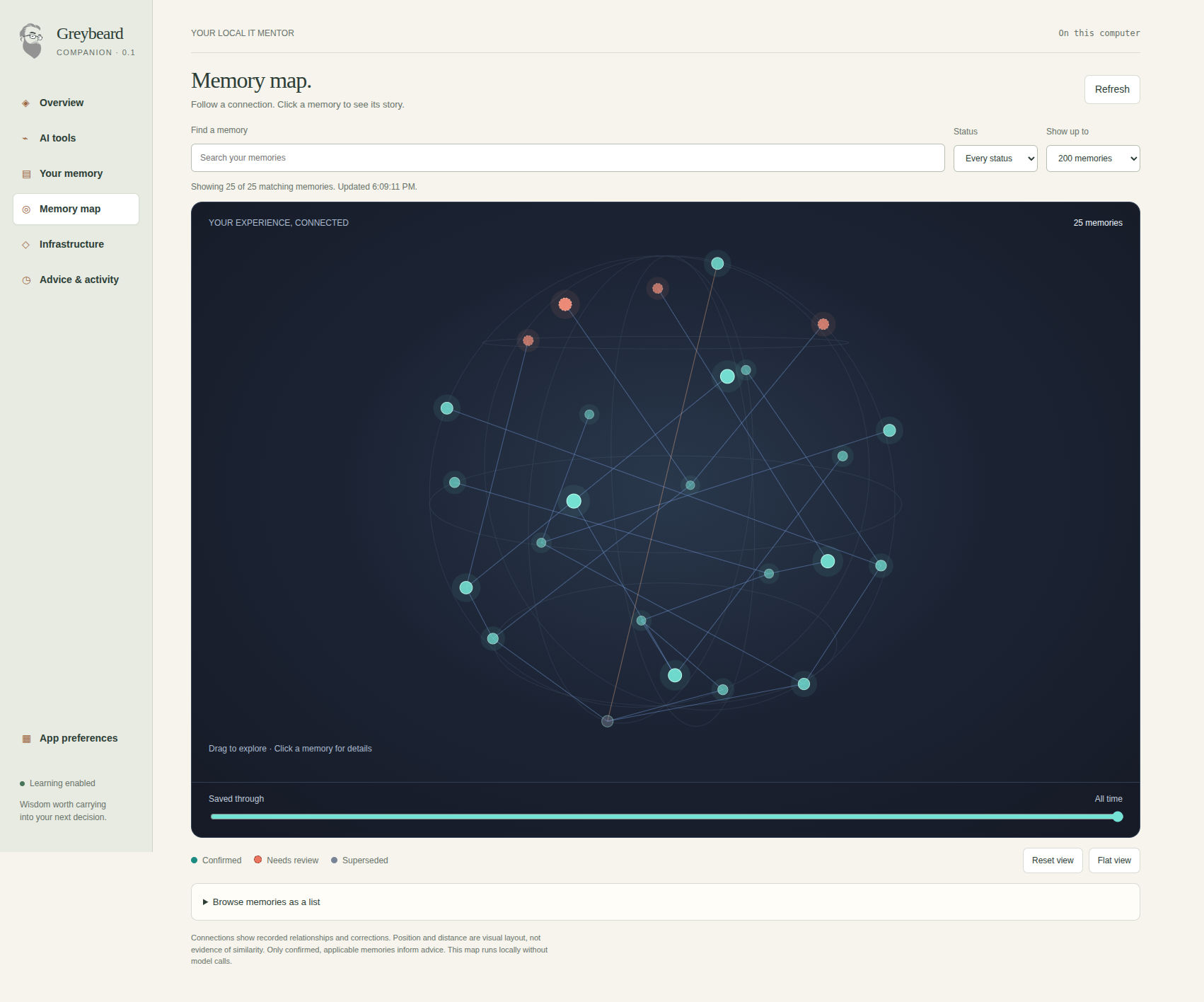
The companion's memory map, shown with illustrative demo memories. Click a memory to explore its wording, history, and recorded connections.
Get started
Windows installers are publisher-signed. The Mac app and DMG are Developer ID signed and notarized. Linux is unsigned; use the release checksums to verify integrity. Download SHA256SUMS.txt from the same release and compare the matching hash before installation.
First launch detects your AI tools. Choose the ones you use, select Enable learning, review the setup results, then fully restart those tools. Codex requires reviewing and trusting Greybeard in /hooks. Proposed memories stay inactive until you confirm their exact wording in the companion.
Upgrading from the earlier executable or a companion candidate: close Greybeard and its AI clients, install the new companion, and rerun setup under AI tools to update integration paths. Keep your local data directory; installation preserves existing memories. The old v0.1.0 download remains available for recovery.
The release includes complete-application update manifests and the Mac ZIP used by the updater. Notify is the default; Automatic downloads an available update, and installation still requires an explicit restart. Existing legacy executables without the companion updater need this manual installation first.
For checksums, terminal installation, and upgrade details, see installation instructions. The release notes describe the included features and limits.
Desktop companion
The companion opens in its own application window. Manage memory, review exact proposals, add lessons from outcomes, inspect connections, rate recalled advice, and configure application updates without a browser tab. It keeps your existing local database. The optional Memory map shows recorded sources, timestamps and connections on a rotatable globe, with a flat view and exact-text details. It runs locally without model calls.
Greybeard ships as a Windows setup executable, an Apple Silicon DMG containing Greybeard.app, and a Linux AppImage. The CLI and MCP servers are bundled inside. Companion application and installation flow · Implementation coverage.
Your first lesson
State a durable preference in your connected Code or CLI session, such as “We always require a recovery owner before a production rollout.” Greybeard proposes a lesson automatically; review its exact wording in the companion. You can also propose one locally:
greybeard memory add --content "Review stale device ownership before device deletion" --scope devices
greybeard memory candidates
greybeard memory confirm --id 1
Use the actual candidate ID returned by the first command. Confirmation previews the exact lesson and requires an interactive terminal; you can also review and confirm it in local graphical setup. A conversation, tool result, or successful command cannot silently turn a candidate into confirmed guidance.
Local memory separates Preferences (how you want to work, including rollout rules) from Lessons (facts, decisions, and reusable approaches). Both require local confirmation. When a confirmed memory changes an answer, the client is instructed to identify the Greybeard memory and explain its effect. Recalling a memory alone does not establish that it is relevant or that Greybeard independently assessed your tenant.
Recall defaults to an 800-byte budget for compact returned memory nodes. This is a context-size control, not measured model billing; tool definitions, the response envelope, skills, and your conversation add separate context. See the memory contract. Pausing learning and advice suppresses memory recall while leaving local review and export available.
Automatic mentoring uses local rules and confirmed memories without a separate model call. Each hook contributes at most 2,048 UTF-8 bytes, and identical context is suppressed for ten minutes within the same host session. Skills reuse context already supplied by a hook. These are context controls, not token or billing guarantees: the AI client may include context again in later model requests.
Client behavior
Greybeard is a local application. MCP exposes its memory and optional tenant-read tools to your AI client. Client integrations supply supported events; Greybeard does not watch your desktop or automatically observe every command. Your existing AI client supplies the model.
| Client | Automatic mentoring |
|---|---|
| Claude Code | Prompt and pre-tool context, automatic preference proposals, memory MCP and skills |
| Claude Desktop Code | Same local hooks and skills as Claude Code; setup connects both surfaces together |
| Claude Desktop Chat | Clearly labeled MCP-assisted; no documented automatic prompt hook; specialist skills require manual import |
| Codex CLI | Prompt and pre-tool context; review new or changed definitions in /hooks before they run |
| Gemini CLI | BeforeAgent context and AfterTool context, with reviewed lesson proposals |
| Cursor | Prompt advice in the running Greybeard companion; session-start and post-tool model context. Cursor's prompt hook cannot inject model context |
| GitHub Copilot CLI | Preserves the transformed user prompt and appends context, plus post-tool context. Optional integration |
Greybeard never approves or blocks a host command. Host permissions still apply. Installed configuration is shown separately from observed events in the companion, including pause, disabled hooks, and local errors. Keep the companion running for native notifications; Mac and Windows installations offer an optional open-at-login preference.
The automatic mentoring contract and verification lists the checked host versions, evidence, and remaining live-session limitations. Ordinary Chat support is not a promise of universal prompt observation.
Memory and control
SQLite stores candidates, confirmed lessons, sources, scopes, and correction relationships. Existing unverified memories migrate to candidates. Related preferences coexist; a correction does not silently overwrite the original. Memory is isolated by profile and tenant snapshot.
greybeard memory list
greybeard memory correct --id 1 --content "Check device ownership and retention before deletion"
greybeard memory export > greybeard-memory.json
greybeard memory pause
greybeard memory resume
greybeard memory forget --id 1
greybeard setup --no-memory-hook
greybeard uninstall
Review and confirm corrections separately. Pausing stops new learning and proactive advice; explicit recall remains available. Disabling the hook removes Greybeard-owned hook entries. Uninstall removes recognized integrations and retains your memories, configuration, and customer-owned certificate files.
Local storage is not a promise that data stays off the network: your AI client may send recalled lessons to its model. Processes running as your OS account can access the same files. Store reusable intent, not secrets or raw tenant exports.
Optional tenant connection
Use your own app registration with a client secret or customer-provisioned certificate. In the companion, open Infrastructure, choose the authentication method, enter your tenant and application IDs, and select the read capabilities. Client secrets use protected OS storage; paste the secret Value, not its ID. See connection setup and rotation. For CLI setup, start with:
greybeard connect capabilities
greybeard connect --help
greybeard connect status
greybeard connect disconnect
No permissions are preselected. The connection command lists each candidate Application permission and its purpose. Configure and consent only the selected capabilities in Entra; Greybeard never creates the registration, grants permissions, or silently escalates access. Its app-only provider checks the returned application's identity and exact role selection and leaves unsuitable connections inactive. These checks do not prove minimum permissions.
The current source checks private-key ownership and permissions on POSIX and Windows. Windows checks the same file handle it reads and permits the current user plus SYSTEM and local Administrators as the OS recovery boundary. Mentor-only setup remains available independently. Exact permission validation and certificate lifecycle requirements are tracked in the implementation plan.
Tenant tools use explicit Microsoft Graph /beta reads. Production tenant writes, approval tools, and delegated permission mutation are disabled in 0.1. Change planning skills prepare a reviewable brief for your existing execution workflow.
Updates and model usage
The companion checks the public GitHub release feed. Notify is the default; Automatic downloads an available update, and installation requires an explicit restart. Configure updates in App preferences. If you use an older standalone executable, install the current companion manually and keep your application-data directory to preserve memory.
Local SQLite and deterministic matching use no model tokens. Recalled context adds input tokens to your existing client's conversation. Retrieval is bounded after link expansion; actual whole-task costs depend on the client, model, and task. Greybeard does not require a separate model subscription or continuous model worker, and does not promise net token savings.
Development
Developer dependencies are separate from the user installation:
npm ci
npm run ci
npm run build:executable
npm run test:executable
Build on the intended operating system and architecture with the same Node runtime used to install native dependencies. Target-platform build and executable-check outcomes are recorded in the release handoff. Release signing status and supported architecture names belong to the actual release assets; a source build alone does not establish them.
The 0.1 plan, review decisions, and implementation status govern this work. Historical tags and internal package versions remain separate from the public 0.1 display label.
Reviews (0)
Sign in to leave a review.
Leave a reviewNo results found