OpenMuse
Health Warn
- License — License: MIT
- Description — Repository has a description
- Active repo — Last push 0 days ago
- Low visibility — Only 5 GitHub stars
Code Fail
- rm -rf — Recursive force deletion command in config/config.example.toml
Permissions Pass
- Permissions — No dangerous permissions requested
No AI report is available for this listing yet.
Moved to https://github.com/nano-muse/nanoMuse — archive of OpenMuse 0.1.0–0.6.0
This repository has moved. OpenMuse continues as nanoMuse — the same code, now
pip install nanomuse, with the Android app and phone-GUI operation for apps that have no API (微信, 支付宝, 12306 …). This repository is kept as an archive of 0.1.0 – 0.6.0 and is no longer maintained; theopenmusepackage on PyPI stays at 0.6.0.

OpenMuse






🧸 OpenMuse is an open-source, self-hosted personal agent in the shape of Meta's Muse: one agent with a name and a face, on your phone, that does things rather than answering questions, keeps working while the app is closed, and asks before anything you could not undo. Any OpenAI-compatible model. One Python package, a web app inside it, and an Android app.
Start Here
| You want to... | Go to |
|---|---|
| Get it on your phone in five minutes | Install and Quick Start |
| Install the Android app | Android |
| Use it from the terminal | CLI |
| Point it at DeepSeek, OpenAI, Ollama or a company gateway | Models and Configuration |
| Know what it will and will not do on its own | Sentinel and docs/sentinel.md |
| Connect mail, a calendar, contacts, a browser or MCP servers | Connectors |
| Run it in Docker or keep it running on a server | Deploy |
| Read the code | Architecture |
What can OpenMuse do?
OpenMuse is a personal agent you talk to from your phone. It can:
- research, write pages and documents, run shell commands and Python, send mail, read your calendar and your contacts, browse the web
- stop and ask before anything hard to undo, with an approval you scope (once, this task, always) and can revoke
- work on goals over weeks while the app is closed, check in on a schedule, and start work when mail arrives, an event is near or a webhook fires
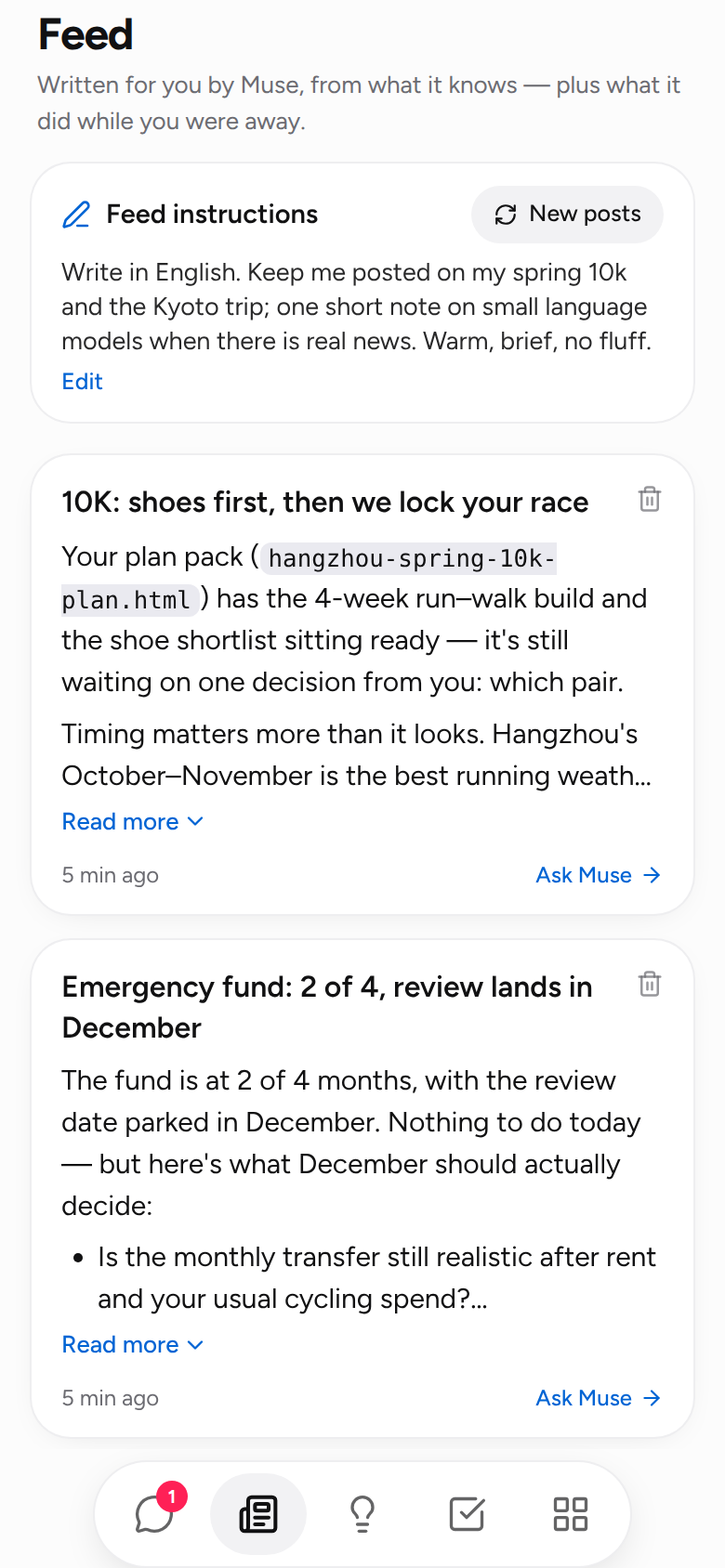
- write you a feed: short posts from what it knows about you and what you asked it to follow
- remember you in a memory you can read, edit and forget, and recall it by meaning
- follow skills in the Agent Skills format and use any MCP server
- run on any OpenAI-compatible model: DeepSeek, OpenAI, OpenRouter, Ollama, vLLM, a gateway with its own headers
💡 Why OpenMuse
- The Muse shape, in the open: chat, feed, ideas, goals and library on a phone; a plush avatar that moves while it works; one agent, not a bot framework.
- Safety is the architecture: the agent never touches a tool directly. A
Sentineldecides allow / ask / deny per call, keeps secrets out of the model, tracks where private data goes, and logs everything. On Linux every command runs in its own bubblewrap sandbox. - Your machine, your model: runs on a laptop, a home server or in Docker. Chat Completions or the Responses API, streaming, native or prompt-based tool calling, local models included.
- Small enough to read: about 18k lines of typed Python, 11k of TypeScript and 800 of Kotlin. No orchestration framework underneath. About 240 tests.
📦 Install
Python 3.11 or newer, on Linux, macOS or Windows. The phone app ships inside the package; Node is only needed to change web/. The Android app is a separate download, see Android.
| Track | Install with | Update with |
|---|---|---|
| Stable | uv tool install openmuse or pip install openmuse |
the same tool, --upgrade |
| Latest | uv tool install git+https://github.com/OpenMuseAgent/OpenMuse.git |
run it again |
| Source | git clone + uv pip install -e ".[dev]" |
git pull |
uv tool install openmuse
openmuse version
Optional: openmuse[browser] adds the Playwright browser tool (then playwright install chromium).
🚀 Quick Start
openmuse config init                 # writes config/config.toml
export DEEPSEEK_API_KEY=sk-...       # the default config uses DeepSeek; see Models below
openmuse serve --host 0.0.0.0        # prints a URL and a QR code
Scan the QR code with your phone on the same Wi-Fi, or open the URL here. The link carries the access token. Setup runs the first time: your name, the agent's name and face, the model. Then try:
- "Compare the Sony WH-1000XM6 and Bose QuietComfort Ultra for long flights and save a short comparison to headphones.md"
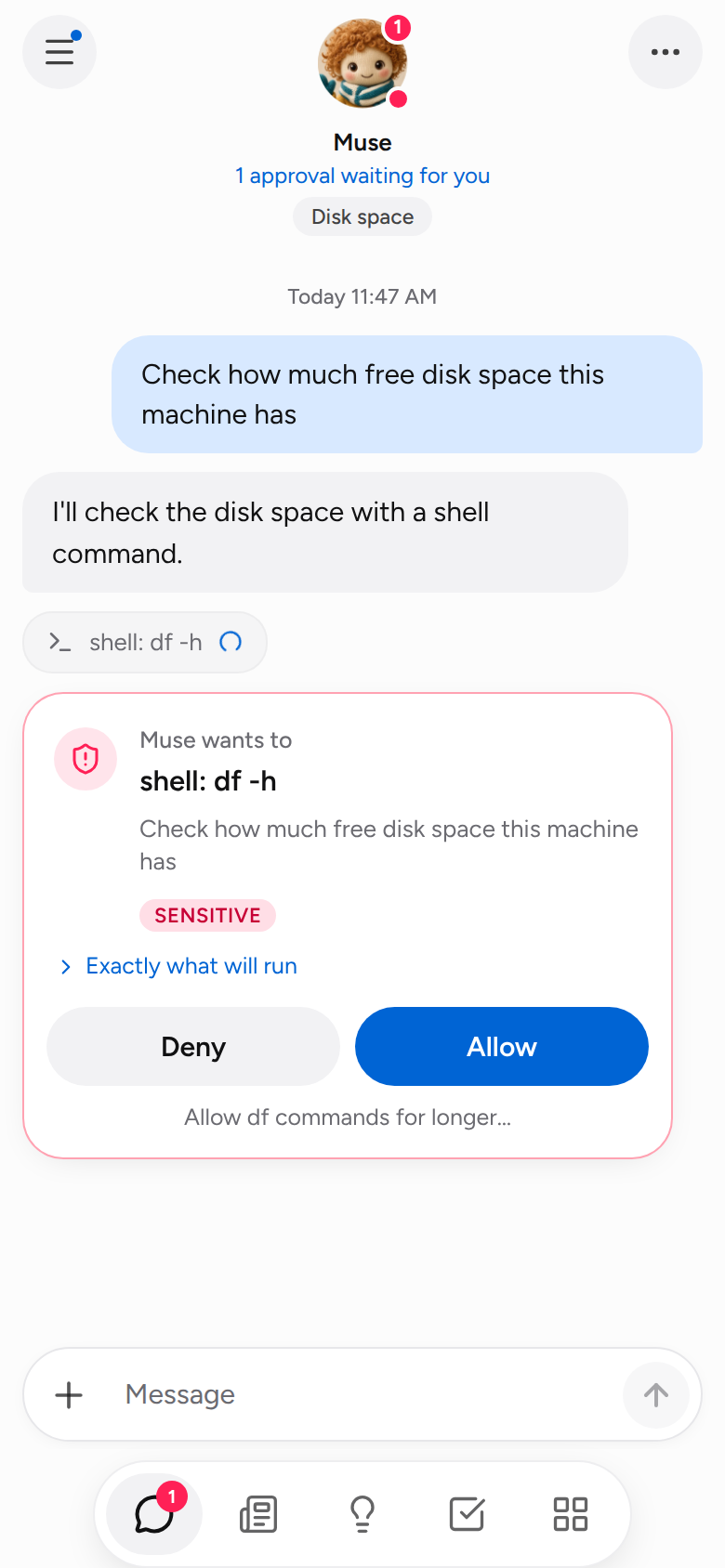
- "Check how much free disk space this machine has", which stops on an approval card
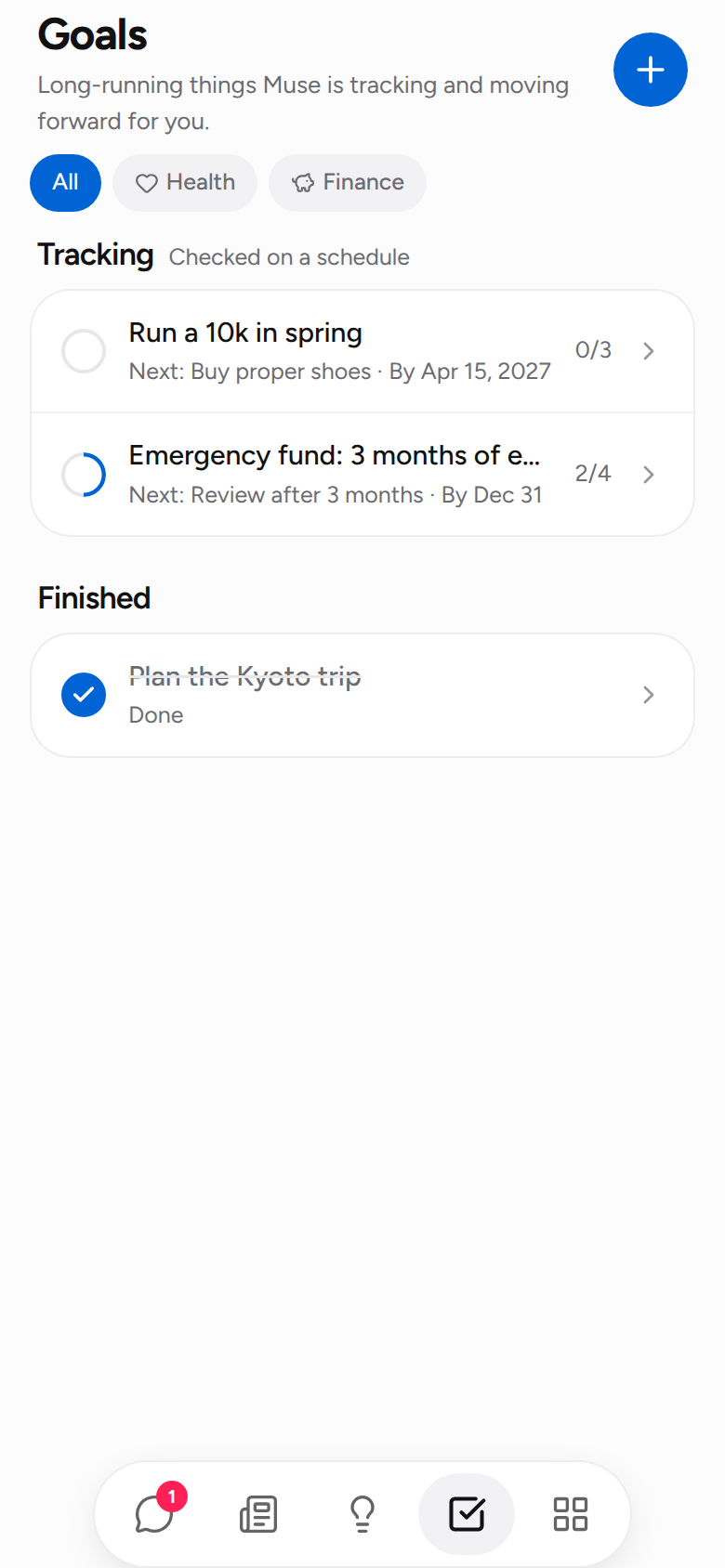
- "Set up a goal: conversational Japanese before my Kyoto trip in December, 30 minutes a day", then open Goals
Prefer the terminal? openmuse chat is the same agent with approvals in the console; openmuse run "task" does one task and exits. Something off? openmuse doctor checks the config, the model and the connectors and says what to fix.
📱 Android
Download openmuse.apk from the latest release and open it on the phone. Android 8.0 or newer, any CPU. It is not from a store, so Android asks once to allow the install.
Then openmuse serve --host 0.0.0.0 on your computer, tap Scan QR code in the app and point the camera at the terminal. Same Wi-Fi, a VPN such as Tailscale, or your server behind TLS all work.
What the app adds over the browser tab:
- notifications while the app is closed: approvals, questions and the last word of background work, each opening the right chat
- connect by QR code, plain
http://on the LAN - the file picker for attachments, downloads to the phone, links in the real browser
No Android? Add the web app to the home screen instead; it installs as a PWA and gets Web Push over https://. Build the APK yourself or read how it works in docs/android.md.
☁️ Deploy
docker run -d --name openmuse -p 8787:8787 -e DEEPSEEK_API_KEY=sk-... \
  -v openmuse-data:/data -v "$PWD/workspace:/workspace" \
  ghcr.io/openmuseagent/openmuse:latest
docker logs openmuse            # the URL with the access token
The image is linux/amd64 and linux/arm64; :latest-browser bundles Chromium for the browser tool. From a checkout, docker compose up -d app does the same and docker compose up -d daemon advances goals with no UI. To reach it from outside your network, put it behind Tailscale or a reverse proxy with TLS rather than opening the port. Details, including a systemd unit: docs/deployment.md.
🌐 The app
openmuse serve runs the agent and serves the app from one process: FastAPI with a WebSocket for live events, React on the phone, built into the package.
| Screen | What you get |
|---|---|
| Chat | One main conversation and side chats. Replies stream in; tool calls show as chips you can open; files it writes open in the app. Approval and question cards appear inline. Attach photos and files; watch it browse and take over for a sign-in. |
| Feed | Feed instructions in your words, and posts the agent writes from them once a day or on demand. Below, what happened while you were away and every card still waiting for you. |
| Ideas | Things to ask next, from your goals, memory and recent conversation, grouped by area. Tap one to send it. |
| Goals | Tracking: checked on a schedule. Goals: done step by step. Each with a plan, a target date, notes, and a proposal when the plan no longer fits. A proactivity dial and quiet hours set how much it does on its own. |
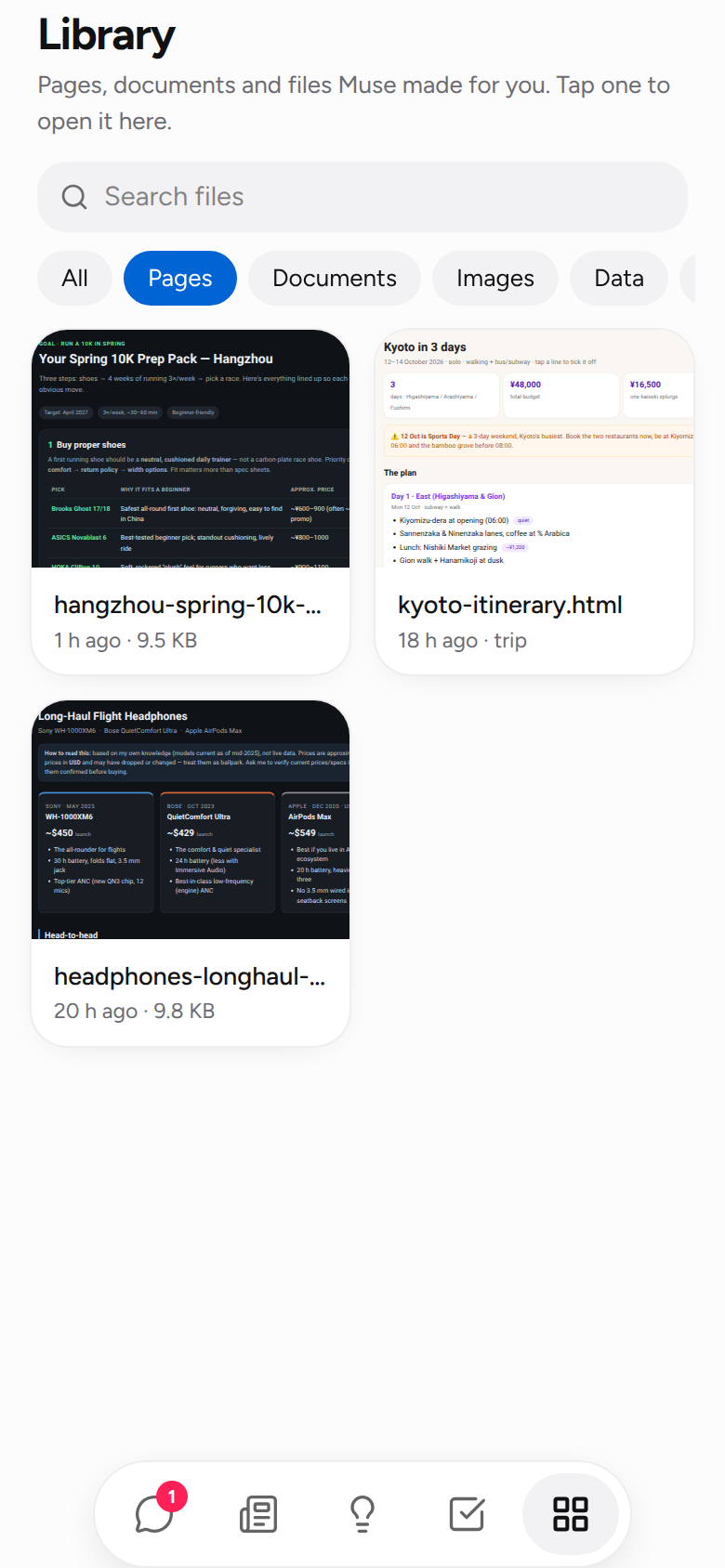
| Library | Everything it made, newest first, with previews. Pages render in a sandbox that cannot reach your token. |
| Avatar | Tap it: the status and a Stop button, approvals across all chats, the activity log, permissions you granted, what is upcoming, memory, skills, connections, settings. |
Reminders ("remind me at six to call mum"), routines ("every weekday at 07:30, a one-line weather check") and triggers (new mail, a calendar event, a webhook) are set from the chat and listed under Upcoming. Everything the app does goes through a REST + WebSocket API, documented in docs/app.md, so another front-end can drive the same agent.
🛡️ Sentinel
Every tool call goes through Sentinel before it runs. Tools declare a risk level and can raise it for a specific call (shell on rm -rf, web_fetch on a private address). First match wins:
deny_tools→ deny[[sentinel.rules]]matching the arguments → the rule's actionalways_allow_tools/always_ask_tools- Taint: private data was read this session and this call sends data outside
egress_allowlist→ ask - Risk × mode:
askasks for sensitive calls,strictalso for moderate ones,autoallows what is not denied - A call with a warning (
sudo,curl | sh, code that deletes files) asks whatever the mode
[sentinel]
mode = "ask"                              # ask | strict | auto
always_ask_tools = ["send_email", "shell"]
egress_allowlist = ["*.wikipedia.org", "github.com", "*.github.com"]

[[sentinel.rules]]
tool   = "shell"
match  = { command = "*rm -rf*" }
action = "deny"
Secrets live in an encrypted vault (openmuse vault set EMAIL_PASSWORD, or the Connections screen) and are referenced as {{vault:EMAIL_PASSWORD}}; Sentinel fills them in right before a call and redacts them from the output, so the model never sees one. Every decision goes to audit.jsonl. What is and is not covered: docs/sentinel.md; reporting: SECURITY.md.
🧠 Models
Any OpenAI-compatible endpoint. Edit [llm] in config/config.toml, or pick a preset under Connections on the phone:
[llm]
provider = "openai"                    # Chat Completions; "openai_responses" for the Responses API
model    = "deepseek-flash"
base_url = "https://api.deepseek.com"
api_key  = "${DEEPSEEK_API_KEY}"

# OpenAI:      model = "gpt-5.6-sol"  base_url = "https://api.openai.com/v1"   api_key = "${OPENAI_API_KEY}"
# Ollama:      model = "qwen3:8b"     base_url = "http://localhost:11434/v1"   api_key = "ollama"
# OpenRouter:  model = "deepseek/deepseek-flash"  base_url = "https://openrouter.ai/api/v1"
# A gateway that needs headers:  extra_headers = { "X-End-User-Id" = "openmuse" }
# An endpoint that ignores `tools`:  tool_mode = "prompt"
Or OPENMUSE_LLM_MODEL, OPENMUSE_LLM_BASE_URL, OPENMUSE_LLM_API_KEY, OPENMUSE_LLM_PROVIDER. Local models work: qwen3:8b on Ollama passes the provider check with native tool calling, gemma3:4b through the prompt fallback. Full reference: docs/configuration.md.
Architecture
flowchart LR
    P([Phone / browser / Android]) <-- WebSocket + REST --> S[MuseService<br/>threads, scheduler, feed]
    C([Terminal]) <--> A
    S <--> A[Agent loop]
    A <--> LLM[(any OpenAI-compatible model)]
    A --> G{{Sentinel}}
    G -- allow --> T[Tools]
    G -- ask --> P
    G --> AU[(audit.jsonl)]
    G <--> V[(vault.enc)]
    T --> F[files · shell · python]
    T --> W[web_search · web_fetch · browser]
    T --> E[email · calendar · contacts]
    T --> MCP[MCP servers]
    T <--> M[(memory.db)]
    T <--> GO[(goals.db)]
| Area | Files |
|---|---|
| Agent loop, system prompt, context window | openmuse/agent/core.py, openmuse/prompts.py |
| Sentinel: policy, approvals, taint, audit; the sandbox | openmuse/sentinel/, openmuse/sandbox.py |
| Credential vault | openmuse/vault/ |
| Tools and the MCP adapter | openmuse/tools/ |
LLM providers, <think> filter, prompt-based tool calling |
openmuse/llm/ |
| Memory, goals, skills | openmuse/memory/, openmuse/goals/, openmuse/skills/ |
| App server: service, REST/WebSocket API, timeline | openmuse/server/ |
| Phone app (React, Vite, Tailwind) | web/ → built into openmuse/server/static/ |
| Android app (Kotlin, WebView, notification service) | android/ |
| Terminal UI and CLI | openmuse/console.py, openmuse/cli.py |
More in docs/architecture.md.
OpenMuse and Meta Muse
| Meta Muse | OpenMuse |
|---|---|
| Runs in a per-user secure VM | Runs on your machine or in Docker; on Linux each shell / Python call gets its own bubblewrap namespace |
| Sentinel approves sensitive actions | Sentinel: allow / ask / deny, rules, taint tracking, egress allowlist, scoped approvals |
| Credentials never reach the model | Encrypted vault, {{vault:NAME}} placeholders, output redaction |
| Remembers you | SQLite memory the agent keeps tidy and you can edit, recalled by keyword and by meaning |
| Works on goals in the background | Goals with steps; a scheduler advances them and reports to the chat |
| A feed written for you | Posts from your instructions and what it knows, once a day or on demand |
| iOS and Android apps | A web app installable to the home screen, and an Android app |
| Meta's models | Any OpenAI-compatible model |
| Closed | MIT |
Docs
- Configuration: every setting, environment overrides, connectors, MCP, local models
- Sentinel: policy order, rules, taint tracking, vault, audit, the sandbox
- The app and its API: screens, phone access, tokens, every endpoint
- Android: install, notifications, building and signing
- CLI:
chat,run,serve,daemon,goals,memory,skills,vault,audit,doctor - Architecture: source map and extension points
- Deployment: Docker, Compose, systemd, TLS
- Troubleshooting
- A simulated phone: OpenMuse as a native app on MobileGym, notifications included, in one browser tab
Releases
Latest release: v0.6.0
v0.6.0 is the app as Meta Muse looks, and the Android app.
- The look after Muse: plush avatars that move, one blue accent, the floating tab bar, Figtree.
- A feed written for you from your instructions, a stop button, live previews in the Library.
- The Android app: connect by QR code, notifications while the app is closed.
openmuse.apkon every release. - Sandboxed commands work from a relative workspace path (they failed with "Can't chdir" before).
Every version: CHANGELOG.md · GitHub releases
Recent Updates
- v0.6.0 🧸 The Muse look, plush avatars, feed posts, a stop button, the Android app.
- v0.5.0 📎 Attachments from the phone, recall by meaning through any
/embeddings, Brave / Tavily / SearXNG search. - v0.4.0 🧩 Skills in the
SKILL.mdformat, triggers (mail, calendar, webhooks), contacts, a sandbox for every command. - v0.3.0 📅 Calendar connector, memory that stays tidy with undo.
- v0.2.0 📱 Scoped approvals, the phone app shell, artifacts, connections from the phone, proactivity, push notifications, browser view, 简体中文.
Roadmap
- Voice: speak a message and see it as text before it goes, through any OpenAI-compatible
/audio/transcriptions - Evals: a small set of everyday tasks with pass rates per model, so a model choice is a measured one
- iOS: the same shell as the Android app
🤝 Contribute
Use OpenMuse for a real task, report what broke, then pick something focused.
- CONTRIBUTING.md has the development setup; CI runs
ruff,pytest, the web build and the Android build. - Open issues for problems to look into.
- A pull request for a focused fix. Another language for the app is one dictionary file in
web/src/i18n/.
Related projects
- nanobot: a personal assistant framework that lives in chat apps (Telegram, Discord, Slack, WeChat). Pick it for a bot in the channels you already use; OpenMuse is one agent with Muse's product shape and safety model.
- OpenClaw: the always-on gateway approach many assistant projects follow.
- browser-use: the element-annotation idea behind the browser tool.
Disclaimer
OpenMuse is an independent community project. It is not affiliated with, endorsed by, or derived from Meta Platforms, Inc. or its Muse product. The plush avatars are the project's own; the name and the design ideas are used for comparison.
License
Reviews (0)
Sign in to leave a review.
Leave a reviewNo results found