opentandem
Health Pass
- License — License: AGPL-3.0
- Description — Repository has a description
- Active repo — Last push 0 days ago
- Community trust — 13 GitHub stars
Code Fail
- exec() — Shell command execution in cli/core.cjs
- fs.rmSync — Destructive file system operation in cli/core.cjs
- os.homedir — User home directory access in cli/core.cjs
- process.env — Environment variable access in cli/core.cjs
- fs module — File system access in cli/core.cjs
- rm -rf — Recursive force deletion command in cli/install.sh
- spawnSync — Synchronous process spawning in cli/launcher.mjs
- fs.rmSync — Destructive file system operation in cli/launcher.mjs
- os.homedir — User home directory access in cli/launcher.mjs
- process.env — Environment variable access in cli/launcher.mjs
- network request — Outbound network request in cli/launcher.mjs
- exec() — Shell command execution in cli/opentandem.cjs
- spawnSync — Synchronous process spawning in cli/opentandem.cjs
- fs.rmSync — Destructive file system operation in cli/opentandem.cjs
- os.homedir — User home directory access in cli/opentandem.cjs
- process.env — Environment variable access in cli/opentandem.cjs
- fs module — File system access in cli/opentandem.cjs
- network request — Outbound network request in cli/opentandem.cjs
- fs.rmSync — Destructive file system operation in cli/service.cjs
- os.homedir — User home directory access in cli/service.cjs
- process.env — Environment variable access in cli/service.cjs
- fs module — File system access in cli/service.cjs
- process.env — Environment variable access in plugin/examples/usage-stats/server.mjs
Permissions Pass
- Permissions — No dangerous permissions requested
No AI report is available for this listing yet.
Mobile remote control for AI coding agents on your own computer. Works with Claude Code, Codex, OpenCode, Gemini CLI, Cursor Agent CLI, GitHub Copilot CLI, Kimi Code, Qwen Code, Kiro CLI, Google Antigravity, CodeBuddy Code, Cline CLI, Trae Agent, CodeFuse Agent, DeepSeek Harness, Pi, OpenClaw and Hermes Agent.

OpenTandem
English | 简体中文
OpenTandem is a unified workspace for individuals and teams that manages multiple AI coding agents, with mobile access.
One workspace, all your machines, with agent switching, model routing, live quota tracking, and team collaboration.
Website · Download · Changelog · Bug reports · AGPL-3.0 License
Remote control for 18 AI coding agents from your phone
 Claude Code |  Codex |  OpenCode |  Gemini CLI |  Cursor Agent CLI |  GitHub Copilot CLI |
 Kimi Code |  Qwen Code |  Kiro CLI |  Google Antigravity |  CodeBuddy Code |  Cline CLI |
 Trae Agent |  CodeFuse Agent |  DeepSeek Harness |  Pi |  OpenClaw |  Hermes Agent |
Run one command, scan with your phone, and keep coding from anywhere.
npx opentandem@latest remote
Quick start
1. Run this on the computer where your coding agents live. It can be your laptop, a Mac mini
under the desk, or a Linux server you reach over SSH.
npx opentandem@latest remote
No Node.js on that computer? Use the installer instead:
# macOS and Linux
curl -fsSL https://opentandem.org/install.sh -o install.sh
sh install.sh remote
# Windows PowerShell
irm https://opentandem.org/install.ps1 | iex; opentandem remote
2. Scan the QR code with your phone. Sign in with your email and tap Allow to connect this computer.
$ npx opentandem@latest remote

  OpenTandem
  Scan with your phone to sign in and allow this computer:

  █▀▀▀▀▀█ ▄▀▄█ █▀▀▀▀▀█
  █ ███ █ ▀▄▀▄ █ ███ █
  …
  https://opentandem.org/agent-pair/7Kp2Xq

  Waiting for your phone… (valid for 10 minutes)
  ✓ Connected to "My workspace" as MacBook-Pro
  ✓ Runs in the background and starts with your computer
3. Send a task from your phone. Open OpenTandem, pick this computer, a project folder and an
agent, and send. The agent runs on your computer; you follow its progress and open its files on the phone.
Every run updates OpenTandem to the latest version first, so there is nothing else to keep up to date.
What you get
OpenTandem starts the agent CLIs already installed on your computer, signed in with your own accounts,
inside your own project folders. All 18 agents listed at the top are supported.
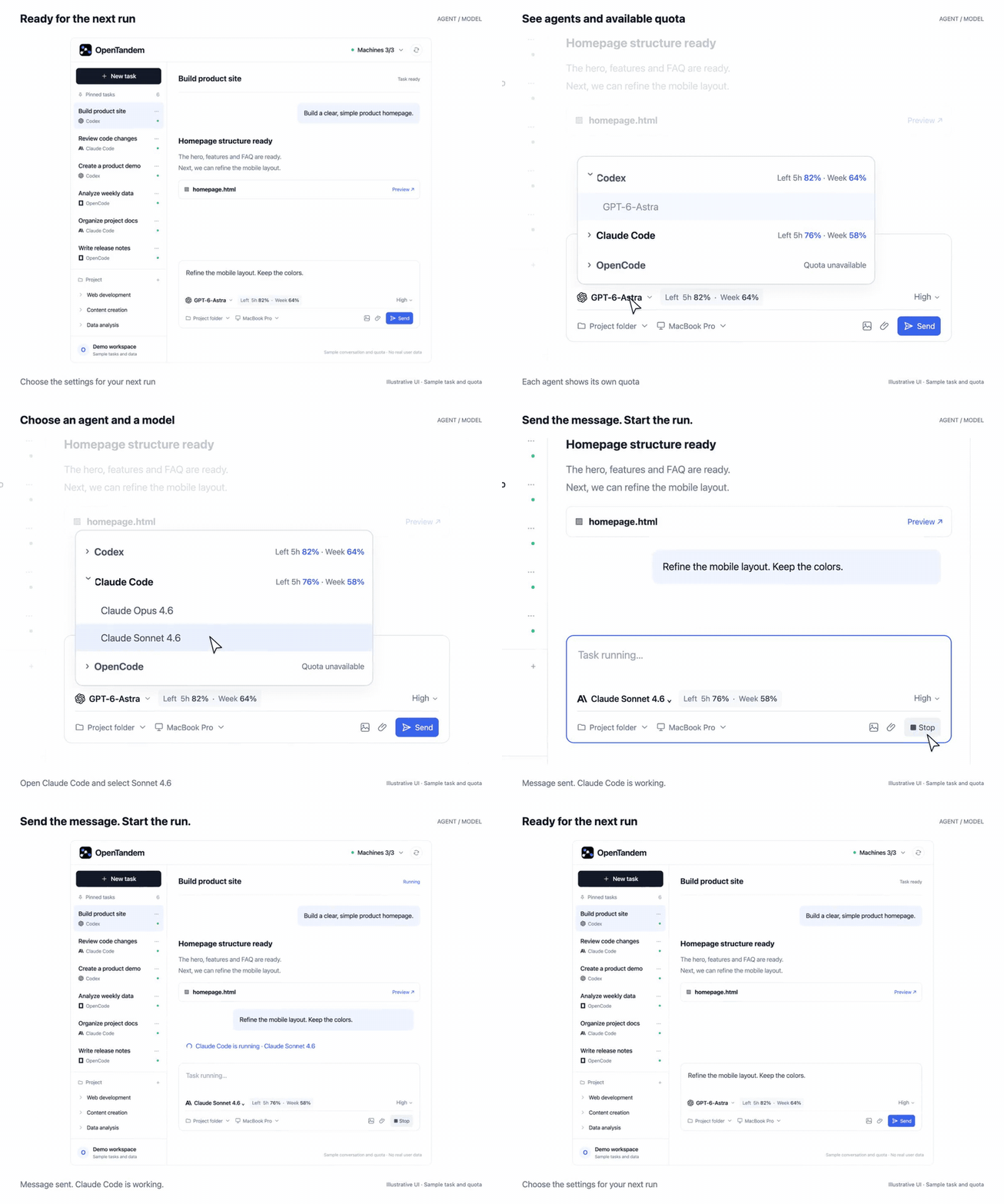
Choose the right agent for the next run.
Agent and model switching
Switch between supported agents and their available models from the task composer, as shown above.
The task keeps its conversation and outputs.
- Switch agents and models in one place
- Models reported by the connected Runner
- Live quota visible beside each agent
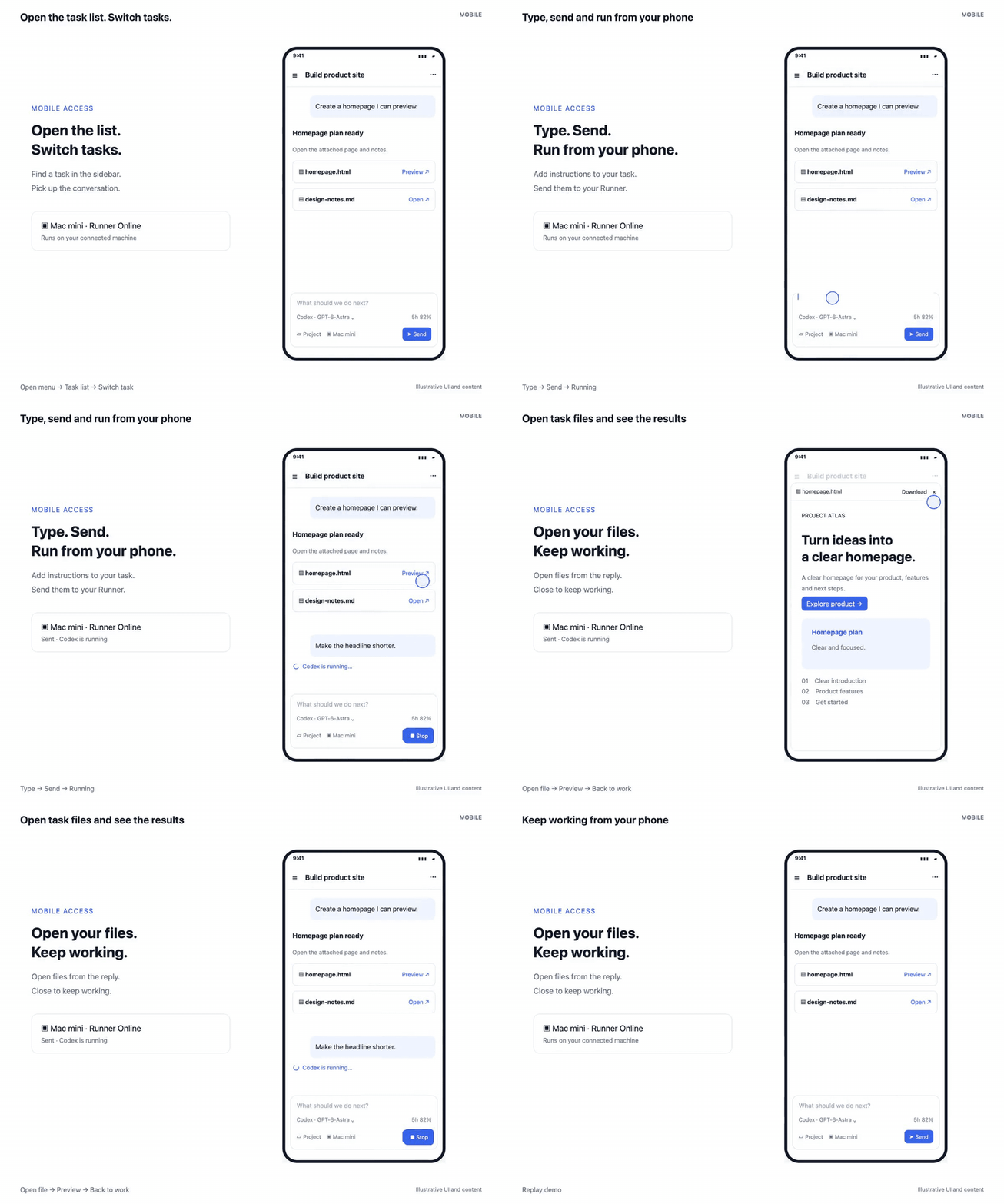
Move to your phone and keep working on the same task.
Mobile and artifacts
Mobile gives you the same task controls as desktop: continue the conversation, switch agents, track execution, and open generated images, documents, and HTML pages.
- Keep the same task and context
- Switch agents and models
- Track progress and open outputs
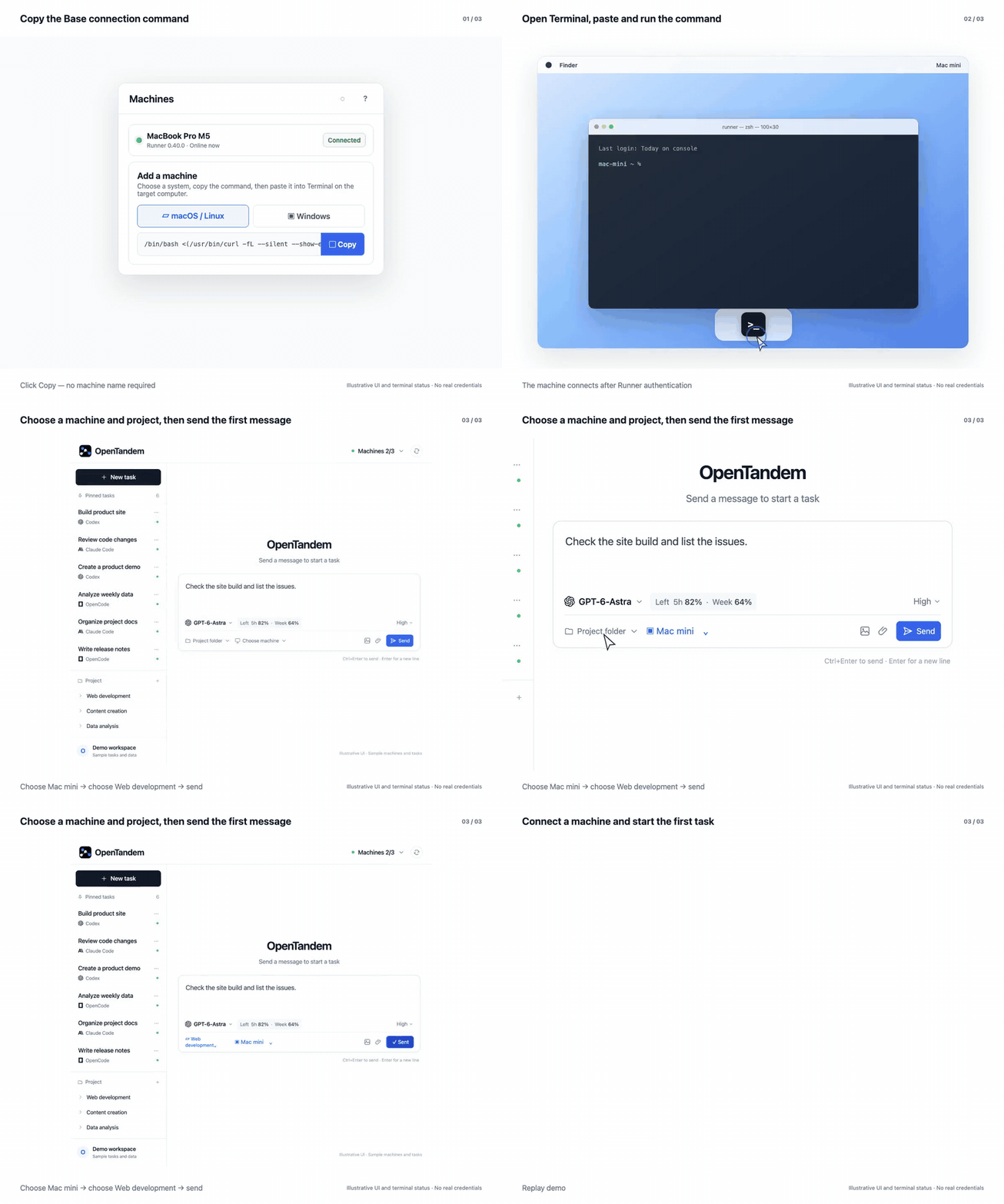
Know which machine is ready before you assign the task.
Multi-machine orchestration
OpenTandem shows connected Runners and their live status. Send work to the machine that already has the right repository, tools, and environment.
- Runner availability in real time
- Project environment stays on the selected machine
- One workspace tracks every execution
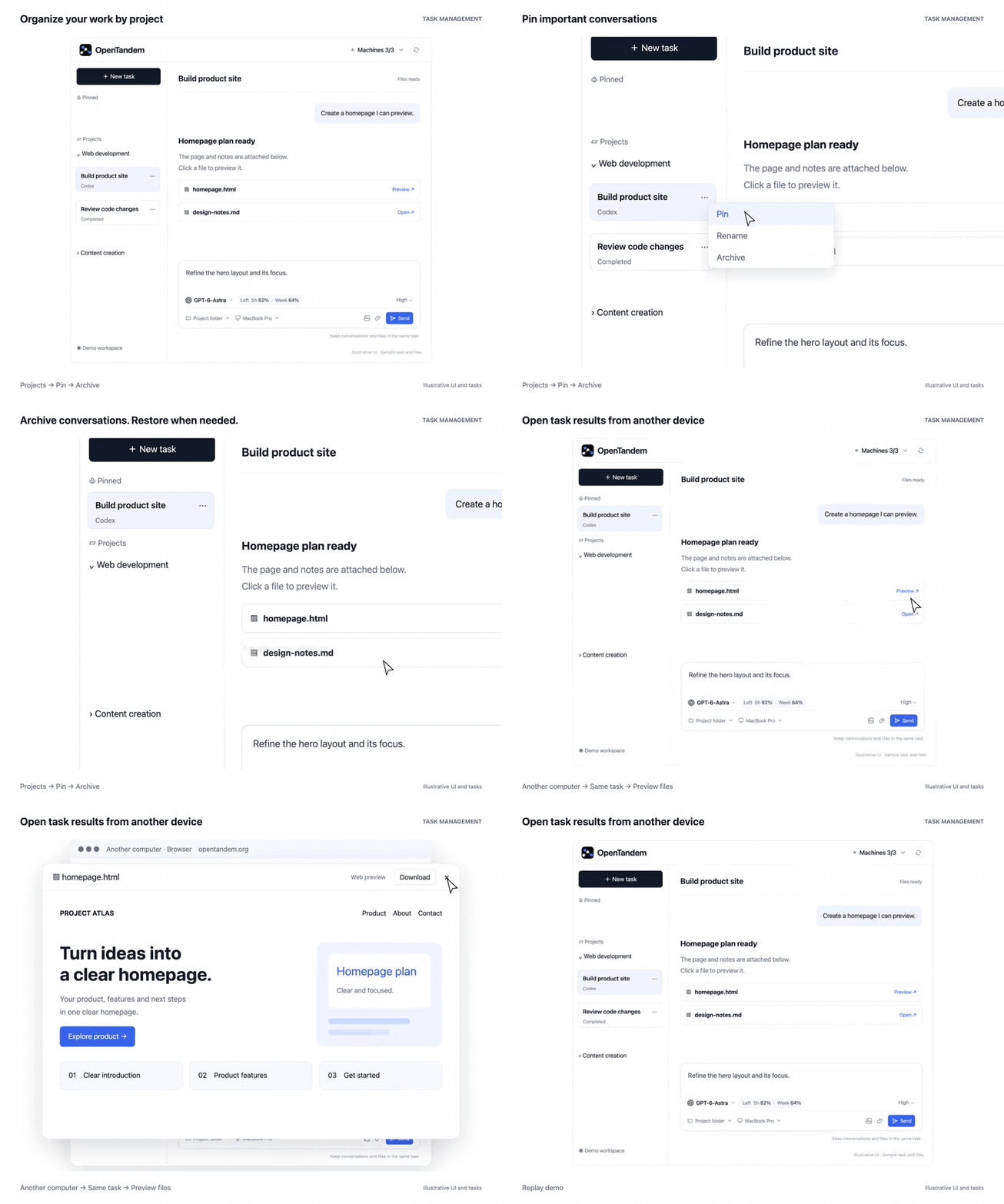
Manage tasks, conversations, and outputs in one place.
Task management
Organize work by project, keep conversations saved and archived, pin important tasks for follow-up, and open generated work from any device.
- Organize tasks by project
- Save, archive, and pin conversations
- Preview task outputs across devices
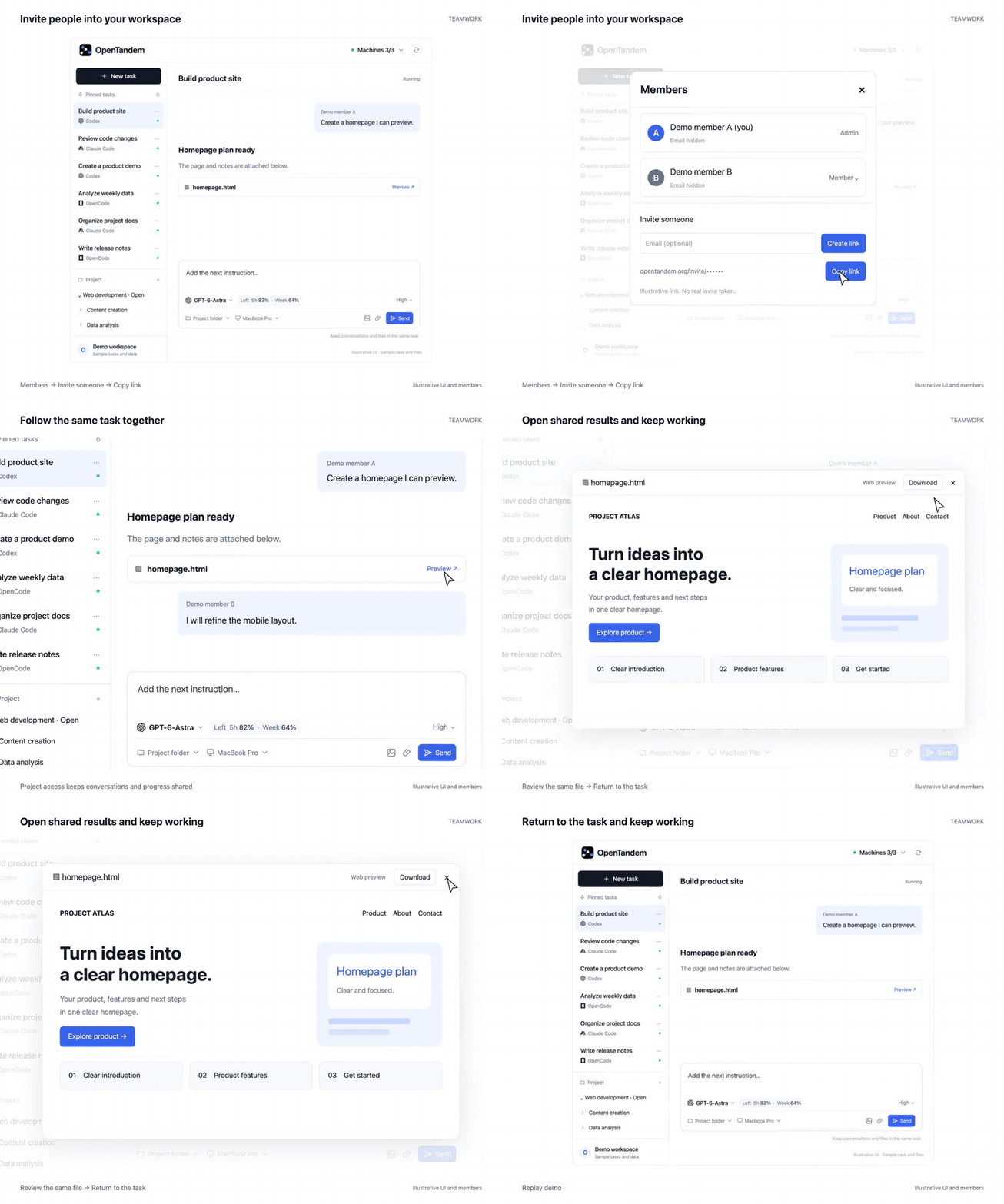
Share tasks, execution progress, and finished work.
Team collaboration
Projects and tasks live inside a workspace with team access. Other members can continue the same execution without rebuilding its context in another conversation.
- Workspace and member management
- Shared projects and task progress
- Conversations and finished work in one place
More on the website.
Commands
| Command | What it does |
|---|---|
opentandem remote |
Connect this computer by scanning a QR code with your phone. When it is already connected, it says so and shows a QR code that opens OpenTandem on your phone. |
opentandem list |
The Runners on this computer (one per workspace), their ids, and whether each is online. |
opentandem stop · start · restart [<id> | all] |
Stop, start or restart one Runner by id (the first few characters are enough). With a single Runner the id can be left out; with several, it lists them and asks. all acts on the whole background service: start all also turns on start at login, stop all turns it off. |
opentandem logs [<id>] [-f] |
Show the latest log lines, or follow them. |
opentandem update |
Update the CLI and the Runner now and restart the service. |
opentandem uninstall |
Remove the service and the program. Your local conversation history stays. |
Other ways to connect
| Way | When to use it |
|---|---|
| Desktop app for Mac | You prefer a window over the terminal. Sign in and choose Connect. |
| Settings → Computers → Add a computer in the web app | You are already signed in on the web and want to copy a command for another computer. |
Note for AI agents: you may run
npx opentandem@latest remotefor the person you are helping,
but only they can scan the QR code, sign in and allow the computer. Show them the QR code or the
link and wait. Never try to complete the sign-in yourself.
How OpenTandem fits together
flowchart LR
  P["Phone and web app"] <--> S["OpenTandem server"]
  S <--> C["CLI: pairing, background service, updates"]
  C --> R["Runner: runs the tasks"]
  R --> A["Codex, Claude Code, OpenCode and other agent CLIs"]
  click P "https://opentandem.org?utm_source=github&utm_medium=readme&utm_campaign=opentandem_oss&utm_content=diagram_app" "Open OpenTandem"
  click S "https://opentandem.org?utm_source=github&utm_medium=readme&utm_campaign=opentandem_oss&utm_content=diagram_server" "Open OpenTandem"
| Part | What it is | Source |
|---|---|---|
| CLI | The opentandem command: connects the computer, keeps the Runner running in the background, starts it with the computer and keeps everything up to date. |
Open source, AGPL-3.0 |
| Runner | Runs your tasks: starts the agent you chose in your project folder and streams its progress, answers and files back. | Open source, AGPL-3.0 |
| Web app and server | The workspace at opentandem.org: tasks, conversations, machines, teams and mobile access. | Hosted service |
Contributing
Bug reports and feature requests are welcome as GitHub issues.
We are not accepting pull requests yet, until a contributor license agreement is in place.
Please report security problems privately through
GitHub security advisories instead of a public issue.
License
The CLI and the Runner are licensed under the GNU Affero General Public License v3.0.
Reviews (0)
Sign in to leave a review.
Leave a reviewNo results found