openwebtrack
mcp
Warn
Health Warn
- License — License: AGPL-3.0
- Description — Repository has a description
- Active repo — Last push 0 days ago
- Low visibility — Only 5 GitHub stars
Code Warn
- process.env — Environment variable access in drizzle.config.ts
- network request — Outbound network request in package.json
Permissions Pass
- Permissions — No dangerous permissions requested
No AI report is available for this listing yet.
A free and open-source website analytics platform.
README.md
OpenWebTrack
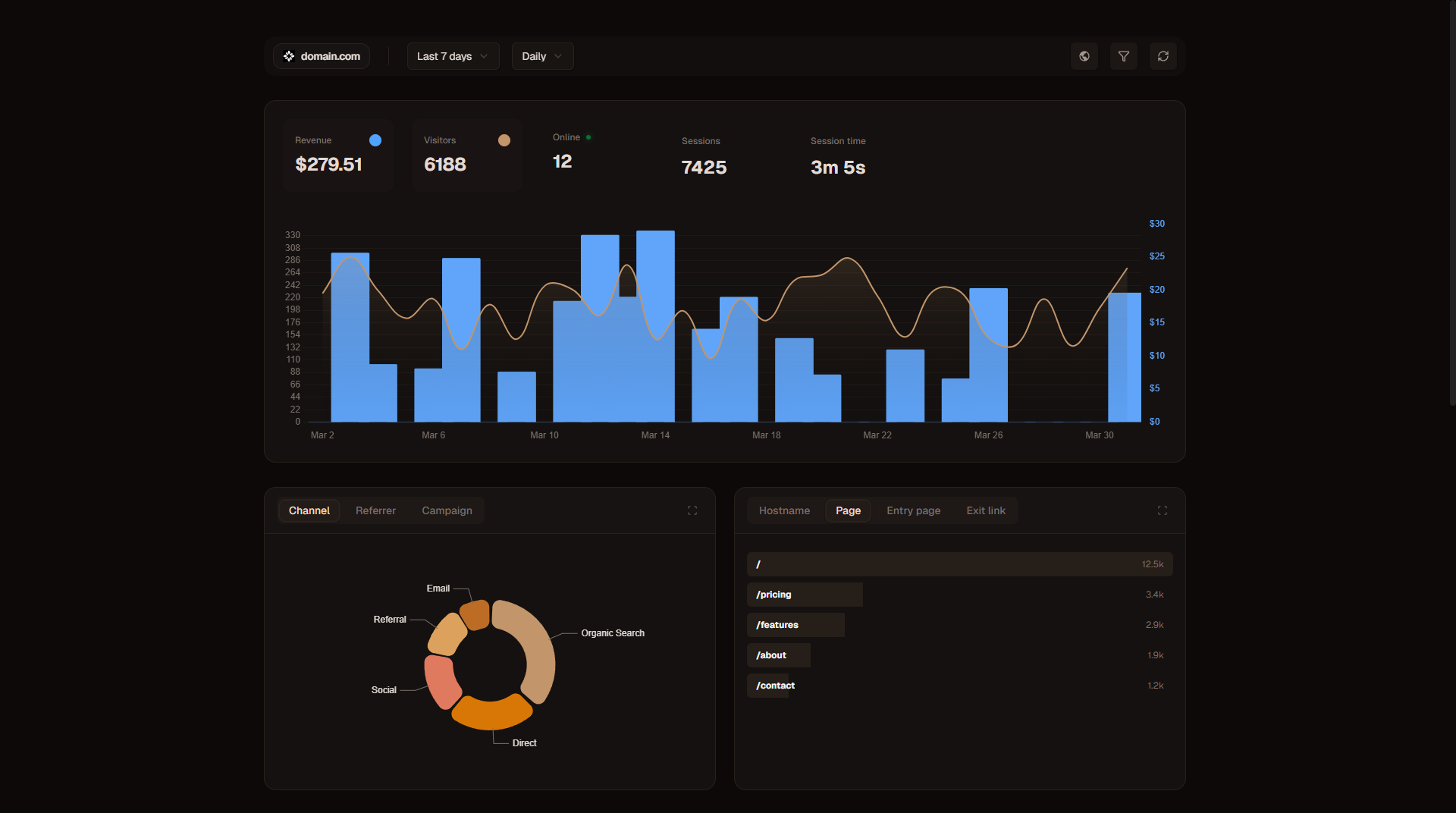
A free and open-source website analytics platform.
Quick Start
services:
    app:
        image: ghcr.io/openwebtrack/openwebtrack:latest
        container_name: openwebtrack
        restart: unless-stopped
        ports:
            - 8424:8424
        environment:
            - DATABASE_URL=postgres://postgres:{STRONG_PASSWORD}@db:5432/openwebtrack
            - ORIGIN=http://localhost:8424
            - AUTH_SECRET={STRONG_SECRET}
            - DISABLE_REGISTER=false
            # - AUTH_GOOGLE_CLIENT_ID=
            # - AUTH_GOOGLE_CLIENT_SECRET=
            # - CRON_SECRET={String} - For weekly summary emails
            # - [email protected] - To enable notifications set your email and preferred email provider
            # - RESEND_API_KEY={String}
            # - MAILEROO_API_KEY={String}
            # - SMTP_HOST=smtp.example.com
            # - SMTP_PORT=587
            # - SMTP_USER={String}
            # - SMTP_PASS={String}
        depends_on:
            - db

    db:
        image: postgres:17-alpine
        container_name: openwebtrack-db
        restart: unless-stopped
        ports:
            - 5432:5432
        environment:
            - POSTGRES_USER=postgres
            - POSTGRES_PASSWORD={STRONG_PASSWORD}
            - POSTGRES_DB=openwebtrack
        volumes:
            - postgres_data:/var/lib/postgresql/data

    # cron: Enable for weekly summary emails
    #     image: alpine:latest
    #     command: >
    #     sh -c "echo '0 9 * * 1 curl -s -H \"Authorization: Bearer ${CRON_SECRET}\" http://app:8424/api/cron/weekly-summary' > /etc/crontabs/root && crond -f -L /dev/stdout"
    #     depends_on:
    #     - app
volumes:
    postgres_data:

Features
Analytics & Insights
- Real-time Traffic Monitoring: Watch your visitors in real-time.
- Detailed Pageviews: Track URLs, titles, and referrers.
- Entry & Exit Pages: Identify which pages visitors land on and which pages they leave from.
- Session Recording: Monitor session duration and activity.
- Custom Events: Track specific user interactions (clicks, signups, etc.).
- Customer Identification: Identify and track customers based on payment data.
- Geolocation Data: See where your users are coming from (Country, Region, City).
- Device & Tech Specs: Analyze Browsers, OS, Device Types, and Screen Sizes.
- PWA Detection: Identify visitors using your site as a Progressive Web App.
- UTM & Channel Tracking: Measure campaign performance with automatic UTM parameter extraction and channel attribution (organic, paid, social, email, and more).
- Traffic Spike Alerts: Get instant notifications when your website experiences unusual traffic spikes.
- Revenue Tracking: Track payments and revenue per country, region, city, page, hostname, device, browser, OS, and referrer source with interactive tooltips showing detailed breakdowns.
- Real-Time Map: Visualize visitors and movements on an interactive globe.
- Funnels: Create custom funnels to analyze user journeys and identify drop-off points.
Notifications & Alerts
- Weekly Summary: Receive automated weekly email reports with key analytics metrics including revenue data.
- Traffic Spike Detection: Configure thresholds to get notified when visitor counts exceed expectations.
- Multi-Provider Support: Send notifications via Resend, Maileroo, or custom SMTP servers.
Visitor Intelligence
- Visitor Profiles: Track individual visitor journeys.
- Retention Metrics: "First seen" and "Last seen" tracking.
- Auto-generated Identities: Friendly names and avatars for anonymous visitors.
Management & Tools
- Multi-Website Support: Manage all your projects from a single dashboard.
- Team Collaboration: Invite team members to view analytics.
- Data Export/Import: Full ownership of your data with easy export options.
- Filtering: Deep dive into data with filters (Date, Device, Location, etc.).
- Traffic Exclusions: Exclude specific IPs, URL paths, and countries from being tracked to filter out internal traffic and bots.
- Embeddable Widget: Embed a customisable real-time visitor counter widget on any webpage or external dashboard.
- REST API: Programmatic access to your analytics data using secure API keys.
- MCP Server: Connect AI assistants through the Model Context Protocol with one account-scoped key for every website you own or that is shared with you.
Contributing
We welcome contributions! Please check our Contributing Guidelines for details on how to report bugs, request features, and submit pull requests.
License
See LICENSE for full details.
Reviews (0)
Sign in to leave a review.
Leave a reviewNo results found