visor
Health Warn
- License — License: MIT
- Description — Repository has a description
- Active repo — Last push 0 days ago
- Low visibility — Only 8 GitHub stars
Code Pass
- Code scan — Scanned 12 files during light audit, no dangerous patterns found
Permissions Pass
- Permissions — No dangerous permissions requested
No AI report is available for this listing yet.
A terminal dashboard your coding agent sets up: PRs, Jira, calendar and anything else, with Plugins in any language.
visor
A heads-up display for your terminal.
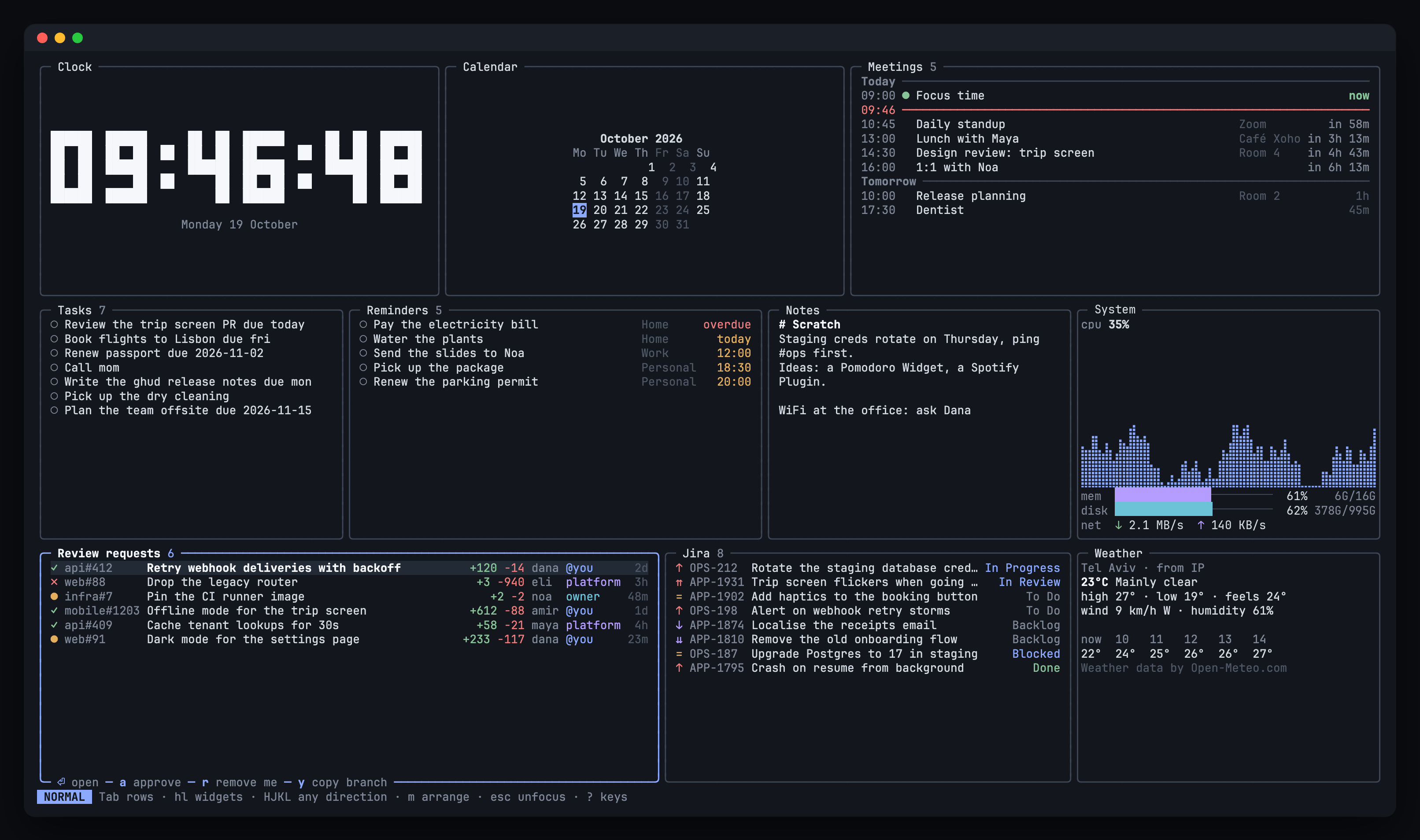
Your next meeting, the PRs waiting for your review, your Jira tickets, today's tasks and reminders, and the weather on one screen. Act on them right there: approve a PR, move a ticket, check off a task, open a meeting.
- Your agent sets it up. Tell Claude Code, Codex or Cursor what you want, and visor's skills turn it into Widgets, Actions or a new Plugin.
- Make it yours. Move, resize and hide Widgets with the mouse or vim keys.
- Works with your tools. GitHub, Jira, macOS Calendar and Reminders, any shell command, and Plugins in any language.
- One key away. Open it over your tab in herdr and close it with the same key.
- Nothing to host. One app on your machine; tokens stay in your system keyring.
| Install | Homebrew, Linux packages, Windows, from source, and updating |
| Getting started | The default Widgets, the keys, and signing in |
| Agent skills | Let your coding agent configure visor or write a Plugin |
| Configure | Widgets, your own Actions and colours in config.toml |
| Plugins | Install or write a Plugin |
| herdr | Open visor with one key, as a popup or in a tab |
| Contributing | Bug reports, feature requests, and who may open pull requests |
Install
macOS, or Linux with Homebrew:
brew install oronbz/tap/visor
Tested on Apple silicon; Intel is best effort. Meetings and Reminders are macOS only.
Linux packages (deb, rpm, apk)From the latest release, amd64 and arm64:
sudo dpkg -i visor_X.Y.Z_amd64.deb      # Debian, Ubuntu
sudo rpm -i visor-X.Y.Z-1.x86_64.rpm    # Fedora, RHEL
sudo apk add --allow-untrusted visor_X.Y.Z_x86_64.apk   # Alpine
- Download
visor_X.Y.Z_windows_amd64.zip(orarm64) from the latest release. - Extract
visor.exeandvisor-weather.exeinto one folder, such as%LOCALAPPDATA%\Programs\visor. - Add that folder to your
PATHand runvisorin a new terminal.
go install github.com/oronbz/visor/cmd/visor@latest
go install github.com/oronbz/visor/cmd/visor-weather@latest
Update
visor checks GitHub for a new release every 12 hours. When one is out, it shows a popup once with what's new, and an ↑ vX.Y.Z pill stays at the right of the footer. ⏎ in the popup, U, a click on the pill or upgrade visor in the ctrl+k palette starts the Upgrade, which depends on how visor was installed:
- Homebrew: visor runs
brew update && brew upgrade --cask visorand comes back as the new version. - A deb, rpm or apk package, or
go install: visor copies the command to run. - Anything else: visor opens the release page.
check for a visor upgrade in the palette checks right away; visor upgrade does too, then upgrades from the shell. To turn the check off, set upgrade_check = false in config.toml or VISOR_NO_UPGRADE_CHECK=1; visor upgrade still works.
Getting started
To try it first, run visor demo: the dashboard on made-up data, with no sign-in needed.
Run visor. With no config you get every default Widget; Script is opt-in through ctrl+k, Add Widget.
ctrl+k(or:, or a click on ^K actions at the start of the footer) opens the Action palette: every Action, the Widgets' and visor's own, such as Add Widget and upgrade visor.?shows every key,qquits.- A Widget that needs a sign-in or a setting shows needs setup and how to fix it. GitHub uses your
ghlogin; Jira usesvisor auth jira.
Agent skills
visor is built to be set up by your coding agent. Install the skills, then ask for what you want: "add a Widget for my team's Jira sprint", "give my PRs Widget a key that checks out the branch", "make a Widget for our deploys".
visor skills install
visor-configureedits your config, Widgets, Actions and herdr keybinds.visor-make-pluginwrites a Plugin with you and tests it.
They go to ~/.agents/skills/, linked into ~/.claude/skills/ for Claude Code, and visor keeps them in step with its version. With the skills CLI instead, pin your version:
npx skills add oronbz/visor#vX.Y.Z -g
Configure
Or by hand. ~/.config/visor/config.toml holds your Widgets and settings (%AppData%\visor on Windows, or VISOR_CONFIG, or --config). visor never rewrites it and reloads it on save. Arrangement goes to a separate layout.json.
visor config default   # the full commented reference
visor config init      # write it to your config path
Widgets
Each [[widget]] block places one Widget; two of the same type need their own id:
theme = "terminal"   # or "visor"

[[widget]]
type = "jira"
site = "acme.atlassian.net"
email = "[email protected]"

[[widget]]
type = "weather"
id = "paris"
city = "Paris, Texas"
Your own Actions
Any Widget takes your own Actions. {{name}} is a value of the selected Item, shell-quoted: every Item has {{id}}, {{title}} and, if it opens a page, {{url}}; script and Plugin Items may name more. Your key wins over the Widget's own.
[[widget]]
type = "jira"
actions = [
  { key = "f", label = "fix bug", run = "~/bin/fix-bug {{id}}", confirm = true },
]
Colours
Override any of the 13 colour tokens:
[colors.dark]
accent = "#8aa9ff"

[colors.light]
accent = "#3f63d8"
Plugins
A Plugin is any program that adds Widget types, speaking JSON-RPC over stdio. Weather ships as one.
Install a Plugin
visor plugin install bitrise               # official, from oronbz/visor-plugins
visor plugin install owner/repo            # or owner/repo/subdir, --ref <tag or branch>
visor plugin list
visor plugin update [name...]
visor plugin uninstall <name>
install shows what it will build and run and asks you to trust it, then adds a Widget to config.toml (--no-widget skips that). Find more under the visor-plugin topic.
Write a Plugin
Easiest: ask your agent to use visor-make-plugin. By hand:
Make a directory with a
visor-plugin.toml:name = "hello" description = "Says hello" protocol = 1 command = ["python3", "hello.py"] [[widget]] type = "hello" title = "Hello" description = "A greeting" refresh = "5m" [[widget.setting]] name = "greeting" kind = "string" default = "Hello" description = "What to say"visor plugin schemaprints the manifest and protocol schema.visor plugin check <dir>runs the protocol against it and says what's wrong.Load it while you work on it:
[[plugin]]
path = "~/code/hello"
Publish on GitHub with the
visor-plugintopic, or open a pull request to oronbz/visor-plugins to make it official.
herdr
The herdr plugin installs visor with Homebrew if it's missing, and adds a visor.toggle action:
herdr plugin install oronbz/visor/herdr
herdr plugin update visor
Open visor with one key
Add to ~/.config/herdr/config.toml, then herdr server reload-config:
[[keys.command]]
key = "cmd+shift+g"
type = "plugin_action"
command = "visor.toggle"
description = "visor"

[[keys.command]]
key = "prefix+d"
type = "plugin_action"
command = "visor.toggle"
description = "visor"
The key opens visor over your tab and closes it again. The sidebar stays usable.
Open visor as a popup
Without the plugin. A popup covers the sidebar and takes every key, so --close-key tells visor which keys close it (match ctrl+b to your prefix):
[[keys.command]]
key = "cmd+shift+g"
type = "popup"
command = "visor --close-key cmd+shift+g --close-key 'ctrl+b d'"
description = "visor"
width = "100%"
height = "100%"
Keep visor in a tab
Run visor in its own herdr tab. It stays in sync with visor opened by a key.
Contributing
Bug reports and feature requests are welcome as issues. Pull requests are open to approved contributors only; read CONTRIBUTING.md first. If you are an AI agent helping with this repository, read CLAUDE.md before making changes and CONTRIBUTING.md before opening issues or PRs.
Inspiration
Inspired by mirador by Julian Chultarsky (@jchultarsky).
Reviews (0)
Sign in to leave a review.
Leave a reviewNo results found