token-burn
Health Pass
- License — License: MIT
- Description — Repository has a description
- Active repo — Last push 0 days ago
- Community trust — 16 GitHub stars
Code Pass
- Code scan — Scanned 5 files during light audit, no dangerous patterns found
Permissions Pass
- Permissions — No dangerous permissions requested
No AI report is available for this listing yet.
CLI tool that spends leftover Claude Code and Codex CLI tokens before the weekly reset by running your prompts across your repositories in parallel

token-burn
CLI tool that spends leftover Claude Code and Codex CLI tokens before the weekly reset by running your prompts across your repositories in parallel
Supported Platforms




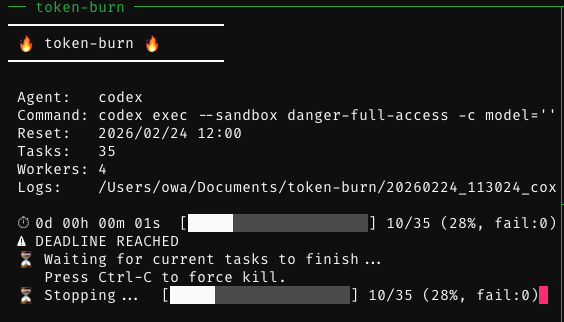
Claude Code / Codex CLI tokens reset weekly with no rollover. Inspired by the Japanese mottainai (もったいない) spirit — the belief that waste is something to be avoided — token-burn puts those remaining tokens to work. It runs your prompts across repositories in parallel before the reset deadline — code reviews, bug hunts, refactoring, test improvements, or anything else you define. When the reset time arrives, token-burn stops starting new tasks and waits for the tasks already running to finish.
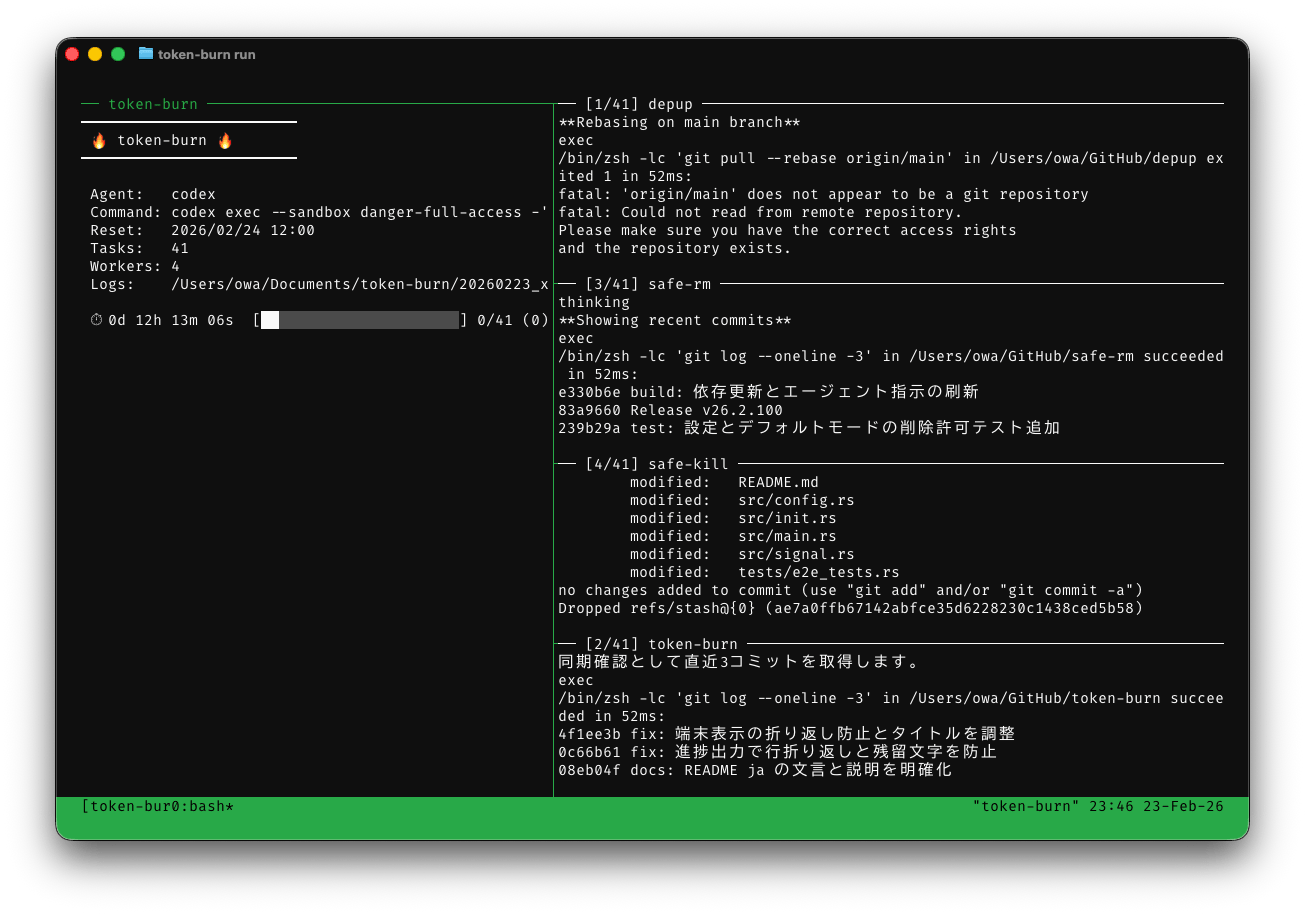
Features
- Deadline-aware scheduling: Picks the agent whose reset deadline is closest, stops starting new tasks when the reset time arrives, and waits for the running tasks to finish
- Parallel runs in tmux: Runs several prompts at once in split panes with a progress monitor; workers close their own panes when the queue is empty, and detaching leaves the run going
- Machine load and disk in the monitor: The monitor pane graphs CPU and memory utilization over the last 5 minutes and shows memory pressure, swap activity, and free disk space, measured the way Finder does when ai-usage supports
--disk - Repository discovery: Scans directories for git repositories from several
[[scan]]sources, keeps those whose remote owner matches your username, and processes each directory once - Processing order: Puts public repositories ahead of private ones, orders each group least-recently-modified first, and skips targets processed recently (
skip_within) - Interactive target picker:
-i/--interactiveopens a TUI to choose targets and their order; pressTabto change workers, the stop threshold, and dry-run mode - Claude Code, Codex CLI and custom agents: Adds the flags an unattended run needs, such as stream-json output and a disallowed
AskUserQuestionfor Claude Code andapproval_policy=neverand--jsonfor Codex CLI - Real reset times from ai-usage: Optionally reads each account's reset time and utilization from
ai-usage --json, falling back to the fixed weekly schedule - Multiple accounts: Expands one agent across accounts (
claude-work/claude-home), each with its own environment and history, anddedup_scopelets one account continue where another stopped - Rate-limit aware: Stops for good when the weekly window reaches
rate_limit_threshold, but pauses until the reset when the five-hour window does; workers recheck usage after every extended pause before taking a task, with ai-usage integration a manual reset ends the pause early, and the monthly overage window never stops a run - Resume interrupted sessions: Continues a Claude Code session cut off by a rate limit with
claude --resumeon the next run instead of starting over. When a wrapper script exits with code 75 before starting the agent, the task is retried on the next run instead of being counted as a failure. The footer of a resumed run reports what that run consumed, with the session total alongside - Readable live monitor: Renders Claude Code's stream-json as readable lines — including the thinking narration (the short progress summaries Claude Code shows instead of the thinking itself), responses missing stream events after an API retry, tool calls, subagent activity and task names on status updates, permission denial reasons, results omitted from model context, hook feedback, context compaction, command cancellation, token usage, cost per model, and API errors. Codex CLI's JSON events get one line per command and changed file instead of a cumulative diff reprinted after every edit, plus a heartbeat while Codex is silent. Escape sequences in tool output are removed, so a command's output cannot clear or retitle the pane
- Safe state and logs: Updates
state.jsonatomically under a lock and numbers per-task logs so they never overwrite each other. If a formatter loses its log or display output, it keeps reading to EOF and marks the task failed; Claude's formatter also continues checking rate limits. After the tmux session closes, the reasons for failed tasks are printed on the terminal you started from and kept inerrors.txtin the logs directory - Dry run and safe command display:
-n/--dry-runpreviews the plan; both the plan and tmux monitor redact environment assignments and credential option values as<redacted>
Requirements
- tmux: Required for split-pane execution
- Claude Code and/or Codex CLI: At least one agent must be installed
- gh CLI: Required for repository visibility detection
- ai-usage (optional): Needed only for the ai-usage integration
Installation
Homebrew (macOS)
brew install owayo/token-burn/token-burn
Cargo
Requires Rust 1.98 or later.
cargo install --git https://github.com/owayo/token-burn --locked
From GitHub Releases
Download the archive for your platform from Releases, extract it, and put token-burn on your PATH. Each release also includes SHA256SUMS for checking the downloads.
| Platform | Archive |
|---|---|
| macOS (Intel) | token-burn-x86_64-apple-darwin.tar.gz |
| macOS (Apple Silicon) | token-burn-aarch64-apple-darwin.tar.gz |
On macOS, if you downloaded the archive with a browser, remove the quarantine attribute before running it: xattr -d com.apple.quarantine token-burn.
From Source
Requires mise (the Rust toolchain is pinned in mise.toml).
git clone https://github.com/owayo/token-burn.git
cd token-burn
make install
make install installs to /usr/local/bin. Set INSTALL_PATH to change it (for example make install INSTALL_PATH="$HOME/.local/bin").
Quickstart
Create the config file and the default prompts (~/.config/token-burn/config.toml and prompts/ next to it):
token-burn init
Edit config.toml: set base_dirs and username in [[scan]], and the command and reset schedule of each agent in [[agents]]. Then check the reset times and preview the plan before the first run:
token-burn status
token-burn run -n
Usage
# Run token consumption (up to `limit` targets)
token-burn run

# Choose the targets and their order in a TUI first
token-burn run -i

# Run only specific repositories (scan and skip rules are bypassed)
token-burn run ~/GitHub/repo-a ./repo-b

# List every target in processing order without running anything
token-burn list

# Remove report directories older than three days
token-burn clean --older-than 3d
When the reset time arrives, token-burn stops starting new tasks and waits for the running ones to finish:
More detail:
- CLI reference: every command and option
- Usage details: processing order, resuming interrupted sessions, the tmux runtime, logs and state
- Rate limits: when a run stops and when it only pauses
- Live monitor: what the worker and monitor panes show
Configuration
Default config location: ~/.config/token-burn/config.toml (pass -c / --config to use another file). state.json (processed targets) and resume.json (interrupted sessions) are kept in the same directory.
A minimal config with one agent and one scan source:
[settings]
parallelism = 3
skip_within = "1d"
limit = 10

[prompts]
default = "prompts/default.md"

[[agents]]
name = "claude"
command = ["claude", "--dangerously-skip-permissions", "--model", "opus"]
reset_weekday = "monday"
reset_time = "09:00"
timezone = "Asia/Tokyo"

[[scan]]
base_dirs = ["~/GitHub"]
username = "yourname"
Prompt values ending with .md are read as files relative to the config directory. Prompt priority: [[targets]].prompt > [[agents]].prompt > [prompts].default
Every section — [settings], [[agents]], [ai_usage] (real reset times and multiple accounts), [[scan]], [prompts], and [[targets]] — is described in docs/configuration.md.
Development
Requires mise. Tool versions are pinned in mise.toml.
make setup   # Install the toolchain (mise) and dependencies
make ci      # Run the same checks as CI (no changes)
| Command | Description |
|---|---|
make setup |
Install the toolchain (mise) and dependencies |
make build |
Build a debug binary |
make release |
Build a release binary |
make run |
Run the debug binary (arguments via ARGS="...") |
make test |
Run the tests |
make lint |
Run clippy with warnings as errors |
make fmt |
Format the code (rewrites files) |
make fmt-check |
Check the formatting (no changes) |
make check |
Run fmt-check and lint (no changes) |
make ci |
Run the same checks as CI (no changes) |
make install |
Install the release binary to INSTALL_PATH (default /usr/local/bin) |
make uninstall |
Remove the binary from INSTALL_PATH |
make clean |
Remove build artifacts |
Run make to list every target. Releases are published from GitHub Actions (Actions → Release → Run workflow).
License
Reviews (0)
Sign in to leave a review.
Leave a reviewNo results found