Ration
Health Warn
- License — License: MIT
- Description — Repository has a description
- Active repo — Last push 0 days ago
- Low visibility — Only 6 GitHub stars
Code Pass
- Code scan — Scanned 8 files during light audit, no dangerous patterns found
Permissions Pass
- Permissions — No dangerous permissions requested
No AI report is available for this listing yet.
AI coding quotas in your Windows tray.
Ration
AI coding quotas in your Windows tray.
English · Türkçe




Features
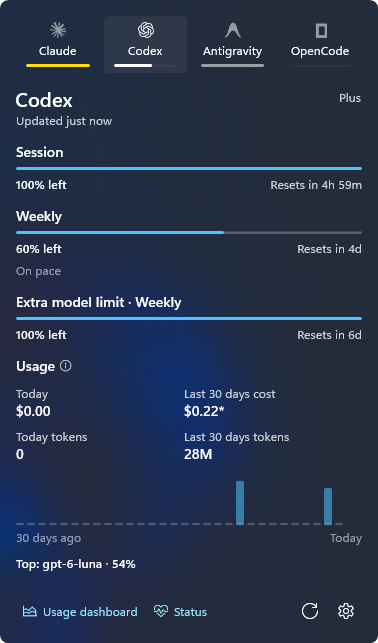
- Session and weekly quota left, with reset times and a pace hint
- Tray icon that fills with your remaining quota
- Token and cost totals for the last 30 days from local logs
- Notifications when a quota drops below 20% and when it runs out
- Light and dark theme; English and Turkish interface
Providers
Claude Code · Codex · Antigravity · OpenCode
Install
Download Ration-win-x64-Setup.exe or the portable zip from Releases. Requires Windows 10 1809 or later; designed for Windows 11. Unsigned builds may trigger a SmartScreen warning.
Verify a download
Every release has a SHA256SUMS.txt file listing the SHA-256 hash of each file. Download it next to the installer and compare:
Get-FileHash .\Ration-win-x64-Setup.exe -Algorithm SHA256
Select-String Setup .\SHA256SUMS.txt
The two hashes must match (PowerShell prints upper case, the file lower case). With a Unix-style shell: sha256sum -c SHA256SUMS.txt --ignore-missing. The built-in updater checks its own downloads; the file is for manual downloads.
Privacy
Credential files are read-only. No telemetry. Quota requests go straight to each provider's own endpoint, and responses are redacted before anything is logged. An installed Ration also checks GitHub Releases once a day for a new version; nothing is downloaded until you choose to.
Data
Ration keeps its files in %LOCALAPPDATA%\Ration (the installer lives there too):
settings.json: your preferences (language, theme, refresh interval, tray provider, notifications, last update check)pricing.json: cached model pricessnapshots\: last quota readingsration.log: diagnostic log with secrets redacted
Settings has buttons to open this folder and to reset the settings.
To remove Ration, uninstall it from Windows Settings > Apps. That removes the app, its start-with-Windows entry, its notification registration and the whole folder above, settings included. If you use the portable zip, turn off Start with Windows first, then delete the zip folder and %LOCALAPPDATA%\Ration.
Development
dotnet build Ration.slnx
dotnet test tests\Ration.Tests
dotnet run --project src\Ration.Cli -- usage -p all
powershell -ExecutionPolicy Bypass -File scripts\package.ps1
Log file: %LOCALAPPDATA%\Ration\ration.log.
To try the update path without GitHub, pack two versions with vpk pack into one folder, install the older one and start it with RATION_UPDATE_REPOSITORY set to that folder.
License
MIT. Provider marks from Simple Icons (CC0), lobe-icons (MIT) and the official OpenAI logo.
Reviews (0)
Sign in to leave a review.
Leave a reviewNo results found