OnBud
Health Pass
- License — License: MIT
- Description — Repository has a description
- Active repo — Last push 0 days ago
- Community trust — 13 GitHub stars
Code Fail
- exec() — Shell command execution in bin/afm-agent-server.ts
- process.env — Environment variable access in bin/afm-agent-server.ts
- process.env — Environment variable access in bin/afm-mcp-server.ts
- process.env — Environment variable access in bin/report.ts
- process.env — Environment variable access in opencode/global-plugin-loader.ts
- rm -rf — Recursive force deletion command in opencode/plugin/security-gate-v2.ts
- process.env — Environment variable access in opencode/plugin/security-gate-v2.ts
- process.env — Environment variable access in opencode/plugin/security-gate.ts
Permissions Pass
- Permissions — No dangerous permissions requested
No AI report is available for this listing yet.
Spotlight-Style Local On-Device Framework for macOS — approvals for every command and edit, on-device by default
Apple's on-device model, put to work on your own files.











Every Apple silicon Mac with Apple Intelligence has a ~3B language model built in. On its own it is a good
reader and a weak programmer. OnBud wraps it in code that does the searching, reading, running and
checking, and asks you before anything changes. Press ⌥ Space, ask about a folder, a paper, a
spreadsheet or your git changes, and approve or deny each command and edit. Answers are computed on your Mac;
nothing leaves it unless you turn on a plugin that says so.
| What you get | |
|---|---|
| Launcher | A Spotlight-style panel (⌥ Space), chat widget, menu-bar activity light, Services menu "Ask OnBud" |
| Local agent | 13 skill packs with contracts and switches, document reading with OCR, commands and edits behind approvals, LaTeX, local jobs, replies in nine languages |
| Plugins | Router model (Ollaya + Decima), GitHub Copilot (writes code), Codex via OpenCode, web search (SearXNG), LaTeX (MacTeX), translation languages — each installed from its own project when you need it |
| OpenCode | The same controller as an OpenCode agent (afm) and an MCP server for frontier agents |
[!NOTE]
OnBud is an independent open-source project. It is not made, endorsed, sponsored or supported by Apple
Inc. It uses Apple's public FoundationModels framework through apfel,
like any third-party app. Apple, Apple Intelligence, macOS and Spotlight are trademarks of Apple Inc.
Recent updates
| Version | What's new |
|---|---|
| 0.2.7 | Update check with your consent · one-click update · faster folder search |
| 0.2.6 | Stop and Undo buttons · conversions written atomically · missing-folder fallback |
| 0.2.5 | Choice buttons instead of guesses · image size targets · PDF merges with page picks · absolute-path answers |
| Version | What's new |
|---|---|
| 0.2.4 | Mac actions in plain English are carried out · volume, brightness, Wi-Fi, Bluetooth, Trash and more · vetted recipes |
| 0.2.3 | A path in the request sets the work folder · LaTeX compiles the named file · translation fixes |
| 0.2.2 | System Settings panes · Codex usage · quick answers by code · general questions as chat |
| 0.2.1 | Architecture diagram in the README |
| 0.2.0 | New name OnBud · Copilot → Codex code ladder · 13 skill packs and the Skills window · remote servers |
| 0.1.0 | First release (as OpenAFM): launcher, documents with OCR, approvals, plugins |
Every release in a few lines: CHANGELOG.md.
Requirements
- Apple silicon Mac (M1 or later), macOS 26 Tahoe or later
- Apple Intelligence turned on (System Settings > Apple Intelligence & Siri)
- apfel and Node.js 22.6+ — setup installs them with Homebrew if they are missing
- No Xcode. Apple's Command Line Tools (git, python3, swiftc) are enough; Homebrew installs them with
itself. OnBud usesswiftconly to build its small helpers on first use if they are missing.
| Feature | Needs |
|---|---|
| GitHub status (read-only: PRs, issues, CI) | gh and gh auth login |
| Long-running commands in background sessions | tmux (brew install tmux) |
| Faster code search | ripgrep (brew install ripgrep; else git grep) |
| Router model, Codex, web search, LaTeX, translation | the matching plugin in Settings > Plugins (see Plugins) |
| Code written by GitHub Copilot | a Copilot plan and Backend > GitHub Copilot (see GitHub Copilot) |
Install
Homebrew (also installs apfel and Node.js):
brew tap p-yi/onbud https://github.com/P-YI/OnBud
brew trust --cask p-yi/onbud/onbud      # Homebrew 7+: allow this one third-party cask
brew install --cask p-yi/onbud/onbud
DMG: download OnBud-0.2.7.dmg from Releases and drag
OnBud to Applications.
[!NOTE]
OnBud is not signed with a Developer ID or notarized. The first launch is blocked with "Apple could not
verify…". Open System Settings > Privacy & Security and click Open Anyway, or runxattr -dr com.apple.quarantine /Applications/OnBud.app.
Then open OnBud and click Set up OnBud…. Terminal opens and, asking before each step:
- checks the Mac (Apple silicon, macOS 26+);
- installs what is missing from each project's own source: Homebrew,
brew install apfel,brew install node; - copies the controller to
~/OnBud/adaptive-coding-agent; - starts apfel (
127.0.0.1:11434) and the controller (127.0.0.1:11435) at login.
Updates: if you allow it (OnBud asks once), OnBud checks GitHub once a day for a new release, shows what
changed, and updates only when you click Update…: through Homebrew if you installed with it, otherwise by
downloading the release and checking it against the published checksum. It then offers to update the controller
too. By hand: brew upgrade --cask onbud (or a newer DMG), then Settings > Backend > Update….
Quick start
Press ⌥ Space and type, or click a quick action:
describe the documents in this folder
paper.pdf: which venue was it published at, and what is the main result?
summarize the uncommitted changes          → a table of changed files
write a commit message for my changes
compile the paper and fix errors           → latexmk, log summary, proposed fixes
Run `npm test`                             → waits for your "yes"
src/stats.py의 mean 함수가 평균을 잘못 계산해. 고쳐줘   → sandbox trial + tests, then "apply?"
show commands                              → everything it can do
Drop files on the panel, paste from the clipboard, or select text in any app > Services > Ask OnBud.onbud://ask?q=…&folder=… opens the panel from Shortcuts, Raycast or scripts.
Skills
Everything OnBud does belongs to one of 13 skill packs (skills/<id>/skill.json). Each pack declares what it
may do and what may leave the Mac; a skill eval checks every change against those contracts. Menu bar ›
Skills… shows each one with its permissions, the plugins it uses and its switch.
core · files · code · git · writing · mac · security · web · frontier ·
server · convert · shortcuts · personal (off by default)
| Skill | What it does | May | Leaves the Mac | Uses |
|---|---|---|---|---|
| core | triage, routing, the final answer and its citation checks, memory, the escalation decision | read, propose | nothing | Router model (optional) |
| files | find files by name, topic or content; answer questions about PDFs (with OCR), Word, slides, sheets, iWork, HWPX, images | read, propose | nothing | Spotlight |
| code | edits tried in a sandbox with your tests, local code jobs on their own branch, docstrings, error triage, renames | read, propose, local jobs | code being completed (Copilot) or a redacted task (Codex), only when those are on | GitHub Copilot, Codex |
| git | repository state, change summaries, commit messages, release notes, PRs and checks (read-only), local jobs | read, propose, local jobs | GitHub API queries | git, gh |
| writing | LaTeX compile, error fixes, citation and reference checks, CSV → tables; short drafts; translation | read, propose | nothing | LaTeX, Translation languages |
| mac | open apps, Finder folders, terminals, editors and System Settings panes; Mac health; dark mode, volume, brightness, lock screen, Wi-Fi, Bluetooth, Trash, hidden files, quit an app, screenshot; vetted recipes (timers, reminders, notes, music, mail drafts, …) and, beyond them, an on-device-written command that is checked and waits for your yes; quick answers by code (time and dates, arithmetic, units, macOS shortcuts) | read, propose, run after approval | nothing | your terminal / editor / browser |
| security | secrets in the project and shell history, credential files, open ports; privacy scan of documents (masked) | read | nothing | – |
| web | web search after you approve the query; the pages read are cited | read, network | the approved query | Web search (SearXNG) |
| frontier | hand-offs you approve: Codex (read-only answer or its own worktree session), Copilot chat | read, cloud model | a redacted task capsule | Codex via OpenCode |
| server | your GPU server or Slurm cluster over your own SSH: upload the project and run a command after approval, job state and logs, open the server in a terminal IDE | read, propose, run after approval, your server | project files (no secrets, nothing over 50 MB) and the approved command, to your server | Remote server (Fresh/TTT) |
| convert | images (format, size targets such as "under 5MB"), PDF merges in any order with pages picked or left out, page edits, documents, zip — always into new files, every PDF page checked | read, write new files | nothing | macOS (sips, PDFKit, textutil) |
| shortcuts | list your Shortcuts, run one after approval, install from a vetted catalog | read, propose, run after approval | nothing | Shortcuts |
| personal | Calendar events and Reminders, read-only — off by default | read | nothing (never stored, logged or handed off) | macOS Calendars / Reminders access |
When a request could mean several things (two files with the same name, several LaTeX documents, similar
Shortcuts), OnBud offers the choices as buttons (⌘1…⌘9) instead of guessing.
Name a file or folder by its path (absolute or ~/, spaces allowed) and every skill works there, even when
another folder is open; paths stay inside your home folder, hidden folders and secrets (keys, .env) are never
read. Commands, edits, web queries, jobs and hand-offs always wait for your "yes"; irreversible actions (send, delete,
pay) are never automatic. Answers follow the request's language (nine languages). Details:
docs/OVERVIEW.md · launcher: apps/spotlight/README.md.
Plugins
Settings > Plugins (GitHub Copilot: Backend > GitHub Copilot). Each one says what it downloads and opens
Terminal with the exact commands; nothing installs in the background. Ollaya and SearXNG start only when you
click Start in Backend (starting at login is an option).
| Plugin | Adds | From |
|---|---|---|
| Router model | "AFM + Decima": a 321M local model advises the router | Ollaya + Decima |
| GitHub Copilot | Copilot's inline completion writes code; the on-device model plans and checks it | copilot-language-server (MIT) |
| Codex via OpenCode | hand big tasks to Codex; "Review with Codex" for local jobs; pick the Strong and Cheap models and their reasoning effort in Backend > Routing (defaults Sol / Terra) | OpenCode |
| Web search | approval-gated web search; a private local search engine if installed | SearXNG (else DuckDuckGo Lite, arXiv, Wikipedia) |
| LaTeX | compile papers and fix errors | MacTeX |
| Translation languages | offline translation packs for the translator | Apple's Translation framework |
| Remote server | run experiments on your server; watch it in a terminal IDE | your ssh; Fresh (GPL-3.0) on the Mac or TTT (MIT) on the server, installed separately |
Remote servers and terminal IDEs (optional)
How the server skill works: upload, run after your yes, watch in Fresh or TTTWhen you develop on a GPU server, an IDE running there (VS Code Remote, say) has no OpenCode, so the cost-saving
ladder (Copilot → Codex's cheap tier → its strong tier) is lost. The server skill keeps OnBud on the Mac and
sends only files, commands and logs to the server:
Mac: OnBud (plan · write code · approve · read results)
  │  your ssh (~/.ssh/config, ssh-agent, keys: read by ssh only)
  ▼
server: <dir>/.onbud/jobs/<id>.{sh,log,exit}  ·  STATUS.md  ·  tmux session / nohup / Slurm
  ▲
Mac terminal (Ghostty, iTerm, Terminal): fresh ssh://host/dir   or   ssh -t host 'cd dir && ttt' / a shell / tmux attach
- "gpu1에서 train.py 돌려줘" → the upload list (secrets such as
.envand keys,node_modules, and files over
50 MB left out) and the command; nothing runs until you say yes. Then the job starts in a tmux session (so you
can attach and take over), with nohup, or withsbatch. The command passes the same security gate as a local one. - "gpu1 진행 상황 알려줘" → the job's state and the log's last lines. "gpu1 fresh로 열어줘" / "ttt로" / "붙어줘" /
"로그 따라가줘" → a terminal window on the server..onbud/STATUS.mdin the remote folder shows the job in the IDE's file tree. - Hosts are the
Hostnames in~/.ssh/config, or~/OnBud/config/servers.json
({"servers": {"gpu1": {"host": "gpu1", "dir": "~/work/proj", "viewer": "fresh"}}}; one entry there is the default).
OnBud never opens key files or types passwords:sshruns withBatchMode=yes, so connect once yourself
(ssh gpu1) when a host needs a password or a new host key. - CLI:
scripts/node-run.sh bin/afm-server.ts hosts | check | run | status | jobs | stop | pull | open. Codex in
OpenCode can read job state and logs with theserver_jobsMCP tool (read-only). - Fresh (GPL-3.0) and TTT (MIT) are optional third-party programs, installed separately under their own licenses.
OnBud does not bundle or redistribute their source or binaries; it only starts them as external programs.
GitHub Copilot (optional)
Only Copilot's inline code completion, through GitHub's official language server (MIT), under your own account.
Plans, terms, pacing and what leaves the Mac- What is used: only Copilot's inline code completion, through GitHub's official
@github/copilot-language-server(MIT),
installed into~/OnBud/runtime/copilot-lswhen you ask. It is not bundled. OnBud does not use Copilot
Chat, premium requests, the Copilot CLI or agents. - Plans: completions are unlimited on Copilot Pro, Pro+ and Copilot Student (free for verified students
through GitHub Education); Copilot Free has 2,000 completions a month. See
GitHub's plans. - Your account, your terms: you sign in yourself on github.com (device code shown in Backend > GitHub
Copilot). Use is under the GitHub Terms
and the Copilot product terms of
your plan. OnBud never stores the token; the language server keeps it. - Editor-like use: completion requests are at least 1.5 s apart and at most 120 an hour, so the
controller behaves like one person typing in an editor. - What leaves the Mac: the code being completed (the request's function and its context) goes to GitHub.
Thecodeskill is marked accordingly. Turn Copilot off in Backend > GitHub Copilot or withONBUD_COPILOT=off; code then goes on-device first, then to Codex if allowed.
How it works
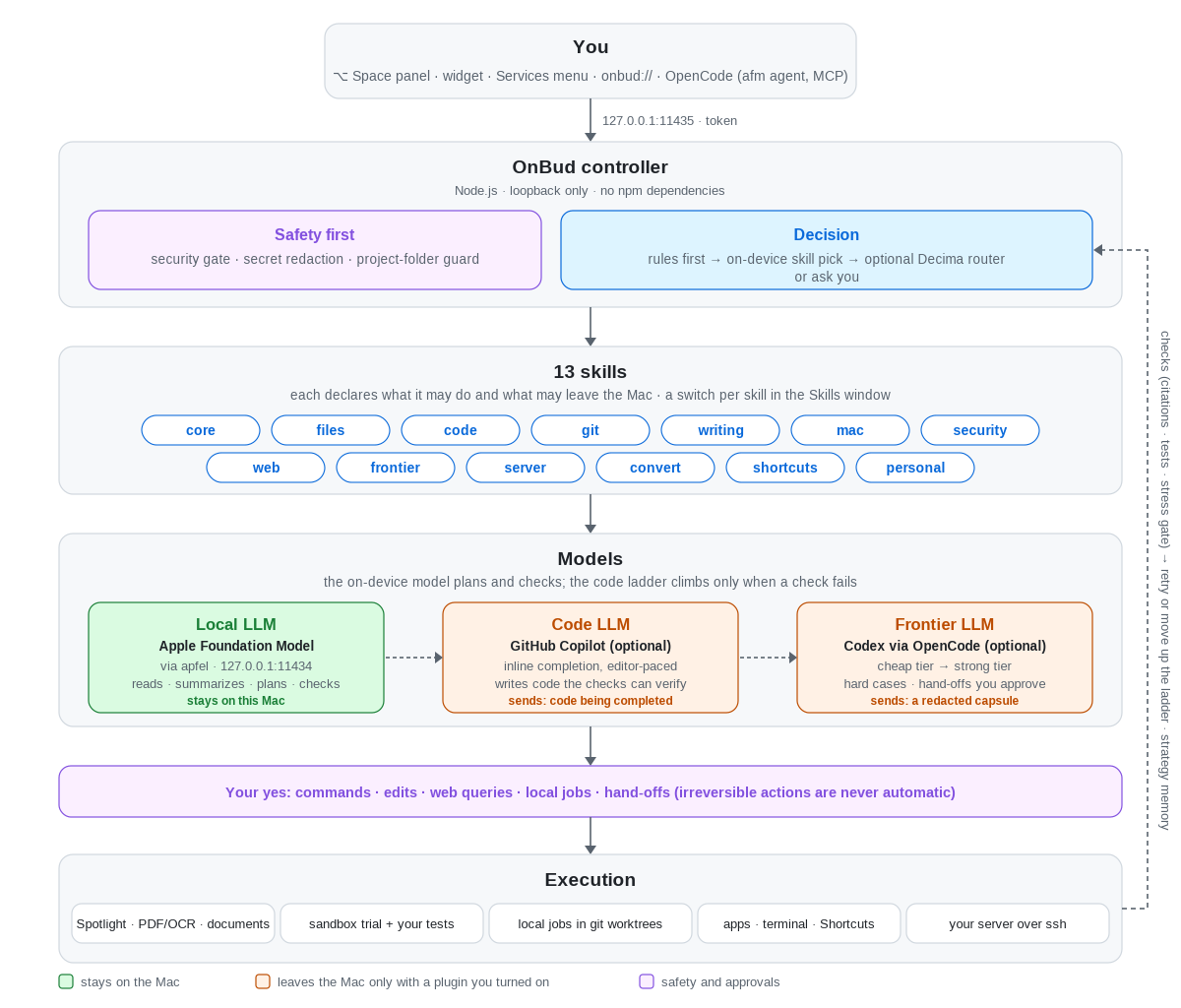
 ⌥ Space ─► OnBud.app ──127.0.0.1:11435──► controller (Node) ──127.0.0.1:11434──► apfel ─► Apple FoundationModels
                                              ├ security gate, secret redaction, folder guard
                                              ├ router: skill (rules, then the on-device model) · ask you · hand-off
                                              ├ 13 skills: files, code, git, writing, mac, web, server, …
                                              └ code: on-device plan ─► Copilot writes ─► checks ─► Codex cheap ─► Codex strong
- Loopback only. Every service binds to
127.0.0.1; the controller needs a token kept in~/OnBud/config(mode 600). - Code checks, the model fills in. Searching, counting, parsing and verifying are code; the model reads,
summarizes and fills small schemas. Answers that cite files are checked against them. - You approve changes. Commands, edits, web queries and jobs wait for an explicit yes; a security gate
blocks destructive commands and secret leaks in the controller and in both OpenCode engines.
Benchmarks
Code on a fresh held-out set (70 = HumanEval 40, LiveCodeBench v6 30), drawn and frozen before the code it
measures, run once per setup on the same day:
| v0.1.0 | v0.2.0 | Codex alone (Sol) | Codex alone (Terra) | |
|---|---|---|---|---|
| Passed (70) | 58 | 66 | 67 | 65 |
| Codex calls | 45 | 41 | 70 | 70 |
| Codex cost (API-equivalent) | $0.19 | $0.09 | $0.26 | $0.11 |
| Time | 29 min | 13 min | 10 min | 7 min |
Everyday file work stays on the Mac (framework eval 53/56 and skill eval 63/63, no Codex calls). For code, a
ladder: GitHub Copilot writes what it can (contest-style code only when a bundled difficulty classifier calls it
easy), Codex's cheap tier takes the rest, and its strong tier answers only when the cheap answer fails a check.
Against v0.1.0: 8 tasks more, half the cost, less than half the time. Against Codex alone: about the same
accuracy at a third of Sol's cost and 17% below Terra's, but slower (Copilot is paced like an editor). Every
setup: docs/BENCHMARKS.md.
Documentation
| Document | What is in it |
|---|---|
| docs/OVERVIEW.md | How OnBud works: launcher, controller, routing, skills, the code ladder, remote servers, limits |
| apps/spotlight/README.md | The launcher: panel, Backend and Routing (Strong / Cheap models), plugins, Skills window, widget, building the app and the DMG |
| skills/README.md | Skill packs: the skill.json contract, evals, how to add a skill |
| docs/skills-plan.md | Design notes and measurements behind the skills and the code ladder |
| docs/BENCHMARKS.md | Every benchmark setup and result, with the comparison to small open models |
| tools/bench/BENCHMARK.md | How to run the benchmarks yourself |
| docs/DEVELOPMENT.md | Building, testing, where things live, rollback |
| CHANGELOG.md | Every release in a few lines, linking to its full notes (docs/release-notes-<version>.md; 0.2.0 also explains the upgrade from 0.1.0) |
| THIRD_PARTY_NOTICES.md | Licenses of the projects, models and datasets OnBud uses or learned from |
Apple Foundation Models, fm and licensing
[!IMPORTANT]
Read Apple's terms before you build on Apple's models.
- OnBud reaches the on-device model through apfel, which uses Apple's public
FoundationModels framework. Your use of
the model and of Apple Intelligence is governed by Apple's macOS license and Apple Intelligence terms,
not by OnBud's license.- OnBud does not use Apple's
fmcommand-line tool (macOS 27).fmhas its own terms: running it
means agreeing, among other things, not to "programmatically access or use Apple models through Apple
software or services except as expressly permitted". Before you scriptfm, putfm servebehind
another program, or contribute such an integration here, read them yourself (fm license --show) and
the macOS Software License Agreement.- OnBud does not use Private Cloud Compute. macOS allows PCC through
fmonly from the Terminal
app, and for third-party apps only with Apple's
Private Cloud Compute entitlement. Please do not
send PRs that route around either restriction.
Build from source
Needs the Command Line Tools (xcode-select --install); no Xcode.
git clone https://github.com/P-YI/OnBud.git ~/OnBud/adaptive-coding-agent
cd ~/OnBud/adaptive-coding-agent
scripts/setup.sh                       # apfel, Node.js, LaunchAgents (asks first)
npm test                               # controller tests
cd apps/spotlight && make install      # build the launcher into /Applications
make dmg                               # build/OnBud-<version>.dmg
More: docs/DEVELOPMENT.md.
Uninstall
~/OnBud/adaptive-coding-agent/scripts/afm-launchagent.sh uninstall agent
~/OnBud/adaptive-coding-agent/scripts/afm-launchagent.sh uninstall apfel
brew uninstall --cask onbud          # or delete /Applications/OnBud.app
rm -rf ~/OnBud                       # controller copy, token, logs, history
Contributing
Contributions are welcome — issues, ideas, docs, local skills, document readers, plugins, translations,
benchmarks. AI coding agents are welcome too (#agentswelcome); please review what they write before you
open a PR.
- Open an issue for larger changes first.
- Keep the defaults: loopback only, nothing installed without asking, changes behind approvals, on-device
unless the user turns on a plugin. - Run
npm testand, for the launcher,cd apps/spotlight && make smoke. - Respect the licenses of the projects OnBud builds on, and Apple's terms (see above).
Acknowledgements
OnBud stands on apfel, OpenCode,
Ollaya, SearXNG,
GitHub's Copilot language server,
Homebrew and Node.js — please star and support them. Ideas came
from fm-guide, fm-proxy,
LocalCode, OpenClaw,
me-box and Laya. Licenses and
what was adopted: THIRD_PARTY_NOTICES.md.
License
MIT © 2026 Yein Park. Third-party projects keep their own licenses and are not bundled.
OnBud is an independent project, not affiliated with, endorsed or sponsored by Apple Inc. Apple, Apple
Intelligence, macOS and Spotlight are trademarks of Apple Inc., registered in the U.S. and other countries.
Reviews (0)
Sign in to leave a review.
Leave a reviewNo results found