skillsight
Health Warn
- License — License: Apache-2.0
- Description — Repository has a description
- Active repo — Last push 0 days ago
- Low visibility — Only 5 GitHub stars
Code Pass
- Code scan — Scanned 12 files during light audit, no dangerous patterns found
Permissions Pass
- Permissions — No dangerous permissions requested
No AI report is available for this listing yet.
See which Claude Code skills your team actually uses. Self-hosted, OTLP-native, no outbound telemetry.
 Skillsight
A self-hosted dashboard for understanding how your team uses Claude Code skills.
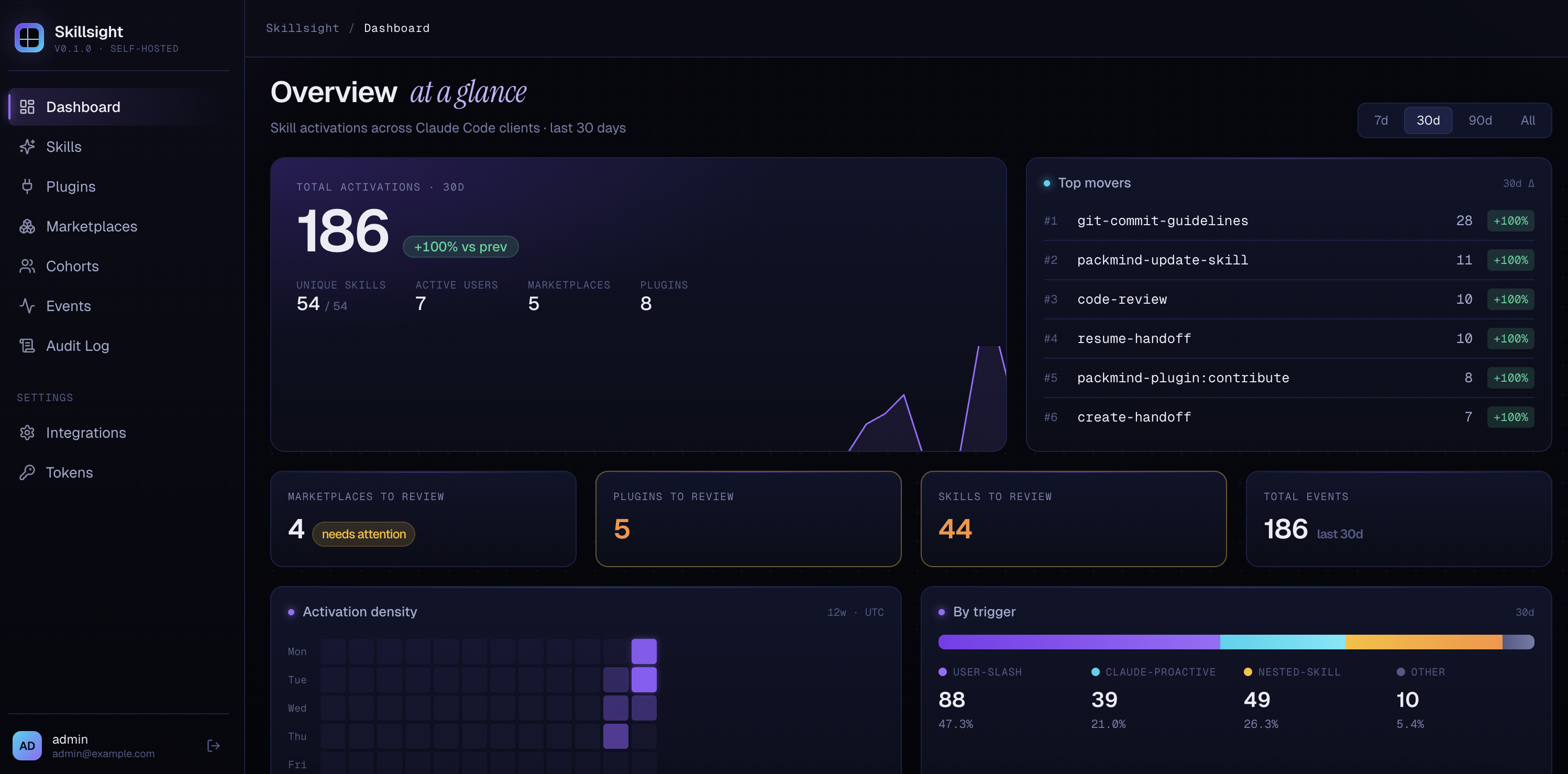
Table of contents
- The problem
- How Skillsight solves it
- Who it's for
- What you get
- The Skills / Plugins / Marketplaces model
- Use cases
- Quick start
- Connecting Claude Code
- Ingesting from Loki instead
- Marketplace sources
- How this relates to Claude Code's native controls
- Contributing
- Roadmap
- Architecture
The problem
You've rolled Claude Code out across your org. You've published an internal marketplace with curated skills, plugins, and agents. Now you're flying blind:
- Which skills are developers actually activating — and which are gathering dust?
- Is anyone using the security-review skill you spent two weeks polishing?
- Which third-party plugins did your team install on their own, and should you officially adopt them or steer the team elsewhere?
- When you deprecate a skill, who needs a heads-up?
Claude Code emits an OpenTelemetry event for every skill activation, but it ships no dashboard for the team rolling skills out. Generic observability stacks (Grafana, Datadog, …) ingest those events fine — but they don't understand the skill → plugin → marketplace model, so turning raw logs into a curated catalog is painful, manual work.
How Skillsight solves it
Skillsight is the missing thin layer. It does three things:
- Collects Claude Code skill-activation events — directly via OTLP, or pulled from an existing Loki stack.
- Correlates them against your plugins and marketplaces (including private, git-backed ones).
- Shows you which skills, plugins, and marketplaces are actually being used — and lets you triage them (
to_review→approved/removed/denied).
No agents, no auto-remediation, no LLM-on-top. Just a clean, focused view of skill usage with the right relationships to make sense of it.
Self-hosted, by design. One docker compose up and you're running. No SaaS, no outbound telemetry — Claude Code activity stays on your servers, period.
Who it's for
- Developer-experience teams rolling Claude Code out internally.
- AI-enablement teams curating an internal skills/plugins marketplace.
- Platform engineering measuring the ROI of skills they build or import.
Built to support adoption and curation, not to surveil developers.
What you get
- Dashboard — top-moving skills, week-over-week trends, activation counts split by trigger (user slash, Claude-proactive, nested).
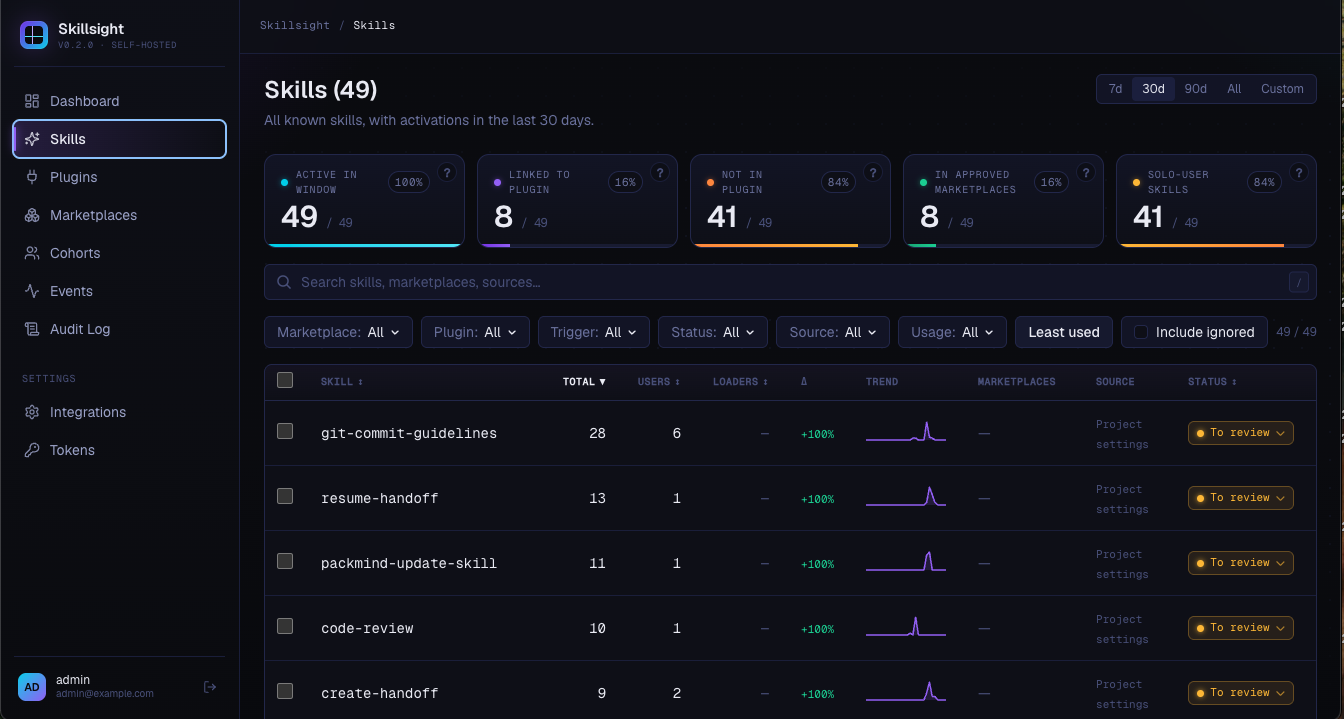
- Skills — every skill ever activated, with status (
to_review/approved/removed/denied), last-used timestamp, drill-down for triggers and users. - Plugins — read-only list of plugins that own activated skills.
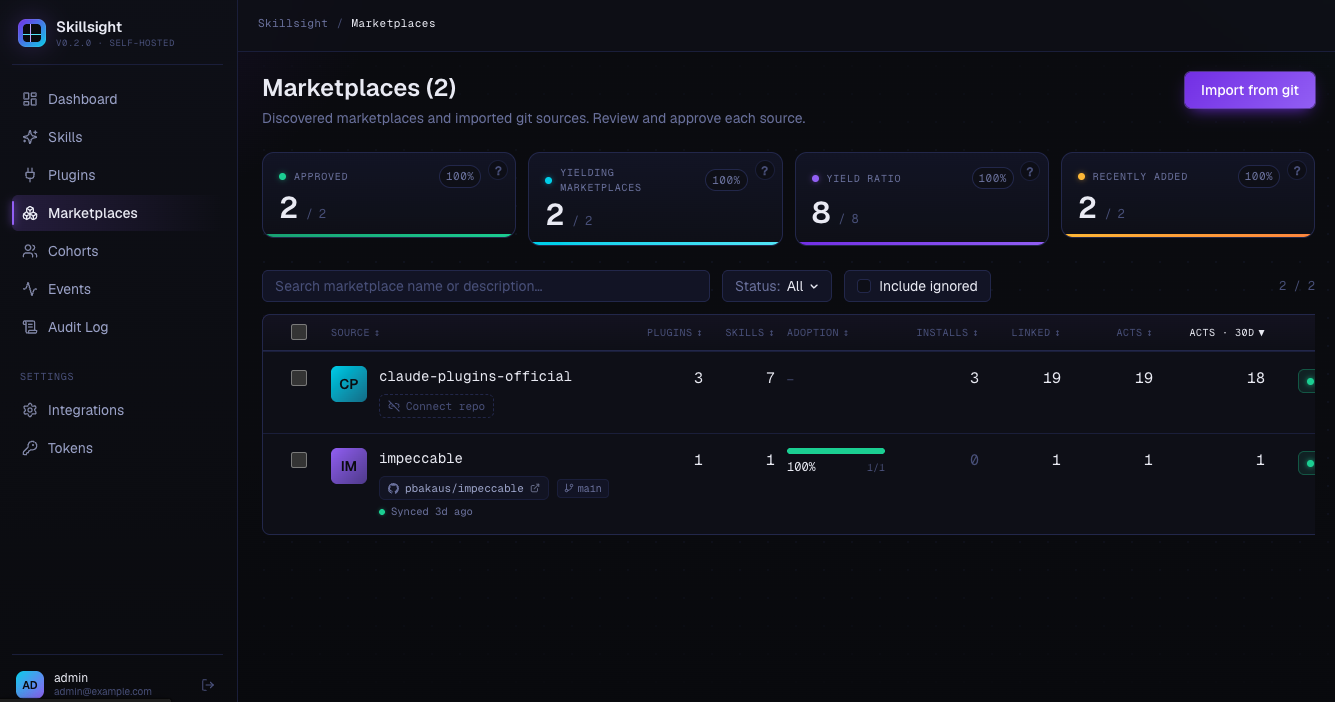
- Marketplaces — list of marketplaces, synced from git sources or implicit from inline plugins.
- Tokens — manage bearer tokens used for OTLP ingestion.
- Settings → Integrations — Loki integrations for pull-based ingestion.
- Audit log — every write operation, with CSV export.
The Skills / Plugins / Marketplaces model
Skillsight mirrors Claude Code's own data model. The relationships are intentionally loose, because Claude Code is loose about them:
- A marketplace is a git-backed catalog of plugins (e.g.
your-org/internal-marketplace). - A plugin belongs to a marketplace — or is inline / local with no marketplace at all.
- A skill belongs to a plugin — or is standalone (Claude Code's bundled built-ins, for example, aren't owned by any plugin).
Two rules make this practical to curate:
- Status flows downward:
marketplace → plugin → skill. Approve a marketplace, and its plugins and skills inherit the approval. The same cascade applies when you mark a marketplacedenied— its plugins and skills inheritdeniedtoo. - Bundled skills auto-display as
approved, so the built-ins don't sit in your review queue forever.
Status is informational only. It organizes your view inside Skillsight; it does not gate or allow-list anything on the developer's machine. See How this relates to Claude Code's native controls for the full picture.
Use cases
- Spot under-used skills (e.g. a security or commit-conventions skill) → train the team or rework the skill.
- Curate the internal marketplace — promote what's popular, retire what isn't, justify investments.
- Discover third-party usage — see which public marketplaces and plugins developers are actually pulling in, and decide whether to officially adopt or steer away.
- Understand audiences — which user populations use which skills.
Quick start
The production docker-compose.yml pulls a pre-built image from GitHub Container Registry — no local build needed, no env file required to get started.
# 1. Grab the compose file (or clone the repo)
curl -O https://raw.githubusercontent.com/PackmindHub/skills-obs/main/docker-compose.yml

# 2. Start the stack — defaults are baked into the compose file
docker compose up -d
Open http://localhost:5173 and sign in with [email protected] / admin. On first login you're redirected to /onboarding, which auto-mints an ingestion token and renders the exact env block to point Claude Code at this instance.
By default the stack tracks ghcr.io/packmindhub/skills-obs:latest. To pin a specific version:
SKILLSIGHT_IMAGE=ghcr.io/packmindhub/skills-obs:1.2.3 docker compose up -d
Environment variables
Every variable below has a sensible default baked into docker-compose.yml. Override any of them by exporting in your shell or by dropping a .env file next to docker-compose.yml (see .env.example for a template).
| Variable | Default | Description |
|---|---|---|
POSTGRES_PASSWORD |
skills_obs |
PostgreSQL password (used by both the DB and the app's connection string) |
POSTGRES_USER |
skills_obs |
PostgreSQL user — override only if reusing an existing DB |
POSTGRES_DB |
skills_obs |
PostgreSQL database name — override only if reusing an existing DB |
JWT_SECRET |
change-me-in-production-please-at-least-32-chars |
HS256 session-signing secret, minimum 32 characters |
JWT_SECRET_PREVIOUS |
(empty) | Previous secret, kept valid for zero-downtime rotation |
ADMIN_EMAIL |
[email protected] |
Bootstrap admin email (used only on the very first start, when the users table is empty) |
ADMIN_PASSWORD_INITIAL |
admin |
Bootstrap admin password (same one-shot semantics) |
HOST_BIND |
0.0.0.0 |
Host interface to bind the published port to |
HOST_PORT |
5173 |
Host-side published port |
SKILLSIGHT_IMAGE |
ghcr.io/packmindhub/skills-obs:latest |
Pin a specific image tag |
Going to production: the bundled defaults are for kicking the tires, not for production. At minimum, set a strong
POSTGRES_PASSWORD, replaceJWT_SECRETwith a 32+ char random string (e.g.openssl rand -hex 32), and changeADMIN_EMAIL/ADMIN_PASSWORD_INITIALbefore the first start (the admin password can also be rotated from the UI afterwards)..env.exampleis a good starting template.
Connecting Claude Code
On first login, Skillsight's onboarding page auto-mints an ingestion token and renders the exact env block below, pre-filled with your hostname and token. You can copy-paste straight from there — the snippets below are for reference.
The variables below are Claude Code's standard OpenTelemetry monitoring settings — see the official monitoring docs for the full reference.
Point Claude Code at Skillsight's OTLP endpoint:
export CLAUDE_CODE_ENABLE_TELEMETRY=1
export OTEL_LOGS_EXPORTER=otlp
export OTEL_EXPORTER_OTLP_PROTOCOL=http/json   # must be http/json, not grpc
export OTEL_EXPORTER_OTLP_ENDPOINT=http://localhost:5173/api/v0/telemetry/v1/logs
export OTEL_EXPORTER_OTLP_HEADERS="Authorization=Bearer <your-token>"
export OTEL_LOG_TOOL_DETAILS=1                  # required for real skill names
For org-wide rollout via managed settings (.claude/settings.json):
{
  "env": {
    "CLAUDE_CODE_ENABLE_TELEMETRY": "1",
    "OTEL_LOGS_EXPORTER": "otlp",
    "OTEL_EXPORTER_OTLP_PROTOCOL": "http/json",
    "OTEL_EXPORTER_OTLP_ENDPOINT": "http://<your-host>:5173/api/v0/telemetry/v1/logs",
    "OTEL_EXPORTER_OTLP_HEADERS": "Authorization=Bearer <your-token>",
    "OTEL_LOG_TOOL_DETAILS": "1"
  }
}
Without
OTEL_LOG_TOOL_DETAILS=1, all custom skill activations show up as"custom_skill"instead of their real names.
Ingesting from Loki instead
If your Claude Code fleet already ships logs to a Grafana Loki stack, Skillsight can pull events from Loki rather than receive them directly. Configure integrations in Settings → Integrations:
url— Loki base URL.lokiQuery— LogQL query selecting Claude Code telemetry (a sensible default is pre-filled).syncIntervalMs— polling interval (min 5 s, default 30 s).- Optional basic-auth, encrypted at rest.
A scheduler polls each enabled integration and feeds the parsed events into the same pipeline as direct OTLP push.
Pointing Claude Code at Grafana Cloud
If you don't yet ship Claude Code telemetry anywhere, the quickest path to a Loki-backed setup is Grafana Cloud's hosted OTLP endpoint. Drop this into .claude/settings.json (or your org-wide managed settings):
{
  "env": {
    "CLAUDE_CODE_ENABLE_TELEMETRY": "1",
    "OTEL_EXPORTER_OTLP_ENDPOINT": "https://acme.grafana.net/otlp",
    "OTEL_EXPORTER_OTLP_HEADERS": "Authorization=Basic <user:api_token encoded in base64>",
    "OTEL_EXPORTER_OTLP_PROTOCOL": "http/protobuf",
    "OTEL_LOGS_EXPORTER": "otlp",
    "OTEL_LOGS_EXPORT_INTERVAL": "30000",
    "OTEL_LOG_TOOL_DETAILS": "1",
    "OTEL_METRICS_EXPORTER": "none"
  }
}
Replace acme.grafana.net with your Grafana Cloud stack's OTLP endpoint, and <user:api_token encoded in base64> with printf '%s' '<instance-id>:<api-token>' | base64 (the instance ID and token come from Grafana Cloud → Connections → OTLP). Once events are flowing into Loki, register a Skillsight integration that points at the same stack's Loki URL.
Marketplace sources
To populate the marketplace and plugin tables without waiting for events, register git-backed marketplace sources. Skillsight clones the repo on a schedule, reads its marketplace.json, and upserts the marketplace, its plugins, and their skills.
Configurable fields per source:
gitUrl— repo URL.accessToken— optional, encrypted at rest, for private repos.branch— optional; defaults to the repo's default branch.syncIntervalMs— polling interval (min 60 s, default 1 h).enabled— pause / resume without deleting.importPluginsAndSkills— auto-import discovered plugins and skills.
Marketplace sources are managed via the API today (
/api/marketplace-sources); theMarketplacespage is a read-only view of the synced results.
How this relates to Claude Code's native controls
Claude Code Enterprise/Team already lets an organization admin register marketplaces centrally and govern each plugin with one of four statuses:
available— installable on demandpre-installed— installed by default for everyonerequired— must be installed (cannot be removed)hidden— not surfaced in the catalog
Skillsight does not replace, mirror, or write to those controls. It works the other way around: it watches what your developers actually activate and gives you a curation view on top of that signal. Its own statuses (to_review / approved / removed / denied) are just labels inside Skillsight to organize the review queue — they never reach a developer's machine.
The two layers are complementary: Claude Code decides what is allowed; Skillsight tells you what is actually used, so the decisions in the first layer can be grounded in field data instead of intuition.
Contributing
Bug reports, feature ideas, and pull requests are welcome. See CONTRIBUTING.md for how to run the stack locally for development.
Roadmap
Planned, no dates — direction, not commitment.
- Claude Code integration (exploratory) — investigate ways to feed Skillsight's curation signal back into Claude Code's native marketplace controls. Intent is to enrich, not replace, the existing governance — scope and feasibility are open.
- Track agents, commands, MCP servers, and hooks — extend ingestion and the UI beyond skills to cover the other Claude Code primitives (subagent invocations, slash commands, MCP tool calls, hook executions), with the same status / plugin / marketplace correlation model.
- Cohort segmentation — tag users into teams and slice every metric by cohort.
- New-skill / new-marketplace alerts — get notified the first time an unknown skill, plugin, or marketplace appears.
- Marketplace recommendations — surface third-party skills gaining traction or duplicating official ones.
- Tags and saved views — custom tags and saved filters to make the tables actionable.
Architecture
A single Docker container: a Hono (Bun) backend serves the React SPA as static files and exposes POST /api/v0/telemetry/v1/logs for OTLP HTTP/JSON ingestion. PostgreSQL stores everything (users, tokens, events, skills, plugins, marketplaces, audit log). Migrations run automatically at startup. Two background schedulers handle Loki polling and marketplace-source git sync.
Everything stays on your infrastructure. Skillsight never phones home, never ships events anywhere, and has no external runtime dependencies beyond your PostgreSQL.
Reviews (0)
Sign in to leave a review.
Leave a reviewNo results found