orca-tycoon
Health Warn
- License — License: MIT
- Description — Repository has a description
- Active repo — Last push 0 days ago
- Low visibility — Only 7 GitHub stars
Code Warn
- process.env — Environment variable access in src/worker.ts
Permissions Pass
- Permissions — No dangerous permissions requested
No AI report is available for this listing yet.
Every Orca agent as a little pixel worker in a tycoon-style office, with specialists, a lounge, foosball, calling booths and Palú the office dog
Office Tycoon for Orca
Your coding agents, as tiny pixel staff in an office you can watch.
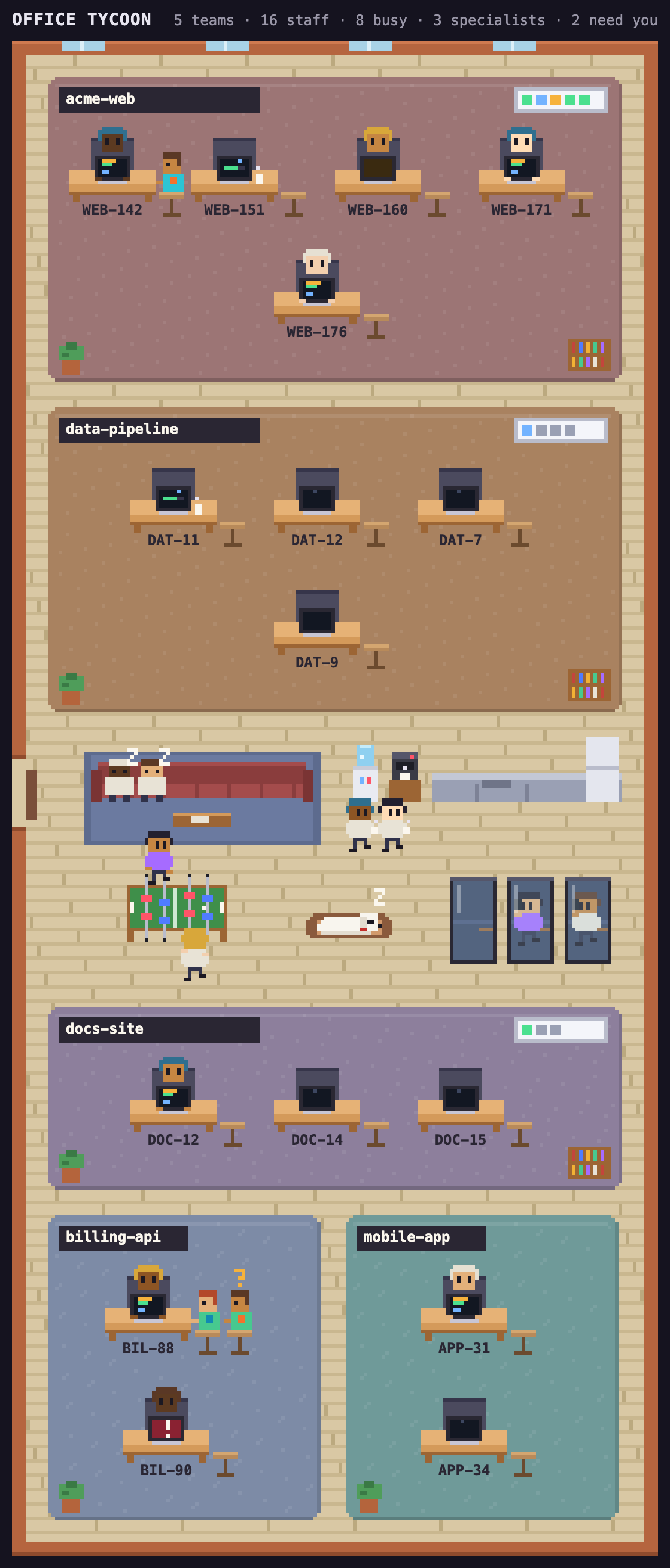
Office Tycoon is a plugin for Orca, the desktop app for running
many coding agents in parallel git worktrees. It draws every agent on your machine, its SSH targets and the
Orca servers you paired, such as a cloud VM, as a little worker in an office, in the style of tycoon and office-sim games. You get a glance at who is busy,
who needs you and who is done, without having to click through every workspace.
Install
Requires Orca 1.4.246 or newer.
In Orca, open Settings, then Plugins, and install Office Tycoon for Orca (palulabs.office-tycoon) from the
plugin directory. To run it from a clone instead:
git clone https://github.com/palulabs/orca-tycoon.git
cd orca-tycoon
orca plugin dev load .        # prints an approval; re-run with the --approve flag it shows
orca plugin open local.office-tycoon --panel office
The worker looks for the Orca CLI at /Applications/Orca.app/Contents/Resources/bin/orca, then~/Applications/..., then orca on your PATH.
Who works here
- Projects are teams. Each repository gets its own open area on the office floor. A big
team spreads across the full width; small ones share the floor in two columns. - Agents get desks. Every agent has a seat with a monitor facing you. A worktree's child
worktrees sit right next to it, so a stack of branches reads as one row of desks. The nameplate
under a desk is the ticket key or issue number in the agent's conversation or workspace name,
else the workspace name. Only when that name is generic, likemainor a name several desks
share, does the first word of the conversation title take its place, so four desks onmain
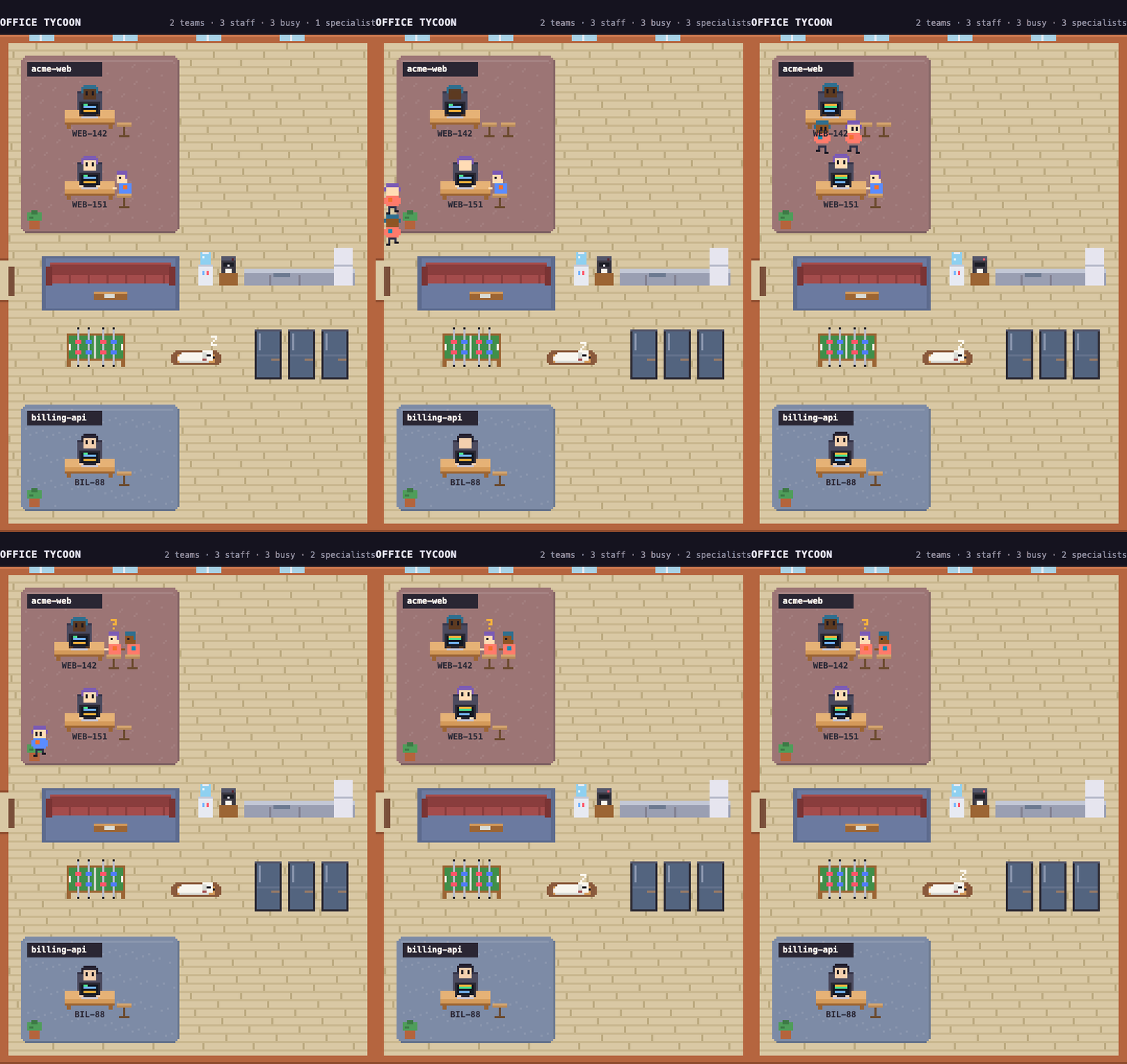
still tell apart. - Subagents are specialists. Every desk has a stool at its end, the second seat. When an
agent calls in a subagent, a specialist walks in through the front door in the side wall, sits on that stool
leaning in toward the screen, and leaves the same way when the job is done. A desk grows up to
three stools and shows a+on the last one beyond that. The badge on a specialist's shirt is coloured by role,
the same across the whole office. - Idle agents take a break. A band across the middle of the floor holds the commons: a lounge
with a sofa, the coffee corner and kitchen, a foosball table and calling booths. Agents that are
done, idle, or waiting on background tasks walk over and pick something to do. Every minute
each one draws a new activity on a rhythm of its own, so they never all move at once: a nap on
the sofa (done and idle agents only), a coffee or a book on the sofa, a mug at the coffee corner,
a game of foosball (always two players, one on each long side), or a call in a booth. When a
place is full they take their next choice, and when everything is full they stay at their desk.
When an agent gets new work, it walks back and sits down. - Palú is the office dog. A white, fluffy, long and low bichon with a little stub of a tail
and a red collar. He wanders the floor, sniffs the plants, the bookshelves and the corners of
the furniture, visits his food and water bowls, naps in his bed in the commons, and now and
then lies down in front of someone's desk for a nap, more often beside someone who is dozing
too. Click him while he rests and he gets up and goes on to whatever he does next. He is only
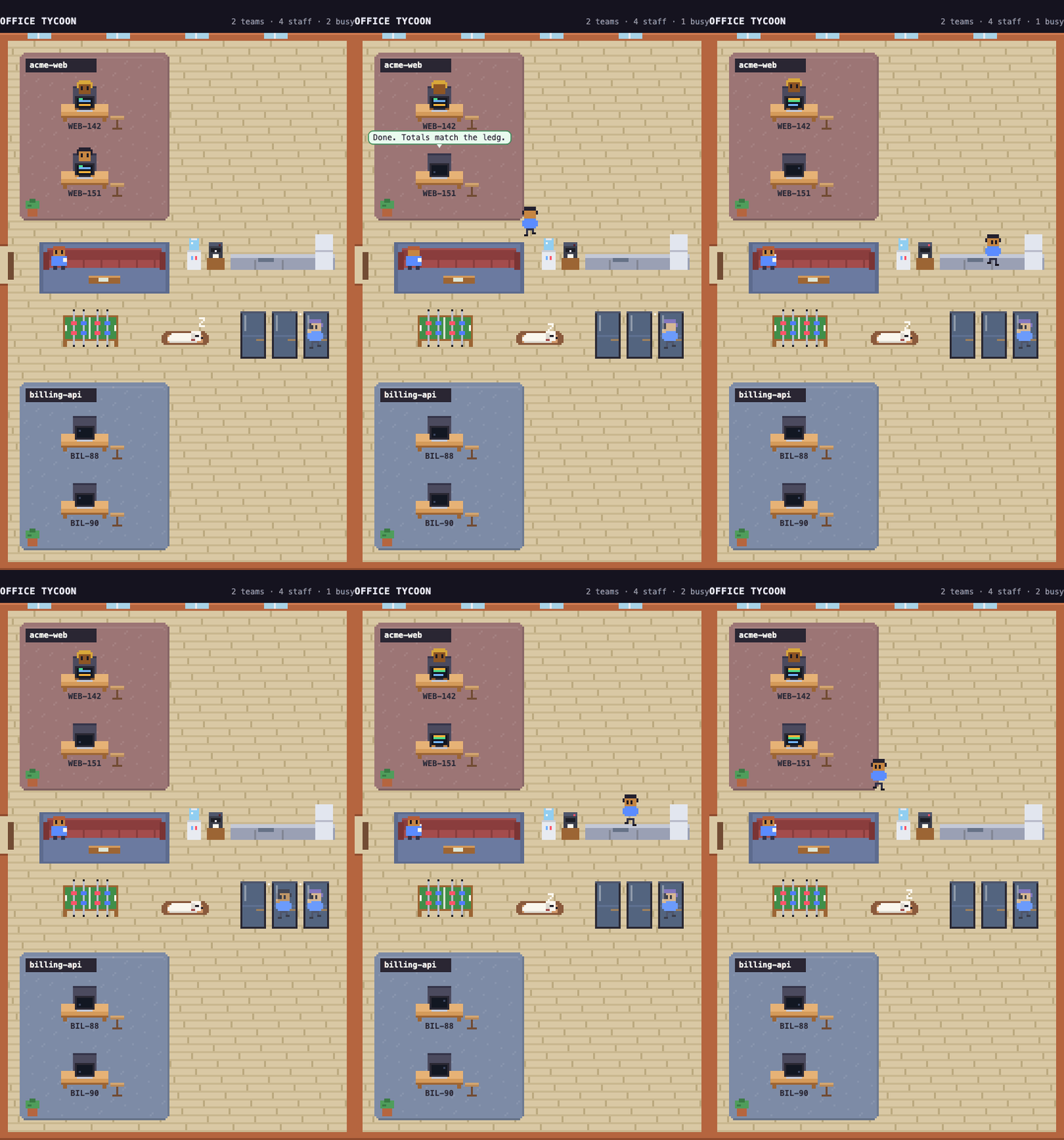
there for company and never changes what anyone does. - Agents speak up. When an agent finishes, a speech bubble shows the first line of its last
reply. When one starts waiting for you it says "Need you!", and when it gets stuck it says
"Stuck!".
A status line along the top counts teams, staff, busy agents and how many need you.
Reading the monitors
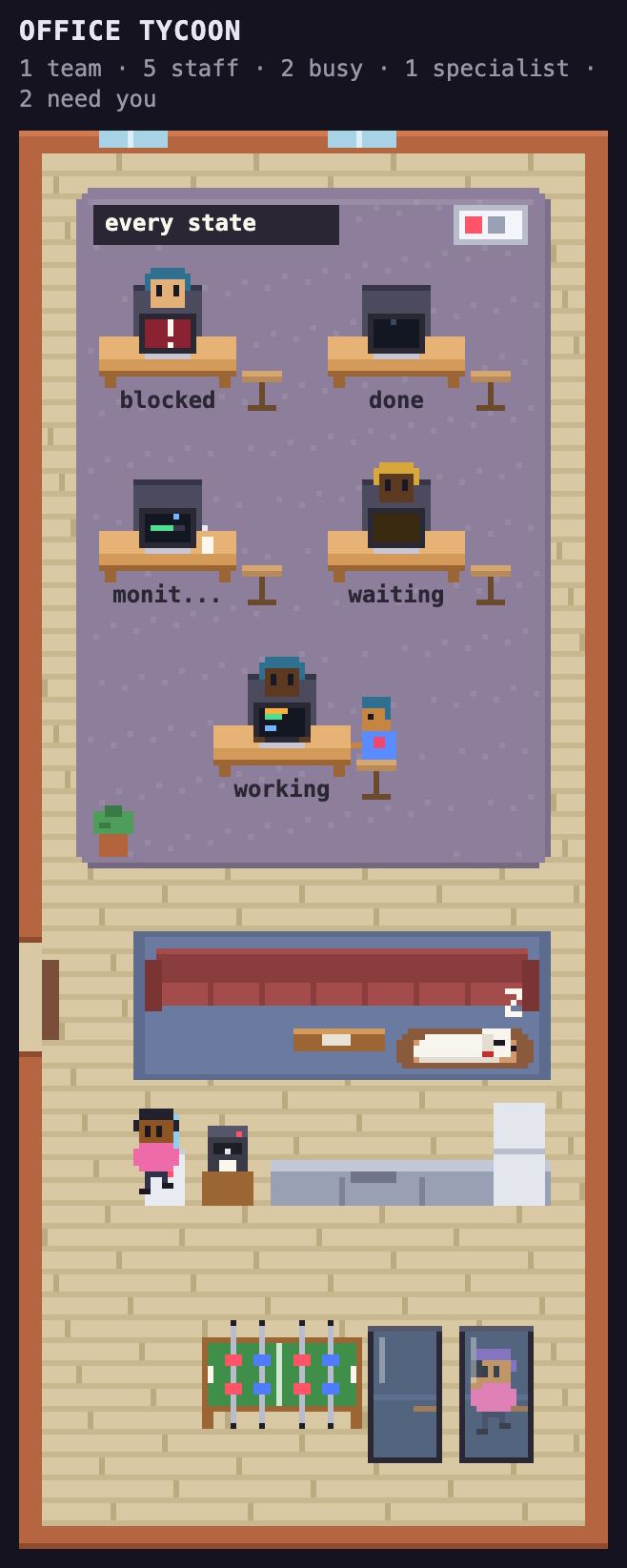
| Agent state | What you see |
|---|---|
| working | typing, code scrolling on screen |
| watching background tasks | on a break in the commons, never napping |
| waiting for you | amber ? on screen |
| blocked | red flashing screen with ! |
| done | on a break in the commons, often napping; dozing at the desk with a z when the commons are full |
Hover over a desk, a person or Palú for a card with who it is, where they sit and what they are
doing; it follows them if they walk off. Click anyone, at their desk or on a break, and they tell you in one line what they are doing:
"I'm editing panel.js", "I'm watching CI run", "I'm waiting on the reviewer". The line comes from
the tool and input Orca already reports, so no model is asked. A specialist tells you the job it
was called in for. The side panel shows the worktree, state, task, current tool and specialists,
and its Open in Orca button brings the agent's terminal tab to the front. A Chat UI session has no
terminal tab, so for one the button shows its worktree instead, as clicking it in the sidebar does.
Clicking a person or a desk never moves Orca's focus; only the button does. An agent on a paired
Orca server sits with the team of its project at a thin client: a pale terminal with a slim box
beside it whose light blinks while it works. The side panel names the server it runs on.
If a server cannot be reached, only its desks go missing until it answers again.
How it works
Orca's plugin API (agents.list) only lists the agents of the focused workspace, and it has no
subagents. To see the whole office, the worker (src/worker.ts) runs orca worktree ps --json
instead. Orca's own sidebar and phone app draw from the same rows. The worker trims them to a small
office model (src/protocol.ts): projects, seats, and each seat's specialists.
The panel (src/panel.html, src/panel.js, src/sprites.js) polls the worker every 3 seconds,
the same rate Orca's phone app uses, and draws one canvas at 8 frames a second. Every sprite is
drawn in code, so the plugin loads no assets and makes no network requests. The office fills the
panel: it is drawn at the biggest whole pixel scale at which the whole building fits, and the
corridors between rooms widen so the bottom wall reaches the panel's bottom edge. Only an office
too crowded to fit at the smallest scale scrolls.
Permissions
Because the worker runs the Orca CLI, the plugin needs the trusted-worker execution profile. It
asks for no other capabilities.
Develop
orca plugin validate .
orca plugin test .            # src/worker.test.ts: ps rows to the office model
orca plugin dev reload .      # after editing; the panel redraws
orca plugin shot local.office-tycoon --panel office --out shot.png
At the top of src/panel.js, AWAY_STATES and LOUNGE_STATES decide which states send an agent
on a break, and ACTIVITIES lists what they can do there, with a weight for how often each comes
up. Add waiting to AWAY_STATES if you'd like agents that wait for you to take a break too.
The screenshots in docs/ show a made-up office, rendered from the real panel code.
License
Office Tycoon for Orca is a community plugin and is not affiliated with Orca or Stably.
Palú, the office dog, is named after the bichon who gave Palu Labs its name. In loving memory,
2003 to 2018.
Reviews (0)
Sign in to leave a review.
Leave a reviewNo results found