dsh-rea
Health Warn
- License — License: MIT
- Description — Repository has a description
- Active repo — Last push 0 days ago
- Low visibility — Only 8 GitHub stars
Code Pass
- Code scan — Scanned 7 files during light audit, no dangerous patterns found
Permissions Pass
- Permissions — No dangerous permissions requested
No AI report is available for this listing yet.
DeepSeek Harness plugin bundle: REA (Reverse Engineer Anything) MCP tools behind a single Plugins-page switch. Ships no engine — only the connection declaration.
中文 · English
dsh-rea
263 reverse-engineering tools behind one switch.
A DeepSeek Harness plugin bundle that mounts the
REA (Reverse Engineer Anything) MCP server as the rea tool namespace — on while you are
investigating, off the moment you are done.




Quick start · Cost · Staying on the newest engine · Why a bundle · Requirements · Configuration · Troubleshooting · FAQ · Development
dsh plugin --profile desktop add @panda-boby/dsh-rea
[!IMPORTANT]
While the switch is on, all 263 REA tool schemas travel in every request — roughly 80K tokens
of context at[email protected]. That is the whole point of the switch: turn it off when the
investigation ends.
What it is — one MCP bridge row, packaged so the Plugins page can show it as a card.
What it is not — no analysis engine, no tool implementation, no model code. Every REA tool comes
from the rea-agents npm package at run time.
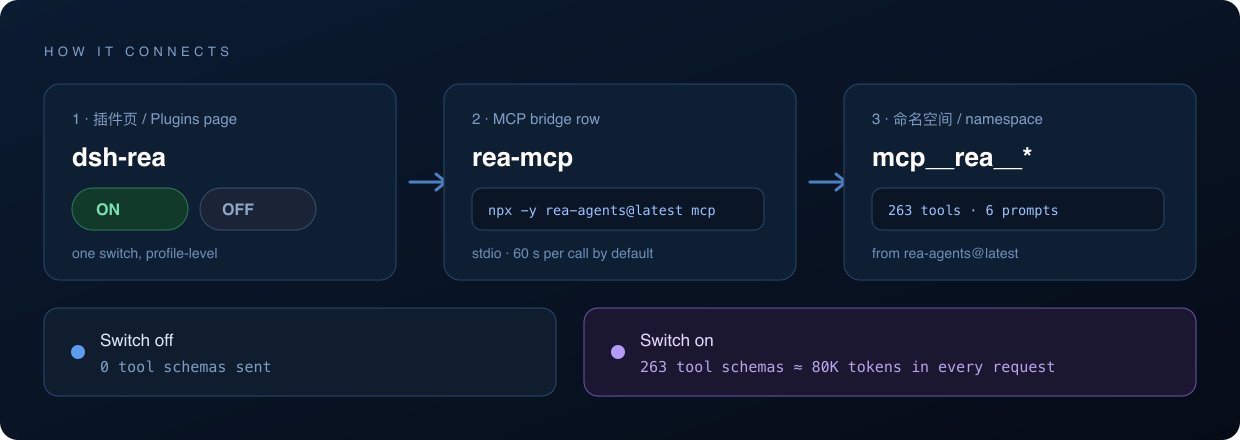
Three artefacts, one chain: the Plugins page carries the dsh-rea card, the card composes the
rea-mcp bridge row, and the row is what brings the rea namespace into a session — with
263 tool schemas attached while it is on, and none while it is off.
Quick start
1. Install
From the npm registry:
dsh plugin --profile desktop add @panda-boby/dsh-rea
Or straight from GitHub:
dsh plugin --profile desktop add github:PandaBoby/dsh-rea
--profile names the profile to change (desktop, web, …). The install also selects the
bundle, so the rea tools appear right away. Working on this package itself? Install from your
checkout instead:
dsh plugin --profile desktop add /absolute/path/to/dsh-rea
[!NOTE]
The unscopeddsh-reaon npm belongs to another publisher (dushudou/dsh-rea). This
repository publishes as@panda-boby/dsh-reaonly.
2. Make sure the engine can start
npx -y rea-agents@latest --version # prints 6.10.1 or newer on a supported runtime
The engine is not downloaded at install time: the bridge runs npx -y rea-agents@latest mcp, so the
first tool sync after the switch is on fetches the newest release and caches it. If this command
fails, see Requirements.
You do not have to track REA releases yourself, either: the bridge asks for @latest, so every
switch-on after a REA release picks the new engine up. See
Staying on the newest engine.
3. Ask for something
Plugins page → Installed plugins → dsh-rea → On, then prompt as usual:
Work out how the search feature in <app> works, show the evidence, then implement something similar in my project.
Tools register as mcp__rea__*. When the investigation is over, turn the switch back off.
Cost
The rea namespace is expensive because its schemas are sent with every request:
| State | Tools sent | Tool-definition context |
|---|---|---|
| dsh-rea off | built-in tools only | ~2K–8K tokens |
| dsh-rea on | built-in + 263 | ~80K tokens |
Measured from the engine's tools/list response, priced the way the harness prices it
(ceil(characters / 4)): 263 tools at [email protected] serialize to ~319K characters, about 80K
tokens. The figure moves with the REA release — 6.9.0 priced at ~82K and 6.5.0 at ~199K for its 207
tools.
Do not price the raw tools/list response by size: at 6.9.0 it is 4.44 MB, but 4.09 MB of that is
per-tool outputSchema, which the harness does not forward to the model. Only name, description
and parameters travel, which is why the same release prices at 0.31 MB of characters. An earlier
version of this README priced the raw response and reported ~200K tokens for 6.9.0; that number
belongs to 6.5.0, and the current engine costs about 40% of it.
To measure it yourself, the context gauge above the composer splits usage into system prompt, tool
definitions and messages: compare the tool-definition line with the switch on and off. Or read the
newest request/header in ~/.dsh/sessions/ and count the mcp__rea__* entries.
Staying on the newest engine
This package pins nothing. cordis.patch.yml launches npx -y rea-agents@latest mcp, so the engine is whatever npm serves as latest at the moment the bridge
starts — not at install time, and not when this package was published.
That means an update reaches you on the next switch-on that re-syncs the tools: turn dsh-rea off
and on again, or restart the harness with the switch already on. A child process that is already
running keeps the engine it started with until the row is disposed, so toggling the switch is what
actually moves an open session onto a newer release. With HMR on (the Desktop and Web default) no
restart is needed.
The npx cache is keyed per spec, so @latest re-queries the registry each time and a new release
needs no cache clearing. Rather than trust the version printed in this README, ask npm what latest
resolves to now:
npx -y rea-agents@latest --version
Pin a version in args when you need the tool list to stop moving; see
Configuration.
Why a bundle
Dropping the same six lines into ~/.dsh/cordis.patch.yml works, but that row is invisible to the
Plugins page — the page lists bundles (packages that carry a dsh.bundle.patch), not
free-standing rows. Wrapping the row in a bundle is what turns it into a switch you can click, and
click back off after the investigation.
Requirements
- DeepSeek Harness with a Plugins page (Desktop and Web profiles both have one).
- Node
^22.23.4 || ^24.22.1 || >=26.12.1.rea-agents6.8.0 and later refuse to start on
anything older: the server prints the requirement and exits, so the bridge ends up with zero tools
instead of an error. - Network access the first time the switch is turned on, so
npxcan fetch the newest release.
Later starts reuse the npm cache.
Configuration
Defaults live in cordis.patch.yml. Override the rea-mcp row from your
profile patch when you need to pin a REA version, raise the call timeout for slow decompilation, or
make startup failures loud:
- id: rea-mcp
  config:
    serverName: rea
    transport: stdio
    command: npx
    args: ["-y", "[email protected]", "mcp"]
    toolCallTimeoutMs: 600000
    failOnStartupError: false
A patch replaces a row's whole config rather than merging into it, so restate every key you
want to keep.
| Key | Default | Meaning |
|---|---|---|
serverName |
rea |
Namespace of the tool names (mcp__rea__<tool>); max 32 chars |
command / args |
npx + -y rea-agents@latest mcp |
The stdio server to launch |
toolCallTimeoutMs |
60000 |
Per-call budget; raise it for long analyses |
failOnStartupError |
false |
When true, a failed start raises instead of silently yielding no tools |
reconnect |
built-in policy | Retry and backoff when the child process drops |
Troubleshooting
| Symptom | Cause | Fix |
|---|---|---|
No rea namespace at all |
Bundle not selected in the profile | Turn the switch on; if you added it as a plain dependency, add it to dsh.profile.bundles too |
| Namespace exists, zero tools | The engine refused to start — usually an unsupported Node, or npx could not reach the registry on first sync |
Run npx -y rea-agents@latest --version in the same environment; set failOnStartupError: true to surface the next failure |
| Tools appear, calls time out | Default 60 s per-call budget | Raise toolCallTimeoutMs |
| You need a fixed engine | @latest drifts with every release |
Pin [email protected] in args |
| The tool count or cost does not match this README | You are on a different engine release — @latest moves |
Run npx -y rea-agents@latest --version, then toggle the switch to reload the row |
If you added dsh-rea to a profile as a plain dependency rather than through dsh plugin add, the
bundle is never composed: the profile's dsh.profile.bundles list is what selects it.
FAQ
Do I have to install REA separately?No. The bundle only declares the connection; npx fetches the newest rea-agents release on the
first sync after the switch is on. REA's own procedure guidance for the model is a separate skill,
deliberately not duplicated here.
This package contains no code — it declares one MCP row. Analysis runs locally through REA; what
reaches a model is the tool results, under your own provider's data policy.
The row is withdrawn, the child process is disposed and the call is cancelled. Later requests are
~80K tokens lighter. With HMR on (the Desktop and Web default) no restart is needed; without HMR
the change applies on the next start.
The schema count follows the engine, not this package. [email protected] serves 263 tools, up from
255 at 6.9.0 and 207 at 6.5.0; the bundle patch tracks @latest, so the number
moves when REA ships — and so does the tool-definition cost. Pin a version if you need it stable,
or read Staying on the newest engine to follow releases on purpose.
Plugins page → dsh-rea → Remove. Removal withdraws the row and allows deleting the package.npx caches live outside the profile and stay until npm or npx cleans them up.
Development
npm ci
npm run validate
npm run validate checks everything that can rot without anyone noticing: required manifest fields
and the paths they point at; that cordis.patch.yml parses as one insert of the rea-mcp row
using an npx … mcp command; that the en and zh locale cards expose the same keys; that the icon
is a real SVG; and that the newest CHANGELOG.md entry matches package.json.
CI runs the same check on Node 22 and 24.
There is no source code to test here: the engine lives in rea-agents, and this repository only
declares how to reach it.
Further reading
- REA repository — what the tools do and how to drive them.
rea-agentson npm — releases and version history.CHANGELOG.md— what changed in this bundle, and when.
Contributing
Issues and pull requests are welcome: PandaBoby/dsh-rea.
Run npm ci && npm run validate before opening a pull request; CI runs the same command on Node 22
and 24. Bug reports about analysis behaviour belong to the
REA repository instead.
License
MIT — see LICENSE. REA itself is a separate project under its own license; this package
only declares how to connect to it.
Reviews (0)
Sign in to leave a review.
Leave a reviewNo results found