PAODO-Workspaces
Health Warn
- License — License: MIT
- Description — Repository has a description
- Active repo — Last push 0 days ago
- Low visibility — Only 5 GitHub stars
Code Fail
- fs.rmSync — Destructive file system operation in app/api/drives/[id]/files/content/route.test.ts
Permissions Pass
- Permissions — No dangerous permissions requested
No AI report is available for this listing yet.
Open-source platform for building your agentic org chart: each agent gets its own sandboxed Docker workspace, tools, HTTP API, and MCP endpoint.
PAODO Workspaces
The open platform for building your agentic org chart.
Every agent gets a real machine: a filesystem, a terminal, and the tools for the job to carry a unit
of work from start to finish.
Each workspace is an isolated Docker container running its own ReAct loop coding agent. Give it
scripts to run and instructions to follow, then call it through the workspace chat interface or an
external API / MCP. Workspaces can be wired into a graph, so agents discover each other and delegate
tasks. Think of it as multiple instances of VS Code + Claude Code, each in its own sandbox
environment, wired together for collaboration.
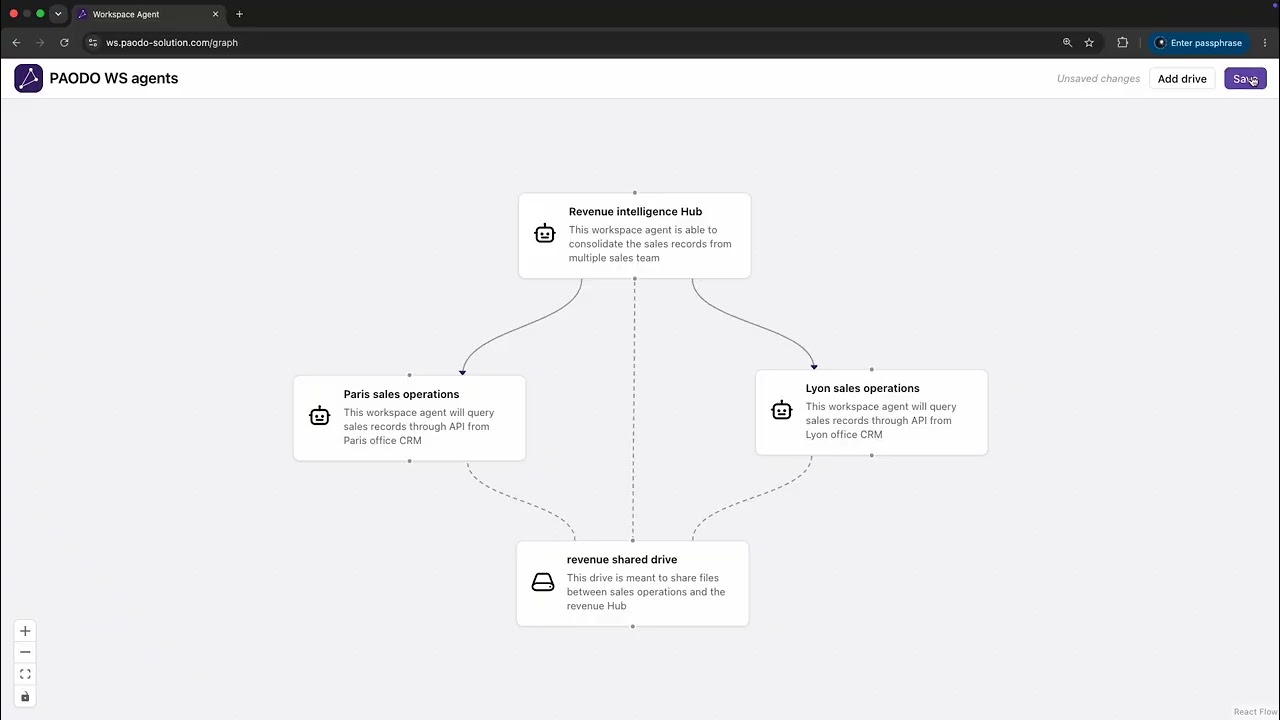
Demo video of PAODO in action :
Features
Isolated workspaces — one Docker container per workspace, with its own agent and
AGENTS.mdinstructions, running as a restricted non-root userInternet access — sealed by default: a workspace only reaches the network once you enable it, per workspace
ReAct agent — full tool set (file read/edit/write, shell, glob, directory listing,
apt_install, web fetch, todo list, context compaction); streams progress live and is interruptible (press escape to kill the running command)File browser — view, edit, upload, and download files from the UI, with syntax highlighting
HTTP API — call any workspace's agent externally with a per-workspace API key
Workspace MCP — expose a workspace's skills as MCP tools through a per-workspace, independently revocable access key
Scheduled triggers — run a workspace agent on a recurring schedule
Live console — shell output and file changes stream to the UI in real time
Per-workspace secrets — give each workspace its own third-party API keys; a credential proxy injects the real values into outbound requests so the keys never reach the agent or its container
Agent graph — connect specialist workspaces so one agent can call another through defined, validated skills
Shared drives — connect shared storage to selected workspaces so agents can exchange files and collaborate on the same materials.
CLI access — Access the app directly through console, optimized for coding agents.
Quick start
Requirements: Docker (running), Node.js 24 LTS (22+ works; nvm use picks it up from .nvmrc), npm 11 (comes with Node 24), and an API key for at least one supported AI model provider.
git clone https://github.com/paodo-solution/PAODO-Workspaces.git
cd PAODO-Workspaces
npm install                   # host tooling only: tests, lint, editor
cp .env.example .env          # set USERNAME and PASSWORD
npm run dev
npm run dev runs the whole stack in Docker, with its own Node 24, so the app itself does not depend on your
local Node. The first run takes about two minutes while it builds the images; later runs start in seconds.
Open http://localhost:3000, sign in with the USERNAME and PASSWORD from .env, and add your provider API key under the gear icon → Settings → Provider API keys.
For VPS deployment, see the deploy guide.
How it works
Each workspace runs in its own Docker sandbox and is accessible via the chat UI, external API,
or MCP server. Agents in connected workspaces and MCP clients can invoke skills
using defined input/output contracts. See Triggers and operations.
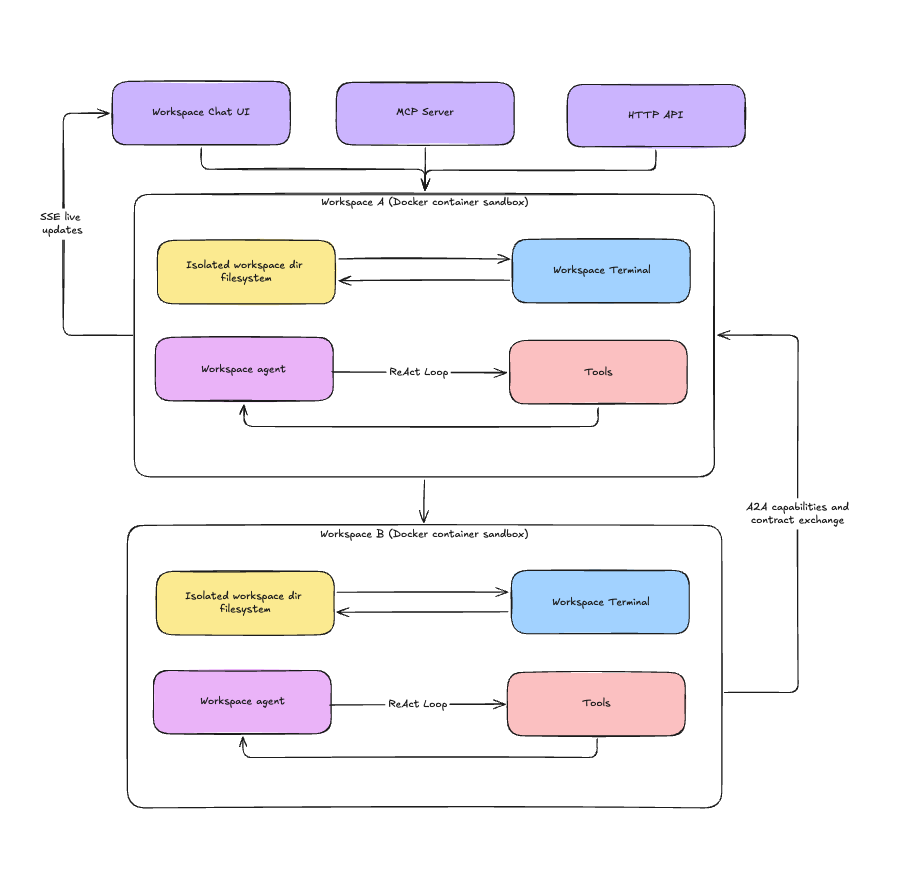
server.ts boots a Node.js HTTP server that mounts Next.js plus a WebSocket server on one port, so shell output and file events stream over /ws without a separate process. Requests hit Next.js API routes, which run the ReAct loop in lib/agent/runner.ts and stream events back over SSE.
Every sandboxed tool call runs inside a per-workspace Docker container (ws_<id>) as a restricted non-root user, with only that workspace's directory mounted.
For the full architecture, see doc/.
The agent runs a ReAct loop with the following tools:
- Files —
file_read·file_write·file_edit·list_directory·glob - System —
execute_command·stop_task·apt_install·http_get - Session —
todo_write·compact_context·workspace_history·workspace_restore - Agent graph —
list_agents·call_agent - Shared drives —
drive_ls·drive_read·drive_download·drive_upload·drive_delete
Agent graph
Workspaces can call each other. The graph page connects them into a directed acyclic graph; an edge A → B lets A's agent invoke B's. Agents find their neighbors with list_agents and call them with call_agent.
Calls are contract-first: each workspace publishes typed skills (.skills/*.json), and the platform validates the caller's input and the callee's output against the skill's schema. The callee runs in a fresh, isolated conversation. No graph edge, no call.
Workspace API access
Enable API access from the workspace panel to generate a key, then:
curl -X POST http://localhost:<port>/api/workspaces/<id>/agent \
  -H "Authorization: Bearer <api-key>" \
  -d '{"message": "list all files and summarize what this workspace does"}'
The response is a Server-Sent Events stream. Each data: frame has a type:
token/reasoning— the answer and the agent's thinking, streamed as they are producedtool_start/tool_result— each tool call with itsargsand output (idpairs them)error— the run failed, with acoderesponse— terminal aggregate: the whole answer in one frame, for non-streaming clientsdone— end of stream, carrying theconversationId
Each call starts its own conversation, visible in the workspace UI. To thread calls together
instead, pass the conversationId returned in the X-Conversation-Id header back in the next
request body. Stop an in-flight run with that id:
curl -X POST http://localhost:<port>/api/workspaces/<id>/agent/stop \
  -H "Authorization: Bearer <api-key>" \
  -d '{"conversationId": "<id>"}'
Workspace MCP access
Enable MCP access from the workspace panel to mint a bearer secret, then point any MCP client at the
workspace:
{
  "mcpServers": {
    "paodo-<id>": {
      "type": "http",
      "url": "http://localhost:<port>/api/workspaces/<id>/mcp",
      "headers": { "Authorization": "Bearer <mcp-secret>" }
    }
  }
}
The client sees the workspace's declared skills and nothing else — no agent tools, no filesystem, no
graph. Each skill's .skills/*.json contract becomes the tool's input and output schema, and calls
run through the same validated path the agent network uses. The secret is stored hashed, shown once,
and revoked independently of the API key.
There is no publication step: the endpoint reads .skills/ fresh on every request, so a skill the
agent adds is immediately callable and one it deletes is gone. Handing out the secret is therefore
the authorization decision — the workspace panel lists the currently exposed tools.
Unlike the chat API, skill calls are one-shot: each runs in a fresh, isolated conversation with noconversationId to continue. Those conversations are still persisted in the workspace UI and
dashboard for auditing.
Known limitations
No automatic compaction — the agent compacts context on demand via
compact_context, but never automatically by size.No file write queue — concurrent writes to the same file can overwrite each other under load.
No image reading — the agent handles images as raw files but can't see their content.
License
MIT — see LICENSE.
paodo-solution.com/workspaces · Built by PAODO
Reviews (0)
Sign in to leave a review.
Leave a reviewNo results found