terminal-delight
Health Warn
- License — License: MIT
- Description — Repository has a description
- Active repo — Last push 0 days ago
- Low visibility — Only 6 GitHub stars
Code Pass
- Code scan — Scanned 12 files during light audit, no dangerous patterns found
Permissions Pass
- Permissions — No dangerous permissions requested
No AI report is available for this listing yet.
Style-first native terminal for Linux and Omarchy, in Rust on gpui + rio-vt. Tiling panes, tabs and CRT-flavored themes; sessions and half-written prompts outlive the window, and the Workbench reads coding agents' own transcripts. AppImage or source.
terminal-delight
A GPU-native Linux terminal with a hot-reloadable, CRT-flavored visual identity.
Rust end-to-end: gpui
(Zed's GPU UI framework) renders everything; rio-vt,
the core of the Rio terminal, does the VT emulation; your real
shell runs on a real PTY, and pictures programs draw with the Kitty graphics protocol
appear in the pane.
Goal: 2-5-20 terminals in one window · native-snappy · web-app polished ·
modify-at-will themes · open source. See docs/PLAN.md for the
gated build plan (all five G0 risk gates + MVP 0.1: passed).
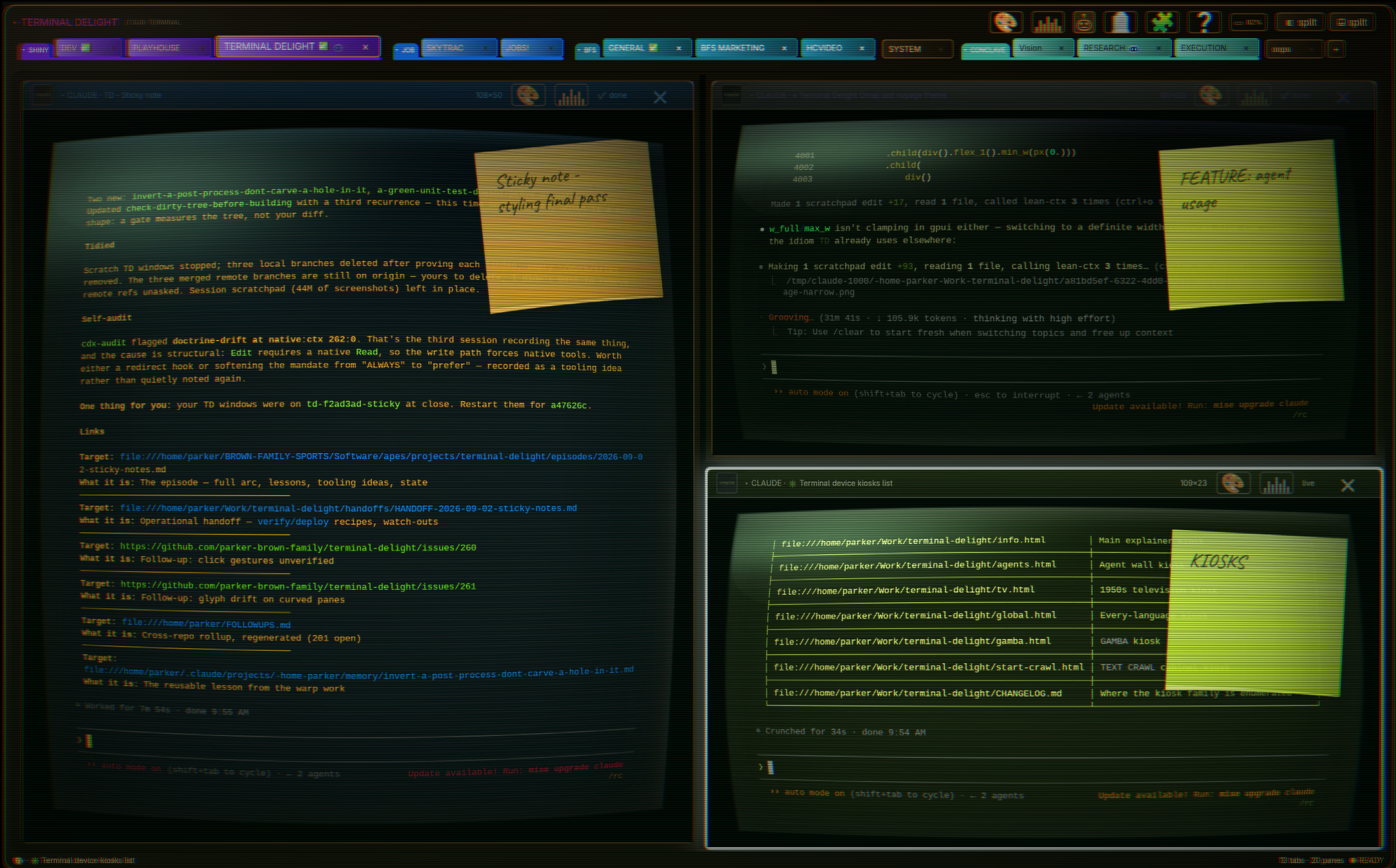
One window, twenty real shells — each pane its own tube, theme, and curvature, and every agent on the wall visible from the tab strip.
Screenshots use staged demo content (a throwaway home + fake prompt), never a real shell.
What's in that shot:
- Sticky notes. Press a note onto any pane and write on it — what this shell
is for, what you were mid-way through, what to check when you get back. It
sticks to the pane, rides the barrel warp with it, and survives a restart.
Peel it off when it's done. - The agent wall — now with subscription usage. The one surface that steers
TD collapses to a wall of agent cards, and a</>card face reports how much
of each AI coding subscription is spent and when the window rolls over
(Claude Code, Codex, Fireworks). TD collects nothing itself: a per-vendor
collector publishes one JSON record and the panel reads the directory, so
adding a subscription is a plugin, not a patch. On Omarchy the records are
already being written for its agents widget and TD picks them up for free. - Agent status lives in the tab strip. Every tab shows a badge per agent
under it — the robot breathing while it works, a yellow HEY blinker when it
needs you (that outranks everything: the turn is yours), ✅ on a clean finish,
❌ when it hit a wall. You never open a tab to find out whether anything is
happening in it. - System notifications when an agent finishes or asks. The toast goes out
throughnotify-send, so it's any freedesktop desktop, not just Omarchy —
Omarchy just renders it through Quickshell. Title istab → paneso you know
where to look, the body is a recap of the agent's own last words pulled from
its transcript, and clicking the toast zips straight to that pane. Nothing
fires if you were already watching it finish. - An MCP server for the window itself. Agents get a real handle on the pane
layer:list_panes(who is running where, mode, cwd, session),pane_events
(tail another agent's tool calls), andget_pane_config/set_pane_config
(brightness, contrast, colour, warp, text size, crawl — in plain percents).
Appearance only: nothing there can write bytes to a PTY. See
docs/mcp.md. grepacross every open terminal. One case-insensitive substring
search over the recent scrollback of all exposed panes at once, answering
with the pane's identity and the matching lines. Find the error, the path,
the value — anywhere in a twenty-pane window — without hunting tab by tab.
Platform: Linux only (X11 & Wayland, via gpui's wgpu renderer). Not macOS/Windows.
Status — 0.1 (multi-pane tiling terminal)
| Capability | State |
|---|---|
| Real shells (PTY + full VT emulation) — bash, vim, top, tmux verified | ✅ |
| Tiling-tree splits + tabs, per-pane grids, focus borders | ✅ |
alt+v / alt+h (or ctrl+alt+r / ctrl+alt+d) split · alt+←/→ switch panes · sub-tab drag-to-split · window pop-out |
✅ |
| Pane closes when its shell exits; last one quits the app | ✅ |
| Layout + per-pane appearance restore on launch | ✅ |
Per-directory default logos — pick once, inherited by subdirs, persistent (dir-logos.toml) |
✅ |
Live resize → SIGWINCH (verified against tput) |
✅ |
| Full ANSI color (16 themed + 256 + truecolor), bold/underline/inverse/dim | ✅ |
Scrollback (wheel), mouse selection (click/word/line), ctrl+shift+c/v, bracketed paste |
✅ |
Hot-reload themes — edit ~/.config/terminal-delight/theme.toml, no restart |
✅ |
4 built-in themes + live-editable custom; picker with hover captions/tooltips |
✅ |
| Per-pane appearance: theme & monitor-OSD grade groups inherit the workspace independently, each with a live "follow outer" toggle | ✅ |
| Monitor-OSD tray: brightness/contrast/colour/text/background/gamma + text size, global or per-pane | ✅ |
| Agent panes (claude/codex): your own messages get their own colour (👤 wheel pip) + ▲▼ to jump between them | ✅ |
| Sticky notes — a written note pinned to a pane, warped with it, restored on launch | ✅ |
| Per-agent tab badges — working / needs-you / done / blocked, without opening the tab | ✅ |
Desktop notifications (notify-send) on finish or question, with a transcript recap; click to jump to the pane |
✅ |
MCP server — list_panes · pane_events · get_pane_config / set_pane_config · grep across every open pane |
✅ |
| Subscription usage on the agent wall, fed by per-vendor collectors (no collection in TD) | ✅ |
| CRT-lite effects: scanlines, vignette, glow — per-theme dials, fully off in light theme | ✅ |
Latency probe (TD_LATENCY=1): key→echo→parsed p50 121µs / p99 169µs; seq 1 100000 in 0.089s |
✅ |
Install
Prebuilt AppImage (x86_64): download terminal-delight-x86_64.AppImage from the
latest release,
then:
chmod +x terminal-delight-x86_64.AppImage
./terminal-delight-x86_64.AppImage
It's a single self-contained file and MIT-licensed (see License).
Each release lists the file's SHA-256 beside it. Release candidates, which preview
the next stable release, are on the releases page
marked Pre-release. The schedule and what each release is checked for are in
RELEASING.md.
Graphics drivers (Vulkan/OpenGL, Wayland/X11) are used from your system, like any
native app. The optional agent-finished bell plays through your systemffplay (install ffmpeg to hear it) and stays silent if it's absent; the
PD/CC0 default sounds are bundled and seeded on first run.
Build from source
# deps (Ubuntu): bash scripts/setup-deps.sh   (Vulkan + build libs)
bash scripts/prepare-gpui.sh   # clone pinned Zed + apply the td patches
cd app && cargo run
gpui is consumed from a pinned Zed checkout
(abbe85a3321bf6cb7f5b241e623d9c2e16c29187, post-wgpu-Linux-renderer) carrying
a five-patch stack (docs/patches/, ~1,080 lines): 0001-td-crt-pass (the
per-pane CRT barrel warp), 0002-focus-blur, 0003-text-crawl, and0004-warp-tube-cap-32 (focus/effect hooks), plus 0002-sever-gpl-crates
(removes the GPL crates the Zed graph would otherwise link — see
License). scripts/prepare-gpui.sh sets the checkout up as a
sibling zed-upstream/ directory and applies all five; CI does the same. The
crates.io gpui release still ships the older blade renderer with known
NVIDIA/X11 issues.
Build the AppImage yourself, or run the full pre-release smoke:
bash scripts/build-appimage.sh    # → dist/terminal-delight-x86_64.AppImage
bash scripts/release-smoke.sh     # fmt + clippy + tests + deny + AppImage check
Theming — edit while it runs
First launch seeds ~/.config/terminal-delight/theme.toml (hacker). Change any value —
colors, the 16 ANSI slots, scanline_opacity, vignette, glow, font — and the running
app picks it up in ~300ms. Four themes ship in app/themes/:
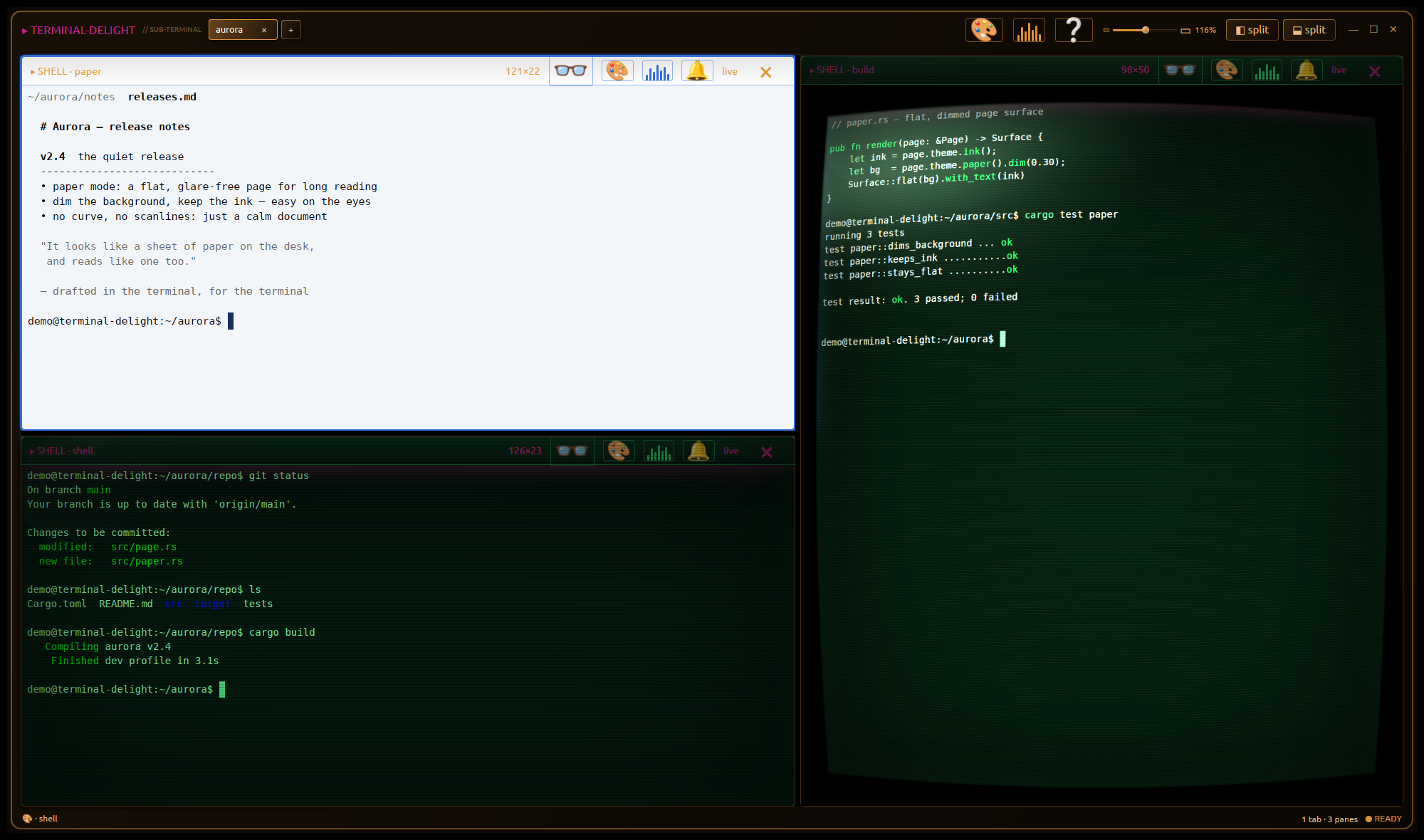
hacker (phosphor green) · tactical-overdrive (cyan) · quiet-command (light,
effects off) · deco (quiet brass). Copy one over your config file to switch.
Omarchy / Hyprland integration — every key on SUPER+ALT+T
scripts/install-keys-hotkey.sh installs td-keybindings and binds
SUPER+ALT+T: every Terminal Delight key, in Omarchy's own searchable key
menu, beside SUPER+K for Omarchy's keys and SUPER+CTRL+K for Herdr's. The list
is the docs site's Keys page, copied beside the
script so the sheet works without a checkout; run the installer again after the
page changes. td-keybindings --print writes the same list to stdout, and--uninstall on the installer reverts the binding.
SUPER+ALT+T used to be td-send's. That hotkey is retired, and the installer
takes the seat back from it, but scripts/td-send still runs by hand: focus a
terminal tile (foot, Alacritty, kitty, Ghostty, org.omarchy.*) and the
session migrates into a Terminal Delight pane — idle shells re-open at their
cwd, claude/codex agents resume by session id, tmux attaches re-attach.
Anything else in the foreground (vim, htop…) is refused and nothing is closed.td-send --dry-run prints the plan without touching anything.
Runtime dependencies (checked by the scripts, which fail with a message):
- Hyprland (
hyprctl) — window addressing and close dispatches; both the
≥0.56 Lua dispatcher and the legacy string form are spoken - jq — JSON plumbing in
td-sendand the hook/installer scripts - Omarchy —
td-keybindingsdraws throughomarchy-menu-select, and the
hotkey installer writes Omarchy'so.bind(…)helper into~/.config/hypr/bindings.lua omarchy-notification-send— optional; notifications are skipped without itplugins/td-send(thetd-send-mcpMCP server that exposespull_workspace/send_windowto agents) needspython3, stdlib only
The Rust side (the ctl adopt verb and terminal-delight probe) adds no new
crate dependencies.
The rest of it lives in a sibling repo
The terminal is the app. The look it wears, and the desktop that wears it back,
are separate projects on purpose — you can take one without the other.
| Repo | What it is |
|---|---|
| terminal-delight | the terminal itself — GPU-native, Rust, tiling panes, per-pane grading |
| omarchy-terminal-delight-theme | the desktop half — the Omarchy theme, the variant set, the compositor curve, and td-tint |
The seam between them is td-tint, which ships with the theme: it writes a
variant's OSC palette down another terminal's tty and puts the matching
gradient on its window border. That is how foot, Alacritty, kitty and Ghostty
get the same one-click identity Terminal Delight panes have, without any of
those terminals knowing this project exists.
The paint overlay needs no plugin. Terminal Delight does not bind a desktop
key for it; on Omarchy, bind Super+Alt+P toterminal-delight ctl paint toggle, which raises the overlay in every
Terminal Delight window on the active workspace and folds them all on the
next press.
Architecture
app/src/main.rs   Workspace: panes, split/focus/close, layout persistence
app/src/pane.rs   TerminalView: grid render (styled runs), input→PTY bytes,
                  selection, scrollback, clipboard, CRT-lite, latency probe
app/src/term.rs   a pane's terminal: core, read loop, PTY or host socket, event channel
app/src/vt/       the core boundary: TD's own types, read loop (pump.rs), PTY (pty.rs),
                  replica socket (socket.rs), rio-vt adapter (rio.rs), and the
                  alacritty_terminal fallback (alacritty.rs, --features core-alacritty)
app/src/theme.rs  TOML themes, hot-reload watcher, gpui Global
app/src/warp.rs   per-pane warp registry feeding the td-crt-pass renderer patch
app/src/bell.rs   per-pane agent-finished bell (sound pick/trim, ffplay playback)
app/src/notify.rs desktop toast: transcript recap, tab → pane title, click-to-jump
app/src/sticky.rs the note stuck to a pane — text, placement, persistence
app/src/usage.rs  reads per-vendor subscription-usage records (TD collects none)
app/src/mcp.rs    the MCP server: list_panes, pane_events, pane config, grep
app/themes/       shipped themes (data files — the no-Rust contribution path)
docs/PLAN.md      the adversarially-hardened plan, gates G0a–G0e + milestones
index.html, src/  original browser design prototype (kept as design reference)
License
terminal-delight's own source is MIT (see LICENSE), and so are its
distributed binaries. Every linked dependency is used under a permissive license
(MIT / Apache-2.0 / BSD-class) — the binary carries no copyleft obligations.
This took one deliberate move. The pinned Zed graph would otherwise pull three
GPL-3.0-or-later crates (ztracing, zlog, ztracing_macro) into the linked
binary via gpui -> sum_tree — they were only used for trace spans and a test
logger. docs/patches/0002-sever-gpl-crates.patch removes those uses and drops
the dependencies, so they never reach the binary. With that edge severed, a
distributed build is cleanly MIT-compatible, which is what makes the prebuilt
AppImage redistributable. The full third-party license bundle is generated bycargo about and shipped inside each AppImage (and inTHIRD-PARTY-LICENSES.md).
cargo deny check enforces this with no GPL exceptions (app/deny.toml) — any
newly-introduced copyleft dependency fails CI. CI also runs formatting, strict
Clippy, tests, the release build, an advisory audit, and (on push) builds the
AppImage. The clean-room rule for Zed reference is in docs/PLAN.md §2.
Privacy
terminal-delight records each pane's working directory and agent resume command
(claude --resume <id> / codex resume <id>) to ~/.config/terminal-delight/state.toml
so it can reopen your work after a restart. That file is written owner-only
(0600); delete it to clear the history.
Roadmap
Shipped since 0.1 — tabs · tiling-tree splits (well past 5 panes) · sub-tab
drag-to-split + window pop-out (the 0.3 detach goal) · the true post-process CRT
shader (the 0.4 wgpu barrel-warp pass — PLAN R1's fork gate, now landed) ·
MIT-clean prebuilt AppImage (0.2 packaging) · portability hardening (vendor-
agnostic GPU setup, explicit font fallback + startup GPU/font diagnostics, X11
PRIMARY-selection copy).
Next — Flatpak alongside the AppImage · broader Linux matrix (AMD/Intel ·
Wayland · fractional scaling) · 20-pane stress + rigorous latency rig vs Alacritty ·
a theme gallery. See docs/PLAN.md for the gated plan.
Experimental — Terminal Delight on the phone: a gateway on the laptop and an
Android app that opens on an agent's workbench, with the terminal one tap behind
it. It is lab work, part of no release, built and sideloaded by hand, and it
needs developer mode or Tailscale on the phone. The goal is Omarchy mobile. If
you want to try it or help, it lives on thefeat/mobile-hello
branch, and its README starts with what it needs and what it is not.
Reviews (0)
Sign in to leave a review.
Leave a reviewNo results found