ralphy
Health Warn
- License — License: GPL-3.0
- Description — Repository has a description
- Active repo — Last push 0 days ago
- Low visibility — Only 5 GitHub stars
Code Pass
- Code scan — Scanned 12 files during light audit, no dangerous patterns found
Permissions Pass
- Permissions — No dangerous permissions requested
No AI report is available for this listing yet.
Works your GitHub issue backlog overnight with Claude Code: plans, codes, commits, and closes issues, then hands you a branch to review in the morning. Never pushes, never opens a PR. Runs on your Claude subscription quota.
Ralphy 🌙




Your coding agents, your repos, your machine — in a browser tab you can open from anywhere.
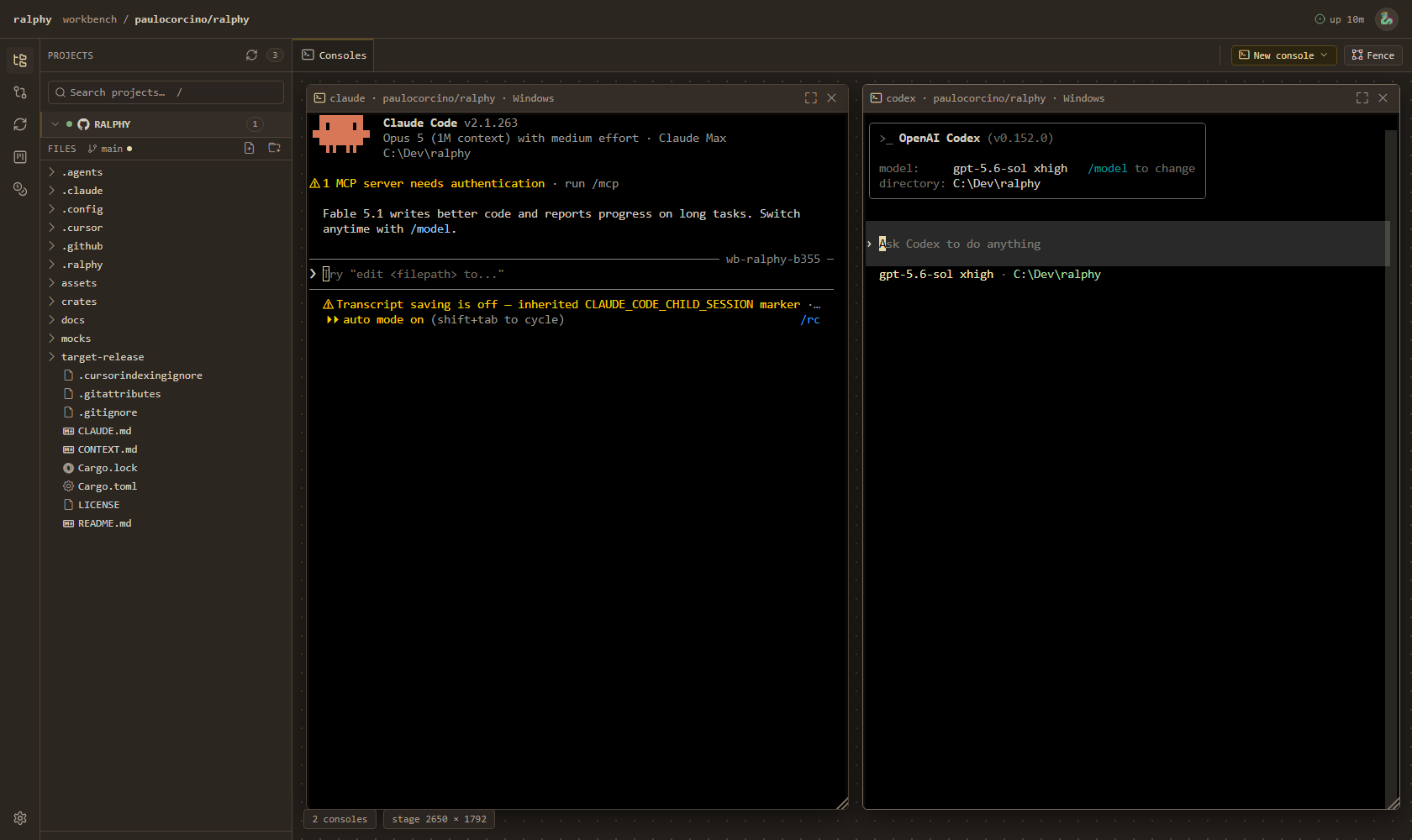
Ralphy is one small binary that turns the computer where your code lives into a workspace
you can reach from any other screen. It runs a resident daemon on your box and serves a
workbench: projects, a file explorer with a real editor, your git changes, your issue
board, live runs, spend — and real agent terminals (Claude, Codex, OpenCode, Copilot,
Cursor, Gemini, Kimi) side by side in one tab.
The terminals belong to the daemon, not to the browser. Close the laptop, pick up the
tablet, open the same URL: the sessions are still running, with their scrollback, and your
window layout comes back with them.
And when you're done for the day, the same binary can work your backlog while you sleep.
     🏠 your machine                      🌍 any screen you happen to have
┌───────────────────────────┐          ┌──────────┐ ┌──────────┐ ┌──────────┐
│  ralphy daemon            │          │ desktop  │ │ notebook │ │  tablet  │
│  · your repos             │  ◀────▶  │          │ │          │ │  / phone │
│  · your agent sessions    │          └──────────┘ └──────────┘ └──────────┘
│  · your gh login          │             one workbench, same sessions,
└───────────────────────────┘                 same layout, no upload
Three things worth knowing up front:
- 🔒 Nothing is uploaded anywhere. The daemon runs on your box, binds to loopback by
default, and reads the same repos and the sameghlogin you already use. - 💳 No API key, no per-token bill. Ralphy drives the agent CLIs you're already signed
into, on the subscription you already pay for. - 💻 Windows, Linux, and macOS, one binary, no runtime to install.
🚀 Get it running
📦 1 — Get the ralphy binary
Grab the archive for your platform from the
Releases page — Windows, Linux, or
macOS (Intel & Apple Silicon) — unzip it anywhere, then let it put itself on your PATH:
./ralphy install
Already have it? ralphy update takes the newest release: it checks the published
checksum, replaces the binary in place, and restarts the daemon if one is running.ralphy update --check just tells you what is new.
(Prefer to build from source? See docs/BUILDING.md.)
✅ 2 — The basics you'll need
- 🤖 At least one coding-agent CLI, signed in. That's the brain behind the terminals and
the runs. Claude Code is the default; Codex, OpenCode,
Copilot, Cursor, Gemini and Kimi work too.
→ which agents, and how to pick one - 🐙 The
ghCLI, logged in — needed for the issue board and the overnight run. Check
withgh auth status. (Not using GitHub? The consoles, explorer and changes panels work
without it.)
No API keys anywhere.
🖥️ 3 — Start the workbench
ralphy daemon setup     # baptize it: pick a name and an avatar, mint an access token
ralphy daemon add .     # register the repo you're standing in (repeat per project)
ralphy daemon           # run it — then open http://127.0.0.1:7257
Want it up whenever you log in? ralphy daemon install registers it with your OS (Task
Scheduler on Windows, a systemd user unit on Linux/WSL), and ralphy daemon uninstall
takes it back out. → docs/daemon.md
🧰 What's in the workbench
- 🗂️ Projects — every repo you registered, in one accordion: branch, dirty state, and
whether it has a GitHub remote. - 📁 Explorer — the real file tree, with a real editor (Monaco): open, read, edit, save.
Images render inline. - 🖥️ Consoles — actual agent CLIs running as terminals on a pannable stage. Group them
into fences, or pop a fence out into its own window for a second monitor. - 🧩 Board — your AFK/HITL backlog as a kanban. Open an issue, read it, and send it to a
run without leaving the page. - ▶️ Runs — the loop, live: which issue is being worked, which phase it's in (planning,
executing, verifying), and what it cost. - 🌿 Changes — the working tree: read the diff, stage, commit, fast-forward pull, and
push when you say so. - 📊 Spend — the token ledger and a dollar estimate, per run, per model, per project.
- 🛰️ Fleet — two daemons, one workbench: a WSL box (or a second machine) shows up as a
peer, with its repos and its consoles.
Two consoles of the same repo on two screens is the point: you drive one agent by hand
while Ralphy's run works the queue in the other.
📱 Reaching it from the couch, the office, or a tablet
The workbench is a web app on your own machine, so anything that can reach that machine can
open it. Two ways, in order of least surprise:
- On your own network — bind it to a LAN address:
ralphy daemon --bind 0.0.0.0. A
non-loopback bind requires the access token minted byralphy daemon setup, or the
daemon refuses to start. - From anywhere — put a tunnel in front of it (dev tunnels, ngrok, Cloudflare Tunnel).
Tunnels that preserve the original hostname need you to declare it:ralphy daemon --allowed-host my-tunnel.example.dev. Declare the exact name, never a
wildcard — that is what keeps DNS rebinding out.
Once it's reachable beyond loopback, turn on require-login: a password plus TOTP 2FA,
enrolled from the Security panel with a QR you scan once. It's opt-in on purpose — Ralphy
never decides for you how reachable your machine should be.
→ docs/daemon.md
🌙 The overnight run
The other half of Ralphy: point it at your GitHub issues and let it work them while you're
asleep. For each issue it plans the work, lets an agent write the code, commits,
re-runs the tests itself, and closes the issue if they pass. In the morning you skim
the branch and merge what you like.
That's Geoffrey Huntley's "Ralph" loop —
plan → execute → commit → verify → repeat — as a batteries-included implementation over
your real issues, with guardrails so it's safe to leave running.
🏷️ Two labels decide everything
- 🟢
AFK(orready-for-agent) — "away from keyboard, agent go." It joins the queue. - 🔴
HITL(orready-for-human) — "human in the loop." Ralphy never touches it.
Unlabeled issues are ignored. A few more labels fine-tune things (triage, staged plans,
"stop before this one"), but those two are the daily driver.
The full label rules →
▶️ Build trust one step at a time
ralphy init                              # guided setup: environment check, labels, repo prep

ralphy run --only-issue 13 --dry-run     # 1️⃣  plan one issue — no code, no commits
ralphy run --only-issue 13               # 2️⃣  actually do that one
ralphy run --deadline-hours 8            # 3️⃣  the whole queue, overnight
Once you trust it, this is the everyday shape of a run:
ralphy run --agent <agent> --branch-mode <current|new>
- 🤖
--agent— who writes the code. Same issues, different brain.
→ see all agents - 🌿
--branch-mode— where the commits land.new(default) cuts a freshafk/run-<stamp>branch so the branch you're on stays untouched;currentcommits right
onto the branch you're already on. Either way Ralphy refuses to start on a dirty repo.
📖 Every other flag — deadlines, planning models, stopping before an issue — lives in the
run options reference, and ralphy run --help prints the same
list. ⏰ Want it on a timer? → docs/scheduling.md
💡 Turning an idea into a backlog
Ralphy works issues, so first you need some. Inside your agent, go from fuzzy to ready in
three moves: grill-with-docs (co-author a short doc so the agent really understands
what you want) → to-prd (shape it into a spec) → to-issues (split it into small,
independent, labeled issues). ralphy init can install those skills for you.
🌅 The morning after
git log --oneline origin/main..afk/run-<stamp>     # see what landed
git diff origin/main..afk/run-<stamp>

# 👍 Happy? Merge it.        # 👎 Not happy? Delete the branch —
git checkout main            #     your main was never touched.
git merge afk/run-<stamp>    git branch -D afk/run-<stamp>
Or just open the Changes panel in the workbench and read the same diff there.
🛡️ Why it's safe to leave running
- 🧹 Won't start on a dirty repo — your uncommitted work is never at risk.
- 🚫 The run never pushes and never opens a PR — it commits locally. Pushing is a
deliberate act you take, from the workbench or the shell. - ⏱️ Time budgets — a hung issue can't run forever.
- 🛑 Stops at the first failure — one stuck issue ends the run instead of burning the
whole night, and hands you the branch as-is. - ✅ Runner-enforced tests — an issue closes only when Ralphy itself watched the tests
pass. → docs/verify-gate.md - 🧯 Command guardrails — destructive commands like
git pushandreset --hardare
blocked mid-run.
📲 Keep an eye on it from your phone (optional)
Ralphy can post a live status card to a Telegram chat and keep it updated the whole way
through — planning, coding, and the final summary. It's read-only; the bot just tells you
how things are going.
ralphy telegram setup    # store your bot token, then send /start to link your chat
ralphy telegram test     # send a ping to confirm it works
More on the Telegram monitor →
📚 More you can do
| Feature | What it's for | Start here |
|---|---|---|
| 🖥️ The daemon & fleet | autostart, WSL peers, reaching it remotely | docs/daemon.md |
| 🤖 Choose your agent | seven vendors — even plan with one and code with another | docs/agents.md |
| 🔍 The verify gate | why "green" means the tests actually passed, not the agent said so | docs/verify-gate.md |
| 📊 Cost reporting | tokens per run, with a $ estimate | docs/usage-and-cost.md |
| ⚙️ Persistent settings | stop retyping the same flags every run | docs/configuration.md |
| ⏰ Scheduled runs | drain the queue nightly on a timer | docs/scheduling.md |
| 📡 Event streaming | POST every run event to a dashboard or webhook | docs/events.md |
| 🧠 Knowledge cache | Ralphy remembers hard-won setup facts across runs | ralphy consolidate --help |
| 🏗️ Architecture | ports & adapters — the decisions, and why | docs/adr/ |
🙏 Credits
- The Ralph loop — the unattended plan-execute-commit pattern is
Geoffrey Huntley's. - Triage vocabulary — the labels (
ready-for-agent,ready-for-human, …) are
Matt Pocock's, from his
engineering skills.
📄 License
GPLv3 — see LICENSE. Copyright (C) 2026 Paulo Corcino.
Reviews (0)
Sign in to leave a review.
Leave a reviewNo results found