runjam
Health Warn
- License — License: MIT
- Description — Repository has a description
- Active repo — Last push 0 days ago
- Low visibility — Only 5 GitHub stars
Code Pass
- Code scan — Scanned 12 files during light audit, no dangerous patterns found
Permissions Pass
- Permissions — No dangerous permissions requested
No AI report is available for this listing yet.
One desktop for all your AI coding agents — Claude Code, Codex CLI & Gemini CLI. Auto-detect, one-click install, unified chat, file explorer, terminal & editor. Local-first. Built with Tauri + Rust + Vue 3.

RunJam
One Desktop, All Your AI Agents
Run multiple AI coding agents — Claude Code, Codex CLI, Gemini CLI — in a single unified desktop app. Auto-detect, one-click install, real-time streaming, local-first.


Features · Quick Start · Architecture · Roadmap · FAQ
What is RunJam?
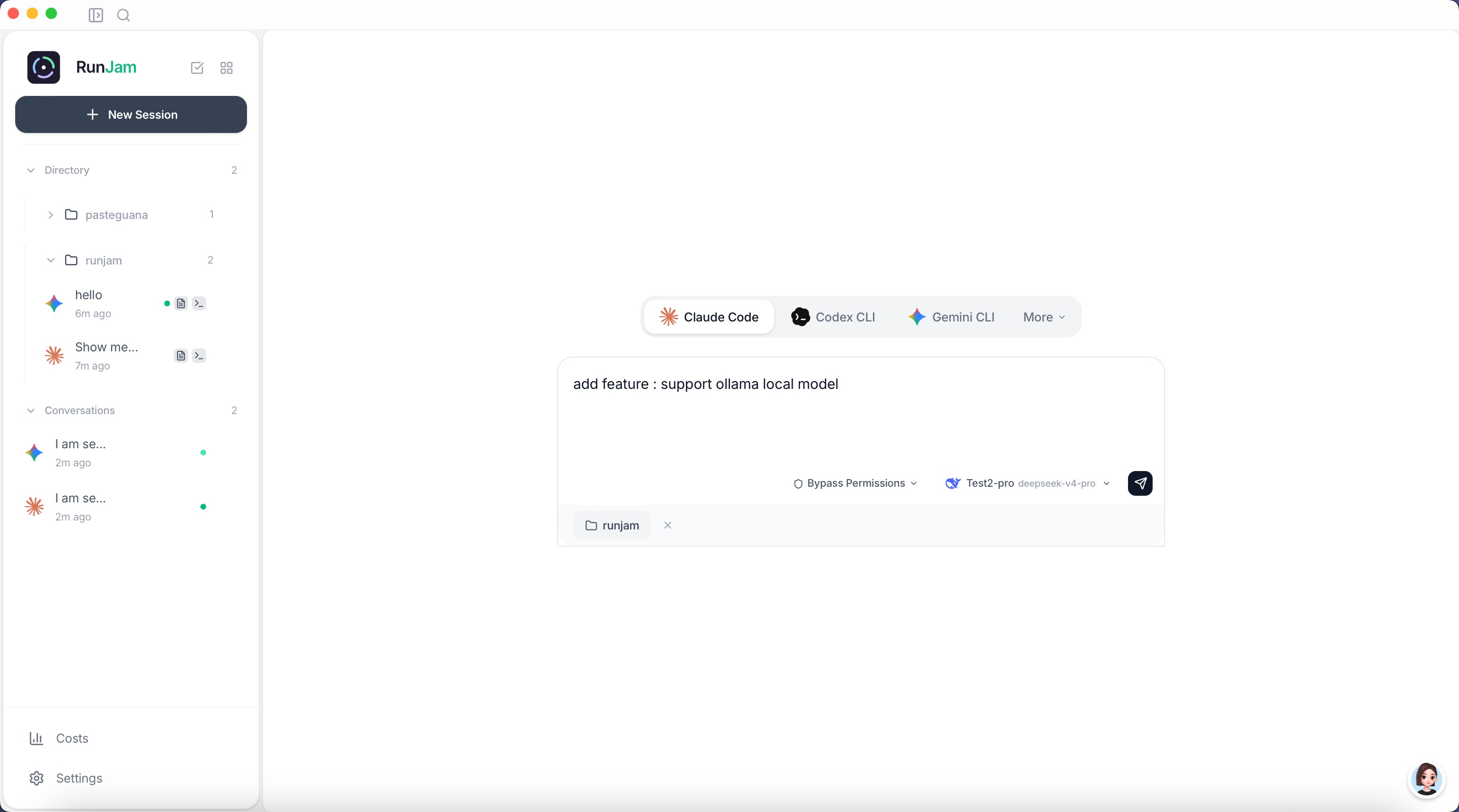
RunJam is a local-first, cross-platform desktop manager for AI coding agents. Think of it as Docker Desktop for AI Agents — it manages your AI coding CLI tools the same way Docker Desktop manages containers.
Instead of juggling multiple terminal windows, manually configuring each agent, and losing track of which agent is working on which project, RunJam brings everything into one clean interface:
- Auto-detect agents already installed on your system
- One-click install missing agents (Claude Code, Codex CLI, Gemini CLI)
- Unified chat interface with real-time streaming, Markdown rendering, and syntax highlighting
- Multi-project, multi-agent sessions running in parallel
- Built-in file explorer, terminal, and code editor for each project workspace
- Unified model configuration — configure once, sync to all agents
- Cache optimization — automatic prompt cache detection saves tokens and money
- Run local models — built-in llama.cpp support for free, offline inference
- Local-first — all data stays on your machine, no cloud, no telemetry
Core philosophy: RunJam doesn't require agents to implement any protocol (like ACP). It directly manages agent CLI processes via stdin/stdout pipes. Zero agent modifications needed.
Features
Agent Management
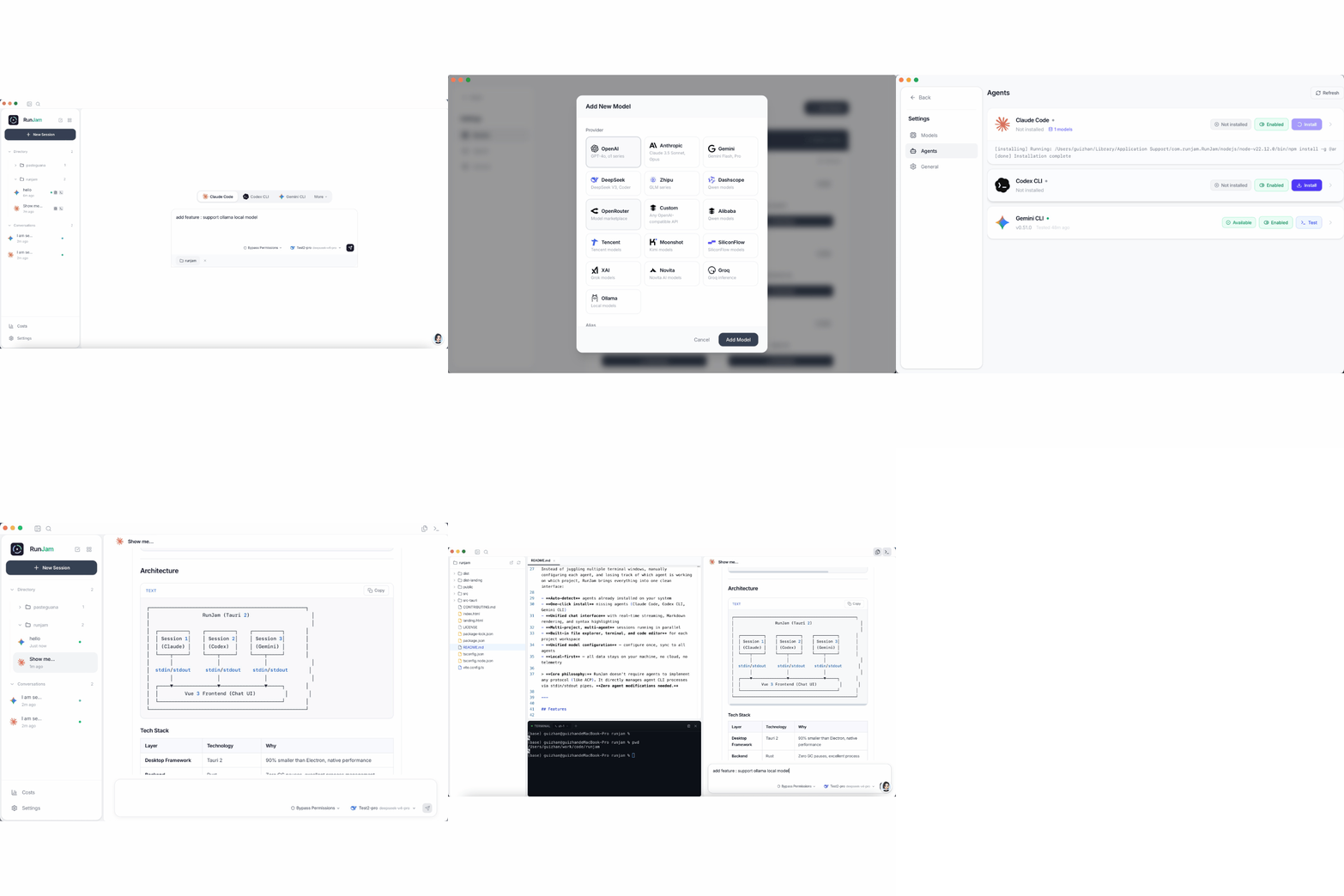
- Auto-detection — Scans your PATH for installed AI agents (Claude Code, Codex CLI, Gemini CLI)
- One-click install/uninstall — Installs agents via
npm install -gwith real-time progress - Agent configuration — View and edit agent config files (
~/.claude/,~/.codex/,~/.gemini/) - Enable/disable agents per session
Unified Chat Interface
- Real-time streaming — Watch agent thinking process, tool calls, and responses live
- Markdown rendering — Full Markdown support with syntax highlighting and Mermaid diagrams
- Thinking process — Agent reasoning steps are separated and auto-collapsed
- Tool call details — Expand to see tool inputs and outputs
- Multi-agent switching — Switch between agents as naturally as switching chat partners
Project Workspace
- File explorer — Browse project files with a VS Code-style tree
- Built-in code editor — Monaco-powered editor with syntax highlighting
- Integrated terminal — xterm.js terminal for each project
- Recent projects — Quick access to recently used project directories
Model Management
- Unified model hub — Configure models once, sync to all agents automatically
- Provider presets — OpenAI, Anthropic, Google AI, Groq, DeepSeek, custom APIs, and local models
- Per-agent model assignment — Assign different models to different agents
- Model aliases — Map friendly names to model IDs
- API proxy — Built-in local proxy for unified API key management
- Cache optimization — Automatic prompt cache hit detection & local response cache to save tokens and reduce costs
- Local models — Built-in llama.cpp integration to run open-source models (DeepSeek Coder, Qwen, Llama, etc.) 100% locally and free
Session Management
- Multi-session parallel — Run multiple agent sessions simultaneously
- Session persistence — Sessions survive app restarts
- Search — Full-text search across all conversation history
- Archive — Archive old sessions to keep the sidebar clean
- Cost tracking — Token usage and cost estimation per session
Local-First & Secure
- All data local — Conversations, configs, and agent states stored in
~/.runjam/ - No telemetry — Zero data collection, no analytics, no phone-home
- No cloud dependency — Works fully offline (agents need their own API access)
- System keychain — API keys stored securely in OS keychain
- Local models — Run models via llama.cpp with zero API costs
Supported Agents
| Agent | CLI Command | Install | Provider |
|---|---|---|---|
| Claude Code | claude |
npm install -g @anthropic-ai/claude-code |
Anthropic |
| Codex CLI | codex |
npm install -g @openai/codex |
OpenAI |
| Gemini CLI | gemini |
npm install -g @google/gemini-cli |
More agents coming soon. RunJam's architecture makes it easy to add new agents — just add their detection and invocation logic.
Quick Start
Prerequisites
- Node.js ≥ 18 (required by AI agent CLIs)
- Rust ≥ 1.80 (for building from source)
- System dependencies:
- macOS: Xcode Command Line Tools
- Windows: Microsoft Visual Studio C++ Build Tools + WebView2
- Linux:
webkit2gtkand related packages
Option A: Download Pre-built Binary
Pre-built binaries will be available on the GitHub Releases page.
Option B: Build from Source
# Clone the repository
git clone https://github.com/peintune/runjam.git
cd runjam

# Install frontend dependencies
npm install

# Run in development mode (hot reload)
npm run tauri dev

# Build for current platform (macOS → .dmg, Windows → .msi/.exe, Linux → .deb/.AppImage)
npm run tauri build
Build artifacts will be in src-tauri/target/release/bundle/.
Platform-specific builds
# macOS: build universal binary (Intel + Apple Silicon)
npm run tauri build -- --target universal-apple-darwin

# macOS: build Intel-only .dmg
npm run tauri build -- --target x86_64-apple-darwin

# macOS: build Apple Silicon-only .dmg
npm run tauri build -- --target aarch64-apple-darwin

# Windows: build .msi / .exe (run on Windows, or cross-compile from macOS/Linux)
npm run tauri build -- --target x86_64-pc-windows-msvc

# Linux: build .deb / .AppImage
npm run tauri build -- --target x86_64-unknown-linux-gnu
Cross-compilation note: Building Windows binaries from macOS/Linux requires additional Rust toolchains.
It's recommended to build each platform's package on that platform directly (e.g., use CI runners).
First Run
- Open RunJam — it auto-detects installed AI agents
- Go to Settings → Agents to install missing agents (one-click)
- Go to Settings → Models to configure your API keys and models
- Click New Session, pick an agent, optionally select a project folder
- Start chatting!
Architecture
┌─────────────────────────────────────────────────────┐
│                  RunJam (Tauri 2)                     │
│                                                       │
│  ┌──────────┐    ┌──────────┐    ┌──────────┐       │
│  │ Session 1│    │ Session 2│    │ Session 3│       │
│  │ (Claude) │    │ (Codex)  │    │ (Gemini) │       │
│  └────┬─────┘    └────┬─────┘    └────┬─────┘       │
│       │               │               │               │
│  stdin/stdout     stdin/stdout    stdin/stdout       │
│       │               │               │               │
│  ┌────▼───────────────▼───────────────▼─────┐       │
│  │         Vue 3 Frontend (Chat UI)          │       │
│  └──────────────────────────────────────────┘       │
└─────────────────────────────────────────────────────┘
Tech Stack
| Layer | Technology | Why |
|---|---|---|
| Desktop Framework | Tauri 2 | 90% smaller than Electron, native performance |
| Backend | Rust | Zero GC pauses, excellent process management |
| Frontend | Vue 3 + TypeScript | Reactive, ecosystem maturity |
| Styling | Tailwind CSS v4 | Rapid UI development |
| State | Pinia | Vue 3 official, great TS support |
| Database | SQLite (rusqlite) | Local-first, zero-config |
| Code Editor | Monaco Editor | VS Code's editor engine |
| Terminal | xterm.js | Industry standard web terminal |
| Process Comm | stdin/stdout pipes | No agent modification needed |
Project Structure
runjam/
├── src-tauri/                  # Rust backend
│   └── src/
│       ├── commands/           # Tauri command handlers (IPC bridge)
│       ├── agent/              # Agent detection & installation
│       ├── session/            # Session management & process control
│       ├── models/             # Data structures
│       ├── db/                 # SQLite layer & migrations
│       ├── proxy.rs            # Local API proxy
│       └── ...
├── src/                        # Vue 3 frontend
│   ├── components/             # UI components
│   ├── views/                  # Page views
│   ├── stores/                 # Pinia state management
│   ├── api/                    # Tauri invoke wrappers
│   ├── composables/            # Vue composables
│   └── i18n/                   # Internationalization (EN/ZH)
├── landing.html                # Landing page (separate build)
└── package.json
How It Works
RunJam manages AI agent CLI tools as child processes:
- Detection — Scans
PATHforclaude,codex,geminiexecutables - Invocation — Spawns agent CLI as a child process with
stdinpiped - Streaming — Reads
stdoutline-by-line, streams to frontend via Tauri events - Parsing — Parses agent output (thinking steps, tool calls, final responses)
- Rendering — Vue frontend renders Markdown, code blocks, and Mermaid diagrams
No network protocols. No agent modifications. No ACP. Just native CLI processes.
Roadmap
- Agent auto-detection & one-click install
- Unified chat interface with streaming
- Multi-agent, multi-project sessions
- Built-in file explorer, editor, and terminal
- Unified model configuration with sync
- Session persistence & search
- Local API proxy for unified key management
- i18n (English / 中文)
- Prompt cache optimization (auto-detect cache hits, response cache)
- llama.cpp local model support (download, run, manage GGUF models)
- PTY session mode (persistent multi-turn context)
- Cost tracking dashboard with charts
- Git worktree integration
- Agent auto-update detection
- Plugin/skill system
- Linux builds
FAQ
How is RunJam different from Cursor / GitHub Copilot?
Cursor and Copilot are AI-powered code editors. RunJam is not an AI or an editor — it's a manager that makes your existing AI CLI agents more productive. Think of it as a unified dashboard for Claude Code, Codex CLI, and Gemini CLI.
How is RunJam different from AionUI?
AionUI requires agents to implement the ACP (Agent Client Protocol). RunJam takes a different approach: it manages agents as native CLI processes via stdin/stdout. Zero agent modifications needed. This means RunJam works with any CLI agent out of the box.
Is my data sent to the cloud?
No. RunJam is local-first. All agent processes run on your machine. All data (conversations, configs, agent states) is stored locally in ~/.runjam/. No telemetry, no analytics, no cloud sync.
Is RunJam free?
Yes. RunJam is fully open-source under the MIT license. Free to use, modify, and distribute.
Can multiple agents run simultaneously?
Yes. You can create separate sessions for different projects, each using a different agent. They run independently in parallel without interfering with each other.
What are the system requirements?
macOS, Windows, and Linux are all supported. The only prerequisite is Node.js ≥ 18 (required by AI agent CLIs). RunJam will check and guide you through installation if needed.
Contributing
Contributions are welcome! See CONTRIBUTING.md for setup instructions, code style guidelines, and PR workflow.
Areas We Need Help With
- Linux build testing & packaging
- New agent support (Aider, Continue, etc.)
- UI/UX improvements
- Documentation & translations
- Bug reports & testing
License
MIT © RunJam Contributors
⭐ Star this repo if you find it useful!
Made with Rust 🦀 and Vue 3 💚
Reviews (0)
Sign in to leave a review.
Leave a reviewNo results found