Crypto-MCP-Server---by-Corax-CoLAB
Health Warn
- License — License: MIT
- Description — Repository has a description
- Active repo — Last push 0 days ago
- Low visibility — Only 5 GitHub stars
Code Fail
- fs module — File system access in fix_dupes.js
- fs module — File system access in fix_dupes2.js
- fs module — File system access in fix_regex.js
- fs module — File system access in fix_regex2.js
- fs module — File system access in fix_server.js
- rimraf — Recursive directory removal in gui/backend/package-lock.json
- network request — Outbound network request in gui/backend/package-lock.json
- network request — Outbound network request in gui/backend/package.json
Permissions Pass
- Permissions — No dangerous permissions requested
This MCP server acts as an AI-driven command center for managing cryptocurrency operations. It enables AI models to fetch live market prices, execute trades via CCXT, retrieve on-chain data, perform technical analysis, and sync with Freqtrade, all presented through a 3D cyberpunk dashboard.
Security Assessment
The overall security risk is Medium. The tool makes external network requests to fetch live pricing data and interact with cryptocurrency exchanges. Several scripts in the repository access the file system, which is standard for a tool managing local configurations and databases. However, the automated scan flagged a recursive directory removal command buried within a package-lock file, and there is a risk that hardcoded secrets could exist in these utility scripts. Because the server is explicitly designed to execute financial trades, it inherently interacts with highly sensitive data (API keys, portfolio balances). No explicitly dangerous permissions were requested at the root level, but financial trading tools always require strict caution.
Quality Assessment
The project is active, having received updates as recently as today, and is cleanly licensed under the MIT framework. However, it currently suffers from very low community visibility. With only 5 GitHub stars, the tool has not yet undergone widespread peer review or testing by the open-source community. Trust is currently limited to the individual developer and their associated company.
Verdict
Use with caution — the tool is actively maintained, but its low community adoption, financial trading capabilities, and local file system manipulations require you to thoroughly audit the codebase for hardcoded secrets before connecting it to live exchange accounts.
Crypto MCP Server by Corax CoLAB. Enables Claude to: Fetch prices (CoinGecko), Trade (CCXT), Get on-chain data, Perform TA, Aggregate portfolios, Send alerts, and Sync with Freqtrade via a cyberpunk 3D dashboard.
Crypto MCP Server
by Corax CoLAB & PelleNybe 🚀🪙






The ultimate AI-driven command center for your local crypto operations, featuring a dark, cyberpunk/command-center aesthetic.
👨💻 Developer & Company

Architected by Pelle Nyberg & Corax CoLAB
This product is proudly brought to you by Corax CoLAB and PelleNybe, the architects behind cyber-physical systems that secure your future in an increasingly regulated and resource-constrained world.
We unite:
🤖 Edge AI & Autonomous Systems
🔗 Blockchain & Decentralized Finance
🌌 Advanced 3D Data Visualization





✨ 10 Technical and Visual Upgrades
- Async Portfolio MCP: The
portfolio_mcp.pynow fetches concurrent exchange balances usingccxt.async_supportfor incredibly fast dashboard load times. - Robust Proxy Timeouts: The Node backend implements robust
AbortSignallogic for MCP communication, preventing hanging connections. - SQLite Indices: The backend automatically initializes proper database indices on
orders.dbforcreated_atandstatusto dramatically speed up log querying. - WebSocket Resilience: The React frontend implements a centralized, self-healing
Socket.ioclient ensuring the dashboard never goes stale if the backend restarts. - Strict Input Validation: Backend order execution endpoints rigorously validate symbol format, trade side, and order type before dispatching to the MCP.
- Cyberpunk Loaders: Components like
PortfolioPanelandTickerPanelfeature animated, stylized loading states during data decryption. - Neon Toasts: A custom notification system provides sleek, auto-dismissing visual feedback for system events and order executions.
- Enhanced Orders Table: The
OrdersLogPanelis upgraded with pagination, neon-color-coded status badges, and interactive hover effects. - Glitch Effects: Critical data changes trigger subtle CSS glitch animations, enhancing the cyberpunk aesthetic.
- Dynamic Theme Colors: The entire dashboard reacts to global market sentiment, shifting its neon glowing borders based on whether the market is bullish or bearish.
🌌 100% Real Data Integration & Visualizer Dynamics (Upgraded v3.0)
The Crypto MCP Server has been heavily upgraded to ensure every single conceptual placeholder has been actively replaced with real data mechanisms. The entire system operates without a single mockup across visualizers. All 3D graphs reflect live local data.
- Dark Pool Sonar: Real-time 3D sonar pings for large volume "whale" trades on central exchanges. Connected to
MCP_CCXTto monitorfetch_tradesdata and renders physics-based 3D ripples with@react-three/fiber. - Flash-Crash Prediction Matrix: Visualizes the ratio of bids to asks as a dynamic glowing heatmap grid, tracking potential liquidity drains using
MCP_CCXTfetch_order_book. - Galaxy View (Gravity Well): Maps the top 50 cryptocurrencies in a 3D galaxy using
MCP_COINGECKO. Star size = Market Cap, orbit speed = Volume, color = 24h change. - AI Sentiment Word-Cloud Sphere: Fetches recent crypto news via
MCP_NEWSand extracts trending keywords and sentiment to form a 3D interactive floating word sphere. - Gas & Network Congestion Hologram: Visualizes current Ethereum network congestion as a glowing, pulsating reactor core using
MCP_ONCHAINgas_price. Faster pulsing/red colors indicate high congestion.
Legacy Visualizers
- Arbitrage Wormhole: Live Cross-DEX arbitrage detection using multi-exchange CCXT MCP polling.
- Neural Trade Visualizer: Calculates genuine diagnostic routing data retrieved from live orderbooks (L2 Bids/Asks) using
react-three-fiber. - Quantum Risk Map: Real-time 3D topography of your portfolio risk exposure.
- Orbital Portfolio Deck: A dynamic, physics-based 3D visualization of your actual asset allocation.
- Global Weather System: An interactive background system that reacts to the current market sentiment (Bull, Bear, Neutral), altering the entire visual environment.
🗺️ System Overview & Architecture
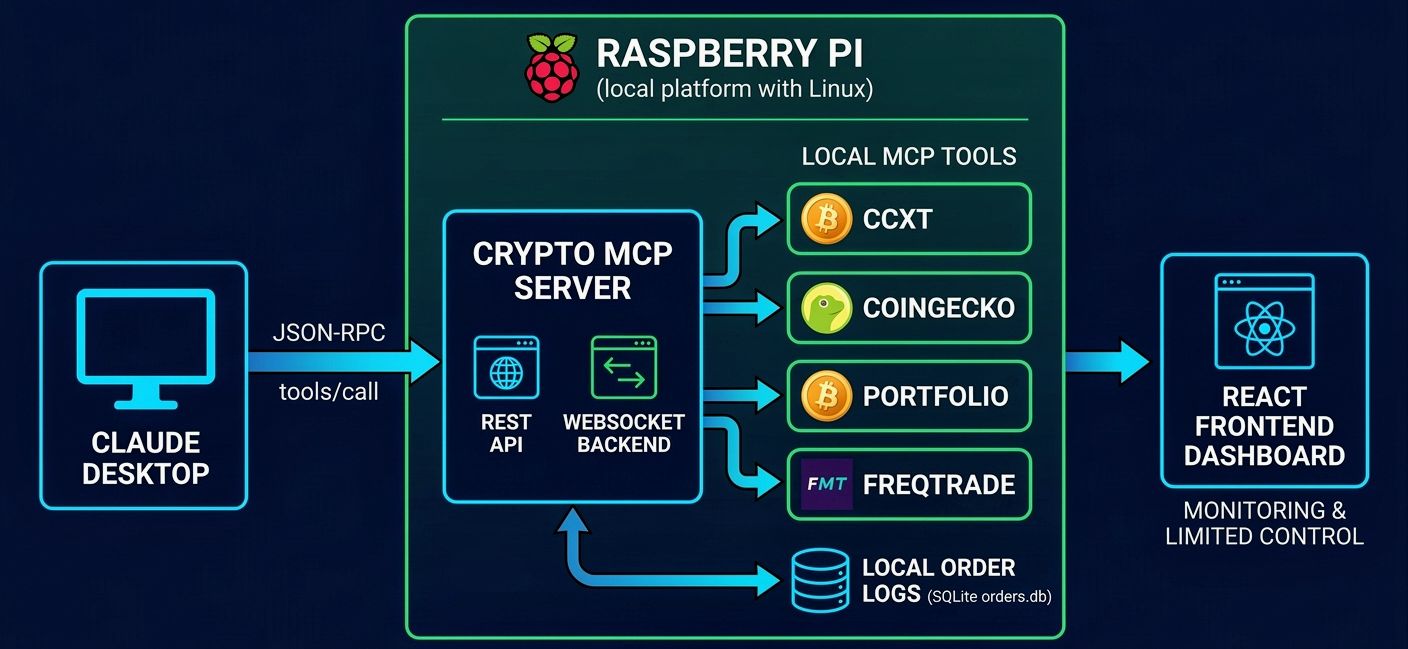
The image series below illustrates the four key stages of the Crypto MCP Server, bridging AI (Claude Desktop), local tools, and blockchain technology.
1️⃣ Architectural Overview (Click to expand)Claude Desktop communicates via JSON-RPC with the Crypto MCP Server backend (REST + WebSocket). The server acts as a proxy, directing traffic to specific local MCP tools—such as CCXT, CoinGecko, and Portfolio—while logging orders to a local SQLite database.
The terminal displays successful execution steps of the automated `install.sh` script, automating directory creation, Node.js installation, and service setup.
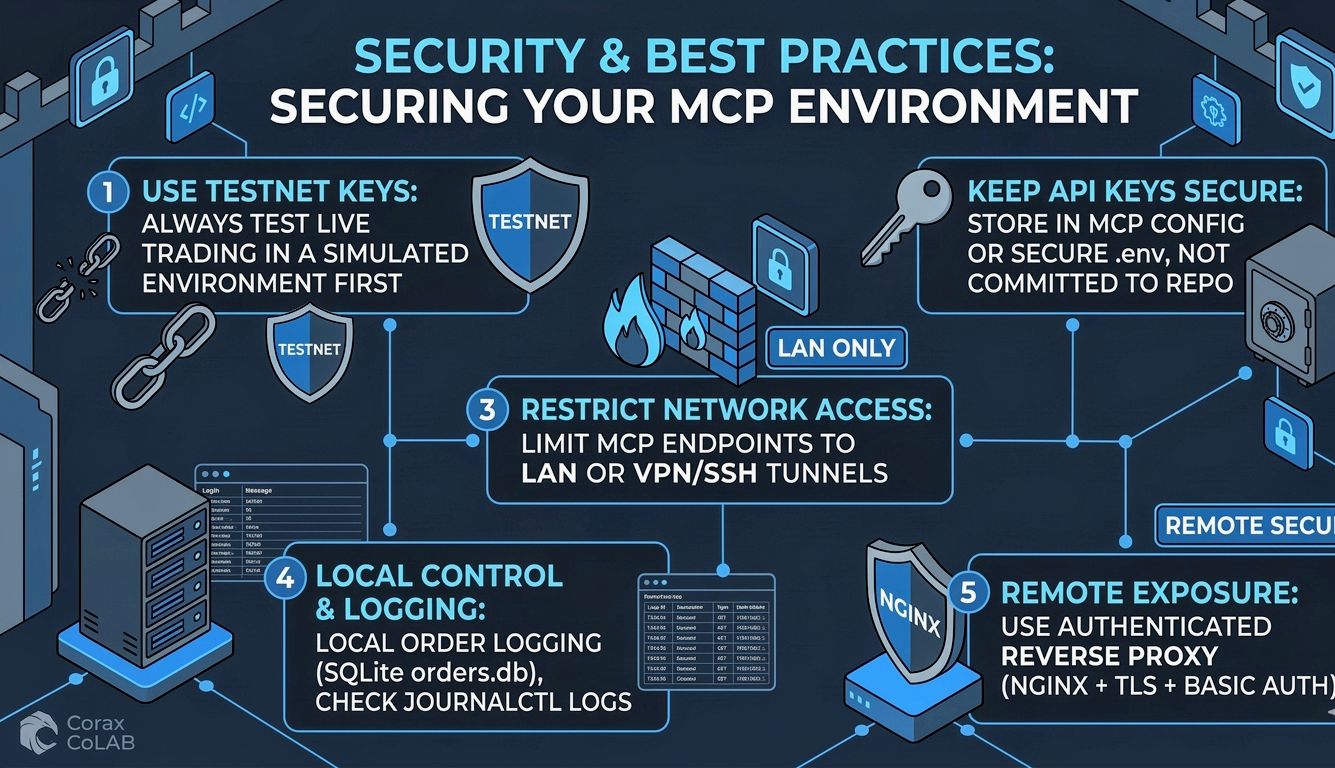
Summarizes the core security principles: using testnet keys, securing API keys, restricting network access, leveraging local control, and implementing an authenticated reverse proxy.
📚 Table of contents
- Developer & Company
- New AI Capabilities & Real Data
- System Overview & Architecture
- ✅ Quick start — automated (install.sh)
- Manual install (condensed)
- Configuration (.env) & MCP endpoints
- 🔗 Claude Desktop integration (step-by-step)
- Dashboard user manual
- SQLite & logs
- Security & best practices
✅ Quick start — automated (recommended) — install.sh 🎯
Place the provided install.sh into $HOME/install.sh (or $HOME/cryptomcpserver/install.sh if you prefer). Make it executable and run it:
# Save install.sh to $HOME/install.sh, then:
cd $HOME
chmod +x install.sh
./install.sh
What install.sh does (summary):
- Creates directories and writes backend & frontend files.
- Installs Node.js if missing and runs
npm installfor backend & frontend. - Ensures the
orderstable exists in$HOME/cryptomcpserver/gui/backend/orders.db. - Frees port 4000 if occupied, then installs & enables the systemd service
crypto-mcp-gui.service. - Attempts a production build of the frontend.
After running, check service status and logs:
sudo systemctl status crypto-mcp-gui.service
sudo journalctl -u crypto-mcp-gui.service -f
🛠 Manual install (condensed)
If you prefer to do everything yourself:
Install system deps:
sudo apt update
sudo apt install -y curl build-essential ca-certificates git
Install Node.js (if needed):
curl -sL https://deb.nodesource.com/setup_20.x | sudo -E bash -
sudo apt install -y nodejs
Backend & Global Config:
cd $HOME/cryptomcpserver
cp .env.example .env
# edit .env to add your passwords, keys, and allowed pairs

cd gui/backend
npm install
Frontend (dev):
cd $HOME/cryptomcpserver/gui/frontend
npm install
npm run dev -- --host   # open http://PI_IP:5173 on your laptop
Systemd (backend):
# Create /etc/systemd/system/crypto-mcp-gui.service
sudo systemctl daemon-reload
sudo systemctl enable --now crypto-mcp-gui.service
⚙️ Configuration: .env (global & backend)
The system uses a centralized .env file located at the root of the project to manage both Python MCP servers and the Node.js backend.
Copy and edit $HOME/cryptomcpserver/.env.example → .env:
# Essential configuration
PORT=4000
DASHBOARD_PASSWORD=your_secure_password # Required for trading and AI reasoning
ALLOWED_PAIRS=BTC/USDT,SOL/USDT # Fail-closed security: only these pairs are allowed
MAX_TRADE_USD=100.0 # Maximum allowed trade amount per transaction

# API Keys
BINANCE_API_KEY=your_key
BINANCE_API_SECRET=your_secret
🔗 Claude Desktop integration (detailed) 🧩
Add MCP servers in Claude Desktop (step-by-step)
- Open Claude Desktop app.
- Open App Settings / Preferences.
- Find Local MCP Servers.
- Click
+(Add) — fill fields one by one:- Name:
ccxt - Description:
CCXT MCP – exchange trading & market data - Transport:
http - Endpoint:
http://127.0.0.1:7001/mcp(if Claude runs on Pi) orhttp://<pi-ip>:7001/mcp(if Claude runs on laptop)
- Name:
- Save. Repeat for other MCPs (
coingecko,portfolio,onchain,ta,notifier,llm, etc.) with their respective ports.
🖥 Dashboard — what you can do (user manual)
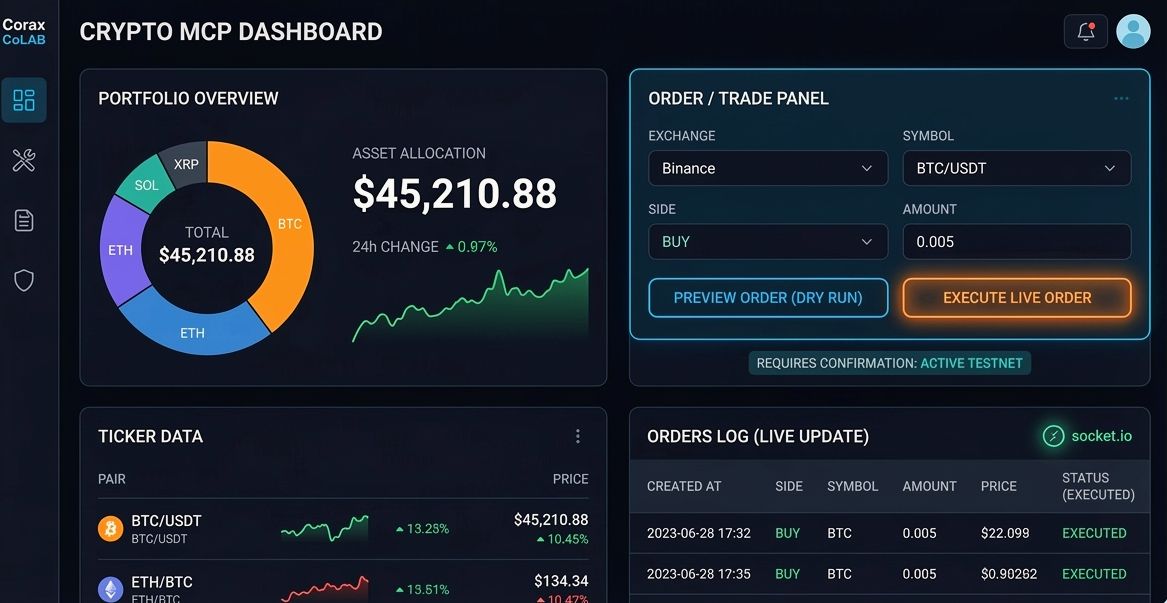
- 📊 Portfolio: View aggregated balances & USD value (async fetching for speed).
- 📈 Ticker: Live market data (via ccxt MCP).
- 🛒 Order / Trade:
- Preview (dry_run): Calculates estimated cost and logs a preview.
- Confirm → Place order: Sends create_order to CCXT MCP (backend requires
execute:true).
- 📜 Orders log: Shows previews and executed orders (real-time updates via socket.io, paginated with indices).
- 🤖 AI Copilot: Voice-activated command center powered by real local LLMs.
⚠️ Safety: Always test with testnet keys. The UI requires confirmation to execute live orders.
🗄 SQLite & logs
DB file: $HOME/cryptomcpserver/gui/backend/orders.db
Inspect last 10 orders:
sqlite3 $HOME/cryptomcpserver/gui/backend/orders.db \
  "SELECT id,created_at,exchange,symbol,side,amount,price,status FROM orders ORDER BY created_at DESC LIMIT 10;"
🔒 Security & best practices
- Use testnet keys while testing.
- Keep API keys out of repo — store them in the MCP server config or in secure
.envnot committed. - Restrict access to MCP endpoints to LAN only (UFW rules) or use VPN/SSH tunnels.
- Auth bypass vulnerabilities via insecure
req.ipvalidation on localhost have been successfully patched./api/order/pendingand/api/order/reasoningendpoints are now fully secured withDASHBOARD_PASSWORDverification.
Reviews (0)
Sign in to leave a review.
Leave a reviewNo results found