AI-Human-Research-OS
Health Warn
- License — License: MIT
- Description — Repository has a description
- Active repo — Last push 0 days ago
- Low visibility — Only 5 GitHub stars
Code Pass
- Code scan — Scanned 12 files during light audit, no dangerous patterns found
Permissions Pass
- Permissions — No dangerous permissions requested
No AI report is available for this listing yet.
A research operating system for humans and AI coding agents (Claude Code, Codex): research projects, a paper wiki, and reusable skills as plain Markdown in Git. No database, no server.
AI-Human Research OS
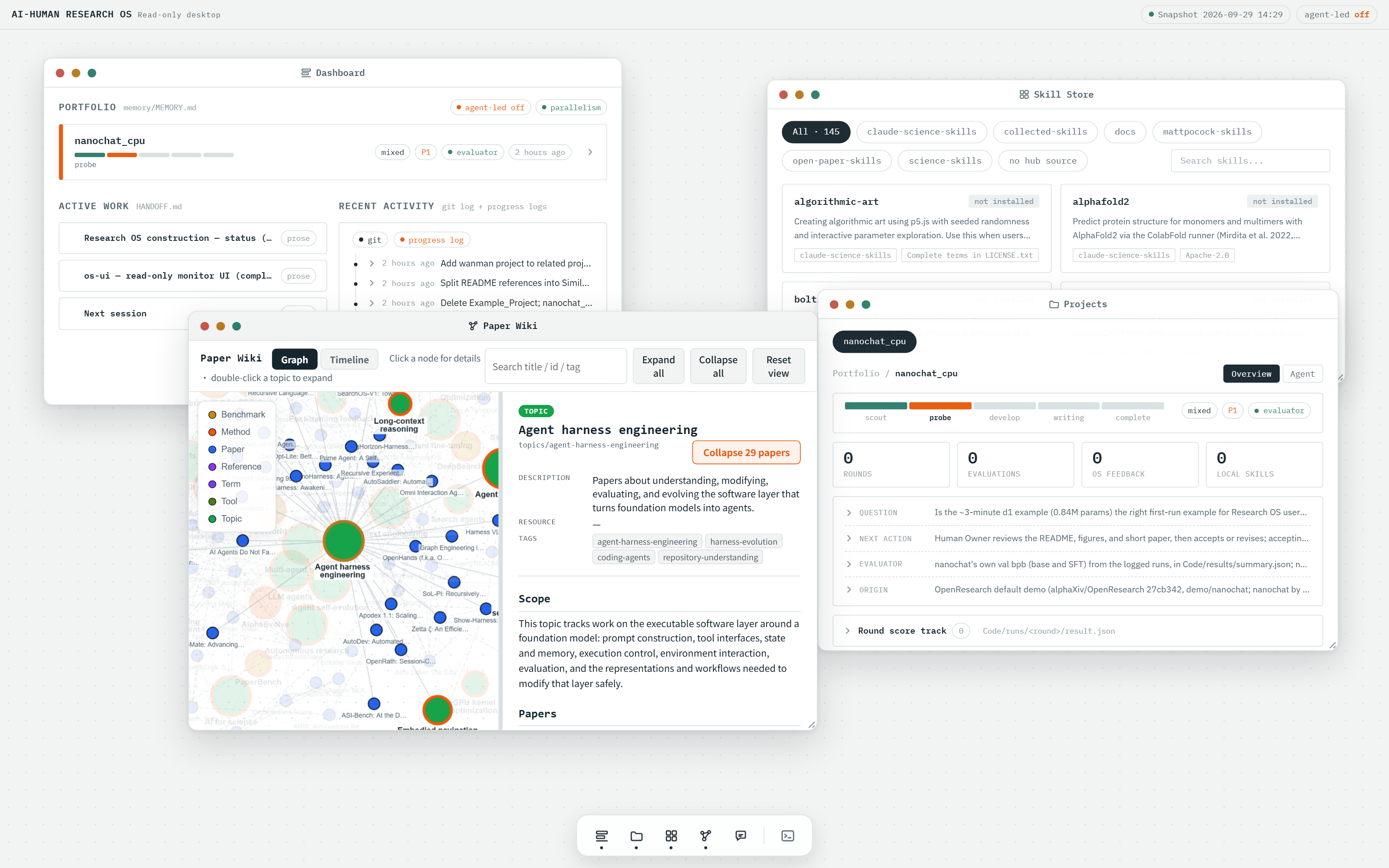
The optional os-ui desktop, rendered from this repository's own files.



A lightweight, folder-based research operating system for humans working with
code agents such as Codex and Claude Code. The agent is the execution core; the
human steers in natural language. The core has no database, server, or CLI —
just a stable directory layout, a few conventions, and reusable skills, so
agents can support long-term, iterative research with low token cost. Two
optional layers sit on top: a browser desktop for watching the OS, and a
harness that runs Claude Code and Codex on your own subscriptions (see
Optional Layers).
The folder structure is intentionally simple and non-linear. Research ideas,
references, experiments, figures, and writing often update each other, so the
folders are organized by material type rather than by a fixed workflow.
Table of Contents
- Current Design Stance
- Quick Start
- Core Directories
- Minimal Workflow
- Optional Layers
- Contributing
- License
- Roadmap
- Similar Projects
Current Design Stance
This OS is a file-system-native environment for long-horizon human-agent
research. Since 2026-11-21 it is being built into a free, local desktop app for
researchers who already have Claude Code, Codex, or a similar coding agent: a
small trunk with plugins and no model of its own
(ADR-0006). That app is
not built yet. What works today is the folder layout, the skills, and the
optional layers below, and no test by an outside user is on record.
The default operating policy is portfolio always on, intra-project parallelism
on demand. Multiple projects can be tracked at once, but multi-agent execution
inside a project should start only when the task is decomposable, verifiable, and
worth the merge cost. Agent-led research is controlled by the agent_led_research
policy in memory/MEMORY.md: off, scout_only, orfull_gated.
Human-led and agent-led work use the same evaluation stance: hard checks,
rubric scoring, and LLM critique evaluate complete artifacts such as code,
figures, references, and paper drafts, not empty ideas.
Quick Start
- Clone the repository and open it with Claude Code or Codex.
- Both agents load AGENTS.md at startup. It sets the execution
contract, points each kind of task to the files to read, and holds the
memory, research-integrity, and maintenance rules. - Talk to the agent in natural language, e.g. "record this idea", "start a
project from idea X", "add this paper to the paper wiki", "hand this task
to project X".
Run ./verify.sh from the repository root to check the paper wiki,
navigation map, project contract, installed skills, and os-ui's copies of the
brand icons. It requires a working uv and the Python version in.python-version already installed; it uses a temporary
cache and performs no downloads or project-environment sync. Runtime errors mark
dependent checks SKIP while independent checks continue. Exit codes: 0 = all
passed, 1 = a check failed, 2 = runtime error left checks incomplete.
Core Directories
| Path | Purpose |
|---|---|
| ideas/ | OKF bundle for research ideas, hypotheses, inspirations, and early discussions |
| inbox/ | Temporary intake area for new materials before classification and archival |
| paper-wiki/ | Paper notes, topic syntheses, and concepts, with a graph viewer (online) |
| projects-folder/ | Research projects and reusable project templates |
| projects-folder/templates/ai_research_template/ | AI-research paper template copied to start a new project |
| memory/ | Global long-term memory across projects: portfolio, decisions, and policies |
| human/ | Stable user context, collaboration preferences, cognition notes, and privacy boundaries |
| research-skills-hub/ | Canonical store of reusable agent skills |
.agents/skills/, .claude/skills/ |
Installed skills, symlinked or copied from the hub byresearch-skill-installer |
| os-ui/ | Optional browser desktop for observing OS state and talking to agents |
| os-harness/ | Optional runner for Claude Code and Codex turns on your own subscriptions |
| os-build/ | Goals, construction manual, and read-only reference repositories for building the OS |
| docs/ | Presentation draft, architecture decision records, and brand assets |
| AGENTS.md | Agent operating guide (read first) |
| CONTEXT.md | Shared vocabulary, e.g. Research Task, Agent Run, Write Lease |
| HANDOFF.md | Cross-session record of active work and settled decisions |
| FILETREE.md | Auto-generated top-level navigation map |
| verify.sh | Read-only consistency checks |
Minimal Workflow
idea → ideas/ OKF concept or idea bundle → the research-project-manager
skill copies ai_research_template/
to projects-folder/<ProjectName>/ and registers it → experiments inprojects-folder/<ProjectName>/Code/, figures in Figs/ → writepaper/main.tex with local references in paper/references.bib → memory updated in
project PROJECT_MEMORY.md and
memory/MEMORY.md. Details: AGENTS.md.
Each project carries its own AGENTS.md with the template's shared rules, so
it can also stand alone as its own repository; the template is the greatest
common divisor of its projects (template contract).
A complete worked example lives in
projects-folder/nanochat_cpu/: Andrej
Karpathy's nanochat, shrunk until every stage (tokenizer, pretraining, eval,
SFT, chat) runs on a laptop-class CPU in a few minutes, with a short paper
compiled from its results. See its
Code/README.md to run it and
paper/main.pdf for the write-up.
Optional Layers
Neither layer is required: the folders, conventions, and skills above work
without them.
Root agent and project agents. os-harness/ runs one
Claude Code or Codex turn in one directory through the vendors' own CLIs. Each
turn uses the login you already have (a Claude Pro/Max or ChatGPT
subscription), not an API key, and every session keeps a resumable trace. At the
repository root, the agent acts as the root agent: with theproject-dispatch
skill it briefs a project's agent, dispatches the work, tracks it, and reviews
the result, with at most one running session per project.
python os-harness/harness.py check # each CLI's version and login state
Browser desktop. os-ui/ shows the repository's state as
a desktop with Dashboard, Projects, Skill Store, Paper Wiki, and Root Agent
windows. It never edits research files; its only actions are agent
conversations, run through os-harness, and turning installed skills on or off.
./os-ui/start.sh # needs uv and npm; prints the local URL and the Root Agent token
Desktop client. os-ui/client/ is the same
desktop as an app for macOS, Windows, and Linux: no terminal or token, a
self-refreshing snapshot, and a notification when an agent turn ends.
Decision records: ADR-0003
(subscription-CLI harness), ADR-0004
(root agent as a skill), and ADR-0005
(desktop client).
Contributing
Changes reach main only through pull requests that pass
CI. See CONTRIBUTING.md.
License
Original content in this repository is licensed under the MIT License.
Vendored or collected third-party content keeps its upstream license and
attribution:
- research-skills-hub/science-skills/:
upstream declares Apache-2.0 for software and CC-BY for other materials. - research-skills-hub/mattpocock-skills/: MIT.
- research-skills-hub/claude-science-skills/
and research-skills-hub/collected-skills/:
upstream terms, recorded per collection or per skill. - os-build/references/: read-only reference
repositories under their own licenses.
Roadmap
The end goal is a complete Research OS. Construction status and settled
decisions live in HANDOFF.md; long-term goals live in
os-build/GOAL.md.
Done:
- Project management skill:
research-project-manager
(new,status,validate,set,sync,archive);validateruns in./verify.sh. - Skill catalog and installer:
research-skill-installer
lists hub skills and installs, disables, or removes them in every registered target. - Install once, activate on demand: the hub is the only source, and every
install is a symlink or copy of it (Managing skills). - Finding skills: the hub index for local skills, and
discover-academic-skills
for skills.sh. - Paper wiki and reading workflow: paper-wiki/, maintained by
paper-wiki-manager,
with paper, topic, and concept pages, project links, aviz.htmlgraph, and a
validator; it replaced the oldReferences/folder. - Memory: global memory/MEMORY.md, per-project
PROJECT_MEMORY.md, and user context in human/.
Open:
- Accept any input (an idea, a codebase, a paper draft, ...), then archive and
integrate it automatically. inbox/ is the intake area;
automatic classification is not built. - Read papers as Markdown through tools such as the
hfCLI, arxiv2md, and the
DeepXiv CLI. Skills for all three are collected in
collected-skills/ but not installed. - Manage
ideas/with a dedicated skill. - A CLI through which agents can understand a whole research project.
- Commands that make agents deterministically read specific files, such as
AGENTS.md, at session start. - A group-meeting workspace where humans and AI discuss research: the AI checks
feasibility and points out missed papers, then implements the agreed ideas.
Similar Projects
Projects closest to this OS: environments where humans and AI agents carry
research from a question to a paper, with persistent, traceable artifacts.
Projects that are only related, or that served as design references, are
listed in os-build/references/related-projects.md.
- FAROS: a collaborative AI Scientist
system that goes from research questions to auditable evidence, covering
literature-grounded planning, experiments, paper writing, and review, with
human review at key decisions. - OpenResearch: turns coding agents
into research agents. The adapter layering of os-harness/
follows it, and nanochat_cpu ports its default
demo. - Dr. Claw: an AI research assistant and
research IDE with a Claude Code plugin, covering literature review through
paper writing.
Reviews (0)
Sign in to leave a review.
Leave a reviewNo results found