token-tracker
Health Pass
- License — License: MIT
- Description — Repository has a description
- Active repo — Last push 0 days ago
- Community trust — 11 GitHub stars
Code Fail
- process.env — Environment variable access in lib/anthropic-api.js
- network request — Outbound network request in lib/anthropic-api.js
- fs module — File system access in lib/antigravity-parser.js
- network request — Outbound network request in lib/auth.js
- exec() — Shell command execution in lib/backup.js
- fs.rmSync — Destructive file system operation in lib/backup.js
- fs module — File system access in lib/backup.js
- fs module — File system access in lib/cache.js
Permissions Pass
- Permissions — No dangerous permissions requested
No AI report is available for this listing yet.
Token usage dashboard for Claude Code — tracks costs, sessions, models, and tools with real-time updates
Token Tracker
Real-time analytics dashboard for AI coding token usage (Claude Code, OpenAI Codex, Google Antigravity) with cost estimation and activity tracking.













































Quick Start
git clone https://github.com/pepperonas/token-tracker.git
cd token-tracker
npm install
npm start
Highlights
- Multi-Provider Tracking (Claude Code, OpenAI Codex, Google Antigravity) — track tokens, costs, models, and sessions across all three agent platforms simultaneously. Automatic zero-dependency ingestion from
~/.codex/sessions/**/rollout-*.jsonland~/.gemini/antigravity-cli/conversations/*.db, real-time file watcher, global header provider filter, breakdown cards, and colored badges - 40+ interactive charts across 10 tabs with real-time SSE updates
- Claude API tab — Anthropic Admin API usage/cost dashboard: budget tracking with progress bar, 4 KPIs (total cost, tokens, avg cost/day, cache efficiency), daily cost/token charts by model, model distribution doughnut, cumulative cost trend. Per-API-key breakdown: horizontal stacked bar chart showing cost per key by model, daily cost timeline per key, key comparison table (tokens, input, output, cache %, calculated cost, last used), token history timeline (stacked area). Costs per key calculated via model pricing since the cost API doesn't support
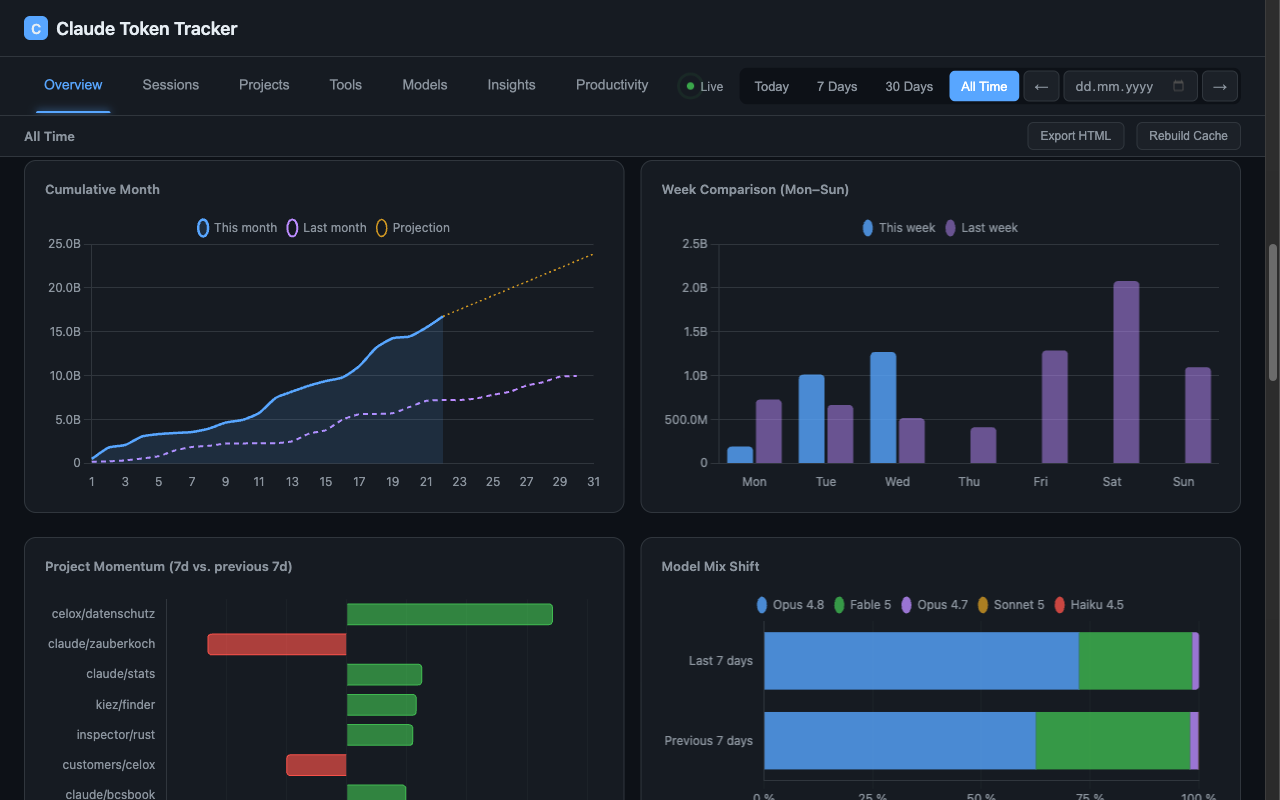
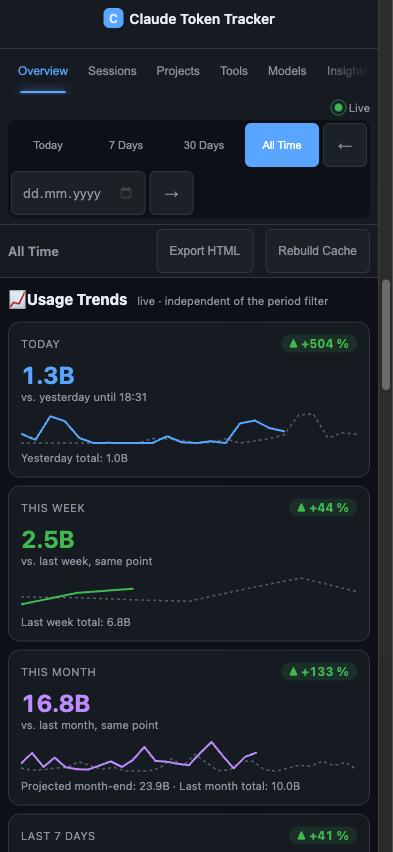
group_by api_key_id. Key names resolved via/v1/organizations/api_keys. AES-256-GCM encrypted key storage, SWR caching with configurable TTL - Usage trends — four live cards (today / this week / this month / last 7 days) comparing against the previous period cut off at the same point in time (yesterday up to this hour, last week up to this weekday+time, last month up to this day-of-month, clamped for shorter months), each with a delta badge, overlay sparkline and month-end projection. Below them five comparison charts on the same payload: 90-day volume with 7d/30d moving averages, cumulative month vs. previous month, week comparison Mon–Sun, project momentum (last 7 days vs. the 7 before) and model-mix shift as 100 % stacked bars. Independent of the period filter, honours the cache and token↔cost toggles
- GitHub Integration — SWR caching, billing with plan detection & percentages, code statistics (LOC by repo), PR Code Impact, Actions Usage by Repository, contribution heatmap
- Tool Cost Attribution — proportional cost/token distribution per tool, MCP server breakdown (auto-detected via
mcp__prefix), sub-agent tracking (via/subagents/path), cost-over-time chart, enhanced table with Type/Cost/Tokens columns - Project Detail Dialog — click any project in chart or table to open a detail modal with 6 KPIs (tokens, cost, sessions, messages, active time, net lines), daily token chart, model distribution doughnut, top tools, sessions list, and JSON export to clipboard. Every KPI carries a one-line explanation and opens a methodology dialog ("How these numbers are computed") covering the formulas, the 5-minute idle cap, the price source — and what is not counted
- Per-project report (HTML + PDF) — a standalone, print-optimised report per project: KPIs, cost split by component (including the 5-minute and 1-hour cache-write tiers), cost-over-time chart, model and session tables, and a methodology section so the document explains itself. No CDN, no chart library, charts are inline SVG — it survives being mailed around and printed. "PDF" is the browser's own print-to-PDF
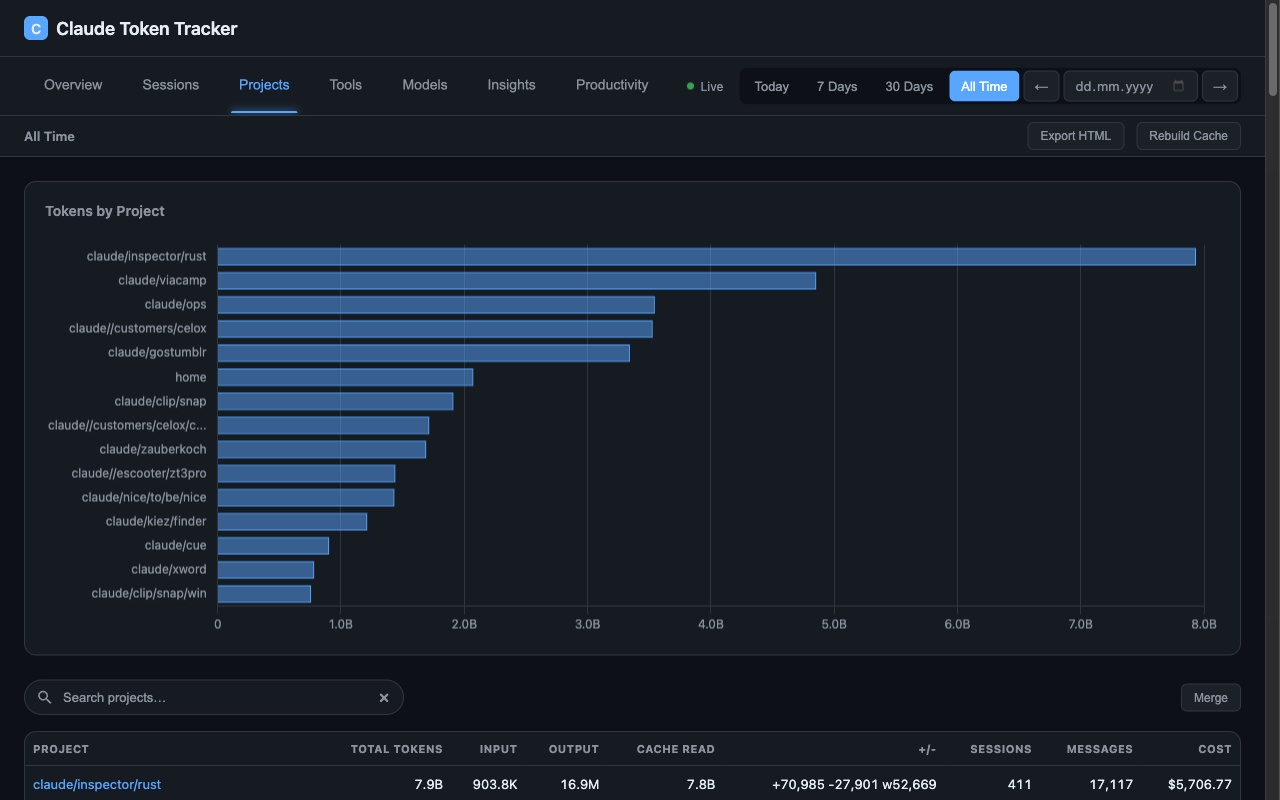
- Project search & merge — live substring filter over the Projects table, plus non-destructive merging of projects that are the same codebase (renamed/moved or synced from another device under a different path) into one canonical name, with a 🪄 suggestions button that auto-detects likely duplicates from path names
- Rate-Limit Tracking — automatic detection of Claude Code rate-limit events from JSONL logs, daily aggregation, KPI card, backfill for historical data
- Period navigation — prev/next arrows beside date picker jump by selected period duration
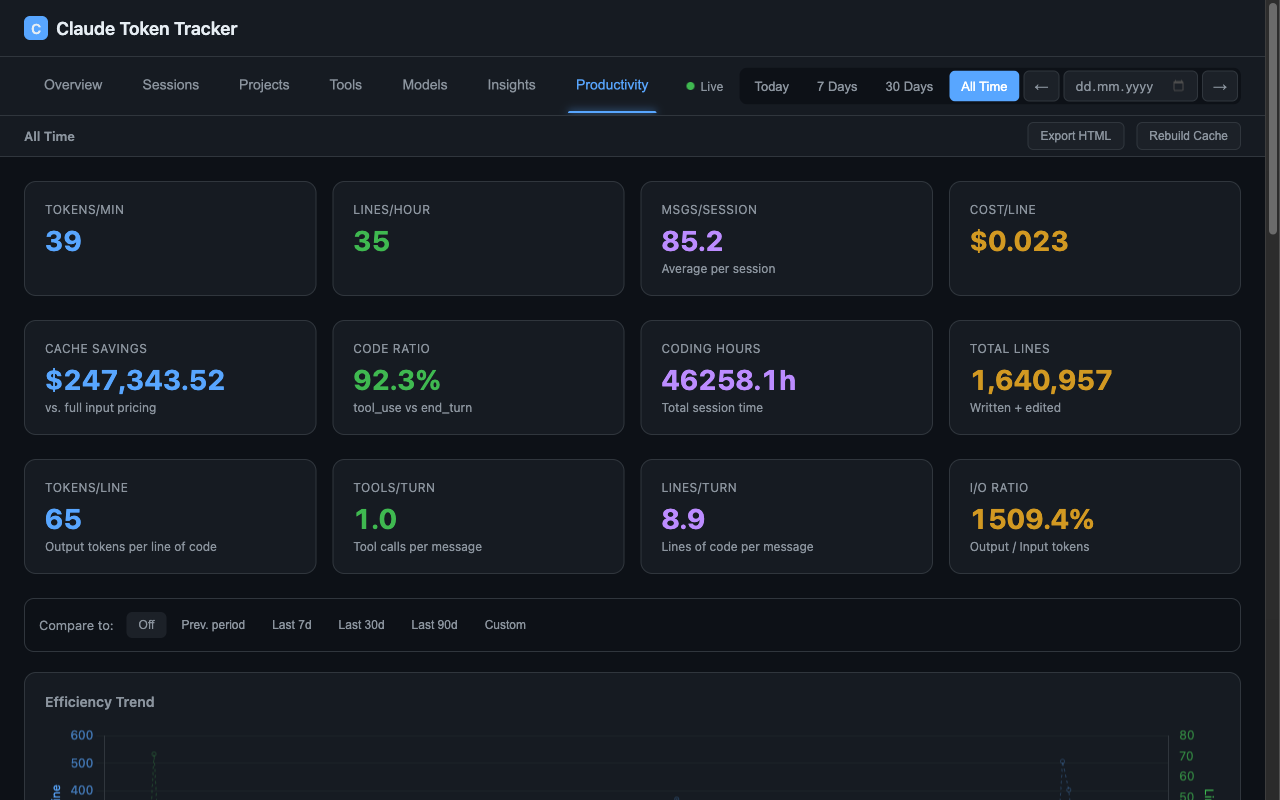
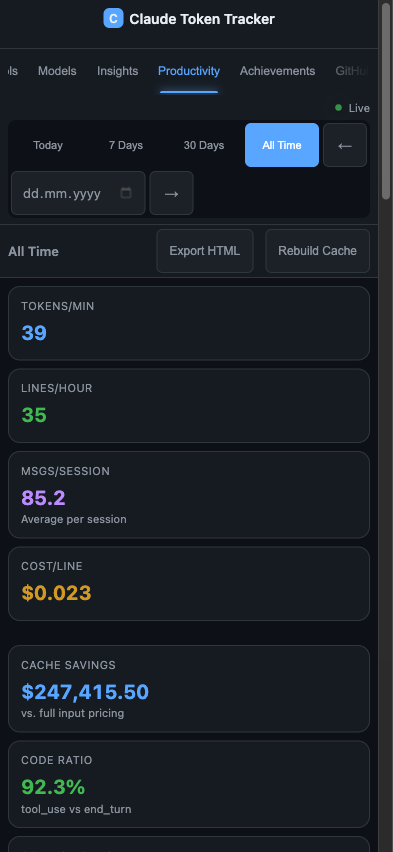
- Productivity tab — Tokens/Min, Lines/Hour, Cost/Line, Cache Savings, Code Ratio with trend indicators
- Period comparison — inline pill selector (Off / Prev. Period / Last 7d / 30d / 90d / Custom) compares two periods side-by-side with 8 metrics, delta %, and color-coded indicators
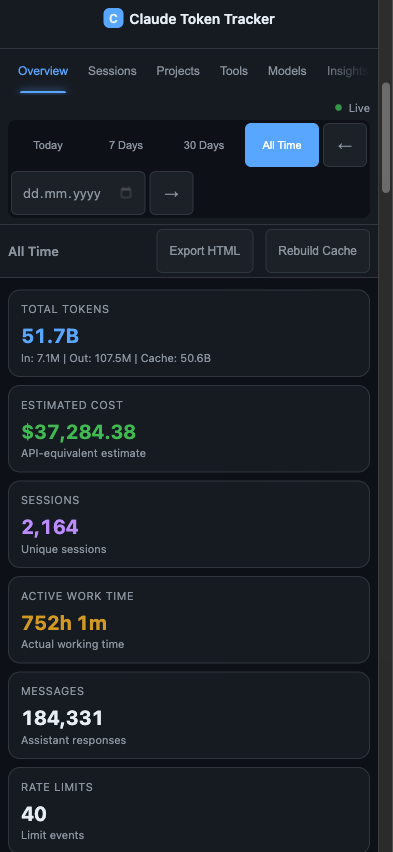
- HTML export — mobile-responsive interactive snapshot with Chart.js, 8 tabs, 12+ charts, and sortable tables. Optimized for phones (412px+) with adaptive layouts
- Global comparison — compare your stats against the average of all users (multi-user mode)
- 1200 achievements — gamification system across 14 categories with 5 tiers, tier-based points, timeline chart, daily unlock stats, and real-time unlock notifications via SSE
- Lines of Code tracking — Write (green), Edit (yellow), Delete (red) with adaptive hourly/daily chart
- Usage heatmap — weekday × hour grid in the overview showing token-usage intensity (rows Mon→Sun for multi-day ranges, a single 24-hour strip for one day), cache-toggle aware with per-cell tooltips
- Weekday-aware dates — chart axis labels and the period-range header show the weekday (e.g.
Sa 06-27,Thu 05/28/2026 – Sat 06/27/2026) - Multi-device tracking — track usage across multiple machines (MacBook, VPS, Desktop), per-device API keys, device switcher in dashboard, aggregated "All Devices" view, click-to-rename devices, OS-selectable install commands
- Multi-user mode — GitHub OAuth, per-user data isolation, Sync Agent with one-click install (macOS/Linux/Windows)
- Token breakdown — Input, Output, Cache Read, Cache Create with per-type API-equivalent cost estimation. Cache writes are billed by TTL tier (5 min = 1.25× input, 1 h = 2× input) — Claude Code writes overwhelmingly to the 1-hour cache, so a flat rate understates cost by ~8.5 %
- Share API — secure external API for sharing project-specific token usage data with clients. Share tokens (48-char hex, 192-bit entropy) expose sanitized project data (tokens, cost, sessions, code lines, daily breakdown) via public endpoints. Admin key authentication for share management, rate limiting (30 req/min/IP), CORS restrictions, and optional expiry. Used by OPS for customer transparency dashboards. Settings UI shows Share Admin Key with copy button.
- Per-project report (HTML + PDF) — a standalone, print-optimised report for any project: KPIs, cost split by component including both cache-write tiers, cost over time, model and session tables, and a methodology section so the document explains itself. No CDN and no chart library — charts are inline SVG, so it survives being mailed around and printed. "PDF" is the browser's own print-to-PDF
- "How it adds up" — every KPI carries a one-line explanation and opens a methodology dialog covering the formulas, the 5-minute idle cap, where prices come from, and what is deliberately not counted (web search, fast mode, US-only inference, the Batch discount, Bash-driven edits)
- Accurate cache pricing — cache writes are billed by TTL tier: 5 minutes at 1.25x input, 1 hour at 2x. Claude Code writes overwhelmingly to the 1-hour cache, so a flat rate understates cost by ~8.5%
- Database download — download the full SQLite database from Settings for local backup or analysis
- 608 automated tests — unit, integration, and multi-user API tests
- Zero-framework frontend — vanilla JS, 2 runtime dependencies, no build step
Screenshots
 |
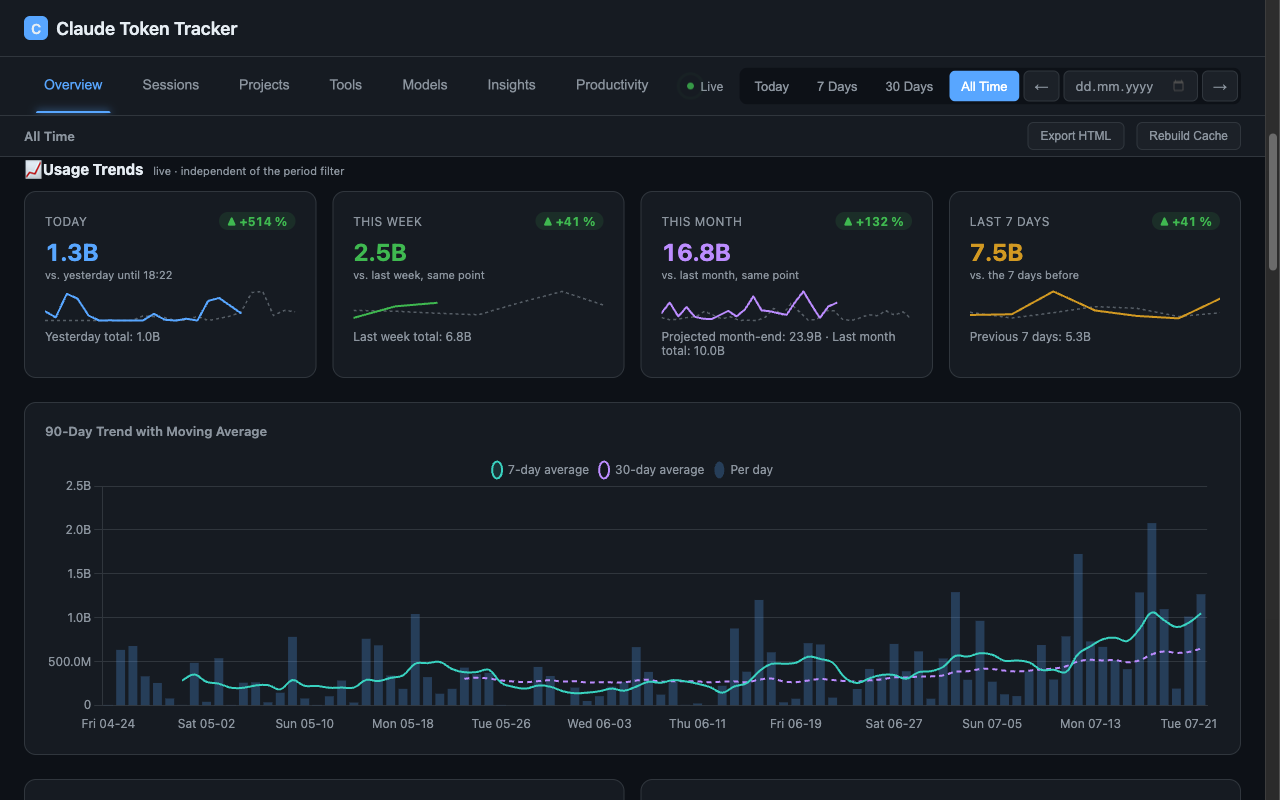 |
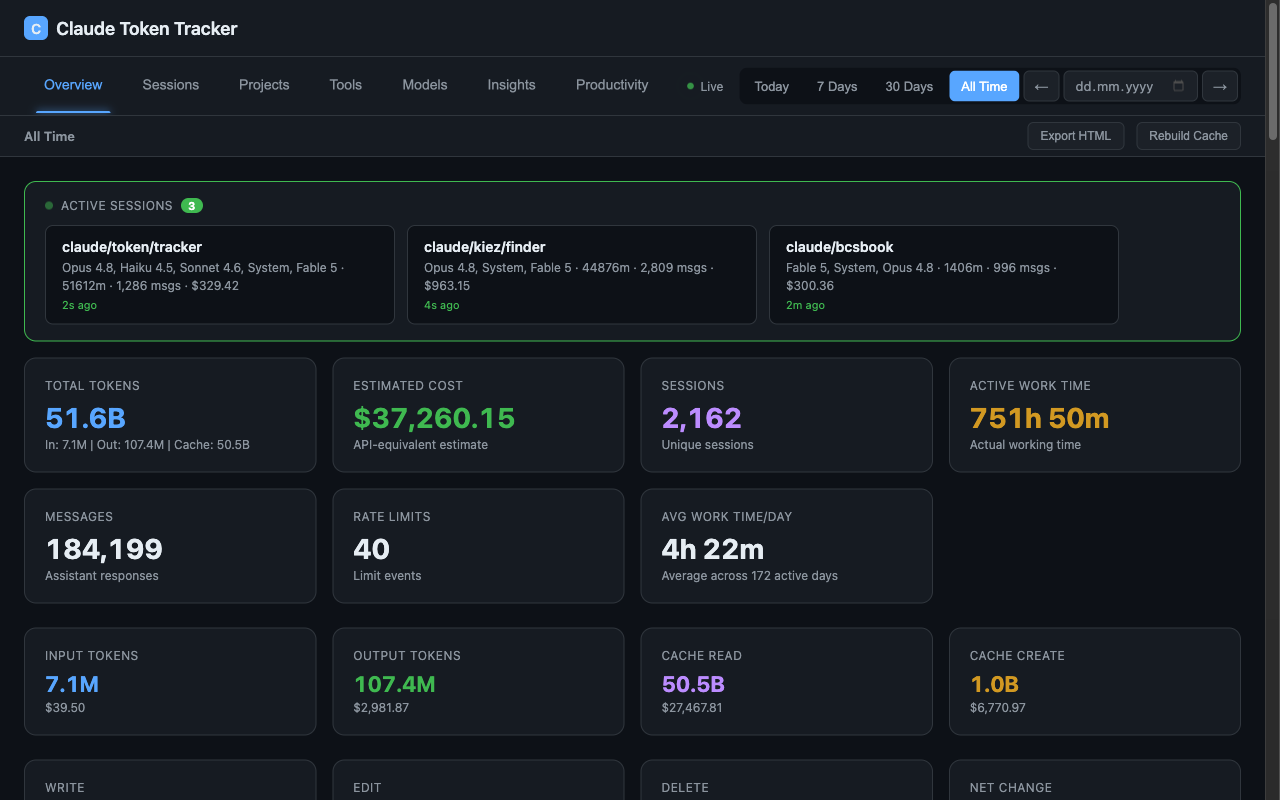
| Overview — live sessions, KPI cards, token breakdown, active work time | Usage trends — today / week / month / rolling 7d vs. the previous period at the same point, plus the 90-day trend with moving averages |
 |
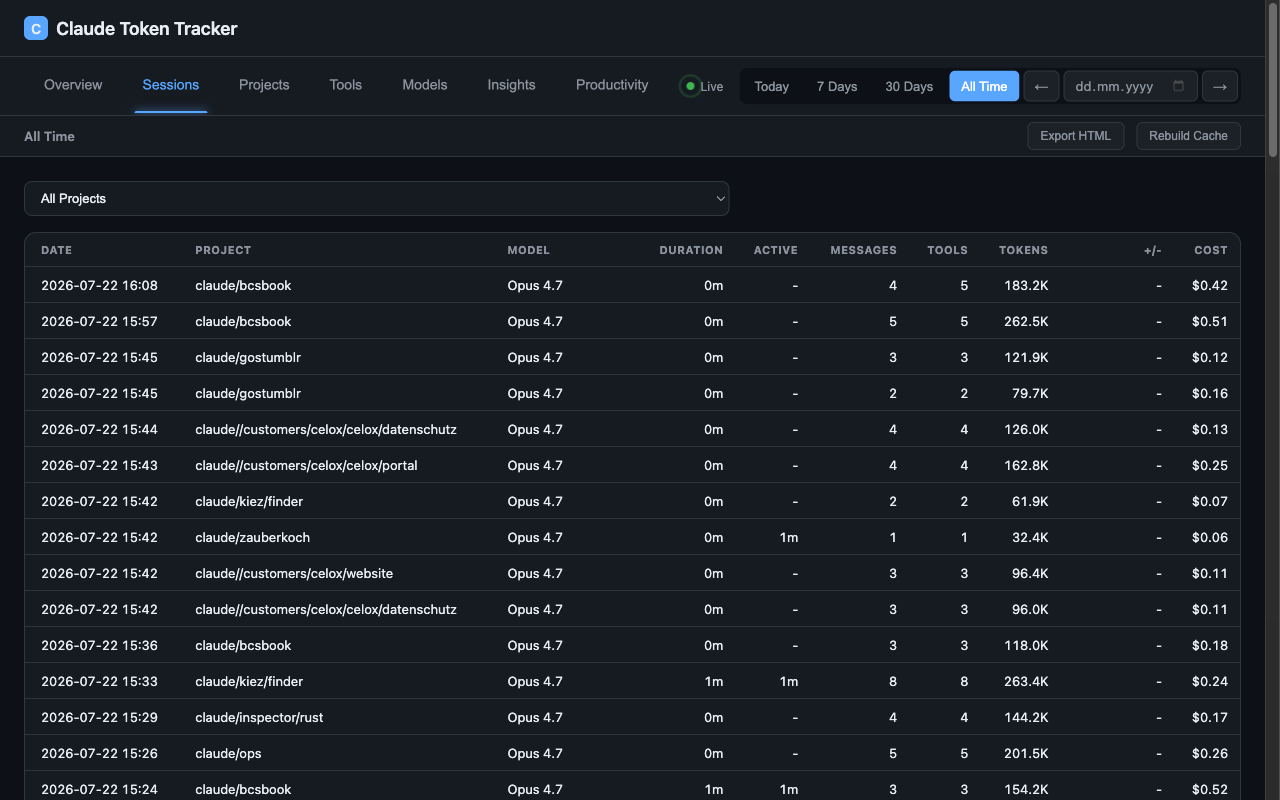 |
| Trend comparisons — cumulative month vs. previous month, week comparison, project momentum, model-mix shift | Sessions — sortable table with project, model, duration, active time, tokens, cost |
 |
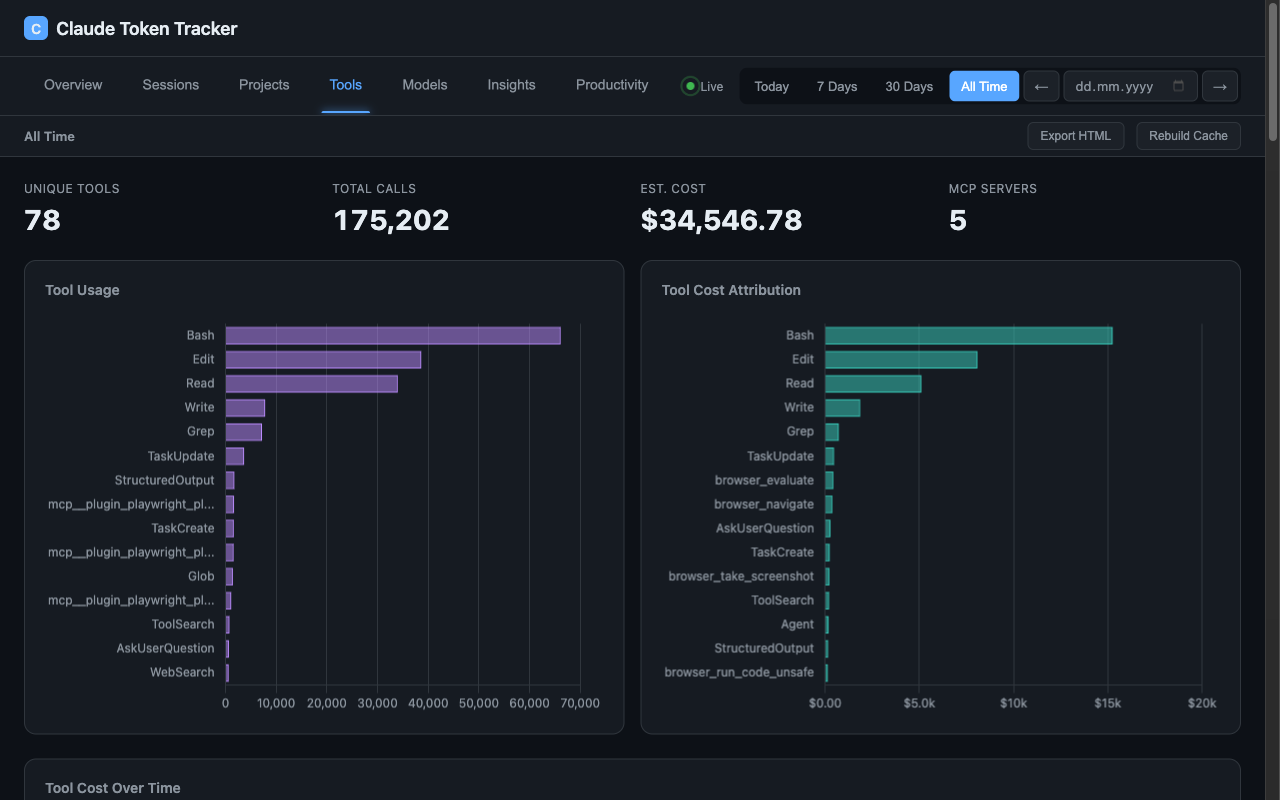 |
| Projects — per-project tokens and cost, live search, non-destructive merge | Tools — tool cost attribution, MCP server breakdown, sub-agent tracking |
 |
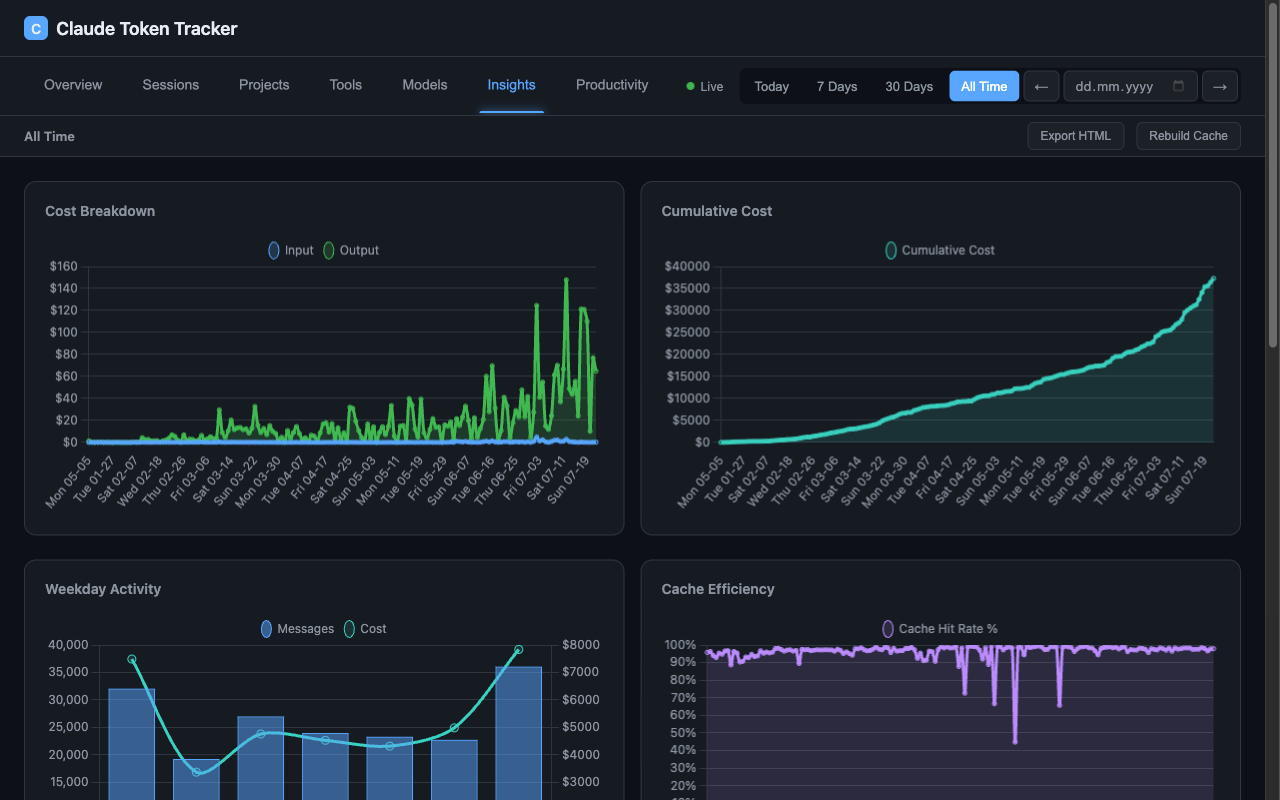 |
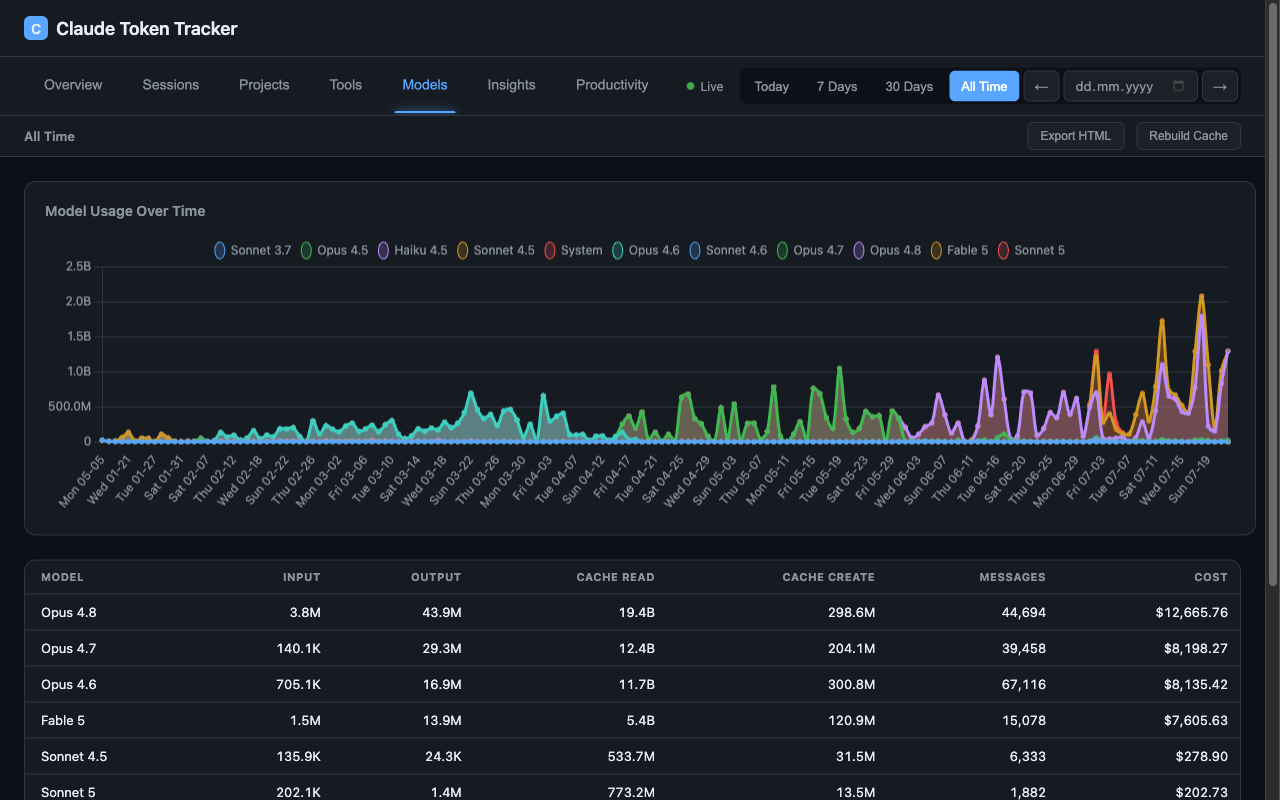
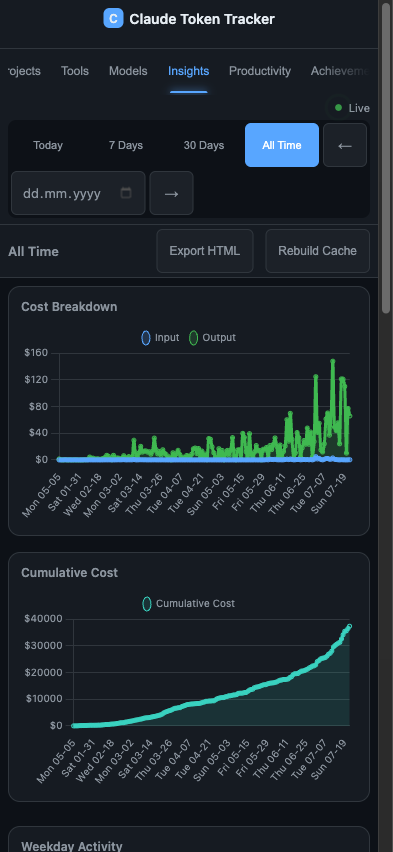
| Models — model usage over time, per-model tokens and cost | Insights — cost breakdown, cumulative cost, weekday activity, cache efficiency |
 |
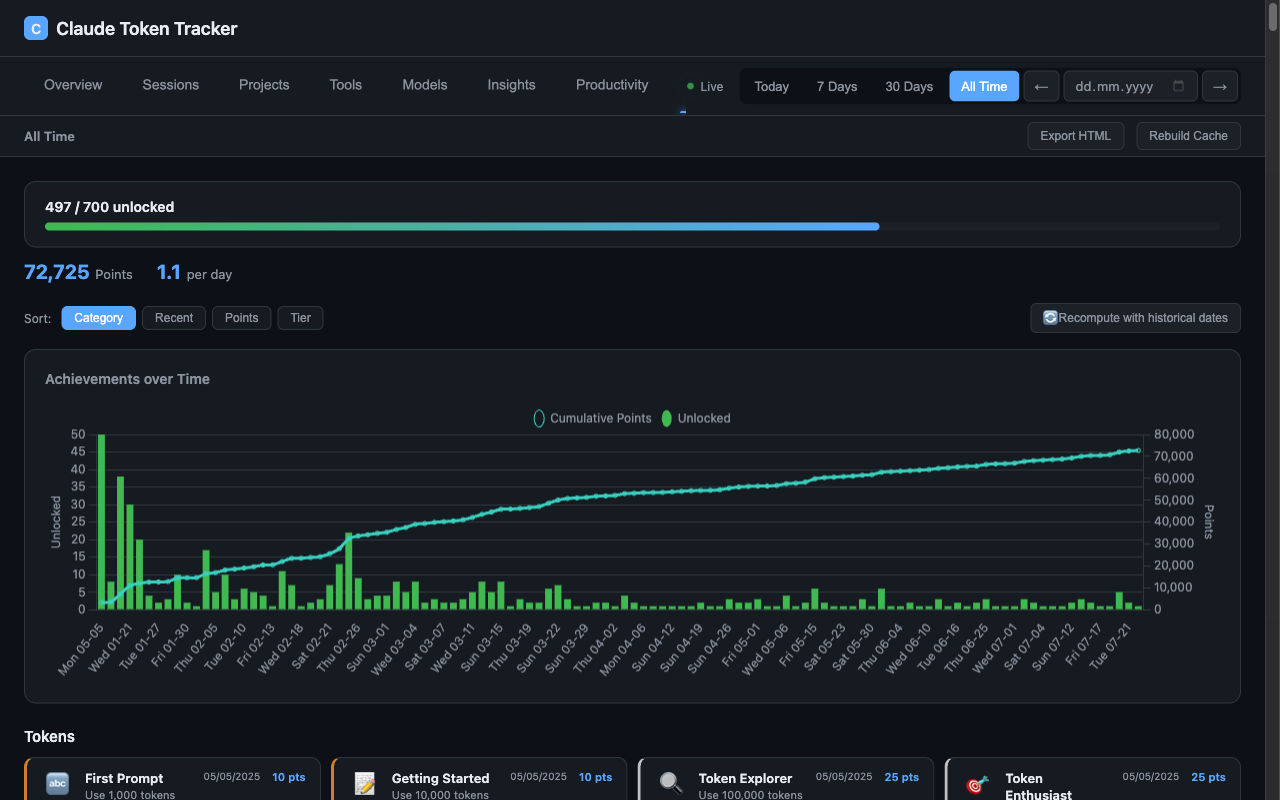 |
| Productivity — efficiency metrics with period comparison | Achievements — 1200 achievements across 14 categories, unlocked with historical dates |
Mobile (iPhone 16 — 393px)
 |
 |
 |
 |
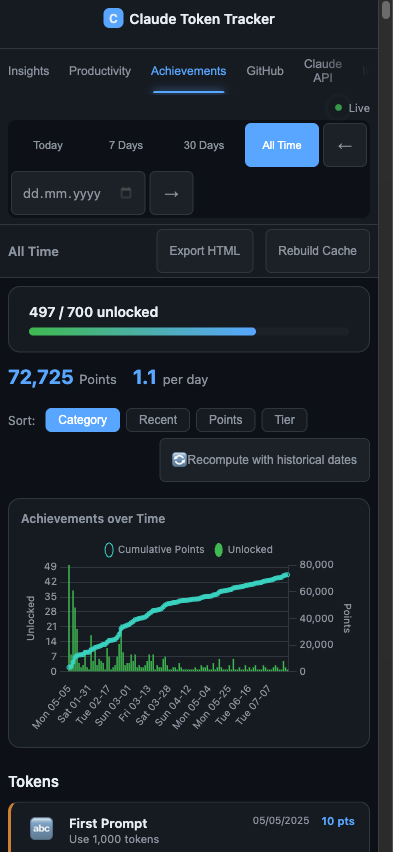 |
| Overview | Trends | Insights | Productivity | Achievements |
Architecture
~/.claude/projects/**/*.jsonl
    -> Parser (incremental byte-offset, dedup by message ID)
    -> SQLite (WAL mode, 10 tables)
    -> Aggregator (in-memory pre-computed maps)
    -> HTTP Server (50+ JSON endpoints + SSE)
    -> Frontend (Chart.js, vanilla JS, i18n DE/EN)
Multi-user mode:
Sync Agent (client) -> POST /api/sync (API key auth)
    -> Per-user SQLite storage
    -> AggregatorCache (lazy loaded, incremental sync, 30min eviction)
    -> GitHub OAuth sessions
Share API (external integration):
OPS -> POST /api/shares (admin key auth) -> project_shares table
Customer browser -> GET /api/public/share/:token -> sanitized project data
Tech Stack
| Layer | Technology |
|---|---|
| Runtime | Node.js >= 20.12 (native HTTP server, no Express) |
| Database | SQLite via better-sqlite3 (WAL mode, transactions) |
| Frontend | Vanilla JS + HTML5 + CSS3 (no build step) |
| Charts | Chart.js 4.x |
| File watching | Chokidar 4.x |
| Auth | GitHub OAuth + HttpOnly session cookies |
| Encryption | AES-256-GCM (admin API keys) |
| Testing | Vitest + Supertest |
| Linting | ESLint 9 (flat config) |
| CI | GitHub Actions |
Share API
Endpoints
| Endpoint | Auth | Description |
|---|---|---|
| GET /api/share-admin-key | Session | Get admin key + base URL (settings UI) |
| POST /api/share-admin-key | Session | Regenerate admin key |
| GET /api/shares | Admin Key / Session | List all shares |
| POST /api/shares | Admin Key / Session | Create share { project, label, expires_in_days } |
| DELETE /api/shares/:id | Admin Key / Session | Revoke a share |
| GET /api/shares/projects | Admin Key / Session | List projects with stats |
| GET /api/public/share/:token | Public | Get project data (rate limited) |
Security
- Share tokens: 48-char hex (24 bytes / 192-bit cryptographic randomness)
- Admin key: 64-char hex, stored in .env, required for management endpoints
- Rate limiting: 30 requests/minute per IP on public endpoint
- CORS: restricted to configured origins (ops.celox.io, tracker.celox.io)
- No internal paths exposed, no project enumeration possible
- Optional expiry dates on share tokens
Setup
# Add to .env
SHARE_ADMIN_KEY=your-64-char-hex-key
# Or generate in Settings -> Share API -> "Neu generieren"
Integration with OPS
- Open Token Tracker -> Settings -> Share API
- Copy Tracker URL and Share Admin Key
- Add to OPS .env: TOKEN_TRACKER_BASE_URL and TOKEN_TRACKER_ADMIN_KEY
- In OPS: Edit customer -> "Projekt verknuepfen" -> select project
- Customer detail page shows KI-Nutzung tab with charts, costs, and sessions
Public Response Format
{
  "label": "Project Label",
  "summary": { "total_cost", "total_sessions", "lines_written", "..." },
  "daily": [{ "date", "messages", "cost", "lines_written", "..." }],
  "sessions": [{ "start", "end", "duration_min", "cost", "model", "..." }]
}
Data Continuity & Restore
~/.claude/projects JSONL is only a rolling window — Claude Code prunes old
session files, so the tracker's SQLite DB (data/tracker.db) is the long-term
store of the full history. Continuity across devices and reinstalls:
- Hosted (multi-user): the sync agent pushes every message to the server;
after a machine reset, install the sync agent with a device key from
Settings and the same account keeps counting — old history stays intact. - Local backups: set
BACKUP_PATH(+ optionalBACKUP_INTERVAL_HOURS) —
atomicVACUUM INTOsnapshots, auto-pruned to 10 copies. - Full local restore after a reset:
bash scripts/restore-from-server.sh
pulls a consistent DB snapshot from the hosted server, swaps it in and
restarts. Local JSONL is re-parsed on top (deduplicated by message id) and
achievements recompute with historical dates automatically.
Documentation
| Document | Contents |
|---|---|
| docs/API.md | Every route, its authentication and its parameters |
| docs/ARCHITECTURE.md | Data flow, modules, and the decisions behind them |
| docs/METRICS.md | What every number means — and which definitions used to be wrong |
| docs/CONFIGURATION.md | Every environment variable, and what is deliberately not configurable |
| CONTRIBUTING.md | Setup, ground rules, and how to add an achievement without shipping an impossible one |
| CHANGELOG.md | Release history |
| README_EN.md / README_DE.md | Long-form manual, English and German |
Links
- Try it: tracker.celox.io
- Author: Martin Pfeffer | GitHub
- License: MIT
If you find this project useful, consider supporting its development:

Reviews (0)
Sign in to leave a review.
Leave a reviewNo results found