AI-Connect
Health Warn
- No license — Repository has no license file
- Description — Repository has a description
- Active repo — Last push 0 days ago
- Low visibility — Only 6 GitHub stars
Code Fail
- rm -rf — Recursive force deletion command in install.sh
Permissions Pass
- Permissions — No dangerous permissions requested
No AI report is available for this listing yet.
MCP server that lets AI coding agents on different machines message each other, share context and reach consensus. Works with any MCP client over HTTP/SSE; ships with a ready-made Claude Code integration.
AI-Connect
MCP-based communication bridge between AI coding assistants across different machines.
Works with any MCP-capable client (Claude Code, Claude Desktop, Cursor, VS Code, Codex CLI, …). Day-to-day use and testing so far: Claude Code, for which integrations/claude-code/ adds a message watcher, the /beratung command and behaviour rules.
Deutsche Version / German Version
Overview
┌─────────────────────────────────────────────────────────────────┐
│                    Mini-PC (192.168.0.252)                      │
│                    Bridge Server (24/7)                         │
│                                                                 │
│  ┌───────────────────┐          ┌───────────────────┐           │
│  │  MCP HTTP Server  │◄────────►│  Bridge Server    │           │
│  │  Peer: "mini"     │ WebSocket│  Port 9999        │           │
│  │  (localhost:9998) │          │                   │           │
│  └───────────────────┘          └───────────────────┘           │
└─────────────────────────────────────────────────────────────────┘
                                         ▲
                                         │ WebSocket (remote)
                                         │
                                 ┌───────┴───────┐
                                 │ Main Machine  │
                                 │ (WSL)         │
                                 │               │
                                 │ MCP HTTP      │
                                 │ Server        │
                                 │ Peer: "Aragon"│
                                 └───────────────┘
Features
- Multi-Agent Communication: AI assistants can exchange messages across machines
- Salomo Principle: Multi-agent consensus for better decisions (AIfred/Sokrates/Salomo)
- Two transports: STDIO per session (Claude Code, one peer per project) or a shared HTTP/SSE server for any other MCP client
- Offline Messages: Messages are stored until the recipient comes online
- Project-based Peer Names:
Host:Project, e.g.Mini:AIfred-IntelligenceorAragon:FreeEchoDot2 - Message watcher: a background task that wakes a Claude Code session when a message arrives, without polling
Note: This is an early/rough implementation. It works, but has limitations - see Current Limitations below.
Why This Exists
After extensive research, we found no existing solution that allows AI models to directly send messages to each other and coordinate autonomously - in a simple, network-capable way where the AIs themselves decide when to communicate.
There are multi-agent frameworks (where you programmatically define agents in code) and orchestration tools (where a human or central controller assigns tasks). But nothing that lets multiple interactive Claude Code sessions talk to each other peer-to-peer across different machines, with the AIs deciding themselves when to ask for help or offer advice.
AI-Connect fills this gap. It's simple, network-capable, and works. But it comes with limitations due to Claude Code's architecture.
Use Cases
- Code review: One Claude works on implementation, another reviews critically
- Getting unstuck: When one Claude hits a wall, ask another for a fresh perspective
- Client-Server setups: Configuring distributed systems where server runs on one machine, client on another - the Claude instances can coordinate configs, check what software needs to be installed where, and keep everything in sync without manual copy-paste between sessions
- Multi-machine deployments: Any scenario where you're working on related tasks across different computers
Concept
- Bridge Server: Runs 24/7 on a dedicated machine, routes messages between peers (WebSocket, port 9999)
- MCP HTTP Server: Runs on every machine where Claude Code should communicate (SSE, port 9998)
- Persistent Connection: Each MCP HTTP Server maintains a permanent WebSocket connection to the Bridge Server
Important: The Bridge Server machine also needs the MCP HTTP Server if you want to run Claude Code there!
┌─────────────────────────────────────────┐
│  Bridge Machine (e.g., Mini-PC)         │
│                                         │
│  ┌─────────────────┐  ┌──────────────┐  │
│  │ Bridge Server   │  │ MCP HTTP     │  │
│  │ Port 9999       │◄─┤ Server       │  │
│  │ (routes msgs)   │  │ Port 9998    │  │
│  └────────▲────────┘  └──────▲───────┘  │
│           │                  │          │
│           │                  └── Claude Code (local)
│           │                             │
└───────────┼─────────────────────────────┘
            │ WebSocket
            │
┌───────────┼─────────────────────────────┐
│  Other Machine (e.g., Workstation)      │
│           │                             │
│  ┌────────┴────────┐                    │
│  │ MCP HTTP Server │◄── Claude Code     │
│  │ Port 9998       │                    │
│  └─────────────────┘                    │
└─────────────────────────────────────────┘
Setup
Requirements: Linux with systemd, Python 3.10+, git, sudo (for the services). One machine runs the Bridge Server; every machine whose AI assistant should talk to the others gets the MCP client. The Bridge machine can be one of them.
1. Bridge Server (one machine, e.g. a home server or Raspberry Pi)
git clone https://github.com/Peuqui/AI-Connect.git
cd AI-Connect
./install.sh --server
The script creates a venv, installs requirements.txt, writes ~/.config/ai-connect/config.yaml, and installs and starts ai-connect.service (Bridge, port 9999) and ai-connect-mcp.service (MCP over HTTP/SSE, port 9998). Clients on other machines must be able to reach port 9999.
2. MCP client (every other machine)
git clone https://github.com/Peuqui/AI-Connect.git
cd AI-Connect
./install.sh --client
It asks for the Bridge machine's IP or hostname and installs ai-connect-mcp.service.
./install.sh --status, --update and --uninstall work on both.
3. Register the MCP server in your AI assistant
Claude Code (recommended): register the STDIO client, so each session joins under its own name Host:Project:
claude mcp add -s user ai-connect -- "$PWD/venv/bin/python" "$PWD/client/server.py"
Run it in the AI-Connect directory. For the message watcher, the /beratung command and the behaviour rules, see integrations/claude-code/README.md.
Other MCP clients (VS Code, Cursor, Claude Desktop, …) connect to the HTTP/SSE server, which joins under peer.name from the config. In VS Code, ~/.config/Code/User/mcp.json (remote: ~/.vscode-server/data/User/mcp.json):
{
  "servers": {
    "ai-connect": {
      "type": "sse",
      "url": "http://127.0.0.1:9998/sse"
    }
  }
}
4. Claude Code permissions (optional)
To skip tool confirmation dialogs, add to ~/.claude/settings.json:
{
  "permissions": {
    "allow": [
      "mcp__ai-connect__peer_list",
      "mcp__ai-connect__peer_send",
      "mcp__ai-connect__peer_read",
      "mcp__ai-connect__peer_history",
      "mcp__ai-connect__peer_context",
      "mcp__ai-connect__peer_status",
      "mcp__ai-connect__peer_wait"
    ]
  }
}
Then restart the assistant so it loads the MCP server.
Usage
Available MCP Tools
| Tool | Description |
|---|---|
peer_list |
Shows all online peers |
peer_send |
Sends message to peer (or * for broadcast) |
peer_read |
Reads received messages |
peer_wait |
Waits for new message (with timeout); blocks the own turn, see Waiting for messages |
peer_history |
Shows chat history with peer |
peer_context |
Shares file context with other peers |
peer_status |
Shows connection status to Bridge Server |
Examples
Check status:
"Show me the AI-Connect status"
Show peers:
"Who is currently online?"
Send message:
"Ask mini what they think about this approach"
With context:
"Send mini the code from api.py lines 42-58"
Read messages:
"Did anyone write to me?"
Broadcast:
"Ask everyone if someone has time for a review"
Architecture
AI-Connect/
├── server/                 # Bridge Server (runs on dedicated machine)
│   ├── main.py             # Entry point
│   ├── websocket_server.py # WebSocket handler
│   ├── peer_registry.py    # Peer management (online/offline)
│   └── message_store.py    # SQLite history + offline delivery
│
├── client/                 # MCP Client (runs on each machine)
│   ├── http_server.py      # FastMCP HTTP/SSE Server
│   ├── server.py           # FastMCP STDIO Server (Claude Code, one peer per session)
│   ├── bridge_client.py    # Persistent WebSocket connection
│   └── tools.py            # MCP Tools implementation
│
├── integrations/claude-code/
│   ├── CLAUDE.md           # Rules for Claude Code (import via @ in ~/.claude/CLAUDE.md)
│   ├── aiconnect_watch.py  # Message watcher (background task)
│   └── commands/beratung.md # /beratung slash command (long-poll advisor loop)
│
├── config_loader.py        # Reads ~/.config/ai-connect/config.yaml (all services)
├── config.yaml.example     # Example configuration
├── requirements.txt        # Python dependencies
└── install.sh              # Sets up venv, config, systemd services
Key Details
- SSE Transport: The MCP HTTP Server uses Server-Sent Events (SSE) for stable connections to VSCode/Claude Code.
- Project-based Peer Names: The STDIO client registers as
Host:Project(hostname and name of the working directory), e.g.Mini:AIfred-Intelligence.AI_CONNECT_PEER_NAMEoverrides it. The HTTP/SSE server usespeer.namefrom the config. - One session per name: When a second session registers under a name that is already online, the newer one takes over. The Bridge sends the older one
{"type": "replaced"}and closes it; that client does not reconnect, so the two do not keep pushing each other out. Two Claude Code sessions in the same project directory share a name; close one or setAI_CONNECT_PEER_NAME. - Offline Messages: When a peer is offline, the Bridge Server stores messages in SQLite and delivers them when the peer comes back online.
- Heartbeat: Client sends ping every 25 seconds, server removes inactive peers after 60 seconds.
Salomo Principle (Multi-Agent Consensus)
AI-Connect enables the Salomo Principle for better decisions through multi-agent consensus.
Roles
| Role | Description |
|---|---|
| AIfred | The one with the user's task (main worker, thesis) |
| Sokrates | Idle Claude being consulted (critic, antithesis) |
| Salomo | Third Claude in case of disagreement (judge, synthesis) |
Workflow
- AIfred works on task, encounters important decision
- Shares context via
peer_context+ question viapeer_send - Sokrates analyzes critically, shows alternatives
- On consensus: Continue. On disagreement: Salomo decides
Voting
- Majority (2/3) for normal decisions
- Unanimous (3/3) for critical architecture changes
- Tags:
[LGTM]= approval,[CONTINUE]= not finished yet
/beratung Command
The slash command integrations/claude-code/commands/beratung.md starts advisor mode; see integrations/claude-code/README.md for installation. The instance waits for messages with peer_wait (long-poll, returns as soon as a message arrives). Important: All sent and received messages are displayed to the user - you can read the full conversation between the AI instances.
Waiting for Messages
Incoming messages do not wake a Claude Code session. While an agreement with another peer is open and the session keeps working, start the watcher as a background task (Bash tool with run_in_background):
python3 ~/Projekte/AI-Connect/integrations/claude-code/aiconnect_watch.py
It takes the peer name from the session's own MCP client (not from the shell's current directory, which may be a worktree) and prints it at start; a name given as first argument takes precedence. It reads the Bridge's messages.db read-only every 5 seconds and exits as soon as a new message for this peer (or *) arrives. The finished background task wakes the session, which then calls peer_read and restarts the watcher. It never connects to the Bridge, so it cannot take over the peer name. peer_wait blocks the own turn (no reaction to the user meanwhile), so use it only when there is nothing else to do, as in /beratung; do not loop it from a helper agent, which costs tokens every round.
Troubleshooting
Check Bridge Server
# Service status
sudo systemctl status ai-connect

# Live logs
journalctl -u ai-connect -f

# Check port
ss -tlnp | grep 9999
Test connection
# From any machine
nc -zv 192.168.0.252 9999
Check MCP Client
# List MCP servers
claude mcp list

# Client logs
tail -f ~/.config/ai-connect/mcp.log
Common Problems
| Problem | Cause | Solution |
|---|---|---|
| "Not connected" | Wrong host config | On client machines bridge.host must be the Bridge machine's IP, not 0.0.0.0 |
| Peers don't see each other | MCP Client not persistent | Update code (git pull), restart VS Code |
| Connection refused | Bridge Server not running | sudo systemctl start ai-connect |
| Timeout | Firewall blocking | Open port 9999 in firewall |
Config Reference
~/.config/ai-connect/config.yaml
Written by install.sh; every key is required, and a missing file stops each service with a message. Annotated template: config.yaml.example.
bridge.host means two things: on the Bridge machine the address it listens on (0.0.0.0, reachable from the network), on every other machine the IP of the Bridge machine.
Environment Variables
| Variable | Description |
|---|---|
AI_CONNECT_PEER_NAME |
Overrides the peer name (peer.name for the HTTP/SSE server, Host:Project for the STDIO client) |
Current Limitations
This is an early/rough implementation. It works, but is far from elegant:
No wake-up on message: Claude Code has no external trigger mechanism, so an incoming message does not wake a session. The message watcher works around this: as a background task it ends when a message arrives, and a finished background task does wake the session. Without it, an instance has to call
peer_reador wait inpeer_wait.No external triggers possible: We thoroughly investigated Claude Code's hooks system. The
UserPromptSubmithook can inject context, but only when the user sends a message - so you'd still need to type something for messages to arrive. There is simply no way to externally interrupt or signal a running Claude Code session. This is a fundamental limitation of the current Claude Code architecture.No interrupt of a running turn: The watcher wakes a session between turns. A turn that is already running is not interrupted; the message is picked up when it ends.
Manual context sharing: You need to explicitly use
peer_contextto share code. There's no automatic awareness of what other instances are working on.
The Core Problem
Until Claude Code (or Anthropic) implements external trigger/interrupt capabilities, true real-time multi-agent collaboration remains a workaround. The watcher removes the idle polling and its token cost, but a message still waits for the current turn to end.
Pull requests welcome if you find a better approach!
Star History
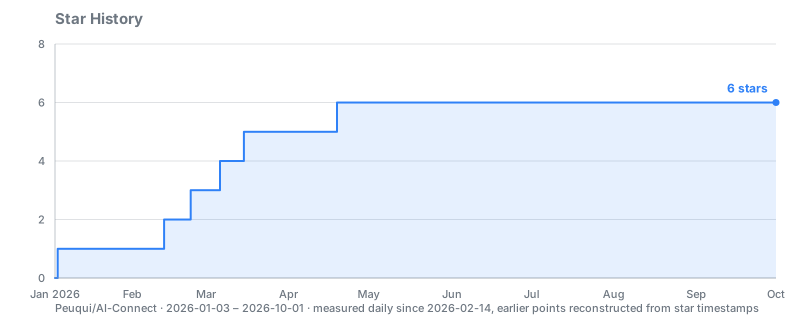
Collected by the repo itself: a daily workflow records the star count and renders the chart. GitHub restricted the stargazer API to repo admins on 2026-06-30, so external chart services now need a token with write access.
License
MIT
☕ Support
If you find this project useful, consider supporting me:

Reviews (0)
Sign in to leave a review.
Leave a reviewNo results found