agi-cli
Health Pass
- License — License: Apache-2.0
- Description — Repository has a description
- Active repo — Last push 0 days ago
- Community trust — 14 GitHub stars
Code Fail
- exec() — Shell command execution in .agents/artifacts/2026-08-07/analyze-verify-work-complete.ts
- spawnSync — Synchronous process spawning in .agents/artifacts/2026-08-07/analyze-verify-work-complete.ts
Permissions Pass
- Permissions — No dangerous permissions requested
No AI report is available for this listing yet.
Framework for building Agent Factories. CLI Native. Everything you will need!

agents




A framework for running a distributed agent factory. Dispatch Claude, Codex, Antigravity, Grok, and more across your own machines, in parallel, on your existing subscriptions. Measure every run with agents perf / agents insights, fold what you learn back into AGENTS.md and skills, then put the loop on a schedule with routines and monitors. Spawn parallel teams in isolated terminals or dispatch to the cloud for a PR. Watch live state across the fleet, nudge stalled runs, and message agents mid-flight. Store secrets behind Touch ID, drive real browsers and Electron apps, and steer the whole fleet from a menu bar — all from one CLI.










https://agents-cli.sh/demo.mp4
Quickstart
npm install -g @phnx-labs/agents-cli   # or: curl -fsSL agi-cli.sh | sh
agents setup                           # first-time setup, or re-open the capability hub
agents setup status                    # readiness for browser, computer, fleet, and more
agents run claude "explain this repo"  # run any agent on your existing subscription
agents setup is interactive and idempotent -- safe to re-run on any machine. Once core setup exists, it opens a status-aware menu for browser, computer, secrets, fleet, share, watchdog, and device preferences; each choice delegates to the same wizard available under agents setup <capability>. In CI or another non-TTY, bare setup prints the checklist without prompting. The agi-cli.sh one-liner installs this same canonical @phnx-labs/agents-cli package. Prefer bun? bun install -g @phnx-labs/agents-cli works too.
Full path -- installing harnesses, logging in, smoke-testing agents teams, and setting up your own fleet: apps/cli/docs/QUICKSTART.md.
Learn (concepts): Loop + graph engineering · Teams as graph engineering · Sessions · index + cross-device · Distributed fleet execution. Also: harness engineering · visual longform.
Already installed? agents upgrade updates agents-cli itself to the latest version (agents upgrade 1.2.3 for a specific version or dist-tag, -y to skip the confirm prompt). The command is upgrade on every platform -- do not reach for agents update, which updates an installed agent harness, not agents-cli (and on macOS, agents helper update is a third thing: it reinstalls the keychain helper).
Source: github.com/phnx-labs/agents-cli
Also available as ag -- all commands work with both agents and ag.
- Factory loop
- One config, every agent
- Run any agent
- Sessions across agents
- Control the fleet
- Sync the fleet
- Pin versions per project
- Run open models through Claude Code
- Run on your own machines
- Teams
- Cloud
- Workflows
- Plugins
- Make it yours
- Browser
- Accounts
- Secrets
- Routines
- Monitors
- Share
- PTY
- Portable setup
- Menu bar
- Private skills
- Security & Privacy
- Compatibility
- FAQ
Factory loop
The same loop whether it's one agent on your laptop or a fleet across a dozen machines: dispatch work, measure what happened, fold the lesson back into the harness, then put it on a schedule.
# Dispatch a team across the fleet -- each teammate in its own worktree
agents teams create checkout --devices yosemite-s0,yosemite-s1
agents teams add checkout claude "Owns: app/payments/*" --name payments
agents teams add checkout codex  "Write tests for the new code" --name qa --after payments
agents teams start checkout --watch

# Measure what happened -- latency, friction, dead-weight skills
agents perf commands --days 7      # slowest CLI entrypoints
agents insights --since 30d        # friction, harness comparison, ranked actions

# Fold the lesson back into the harness -- every agent picks it up next run
agents rules add ~/lessons/payments-review.md --agents claude
agents skills add ~/skills/payments-review --agents claude

# Put it on a schedule so it runs itself
agents routines add nightly-payments-audit \
  --schedule "0 2 * * *" --agent claude --prompt "Audit payments/* for regressions"

# Steer the fleet this loop runs on from the menu bar
agents menubar setup
agents perf reads a disposable warehouse at ~/.agents/.cache/perf/perf.db -- hook, command, and run timing rollups, deletable any time. agents insights (alias agents sessions insights) is deterministic and offline: it caches per-session facets, compares harnesses, and ranks actions by evidence count -- no model call unless you pass --narrative. Routines put any of this on a cron (Routines); monitors fire it on a change instead of a clock (Monitors); the menu bar is the always-on control surface for the fleet these commands drive (Menu bar).
One config, every agent
# Set up the Notion MCP server once.
agents install mcp:com.notion/mcp

# It's now registered with Claude Code, Codex, Antigravity, and Cursor.
agents mcp list
Skills, slash commands, rules, hooks, and permissions work the same way -- install once in ~/.agents/, synced to every agent's native format automatically.
agents skills add gh:yourteam/python-expert     # Knowledge pack -> all agents
agents commands add gh:yourteam/commands         # Slash commands -> all agents
agents rules add gh:team/rules                   # AGENTS.md -> per-agent instruction files
agents permissions add ./perms                   # Permissions -> auto-converted per agent
Write one AGENTS.md. It becomes CLAUDE.md for Claude Code, AGENTS.md for Antigravity, and .cursorrules for Cursor.
Run any agent
agents run claude "Find all auth vulnerabilities in src/"
agents run codex "Fix the issues Claude found"
agents run antigravity "Write tests for the fixed code"
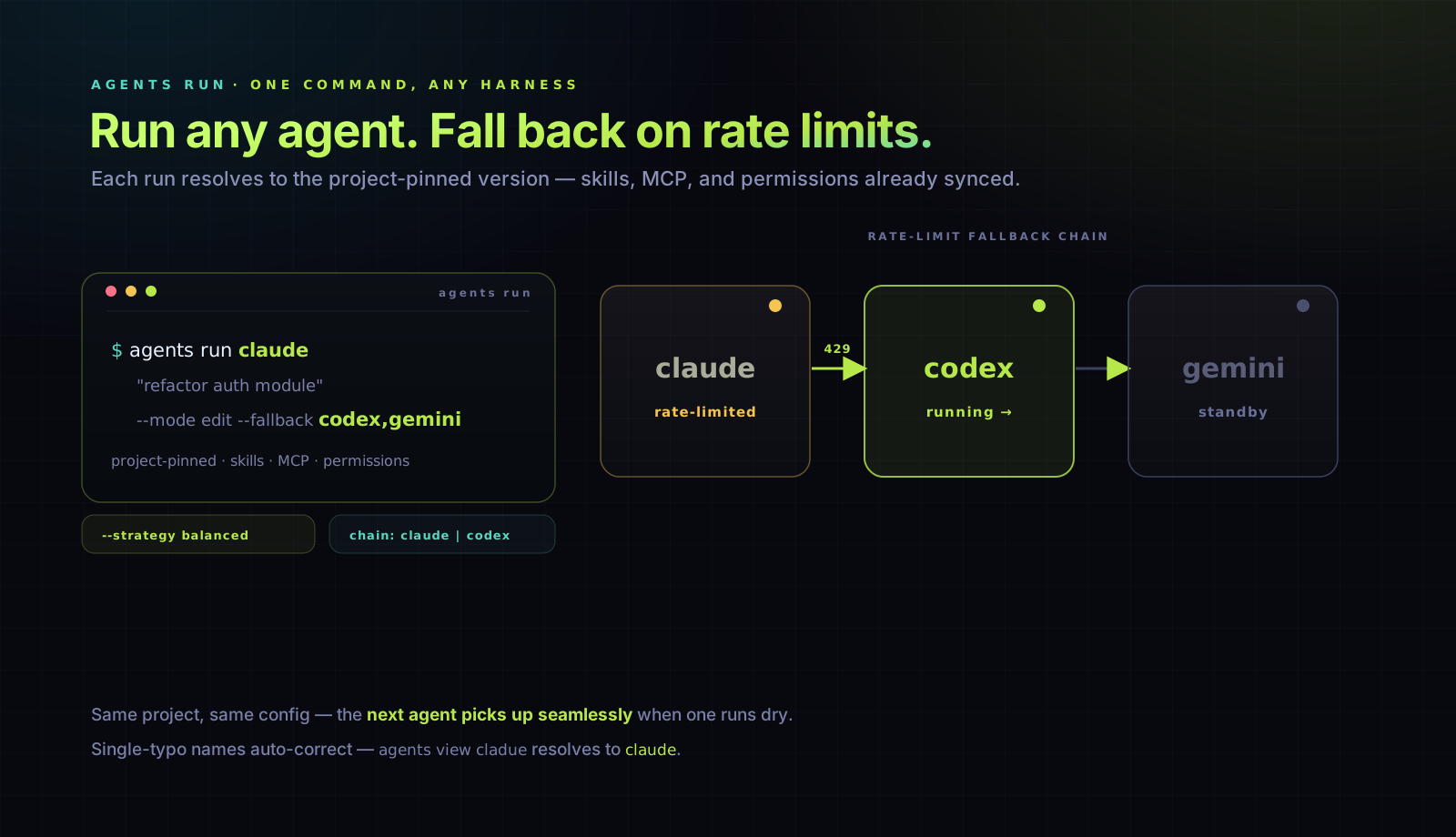
Each resolves to the project-pinned version with skills, MCP servers, and permissions already synced. Single-typo names auto-correct across every command — agents view cladue resolves to claude, agents add codx@latest to codex.
agents run claude "task" --lease reuses one shared warm crabbox pool across
repositories by default. Concurrent runs share the box but execute in isolated~/workspaces/<repo>-<run> directories with separate agent homes and credential
files. Add leaseProfile: private-hot-box to.crabbox.yaml only when a repo intentionally needs a dedicated warm pool;
cross-repo reuse trades re-sync latency for lower idle-compute cost.
Rate-limited? Keep working.
# Claude Code hits a rate limit -> Codex picks up automatically. Same project, same config.
agents run claude "refactor auth module" --mode edit --fallback codex,antigravity
Multiple accounts? Spread the load.
# Picks the signed-in account you haven't used recently.
agents run claude "summarize recent commits" --strategy balanced

# Or choose one account/version interactively for only this run.
agents run claude@
agents run codex@ "review this branch"
--strategy balanced spreads work across available versions of the same agent -- useful when you have multiple accounts and want to avoid burning through one. When every account is rate-limited, the run exits nonzero naming each excluded account and the earliest window reset (use --strategy pinned to force the default) -- it never launches into an exhausted account.
Don't care which harness? agents run auto
# Picks the host (14d usage affinity), the harness (installed CLIs weighted by
# best-account headroom), and the account (balanced) -- all three layers.
agents run auto "summarize recent commits"
agents run auto --host yosemite-s0 "fix the flaky test"   # pin the host layer
run auto excludes any harness whose accounts are all rate-limited or signed out, and exits nonzero with the earliest reset time when nothing anywhere is healthy.
A trailing @ opens an account picker before either an interactive or prompt-based run. Each installed version shows its account identity, exact version, login state, plan, and every available session, weekly, or monthly limit. Logged-out, rate-limited, and out-of-credit accounts remain visible with the reason they cannot be selected; signed-in accounts whose provider does not expose quota data stay selectable and say limits unavailable. The choice pins only that run and does not change your default version.
Account selection is available for Claude, Codex, Gemini, Cursor, Antigravity, Grok, Kimi, Droid, and OpenCode. It requires a terminal and cannot be combined with --resume, --strategy/--balanced, --lease, or --host/--device; profiles and workflows must use their concrete host agent instead.
Chain agents
agents run claude "Review PRs merged this week, summarize risks" \
  | agents run codex "Write regression tests for the top 3 risks"
Supports plan (read-only), edit, auto, and skip modes, effort levels, JSON output for scripting, and timeout limits.
What does --mode skip actually do?
Treat skip as a last-resort escape hatch. In direct-exec runs (without --acp),
agents-cli forwards the harness's native no-prompt flag; it does not add another
safety layer. Prefer auto where it adds a safer automatic policy (smart classifier
on Claude/Copilot, native high-auto mode on Droid, or interactive Kimi), or edit
everywhere else. For headless Kimi, edit, auto, and skip all use the same
already-auto-approved -p behavior, so prefer edit rather than signaling a blanket
bypass. Harnesses without a native bypass flag reject direct-exec skip.
| Harness | Direct-exec --mode skip becomes |
|---|---|
| Claude Code | --dangerously-skip-permissions |
| Codex | --dangerously-bypass-approvals-and-sandbox (equivalent to --yolo) |
| Gemini | --yolo |
| Cursor | -f |
| OpenClaw | --mode full |
| GitHub Copilot | --allow-all (alias: --yolo) |
| Antigravity | --dangerously-skip-permissions |
| Grok | --always-approve |
| Kimi | --yolo interactively; no extra flag in headless -p runs, which already auto-approve |
| Droid | --skip-permissions-unsafe |
With --acp, these native flags are not used. agents-cli instead grants skip
permission requests at the ACP protocol layer: it selects allow_always when offered,
otherwise the first permission option offered by the server. The same last-resort
warning applies.
Codex has no native smart-classifier mode, so agents run codex --mode auto resolves
to sandboxed edit and can still prompt. When --mode is omitted for Codex, the same
safe writable mode is used: the workspace, ~/.agents, and regenerable toolchain caches
are writable; network access is enabled; and approvals are requested on demand. An
explicit --mode plan keeps the filesystem read-only while leaving network access on.agents run codex --mode skip is different:
it bypasses approvals and removes the sandbox. full remains an alias for skip,
but new scripts should use the explicit skip name.
One protocol, every harness
# Typed event stream instead of raw stdout. Same command, any supported agent.
agents run claude "review this diff" --acp --json
--acp routes through the Agent Client Protocol so you get a unified event stream -- agent_message_chunk, tool_call, plan_update, stop_reason -- instead of writing a parser per CLI. File writes and shell commands flow through agents-cli, which means --mode plan becomes a real sandbox: the write RPC is denied, not just unused.
ACP adapters are documented for claude, codex, cursor, opencode, openclaw, and grok. Other harnesses keep running on the direct-exec path.
Sessions across agents
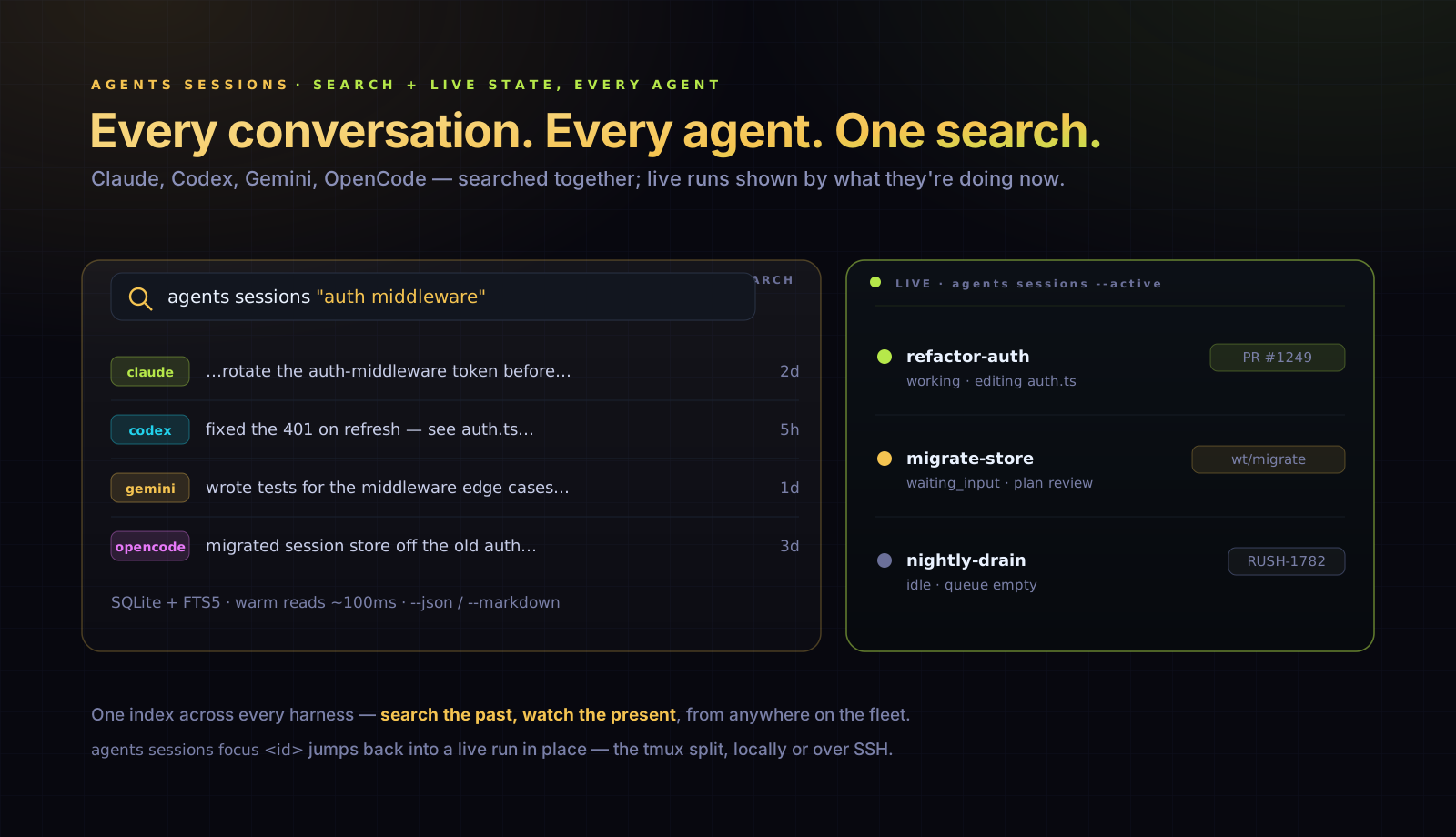
When you run multiple agents, conversations scatter across tools. Session search brings them together.
# Where was that auth conversation? Search Claude Code, Codex, legacy Gemini, OpenCode at once.
agents sessions "auth middleware"

# Filter by agent, project, or time window
agents sessions --agent codex --since 7d
agents sessions --project my-app

# Read a full conversation
agents sessions a1b2c3d4 --markdown

# Render a shareable, redacted Markdown transcript with the session preview on top
agents sessions render a1b2c3d4 -o session.md

# Just the last 3 turns, user messages only
agents sessions a1b2c3d4 --last 3 --include user

# Calls in recent Codex sessions on one device
agents sessions --include tools --agent codex --device mac-mini --since 7d

# One session where two different calls match; query every online device
agents sessions --include tools \
  --query 'program:git input:merge' \
  --query 'program:gh output:CONFLICT' \
  --fleet --json

# Count pre-indexed static git sites, containing calls, and sessions
agents sessions --include tools --query 'program:git' --count --fleet --json

# Populate historical tool rows once on each device
agents sessions backfill tools --fleet

# Which skills/commands you actually invoke -- and which installed ones are dead weight
agents sessions stats
agents sessions stats --zero            # only the never-invoked (dead weight)
agents sessions backfill resources      # fold historical sessions into the usage index

# Friction, owner corrections, repeated recipes, and ranked actions across harnesses
agents sessions insights --since 30d
agents sessions insights --agent claude --agent codex --json
# Top-level alias
agents insights --since 7d
sessions insights is deterministic and offline by default. It caches per-session facets, compares harnesses, and emits an actions table with evidence counts plus shortened sample session ids. --narrative is opt-in and receives aggregates only, never raw transcripts.
Interactive picker when you're in a terminal. Structured output (--json, --markdown, filtered by role or turn count) when piped.
Backed by a SQLite + FTS5 index at ~/.agents/.history/sessions/sessions.db with incremental scanning -- warm reads in ~100ms. Tool-call evidence is redacted and bounded before it is cached; repeated --query clauses must match distinct calls in one session. Tool queries read SQLite only: agents sessions backfill tools performs the one-time historical parse, while normal incremental scans index new and changed sessions. The index stores ordered static Bash program sites, so --count reports occurrences, containing tool calls, and distinct sessions without reparsing. --fleet executes one origin partition per device, so synced mirrors cannot duplicate compact evidence or counts returned over SSH; transcript bodies stay on their origin machine. This uses relational SQLite rows and literal FTS5 only, with no embeddings, vector database, or model calls. External tools can consume --json output as a programmatic observability layer; see docs/sessions.md for the schemas and docs/observability.md for the consumption patterns.
Live state, and catching up fast
Search is the past tense. --active is the present -- it infers what each running session is doing right now from the tail of its transcript.
agents sessions --active            # every live run across the fleet, with state
agents sessions --working           # actively producing work (fleet-wide)
agents sessions --idle              # stopped between turns (fleet-wide)
agents sessions --orphan            # agent outlived its terminal client
agents sessions --crashed           # terminal and agent disappeared uncleanly
agents sessions resume a1b2c3d4     # jump back into one — attach in place, or recover
agents sessions resume ag-claude-a1b2c3d4  # or by its tmux alias
On a terminal, agents sessions --active (and a bare agents sessions) open the interactive session browser — one filter you drive with single keys, re-pulled live across the fleet:
| key | filters by | flag it mirrors |
|---|---|---|
s |
search text | --query / positional |
r |
running only | --active |
b |
bookmarks only | --bookmarks |
* |
bookmark / unbookmark the highlighted session | agents sessions bookmark <id> |
f |
focus the highlighted session | agents sessions resume <id> |
c |
team sessions | --team (alias: --teams) |
a |
agent (cycles) | -a |
d |
device (cycles) | --device |
p |
this repo ↔ all dirs | --all |
w |
time window | --since |
tab |
toggle the preview pane | — |
⏎ |
resume / attach | resume / focus |
y |
copy the equivalent command | --print-cmd |
Bookmark the sessions you keep coming back to. * marks the highlighted row (a ★ shows in the listing), b narrows to bookmarks, and agents sessions bookmark <id> / --bookmarks do the same outside a TTY. Press f to focus the highlighted row through the same attach-or-recover flow as agents sessions resume <id>; Enter keeps its existing resume behavior. Bookmarks live in ~/.agents/.history/bookmarks.json keyed by session id, so they survive a reindex of the session cache. They're per-machine — session sync carries transcripts, not this file.
A session that lost its host says so. When an editor window or an SSH connection goes down hard, the agent it owned used to simply disappear from --active; when an agent outlived its window in tmux, it reported a plain idle. Both now carry their own status: ✗ crashed (the host went down and took the agent with it) and ◍ orphan (still alive, but no client is attached — nothing is showing it). Read from tmux's attached-client count and the editor window's registry heartbeat, so a deliberate agents sessions detach is never mistaken for one, and a session that is still working headlessly is left alone.
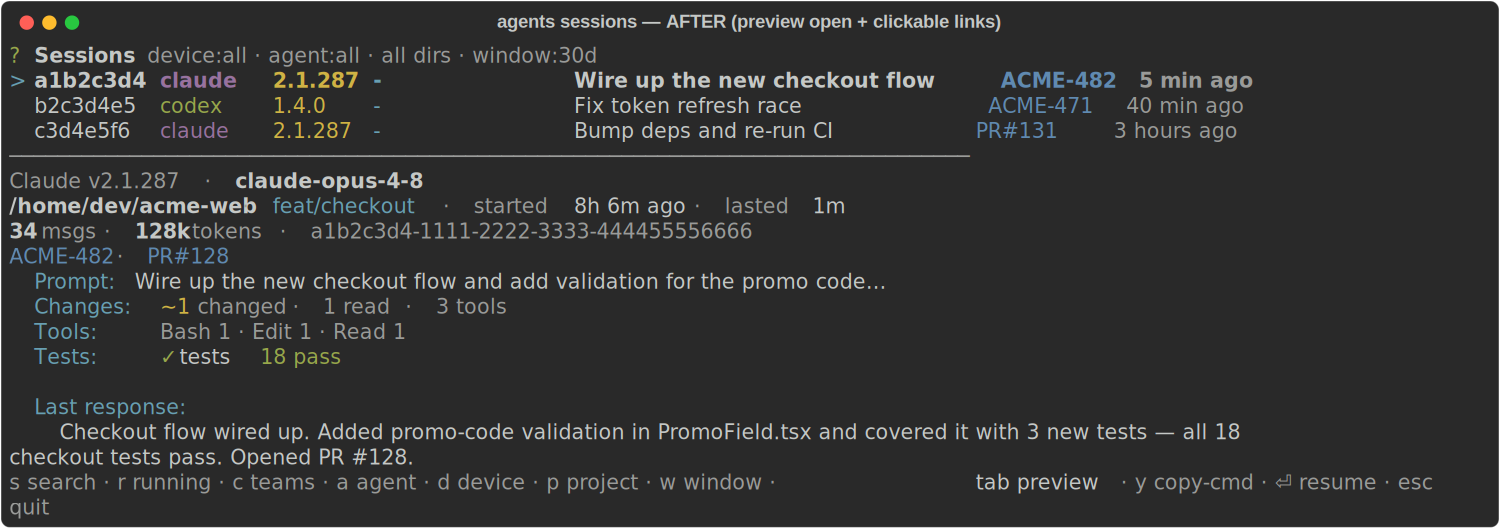
Filters stack (they AND together), the active set shows in the header, and the highlighted row previews below by default (tab hides it) — prompt, activity, last response, plus a links line where the worked-on ticket and the PR the session opened are clickable (OSC 8 hyperlinks: the ticket jumps to Linear, the PR# to GitHub, in terminals that support them). The Linear workspace is resolved from LINEAR_WORKSPACE or the linear-cli config, so tickets stay plain text when it's unknown. Because every hotkey has a flag, the view you build by hand is a real command: press y (or run --print-cmd) to get the exact ag sessions … line — explore interactively, hand the line to an agent. Piped output, --json, or --no-interactive keep the plain listing for scripts. Peek without opening the pager with agents sessions preview <uuid-or-8-char-id>; it resolves across the fleet and supports --json. The older agents sessions <id> --preview spelling remains available.
| before — preview hidden | after — preview open + clickable links |
|---|---|
 |
 |
Each live session resolves to working, waiting_input (with why -- a question, a plan review, or a permission prompt), idle, or a lifecycle state such as orphaned, crashed, closed, abandoned, queued, or unknown. Pass the matching flag (--working, --idle, --waiting, --orphan, --crashed, --closed, --abandoned, --queued, --unknown) directly; each implies --active, and several flags form a union. The fleet fan-out is already the default; --local opts out. --all instead widens historical directory and time scope. Rows also carry badges for the PR, worktree, and ticket. agents sessions resume [selector] accepts the same agent/version, device, time, team, project, skill/plugin, bookmark, and live-state filters as the session browser. A unique id or ag-<agent>-<shortid> tmux alias resolves directly; an agent/version or text selector always opens the preview picker. Immediately before attach it checks the tmux pane process: a living pane is joined in place, while a dead/missing pane enters recovery instead of showing tmux's Pane is dead screen.
Landing on a session cold? agents sessions <id> prints a catch-up digest: an inferred title, files changed grouped by directory (created / modified / deleted), a histogram of which tools did the work (including parsed Bash commands -- git, npm, ffmpeg, ssh, and so on), and the last test verdict -- the signals to reload a task in seconds.
Sharing a session uses agents sessions render <id> -o session.md, not the raw harness JSONL. The document starts with that same preview, then presents user and assistant turns, fenced commands, structured tool arguments, and bounded tool output. Credential-shaped values and local home paths are redacted by default; --no-redact is for local-only inspection.
Resume anywhere — and stay resumed
Pick up any past conversation and drop it back into a terminal:
agents sessions resume                     # multi-select; packs two sessions per tab
agents sessions resume "auth middleware"   # pre-filter the pool, then choose
agents sessions resume --tmux              # into persistent tmux — survives editor restarts
agents sessions resume --host zion --tmux  # resume on another machine over SSH
agents resume 019fd0c8-b3e9-77a2-a1a4-444698c4d897  # original harness/version/device/mode
agents run auto --resume 019fd0c8-b3e9-77a2-a1a4-444698c4d897  # adapt if its account is unavailable
agents sessions resume reopens several sessions in whatever terminal you're in -- auto-detected across iTerm, Ghostty, tmux, and the VSCodium agent-terminal, or forced with --iterm / --ghostty / --tmux / --vscodium. agents resume <id> resumes one session without requiring you to name its harness: exact IDs take a local SQLite fast path, then resolve fleet-wide and recover on the source device. If the origin version is installed, signed in, healthy, and still owns the indexed transcript, its isolated home performs native resume. Claude launches that native resume from the original project directory recorded before the first turn, so its projects/<cwd-key> lookup reaches the conversation even when the session later changed directories. Otherwise a healthy version of the same harness starts with /continue <id>, which reads the indexed transcript even when the old version home is retained under version trash or the same version number was reinstalled into a new home. It never native-resumes from a different isolated home. Back them with tmux and the runs turn durable: detach, close your editor, reboot the GUI -- the session is still alive to agents tmux attach. The whole agents tmux subsystem (persistent multiplexer sessions that survive editor restarts and can be shared with other tools) sits underneath.
Send an agent to the background — and bring it back
Running 30 agents and drowning in terminal tabs? agents sessions detach <id> stops a session's interactive process and keeps it working headless in the background -- it drives its task to done unattended, no tab, lower cost. agents sessions resume <id> brings it back through the same origin-device recovery decision: native resume in the exact healthy origin home, or same-harness /continue when that home is unavailable, with the full indexed history (including whatever it did while backgrounded).
agents sessions detach a1b2c3d4     # go headless in the background, keep working
agents sessions resume a1b2c3d4     # bring it back interactively, right here
Both are agent-agnostic -- they route through the same agents run --resume path (native resume for Claude/Codex, /continue replay for the rest). agents sessions --active shows each session's owner (the human who launched it, resolved from the tailnet identity, or - for an unresolved local run) and its presence -- attached (you're watching it), background (running headless), or parked (its background run finished) -- so the menu bar and AGI EXT show who is running what, and where. In AGI EXT, Agents: Detach (Cmd/Ctrl+K B) and Agents: Attach (Cmd/Ctrl+K A) do the same over the focused terminal.
Control the fleet
Running agents aren't fire-and-forget. Steer them mid-run without opening their terminals.
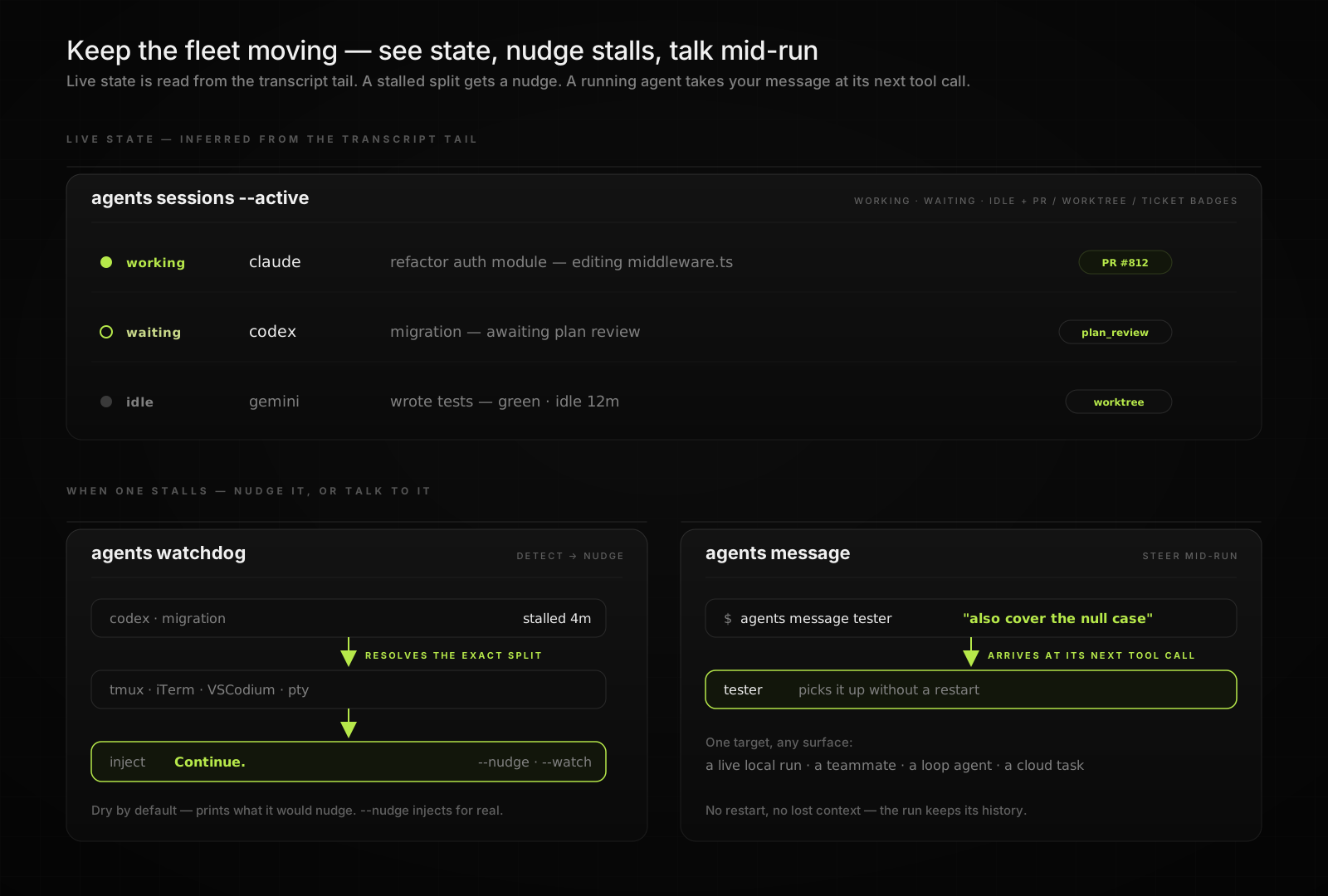
Message a running agent
# Delivered at the agent's next tool call — no restart, no lost context.
agents message tester "also cover the null case"
agents message <target> <text> reaches any running agent by name or id -- a live local run, a teammate, a loop agent, or a cloud task -- and the text lands at its next tool call. Tag the sender with --from <who>.
See every open block
agents feed                         # grouped by outcome (ticket/PR/worktree) across the fleet
agents feed --flat                  # one row per agent (legacy)
agents feed --host mac-mini         # scope the view to one or more hosts
agents feed --local                 # skip the SSH fan-out
agents feed --json                  # blocks stamped with their outcome key
agents feed post --title "Halfway done" "CI green, watching merge"  # title + body
Top-level questions and waiting notifications publish one atomic open-block record per session, including the mailbox id, host, runtime, and every answer option. The default view collapses agents under the outcome they serve (Linear ticket, PR, worktree slug, or Unassigned) so a 1,100-agent fleet reads as dozens of deliverables. Answered, resumed, and stopped blocks clear automatically; Task subagents are excluded. The rendered reply command uses the same mailbox id with agents message, so the decision routes back to the agent that asked it.
Auto-nudge stalls
agents watchdog            # one tick, dry run — reports what it WOULD nudge and why
agents watchdog --verbose  # include healthy/non-actionable session inspections
agents watchdog --nudge    # actually inject "Continue." into the stalled split
agents watchdog --watch    # daemon loop: a tick every --interval
agents watchdog detects a stalled session, resolves the exact terminal split it lives in (tmux, iTerm, VSCodium, or a raw pty), and injects a nudge -- Continue. by default, or set --text. Its timestamped default output shows attention-worthy sessions with their agent, host app, machine, project, activity, age, path, latest preview, and decision reason; --verbose restores healthy/non-actionable inspections. It's dry by default; --nudge acts on a single tick. agents watchdog on|off controls the device-local daemon pass, which runs once every three minutes. Steer a single run with agents watchdog policy <id> off | keep | handsoff.
A stalled session whose tail shows a hard account limit ("You've hit your weekly limit · resets …") is rotated in place instead of nudged: the watchdog gates on the same healthy-account selection agents run auto makes (zero healthy → one skip event per cooldown window, terminal untouched), injects the harness's exit sequence, relaunches agents run auto --interactive --session-id <uuid> in the same tab, then replays the old session's resume once the new TUI is live. Default on; agents watchdog rotate off disables it (nudging stays on).
Sync the fleet
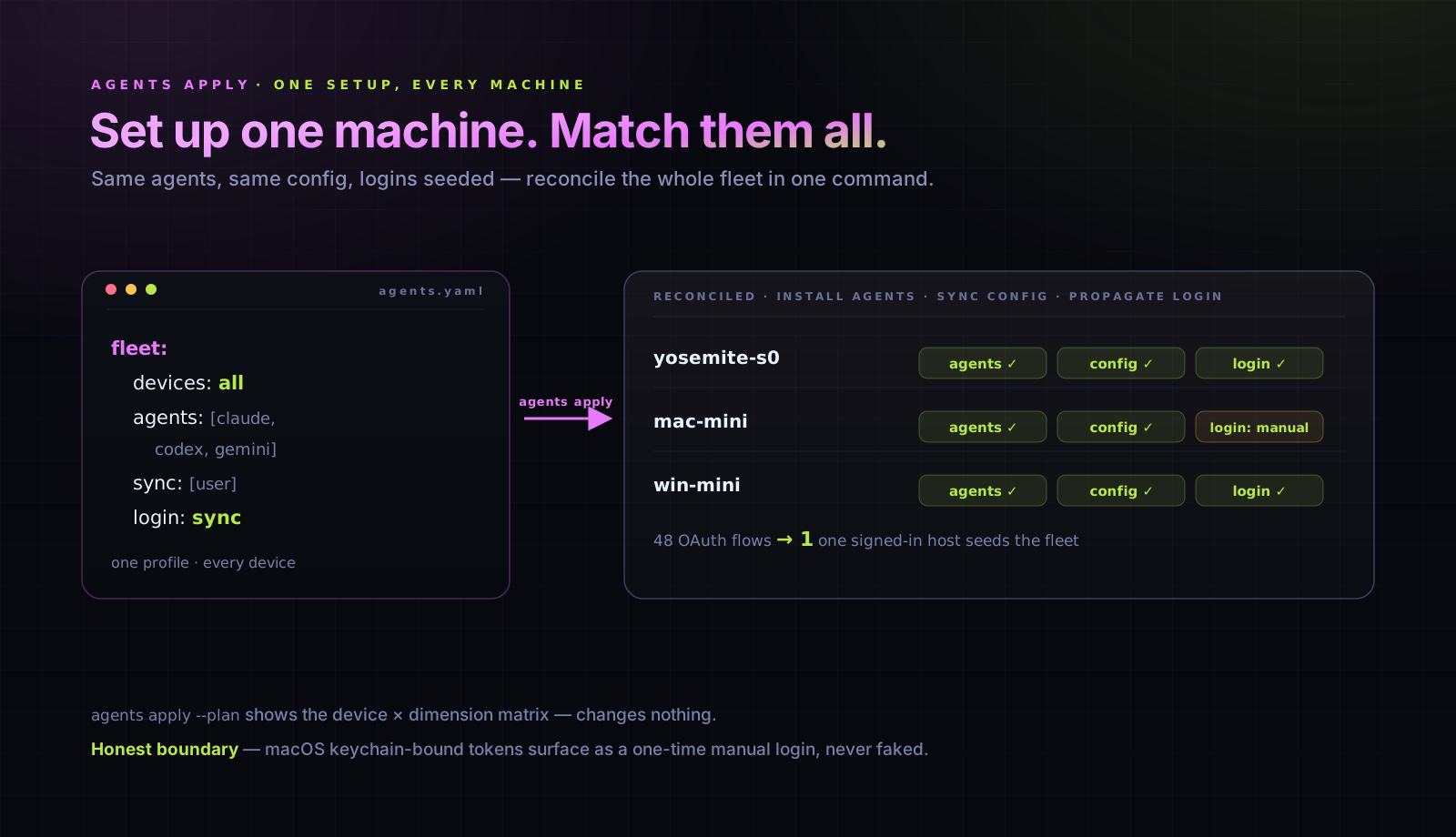
One machine is set up the way you like it. Make every other machine match -- same agents installed, same config, logins seeded -- in one command.
# agents.yaml -- add a fleet: block
fleet:
  devices: all              # every online registered device (minus this one)
  defaults:
    agents: [claude@latest, codex@latest, antigravity@latest]
    sync: [user]            # config scopes to reconcile
    login: sync             # propagate logins where the token is portable
agents apply --plan                 # device x dimension matrix; changes nothing
agents apply                        # reconcile the fleet (confirms first; -y to skip)
agents apply --device yosemite-s0   # scope to one device
agents apply --only agents,config   # limit dimensions (agents, config, login)
agents apply --no-login             # skip login propagation
agents apply (ag apply) probes every target over the existing SSH transport, then reconciles it to the profile: installs missing agents, upgrades agents-cli, syncs the named config scopes, and propagates logins so a host signed in once seeds the fleet -- turning "6 hosts x 8 harnesses = 48 OAuth flows" into one. Portable credential files (claude, codex, grok, kimi, opencode, droid, antigravity) stream to each target over encrypted SSH stdin, never shell-interpolated, and land at 0600. Honest boundary: macOS keychain-bound tokens (claude, antigravity on a Mac target) can't be extracted -- those surface as a one-time manual login, never faked. --plan / --dry-run shows the full matrix without touching anything.
See docs/fleet.md for the manifest schema and reconcile semantics.
Pin versions per project
# This project needs [email protected] -- newer versions changed tool calling.
agents use [email protected] -p

# The monorepo uses [email protected] across the team.
agents use [email protected] -p
This creates an agents.yaml at the project root:
# agents.yaml (commit this to your repo)
agents:
  claude: "2.0.65"
  codex: "0.116.0"
Think requirements.txt for CLI coding agents, on steroids. A shim reads agents.yaml from the project root and routes claude / codex / antigravity / grok (and others) to the right version automatically. Each version gets its own isolated home -- switching backs up config and re-syncs resources.
agents add [email protected]     # Install a specific version
agents add codex@latest       # Install latest
agents add codex@oldest       # Install the oldest published version
agents view                   # See everything installed
agents accounts add work --provider anthropic --auth setup-token
agents run claude --account work
Multiple provider accounts to juggle? See Accounts below.
Run open models through Claude Code (experimental)
Note: Profiles are experimental, but available by default — no enable step needed.
# Kimi K2.5 responding inside Claude Code's UI, tools, and skills.
# No proxy server. No LiteLLM. One OpenRouter key, stored in Keychain.
agents profiles add kimi
agents run kimi "refactor this file"
Built-in presets (all via OpenRouter, one shared key):
| Preset | Model | Notes |
|---|---|---|
kimi |
Kimi K2.5 | #1 HumanEval. Reasoning -- interactive only. |
minimax |
MiniMax M2.5 | #1 SWE-bench Verified. Reasoning. |
glm |
GLM 5 | #1 Chatbot Arena (open-weight). |
qwen |
Qwen3 Coder Next | Latest coding Qwen. Print-safe. |
deepseek |
DeepSeek Chat V3 | Latest non-reasoning. Print-safe. |
A profile swaps the model while keeping Claude Code as the agent runtime -- same UI, slash commands, skills, MCP tools. Under the hood: ANTHROPIC_BASE_URL + ANTHROPIC_MODEL, auth from Keychain at spawn time.
Custom endpoints (Ollama, vLLM) work too -- drop a YAML in ~/.agents/profiles/:
name: local-qwen
host: { agent: claude }
env:
  ANTHROPIC_BASE_URL: https://ollama.example.com
  ANTHROPIC_MODEL: qwen3.6:35b
auth:
  envVar: ANTHROPIC_AUTH_TOKEN
  keychainItem: agents-cli.ollama.token
Profile YAML has no secrets -- safe to agents repo push to a shared repo. agents profiles presets lists the full catalog.
Run on your own machines
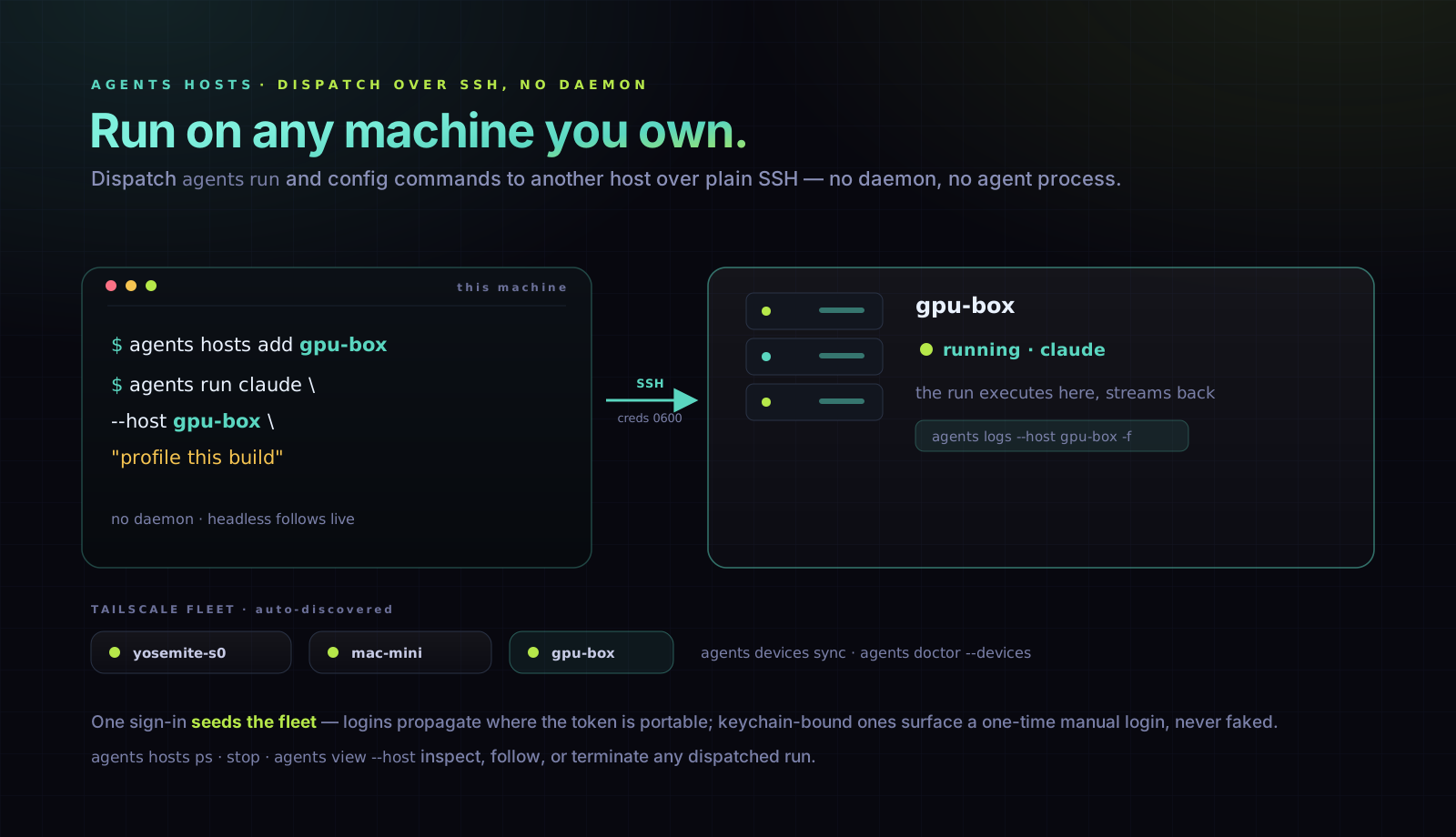
Dispatch any read-only or config command -- and agents run itself -- to another machine over SSH. No daemon.
# Enroll a machine (from ~/.ssh/config, or inline with user@address)
agents hosts add gpu-box
agents hosts check gpu-box              # reachable? which agents-cli version?

# Run there instead of locally
agents run claude --host gpu-box "profile this build"   # headless: follows live by default
agents run claude --host gpu-box                         # no prompt → interactive TTY over SSH (tmux-backed)
agents run claude --host gpu-box --copy-creds "fix auth" # copy local runtime creds + Claude token, shred after
agents run claude --device auto "…"                      # affinity-pick host from 14d usage (harness stays claude)
agents run claude --host auto "…"                        # same — auto is a host value, not a harness name
agents view kimi --device all                            # fan out across every registered device (grouped-by-OS roster)
agents output --device all                               # per-device burn vs shipped output across the fleet
agents view --device all --json                          # machine-readable fleet inventory
agents hosts ps                         # list dispatched runs + terminal status
agents hosts stop <id>                  # terminate a hung/detached run (alias: kill)
agents logs --host gpu-box              # pick a dispatched run — concise summary by default
agents logs <id> --full                 # the full raw transcript / stdout (token-heavy)
agents logs <id> -f                     # re-attach to a running one and follow
agents view claude --host gpu-box       # inspect the remote install
agents sync --host gpu-box              # make the remote machine current
agents doctor claude                    # diagnose every installed claude version
agents doctor claude@latest             # diagnose only the newest installed version
agents doctor claude@oldest             # diagnose only the oldest installed version
agents doctor claude@pinned             # diagnose the global-default (pinned) version
agents doctor claude@all                # diagnose all versions, including isolated copies
agents doctor claude@latest --fix       # auto-fix the newest installed version
agents doctor claude@latest --device mac-mini  # diagnose newest claude on mac-mini
agents doctor --devices                 # readiness matrix for every registered device
agents doctor --devices --json          # machine-readable fleet readiness
agents doctor --device mac-mini         # same matrix, scoped to one device
agents fleet status                     # online/offline rollup + NEEDS ATTENTION + OS-grouped rows (cache-first)
agents fleet status --verbose           # full per-device auth/CLI/sync/version grid
agents fleet status --live              # force a live resource probe (alias of --refresh)
agents fleet status --json --strict     # scriptable fleet health gate
agents devices harnesses                # per device: agent@version · account · signed · quota · ready
agents devices accounts                 # same, one row per account (which harnesses share it)
agents devices harnesses --agents claude,codex --json   # scoped, machine-readable
agents doctor --check --devices         # CI drift gate across every registered device

# Your Tailscale fleet, auto-discovered
agents devices sync                     # ingest `tailscale status`
agents devices list                     # fleet + headroom: load, mem, idle/busy — which box has room (cache-first)
agents devices list --live              # force a live probe of every device (alias of --refresh)
agents devices list --full              # add per-device cores and free/total RAM
agents devices list --no-stats          # instant: names/addresses only, skip the probe
agents devices config zion interactive.host zion   # the device agents show YOU artifacts on (★ in the list)
agents devices config mac-mini agents.max-concurrent 4   # per-device settings (central fleet.devices.<name>.config)
agents devices config mac-mini scheduler.enabled off     # bare `devices config <name>` opens a settings menu (TTY)
agents devices config mac-mini notes "runs the releases — don't reboot"   # operator notes, repeat to append
agents ssh mac-mini                     # hardened SSH: fails fast if offline,
                                        # PowerShell on Windows, password-from-Keychain,
                                        # auto-syncs your terminfo (Ghostty/kitty/…) so
                                        # backspace, colors & clear work on the remote
agents cp mac-mini:/abs/log.json /tmp/  # fleet file transfer; host:path or abs local
agents cp -r /tmp/src/ yosemite-s0:~/dst/  # ~ and $HOME expand on the REMOTE, never locally
agents hosts list                       # devices show up here too (one host pool)
agents hosts add mac-mini --cap gpu     # tag a device for capability routing (--host gpu)

# Hosts as a task backend + scheduled placement
agents cloud run "nightly benchmark" --host gpu-box --agent claude   # task in cloud ps AND hosts ps
agents routines add nightly -s "0 2 * * *" -a claude -p "run the sweep" --run-on gpu-box
agents devices list shows normalized load, memory pressure, and an
idle/light/busy/loaded headroom badge, plus a fleet-capacity summary
(164 cores · 421G free / 518G RAM). It answers "which machine has room right now?" —
the utilization signal the teammate scheduler doesn't yet see. It's cache-first:
reads serve instantly from a stats cache the daemon warms (~every 3 min), probing only
this machine locally plus any device missing from the cache; pass --refresh (or the
shorter --live) to force a full live probe of every box. Cache-served output notes its
age (updated 2m ago — pass --refresh (--live) for a live probe).
agents fleet status answers "is my fleet OK?" at a glance: a one-line rollup
(● N online · ○ M offline), a short NEEDS ATTENTION list where every item names
the command that fixes it (offline → check the box, config drift or a stark CLI gap →agents apply <box>, version skew → agents upgrade --fleet), then quiet per-device
rows grouped by OS (macOS / Linux / Windows) showing just name · capacity · load/mem · version, with this machine flagged ▸ … ← this machine. A healthy fleet reads in a few
lines; orphaned versions are demoted to a one-line agents prune nudge in the footer.
Pass --verbose for the full per-device grid — the Auth column (which agent accounts
are actually logged in, per device, read from the auth-health cache — no network), plus
the CLI-readiness and sync-drift columns. The Auth column has four buckets so it never
cries wolf: ●live (verified), ·present (signed in but the agent has no live-probe
endpoint — e.g. codex/grok — benign), ◐degraded (soft/self-healing: expired-but-refreshing,
rate-limited), and ○revoked (server rejected — re-login now). Only ○ means a real
re-login is needed. Run agents fleet ping to force a live re-verification across the fleet.
agents devices harnesses answers "what can each box actually run right now?" — one row
per installed agent@version across the fleet with its account, signed-in,
quota (highest usage-window utilization; * = from the cached snapshot), and a single
ready verdict (signed in AND not rate-limited). It SSH-probes each online device
(bounded, so one unreachable box can't stall the glance) and reuses the daemon-warmed usage
cache, so it never blocks on a per-account network fetch — pass --refresh (--live) for a
live quota read. agents devices accounts is the same data through the identity lens:
one row per account, collapsing the installs that share it (e.g. five claude versions on one
email) and naming which harnesses use it — the fast way to see which accounts are logged in
and healthy across every machine. Scope either with --agents <csv> / --device <csv>, and
add --json for the machine-readable per-host rows.
Hosts (agents hosts) are git-synced dispatch targets in agents.yaml; devices (agents devices) are your Tailscale machines in a local registry. Both ride SSH and feed one host pool: devices appear in agents hosts list and capability routing without a second enrollment. On --host runs every agents run option is either forwarded (--effort --env --timeout --loop …), rejected loud (--secrets never crosses SSH implicitly), or consumed locally — nothing silently drops. See docs/concepts.md.
Every --host command rides one multiplexed SSH engine, tuned for driving a fleet from a small laptop: the first call to a machine opens a control socket and every later call reuses it (no repeat TCP+auth handshake), connections carry keepalive so a dropped link dies in ~45 s instead of zombying, and following a remote run polls in a single round-trip per cycle. Measured against a Tailscale-relayed host: repeated calls ~6–7× faster, dispatch readiness ~2×, and the follow loop ~21× faster with 50% fewer local ssh spawns. Design: docs/ssh-transport.md · reproduce: node scripts/bench-ssh.mjs <host>.
Teams
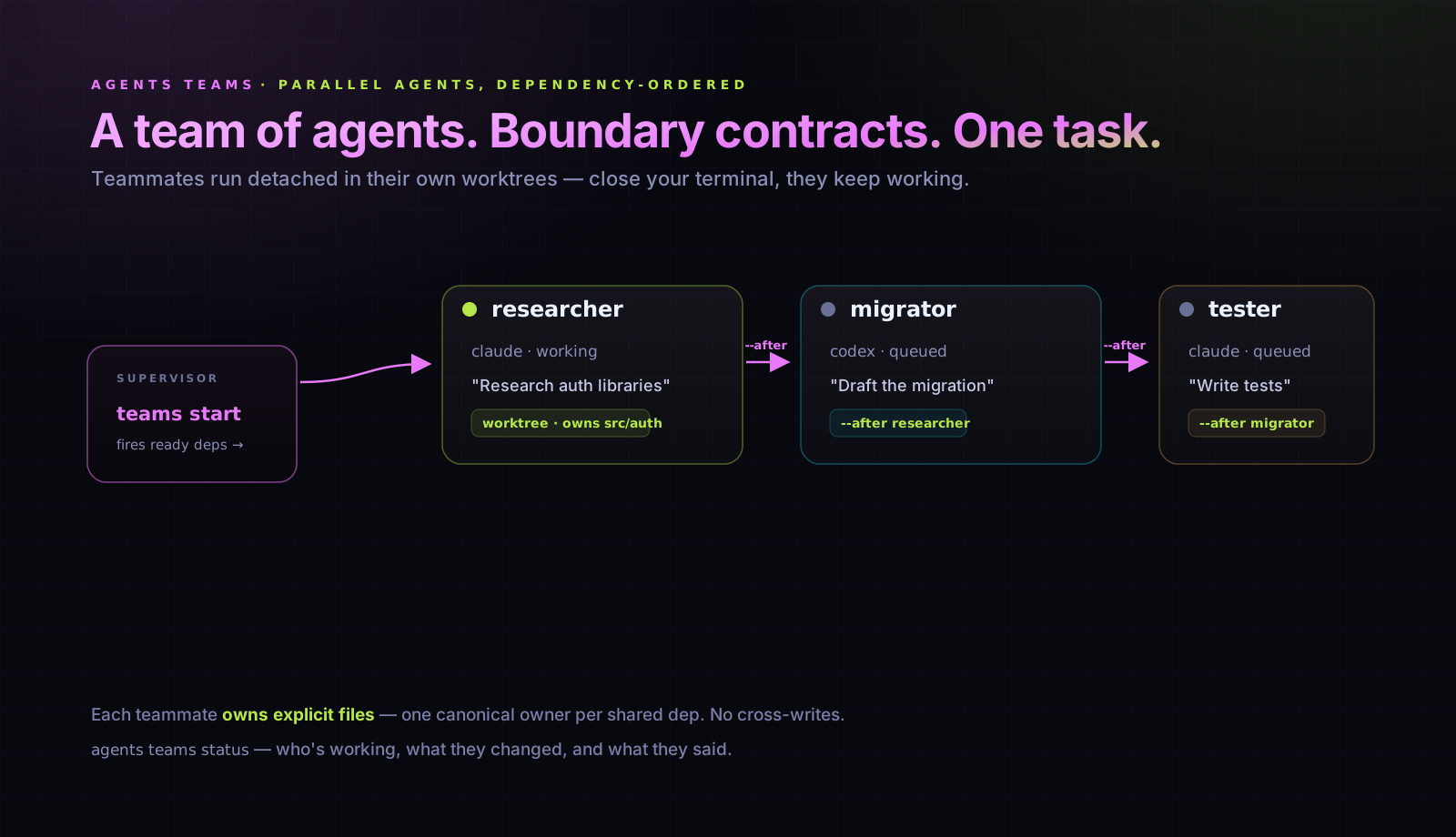
agents teams create auth-feature

# Research first, then implement, then test.
agents teams add auth-feature claude "Research auth libraries"       --name researcher
agents teams add auth-feature codex  "Draft the migration"           --name migrator --after researcher
agents teams add auth-feature claude "Write tests for the new code"  --name tester   --after migrator

agents teams start auth-feature     # Fires teammates whose deps are done
agents teams status auth-feature    # Who's working, what they changed, what they said
Teammates run detached -- close your terminal, they keep working. Check in with teams status, glance at a teammate's summary with teams logs <name> (add --full for the raw output), clean up with teams disband.
Team state is observable via agents teams list --json / agents teams status --json (compact by default; add --verbose for the full per-teammate shape). External tools join it with sessions --json (teammates get isTeamOrigin: true) and cloud list --json (for --cloud teammates) to build a unified fleet view. See docs/observability.md.
Cloud
Some work shouldn't tie up your laptop. agents cloud run hands a task to a managed provider that clones the repo, plans, implements, tests, and opens a PR -- while your terminal stays free. The host provider dispatches the same way onto machines you own: agents cloud run "…" --host gpu-box (tasks track in agents cloud ps and agents hosts ps alike).
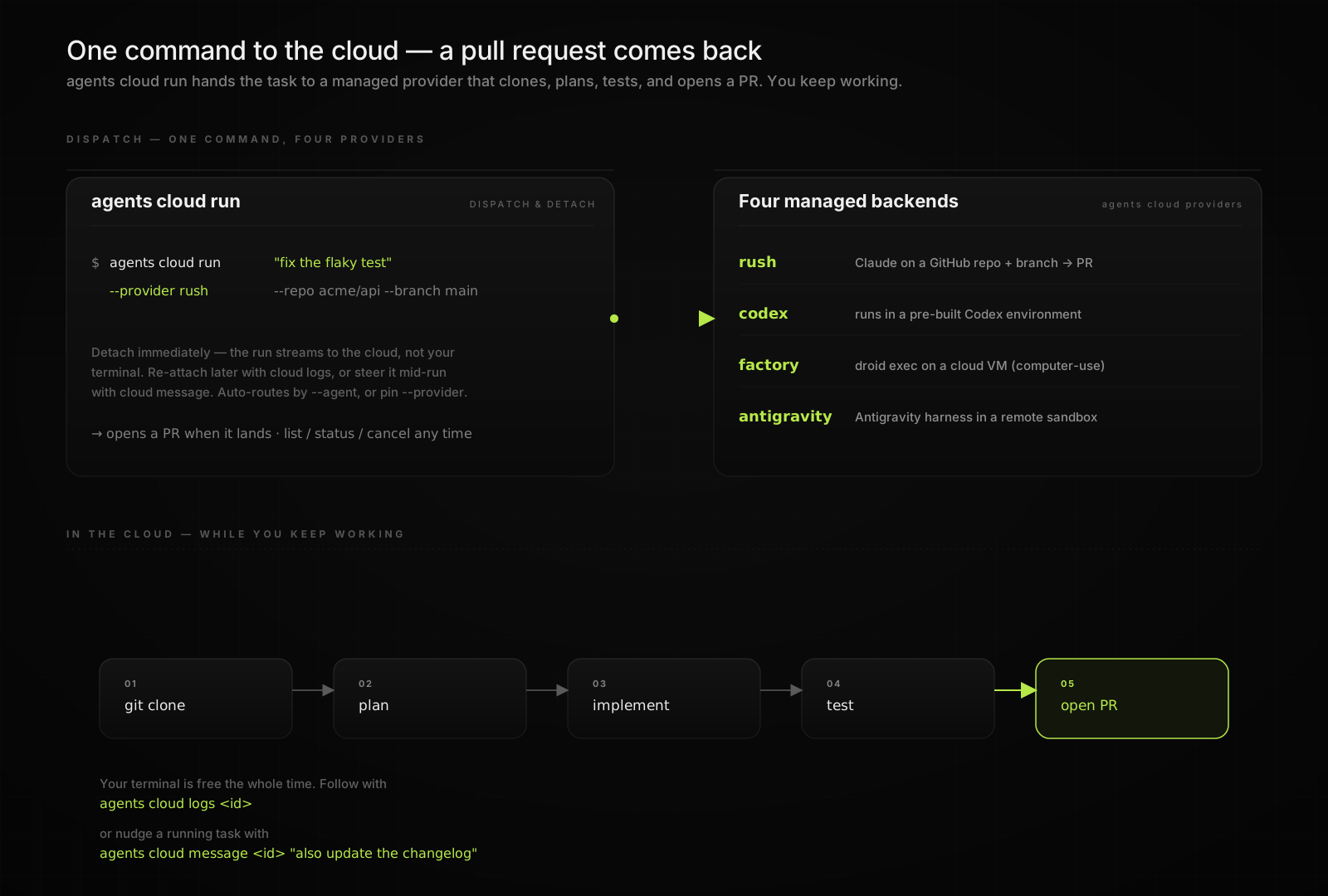
# Dispatch and detach — streams to the cloud, not your terminal.
agents cloud run "fix the flaky test in the payments suite" \
  --provider rush --repo acme/api --branch main

agents cloud list                                      # what's running, queued, or needs review
agents cloud logs <id>                                 # re-attach and stream
agents cloud message <id> "also update the changelog"  # steer it mid-run
agents cloud cancel <id>
Five managed backends behind one interface (agents cloud providers):
| Provider | What runs | Notes |
|---|---|---|
rush |
Claude against a GitHub repo + branch | Opens a PR. Multi-repo via repeatable --repo; attach screenshots with --image for vision dispatch. |
codex |
A pre-built Codex Cloud environment | Target it with --env. |
factory |
droid exec on a cloud VM |
Computer-use; pick the box with --computer. |
antigravity |
Gemini managed agents | Antigravity harness in a remote sandbox. |
cursor |
Cursor Cloud Agents | v1 REST API with repo, status, SSE, cancel, and follow-up runs. |
Auto-routes each --agent to its native cloud, or pin the backend with --provider. Instead of dispatching now, register a run as an event trigger with --on pull_request (also push, issue_comment, workflow_run) -- it persists as a trigger-bound routine that fires on the event. --json on every subcommand for scripting.
The same dispatch is a placement on agents run: agents run claude "fix the flaky e2e" --cloud --repo acme/api routes through the identical provider registry and tracks in agents cloud list/status/logs alike. --cloud sits alongside --host/--device/--lease as one of three placements (local, machine, cloud) and is mutually exclusive with them; --where cloud[:provider] is the one-door spelling. Agents without a native cloud fail loud unless --provider is given.
Workflows
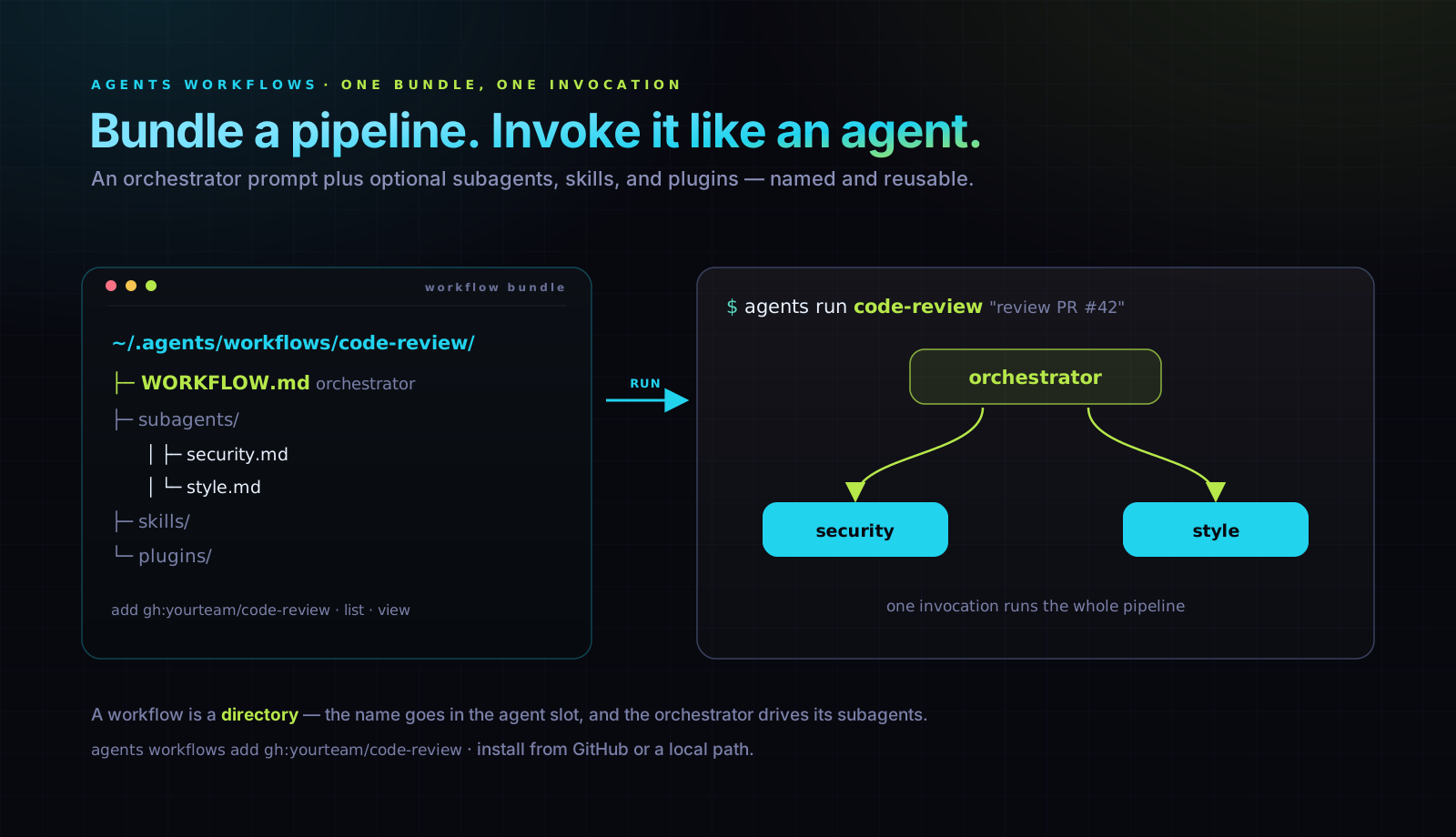
Bundle an orchestrator prompt with optional subagents, skills, and plugins into a named, reusable pipeline. One bundle, one invocation.
# Use a workflow — workflow name goes in the agent slot
agents run code-review "review PR #42 on acme/api"

# List + inspect
agents workflows list
agents workflows view code-review

# Install from GitHub or local
agents workflows add gh:yourteam/code-review
agents workflows add ./my-workflow
A workflow is a directory:
~/.agents/workflows/code-review/
  WORKFLOW.md          # YAML frontmatter + orchestrator system prompt
  subagents/           # optional: *.md files exposed to the orchestrator
    security.md
    style.md
  skills/              # optional: knowledge packs scoped to this workflow
  plugins/             # optional: plugin bundles
WORKFLOW.md's Markdown body is the orchestrator's system prompt. Files under subagents/ get copied to ~/.claude/agents/ at run time so the built-in Agent tool can dispatch to them by name — including in parallel. skills/ and plugins/ sync into the version home just for the run.
# WORKFLOW.md frontmatter
---
name: Code Review
description: Evidence-grounded PR review with file:line citations.
model: opus
tools:
  - Read
  - Grep
  - Bash
  - WebFetch
---
Workflows that need to write — post PR comments, edit files, send Slack — should run with --mode edit, or --mode auto on Claude Code and GitHub Copilot. Reserve --mode skip (legacy alias: full) for last-resort bypasses. agents run defaults to --mode plan for other harnesses; Codex defaults to its safe writable profile. An explicit Codex --mode plan is read-only with network access.
Resolution is project > user > system: a <repo>/.agents/workflows/<name>/ overrides a same-named workflow in ~/.agents/workflows/. Commit project workflows with your repo so teammates get the same pipeline.
Plugins
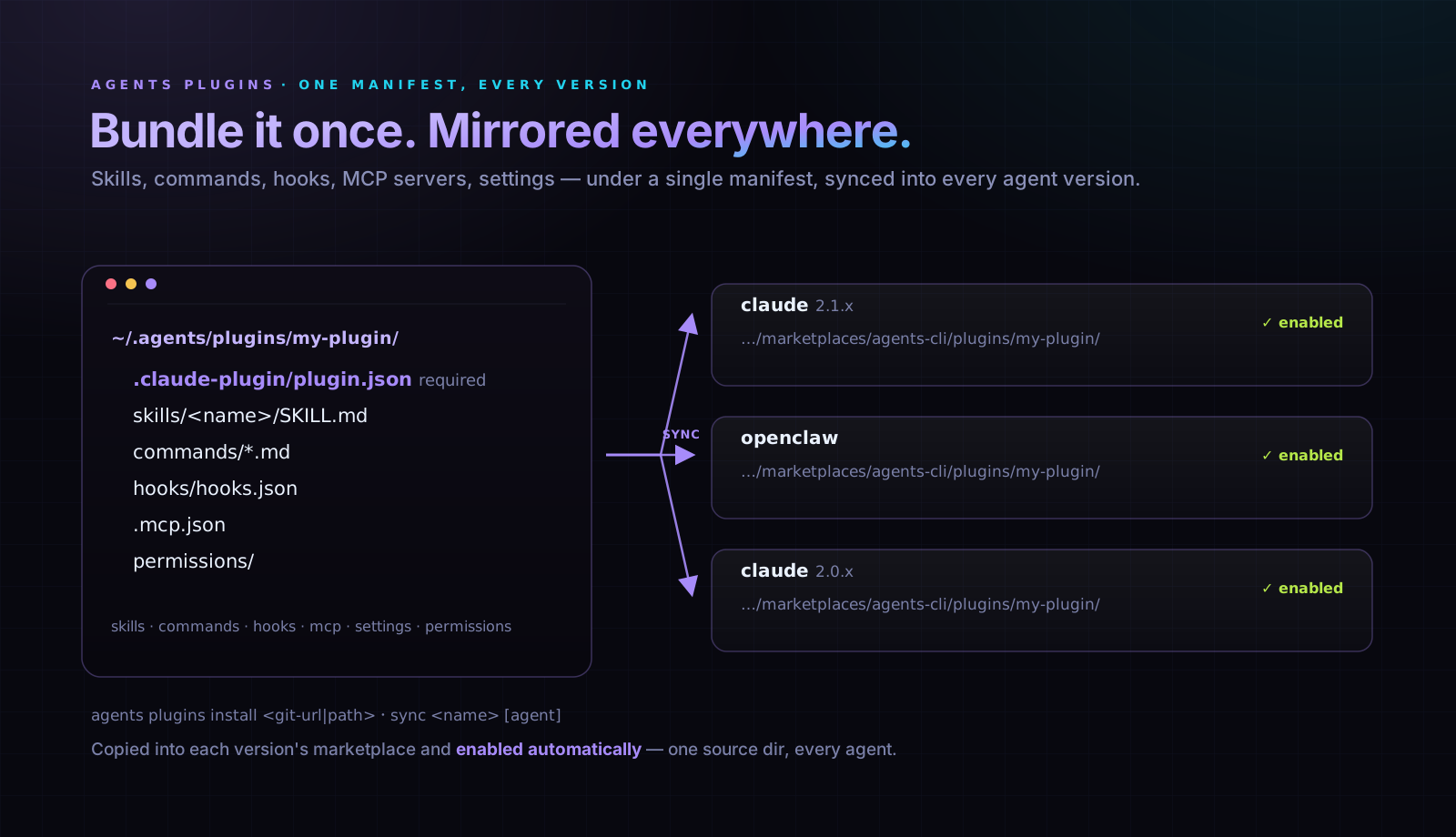
Bundle skills, commands, hooks, MCP servers, settings, and permissions under a single manifest. One source dir at ~/.agents/plugins/<name>/, mirrored into every installed Claude / OpenClaw version automatically.
# Install from a git URL or local path
agents plugins install hivemind@https://github.com/activeloopai/hivemind.git
agents plugins install ./my-plugin
agents plugins add ./my-plugin

# Apply to one agent (default version) or all supported
agents plugins sync rush-toolkit claude
agents plugins sync rush-toolkit
A plugin is a directory with a manifest:
~/.agents/plugins/my-plugin/
  .claude-plugin/plugin.json       # required: { name, version, description }
  skills/<name>/SKILL.md           # optional
  commands/*.md                    # optional
  hooks/hooks.json                 # optional — executable surface
  .mcp.json                        # optional — executable surface
  bin/, scripts/, settings.json    # optional — executable surface
  permissions/                     # optional — executable surface
On sync, agents-cli copies the plugin into each version home's marketplace (<home>/.claude/plugins/marketplaces/agents-cli/plugins/<name>/), registers the synthetic marketplace, and flips settings.json#enabledPlugins[<name>@agents-cli] = true so Claude / OpenClaw load it.
Executable-surface gate
Plugins that ship hooks/, .mcp.json, bin/, scripts/, settings.json (non-permissions), or permissions/ can execute code on session events. agents-cli requires explicit consent before flipping enabledPlugins:
# Hooks-bearing plugins copy in but stay disabled by default
agents plugins install hivemind@https://github.com/activeloopai/hivemind.git \
  --allow-exec-surfaces

# Same gate on re-sync (e.g., after upstream updates)
agents plugins sync hivemind claude --allow-exec-surfaces
Skills, commands, and subagents are declarative and never trip the gate. The gate is per-plugin, per-install: consenting to hivemind doesn't grant blanket exec-surface trust to anything else.
Version portability
Plugins live in the user repo (~/.agents/plugins/), not inside any single version home. Switching Claude via agents use claude@<v> re-syncs the plugin into the new version automatically — no re-install. New Claude versions added later pick it up on their first sync. Project-level <repo>/.agents/plugins/<name>/ overrides a same-named user plugin (resolution is project > user > system, same as every other resource).
Make it yours
White-label the CLI. agents setup mine mints a personally-named binary — jack instead of agents — that is agents-cli: same tool, your name, running the exact feature set you choose. Anyone can mint their own; Jack and Pranjal each get an independent brand.
agents setup mine                      # wizard: pick a name, check off what to disable
agents mine init jack --disable teams cloud   # or non-interactively

jack run claude "hello"                # every agents verb, under your name
jack --help                            # help, version, and errors all read "jack"
Manage brands with agents mine list | toggle | remove:
agents mine toggle jack --disable-plugin rush --disable-skill deploy
agents mine toggle jack --enable teams
agents mine remove jack --purge
Under the hood, init drops a pure pass-through shim in ~/.agents/.cache/shims/<name> (already on PATH) that sets AGENTS_BRAND and forwards every argument to the same binary — nothing is copied or forked. The brand's config lives in ~/.agents/agents.yaml (brands.<name>), so it rides agents repo push/pull across your fleet. Disabling a command hides it only under that brand; plain agents / ag keep every command. Curated skills/plugins/MCP ride a per-brand resource profile. Full reference: Make it yours.
Personal use is free and Apache-2.0. Redistributing a branded build commercially will require a license in a future release.
Browser
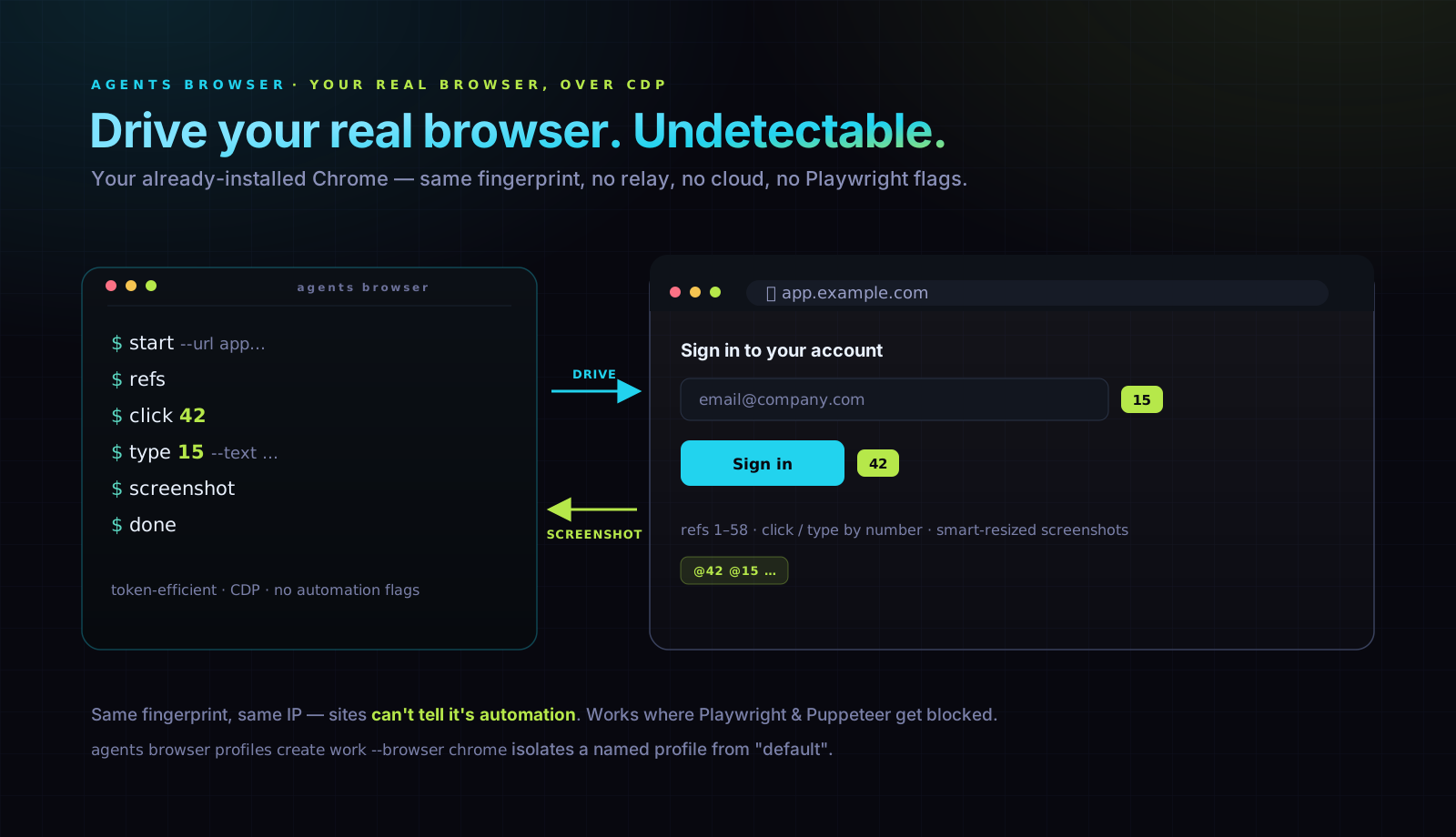
Give agents access to a real browser — no relay extension, no cloud service, no Playwright getting blocked.
# First run: omit --profile and we auto-pick the first installed Chromium-family
# browser. macOS prefers Chrome > Brave > Edge > Chromium > Comet; Linux prefers
# Chrome > Chromium > Brave > Edge; Windows prefers Edge (always preinstalled) >
# Chrome > Brave > Comet. The auto-picked profile is saved as "default" for later runs.
export AGENTS_BROWSER_TASK=$(agents browser start --url https://app.example.com)

# Or pin a named profile to a specific browser (chrome, comet, brave, chromium,
# edge, or custom) when you want isolation from "default".
agents browser profiles create work --browser chrome
# `start` writes the resolved name (e.g. `swift-crab-falcon-a3f92b1c`) to stdout
# and human-friendly commentary to stderr, so $(...) capture stays clean.
export AGENTS_BROWSER_TASK=$(agents browser start --profile work --url https://app.example.com)
agents browser refs                  # Get interactive element refs
agents browser click 42              # Click element ref 42
agents browser type 15 --text "hello"  # Type into element ref 15
agents browser screenshot            # Smart resizing, token-efficient
agents browser tabs                  # List tabs open for the current task
agents browser tab focus tab123      # Switch focus to another tab
agents browser done                  # Close task's tabs when finished

# Need to address a different task in the same shell? Override per call:
agents browser screenshot --task other-flow

# Repeated observe/action loops: one Node process and daemon socket stay warm.
printf '%s\n' \
  '{"action":"screenshot","path":"/tmp/page.jpg"}' \
  '{"action":"click","atX":320,"atY":540}' \
  | agents browser stream --task "$AGENTS_BROWSER_TASK"
Why this works where Playwright fails
Playwright and Puppeteer spin up fresh browser instances with automation flags. Sites like LinkedIn, Google, and most finance apps detect and block them immediately.
agents browser launches your existing residential Chrome (or Brave, Edge, Chromium) on your machine via CDP. Same browser fingerprint, same IP, same everything. Sites can't detect automation because you're using the same browser you'd use manually.
Token-efficient automation
The CLI handles the mechanical work so agents don't burn tokens on low-level browser commands. Screenshots are automatically resized without excessive compression — agents process smaller images while keeping the detail they need to make decisions.
Profile isolation
Multiple agents can run browser tasks simultaneously without stepping on each other. Each profile gets its own user data directory, cookies, and state. One agent logs into your work Slack, another into your personal email — no conflicts, no shared state.
agents browser profiles create work-slack --browser chrome
agents browser profiles create personal-gmail --browser chrome
# Two agents, two profiles, no interference
Safe credential access
Attach a secrets bundle to a profile. The agent can log in without credentials in plaintext, and every secret access is recorded in the session log.
agents browser profiles create bank --browser chrome --secrets bank-creds
Electron apps
Control Electron apps (Slack, Discord, VS Code, your own app) with custom binaries:
agents browser profiles create slack \
  --browser custom \
  --binary "/Applications/Slack.app/Contents/MacOS/Slack" \
  --electron
Remote browsers
Connect to browsers running anywhere — local, SSH tunnels, or cloud services:
# Local CDP (discovers WebSocket URL automatically)
agents browser profiles create local-debug \
  --browser chrome \
  --endpoint "http://localhost:9222"

# SSH tunnel to a remote machine
agents browser profiles create staging \
  --browser chrome \
  --endpoint "ssh://[email protected]?port=9222"

# Cloud browser services (BrowserBase, Steel, etc.)
agents browser profiles create cloud \
  --browser chrome \
  --endpoint "wss://connect.browserbase.com?apiKey=..."
Accounts
Give a provider credential a durable name once, reuse it everywhere -- across harnesses, across machines.
agents accounts add work --provider anthropic --auth setup-token
agents accounts add gateway --provider openrouter --auth api-key \
  --from-secrets openrouter.ai:OPENROUTER_API_KEY  # import from an existing secrets bundle
agents accounts add deepinfra --provider deepinfra --auth api-key

agents accounts set-default claude work   # claude uses `work` when --account is omitted
agents accounts sync work --device yosemite-s0   # explicitly copy the bundle to a worker device
agents run claude --account work
agents profiles add deepinfra --account deepinfra
One provider account is one agents secrets bundle -- agents accounts add creates it with secrets policy never, so a background agent launch on that account never raises Touch ID. agents accounts (no subcommand) lists provider bundles next to harness-native signed-in identities so you see both kinds of credential together; accounts list / inspect <name> / set-key <name> (rotate) / rename / remove manage a bundle by its stable id, independent of its current label.
Harness-native OAuth logins (Claude Code's own /login, codex login, and so on) stay exactly where the harness put them -- agents-cli discovers and displays them but never copies, renames, or converts them into a provider bundle. accounts sync <name> --device <device> is the only way a provider account crosses machines, and it's explicit: nothing syncs automatically. Selection order for a run is explicit --account, then accounts set-default for that harness, then the harness's native/balanced account behavior.
Secrets
Platform:
agents secretsrequires macOS Keychain or Linux libsecret.
On Windows (non-WSL), use environment variables or a.envfile instead.
# API keys in Keychain, not in .env files.
agents secrets create prod-stripe
agents secrets add prod-stripe STRIPE_SECRET_KEY     # Prompts, stores in Keychain
agents secrets add prod-stripe TEST_CARD --value "4242..."

# Injected at run time. Bundle definitions live in the Keychain, not on disk.
agents run claude "charge a test card" --secrets prod-stripe
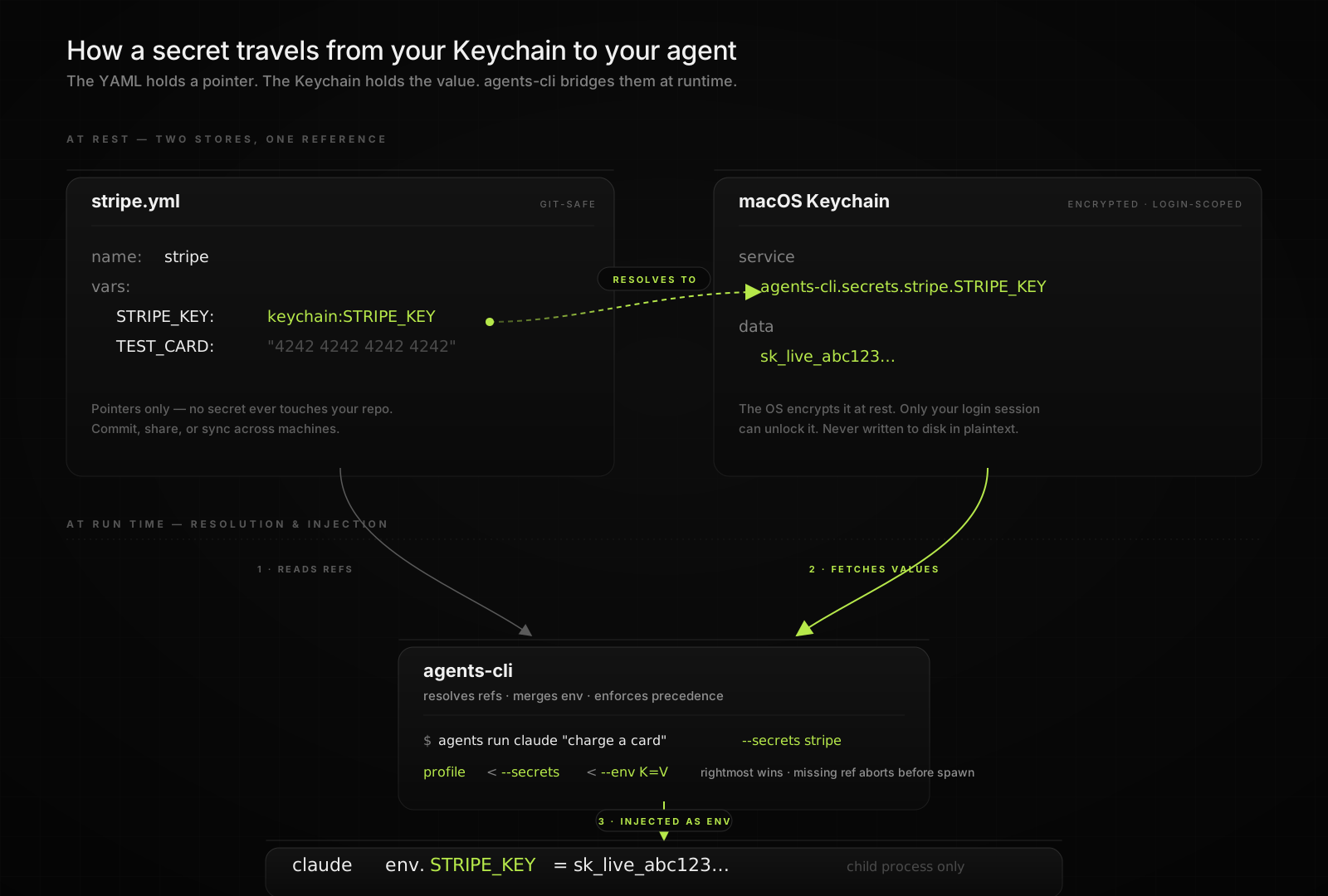
Merge order: profile env < --secrets < --env K=V. A missing keychain item aborts before the child starts.
Cross-machine sync via iCloud Keychain
Secret bundles sync through iCloud Keychain by default. Sign into the same iCloud account on another Mac (with iCloud Keychain enabled) and the bundle appears there within seconds — no copy-paste, no .env files emailed to yourself, no shared secret stores. Pass --no-icloud-sync when creating a bundle if it should stay device-local.
# On laptop:
agents secrets create npm-tokens
agents secrets add npm-tokens NPM_TOKEN          # value lives in iCloud Keychain

# On another Mac (same iCloud account):
agents secrets list                              # npm-tokens is already there;
agents run claude "..." --secrets npm-tokens     # injects NPM_TOKEN automatically
Under the hood, synced bundles route writes through a notarized helper app (Agents CLI.app) that holds the entitlement macOS requires for kSecAttrSynchronizable. Bundles created with --no-icloud-sync stay device-local.
Bundle definitions sync via iCloud Keychain too — no agents repo push needed for secrets, no recreate step on each Mac. Nothing about secrets ever lives in plaintext on disk.
Per-secret metadata and rotation
Tag each secret with --type, --expires, and --note so the bundle is self-documenting. --expires is always future-dated (YYYY-MM-DD); past or same-day values are rejected. Use agents secrets rotate <bundle> <key> to refresh a credential — add only creates new keys, rotate replaces the value and preserves metadata unless overridden.
agents secrets add prod STRIPE_API_KEY --type api-key --expires 2027-01-15 --note "Live key, owner: payments-team"
agents secrets rotate prod STRIPE_API_KEY --note "rotated after suspected leak"
agents secrets list   # EXPIRING column flags secrets due in the next 30 days
Routines
# Claude Code reviews PRs every weekday at 9 AM. Scheduler auto-starts.
agents routines add daily-digest \
  --schedule "0 9 * * 1-5" \
  --agent claude \
  --project-anchor agents-cli \
  --cwd apps/cli \
  --prompt "Review yesterday's PRs and summarize key changes"

agents routines list                   # All jobs + next run times
agents routines run daily-digest       # Test it now, ignore the schedule
agents routines logs daily-digest      # Last execution — status + report (add --full for raw stdout)
agents routines runs daily-digest      # Every attempt, including blocked/skipped pre-session runs
agents routines doctor daily-digest    # Project/CWD/trust/write/auth readiness
agents routines stats                  # Run count, failed, missed, avg/p50/p95 duration — per job or all

# Definitions sync to every device; activation is stored per hostname
agents routines add nightly-drain --schedule "0 3 * * *" --agent claude \
  --cwd '~' \
  --prompt "Drain the local work queue"

agents routines devices nightly-drain --set yosemite-s0           # one schedule owner
agents routines list --host yosemite-s0                            # query another device

# Signed webhook trigger: Linear issue labeled "agent" fires a routine
agents routines add agent-labeled-issue --on linear:Issue --action update \
  --team-key RUSH --label agent --agent claude \
  --cwd '~' \
  --prompt "Work the Linear issue that was just labeled agent"
agents webhook serve --secrets-bundle webhooks --port 8787          # /hooks/linear, /hooks/github
agents daemon funnel up yosemite-s0 --local-port 8787 --port 443    # public HTTPS ingress
Jobs run sandboxed -- agents only see directories and tools you explicitly allow.--project tags a routine into a project group for listings only -- it never
decides where the body runs. The reliability contract (execution anchor + --cwd,
readiness that saves a blocked routine paused, and the blocked/skipped run
statuses) is specified in
docs/specifications.md §Routine execution & readiness;
some of it is planned (RUSH-2290), and the section marks what is landed vs intended.
Daemon
Routines, the secrets broker, browser IPC, and the watchdog pass all run inside
one always-on daemon per device. agents daemon is its runtime surface:
agents daemon                # identity + duplicates + per-service health (same as status)
agents daemon status --json  # machine-readable, for scripts / AGI EXT

agents daemon start          # start it (bypasses daemon.enabled -- the deliberate override)
agents daemon stop           # stop it
agents daemon restart        # stop then start

agents daemon disable        # persist daemon.enabled: false -- nothing auto-starts it
agents daemon enable         # clear the kill switch

agents daemon reload                        # SIGHUP -- reload jobs, re-evaluate scheduler.enabled, no restart
agents daemon services                      # health of the two hosted services (secrets broker, browser IPC)
agents daemon services list                 # every toggleable service and its current on/off state
agents daemon services enable secrets-broker
agents daemon services disable browser-ipc  # stop hosting browser IPC without stopping the daemon
agents daemon logs -f --level warn --since 1h
agents daemon doctor                        # one-shot health check; non-zero exit on problems
Each hosted responsibility (secrets broker, browser IPC, scheduler, monitors,
watchdog, device probe, self-heal, keychain reap, account-state refresh,
state-dir checks) is an independent toggle in ~/.agents/daemon/services.yaml.agents daemon services list shows every service; enable|disable <id> flips
one. Missing keys default to enabled, so upgrades are no-ops. Most services take
effect on the next daemon start; scheduler and monitor engine also re-evaluate
on SIGHUP reload.
There is no agents daemon jobs -- scheduled work is always agents routines
(see agents routines stats for per-routine failure detail). disable is a
device-local kill switch: with it set, routines add/routines start/routines catchup/webhook triggers stop auto-starting the daemon, mirroringsystemctl disable -- agents daemon start still works as the explicit
override.
Monitors
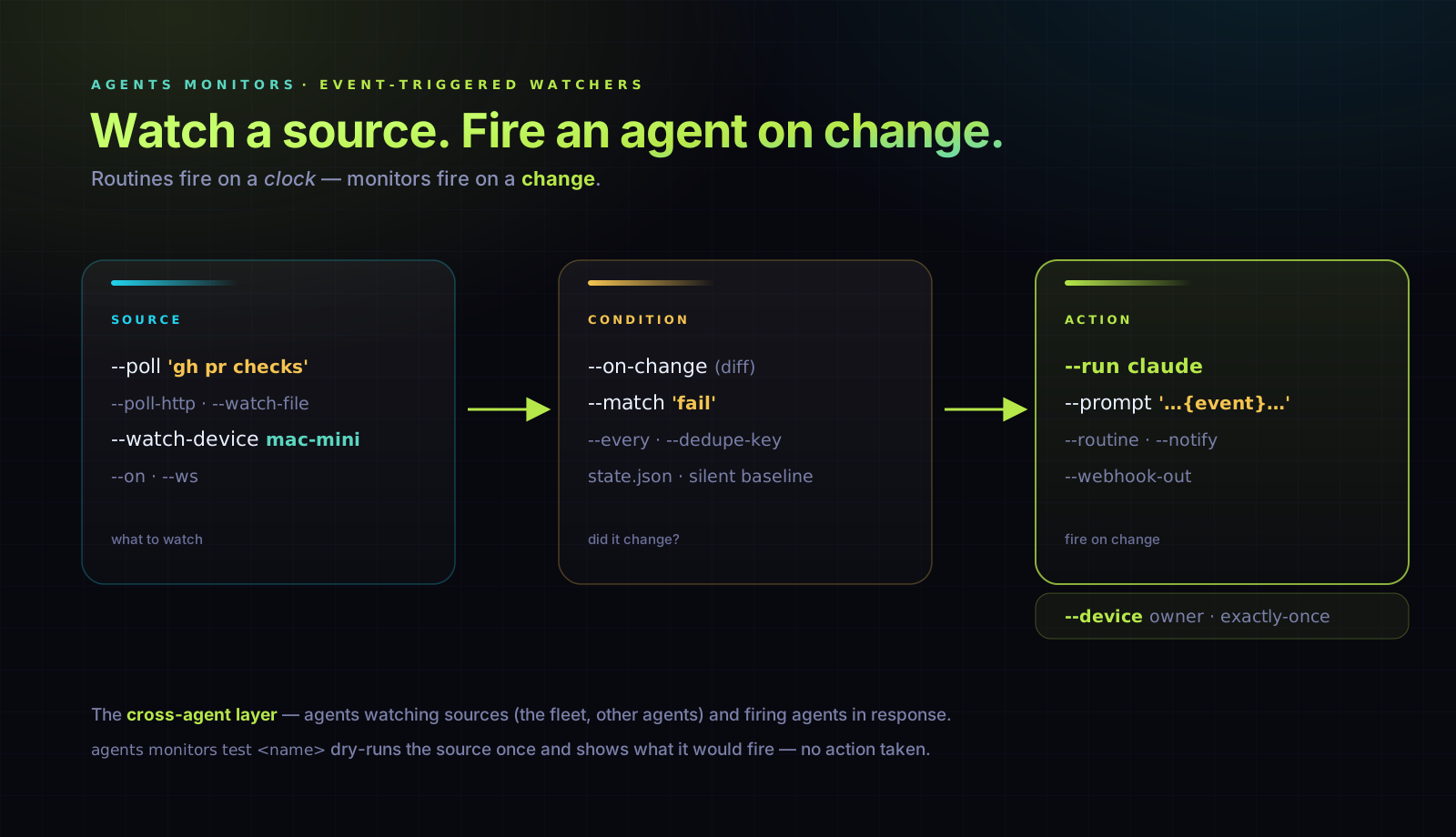
# Routines fire on a clock. Monitors fire on a change: watch a source, and when
# it flips, spawn an agent, kick a routine, or notify. The cross-agent layer --
# agents watching sources (including the fleet and other agents) and reacting.

# CI goes red -> a Claude agent triages it (poll a command, diff, match a pattern)
agents monitors add ci-red \
  --poll 'gh pr checks 1249 --json name,bucket' 30s --match fail \
  --run claude --prompt 'CI failed: {event}. Diagnose and fix.' \
  --device yosemite-s0

# A fleet box goes unreachable or overloaded -> notify (watch the fleet itself)
agents monitors add box-down --watch-device mac-mini --on-change --notify telegram

# Poll an endpoint every 8h; fire once when the body flips to "issued"
agents monitors add cert-issued \
  --poll-http 'https://secure.ssl.com/.../order' 8h --match issued --notify telegram

agents monitors test ci-red    # Dry-run: evaluate the source once, show what it would fire -- no action
agents monitors list           # Every monitor: source, owner device, last fired
Sources: a command's stdout (--watch / --poll), an HTTP endpoint (--poll-http), a file (--watch-file), or a fleet device's reachability + load (--watch-device). Push sources -- a signed webhook (--on) and a WebSocket (--ws) -- are accepted today and delivered through a receiver wired in a follow-up. Conditions: fire on any change (--on-change), on a regex (--match), or --every tick -- deduped by a native state store, so a monitor stays silent until something actually changes. Actions: --run <agent> (the event is injected into the prompt as {event}), --routine, --notify, or --webhook-out. Pin a monitor to one owner device with --device (exactly-once), or offload the action elsewhere with --run-on. Runs in the routines daemon; agents monitors pause / resume any time.
Share
# Publish an HTML artifact to a public link on your own Cloudflare R2 (~$0).
agents artifacts setup                                      # once: provision bucket + Worker on your CF
agents artifacts share plan.html --slug fleet --expire 30d  # → https://<base>/fleet
agents artifacts share plan.html --json                     # URL object for plan-render hooks
agents artifacts share status                               # show the endpoint
agents unshare fleet                                        # take a published link (+ its OG cover) down
agents artifacts share closes the loop: an agent makes work (a plan, a viz, a report),
publishes it, and you open the link to see it. setup reads a Cloudflare API token
from your cloudflare.com secrets bundle (or --token), creates an R2 bucket, uploads
a tiny Worker, and enables the free *.workers.dev subdomain (or maps --domain share.example.com when the token owns the zone). Writes are bearer-gated through
the Worker (its R2 binding does the put, so the client needs no S3 keys); reads are
public, so a link outlives the agent. R2 has zero egress + a 10 GB free tier, so
this is effectively free.
Fleet mode: provision one endpoint, then every fleet / cloud / ephemeral agent
publishes through it with a shared write token — agents artifacts share join <baseUrl> uses an
existing endpoint with no provisioning. --expire 30d|12h|<date> auto-expires a link.--json emits { url, coverUrl, expiresAt } so plan-render automation can publish the
rendered HTML and post the returned link without scraping terminal text.
agents artifacts share delete <targets...> (alias agents unshare) takes a page down — pass a
full URL, <user>/<slug>, or a bare slug (resolved against your own namespace); several
targets at once are fine. It also deletes the sibling <slug>.png OG cover by default
(--keep-cover opts out) and verifies the page actually 404s before reporting success —
the Worker's delete is idempotent, so {"ok":true} alone is never proof.
See docs/share.md.
PTY
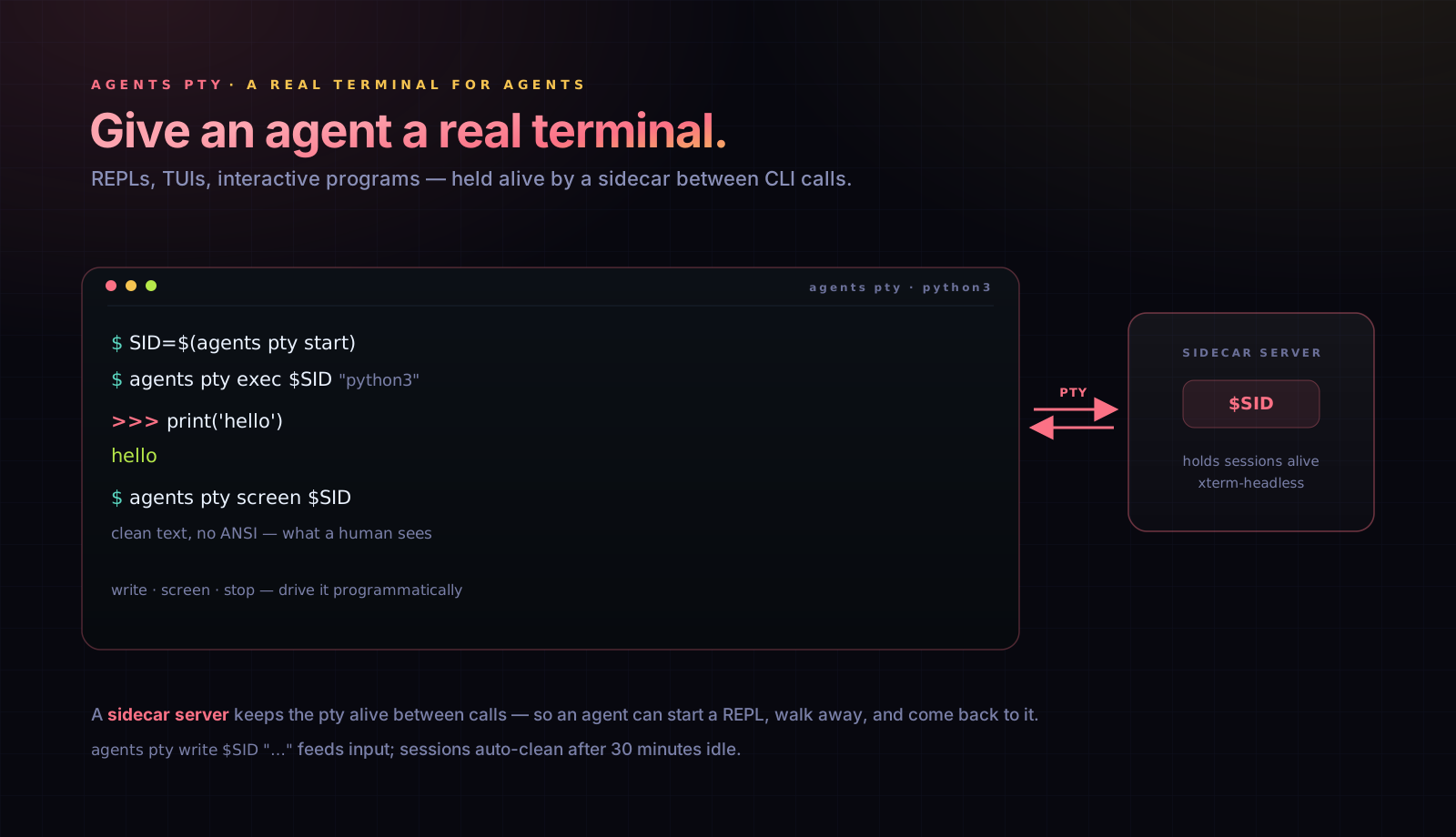
# Give agents a real terminal for REPLs, TUIs, interactive programs.
SID=$(agents pty start)
agents pty exec $SID "python3"
agents pty screen $SID                # Clean text, no ANSI -- what a human sees
agents pty write $SID "print('hello')\n"
agents pty stop $SID
A sidecar server holds sessions alive between CLI calls. screen renders via xterm-headless. Sessions auto-clean after 30 minutes idle.
Portable setup
# New machine? One command.
agents setup

# Installs CLIs, registers MCP servers, syncs skills/commands/rules/hooks,
# sets up shims, configures defaults. Done.

agents repo push     # Snapshot your config to git
How config is layered
Two repos with the same shape, different roles:
| Repo | Role | Owner |
|---|---|---|
~/.agents-system/ |
System repo — core/built-in skills, commands, hooks, rules, MCP configs, permissions, and profiles that ship with agents-cli. The defaults every install gets. |
Maintained upstream at phnx-labs/.agents-system |
~/.agents/ |
User repo — your personal additions and overrides. This is what agents repo push/pull syncs. |
You |
Version pinning: agents.yaml at project root pins which agent version to use (like .nvmrc for Node).
Resource resolution: When syncing resources (commands, skills, rules, hooks, MCP, permissions), the order is project > user > system. A .agents/ directory at project root wins, then ~/.agents/, then ~/.agents-system/. Same-named resources higher in the chain override lower ones; everything else unions in. Run agents view --merged to see the effective skills, commands, MCP servers, hooks, rules, plugins, workflows, and subagents, with each row tagged by its winning layer.
See docs/concepts.md for the full mental model: DotAgents repos, resource kinds, and how resolution works end-to-end.
Other useful commands: agents doctor checks CLI availability and resource sync drift, agents usage shows available quota/rate-limit data for installed agents, agents budget shows cross-vendor spend caps and current spend-to-cap (and enforces pre-flight estimates + a hard-cap kill-switch on every run — see docs/observability.md), agents import adopts an existing unmanaged install, agents trash lists and restores soft-deleted version directories, and agents subagents installs reusable subagent definitions for parent-agent workflows.
Menu bar
On macOS, agents-cli puts a status item in your menu bar -- a live glance at what your agents are doing, plus a Spotlight-style bar for filing work without breaking focus.
agents menubar setup       # configure end-to-end: one instance, started at login
agents menubar status      # is it installed and running?
There is only ever one agents mark: the helper takes a lock at launch, so a
second copy surfaces the running one's menu and exits instead of adding a
duplicate icon. agents menubar setup is the recovery command when a machine is
already wrong -- it ends any duplicate, installs the bundle, wires the login
item, and verifies exactly one helper came back up.
The dropdown surfaces a NEEDS YOU queue (agents waiting on a question, a plan review, or a permission prompt), the running roster, and a routines summary -- the same live state as agents sessions --active, one click away.
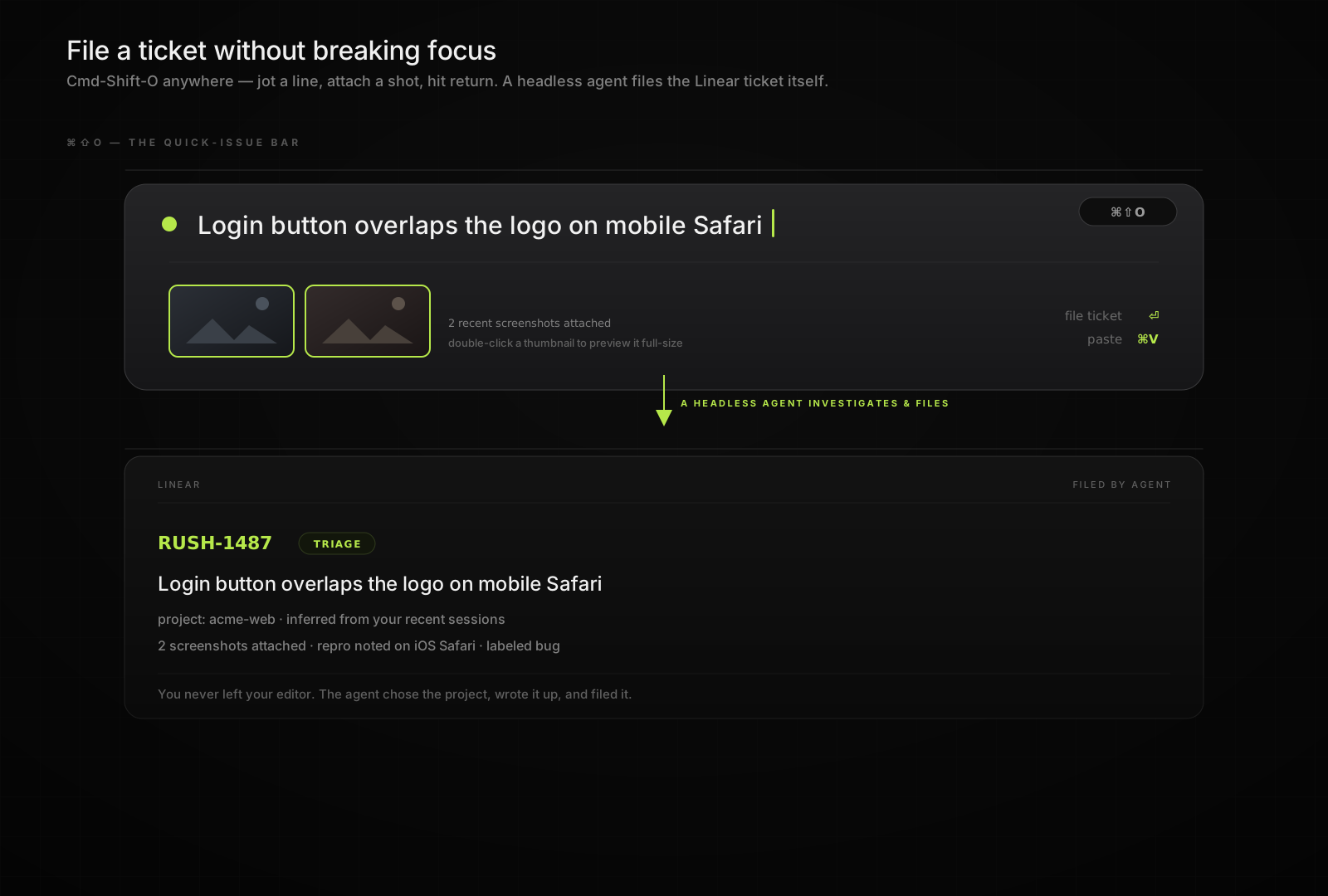
Quick-issue bar (⌘⇧O)
Press Cmd-Shift-O anywhere for a thin capture surface: the prepared text field appears immediately while repo, thumbnail, and ticket rows hydrate in the background. Type a one-line note, Cmd-V to paste, and attach one or more recent screenshots (double-click a thumbnail to preview it in full). Submit, and a headless agent picks the right project from your recent sessions, investigates, and files the Linear ticket itself -- you never leave what you were doing.
The bar also lists the open Linear tickets of the repo you picked, urgent first. Switching the repo switches the Linear project; typing filters the list, so an existing ticket shows up before you file a duplicate; and clicking a row (or ⌘1-⌘5) dispatches that ticket to the selected agents -- Run implements it, Plan posts a plan as a ticket comment.
Private skills
Keep work or personal skills in a separate repo — public ones in ~/.agents/, private ones in an extra repo that merges in at sync time.
# Add a private repo for work-only skills
agents repo add gh:yourname/.agents-work

# Add with a custom alias
agents repo add [email protected]:acme/team-skills.git --as acme

agents repo list          # Primary + every registered extra
agents repo pull          # Pull updates for all enabled extras
agents repo disable acme  # Stop merging without deleting
agents repo remove acme   # Unregister and delete the clone
Extras clone into ~/.agents-system/.repos/<alias>/ and ship the same layout as the primary (skills/, commands/, hooks/, rules/). Their contents merge into agent version homes after the primary's — so ~/.agents/ always wins on name collisions. agents skills list shows which repo each skill came from.
Security & Privacy
The CLI binary has no built-in telemetry or phone-home path. Routine commands run locally; explicit features such as cloud dispatch and iCloud Keychain sync send only the data needed for the action you invoke. Here's exactly what agents-cli stores locally and why.
Event log
Every agent run, version install, browser launch, and secrets access is logged to ~/.agents/.cache/logs/events-YYYY-MM-DD.jsonl. This gives you a complete record of what agents did on your machine.
# What gets logged (example event):
{
  "ts": "2026-05-09T10:23:45Z",
  "event": "agent.run.end",
  "agent": "claude",
  "version": "2.1.121",
  "prompt": "Fix the auth bug in...",  # truncated to 200 chars
  "durationMs": 45230,
  "exitCode": 0,
  "hostname": "your-mac",
  "platform": "darwin"
}
What's logged: Operation type, agent, version, timing, prompt length + SHA-256 hash (raw text never stored), exit codes, errors, and secret bundle/key names with caller context. Argv entries that look like tokens or secret paths are redacted. What's NOT logged: Raw prompts, outputs, file contents, or secret values.
Permissions: Logs directory is 0700 (owner-only), files are 0600. Only you can read them.
Retention: 7 days by default, then auto-pruned.
Opt out: Set AGENTS_DISABLE_EVENT_LOG=1 in your shell to disable completely.
Session search
Conversations with Claude, Codex, legacy Gemini, and other agents scatter across their native storage. Session search indexes them locally so you can find any conversation:
agents sessions "auth middleware"     # Full-text search across all agents
agents sessions --agent claude --since 7d
agents sessions --include tools --query 'program:git' --fleet --json
agents sessions --include tools --query 'program:git' --count --fleet --json
agents sessions backfill tools --fleet
The index lives at ~/.agents/.history/sessions/sessions.db (SQLite + FTS5). A local query stays on the machine; an explicit --fleet tool query sends only redacted, bounded match evidence or aggregate counts over SSH. Historical tool parsing is explicit via sessions backfill tools; queries never parse transcripts. See Sessions for full usage.
Secrets
API keys and credentials are stored in macOS Keychain, never in plaintext files. Bundle definitions also live in Keychain.
agents secrets create my-keys
agents secrets add my-keys API_KEY    # Prompts for value, stores in Keychain
By default, secrets sync via iCloud Keychain to your other Macs. With --no-icloud-sync, they stay device-local. See Secrets for full usage.
Summary
| Data | Location | Who can read | Opt out |
|---|---|---|---|
| Event log | ~/.agents/.cache/logs/ |
You only (0600) | AGENTS_DISABLE_EVENT_LOG=1 |
| Session index | ~/.agents/.history/sessions/ |
You only | Delete the directory |
| Secrets | macOS Keychain | You + apps you authorize | Don't use agents secrets |
| Config | ~/.agents/ |
You only | N/A |
Compatibility
Which DotAgents resources each agent CLI can load. Source of truth: src/lib/agents.ts (capabilities); gates use supports(agent, cap, version) from src/lib/capabilities.ts. Full matrix also in docs/concepts.md.
Gemini CLI is hard-deprecated. Google retired it for free, Pro, and Ultra tiers on June 18, 2026 (announced at Google I/O 2026); the
geminicommand no longer serves requests on those tiers. agents-cli keeps the legacygeminiid only so old sessions/config can still be read.agents add gemini,agents import gemini, andagents sync geminifail and point to Antigravity CLI (antigravity), Google's official successor — see the transition notice.
| Agent | Versions | Hooks | MCP | Permissions | Skills | Commands | Plugins | Subagents | Rules | Workflows |
|---|---|---|---|---|---|---|---|---|---|---|
| Claude Code | yes | yes | yes | yes | yes | yes | yes | yes | CLAUDE.md |
yes |
| Codex CLI | yes | >= 0.116.0 | yes | no | yes | < 0.117.0 · skills ($name, >= 0.117) | >= 0.128.0 | no | AGENTS.md |
no |
| Antigravity | yes | yes | yes | yes | yes | yes | yes | no | AGENTS.md |
no |
| Grok Build | yes | yes | yes | yes | yes | skills ($name) | yes | no | AGENTS.md |
no |
| OpenClaw | yes | yes | yes | no | yes | gateway | yes | yes | workspace/AGENTS.md |
no |
| Cursor | yes | yes | yes | yes | yes | IDE + skills ($name) | yes | >= 2026.1.22 | .cursorrules |
no |
| OpenCode | yes | no | yes | >= 1.1.1 | yes | yes | no | no | AGENTS.md |
no |
| Copilot | yes | no | yes | no | yes | yes | no | no | AGENTS.md |
no |
| Amp | yes | no | yes | no | yes | yes | no | no | AGENTS.md |
no |
| Kiro | yes | no | yes | >= 2.8.0 | yes | yes | no | >= 1.23.0 | AGENTS.md |
no |
| Goose | yes | no | yes | no | no | no | no | no | AGENTS.md |
no |
| Roo Code | yes | no | yes | no | yes | yes | no | no | AGENTS.md |
no |
| Droid | yes | yes | yes | >= 0.57.5 | >= 0.26.0 | yes | yes | yes | AGENTS.md |
no |
Legend: yes / no = synced or skipped at install time. skills ($name) = no file-based slash-command dir; behavior ships as a generated skill invoked with $command. IDE + skills ($name) = an IDE command file plus a generated skill for the CLI. gateway = OpenClaw resolves slash commands at runtime, not from synced files. Version suffixes are enforced at sync time — out-of-range versions are skipped with a clear message.
Host CLIs (agents cli) are separate: YAML manifests under ~/.agents/cli/ install binaries onto your PATH (gh, higgsfield, etc.). They are not copied into per-agent version homes.
agents-cli features (not agent-native resources)
| Agent | Routines | Teams | Session index |
|---|---|---|---|
| Claude Code | yes | yes | yes |
| Codex CLI | yes | yes | yes |
| Cursor | -- | yes | -- |
| OpenCode | -- | yes | -- |
| Grok Build | -- | yes | yes |
| Antigravity | -- | yes | -- |
| Copilot | -- | -- | yes |
| OpenClaw, Amp, Goose, Roo | -- | -- | -- |
| Kiro | -- | -- | -- |
Version-gated sync
| Capability | Agent | Gate |
|---|---|---|
| Hooks | Codex | >= 0.116.0 |
| Subagents | Kiro | >= 1.23.0 |
| Skills | Droid | >= 0.26.0 |
| Permissions | Droid | >= 0.57.5 |
| Permissions | Kiro | >= 2.8.0 |
| File-based commands | Codex | < 0.117.0 (0.117+ uses command-as-skill) |
| Plugins | Codex | >= 0.128.0 |
Codex 0.117.0+ no longer reads .codex/prompts/; agents-cli converts slash commands into skills so they stay invocable as $name. OpenCode's plugin-based hook system is on the roadmap; hooks stay no until a writer ships.
Slash commands can declare per-agent/version targeting in frontmatter (agents:, since:, until:). Gating applies when syncing from ~/.agents/commands/ (user/system) into version homes — project .agents/commands/ files are read in place and are not filtered by agents:.
FAQ
Why use agents instead of claude / codex / antigravity directly?
Claude Code, Codex CLI, Antigravity, Grok Build, and others each have their own config format, MCP setup, version management, and skill system. If you use more than one, you maintain N copies of everything. agents gives you one interface, one config source, and one place to pin versions -- plus features the individual CLIs don't ship: cross-agent pipelines, shared teams, unified session search, and project-pinned versions like .nvmrc.
Is it free?
Yes. This developer tool is entirely free because we believe developers should have the best tools — fast and robust — so they can create the best products for their users.
Is this like nvm / mise / asdf for AI agents?
For version management, yes. agents-cli reads agents.yaml from the project root, walks up the directory tree, and routes to the correct binary per project. But it also manages agent-native resources (skills, MCP servers, commands, hooks, permissions) that language version managers don't touch.
How does version switching actually work?
Same approach as nvm, pyenv, and rbenv — battle-tested by millions of developers. When you install a version, we set up a shim script that resolves the version from agents.yaml and runs the right binary. Each version has an isolated config directory. No manual setup required.
How do I share my agent setup with my team?
Add a .agents/ directory at your project root with your skills, hooks, rules, and commands. Resources merge automatically: project > user (~/.agents/) > system (~/.agents-system/). Commit it with your repo and teammates get the same agent environment.
Do I need to write separate rules for each agent (CLAUDE.md, .cursorrules, etc.)?
No. Write one AGENTS.md — it's the canonical source. We automatically sync it to each agent's expected location (CLAUDE.md for Claude Code, AGENTS.md for Antigravity, .cursorrules for Cursor). Same content, zero duplication.
Do agents use API keys or subscriptions?
Your choice. We hand off to the original CLI process — use your existing subscription or API key. This is intentional: subscription pricing is usually cheaper than API token pricing for individual users. Configure each agent however you want.
Does it store my API keys or send telemetry?
No CLI telemetry or phone-home. API keys come from your shell environment or each agent CLI's existing auth, and remote calls only happen when you invoke a feature that requires them, such as cloud dispatch.
For full transparency: agents-cli keeps a local event log at ~/.agents/.cache/logs/ so you can see exactly what agents did on your machine. Logs are owner-readable only (0600) and auto-prune after 7 days. Set AGENTS_DISABLE_EVENT_LOG=1 to disable. See Security & Privacy for details.
Which platforms?
macOS and Linux. Windows via WSL works but isn't first-class yet.
macOS-only features: Keychain-based secrets (agents secrets, agents profiles login) require macOS. Default iCloud sync for bundles requires macOS + iCloud Keychain enabled; use --no-icloud-sync for device-local bundles. On Linux, use environment variables or .env files for API keys. Native Linux credential store support is planned.
Interactive tmux-backed runs require tmux 3.2 or newer.
Do I need Node.js?
The installer tries Bun first (faster), falls back to npm. Node 22.5+ required at runtime.
Can I use it in CI?
Yes -- agents run is non-interactive by default. --yes auto-accepts prompts, --json for structured output. Pass explicit names and IDs instead of relying on interactive pickers.
The auto-update prompt is suppressed automatically when stdin or stdout isn't a TTY. For headless environments where TTY detection misfires (k8s pods that allocate a PTY for stdout, cloud sandbox factories), set AGENTS_CLI_DISABLE_AUTO_UPDATE=1 to skip the update check entirely -- no prompt, no network call.
agents-cli also prints a one-time "star us on GitHub" line after your first successful agents run/agents teams. It's already skipped in CI, non-TTY, --json, and --quiet runs; set AGENTS_NO_NUDGE=1 to suppress it everywhere.
To update on demand instead of waiting for the prompt, run agents upgrade (add -y to skip the confirmation, or pass a version/dist-tag to install something other than latest).
What happens to my config when I switch versions?
Each version has its own isolated config directory. Switching just repoints a symlink — your per-version config stays untouched. On first migration (if you had a real ~/.claude/ directory before using agents-cli), that gets backed up once to ~/.agents-system/backups/.
Does session search use RAG or semantic search?
No — it's a SQLite + FTS5 full-text index. Fast, flexible, and robust. Agents can query sessions programmatically. Most commands support --json output for scripting with jq.
How do I use custom or local models?
Profiles (experimental — available by default). Works with LiteLLM Proxy, Ollama, or any OpenAI-compatible endpoint. Drop a YAML in ~/.agents/profiles/ pointing to your endpoint.
Can I add support for a new agent?
Agents are defined in src/lib/agents.ts -- each is a config object declaring commands dir, rules file, and capabilities. PRs welcome.
What's the relationship to Phoenix Labs / Rush?
agents-cli is an open client maintained by Phoenix Labs. Rush is a separate product. No Rush account required, no upsell.
This monorepo also contains
@phnx-labs/agents-cli is the published package and this README is its front page — but the repo houses more. No JS workspaces: each package installs and builds independently (bun install inside it).
| Path | What |
|---|---|
apps/cli |
The CLI (this README) — version management, config sync, sessions, teams, cloud, browser, computer, secrets. |
apps/ext |
AGI EXT — a VS Code extension that spawns agent terminals as tabs and adds the Fleet dashboard. A separate product with its own publish identity. |
native/computer-mac · native/computer-win |
Native backends behind agents computer — Swift (macOS Accessibility + screen capture) and C#/.NET (Windows UI Automation). |
packages/session-tracker |
The SessionStart hook that writes live-session state AGI EXT reads back (apps/ext/src/core/liveSession.ts) — not the CLI, which reads transcripts. |
Contributing
git clone https://github.com/phnx-labs/agents-cli
cd agents-cli/apps/cli
bun install && bun run build && bun test
Commands in apps/cli/src/commands/, libraries in apps/cli/src/lib/, tests as *.test.ts under vitest. CLAUDE.md has the full style guide. docs/landscape.md covers the competitive landscape.
License
Apache-2.0 -- see LICENSE.
Reviews (0)
Sign in to leave a review.
Leave a reviewNo results found