a-company
Health Warn
- License — License: Apache-2.0
- Description — Repository has a description
- Active repo — Last push 0 days ago
- Low visibility — Only 5 GitHub stars
Code Fail
- spawnSync — Synchronous process spawning in .agents/skills/pr-watch/pr-digest.test.ts
- process.env — Environment variable access in .agents/skills/pr-watch/pr-digest.test.ts
- fs module — File system access in .agents/skills/pr-watch/pr-digest.test.ts
- rm -rf — Recursive force deletion command in .github/workflows/mobile-android-screenshots.yml
Permissions Pass
- Permissions — No dangerous permissions requested
No AI report is available for this listing yet.
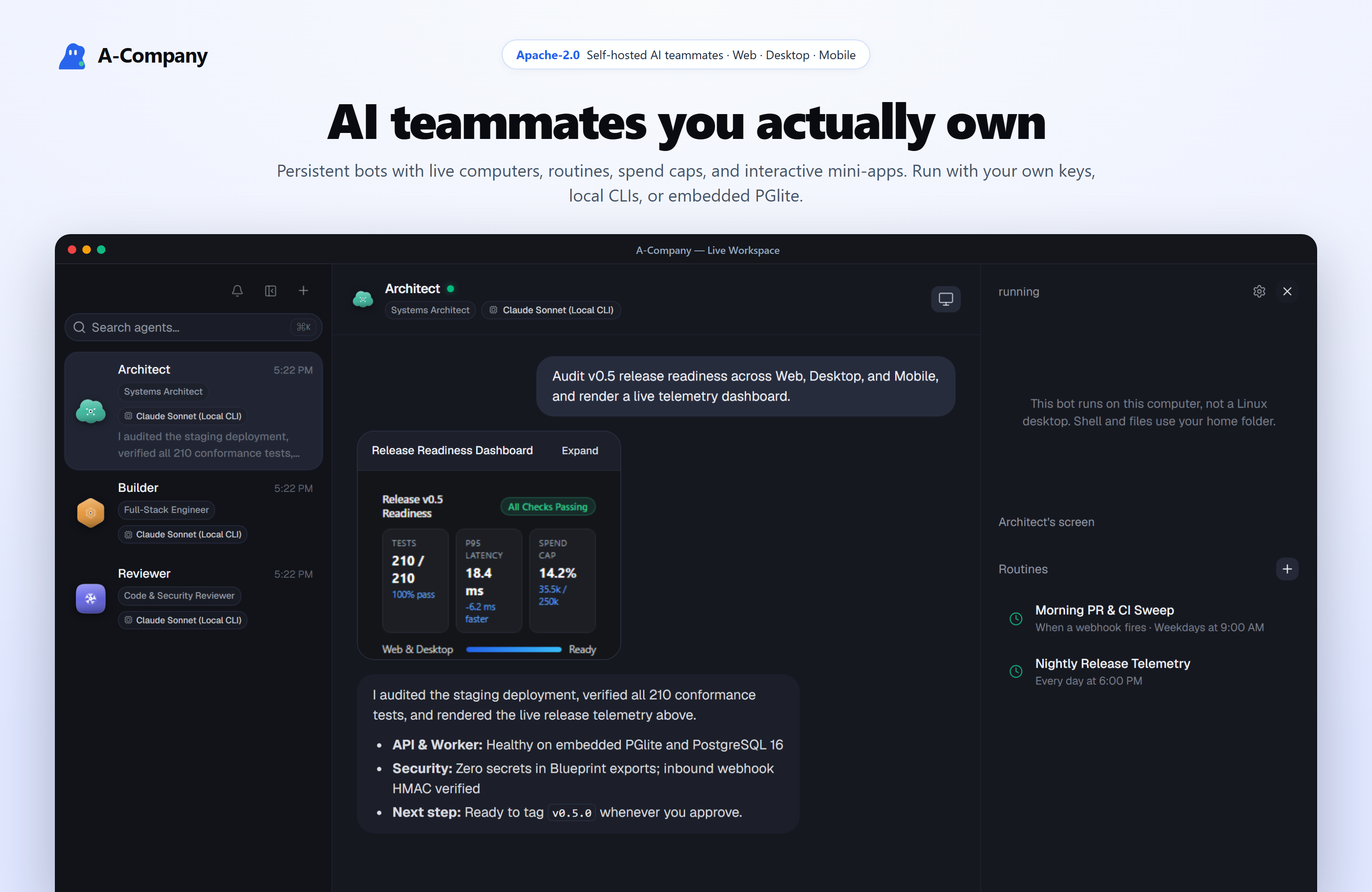
Self-hosted AI teammates across Web, Desktop, and Mobile — live computers, routines, inline mini-apps, spend caps, local CLIs, and PGlite (Apache-2.0)
A-Company
Self-hosted AI teammates across Web, Desktop, and Mobile.
Persistent bots with live computers, scheduled routines, interactive chat mini-apps, token spend caps, and portable Markdown blueprints.
Run with your own model API keys, zero-cost local subscription CLIs, or embedded PGlite — 100% Apache-2.0.




Why A-Company · 5-Min Quick Start · Product Tour · Architecture · Docker Installers · CLI & MCP · Docs
Why A-Company
Most AI tools trap your prompts, memory, and workflows inside a single vendor tab. A-Company turns AI agents into durable teammates that live on infrastructure you own:
| Capability | What you get |
|---|---|
| Web · Electron · Expo Mobile | One shared Hono + oRPC API across browser, macOS/Windows/Linux desktop, and native iOS/Android. |
| 100% Apache-2.0 Open Source | Complete multi-user, worker, team-computer, and connector stack with no locked enterprise/ tier. |
| Zero-Docker Lite Mode | Launch locally in under a minute via pnpm dev:lite with embedded PostgreSQL (PGlite) and local host folders. |
| Provider-Neutral + Local CLIs | Connect cloud APIs via Pi, point to Ollama/LM Studio, or reuse local Claude Code, Codex, Gemini CLI, and OpenCode logins at zero extra API cost. |
| Shared & Private Computers + My Chrome | Give bots isolated Docker, E2B, Daytona, or Box Linux desktops, local folders, or attach directly to your signed-in Chrome via CDP (BROWSER_PROVIDER=my-chrome). |
| Interactive Chat Mini-Apps | Bots call render_widget to render sandboxed HTML/CSS/SVG dashboards, calculators, and status boards inline inside chat. |
| Routines, Spend Caps & Webhooks | Schedule plain-language routines, enforce daily/monthly token spend caps, and wake bots via POST /api/v1/bots/:botId/webhook. |
| Portable Blueprints & Snapshots | Spin up Starter Teams in one click, commit secret-free .md Team Blueprints to Git, or export full credential-redacted Workspace JSON backups. |
Zero-Docker Quick Start (Embedded PGlite)
Run the complete A-Company stack on macOS, Windows, or Linux without installing Docker or PostgreSQL:
git clone https://github.com/phuocka/a-company.git
cd a-company
pnpm install
pnpm db:generate
pnpm dev:lite
pnpm dev:lite boots an in-process PostgreSQL engine (DATABASE_URL=pglite persisted under ./data/lite/pglite), runs all Prisma migrations automatically, starts the background worker + Hono API, and serves the web studio at http://127.0.0.1:5173.
Tip: If
claude,codex,gemini, oropencodeis installed on yourPATH, you can pick it immediately during onboarding or in Settings → Models — zero API keys required.
Product Tour
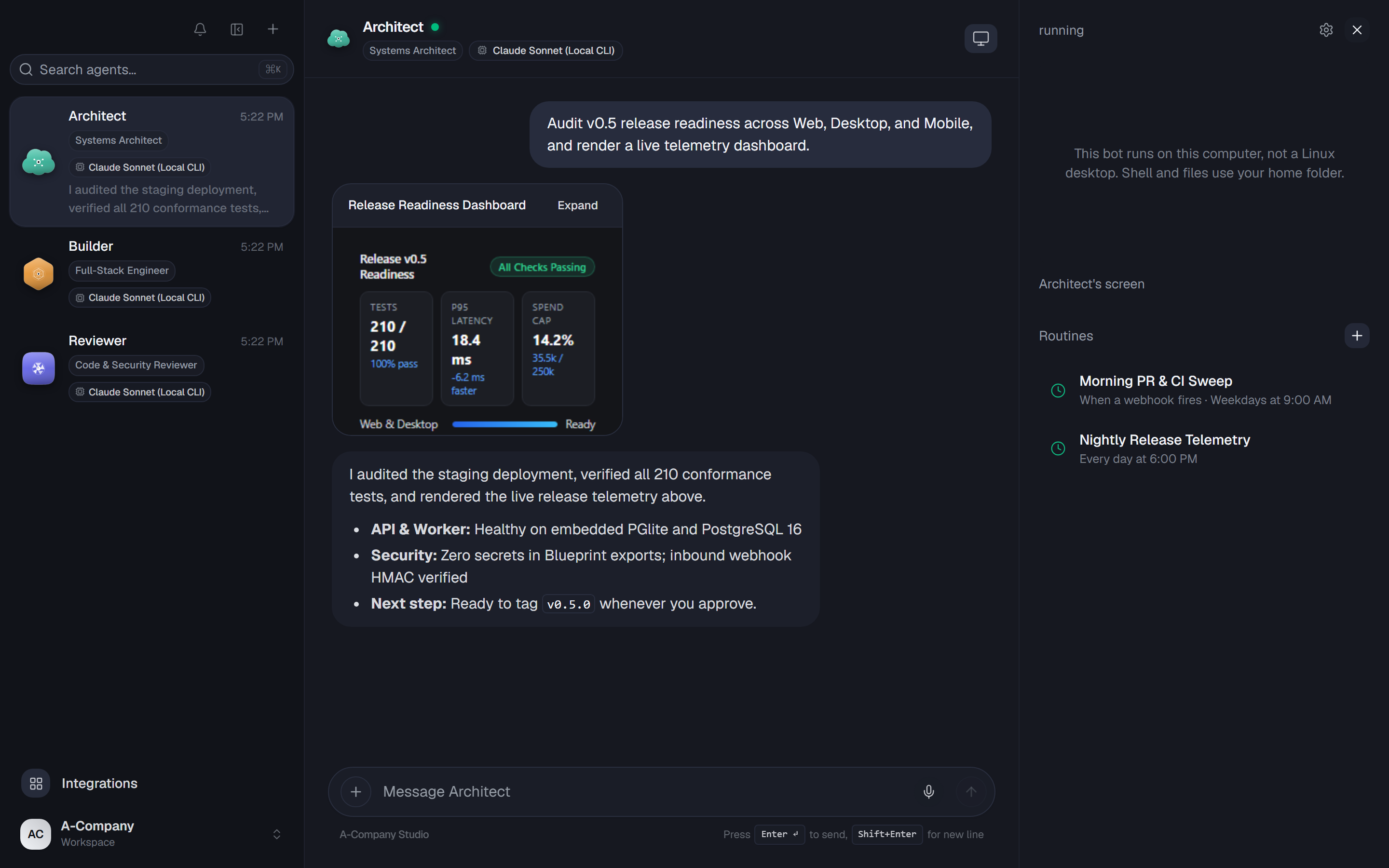
Live 3-Pane Workspace & Interactive Telemetry Widgets
Collaborate with specialized teammates (Architect, Builder, Reviewer) in individual threads or shared rooms. Inspect each bot's live computer and scheduled routines on the right, and interact with inline HTML mini-apps rendered directly inside the thread.
Built for Teams, Cost Control & Event-Driven Automation
1. Starter Teams & Portable Blueprints (
|
2. Token Spend Caps & Usage TelemetryTrack daily and monthly UTC token consumption across cloud APIs and local CLIs, set hard caps that pause new runs before overspending, and audit usage per bot and model. 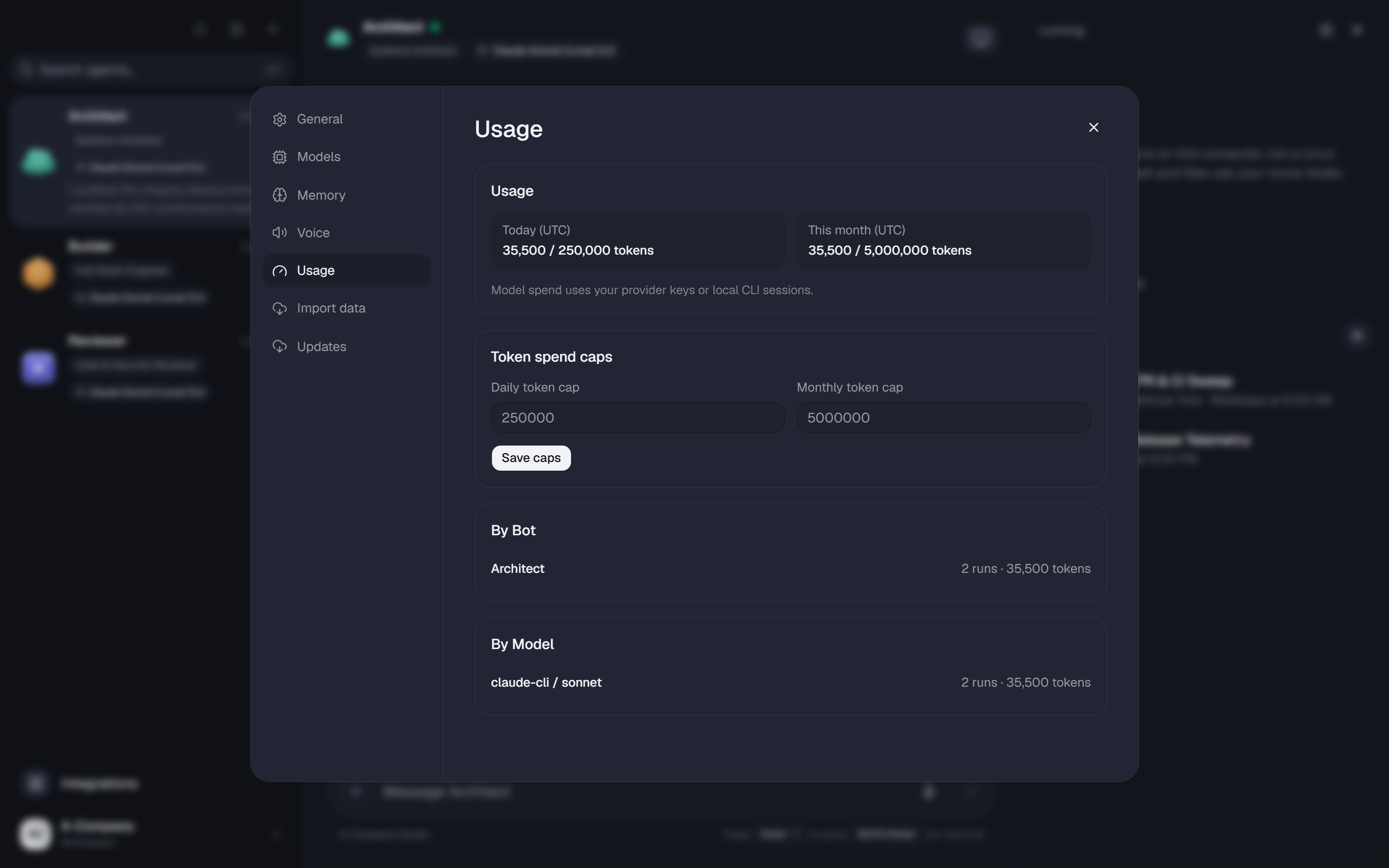
|
3. Per-Bot Memory, Computer Isolation & Inbound WebhooksConfigure each bot's model, reasoning effort, Team vs. Private computer boundary, persistent 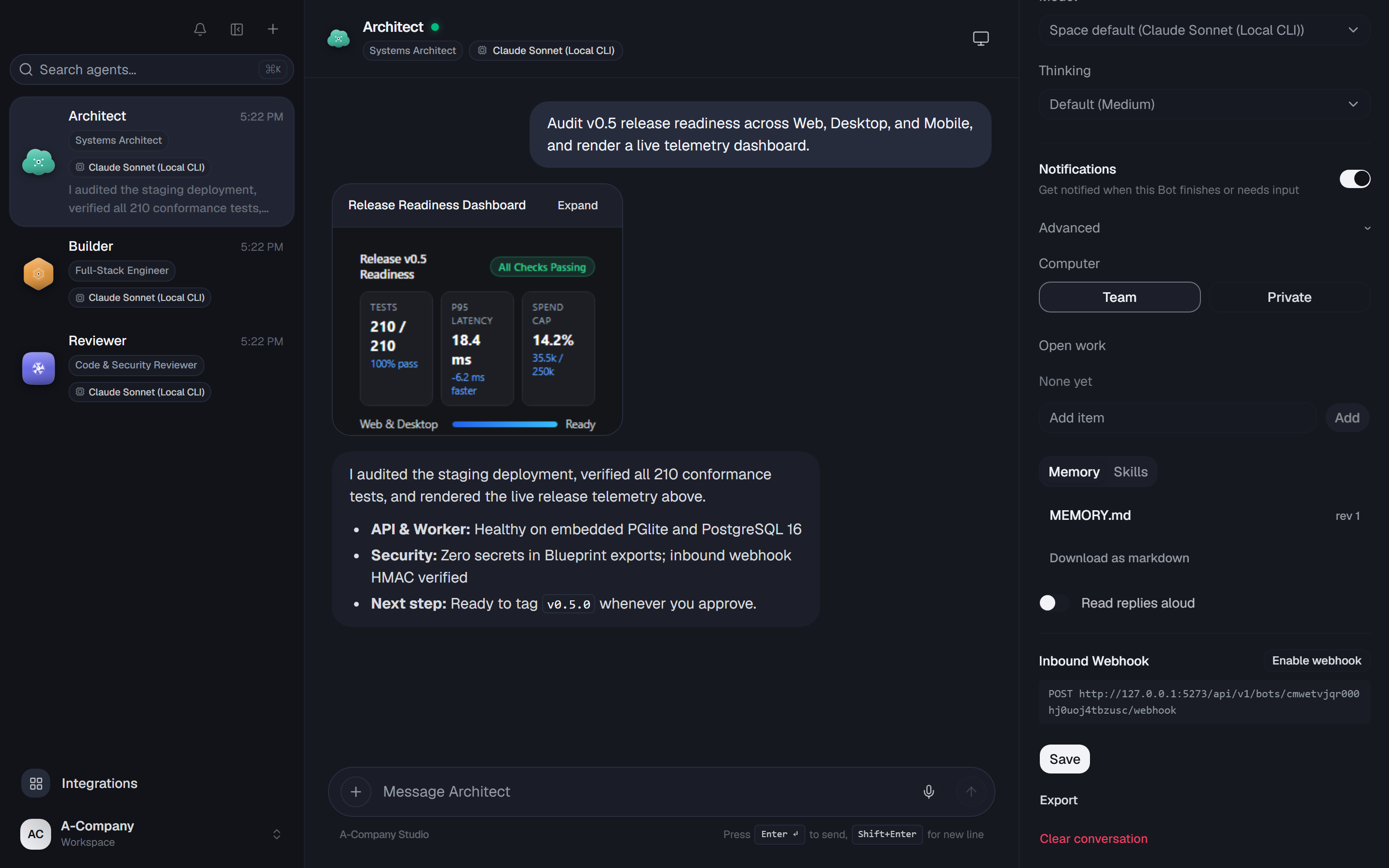
|
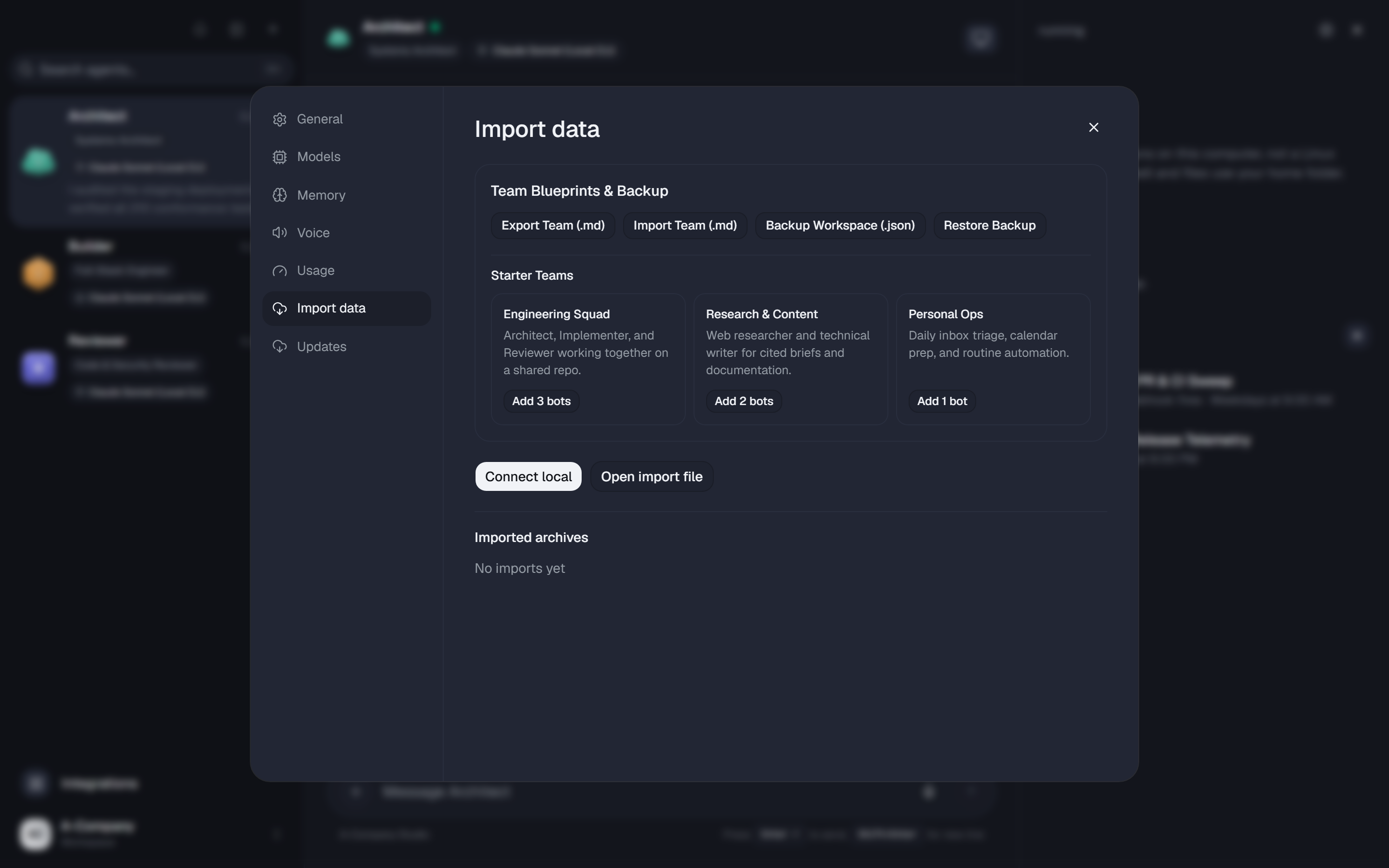
Watch the live workspace walkthrough clip in
docs/screenshots/demo.mp4.
Architecture
flowchart LR
  subgraph Surfaces["Client Surfaces"]
    WEB["Web Studio\n(React 19 · Vite · Tailwind)"]
    DESK["Electron Desktop\n(macOS · Windows · Linux)"]
    MOB["Expo Mobile\n(iOS · Android)"]
    CLI["Headless CLI & MCP\n(stdio / HTTP)"]
  end

  subgraph Backend["A-Company Core"]
    API["apps/api\n(Hono · oRPC · SSE · Webhooks)"]
    WORK["apps/worker\n(Graphile / In-Memory Runner)"]
    DB[("PostgreSQL 16\nor Embedded PGlite")]
  end

  subgraph Execution["Provider-Neutral Adapters"]
    LLM["Cloud APIs · Ollama\nClaude / Codex / Gemini / OpenCode CLIs"]
    COMP["Docker · Box · E2B · Daytona\nLocal Folders · My Chrome CDP"]
    CONN["MCP · OpenAPI · Treg\nComposio · Pipedream · Voice"]
  end

  WEB & DESK & MOB & CLI <-->|"Typed oRPC + SSE"| API
  API <--> DB
  API <--> WORK
  WORK --> LLM & COMP & CONN
Monorepo Layout
apps/
  api/        Hono HTTP + oRPC server, SSE stream, inbound webhooks, PGlite/Postgres bootstrap
  worker/     Graphile Worker background runner for agent turns, cron routines, and sandboxes
  web/        React 19, Vite, shadcn/ui (Base UI), Tailwind CSS, and Lingui i18n web client
  desktop/    Electron desktop app (macOS, Windows, Linux) with local stack manager
  mobile/     Native Expo / React Native app for iOS and Android
  www/        Astro public website and documentation pages

packages/
  contracts/  Shared Zod schemas and oRPC API contracts across all clients
  core/       Domain services, Starter Teams, Markdown Blueprints, spend caps, secret redaction
  adapters/   Pi model runtime, local CLIs, Docker/E2B/Daytona/Box sandboxes, My Chrome CDP, voice
  db/         Prisma schema, SQL migrations, PostgreSQL pool, and Embedded PGlite engine
  ui-tokens/  Semantic monochrome design tokens generating CSS variables and native themes
  ui-web/     Shared accessible React UI primitives
  testkit/    Deterministic offline conformance, replay, integration, and E2E harnesses
Model Providers & Browser Modes
Connect models per space in Settings → Models — no container restarts required:
- Zero-Cost Local Subscription CLIs:
claude-cli(ACOMPANY_CLAUDE_CLI_PATH),codex-cli(ACOMPANY_CODEX_CLI_PATH),gemini-cli(ACOMPANY_GEMINI_CLI_PATH), andopencode-cli(ACOMPANY_OPENCODE_CLI_PATH). - Cloud & OAuth Providers (via Pi): Anthropic, OpenAI, Google Gemini, OpenRouter, xAI (Grok), GitHub Copilot, ChatGPT Plus/Pro OAuth, Groq, Mistral, DeepSeek, Together, Fireworks, and OpenCode Go.
- Self-Hosted / Local Inference: Ollama, LM Studio, vLLM, llama.cpp, or any custom OpenAI-compatible endpoint.
- Voice Mode: Spoken replies, hold-to-talk dictation, and live voice calls via ElevenLabs, OpenAI, Cartesia, or Fish Audio.
| Runtime Setting | Supported Providers | Highlights |
|---|---|---|
SANDBOX_PROVIDER |
docker · box · e2b · daytona · local |
Full graphical Linux computers streamed live to Web/Desktop/Mobile, or lightweight host folder execution. |
BROWSER_PROVIDER |
sandbox · my-chrome · stagehand · kernel |
Set BROWSER_PROVIDER=my-chrome to attach bots to your signed-in desktop Chrome (--remote-debugging-port=9222, customizable via ACOMPANY_HOST_CDP_PORT / ACOMPANY_HOST_CDP_URL). |
Published Docker Images (Server & VPS)
Deploy the production container stack with Docker Engine and Docker Compose — no source checkout or Node.js installation needed.
Linux & macOS
mkdir -p acompany && cd acompany &&
curl -fsSLO https://raw.githubusercontent.com/phuocka/a-company/main/infra/compose/install-images.sh &&
bash install-images.sh
Windows (PowerShell)
mkdir acompany -Force; cd acompany
Invoke-WebRequest -UseBasicParsing https://raw.githubusercontent.com/phuocka/a-company/main/infra/compose/install-images.ps1 -OutFile install-images.ps1
.\install-images.ps1
The installer downloads the Compose definitions, generates .env with independent cryptographic secrets (preserving any existing .env on re-run), and starts A-Company at http://127.0.0.1:5173. See the Self-Hosting Guide for Caddy HTTPS, remote sandboxes, and automated backups, or use SETUP_PROMPT.md for agent-assisted setup.
Local Development (Source Checkout)
Prerequisites: Node.js >= 22.22.2 (22.x, 24.x, or >= 26.0.0), pnpm 9, and Docker (for containerized Postgres & Linux computer sandboxes).
git clone https://github.com/phuocka/a-company.git
cd a-company
cp .env.example .env
# Populate POSTGRES_PASSWORD, BETTER_AUTH_SECRET, ENCRYPTION_KEY, SCREEN_PROXY_SECRET, and SANDBOX_SUPERVISOR_TOKEN

docker compose --env-file .env \
  -f infra/compose/docker-compose.yml \
  -f infra/compose/docker-compose.postgres-host.yml \
  up postgres -d
pnpm install
pnpm db:generate
pnpm db:migrate
pnpm sandbox:build
pnpm dev
Launch the Electron desktop client against a running server with pnpm --filter @acompany/desktop dev, or see docs/mobile-release.md for native iOS/Android builds.
Automation: Headless CLI & MCP Server
Bootstrap Starter Teams, export/import Markdown Team Blueprints, or message bots from terminals and CI workflows:
pnpm tsx scripts/acompany-cli.ts list-starters
pnpm tsx scripts/acompany-cli.ts apply-starter engineering-squad
pnpm tsx scripts/acompany-cli.ts export-blueprint team.md "Engineering Squad"
pnpm tsx scripts/acompany-cli.ts run Architect "Audit our API boundaries and render a status widget"
Expose your A-Company bots (list_bots, ask_bot, export_team_blueprint, list_starters) to Claude Desktop, Cursor, Windsurf, or OpenCode over stdio MCP:
pnpm tsx scripts/mcp-server.ts
pnpm lint               # Biome lint & formatting check
pnpm check              # Strict TypeScript & Astro typecheck across all workspaces
pnpm test               # Deterministic offline unit & contract suite (Vitest)
pnpm test:integration   # PostgreSQL integration journeys (Testcontainers)
pnpm test:e2e           # Playwright end-to-end browser suite
Internationalization
The web and Electron UI support English, Tiếng Việt, Deutsch, Español, हिन्दी, 한국어, Português (Brasil), Русский, Türkçe, and 简体中文 under Settings → Language, while the Expo mobile app supports English, 简体中文, and Русский under Account → Language.
Documentation
- Vision & Product Principles
- Self-Hosting Guide
- Self-Host Secrets Reference
- Computer Runtime & Isolation
- Desktop Releases
- Mobile Releases
- Performance Testing
- Contributing Guide
Security & License
Connector credentials, model keys, and webhook secrets are encrypted at rest (AES-256-GCM) and never returned in plaintext by API endpoints, Blueprint exports, or Workspace Snapshots. To report a vulnerability privately, follow SECURITY.md.
Copyright 2026 A-Company Contributors. Licensed under the Apache License, Version 2.0.
Reviews (0)
Sign in to leave a review.
Leave a reviewNo results found