pillar
Health Pass
- License — License: AGPL-3.0
- Description — Repository has a description
- Active repo — Last push 0 days ago
- Community trust — 31 GitHub stars
Code Pass
- Code scan — Scanned 12 files during light audit, no dangerous patterns found
Permissions Pass
- Permissions — No dangerous permissions requested
No AI report is available for this listing yet.
Open source product copilot. Embed an AI chat widget that doesn't just answer questions—it executes client-side actions in the user's browser to get things done inside your app.






Docs · Blog · Website · Discord · Twitter
Pillar
The open-source product copilot. Build AI agents into your app that execute tasks, not just answer questions.
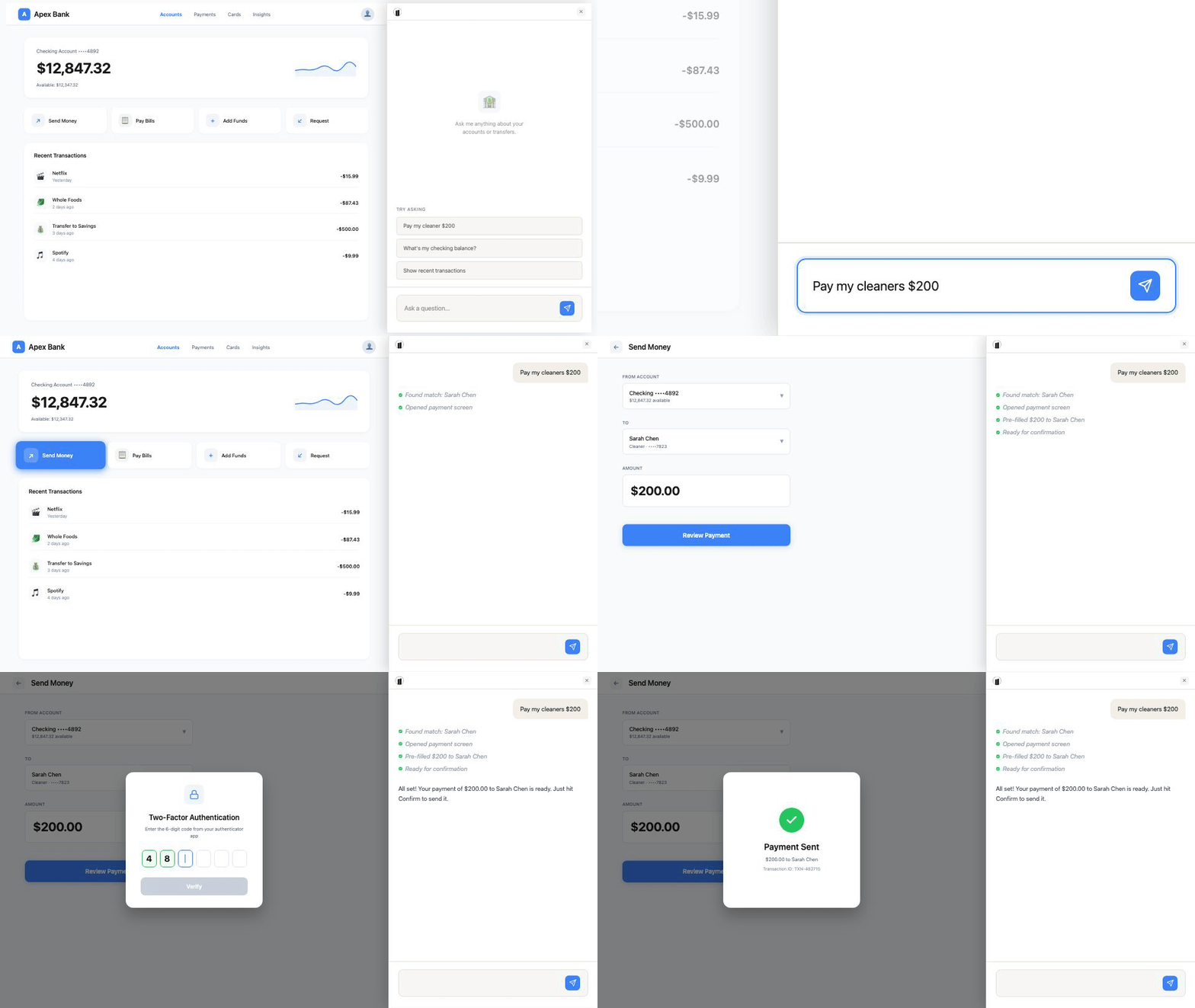
Pillar is an embeddable AI co-pilot SDK. Users say what they want, and Pillar uses your UI to make it happen — navigating pages, pre-filling forms, and calling your APIs. It runs client-side with the user's session, so there's no proxy servers or token forwarding.
Pillar works across SaaS and web apps. A user could ask:
A banking app: "Send my cleaner $200"
A CRM: "Close the Walmart deal as won and notify implementation"
An analytics dashboard: "Add a weekly signups chart to my dashboard"
A PM tool: "Create a P1 bug for this checkout crash and add it to this sprint"
Pillar understands the intent, builds a multi-step plan, and executes it using your UI — the same way the user would, but hands-free.
This repository contains the Pillar platform: backend API and admin dashboard. SDK packages are maintained separately — see sdk, sdk-react, and sdk-vue.
Why Pillar?
- One install, fully yours:
npm installand go. Define actions, customize UI and behavior — all in your own code. No black boxes. - Actions, not just answers: Navigate pages, pre-fill forms, call APIs. The assistant does things on behalf of users, not just explains how.
- Client-side execution: Runs in the user's browser with their session. Same auth, no proxy servers, no token forwarding.
- Managed knowledge: Crawls your docs and integrates with your content sources — websites, files, cloud storage, and snippets. RAG that stays fresh automatically.
- MCP server included: Standards-compliant MCP plus WebMCP support let you connect top models and agent workflows through Pillar.
- Multi-framework SDKs: React, Vue, Angular, and vanilla JS. All MIT-licensed, embed freely in proprietary apps.
Quick Start
Cloud (Fastest)
Sign up at trypillar.com to get your Agent Slug, then install the SDK:
npm install @pillar-ai/react
1. Add the provider to your app:
import { PillarProvider } from '@pillar-ai/react';

function App() {
  return (
    <PillarProvider agentSlug="your-agent-slug">
      <YourApp />
    </PillarProvider>
  );
}
2. Register tools using usePillarTool:
Tools let the AI assistant perform tasks in your app — navigating to a page, opening a modal, calling an API. Create a hook file for your tool definitions:
// hooks/usePillarTools.ts
import { usePillarTool } from '@pillar-ai/react';
import { useRouter } from 'next/navigation';

export function usePillarTools() {
  const router = useRouter();

  usePillarTool({
    name: 'open_settings',
    type: 'navigate',
    description: 'Navigate to the settings page',
    examples: ['open settings', 'go to settings'],
    autoRun: true,
    execute: () => router.push('/settings'),
  });

  usePillarTool({
    name: 'add_to_cart',
    type: 'trigger_tool',
    description: 'Add a product to the shopping cart',
    inputSchema: {
      type: 'object',
      properties: {
        productId: { type: 'string', description: 'The product ID to add' },
        quantity: { type: 'number', description: 'Number of items to add' },
      },
      required: ['productId', 'quantity'],
    },
    execute: async ({ productId, quantity }) => {
      await cartApi.addItem(productId, quantity);
    },
  });
}
Call the hook from a component inside your PillarProvider:
import { usePillarTools } from './hooks/usePillarTools';

function App() {
  usePillarTools();
  return <div>{/* your app */}</div>;
}
Tools are automatically registered when the component mounts and unregistered when it unmounts.
3. Sync tools to Pillar:
The CLI scans your codebase for usePillarTool calls and syncs the tool definitions to Pillar. Run this in CI/CD after building your app:
PILLAR_SLUG=your-product-slug PILLAR_SECRET=your-secret-token npx pillar-sync --scan ./src
Replace the slug and secret placeholders with the values from your dashboard. Point --scan at the directory containing your tool definitions.
The execute functions run client-side in your app. Users can now ask the copilot to navigate to settings or add items to their cart, and it executes using your code.
Self-Hosted
git clone https://github.com/pillarhq/pillar.git
cd pillar
cp backend/.env.example backend/.env
# Edit backend/.env with your API keys
docker compose up
The API runs on port 8000, the admin dashboard on port 3000. See Self-Hosting for configuration details.
Features
| Feature | Description | |
|---|---|---|
| Tools | Navigate pages, pre-fill forms, call APIs — the assistant executes, not just explains | Docs |
| Knowledge Base | Ingest from websites, files, cloud storage (S3/GCS), and snippets | Docs |
| AI Chat | Streaming, context-aware responses grounded in your documentation | Docs |
| Custom Cards | Render interactive UI for confirmations and data input inline in chat | Docs |
| Human Escalation | Hand off to Intercom, Zendesk, Freshdesk, or a custom support flow | Docs |
| MCP Server | Standards-compliant MCP and WebMCP support for top-model and agent workflows through Pillar | |
| Admin Dashboard | Manage sources, review analytics, configure agent behavior and theming |
Explore all features in the documentation.
SDKs
All SDK packages are MIT-licensed — embed freely in proprietary applications. Source code lives in standalone repos under github.com/pillarhq.
| Framework | Package | Install | Guide |
|---|---|---|---|
| React | @pillar-ai/react |
npm install @pillar-ai/react |
React Quickstart |
| Vue | @pillar-ai/vue |
npm install @pillar-ai/vue |
Vue Quickstart |
| Angular | @pillar-ai/angular |
npm install @pillar-ai/angular |
Angular Quickstart |
| Vanilla JS | @pillar-ai/sdk |
npm install @pillar-ai/sdk |
Vanilla JS Quickstart |
Or load via CDN with no build step:
<script src="https://cdn.trypillar.com/sdk.js"></script>
<script>
  Pillar.init({ agentSlug: 'your-agent-slug' });
</script>
See the React API Reference and Core SDK Reference for full API docs.
Architecture
backend/          Django API, RAG pipeline, MCP server, Hatchet workflows
frontend/         Next.js admin dashboard
SDKs are maintained in separate repos: sdk, sdk-react, sdk-vue.
Stack: Django + DRF, PostgreSQL + pgvector, Redis, Hatchet (workflow orchestration), Next.js, TypeScript
Self-Hosting
Prerequisites
- Docker and Docker Compose
- At least one AI provider API key (OpenAI, Anthropic, or Google)
- A Hatchet instance (cloud or self-hosted) for background workflows
Setup
git clone https://github.com/pillarhq/pillar.git
cd pillar
cp backend/.env.example backend/.env
# Edit backend/.env with your API keys and configuration
docker compose up
The API runs on port 8000 and the admin dashboard on port 3000. See backend/.env.example for all configuration options.
For local development setup, see the Contributing Guide.
Open Source vs Cloud
| Open Source | Cloud | |
|---|---|---|
| Deployment | Self-hosted | Managed at trypillar.com |
| Infrastructure | You manage | We manage |
| Updates | Manual | Automatic |
| License | AGPL-3.0 | Usage-based pricing |
| Support | Community | Priority support |
| Features | Full platform | Full platform + managed infra |
The hosted version at trypillar.com is the easiest way to get started. No infrastructure to manage, always up to date.
For enterprises that need to self-host without AGPL obligations, commercial licenses are available. Contact [email protected].
Resources
Contributing
We welcome contributions! Please read our Contributing Guide before submitting a pull request.
License
This project uses a dual license model:
- AGPL-3.0 for the core product (backend + frontend). If you modify Pillar and run it as a service, you must release your modifications under AGPL-3.0. Using Pillar's API from your application does not trigger this obligation.
- MIT for SDK packages in
packages/. You can freely embed these in your proprietary applications.
See LICENSE for the full AGPL-3.0 text. Third-party dependency details are in backend/pyproject.toml and frontend/package.json.
Responsible use: Users are responsible for respecting websites' policies when using Pillar's crawling features. Pillar respects robots.txt by default.
Reviews (0)
Sign in to leave a review.
Leave a reviewNo results found