update-helper-skills
Health Warn
- No license — Repository has no license file
- Description — Repository has a description
- Active repo — Last push 0 days ago
- Community trust — 15 GitHub stars
Code Warn
- Code scan incomplete — No supported source files were scanned during light audit
Permissions Pass
- Permissions — No dangerous permissions requested
No AI report is available for this listing yet.
A collection of AI Agent skills for safely modifying massive source files.
🇺🇸 English | 🇻🇳 Tiếng Việt
🛠️ Update Helper v5 — by PitroyTech


The safe and efficient way for AI agents to update existing code.
No blind patches. No broken builds. No context window burnout.
Search first. Read less. Patch narrow. Verify hard. Rollback clean.
🤔 The Problem
AI agents write new code fast. But finding and fixing existing code is a different story.
Without a protocol, agents easily:
- ❌ Read entire large codebases (15,000–30,000 lines) to find one function → context window burned, no patch even attempted
- ❌ Delete a UI button but forget the event handler still listening behind it → app runs but silently broken
- ❌ Patch the build output instead of the source file → tests pass, next build wipes the fix
- ❌ API returns valid data, but agent keeps swapping models and keys → hours wasted chasing the wrong layer
- ❌ Write file with wrong encoding command → BOM lost → Vietnamese/CJK/emoji corrupted silently
- ❌ Apply user's description to code that was refactored long ago → patch breaks live logic
With Update Helper:
- ✅ Find anchor → read only 40–160 lines around it, leave the rest untouched
- ✅ Map render → handler → state → config → dist before deleting anything
- ✅ Distinguish SOURCE vs GENERATED → patch source only, rebuild artifact after
- ✅ Separate 3 layers: request sent / response received / post-processing → pinpoint the real failure
- ✅ Check BOM/encoding before writing → write with correct encoding → verify after
- ✅ Compare user's description against actual code → ask before applying if they differ
🔄 How Does It Change Agent Behavior?
User: "fix this" / "remove old UI" / "last patch broke it"
        ↓
Update Helper
        ↓
[Lite]  Find anchor → read range → identify owner →
        state intended edit → backup if needed → patch →
        syntax check → invariant search → report

[Full]  + classify source-of-truth → trace data flow →
        assess blast radius → write with correct encoding →
        UI symmetry checklist → cleanup backups
        ↓
Result: right file, right flow, build passes, invariants clean, rollback path preserved
The key difference: the agent doesn't try to "see everything" upfront. It finds a good anchor, reads only the relevant range, and expands only when the blast radius is genuinely large.
Lite — for small, clear tasks: 1 file, no encoding risk, no generated/source confusion.
Full Protocol — for large files, multi-module changes, encoding risk, refactors, potentially stale specs, or repos touched by other agents/humans.
🧭 What Changes for the Agent?
| Case | Agent without skill | With Update Helper |
|---|---|---|
| UI bug | Fix what's visible | Trace render → handler → state → config before patching |
| Provider/API bug | Swap model, swap key | Separate request sent / response received / post-processing |
| Generated file | Edit the running file | Find source-of-truth, patch source, rebuild output |
| Large file | Read too much | Search anchor, read bounded range (small zone around target) |
| Vietnamese/CJK file | Replace with convenient tool | Check encoding/BOM, use stable anchors, preserve encoding |
| Broken patch | Stack another workaround | Restore .bak2, re-read range, patch smaller |
⚡ Installation
Antigravity / OpenClaw (skills folder)
git clone https://github.com/pitroytech/update-helper-skills.git
# Copy to your agent's skills directory:
xcopy /E /I update-helper-skills\skills\update-helper %USERPROFILE%\.gemini\antigravity\skills\update-helper
Claude Code / Cursor / Cline (.skill file)
Download update-helper.skill → import into your skill manager
Manual (any agent)
Copy contents of skills/update-helper/SKILL.md into your system prompt or AGENTS.md
Once loaded, the agent automatically activates the protocol on triggers: fix this, remove old UI, refactor, port this, last patch broke it.
📊 Comparison
| Without Update Helper | With Update Helper |
|---|---|
| Read entire large file to find 1 fix | Find anchor → read bounded range |
| Delete UI, but event handler code remains | Full checklist: render + CSS + binding + config + dist |
| Edit output file because it's the running one | Classify source-of-truth → patch source → rebuild |
| See error → swap model, swap key | Separate request/response/processing → find real failure |
| Encoding broken, no idea why | Detect BOM before writing, verify after writing |
| New agent → re-read everything from scratch | Read existing map/backup/KI → continue immediately |
| Apply stale spec to refactored code | Compare spec vs actual, ask before merge |
| Backups sometimes forgotten, sometimes cluttering | .bak2 per write + session backup + clear cleanup rules |
🎯 Real-World Scenarios
Scenario 1: Removing an old UI feature
Task: remove Batch tuning controls from the API settings page.
Agent without skill only deletes the visible HTML. Result: inputs disappear on screen, but backend code still reads old values, causing save errors.
Agent with Update Helper runs the full checklist:
Search: batch-gemini, batch-zhipu, api-advanced
Read  : render block, CSS, Gemini handler, Zhipu handler, generic config save
Patch : remove visible controls + default buttons + save reads + null-crash handlers
Verify: npm run verify
Check : rg "batch-gemini|batch-zhipu|api-advanced" src dist → 0 results
Scenario 2: Patching the wrong file (output vs source)
Task: changed settings but userscript doesn't reflect the change.
Agent without skill finds the running file and edits it directly. Tests pass. Next build — fix gone.
Agent with Update Helper finds the build script first, classifies files:
src/module.js          → SOURCE — this is the file to patch
dist/app.user.js       → GENERATED — build output, don't edit directly
src/app.user.js        → REFERENCE — old monolith, leave untouched

→ Patch source → run npm run build → verify dist
Scenario 3: Dropdown loses models after testing a provider
Task: tested Groq then ran RACE with Gemini, dropdown now only shows Gemini models.
Agent without skill jumps to fix dropdown labels. No effect because labels aren't the cause.
Agent with Update Helper traces the data flow:
RACE → providerModelPool[provider] → sync flat modelPool → dropdown → scheduler

→ Found: RACE overwrites entire modelPool instead of updating only that provider
→ Correct fix: RACE updates providerModelPool[provider], dropdown hydrates from aggregate store
Scenario 4: API returns valid data but agent still reports failure
Task: logs show valid response, but scheduler still reports failed.
Agent without skill keeps swapping models, testing keys, switching providers. Doesn't solve it.
Agent with Update Helper separates 3 layers:
Request sent?         → Yes ✅
Response received?    → Yes, valid JSON ✅
Post-processing?      → Crash at apply translation step ❌

→ Root cause: apply function was deleted in a previous refactor, call site not updated
📸 Real Results
❌ Before — agent without skill (12 consecutive failed searches)
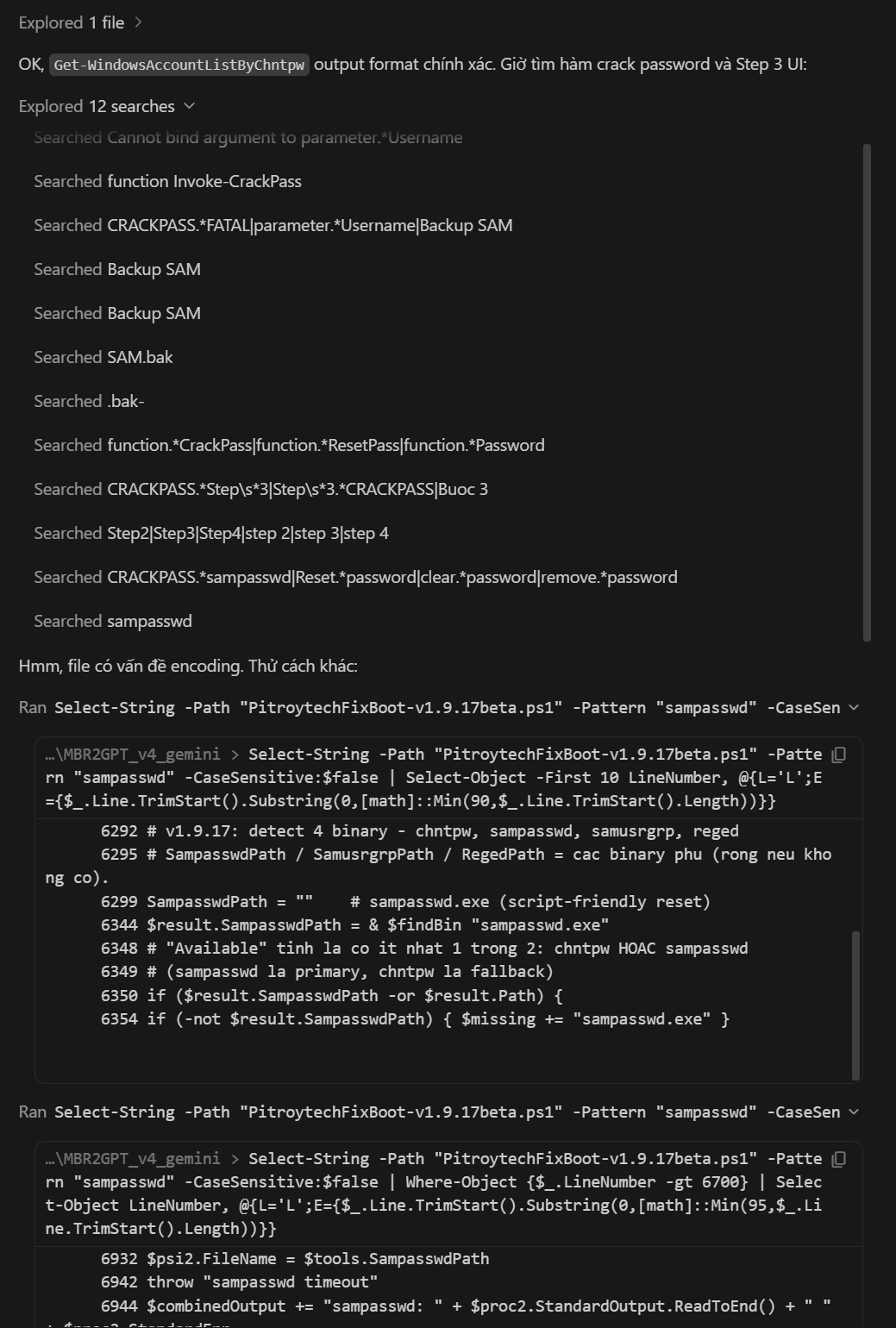
Agent using grep_search can't handle a 14,000-line UTF-8 BOM file. Conclusion: "file has encoding issues, let's try something else" → random guessing, token waste.
✅ After — agent with Update Helper (3 searches, root cause found)
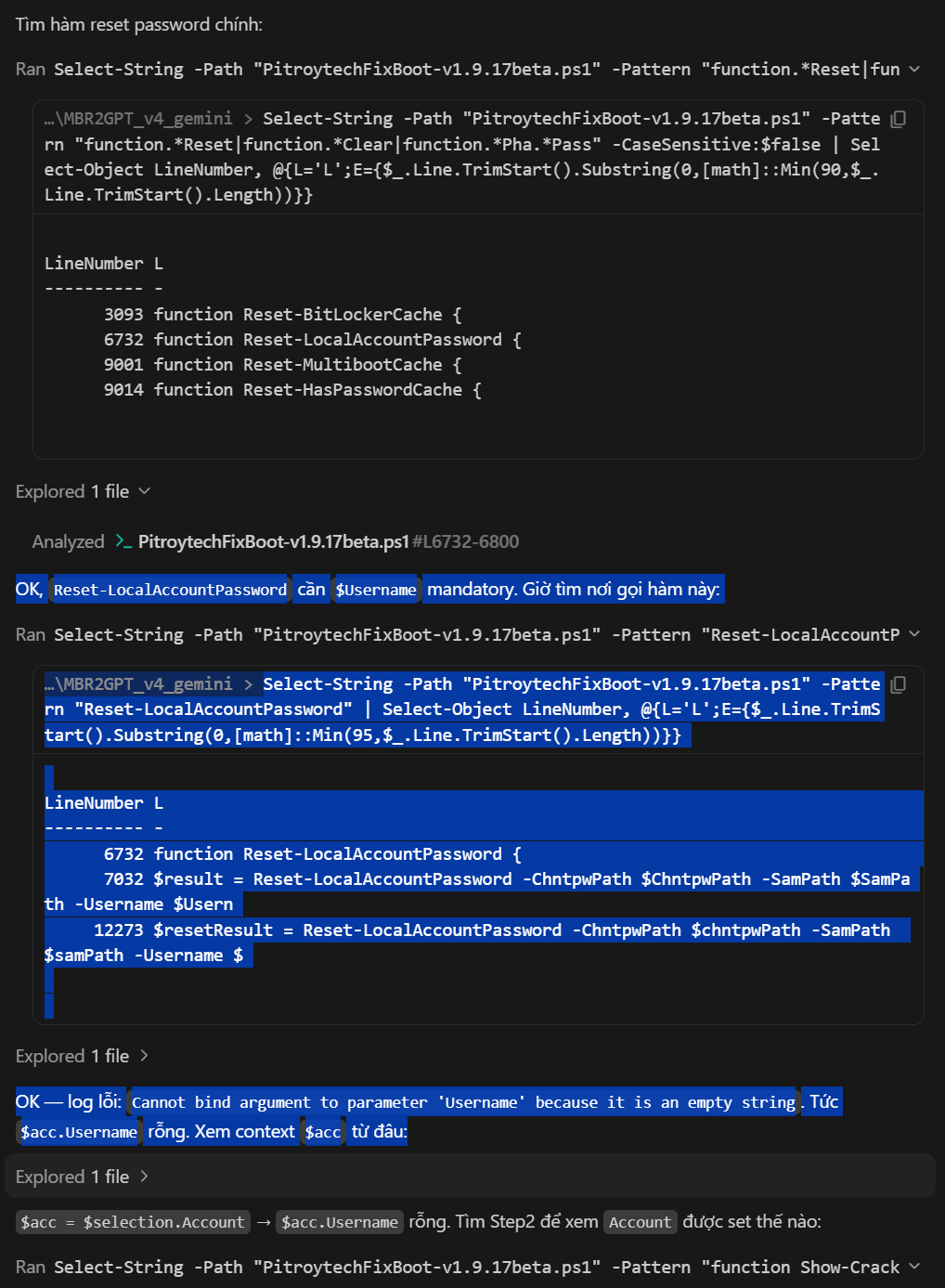
Detailed Data Flow Tracing process:
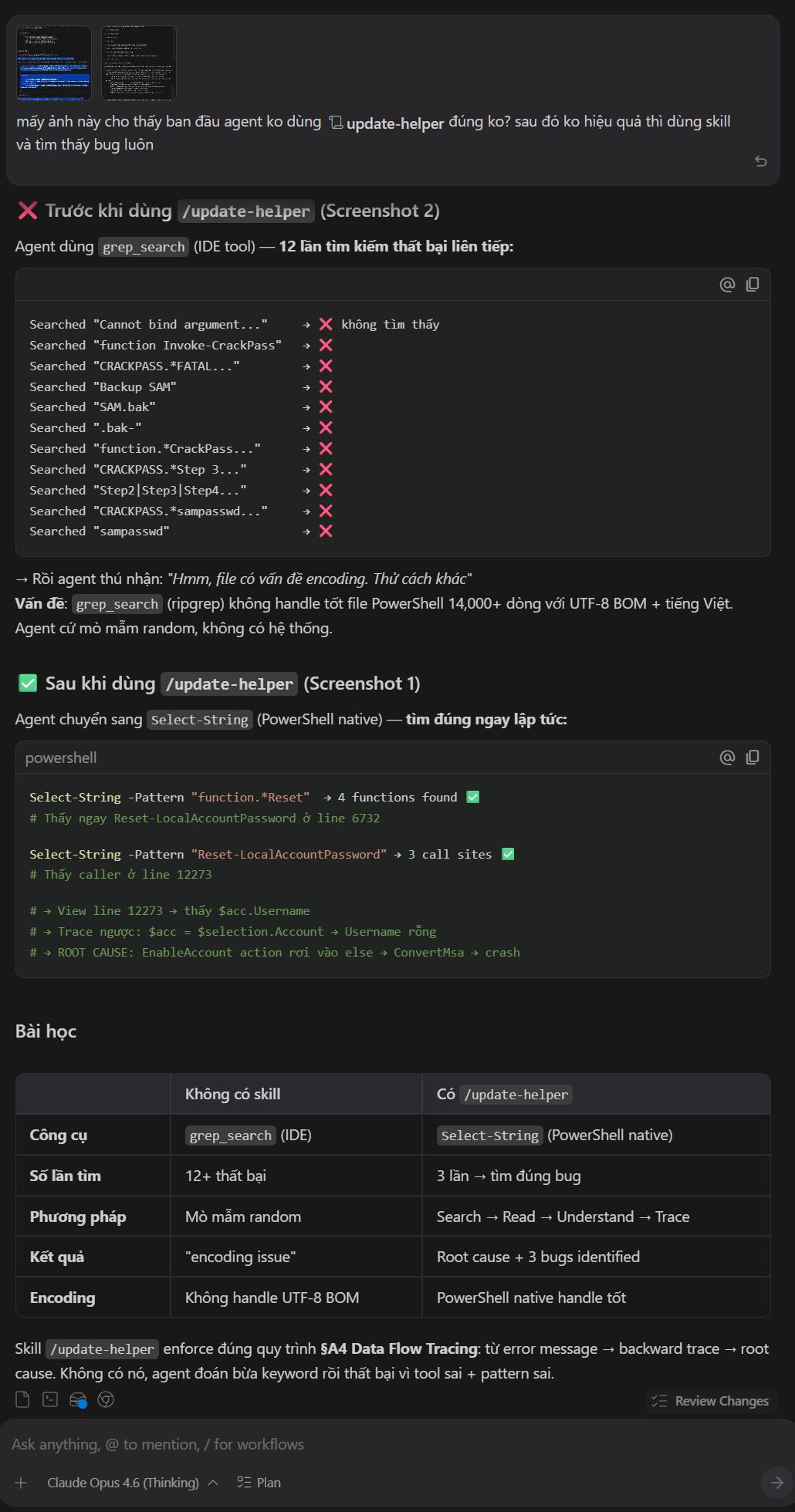
Find "Reset-LocalAccountPassword"     → line 6732  ✅
Trace caller                          → line 12273 ✅
Root cause: $acc.Username is empty → ConvertMsa crash ✅
📋 Quick Comparison
| Without skill | With Update Helper | |
|---|---|---|
| Tool | grep_search (IDE) |
Select-String (PowerShell native) |
| Searches | 12+ FAILED | 3 targeted → bug found |
| Method | Random guessing | Search → Read → Understand → Trace |
| Result | "encoding issue" | Root cause + 3 bugs identified |
| Encoding | Can't handle UTF-8 BOM | BOM preserved correctly |
💰 Real Token Savings
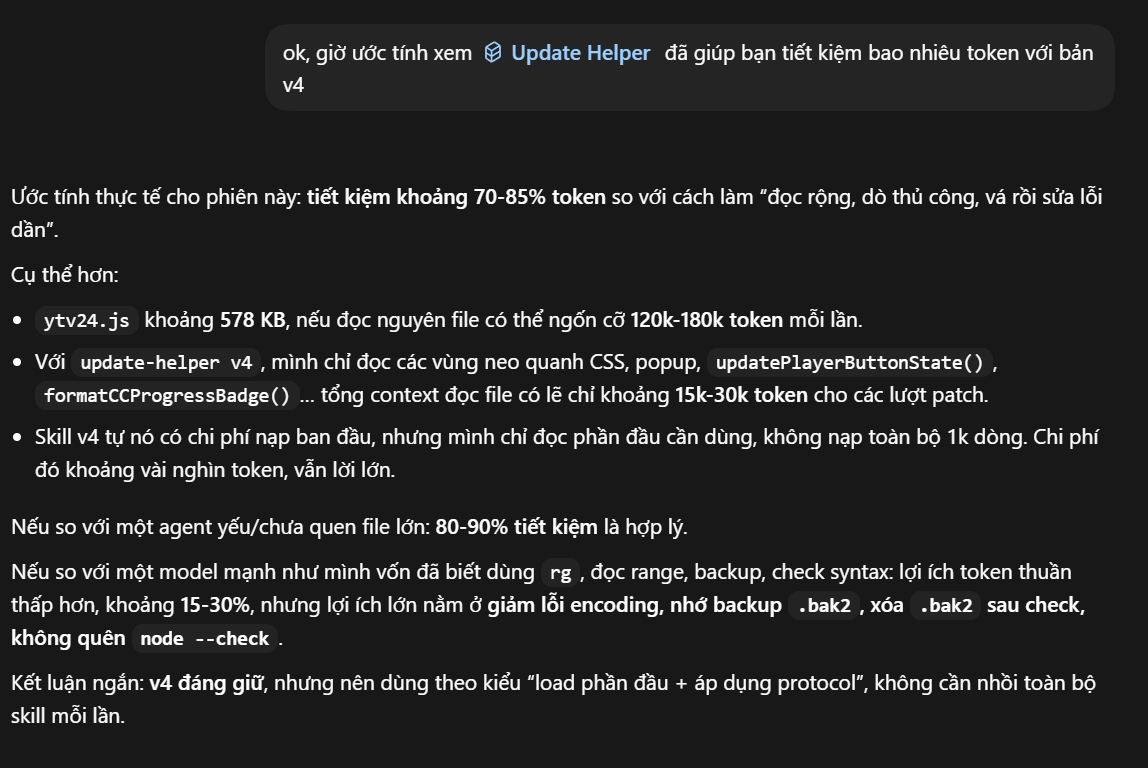
| Task type | Without protocol | With Update Helper |
|---|---|---|
| JS file 500KB+ | Easily 100k–180k tokens | Anchor + bounded range → ~15k–30k tokens |
| UI removal | 2–4 rounds (missed handlers) | 1 round with full checklist |
| Source/dist confusion | Patch wrong file, test pass, build loses fix | Classify first → patch right file |
| Encoding corruption | May lose entire session to recover | Detect first, clear restore path |
| Multi-agent handoff | Next agent re-reads from scratch | Continue from existing map/backup |
Strong agents still benefit — not because they can't code, but because the protocol prevents small mistakes that cost big.
✅ Battle-Tested On
- Userscripts 15,000+ lines: provider routing, scheduler, model pool, floating settings UI
- Translation tools using Gemini, Groq, OpenRouter, SambaNova
- PowerShell/JS files with Vietnamese, CJK, emoji — UTF-8 BOM and no-BOM
- Repos with
src/,dist/, generated userscripts, stale monolith references - Multi-agent sessions: one agent maps, one patches, one recovers
Every rule in this skill exists because a session without it went wrong.
🧩 What's Inside SKILL.md?
This README is the introduction for humans. SKILL.md is what the agent reads at work.
| Feature | Description |
|---|---|
| Tool Cheat Sheet | Quick-reference command table, dual-platform: Linux/Claude Code and Windows/PowerShell |
| Lite Workflow | 9 steps for clear tasks, with command examples for each step |
| Full Protocol | For large files, multi-module, encoding risk, refactors, or broken previous patches |
| Source-of-Truth Detection | Classify source, generated output, and stale references |
| Pre-Submit Checklist | 11 mandatory checks before claiming a patch is done |
| UI Removal Checklist | Render, CSS, handler, config, status, consumers, dist |
| Refactor & Port Protocol | Leaf → caller → parent → entry point; 5-step port workflow |
| Backup Cleanup | Separate protocols for git workspaces and non-git workspaces |
| Failure Recovery | Restore .bak2, re-read range, patch smaller |
| Multi-Agent Handoff | Read map/backup/KI before continuing, never overwrite backups |
| Final Report | Changed files, behavior, verification, backup state, remaining risk |
🔖 Version History
| Version | Changes |
|---|---|
| v5.0 | Lite/Full split. Source-of-truth detection. Tool cheat sheet + str_replace diagnostics. Pre-submit checklist. UI removal checklist. Refactor/port protocol. Backup cleanup for git and non-git. Feature_map/KI check in multi-agent. Dual-platform command examples throughout. |
| v4.0 | Self-contained. Encoding-safe write .NET. Multi-agent onboarding. Cascade analysis. Proactive bug hunt. |
| v3.4 | Stale-spec detection. Improved BOM write pattern. |
| v3.3 | Data-flow tracing. Architecture summary. JS UI patterns. |
| v3.x | Initial public releases. |
📄 License
MIT License. Original concept, design, and all content © PitroyTech.
Built from real sessions — not from theory about how agents should work.
Reviews (0)
Sign in to leave a review.
Leave a reviewNo results found