ptc-xae-mcp
Health Warn
- License — License: Apache-2.0
- Description — Repository has a description
- Active repo — Last push 0 days ago
- Low visibility — Only 5 GitHub stars
Code Pass
- Code scan — Scanned 12 files during light audit, no dangerous patterns found
Permissions Pass
- Permissions — No dangerous permissions requested
No AI report is available for this listing yet.
Let Claude drive Beckhoff TwinCAT 3. MCP server on the XAE Automation Interface: write and build PLC code, wire EtherCAT I/O, log in, read and write ADS, run Scope and HMI. Tested with Claude against XAE 3.1.4026.22 and User Mode Runtime 3.1.4026.25.
Pneutronic XAE MCP
Technical name:
ptc-xae-mcp(repository,ptc-xae-mcp.exe, install folder,%LOCALAPPDATA%\ptc-xae-mcp).
An MCP server that gives an AI coding
assistant (Claude Code or any other MCP client) direct control of a
Beckhoff TwinCAT 3 XAE (eXtended Automation
Engineering) instance — the engineering environment for TwinCAT PLC/motion
projects — through its COM Automation Interface. It runs as a small WinForms
host application with an embedded local HTTP server; the GUI and the MCP
tools drive the same underlying TwinCAT session.
Typical uses: read and write PLC source (POUs, GVLs, DUTs), build a project
and parse the compiler output, manage library references, drive online/login
and download, read ADS variables, inspect EtherCAT/fieldbus topology, and
more — see docs/mcp-capabilities.md for the full,
generated list of tools with their parameters.
Independent project. Pneutronic XAE MCP is developed and maintained by
Pneutronic AG, an official Beckhoff Solution Provider. The software itself is
not a Beckhoff product: it is not endorsed, certified or supported by
Beckhoff Automation GmbH & Co. KG, and it is not affiliated with Anthropic PBC.
Please do not contact Beckhoff support about this software;
use the issue tracker
instead. You need your own licensed TwinCAT installation; this project does
not include or redistribute any Beckhoff software.
Safety notice. Several tools act on a running controller: login and
download, start/stop, writing ADS variables and init values, activating a
configuration, and the commissioning tools (twincat_ibn_*), which drive
real outputs. An AI assistant calling them can move machinery. This
software is not a safety component and must never be part of a safety
function. Use it on simulation targets or on machines that the responsible
person has secured and released for commissioning; review what the
assistant proposes before it writes to a controller. The software is
provided "as is" without warranty, see the LICENSE (Apache-2.0, sections 7
and 8).
Prerequisites
- Windows (WinForms host; the COM Automation Interface and several P/Invoke
paths are Windows-only). - TwinCAT XAE 3.1.4026 (Beckhoff's engineering environment) installed on
the same machine. The Automation Interface this project drives is part of
the XAE install, not a separate download. - .NET 10 SDK to build.
- Optional, only if you use the corresponding tools:
- TE130x (Scope View) for the Scope/measurement tools.
- TE2000 (HMI Engineering) for the HMI tools.
TwinCAT itself is proprietary Beckhoff software and is not redistributed by
this project — see THIRD-PARTY-NOTICES.md.
Tested with
| Component | Version |
|---|---|
| TwinCAT XAE (TcXaeShell) | 3.1.4026.22 |
| TwinCAT User Mode Runtime (TC1700) | 3.1.4026.25 |
| MCP client | Claude Code with Claude models |
Every release runs the unit suite on CI and the live integration suite against a
real XAE on the versions above (see CONTRIBUTING.md). Other
4026 builds and other MCP clients are expected to work but are not part of the
release test.
Build
dotnet build src\PtcXaeMcp.WinForms\ptc-xae-mcp.sln -c Release
-p:TwinCat=true|false forces whether the TwinCAT-only COM partials (Scope,
EventLogger) are compiled in; it auto-detects from the local TwinCAT install
when omitted. See src/README.md for the full project layout
and how to run each test layer.
Run
Start the built ptc-xae-mcp.exe (from src\PtcXaeMcp.WinForms\bin\<Debug|Release>\net10.0-windows\,
or the installer under setup/). It opens a small WinForms window and
always starts the embedded MCP server on http://localhost:5010 — a plain
double-click is enough. --http-server is still accepted for existing launchers
and makes a second instance exit quietly (exit code 2) instead of showing a dialog.
A second instance refuses to start (single-instance mutex) rather than binding
a second copy of the port.
Add --diagnostics (or set PTC_XAE_MCP_DIAGNOSTICS=1) to also register a
second, non-production tool group — research/demo/test-support tools such asptc_test_marker, twincat_show_step, twincat_safety_recon,twincat_safety_probe_create_alias, twincat_dump_nc_tree, twincat_scope_probe, twincat_ibn_arm
(IBN Live arming for the test suite — released clients cannot arm; a human arms in the
Approvals view) and the deprecated twincat_open_plc_object/twincat_close_plc_object
aliases. A released MCP client never needs this flag; the live integration suite host sets it.
Never run a host connected to a real machine with --diagnostics.
The host window
The window is the server's cockpit, not a second user interface for the tools —
TwinCAT is operated through the MCP client. It has a header and three views:
- Header — XAE, project and MCP status (port and connected clients), Stop
(cancels the running schema apply, liketwincat_stop) and a Menu: refresh
status, Open sample project, Connect a client…, Settings…, the recovery
actions Close XAE instance and Dismiss security dialog, the log folder and the
light/dark theme. - Activity — every tool call with arguments, result and duration, an HTML report,
and Run again in Console for a selected call. - Approvals — every human approval in one place: IBN Live (arming happens only
here; ABORT / RELEASE-ALL, remaining time, audit log; each proposed step opens a
confirm popup), the restore popup of the persistent snapshot (PLC state, target and
the differences; nothing is written until you confirm) and the history of HMI write
approvals. The tab shows a badge while something is pending. - Console — run any MCP tool by hand through the real MCP path (same token
check, lock and activity log as an AI client): search, a form generated from the
tool's parameters, raw JSON, favourites. Tools that are not read-only ask for
confirmation first. Handy for debugging the Automation Interface without an AI.
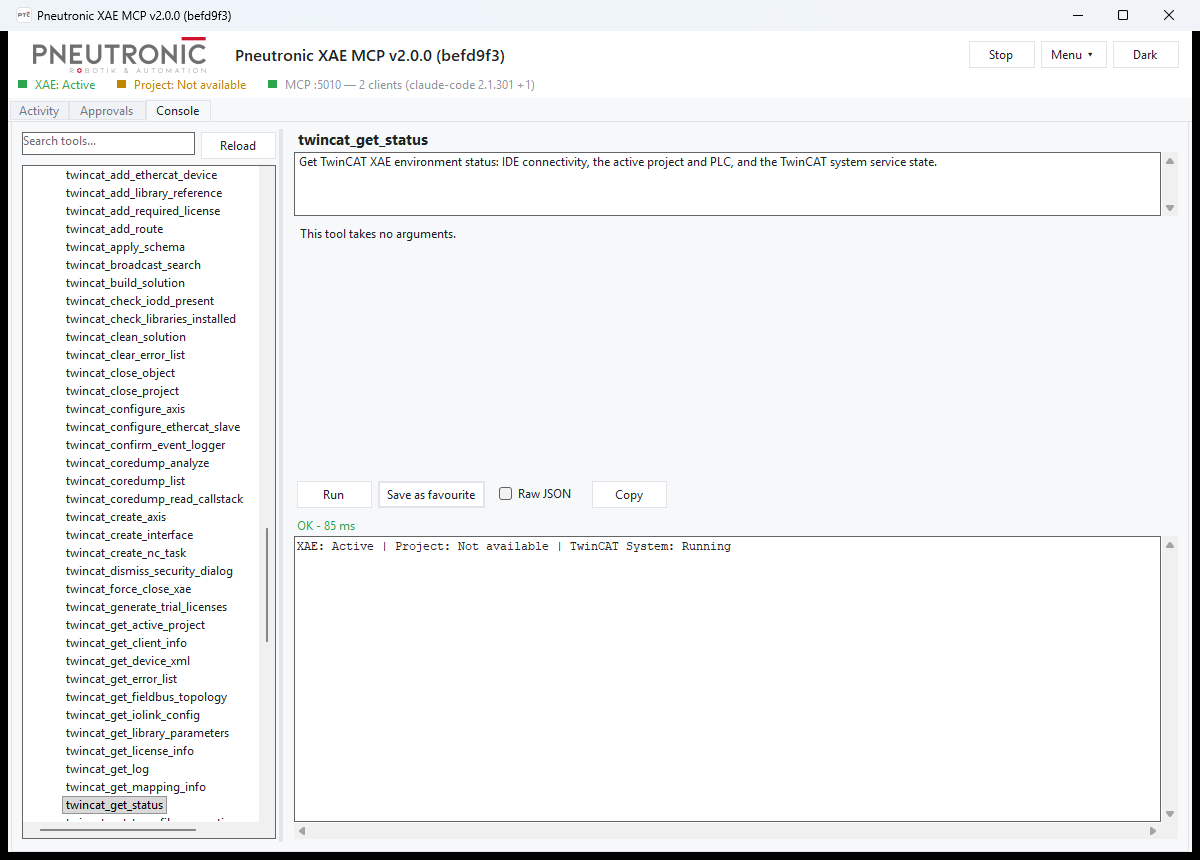
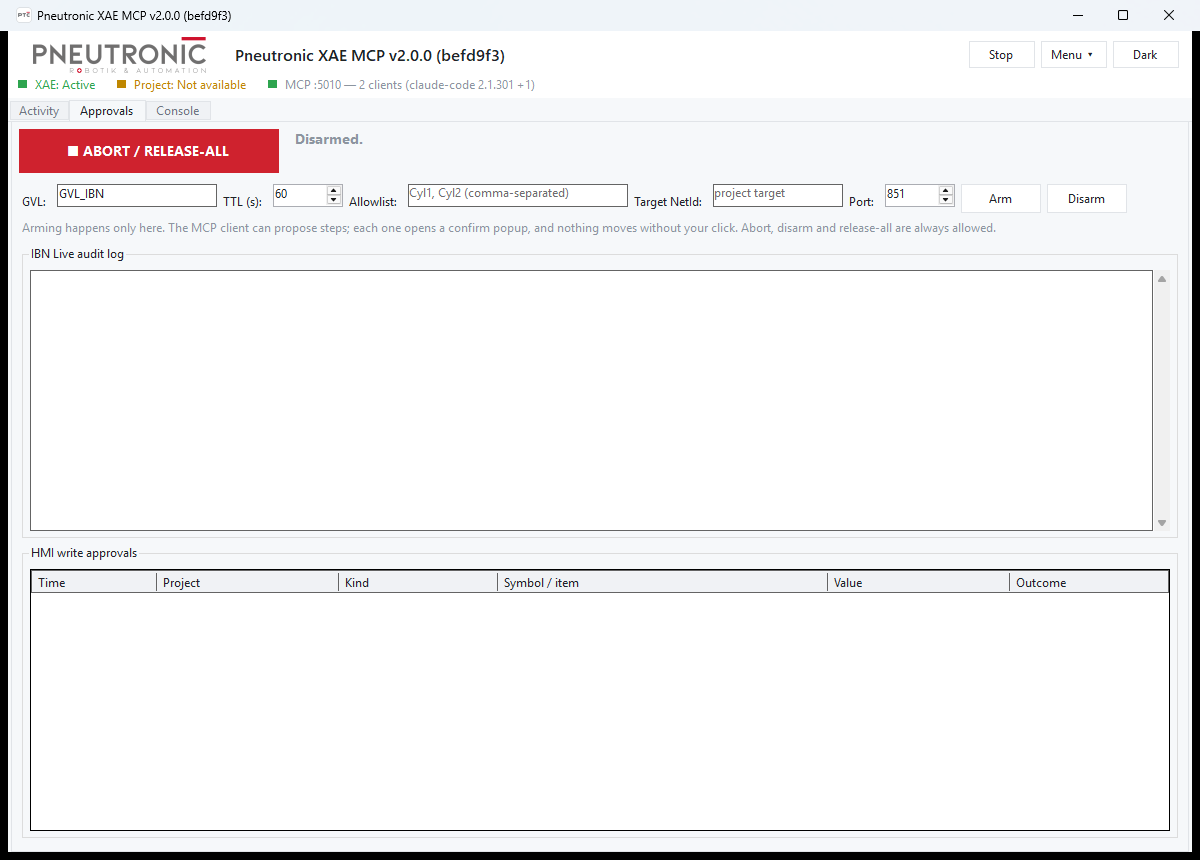
Getting started without an AI client: start the exe, choose Menu → Open sample
project (a copy of the neutral fixture is opened from your Documents folder), then
run the Getting started favourites in the Console (status, open project — fill in the.sln path —, list PLC objects, build, error list). Menu → Connect a client… shows the configuration for Claude Code or
another MCP client and tests the connection.
Connect from Claude Code
Add it to your MCP client config (e.g. .mcp.json in your project, or the
equivalent for another MCP client):
{
  "mcpServers": {
    "ptc-xae": {
      "url": "http://localhost:5010/"
    }
  }
}
Or run claude mcp add --transport http ptc-xae http://localhost:5010/; the window's
Menu → Connect a client… shows both, including the header to add whenPTC_XAE_MCP_TOKEN is set.
The exe must already be running (see "Run" above) — the client connects to
the existing HTTP server rather than launching it. GET http://localhost:5010/health
gives a quick liveness check (version, uptime, connected-session count, log
paths) without going through the MCP handshake.
Applying an IO schema (twincat_apply_schema)
twincat_apply_schema builds an EtherCAT topology, a GVL and the variable links
from a JSON schema. Through MCP it is fail-closed by default
(failClosed=true):
- the PLC project and the EtherCAT master must match by exact name — there is
no fallback to the first PLC or master; the target master must be empty; - the GVL is written to exactly
TIPC^<plc>^<plc> Project^GVLs^<gvlName>; a
missing or ambiguousGVLsfolder is an error, never a fallback to another
folder or the PLC root; - a GVL that already exists at that path is an
[Error]and nothing is deleted.
PassoverwriteExistingGvl=true(or settwincat.overwriteExistingGvlin the
schema) to replace exactly that GVL; its declarations and links are lost.
Pass failClosed=false for the lenient greenfield resolution. The GUI's Apply
button keeps that lenient behaviour, but the GVL collision rule applies there too.
Security model
The server binds to localhost:5010 only, checks the Host/Origin headers
on every request, and supports an optional bearer token
(PTC_XAE_MCP_TOKEN) for local multi-user machines. It is designed to be
reachable only from the machine it runs on, by whatever process/user can
already reach that port — it is not a network service and has no
authentication model beyond that token. Full threat model and details:
SECURITY.md.
No telemetry. The server makes no network connections of its own: no
usage statistics, no update check, no license check, nothing is sent to
Pneutronic or anyone else. The only outbound traffic is ADS to the TwinCAT
targets you address through the tools (and, when you configure it, the
ADS-over-MQTT broker of your TwinCAT router). Logs stay in%LOCALAPPDATA%\ptc-xae-mcp\ on your machine.
Logs
Two rolling log sinks live under %LOCALAPPDATA%\ptc-xae-mcp\:
| File | Content |
|---|---|
host-<yyyyMMdd>.log |
Global exceptions, server start/stop, session connects, warnings from ASP.NET/Kestrel/the MCP SDK |
activity-<yyyyMMdd-HHmmss-fff>.log |
Per-run JSON-lines trace of every MCP tool call |
See src/README.md for retention
settings and environment variables. /health reports the exact current file
paths.
License and trademarks
Licensed under the Apache License 2.0, see LICENSE and
NOTICE. "Pneutronic XAE MCP", "ptc-xae-mcp", "Pneutronic" and the
Pneutronic logo are trademarks of Pneutronic AG and are not covered by the code
license, see TRADEMARKS.md.
Third-party marks used in this documentation to describe compatibility:
- Beckhoff®, TwinCAT® and TwinSAFE® are registered trademarks of, and
licensed by, Beckhoff Automation GmbH, Germany. - EtherCAT® is a registered trademark and patented technology, licensed by
Beckhoff Automation GmbH, Germany. - Claude is a trademark of Anthropic PBC.
- Microsoft, Windows, Visual Studio and .NET are trademarks of the Microsoft
group of companies.
All other names may be trademarks of their respective owners. Their use here
is nominative and implies no affiliation or endorsement. Third-party
components are listed in THIRD-PARTY-NOTICES.md.
Contributing
See CONTRIBUTING.md for the CI/live-test gates.
Support
Help for this project happens in the open: ask questions in
Discussions and report bugs or ideas in
Issues, see SUPPORT.md.
If you would like professional support, or help introducing AI-assisted engineering in your
TwinCAT team, Pneutronic AG (PTC) offers both as a service: pneutronic.ch.
Reviews (0)
Sign in to leave a review.
Leave a reviewNo results found