precis-finance-mcp
Health Warn
- License — License: NOASSERTION
- Description — Repository has a description
- Active repo — Last push 0 days ago
- Low visibility — Only 5 GitHub stars
Code Pass
- Code scan — Scanned 12 files during light audit, no dangerous patterns found
Permissions Pass
- Permissions — No dangerous permissions requested
No AI report is available for this listing yet.
Read-only MCP server for FP&A & management reporting — governed metrics, financial statements and drill-down over a SQL semantic layer. Your own financials on your own warehouse, not market data. Open core of Précis. (metric engine · ClickHouse · OIDC · Docker)
Précis Finance MCP




A read-only, self-hosted MCP server for FP&A
and management reporting: governed metrics, financial statements, and row-level
drill-down over a SQL semantic layer — your own warehouse, not market data.
The open core of Précis, the agentic Finance Intelligence Platform.
You describe your business metrics once — KPIs, hierarchies, and
financial-statement layouts in a YAML catalogue over a semantic layer of plain
SQL views, versioned in git — and any MCP-capable client gets consistent,
defensible numbers. The semantic views are plain SQL in your ClickHouse, so your
existing BI tools can query the same views directly. This repository is complete and
self-hostable — the metric engine, semantic layer and catalogue, ingestion,
identity, and the MCP transport — and depends on nothing outside it.
Use this if
- You run or support a finance function and want AI clients — Claude, ChatGPT,
or any MCP-capable client — answering questions and pulling management
reporting from your own numbers. - You need governed metrics — one agreed definition of gross margin,
utilisation, or revenue by business unit — not an agent querying raw rows in
the general ledger or inventing its own definitions. - You want it self-hosted, on infrastructure you already operate and under a
security model you control — not another cloud contract. - You need every answer traceable: read-only by construction, no figure
generated by the model, every number aggregated from semantic views you can
read.
Requirements
- Docker — Engine + Compose v2. Everything runs in containers; there is
nothing else to install. - No warehouse to provision — the stack bundles ClickHouse (the engine's
analytical store) and PostgreSQL (platform state — users, sessions, audit). A
local trial runs with nothing else and loads a sample finance model. - Already run ClickHouse? — optionally point the engine at your own instance
instead of the bundled one; see
data modes. - An MCP-capable client — Claude (claude.ai and Desktop connectors, against
a deployed instance), Claude Code, ChatGPT, or any MCP client. - Optional Excel access — the multi-user image also hosts the Précis Excel
add-in at/excel; enable its OAuth client when you want live read-only
workbook functions.
What Précis Finance MCP looks like
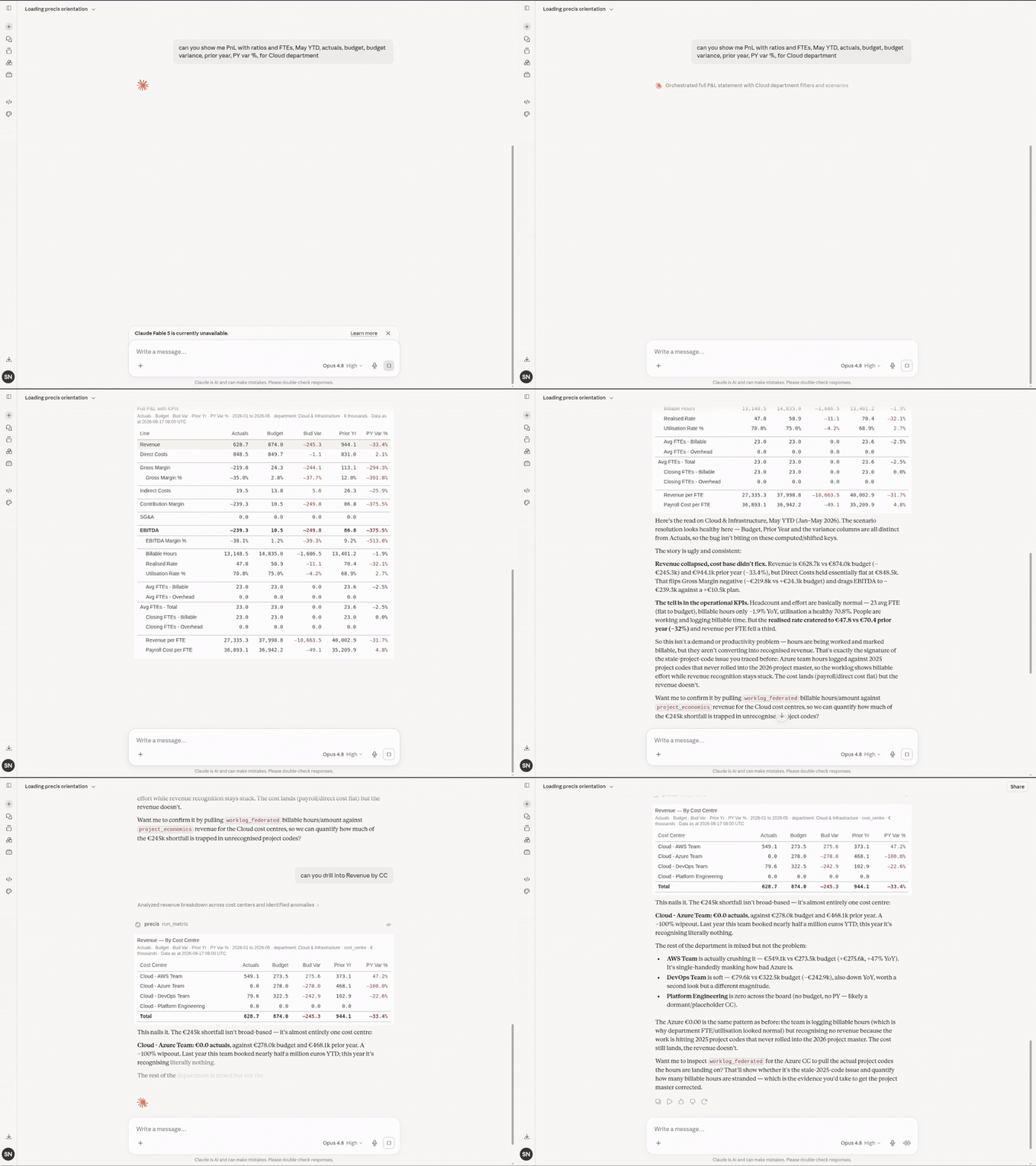
Every figure aggregates from the semantic views — account, cost centre,
period, scenario — and the measures generic metric layers can't express
(a utilisation denominator averaged across periods, re-aggregated by quarter
or business unit, with subtotals in the layout) are first-class catalogue
definitions.
Quickstart — single-user local trial
export MCP_DEV_KEY=$(openssl rand -hex 32)
docker compose -f deploy/docker-compose.local.yml up -d --build
docker compose -f deploy/docker-compose.local.yml exec precis-mcp \
  python -m precis_mcp.sample_data   # populate the demo model
One stack — the server plus a bundled ClickHouse and Postgres — a shared dev
key, bound to 127.0.0.1. Point any MCP client at http://127.0.0.1:8768/mcp
with the dev key as bearer token. For example, with Claude Code:
claude mcp add --transport http precis http://127.0.0.1:8768/mcp \
  --header "Authorization: Bearer $MCP_DEV_KEY"
Then ask a finance-specific question to prove this is not a generic SQL MCP:
"Show the P&L for FY2025 with comparatives." · "Drill revenue down by cost
centre." · "Show utilisation by month for the Digital Transformation team."
Full walkthrough, including the demo data and bringing your own model:
docs/getting-started/quickstart.md.
Rather do this on a call? We pair with early adopters to stand Précis Finance MCP up
against their own warehouse — precis.finance or
[email protected].
Multi-user deployment
deploy/docker-compose.yml runs the multi-user stack — the open server,
PostgreSQL, ClickHouse, and OAuth 2.1 + PKCE sign-in. Deployment is modular
along independent axes:
- Data — bundled ClickHouse (empty or with sample data) or your own:
docs/deployment/clickhouse-data-modes.md - Identity — local dev key, the bundled Keycloak (optionally federated to
your IdP), or a direct external OIDC provider (Auth0 / Okta / Entra / Ping):
docs/deployment/oauth-keycloak.md,
docs/deployment/external-idp-recipes.md - Ingress — the bundled Caddy proxy (
bundled-proxyprofile, on by
default) terminates TLS with automatic Let's Encrypt certificates from
nothing butPRECIS_DOMAIN. The app itself is proxy-agnostic: drop the
profile to front it with an ingress you already operate (reference nginx
vhost indeploy/nginx/, host helperscripts/install-precis-mcp.sh --nginx) - Backups — additive
backupcompose profile: scheduled bundles
(Postgres dump + ClickHouse backup + instance config) to a local volume or
S3, with restore and drill commands:
docs/operations/backups.md - Excel add-in — optional hosted workbook functions served from the same
instance at/excel; enable with the bundled Keycloak client or a public
client in your external IdP:
docs/excel/
scripts/deploy-mcp.sh --data-mode ... --auth-mode ... is the friendly front
door over the Compose profiles. Every knob is an environment variable:
docs/configuration/environment-variables.md.
Configure your data model
Your model lives in an instance/ directory — metric catalogue, semantic SQL
views, ingestion bindings — and the bundled demo instance shows the shape.
Start at docs/configuration/catalogue-and-semantic.md,
then docs/configuration/ingestion.md and
docs/operations/onboarding-ingestion.md
to load your data. The developer guide for adding server tools is
docs/development/adding-read-tools.md.
Security and read-only posture
Start with the mechanisms, not the promise.
- Read-only by construction — the server retrieves; it never writes to or
changes your source. There is no write path back. - No figure is generated by the model — tools return numbers aggregated from
source dimensions (account, cost centre, period, scenario), or report that the
data isn't there. The client composes the question and narrates the answer; it
never invents a figure. - Traceable to source — every number traces from response → semantic view →
warehouse. The semantic views are plain SQL you can read; the catalogue is
versioned in git. - Your own warehouse, not market data — it runs in your environment, against
your warehouse, under your own access controls. - Identity — a local dev key, the bundled Keycloak (optionally federated to
your IdP), or a direct external OIDC provider (Auth0 / Okta / Entra / Ping). - Operator responsibility — Précis Finance MCP is designed to expose governed read
operations; you still deploy and operate it under your own security model.
Disclosure policy: SECURITY.md.
Documentation
Full documentation: docs.precis.finance.
| Area | Start here |
|---|---|
| Getting started | quickstart |
| Deployment | ClickHouse data modes · OAuth / Keycloak · external IdP recipes |
| Excel | Précis for Excel · function reference |
| Configuration | catalogue & semantic layer · ingestion · environment variables |
| Operations | onboarding & ingestion · backups |
| Development | adding read tools |
| Security | SECURITY.md |
Précis Finance MCP vs Précis
The deployment and data model you build here are the foundation the full
Précis platform runs on. Précis is currently
pre-General Availability and adds a licensed agentic workspace over this same
engine and data model. Moving from the open core to Précis is workflow
configuration and adoption — not a second data-integration project. Précis
prepares; the finance professional decides.
What ships — and what doesn't
Ships in Précis Finance MCP (Elastic License 2.0): the MCP server and transport ·
metric engine · financial-statement layouts · semantic SQL view pattern · YAML
metric catalogue · sample finance model · ingestion path · hosted read-only
Excel add-in · ClickHouse analytical store · PostgreSQL platform state · local
dev-key mode · multi-user OAuth 2.1 mode · Docker Compose deployment · backup &
restore profile · configuration and deployment docs.
Lives in Précis, not in this repo: the workspace UI · the conversational
agent · plan write-back · scenario commit workflows · scheduled Dispatch
briefings · report / management-pack workflow · Excel write-back / round-trip ·
commercial support (unless separately agreed).
Talk about Précis — the full platform and design-partner programme:
precis.finance or
[email protected].
Support and services
Précis Finance MCP is built to be self-serve, and the documentation aims to be
enough. If you'd like help beyond it — configuring your data model, a guided
deployment, ongoing support, or a demo environment to evaluate against realistic
data — book a setup session at precis.finance or write
to [email protected]. The same address reaches
the team behind the full Précis platform.
Contributing
This repository is a one-way mirror of the Précis monorepo: main advances
by sync commits, and pull requests are applied internally with your authorship
and DCO sign-off preserved, then published in the next sync. See
CONTRIBUTING.md.
License
Elastic License 2.0 — source-available. Free to use, modify,
self-host (including commercially), and redistribute; you may not offer it to
third parties as a hosted or managed service.
Reviews (0)
Sign in to leave a review.
Leave a reviewNo results found